
springboot成神之——Basic Auth应用
本文介绍Basic Auth在spring中的应用
目录结构
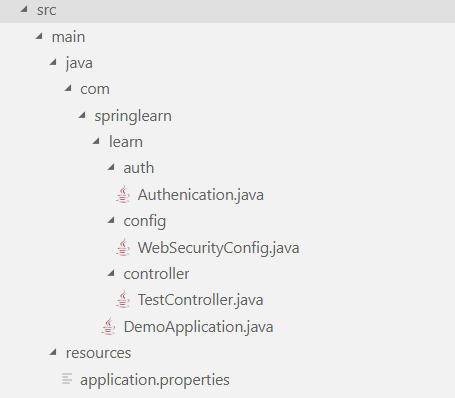
依赖
<dependency>

	<groupId>org.springframework.boot</groupId>

	<artifactId>spring-boot-starter-security</artifactId>

</dependency>
入口DemoApplication
package com.springlearn.learn;

import org.springframework.boot.SpringApplication;

import org.springframework.boot.autoconfigure.SpringBootApplication;

@SpringBootApplication

public class DemoApplication {

	public static void main(String[] args) {

		SpringApplication.run(DemoApplication.class, args);

	}

}
验证Authenication
// 主要是验证不成功返回401

package com.springlearn.learn.auth;

import java.io.IOException;

import java.io.PrintWriter;

import javax.servlet.ServletException;

import javax.servlet.http.HttpServletRequest;

import javax.servlet.http.HttpServletResponse;

import org.springframework.security.core.AuthenticationException;

import org.springframework.security.web.authentication.www.BasicAuthenticationEntryPoint;

import org.springframework.stereotype.Component;

@Component

public class Authenication extends BasicAuthenticationEntryPoint {

    @Override

    public void commence(HttpServletRequest request, HttpServletResponse response, AuthenticationException authEx)throws IOException, ServletException {

        response.addHeader("WWW-Authenticate", "Basic realm=" + getRealmName());

        response.setStatus(HttpServletResponse.SC_UNAUTHORIZED);

        PrintWriter writer = response.getWriter();

        writer.println("HTTP Status 401 - " + authEx.getMessage());

    }

    @Override

    public void afterPropertiesSet() throws Exception {\

        setRealmName("yejiawei");

        super.afterPropertiesSet();

    }

}
配置WebSecurityConfig
package com.springlearn.learn.config;

import javax.sql.DataSource;

import org.springframework.beans.factory.annotation.Autowired;

import org.springframework.context.annotation.Bean;

import org.springframework.context.annotation.Configuration;

import org.springframework.security.config.annotation.authentication.builders.AuthenticationManagerBuilder;

import org.springframework.security.config.annotation.web.builders.HttpSecurity;

import org.springframework.security.config.annotation.web.configuration.EnableWebSecurity;

import org.springframework.security.config.annotation.web.configuration.WebSecurityConfigurerAdapter;

import org.springframework.security.core.userdetails.User;

import org.springframework.security.core.userdetails.UserDetails;

import org.springframework.security.crypto.bcrypt.BCryptPasswordEncoder;

import org.springframework.security.web.AuthenticationEntryPoint;

import org.springframework.web.servlet.config.annotation.CorsRegistry;

import org.springframework.web.servlet.config.annotation.WebMvcConfigurer;

import org.springframework.security.config.annotation.authentication.configurers.provisioning.InMemoryUserDetailsManagerConfigurer;

@Configuration

@EnableWebSecurity

public class WebSecurityConfig extends WebSecurityConfigurerAdapter implements WebMvcConfigurer{

    @Autowired

    private AuthenticationEntryPoint authEntryPoint;

    @Autowired

	DataSource dataSource;

    @Override

    protected void configure(HttpSecurity http) throws Exception {

        http.cors().and().csrf().disable();

        // 所有的请求都要验证

        http.authorizeRequests().anyRequest().authenticated();

        // 使用authenticationEntryPoint验证 user/password

        http.httpBasic().authenticationEntryPoint(authEntryPoint);

    }

    @Bean

    public BCryptPasswordEncoder passwordEncoder() {

        BCryptPasswordEncoder bCryptPasswordEncoder = new BCryptPasswordEncoder();

        return bCryptPasswordEncoder;

    }

    @Autowired

    public void configureGlobal(AuthenticationManagerBuilder auth) throws Exception {

        String password = "234";

        String encrytedPassword = this.passwordEncoder().encode(password);

        System.out.println("Encoded password = " + encrytedPassword);

		// 这里使用写死的验证,你可以在这里访问数据库

        InMemoryUserDetailsManagerConfigurer<AuthenticationManagerBuilder> mngConfig = auth.inMemoryAuthentication();

        UserDetails u1 = User.withUsername("yejiawei").password(encrytedPassword).roles("ADMIN").build();

        UserDetails u2 = User.withUsername("donglei").password(encrytedPassword).roles("USER").build();

        mngConfig.withUser(u1);

        mngConfig.withUser(u2);

    }

    @Override

    public void addCorsMappings(CorsRegistry registry) {

        registry.addMapping("/**").allowedOrigins("*").allowedMethods("GET", "POST", "PUT", "DELETE").allowedOrigins("*")

        .allowedHeaders("*");

    }

}
控制器TestController
package com.springlearn.learn.controller;

import javax.servlet.http.HttpServletRequest;

import javax.servlet.http.HttpServletResponse;

import org.springframework.security.core.Authentication;

import org.springframework.security.core.context.SecurityContextHolder;

import org.springframework.web.bind.annotation.RequestMapping;

import org.springframework.web.bind.annotation.RequestMethod;

import org.springframework.web.bind.annotation.ResponseBody;

import org.springframework.web.bind.annotation.RestController;

@RestController

public class TestController {

    @ResponseBody

    @RequestMapping(value = "/AuthTest", method = RequestMethod.GET)

    public String AuthTest(HttpServletRequest request, HttpServletResponse response) {

        Authentication auth = SecurityContextHolder.getContext().getAuthentication();

        System.out.println(auth.getName());

        return "OK";

    }

}
前端访问
<!DOCTYPE html>

<html lang="en">

<head>

    <meta charset="UTF-8">

    <meta name="viewport" content="width=device-width, initial-scale=1.0">

    <meta http-equiv="X-UA-Compatible" content="ie=edge">

    <title>Document</title>

    <script src="https://unpkg.com/axios/dist/axios.min.js"></script>

    <script>

        axios.defaults.headers.post['Content-Type'] = 'application/x-www-form-urlencoded';

        axios.get('http://localhost:8888/AuthTest', {

            auth: {

                username: 'yejiawei',

                password: '234'

            }

        }).then(function (response) {

            console.log(response.data);

        }).catch(function (error) {

            console.log(error);

        }).then(function () {

        });

    </script>

</head>

<body>

</body>

</html>
springboot成神之——Basic Auth应用的更多相关文章
- springboot成神之——basic auth和JWT验证结合
本文介绍basic auth和JWT验证结合 目录结构 依赖 config配置文件WebSecurityConfig filter过滤器JWTLoginFilter filter过滤器JWTAuthe ...
- springboot成神之——ioc容器(依赖注入)
springboot成神之--ioc容器(依赖注入) spring的ioc功能 文件目录结构 lang Chinese English GreetingService MyRepository MyC ...
- springboot成神之——application.properties所有可用属性
application.properties所有可用属性 # =================================================================== # ...
- springboot成神之——springboot入门使用
springboot创建webservice访问mysql(使用maven) 安装 起步 spring常用命令 spring常见注释 springboot入门级使用 配置你的pom.xml文件 配置文 ...
- springboot成神之——mybatis和mybatis-generator
项目结构 依赖 generator配置文件 properties配置 生成文件 使用Example 本文讲解如何在spring-boot中使用mybatis和mybatis-generator自动生成 ...
- springboot成神之——swagger文档自动生成工具
本文讲解如何在spring-boot中使用swagger文档自动生成工具 目录结构 说明 依赖 SwaggerConfig 开启api界面 JSR 303注释信息 Swagger核心注释 User T ...
- springboot成神之——log4j2的使用
本文介绍如何在spring-boot中使用log4j2 说明 依赖 日志记录语句 log4j2配置文件 本文介绍如何在spring-boot中使用log4j2 说明 log4j2本身使用是非常简单的, ...
- springboot成神之——mybatis在spring-boot中使用的几种方式
本文介绍mybatis在spring-boot中使用的几种方式 项目结构 依赖 WebConfig DemoApplication 方式一--@Select User DemoApplication ...
- springboot成神之——发送邮件
本文介绍如何用spring发送邮件 目录结构 依赖 MailConfig TestController 测试 本文介绍如何用spring发送邮件 目录结构 依赖 <dependency> ...
随机推荐
- 51nod 1119 组合数,逆元
http://www.51nod.com/onlineJudge/questionCode.html#!problemId=1119 1119 机器人走方格 V2 基准时间限制:1 秒 空间限制:13 ...
- 使用ZooKeeper实现Java跨JVM的分布式锁
一.使用ZooKeeper实现Java跨JVM的分布式锁 二.使用ZooKeeper实现Java跨JVM的分布式锁(优化构思) 三.使用ZooKeeper实现Java跨JVM的分布式锁(读写锁) 说明 ...
- HAWQ取代传统数仓实践(十七)——事实表技术之累积度量
累积度量指的是聚合从序列内第一个元素到当前元素的数据,例如统计从每年的一月到当前月份的累积销售额.本篇说明如何在销售订单示例中实现累积月销售数量和金额,并对数据仓库模式.初始装载.定期装载做相应地修改 ...
- OneDrive网页版打不开的解决办法
发现OneDrive文件被误删了,想去网页版找回历史文件,发现网页版无法打开,而客户端是可以正常使用的,于是猜测是域名指向的主IP被封了,于是想通过客户端的IP访问 第一步,WireShark抓包 第 ...
- struts2逻辑视图类型汇总与解释(转)
在struts2框架中,当action处理完之后,就应该向用户返回结果信息,该任务被分为两部分:结果类型和结果本身. 结果类型提供了返回给用户信息类型的实现细节.结果类型通常在Struts2中就已预定 ...
- python学习之面向对象(下)
该篇主要是针对面向对象的细讲,包括类的多重继承,方法的重写,析构函数,回收机制进行讲解 #该类主要是讲述python面象对象的一些特征,包括继承,方法的重写,多态,垃圾回收 class person( ...
- word中如何将空格变成换行
大家在工作和学习中可能会遇到文字替换或符号替换,大家要学会txt.doc.xls之间的切换,替换好之后放到最终的文件中,txt好处是没有格式,doc个好处是有格式,而xls主要是分配到单元格中. 那么 ...
- 使用阿里云Code进行版本控制并配置IDEA
1. 申请阿里code的账号,网址如下https://code.aliyun.com, 2. 申请完成之后,将账号信息发给项目负责人,由负责人加入项目中 3. 下载git,下载地址为 ...
- 关于使用modelsim的一点感想
使用modelsim的过程中工程结构是这样的 testbench中例化了一个模块a,模块a中调用了模块b,中间模块a在其他工程中用了一下,改了模块名字,同时内容也稍微修改了一下,用完之后复制回来覆盖了 ...
- ACM学习历程—SNNUOJ 1239 Counting Star Time(树状数组 && 动态规划 && 数论)
http://219.244.176.199/JudgeOnline/problem.php?id=1239 这是这次陕西省赛的G题,题目大意是一个n*n的点阵,点坐标从(1, 1)到(n, n),每 ...