
SSM整合配置(Spring+Spring MVC+Mybatis)
一、配置准备
通过Maven工程,在eclipse中整合SSM,并在Tomcat服务器上运行
在进行配置前,先理清楚要配置哪些文件,如图,除web.xml外,其余三个配置文件名称均可自定义:
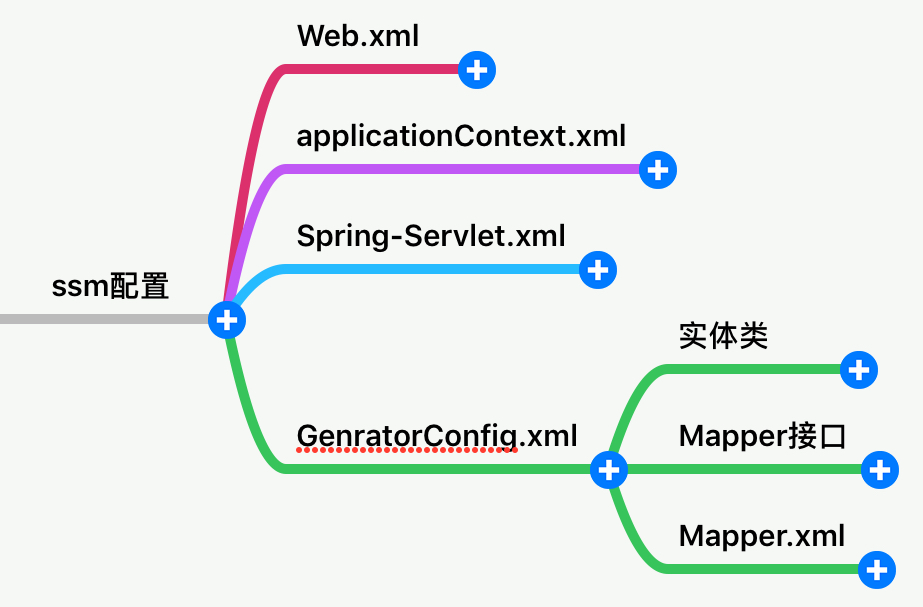
如图所示,一共有四个需要手动配置的文件:
1、web.xml:配置servlet、filter、listener
2、applicationContext.xml:配置相关的bean,与mybatis整合
3、Spring-Servlet.xml:用于配置视图解析器、控制器等
4、GenratorConfig.xml:用于生成Mybatis用到的实体类、Mapper接口、Map配置文件
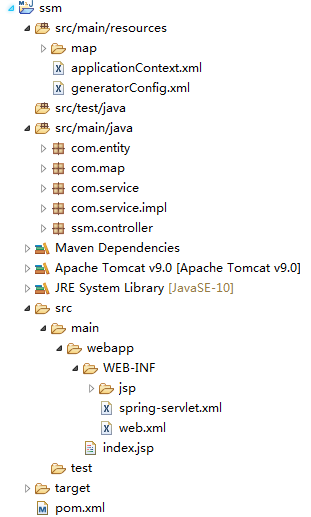
新建一个Maven工程,工程结构如图:
二、配置过程
大致了解所需配置文件后,开始配置
1、Web.xml
配置前首先导入依赖包
<project xmlns="http://maven.apache.org/POM/4.0.0" xmlns:xsi="http://www.w3.org/2001/XMLSchema-instance"

  xsi:schemaLocation="http://maven.apache.org/POM/4.0.0 http://maven.apache.org/maven-v4_0_0.xsd">

  <modelVersion>4.0.0</modelVersion>

  <groupId>ssm</groupId>

  <artifactId>ssm</artifactId>

  <packaging>war</packaging>

  <version>0.0.1-SNAPSHOT</version>

  <name>ssm Maven Webapp</name>

  <url>http://maven.apache.org</url>

  <properties>

    <spring.version>5.0.0.RELEASE</spring.version>

    <!--mybatis版本号,3.4.5是2017年8月发布的新版本-->

    <mybatis.version>3.4.5</mybatis.version>

    <!--<slf4j.version>1.7.25</slf4j.version>-->

    <slf4j.version>1.7.25</slf4j.version>

    <log4j.version>1.2.17</log4j.version>

  </properties>

  <dependencies>

    <dependency>

      <groupId>junit</groupId>

      <artifactId>junit</artifactId>

      <version>4.11</version>

      <scope>test</scope>

    </dependency>

    <!--spring核心包——Start-->

    <dependency>

      <groupId>org.springframework</groupId>

      <artifactId>spring-core</artifactId>

      <version>${spring.version}</version>

    </dependency>

    <dependency>

      <groupId>org.springframework</groupId>

      <artifactId>spring-web</artifactId>

      <version>${spring.version}</version>

    </dependency>

    <dependency>

      <groupId>org.springframework</groupId>

      <artifactId>spring-oxm</artifactId>

      <version>${spring.version}</version>

    </dependency>

    <dependency>

      <groupId>org.springframework</groupId>

      <artifactId>spring-tx</artifactId>

      <version>${spring.version}</version>

    </dependency>

    <dependency>

      <groupId>org.springframework</groupId>

      <artifactId>spring-jdbc</artifactId>

      <version>${spring.version}</version>

    </dependency>

    <dependency>

      <groupId>org.springframework</groupId>

      <artifactId>spring-webmvc</artifactId>

      <version>${spring.version}</version>

    </dependency>

    <dependency>

      <groupId>org.springframework</groupId>

      <artifactId>spring-aop</artifactId>

      <version>${spring.version}</version>

    </dependency>

    <dependency>

      <groupId>org.springframework</groupId>

      <artifactId>spring-context-support</artifactId>

      <version>${spring.version}</version>

    </dependency>

    <dependency>

      <groupId>org.springframework</groupId>

      <artifactId>spring-test</artifactId>

      <version>${spring.version}</version>

      <scope>test</scope>

    </dependency>

    <dependency>

      <groupId>org.mybatis</groupId>

      <artifactId>mybatis</artifactId>

      <version>${mybatis.version}</version>

    </dependency>

    <dependency>

      <groupId>com.github.pagehelper</groupId>

      <artifactId>pagehelper</artifactId>

      <version>4.1.6</version>

    </dependency>

    <dependency>

      <groupId>tk.mybatis</groupId>

      <artifactId>mapper</artifactId>

      <version>3.3.8</version>

    </dependency>

    <!--mybatis/spring包-->

    <dependency>

      <groupId>org.mybatis</groupId>

      <artifactId>mybatis-spring</artifactId>

      <version>1.3.1</version>

    </dependency>

    <!--mysql数据库的jdbc连接包-->

    <dependency>

      <groupId>mysql</groupId>

      <artifactId>mysql-connector-java</artifactId>

      <!-- mysql-8 需要 Connector/J 8.0.9 or higher -->

      <version>8.0.13</version>

    </dependency>

    <!-- 导入dbcp的jar包,用来在applicationContext.xml中配置数据库 -->

    <dependency>

      <groupId>commons-dbcp</groupId>

      <artifactId>commons-dbcp</artifactId>

      <version>1.4</version>

    </dependency>

  </dependencies>

  <build>

    <finalName>ssm</finalName>

    <plugins>

         <plugin>

          <groupId>org.mybatis.generator</groupId>

          <artifactId>mybatis-generator-maven-plugin</artifactId>

          <version>1.3.2</version>

          <!-- 配置文件位置 -->

          <configuration>

            <configurationFile>

              src/main/resources/generatorConfig.xml

            </configurationFile>

            <verbose>true</verbose>

            <overwrite>true</overwrite>

          </configuration>

          <!-- 自动生成PO类的核心包 -->

          <dependencies>

            <dependency>

              <groupId>org.mybatis.generator</groupId>

              <artifactId>mybatis-generator-core</artifactId>

              <version>1.3.2</version>

            </dependency>

            <dependency>

              <groupId>mysql</groupId>

              <artifactId>mysql-connector-java</artifactId>

              <!-- mysql-8 需要 Connector/J 8.0.9 or higher -->

              <version>8.0.13</version>

            </dependency>

          </dependencies>

        </plugin>

    </plugins>

  </build>

</project>
spring mvc采用前置控制器的设计模式,由一个DispatcherServlet负责分派,因此要在web.xml中对这个Servlet进行配置,该Servlet在启动时便实例化,因此要配置load-on-startup属性,我们先了解一下Spring MVC中的Context Hierarchy,首先看一张来自官网的图
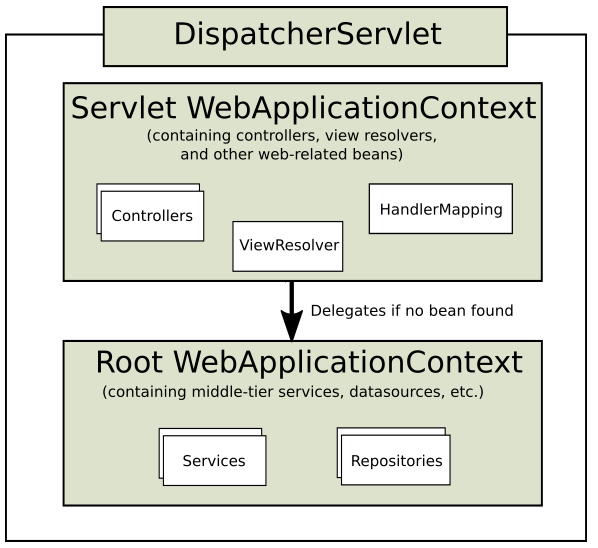
WebApplicationContext是ApplicationContext的拓展,是用于生成Bean的工厂,每个DispatcherServlet都需要一个Servlet WebApplicationContext来进行自己的配置,多个DispatcherServlet共享一个Root WebApplicationContext的配置,通常,在Servlet WebApplicationContext中配置控制器、视图解析器,在Root WebApplicationContext配置需要被多个Servlet共享的业务逻辑以及数据访问的Bean。
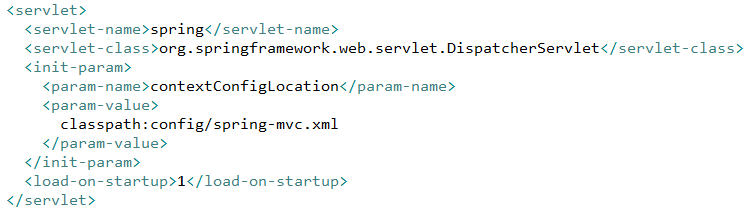
每个DispatcherServlet对应的Servlet WebApplicationContext,默认名称为[servlet-name]-servlet,如本例中web.xml中配置servlet-name为spring,那么默认的Servlet WebApplicationContext配置文件名称便为spring-servlet,其默认路径在WEB-INF下,当然,也可以通过在Servlet中配置init-param的contextConfigLocation来自定义配置路径以及配置名称,本例中不进行配置,采用默认的名称 spring-servlet
对于Root WebApplicationContext的配置,首先要在web.xml中通过<context-param>标签,设置该标签中contextConfigLocation的值,指定Root WebApplicationContext的路径与名称,随后在通过配置一个名为org.springframework.web.context.ContextLoaderListener的监听器,在启动时读取contextConfigLocation指定的Root WebApplicationContext,这里指定的Root WebApplicationContext在src/main/resources/applicationContext.xml中。配置完毕后的web.xml如下所示
<!DOCTYPE web-app PUBLIC

 "-//Sun Microsystems, Inc.//DTD Web Application 2.3//EN"

 "http://java.sun.com/dtd/web-app_2_3.dtd" >

<web-app>

  <context-param>

      <param-name>contextConfigLocation</param-name>

      <param-value>classpath:applicationContext.xml</param-value>

  </context-param>

  <listener>

    <listener-class>org.springframework.web.context.ContextLoaderListener</listener-class>

  </listener>

   <servlet>

      <servlet-name>spring</servlet-name>

      <servlet-class>

         org.springframework.web.servlet.DispatcherServlet

      </servlet-class>

      <load-on-startup>1</load-on-startup>

   </servlet>

   <servlet-mapping>

      <servlet-name>spring</servlet-name>

      <url-pattern>/</url-pattern>

   </servlet-mapping>

</web-app>
2、spring-servlet.xml配置
在该配置文件中,主要配置控制器与视图解析器,配置过程比较简单,先在工程中新建一个实现控制器的包,这里定义为ssm.controller,随后配置一个视图解析器的bean以及扫描控制器注解,配置完毕后如图所示
<?xml version="1.0" encoding="UTF-8"?>

<beans xmlns="http://www.springframework.org/schema/beans"

       xmlns:xsi="http://www.w3.org/2001/XMLSchema-instance"

       xmlns:context="http://www.springframework.org/schema/context"

       xmlns:mvc="http://www.springframework.org/schema/mvc"

       xsi:schemaLocation="http://www.springframework.org/schema/beans

    http://www.springframework.org/schema/beans/spring-beans.xsd

    http://www.springframework.org/schema/context

    http://www.springframework.org/schema/context/spring-context.xsd

    http://www.springframework.org/schema/mvc

    http://www.springframework.org/schema/mvc/spring-mvc.xsd">

    <!--启用spring的一些annotation -->

    <context:annotation-config/>

    <!--  自动扫描该包,使SpringMVC认为包下用了@controller注解的类是控制器  -->

    <context:component-scan base-package="ssm.controller">

        <context:include-filter type="annotation" expression="org.springframework.stereotype.Controller"/>

    </context:component-scan>

    <!--配置视图解析器-->

    <bean id="viewResolver" class="org.springframework.web.servlet.view.InternalResourceViewResolver">

        <property name="prefix" value="/WEB-INF/jsp/"/>

        <property name="suffix" value=".jsp"/>

    </bean>

</beans>
3、generatorConfig.xml配置
要在applicationContext.xml中整合spring与mybatis,至少要配置两样东西:一个 SqlSessionFactory 和至少一个数据映射器类,因此,我们要先通过generatorConfig.xml,帮助我们自动生成实体对象、Mapper接口,以及对应的Mapper.xml文件。generatorConfig.xml的路径由pom.xml中configurationFile指定
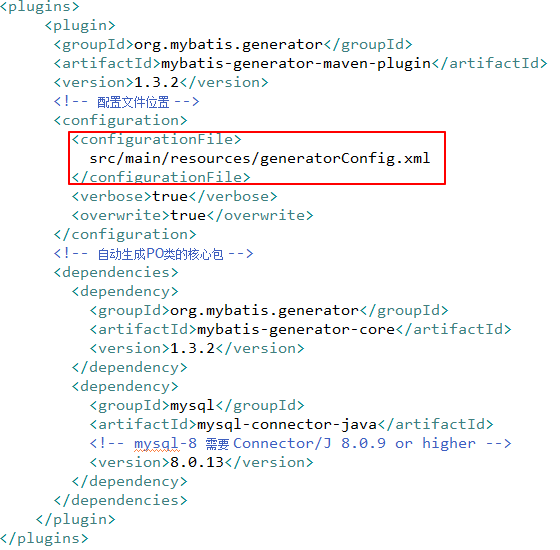
在这个配置文件中:
jdbcConnection指定数据连接
javaModelGenerator指定要生成的实体对象的位置,
sqlMapGenerator指定要生成的Map.xml文件的位置
javaClientGenerator指定要生成的Mapper接口的位置
table指定要生成的表,通过enable**ByExample属性,指定是否要生成example文件
我们指定生成的数据表如下:

最终配置文件如图
<?xml version="1.0" encoding="UTF-8"?>
<!DOCTYPE generatorConfiguration
PUBLIC "-//mybatis.org//DTD MyBatis Generator Configuration 1.0//EN"
"http://mybatis.org/dtd/mybatis-generator-config_1_0.dtd"> <generatorConfiguration> <context id="test" defaultModelType="flat"> <commentGenerator>
<property name="suppressDate" value="true"/>
<!-- 是否去除自动生成的注释 true:是 : false:否 -->
<property name="suppressAllComments" value="true"/>
</commentGenerator> <jdbcConnection driverClass="com.mysql.cj.jdbc.Driver" connectionURL="jdbc:mysql://127.0.0.1:3306/test?autoReconnect=true&utoReconnectForPools=true&
useUnicode=true&characterEncoding=utf-8&useSSL=false&
serverTimezone=UTC"
userId="root" password="wqk123">
</jdbcConnection> <javaTypeResolver>
<property name="forceBigDecimals" value="false"/>
</javaTypeResolver>
<!-- pojo -->
<javaModelGenerator targetPackage="com.entity" targetProject="src/main/java">
</javaModelGenerator>
<!-- 创建mapxml -->
<sqlMapGenerator targetPackage="map" targetProject="src/main/resources">
<property name="enableSubPackages" value="true"/>
</sqlMapGenerator>
<!-- 创建map接口,作用等同于dao接口 -->
<javaClientGenerator targetPackage="com.map" type="XMLMAPPER" targetProject="src/main/java">
<property name="enableSubPackages" value="true"/>
</javaClientGenerator> <table tableName="food_item" enableCountByExample="false" enableUpdateByExample="false" enableDeleteByExample="false"
enableSelectByExample="false" selectByExampleQueryId="false">
<generatedKey column="food_id" sqlStatement="MySql" identity="true"/>
</table> </context> </generatorConfiguration>
配置完毕后,在项目上指定maven build,并设置Goals为mybatis-generator:generate -X,随后自动生成相应文件如图

4、配置applicationContext.xml
在配置generatorConfig.xml时提到了,如果要想在applicationContext.xml中实现Mybatis与spring的整合,那么至少需要配置两样东西:一个 SqlSessionFactory 和至少一个数据映射器类,此外,在applicationContext.xml中还要扫描实现业务逻辑的service包并配置数据库链接源
<?xml version="1.0" encoding="UTF-8"?>
<beans xmlns="http://www.springframework.org/schema/beans"
xmlns:xsi="http://www.w3.org/2001/XMLSchema-instance"
xmlns:context="http://www.springframework.org/schema/context"
xmlns:tx="http://www.springframework.org/schema/tx"
xsi:schemaLocation="http://www.springframework.org/schema/beans
http://www.springframework.org/schema/beans/spring-beans.xsd
http://www.springframework.org/schema/context
http://www.springframework.org/schema/context/spring-context.xsd
http://www.springframework.org/schema/tx
http://www.springframework.org/schema/tx/spring-tx.xsd">
<!--配置连接池数据源-->
<bean id="dataSource" class="org.apache.commons.dbcp.BasicDataSource">
<property name="driverClassName" value="com.mysql.cj.jdbc.Driver"/>
<property name="url" value="jdbc:mysql://127.0.0.1:3306/test?autoReconnect=true&utoReconnectForPools=true&
useUnicode=true&characterEncoding=utf-8&useSSL=false&
serverTimezone=UTC"/>
<property name="username" value="root"/>
<property name="password" value="wqk123"/>
</bean>
<!--spring和mybatis整合-->
<!--会话工厂bean SQLSessionFactory-->
<bean id="SqlSessionFactory" class="org.mybatis.spring.SqlSessionFactoryBean">
<!--数据源-->
<property name="dataSource" ref="dataSource"/>
<!--别名-->
<property name="typeAliasesPackage" value="com.entity"/>
<!-- 感觉这里不应该直接写:ToolTPOMapper.xml -->
<!--sql映射文件-->
<property name="mapperLocations" value="classpath:map/FoodItemMapper.xml"/>
<!--<property name="configLocation" value="classpath:config/mybatis-config.xml"/>-->
</bean>
<!--扫描mapper接口包-->
<bean class="org.mybatis.spring.mapper.MapperScannerConfigurer">
<!--指定要自动扫描接口的基础包,实现接口-->
<property name="basePackage" value="com.map"/>
<!--指定会话工厂,如果上下文中只有一个则可以省去-->
<property name="sqlSessionFactoryBeanName" >
<idref bean="SqlSessionFactory"/>
</property>
</bean>
<!--service实现类扫描-->
<context:component-scan base-package="com.service"/>
<!--事务管理-->
<bean id="transactionManager" class="org.springframework.jdbc.datasource.DataSourceTransactionManager">
<property name="dataSource" ref="dataSource"/>
</bean>
<!--支持注解驱动的事务管理,指定事务管理器-->
<tx:annotation-driven transaction-manager="transactionManager"/> </beans>
至此,配置以及完成
三、验证配置
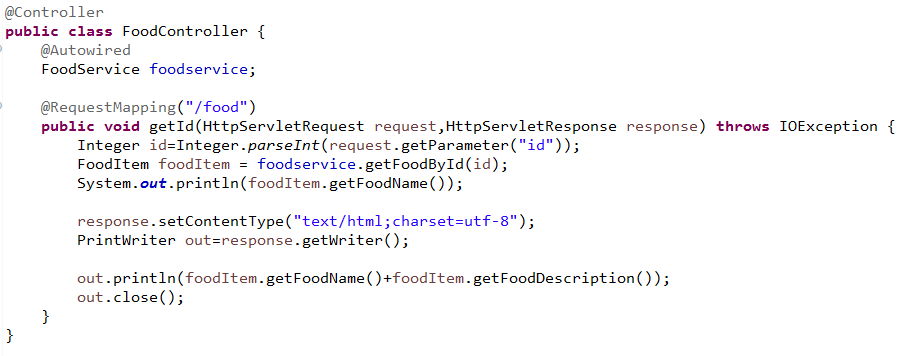
实现一个简单的功能,通过id参数读取相应食品的名称以及描述
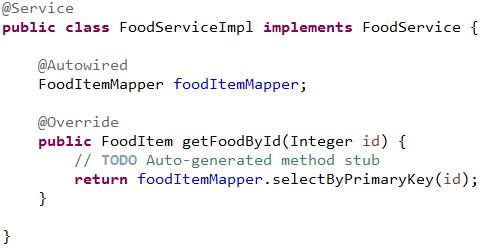
1、定义业务逻辑的service接口并实现

2、定义控制器并实现
3、测试实际效果

SSM整合配置(Spring+Spring MVC+Mybatis)的更多相关文章
- SSM整合配置
SSM三大框架整合详细教程(Spring+SpringMVC+MyBatis) 使用SSM(Spring.SpringMVC和Mybatis)已经有三个多月了,项目在技术上已经没有什么难点了,基于现有 ...
- SSM 整合配置
目录 1. Maven : pox.xml 2. Web container : web.xml 3. Spring context : dbconfig.properties + applicati ...
- SSM 整合配置以及一个简单登陆案例(个人记录)
SSM 文件以及大部分参考博客 https://blog.csdn.net/qq598535550/article/details/51703190 简答的登陆注册案例下载链接在末尾补贴图了 我建立的 ...
- SSM三大框架整合配置(Spring+SpringMVC+MyBatis)
web.xml <?xml version="1.0" encoding="UTF-8"?> <web-app xmlns:xsi=" ...
- JAVA 框架 / SSM / SSM SPRING+SPING MVC + MYBATIS 三大框架整合详细步骤
http://how2j.cn/k/ssm/ssm-tutorial/1137.html
- SSM整合案例(Spring+Struts+Mybatis)
项目目录结构 第一步:创建数据库和数据表 CREATE DATABASE IF NOT EXISTS mybatis; USE mybatis; CREATE TABLE t_user ( ) NOT ...
- redis与ssm整合(用 redis 替代mybatis二级缓存)
SSM+redis整合 这里主要是利用redis去做mybatis的二级缓存,mybaits映射文件中所有的select都会刷新已有缓存,如果不存在就会新建缓存,所有的insert,update操作都 ...
- SSM整合配置错误记录
org.springframework.beans.factory.UnsatisfiedDependencyException: Error creating bean with name 'dic ...
- SSM Spring +SpringMVC+Mybatis 整合配置 及pom.xml
SSM Spring +SpringMVC+Mybatis 配置 及pom.xml SSM框架(spring+springMVC+Mybatis) pom.xml文件 maven下的ssm整合配置步骤
随机推荐
- /etc/resolv.conf服务器客户端DNS重要配置文件
DNS客户端配置文件:etc/resolv.conf /etc/resolv.conf文件相当于windows如下图: 当然/etc/resolv.conf文件为辅助配置DNS文件,其实在网卡里也可以 ...
- 【转】电脑运行命令CMD集锦
在win7系统里直接点开始,最左下面有个搜索框,在里面直接输CMD,回车就可以:或者win键+R键,出现对话框,输入CMD,回车就可以了: winver 检查Windows版本 wmimgmt.msc ...
- mac系统默认python3.6
1. 终端打开.bash_profile文件 终端输入:open ~/.bash_profile 2. 打开.bash_profile文件后在内容最后添加 alias python=" ...
- 软工实践——团队作业需求规格说明书——原型UI设计
登录界面 还包含忘记密码和注册的功能 注册界面 注册成功后会有弹窗提示,且一个手机号只能注册一次. 忘记密码界面 通过手机收到的验证码更改密码. 项目界面 登陆之后的页面就是这个项目界面.在拥有的界面 ...
- 团队作业——Alpha冲刺 3/12
团队作业--Alpha冲刺 冲刺任务安排 杨光海天 今日任务:完成Android开发环境的搭建,学习基础开发知识 明日任务:继续学习Android开发知识,与其他成员协商,了解自己需要完成的开发任务, ...
- kdTree相关原理及c++实现
kdTree概念 kd-tree或者k维树是计算机科学中使用的一种数据结构,用来组织表示k维空间中点的集合.它是一种带有其他约束条件的二分查找树.Kd-tree对于区间和近邻搜索十分有用.一般位于三维 ...
- [CTSC2018]混合果汁
题目连接:https://www.luogu.org/problemnew/show/P4602 因为题中说是让最小值最大,所以自然想到二分答案.对于每一个二分的值,判断是否合法,若合法,在右区间二分 ...
- 当我们跑SparkSQL时候为了更好地了解SparkSQL运行,可以WEBUI看SQL的Tab
- helm 部署
Helm 基本概念 Helm 可以理解为 Kubernetes 的包管理工具,可以方便地发现.共享和使用为Kubernetes构建的应用,它包含几个基本概念 Chart:一个 Helm 包,其中包含了 ...
- oracle查询父节点及其下所有子节点
1.我们的组织机构就是这种树形菜单的格式. . 2.执行sql: select ( select organization_name from SYS_ORGANIZATION where organ ...