
Android -- ListView与Adapter
ListView在Android中有着很重要的作用。Android开发中ListView是比较常用的组件,它以列表的形式展示具体内容,并且能够根据数据的长度自适应显示。
背景
建了个Person类,里面有Name,Number,id,三个属性。
private String name;

    private String number;

    private int id;
主要用来向listView中添加信息的。
布局
<LinearLayout xmlns:android="http://schemas.android.com/apk/res/android"

    xmlns:tools="http://schemas.android.com/tools"

    android:layout_width="match_parent"

    android:layout_height="match_parent"

    tools:context=".MainActivity"

    android:orientation="vertical">

    <ListView

        android:id="@+id/lv"

        android:layout_width="match_parent"

        android:layout_height="match_parent"

         />

</LinearLayout>
直接放listview上去就OK了。
程序
private ListView lv;
private List<Person> list;
@Override

    protected void onCreate(Bundle savedInstanceState) {

        super.onCreate(savedInstanceState);

        setContentView(R.layout.activity_main);

        list = new ArrayList<Person>();

        lv = (ListView) findViewById(R.id.lv);

        addPerson();

        lv.setAdapter(new MyAdapter());

    }

    private class MyAdapter extends BaseAdapter {

        @Override

        public int getCount() {

            //返回大小

            return list.size();

        }

        @Override

        public Object getItem(int position) {

            // TODO 自动生成的方法存根

            return null;

        }

        @Override

        public long getItemId(int position) {

            // TODO 自动生成的方法存根

            return 0;

        }

        @Override

        public View getView(int position, View convertView, ViewGroup parent) {

            TextView tv = new TextView(getApplicationContext());

            tv.setTextSize(50);

            tv.setTextColor(Color.BLUE);

            Person person = list.get(position);

            tv.setText(person.toString());

            System.out.println("返回位置"+position);

            return tv

        }

    }

    // 添加数据函数

    private void addPerson() {

        for (int i = 0; i < 20; i++) {

            Person person1 = new Person("张三" + i, "12345678912", i);

            list.add(person1);

        }

    }
要申明一个adapter,adapter里面放数据,然后listview通过setAdapter配置adapter。
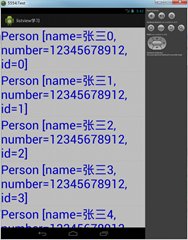
----------------------------简单的分割线------------------------------------简单的---------------------------
如果需要自定义lixtview中当样式的话,可以仙剑一个布局item的布局。
item布局
<?xml version="1.0" encoding="utf-8"?>

<LinearLayout xmlns:android="http://schemas.android.com/apk/res/android"

    android:layout_width="match_parent"

    android:layout_height="60dip"

    android:orientation="horizontal" >

    <TextView

        android:id="@+id/tv_id"

        android:layout_width="wrap_content"

        android:layout_height="wrap_content"

        android:layout_marginLeft="5dip"

        android:text="id"

        android:textColor="#ff0000"

        android:textSize="18sp" />

    <LinearLayout

        android:layout_width="wrap_content"

        android:layout_height="wrap_content"

        android:gravity="center"

        android:orientation="vertical" >

        <TextView

            android:id="@+id/tv_name"

            android:layout_width="wrap_content"

            android:layout_height="wrap_content"

            android:layout_marginLeft="5dip"

            android:text="名字"

            android:textColor="#000000"

            android:textSize="18sp"/>

        <TextView

            android:id="@+id/tv_phone"

            android:layout_width="wrap_content"

            android:layout_height="wrap_content"

            android:layout_marginLeft="5dip"

            android:text="电话"

            android:textColor="#88000000"

            android:textSize="16sp"/>

    </LinearLayout>

</LinearLayout>
重新写一下adapter里面的getView方法:
getView
@Override

        public View getView(int position, View convertView, ViewGroup parent) {

            Person person = list.get(position);

            View view = View.inflate(MainActivity.this, R.layout.listview_item, null);

            //找id

            TextView tv_id = (TextView) view.findViewById(R.id.tv_id);

            tv_id.setText("id:"+person.getId());

            TextView tv_name = (TextView) view.findViewById(R.id.tv_name);

            tv_name.setText("tv_name:"+person.getName());

            TextView tv_phone = (TextView) view.findViewById(R.id.tv_phone);

            tv_phone.setText("tv_phone:"+person.getNumber());

            return view;

        }
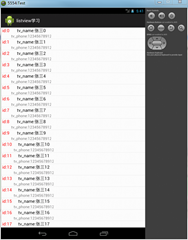
我是天王盖地虎的分割线
源代码:http://pan.baidu.com/s/1dD1Qx01
listview学习.zip
转载请注明出处:http://www.cnblogs.com/yydcdut
Android -- ListView与Adapter的更多相关文章
- Android listview与adapter用法(BaseAdapter + getView)
Android listview与adapter用法http://www.cnblogs.com/zhengbeibei/archive/2013/05/14/3078805.html package ...
- Android listview与adapter用法
listview与adapter用法 博客分类: android 一个ListView通常有两个职责. (1)将数据填充到布局. (2)处理用户的选择点击等操作. 第一点很好理解,ListView ...
- 【转】Android listview与adapter用法
一个ListView通常有两个职责. (1)将数据填充到布局. (2)处理用户的选择点击等操作. 第一点很好理解,ListView就是实现这个功能的.第二点也不难做到,在后面的学习中读者会发现,这非常 ...
- [Android] ListView关于adapter多种view设置
使用的关键点是在adapter覆盖两个方法 public int getItemViewType(int position) public int getViewTypeCount() 其它的可另go ...
- [Android]ListView的Adapter.getView()方法中延迟加载图片的优化
以下内容为原创,欢迎转载,转载请注明 来自天天博客:http://www.cnblogs.com/tiantianbyconan/p/4139998.html 举个例子吧,以好友列表为例 ListVi ...
- android listview用adapter.notifyDataSetChanged()无法刷新每项的图标
http://blog.csdn.net/caizhegnhao/article/details/41318575 今天在开发中遇到一个很奇怪的listview的问题. 这个问题情景是我的应用需要做一 ...
- Android ListView 自定义 Adapter
自定义Adapter类 public class ListViewAdapter extends BaseAdapter { private static final String TAG = Mai ...
- Android ListView 和 ***Adapter 从本地/网络获取歌曲列表
本文内容 环境 项目结构 测试数据 演示 1:SimpleAdapter 演示 2:BaseAdapter 演示 3:CustomLazyList 演示 4:CustomLazyCompleteLis ...
- Android ListView自定义Adapter使用误区
参考博客:BaseAdapter中重写getview的心得以及发现convertView回收的机制 使用自定义的BaseAdapter实现LIstView的展示 由于Recycler(反复循环器)的机 ...
随机推荐
- javascript 进制转换(2进制、8进制、10进制、16进制之间的转换)
//十进制转其他 var x=110; alert(x); alert(x.toString(8)); alert(x.toString(32)); alert(x.toString(16)); // ...
- Java多线程编程——volatile关键字
(本篇主要内容摘自<Java多线程编程核心技术>) volatile关键字的主要作用是保证线程之间变量的可见性. package com.func; public class RunThr ...
- SDOI 2017 Round1 解题报告
Day 1 T1 数字表格 题目大意 · 求\(\prod\limits_{i=1}^n\prod\limits_{j=1}^mFibonacci(\gcd(i,j))\),\(T\leq1000\) ...
- 【BZOJ 2121】字符串游戏
http://www.lydsy.com/JudgeOnline/problem.php?id=2121 dp,设\(f(i,j,k,l)\)表示原串i到j这个子串能否被删成第k个串的长度为l的前缀. ...
- 「BZOJ4763」雪辉
「BZOJ4763」天野雪辉 题目大意:有一棵 \(n\) 个点的树,树上每一个点有权值 \(a_i \leq 30000\) ,每次询问给出若干路径,求出这些路径的并上面的不同颜色数与 \(mex\ ...
- Java基础学习——多线程之创建任务
这次来盘点一下Java中用线程执行任务的写法. 1.扩展Thread 最基本的实现方法是在创建一个继承Thread的新类,在其中覆盖run()方法执行任务. public class MyThread ...
- 【洛谷】P1196 [NOI2002]银河英雄传说【带权并查集】
P1196 [NOI2002]银河英雄传说 题目描述 公元五八○一年,地球居民迁至金牛座α第二行星,在那里发表银河联邦创立宣言,同年改元为宇宙历元年,并开始向银河系深处拓展. 宇宙历七九九年,银河系的 ...
- bzoj 1458: 士兵占领 -- 最大流
1458: 士兵占领 Time Limit: 10 Sec Memory Limit: 64 MB Description 有一个M * N的棋盘,有的格子是障碍.现在你要选择一些格子来放置一些士兵 ...
- SCOJ 4493: DNA 最长公共子串 后缀自动机
4493: DNA 题目连接: http://acm.scu.edu.cn/soj/problem.action?id=4493 Description Deoxyribonucleic acid ( ...
- BR16F84 OBD II Interface Chip For PWM, VPW, and ISO 9141-2 Vehicles
http://faq.ford77.ru/pdf/eec/DataSheet.pdf FEATURES:Operating Voltage 5.0 VOperating Current 5 Ma. T ...