
nodejs+express+mongodb搭建博客
https://github.com/lanleilin/sayHelloBlog
是可以运行的
https://github.com/lanleilin/sayHelloBlog
文件结构如下:
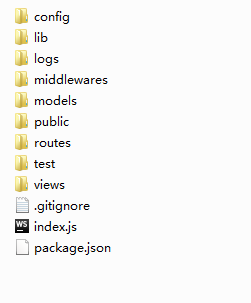
config存放配置文件,
lib存放连接数据库文件
middlewares存放中间件
public存放静态文件
views存放模版文件
routes存放路由文件
model存放操作数据库文件
logs存放日志
index.js主程序
配置文件 config/default.js
module.exports = {

  port: 3000,

  session: {

    secret: 'myblog',

    key: 'myblog',

    maxAge: 2592000000

  },

  mongodb: 'mongodb://localhost:27017/myblog'

};
lib/mongo.js
var config = require('config-lite');

var Mongolass = require('mongolass');

var mongolass = new Mongolass();

mongolass.connect(config.mongodb);

var moment = require('moment');

var objectIdToTimestamp = require('objectid-to-timestamp');

// 根据 id 生成创建时间 created_at

mongolass.plugin('addCreatedAt', {

  afterFind: function (results) {

    results.forEach(function (item) {

      item.created_at = moment(objectIdToTimestamp(item._id)).format('YYYY-MM-DD HH:mm');

    });

    return results;

  },

  afterFindOne: function (result) {

    if (result) {

      result.created_at = moment(objectIdToTimestamp(result._id)).format('YYYY-MM-DD HH:mm');

    }

    return result;

  }

});

exports.User = mongolass.model('User', {

  name: { type: 'string' },

  password: { type: 'string' },

  avatar: { type: 'string' },

  gender: { type: 'string', enum: ['m', 'f', 'x'] },

  bio: { type: 'string' }

});

exports.User.index({ name: 1 }, { unique: true }).exec();// 根据用户名找到用户,用户名全局唯一

exports.Post = mongolass.model('Post', {

  author: { type: Mongolass.Types.ObjectId },

  title: { type: 'string' },

  content: { type: 'string' },

  pv: { type: 'number' }

});

exports.Post.index({ author: 1, _id: -1 }).exec();// 按创建时间降序查看用户的文章列表

exports.Comment = mongolass.model('Comment', {

  author: { type: Mongolass.Types.ObjectId },

  content: { type: 'string' },

  postId: { type: Mongolass.Types.ObjectId }

});

exports.Comment.index({ postId: 1, _id: 1 }).exec();// 通过文章 id 获取该文章下所有留言,按留言创建时间升序

exports.Comment.index({ author: 1, _id: 1 }).exec();// 通过用户 id 和留言 id 删除一个留言
middlewares/check.js
module.exports = {

  checkLogin: function checkLogin(req, res, next) {

    if (!req.session.user) {

      req.flash('error', '未登录');

      return res.redirect('/signin');

    }

    next();

  },

  checkNotLogin: function checkNotLogin(req, res, next) {

    if (req.session.user) {

      req.flash('error', '已登录');

      return res.redirect('back');//返回之前的页面

    }

    next();

  }

};
models/post.js
var marked = require('marked');

var Post = require('../lib/mongo').Post;

var CommentModel = require('./comments');

// 给 post 添加留言数 commentsCount

Post.plugin('addCommentsCount', {

  afterFind: function (posts) {

    return Promise.all(posts.map(function (post) {

      return CommentModel.getCommentsCount(post._id).then(function (commentsCount) {

        post.commentsCount = commentsCount;

        return post;

      });

    }));

  },

  afterFindOne: function (post) {

    if (post) {

      return CommentModel.getCommentsCount(post._id).then(function (count) {

        post.commentsCount = count;

        return post;

      });

    }

    return post;

  }

});

// 将 post 的 content 从 markdown 转换成 html

Post.plugin('contentToHtml', {

  afterFind: function (posts) {

    return posts.map(function (post) {

      post.content = marked(post.content);

      return post;

    });

  },

  afterFindOne: function (post) {

    if (post) {

      post.content = marked(post.content);

    }

    return post;

  }

});

module.exports = {

  // 创建一篇文章

  create: function create(post) {

    return Post.create(post).exec();

  },

  // 通过文章 id 获取一篇文章

  getPostById: function getPostById(postId) {

    return Post

      .findOne({ _id: postId })

      .populate({ path: 'author', model: 'User' })

      .addCreatedAt()

      .addCommentsCount()

      .contentToHtml()

      .exec();

  },

  // 按创建时间降序获取所有用户文章或者某个特定用户的所有文章

  getPosts: function getPosts(author) {

    var query = {};

    if (author) {

      query.author = author;

    }

    return Post

      .find(query)

      .populate({ path: 'author', model: 'User' })

      .sort({ _id: -1 })

      .addCreatedAt()

      .addCommentsCount()

      .contentToHtml()

      .exec();

  },

  // 通过文章 id 给 pv 加 1

  incPv: function incPv(postId) {

    return Post

      .update({ _id: postId }, { $inc: { pv: 1 } })

      .exec();

  },

  // 通过文章 id 获取一篇原生文章(编辑文章)

  getRawPostById: function getRawPostById(postId) {

    return Post

      .findOne({ _id: postId })

      .populate({ path: 'author', model: 'User' })

      .exec();

  },

  // 通过用户 id 和文章 id 更新一篇文章

  updatePostById: function updatePostById(postId, author, data) {

    return Post.update({ author: author, _id: postId }, { $set: data }).exec();

  },

  // 通过用户 id 和文章 id 删除一篇文章

  delPostById: function delPostById(postId, author) {

    return Post.remove({ author: author, _id: postId })

      .exec()

      .then(function (res) {

        // 文章删除后,再删除该文章下的所有留言

        if (res.result.ok && res.result.n > 0) {

          return CommentModel.delCommentsByPostId(postId);

        }

      });

  }

};
models/users.js
var User = require('../lib/mongo').User;

module.exports = {

  // 注册一个用户

  create: function create(user) {

    return User.create(user).exec();

  },

  // 通过用户名获取用户信息

  getUserByName: function getUserByName(name) {

    return User

      .findOne({ name: name })

      .addCreatedAt()

      .exec();

  }

};
models/comment.js
var marked = require('marked');

var Comment = require('../lib/mongo').Comment;

// 将 comment 的 content 从 markdown 转换成 html

Comment.plugin('contentToHtml', {

  afterFind: function (comments) {

    return comments.map(function (comment) {

      comment.content = marked(comment.content);

      return comment;

    });

  }

});

module.exports = {

  // 创建一个留言

  create: function create(comment) {

    return Comment.create(comment).exec();

  },

  // 通过用户 id 和留言 id 删除一个留言

  delCommentById: function delCommentById(commentId, author) {

    return Comment.remove({ author: author, _id: commentId }).exec();

  },

  // 通过文章 id 删除该文章下所有留言

  delCommentsByPostId: function delCommentsByPostId(postId) {

    return Comment.remove({ postId: postId }).exec();

  },

  // 通过文章 id 获取该文章下所有留言,按留言创建时间升序

  getComments: function getComments(postId) {

    return Comment

      .find({ postId: postId })

      .populate({ path: 'author', model: 'User' })

      .sort({ _id: 1 })

      .addCreatedAt()

      .contentToHtml()

      .exec();

  },

  // 通过文章 id 获取该文章下留言数

  getCommentsCount: function getCommentsCount(postId) {

    return Comment.count({ postId: postId }).exec();

  }

};
public中存放css文件
routes/index.js
module.exports = function (app) {

  app.get('/', function (req, res) {

    res.redirect('/posts');

  });

  app.use('/signup', require('./signup'));

  app.use('/signin', require('./signin'));

  app.use('/signout', require('./signout'));

  app.use('/posts', require('./posts'));

  // 404 page

  app.use(function (req, res) {

    if (!res.headersSent) {

      res.render('404');

    }

  });

};
routes/post.js
var express = require('express');

var router = express.Router();

var PostModel = require('../models/posts');

var CommentModel = require('../models/comments');

var checkLogin = require('../middlewares/check').checkLogin;

// GET /posts 所有用户或者特定用户的文章页

//   eg: GET /posts?author=xxx

router.get('/', function(req, res, next) {

  var author = req.query.author;

  PostModel.getPosts(author)

    .then(function (posts) {

      res.render('posts', {

        posts: posts

      });

    })

    .catch(next);

});

// GET /posts/create 发表文章页

router.get('/create', checkLogin, function(req, res, next) {

  res.render('create');

});

// POST /posts 发表一篇文章

router.post('/', checkLogin, function(req, res, next) {

  var author = req.session.user._id;

  var title = req.fields.title;

  var content = req.fields.content;

  // 校验参数

  try {

    if (!title.length) {

      throw new Error('请填写标题');

    }

    if (!content.length) {

      throw new Error('请填写内容');

    }

  } catch (e) {

    req.flash('error', e.message);

    return res.redirect('back');

  }

  var post = {

    author: author,

    title: title,

    content: content,

    pv: 0

  };

  PostModel.create(post)

    .then(function (result) {

      // 此 post 是插入 mongodb 后的值,包含 _id

      post = result.ops[0];

      req.flash('success', '发表成功');

      // 发表成功后跳转到该文章页

      res.redirect(`/posts/${post._id}`);

    })

    .catch(next);

});

// GET /posts/:postId 单独一篇的文章页

router.get('/:postId', function(req, res, next) {

  var postId = req.params.postId;

  Promise.all([

    PostModel.getPostById(postId),// 获取文章信息

    CommentModel.getComments(postId),// 获取该文章所有留言

    PostModel.incPv(postId)// pv 加 1

  ])

  .then(function (result) {

    var post = result[0];

    var comments = result[1];

    if (!post) {

      throw new Error('该文章不存在');

    }

    res.render('post', {

      post: post,

      comments: comments

    });

  })

  .catch(next);

});

// GET /posts/:postId/edit 更新文章页

router.get('/:postId/edit', checkLogin, function(req, res, next) {

  var postId = req.params.postId;

  var author = req.session.user._id;

  PostModel.getRawPostById(postId)

    .then(function (post) {

      if (!post) {

        throw new Error('该文章不存在');

      }

      if (author.toString() !== post.author._id.toString()) {

        throw new Error('权限不足');

      }

      res.render('edit', {

        post: post

      });

    })

    .catch(next);

});

// POST /posts/:postId/edit 更新一篇文章

router.post('/:postId/edit', checkLogin, function(req, res, next) {

  var postId = req.params.postId;

  var author = req.session.user._id;

  var title = req.fields.title;

  var content = req.fields.content;

  PostModel.updatePostById(postId, author, { title: title, content: content })

    .then(function () {

      req.flash('success', '编辑文章成功');

      // 编辑成功后跳转到上一页

      res.redirect(`/posts/${postId}`);

    })

    .catch(next);

});

// GET /posts/:postId/remove 删除一篇文章

router.get('/:postId/remove', checkLogin, function(req, res, next) {

  var postId = req.params.postId;

  var author = req.session.user._id;

  PostModel.delPostById(postId, author)

    .then(function () {

      req.flash('success', '删除文章成功');

      // 删除成功后跳转到主页

      res.redirect('/posts');

    })

    .catch(next);

});

// POST /posts/:postId/comment 创建一条留言

router.post('/:postId/comment', checkLogin, function(req, res, next) {

  var author = req.session.user._id;

  var postId = req.params.postId;

  var content = req.fields.content;

  var comment = {

    author: author,

    postId: postId,

    content: content

  };

  CommentModel.create(comment)

    .then(function () {

      req.flash('success', '留言成功');

      // 留言成功后跳转到上一页

      res.redirect('back');

    })

    .catch(next);

});

// GET /posts/:postId/comment/:commentId/remove 删除一条留言

router.get('/:postId/comment/:commentId/remove', checkLogin, function(req, res, next) {

  var commentId = req.params.commentId;

  var author = req.session.user._id;

  CommentModel.delCommentById(commentId, author)

    .then(function () {

      req.flash('success', '删除留言成功');

      // 删除成功后跳转到上一页

      res.redirect('back');

    })

    .catch(next);

});

module.exports = router;
routes/signin.js
var sha1 = require('sha1');

var express = require('express');

var router = express.Router();

var UserModel = require('../models/users');

var checkNotLogin = require('../middlewares/check').checkNotLogin;

// GET /signin 登录页

router.get('/', checkNotLogin, function(req, res, next) {

  res.render('signin');

});

// POST /signin 用户登录

router.post('/', checkNotLogin, function(req, res, next) {

  var name = req.fields.name;

  var password = req.fields.password;

  UserModel.getUserByName(name)

    .then(function (user) {

      if (!user) {

        req.flash('error', '用户不存在');

        return res.redirect('back');

      }

      // 检查密码是否匹配

      if (sha1(password) !== user.password) {

        req.flash('error', '用户名或密码错误');

        return res.redirect('back');

      }

      req.flash('success', '登录成功');

      // 用户信息写入 session

      delete user.password;

      req.session.user = user;

      // 跳转到主页

      res.redirect('/posts');

    })

    .catch(next);

});

module.exports = router;
routes/signout.js
var express = require('express');

var router = express.Router();

var checkLogin = require('../middlewares/check').checkLogin;

// GET /signout 登出

router.get('/', checkLogin, function(req, res, next) {

  // 清空 session 中用户信息

  req.session.user = null;

  req.flash('success', '登出成功');

  // 登出成功后跳转到主页

  res.redirect('/posts');

});

module.exports = router;
routes/signup.js
var fs = require('fs');

var path = require('path');

var sha1 = require('sha1');

var express = require('express');

var router = express.Router();

var UserModel = require('../models/users');

var checkNotLogin = require('../middlewares/check').checkNotLogin;

// GET /signup 注册页

router.get('/', checkNotLogin, function(req, res, next) {

  res.render('signup');

});

// POST /signup 用户注册

router.post('/', checkNotLogin, function(req, res, next) {

  var name = req.fields.name;

  var gender = req.fields.gender;

  var bio = req.fields.bio;

  var avatar = req.files.avatar.path.split(path.sep).pop();

  var password = req.fields.password;

  var repassword = req.fields.repassword;

  // 校验参数

  try {

    if (!(name.length >= 1 && name.length <= 10)) {

      throw new Error('名字请限制在 1-10 个字符');

    }

    if (['m', 'f', 'x'].indexOf(gender) === -1) {

      throw new Error('性别只能是 m、f 或 x');

    }

    if (!(bio.length >= 1 && bio.length <= 30)) {

      throw new Error('个人简介请限制在 1-30 个字符');

    }

    if (!req.files.avatar.name) {

      throw new Error('缺少头像');

    }

    if (password.length < 6) {

      throw new Error('密码至少 6 个字符');

    }

    if (password !== repassword) {

      throw new Error('两次输入密码不一致');

    }

  } catch (e) {

    // 注册失败,异步删除上传的头像

    fs.unlink(req.files.avatar.path);

    req.flash('error', e.message);

    return res.redirect('/signup');

  }

  // 明文密码加密

  password = sha1(password);

  // 待写入数据库的用户信息

  var user = {

    name: name,

    password: password,

    gender: gender,

    bio: bio,

    avatar: avatar

  };

  // 用户信息写入数据库

  UserModel.create(user)

    .then(function (result) {

      // 此 user 是插入 mongodb 后的值,包含 _id

      user = result.ops[0];

      // 将用户信息存入 session

      delete user.password;

      req.session.user = user;

      // 写入 flash

      req.flash('success', '注册成功');

      // 跳转到首页

      res.redirect('/posts');

    })

    .catch(function (e) {

      // 注册失败,异步删除上传的头像

      fs.unlink(req.files.avatar.path);

      // 用户名被占用则跳回注册页,而不是错误页

      if (e.message.match('E11000 duplicate key')) {

        req.flash('error', '用户名已被占用');

        return res.redirect('/signup');

      }

      next(e);

    });

});

module.exports = router;
index.js
var path = require('path');

var express = require('express');

var session = require('express-session');

var MongoStore = require('connect-mongo')(session);

var flash = require('connect-flash');

var config = require('config-lite');

var routes = require('./routes');

var pkg = require('./package');

var winston = require('winston');

var expressWinston = require('express-winston');

var app = express();

// 设置模板目录

app.set('views', path.join(__dirname, 'views'));

// 设置模板引擎为 ejs

app.set('view engine', 'ejs');

// 设置静态文件目录

app.use(express.static(path.join(__dirname, 'public')));

// session 中间件

app.use(session({

  name: config.session.key,// 设置 cookie 中保存 session id 的字段名称

  secret: config.session.secret,// 通过设置 secret 来计算 hash 值并放在 cookie 中,使产生的 signedCookie 防篡改

  cookie: {

    maxAge: config.session.maxAge// 过期时间,过期后 cookie 中的 session id 自动删除

  },

  store: new MongoStore({// 将 session 存储到 mongodb

    url: config.mongodb// mongodb 地址

  })

}));

// flash 中间价,用来显示通知

app.use(flash());

// 处理表单及文件上传的中间件

app.use(require('express-formidable')({

  uploadDir: path.join(__dirname, 'public/img'),// 上传文件目录

  keepExtensions: true// 保留后缀

}));

// 设置模板全局常量

app.locals.blog = {

  title: pkg.name,

  description: pkg.description

};

// 添加模板必需的三个变量

app.use(function (req, res, next) {

  res.locals.user = req.session.user;

  res.locals.success = req.flash('success').toString();

  res.locals.error = req.flash('error').toString();

  next();

});

// 正常请求的日志

app.use(expressWinston.logger({

  transports: [

    new (winston.transports.Console)({

      json: true,

      colorize: true

    }),

    new winston.transports.File({

      filename: 'logs/success.log'

    })

  ]

}));

// 路由

routes(app);

// 错误请求的日志

app.use(expressWinston.errorLogger({

  transports: [

    new winston.transports.Console({

      json: true,

      colorize: true

    }),

    new winston.transports.File({

      filename: 'logs/error.log'

    })

  ]

}));

// error page

app.use(function (err, req, res, next) {

  res.render('error', {

    error: err

  });

});

if (module.parent) {

  module.exports = app;

} else {

  // 监听端口,启动程序

  app.listen(config.port, function () {

    console.log(`${pkg.name} listening on port ${config.port}`);

  });

}
模版文件,模版引擎用的ejs

比较多,贴一个post.ejs
<%- include('header') %>

<% posts.forEach(function (post) { %>

  <%- include('components/post-content', { post: post }) %>

<% }) %>

<%- include('footer') %>
components/post-content.ejs
<div class="post-content">

  <div class="ui grid">

    <div class="four wide column">

      <a class="avatar"

         href="/posts?author=<%= post.author._id %>"

         data-title="<%= post.author.name %> | <%= ({m: '男', f: '女', x: '保密'})[post.author.gender] %>"

         data-content="<%= post.author.bio %>">

        <img class="avatar" src="/img/<%= post.author.avatar %>">

      </a>

    </div>

    <div class="eight wide column">

      <div class="ui segment">

        <h3><a href="/posts/<%= post._id %>"><%= post.title %></a></h3>

        <pre><%- post.content %></pre>

        <div>

          <span class="tag"><%= post.created_at %></span>

          <span class="tag right">

            <span>浏览(<%= post.pv %>)</span>

            <span>留言(<%= post.commentsCount %>)</span>

            <% if (user && post.author._id && user._id.toString() === post.author._id.toString()) { %>

              <div class="ui inline dropdown">

                <div class="text"></div>

                <i class="dropdown icon"></i>

                <div class="menu">

                  <div class="item"><a href="/posts/<%= post._id %>/edit">编辑</a></div>

                  <div class="item"><a href="/posts/<%= post._id %>/remove">删除</a></div>

                </div>

              </div>

            <% } %>

          </span>

        </div>

      </div>

    </div>

  </div>

</div>
nodejs+express+mongodb搭建博客的更多相关文章
- 从无到有,用Nodejs+express+mongodb搭建简易登陆系统
前端处理server表示很蛋疼,初学Node,虽然感觉异常强大,但是学起来还是有些吃力的,Node是工具,它不是万能的,搭建一个系统还是需要借助其他一些工具,对于我这个没怎么接触server的前端来说 ...
- 用Angular2+Express快速搭建博客
1. 写在前面 昨天花了1天的时间把自己的博客从以前的Express换成了Angular2+Express,遂记录于此.博客Demo在这里,你也可以点击这里查看完整代码. 第一次使用Angular2, ...
- 【nodejs笔记1】配置webstorm + node.js +express + mongodb开发博客的环境
1. 安装webstorm 并破解 2. 安装node (以及express框架) 至官网下载并安装.(http://nodejs.org)v0.10.32 msi 安装后测试,打开命令行, c ...
- nodejs实战《一起学 Node.js》 使用 Express + MongoDB 搭建多人博客
GitHub: https://github.com/nswbmw/N-blog N-blog 使用 Express + MongoDB 搭建多人博客 开发环境 Node.js: 6.9.1 Mong ...
- NodeJS+Mongodb+Express做CMS博客系统
楼主正在用业余时间开发中-- ,目前的版本仅支持会员系统,尝鲜一下吧~ hi-blog 一个 nodejs+express+mongodb 的 cms 系统 怎么启动 默认你已经安装了 mongodb ...
- 【重点突破】—— Nodejs+Express+MongoDB的使用基础
前言:最近学习vue和react的高阶项目,都需要和Nodejs+Express+MongoDB结合实现全栈开发.这里结合实例Demo和所学项目集中总结一下这部分服务端的基础知识. 一.Express ...
- 手把手教从零开始在GitHub上使用Hexo搭建博客教程(四)-使用Travis自动部署Hexo(2)
前言 前面一篇文章介绍了Travis自动部署Hexo的常规使用教程,也是个人比较推荐的方法. 前文最后也提到了在Windows系统中可能会有一些小问题,为了在Windows系统中也可以实现使用Trav ...
- 手把手教从零开始在GitHub上使用Hexo搭建博客教程(三)-使用Travis自动部署Hexo(1)
前言 前面两篇文章介绍了在github上使用hexo搭建博客的基本环境和hexo相关参数设置等. 基于目前,博客基本上是可以完美运行了. 但是,有一点是不太好,就是源码同步问题,如果在不同的电脑上写文 ...
- 手把手教从零开始在GitHub上使用Hexo搭建博客教程(一)-附GitHub注册及配置
前言 有朋友问了我关于博客系统搭建相关的问题,由于是做开发相关的工作,我给他推荐的是使用github的gh-pages服务搭建个人博客. 推荐理由: 免费:github提供gh-pages服务是免费的 ...
随机推荐
- checkbox 最多选两项
<!DOCTYPE html><html lang="en"><head> <meta charset="UTF-8" ...
- ElasticSearch High Level REST API【4】多搜索
1.Multi-Search多搜索请求 Multi-Search可同时添加多个search搜索请求,并行地在一个http请求中执行多个搜索请求,相较多次单请求查询可提升查询效率.ES客户掉通过mget ...
- django 图片上传与显示
由于图片上传的需要,学习了一波上传 1. 上传 前端代码 <form action="写上相应的定向位置" method="post" enctype=& ...
- 麦子学院python开发全套完整无加密课程
点击了解更多Python课程>>> 麦子学院python开发全套完整无加密课程 第一阶段:Python基础准备 1.Web前端开发之HTML+CSS基础入门 2.Javascript ...
- php使用curl获取文本出现中文乱码的解决办法
在使用php的curl获取远程html文本时出现了中文乱码. 解决办法的代码如下: $url = "www.ecjson.com";//获取页面内容$ch = curl_init( ...
- Laravel 命令行常用命令
一.简介 1.Artisan 是 Laravel 自带的命令行接口名称,它为我们在开发过程中提供了很多有用的命令.想要查看所有可用的Artisan命令,可使用list命令: php artisan l ...
- python网络-多任务实现之协程(27)
一.协程 协程,又称微线程,纤程.英文名Coroutine. 协程不是进程,也不是线程,它就是一个函数,一个特殊的函数——可以在某个地方挂起,并且可以重新在挂起处继续运行.所以说,协程与进程.线程相比 ...
- 手机注册过哪些网站37kfenxi.com,查询注册过哪些网站
注册过哪些网站?发现这么一个网站,https://www.37kfenxi.com?_=cnblogs 可以根据手机号码查询注册过哪些网站,然后通过大数据分析出机主的性格,爱好等. 据说还可以查老板, ...
- vba中ListBox控件的使用
给ListBox添加内容 If CheckBox8 = True Then---------------------------checkbox控件被选中 For i = 0 To ListBox1. ...
- 「微信小程序免费辅导教程」25,基本内容组件text的使用及个人帐号允许的服务类目