
iOS开发:Toast for iPhone
iOS开发:Toast for iPhone
主要特点:
1,支持屏幕Y轴任意位置显示,设置距离顶/底端距离
2,支持多行文本
3,支持设置等待时间
4,支持点击隐藏,屏幕旋转时自动隐藏,淡入淡出
5,无需初始化,类方法调用
效果图:
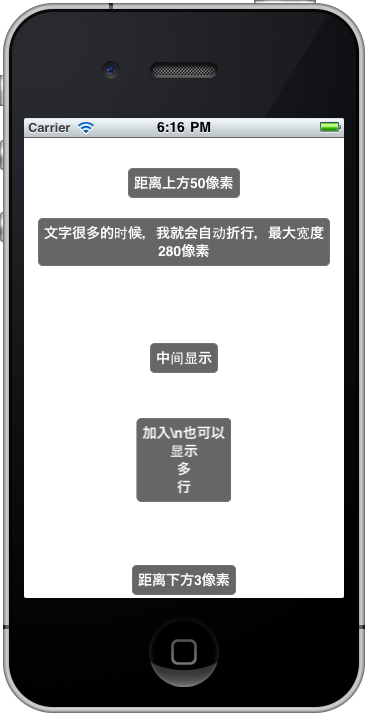
全部代码如下,使用时需要添加QuartzCore.framework,希望能给大家带来方便。
- #import <Foundation/Foundation.h>
- #define DEFAULT_DISPLAY_DURATION 2.0f
- @interface OMGToast : NSObject {
- NSString *text;
- UIButton *contentView;
- CGFloat duration;
- }
- + (void)showWithText:(NSString *) text_;
- + (void)showWithText:(NSString *) text_
- duration:(CGFloat)duration_;
- + (void)showWithText:(NSString *) text_
- topOffset:(CGFloat) topOffset_;
- + (void)showWithText:(NSString *) text_
- topOffset:(CGFloat) topOffset
- duration:(CGFloat) duration_;
- + (void)showWithText:(NSString *) text_
- bottomOffset:(CGFloat) bottomOffset_;
- + (void)showWithText:(NSString *) text_
- bottomOffset:(CGFloat) bottomOffset_
- duration:(CGFloat) duration_;
- @end
- #import "OMGToast.h"
- #import <QuartzCore/QuartzCore.h>
- @interface OMGToast (private)
- - (id)initWithText:(NSString *)text_;
- - (void)setDuration:(CGFloat) duration_;
- - (void)dismisToast;
- - (void)toastTaped:(UIButton *)sender_;
- - (void)showAnimation;
- - (void)hideAnimation;
- - (void)show;
- - (void)showFromTopOffset:(CGFloat) topOffset_;
- - (void)showFromBottomOffset:(CGFloat) bottomOffset_;
- @end
- @implementation OMGToast
- - (void)dealloc{
- [[NSNotificationCenter defaultCenter] removeObserver:self
- name:UIDeviceOrientationDidChangeNotification
- object:[UIDevice currentDevice]];
- [contentView release],contentView = nil;
- [text release],text = nil;
- [super dealloc];
- }
- - (id)initWithText:(NSString *)text_{
- if (self = [super init]) {
- text = [text_ copy];
- UIFont *font = [UIFont boldSystemFontOfSize:14];
- CGSize textSize = [text sizeWithFont:font
- constrainedToSize:CGSizeMake(280, MAXFLOAT)
- lineBreakMode:UILineBreakModeWordWrap];
- UILabel *textLabel = [[UILabel alloc] initWithFrame:CGRectMake(0, 0, textSize.width + 12, textSize.height + 12)];
- textLabel.backgroundColor = [UIColor clearColor];
- textLabel.textColor = [UIColor whiteColor];
- textLabel.textAlignment = UITextAlignmentCenter;
- textLabel.font = font;
- textLabel.text = text;
- textLabel.numberOfLines = 0;
- contentView = [[UIButton alloc] initWithFrame:CGRectMake(0, 0, textLabel.frame.size.width, textLabel.frame.size.height)];
- contentView.layer.cornerRadius = 5.0f;
- contentView.layer.borderWidth = 1.0f;
- contentView.layer.borderColor = [[UIColor grayColor] colorWithAlphaComponent:0.5].CGColor;
- contentView.backgroundColor = [UIColor colorWithRed:0.2f
- green:0.2f
- blue:0.2f
- alpha:0.75f];
- [contentView addSubview:textLabel];
- contentView.autoresizingMask = UIViewAutoresizingFlexibleWidth;
- [contentView addTarget:self
- action:@selector(toastTaped:)
- forControlEvents:UIControlEventTouchDown];
- contentView.alpha = 0.0f;
- [textLabel release];
- duration = DEFAULT_DISPLAY_DURATION;
- [[NSNotificationCenter defaultCenter] addObserver:self
- selector:@selector(deviceOrientationDidChanged:)
- name:UIDeviceOrientationDidChangeNotification
- object:[UIDevice currentDevice]];
- }
- return self;
- }
- - (void)deviceOrientationDidChanged:(NSNotification *)notify_{
- [self hideAnimation];
- }
- -(void)dismissToast{
- [contentView removeFromSuperview];
- }
- -(void)toastTaped:(UIButton *)sender_{
- [self hideAnimation];
- }
- - (void)setDuration:(CGFloat) duration_{
- duration = duration_;
- }
- -(void)showAnimation{
- [UIView beginAnimations:@"show" context:NULL];
- [UIView setAnimationCurve:UIViewAnimationCurveEaseIn];
- [UIView setAnimationDuration:0.3];
- contentView.alpha = 1.0f;
- [UIView commitAnimations];
- }
- -(void)hideAnimation{
- [UIView beginAnimations:@"hide" context:NULL];
- [UIView setAnimationCurve:UIViewAnimationCurveEaseOut];
- [UIView setAnimationDelegate:self];
- [UIView setAnimationDidStopSelector:@selector(dismissToast)];
- [UIView setAnimationDuration:0.3];
- contentView.alpha = 0.0f;
- [UIView commitAnimations];
- }
- - (void)show{
- UIWindow *window = [UIApplication sharedApplication].keyWindow;
- contentView.center = window.center;
- [window addSubview:contentView];
- [self showAnimation];
- [self performSelector:@selector(hideAnimation) withObject:nil afterDelay:duration];
- }
- - (void)showFromTopOffset:(CGFloat) top_{
- UIWindow *window = [UIApplication sharedApplication].keyWindow;
- contentView.center = CGPointMake(window.center.x, top_ + contentView.frame.size.height/2);
- [window addSubview:contentView];
- [self showAnimation];
- [self performSelector:@selector(hideAnimation) withObject:nil afterDelay:duration];
- }
- - (void)showFromBottomOffset:(CGFloat) bottom_{
- UIWindow *window = [UIApplication sharedApplication].keyWindow;
- contentView.center = CGPointMake(window.center.x, window.frame.size.height-(bottom_ + contentView.frame.size.height/2));
- [window addSubview:contentView];
- [self showAnimation];
- [self performSelector:@selector(hideAnimation) withObject:nil afterDelay:duration];
- }
- + (void)showWithText:(NSString *)text_{
- [OMGToast showWithText:text_ duration:DEFAULT_DISPLAY_DURATION];
- }
- + (void)showWithText:(NSString *)text_
- duration:(CGFloat)duration_{
- OMGToast *toast = [[[OMGToast alloc] initWithText:text_] autorelease];
- [toast setDuration:duration_];
- [toast show];
- }
- + (void)showWithText:(NSString *)text_
- topOffset:(CGFloat)topOffset_{
- [OMGToast showWithText:text_ topOffset:topOffset_ duration:DEFAULT_DISPLAY_DURATION];
- }
- + (void)showWithText:(NSString *)text_
- topOffset:(CGFloat)topOffset_
- duration:(CGFloat)duration_{
- OMGToast *toast = [[[OMGToast alloc] initWithText:text_] autorelease];
- [toast setDuration:duration_];
- [toast showFromTopOffset:topOffset_];
- }
- + (void)showWithText:(NSString *)text_
- bottomOffset:(CGFloat)bottomOffset_{
- [OMGToast showWithText:text_ bottomOffset:bottomOffset_ duration:DEFAULT_DISPLAY_DURATION];
- }
- + (void)showWithText:(NSString *)text_
- bottomOffset:(CGFloat)bottomOffset_
- duration:(CGFloat)duration_{
- OMGToast *toast = [[[OMGToast alloc] initWithText:text_] autorelease];
- [toast setDuration:duration_];
- [toast showFromBottomOffset:bottomOffset_];
- }
- @end
可以这样来使用
- [OMGToast showWithText:@"中间显示" duration:5];
- [OMGToast showWithText:@"距离上方50像素" topOffset:50 duration:5];
- [OMGToast showWithText:@"文字很多的时候,我就会自动折行,最大宽度280像素" topOffset:100 duration:5];
- [OMGToast showWithText:@"加入\\n也可以\n显示\n多\n行" topOffset:300 duration:5];
- [OMGToast showWithText:@"距离下方3像素" bottomOffset:3 duration:5];
iOS开发:Toast for iPhone的更多相关文章
- iOS开发点滴:iPhone屏幕适配
最近开始做iOS开发,遇到一些小问题和解决方法,记录下. 今天是iPhone屏幕适配 iPhone5出来之后屏幕就有iPhone就有了2种尺寸:3.5寸和4寸,xcode 5 的IB设计器里面界面 ...
- iOS开发:判断iPhone是否是刘海屏iPhoneX、iPhoneXR、iPhoneXs、iPhoneXs Max等
保证能判断,呕心沥血,不行切JIJI 方法一 Objective-C // iPhoneX.iPhoneXR.iPhoneXs.iPhoneXs Max等 // 判断刘海屏,返回YES表示是刘海屏 - ...
- ios开发介绍
iOS开发概述 •什么是IOS •什么是IOS开发 •为什么要选择IOS开发 •学习IOS开发的准备 1.什么是iOS •iOS是一款由苹果公司开发的操作系统(OS是Operating Sys ...
- ios新手开发——toast提示和旋转图片加载框
不知不觉自学ios已经四个月了,从OC语法到app开发,过程虽然枯燥无味,但是结果还是挺有成就感的,在此分享我的ios开发之路中的小小心得~废话不多说,先上我们今天要实现的效果图: 有过一点做APP经 ...
- iOS开发UI篇—iPad和iPhone开发的比较
一.iPad简介 1.什么是iPad 一款苹果公司于2010年发布的平板电脑 定位介于苹果的智能手机iPhone和笔记本电脑产品之间 跟iPhone一样,搭载的是iOS操作系统 2.iPad的市场情况 ...
- iOS开发---iPhone SDK 包含哪些东西?
第一部分: 在使用Intel芯片的Macintosh计算机开发iOS应用程序所需的全部接口.工具以及资源全都包含于iPhone SDK. 苹果公司将大部分系统接口发布在框架这种特殊的数据包.一个框架就 ...
- IOS开发/iphone开发多线程
有时候可能有很多功能要同时实现,例如每隔多长时间就会检测程序网络连接,又或者有时候需要从服务器下载一个不小的文件,如果用单线程几乎是不可想的事情,程序将会卡的无法使用,用到多线程和不用多线程,给用户的 ...
- 【转】iOS开发UI篇—iPad和iPhone开发的比较
原文网址:http://www.cnblogs.com/wendingding/p/3918007.html iOS开发UI篇—iPad和iPhone开发的比较 一.iPad简介 1.什么是iPad ...
- IOS开发系列之阿堂教程:玩转IPhone客户端和Web服务端交互(客户端)实践
说到ios的应用开发,我们不能不提到web server服务端,如果没有服务端的支持,ios应用开发就没有多大意义了,因为从事过手机开发的朋友都知道(Android也一样),大量复杂业务的处理和数据库 ...
随机推荐
- [LOJ#530]「LibreOJ β Round #5」最小倍数
[LOJ#530]「LibreOJ β Round #5」最小倍数 试题描述 第二天,LCR 终于启动了备份存储器,准备上传数据时,却没有找到熟悉的文件资源,取而代之的是而屏幕上显示的一段话: 您的文 ...
- spring的事务传播与隔离
propagation 事务的传播属性: 1.PROPAGATION_REQUIRED(*-required):支持当前事务,如果当前没有事务,就新建一个事务.(最常见的选择) 2.PROPAGATI ...
- APUE 学习笔记(六) 进程控制
1. fork 创建新进程 fork创建的新进程称为子进程,fork函数调用一次,返回两次. 两次返回的唯一区别就是子进程的返回值是0,而父进程的返回值是新子进程的进程ID 在fork之后是父进程先执 ...
- poj 4001 To Miss Our Children Time
To Miss Our Children Time Time Limit: 2000/1000 MS (Java/Others) Memory Limit: 65768/65768 K (Jav ...
- mysql 新增用户并授权
grant all privileges on *.* to 'root'@‘%’ identified by '123456'; *.* 表示所有资源. 刷新权限 flush privileges;
- 阿里云oss教程
OSS是提供非结构化数据存取的服务.对于刚开始使用OSS的用户,非结构数据可以理解为word文档.PDF.PPT.EXCEL表格.MP3.MKV.RMVB.HTML等各种类型文件.OSS提供API去进 ...
- PAT 甲级 1045 Favorite Color Stripe(DP)
题目链接 Favorite Color Stripe 题意:给定$A$序列和$B$序列,你需要在$B$序列中找出任意一个最长的子序列,使得这个子序列也是$A$的子序列 (这个子序列的相邻元素可以重复) ...
- ros pub sub ("~")
base_velocity_smoother.cpp remap ("~") 订阅: "cmd_vel" ...
- poj 2104 K-th Number(主席树
Time Limit: 20000MS Memory Limit: 65536K Total Submissions: 59058 Accepted: 20529 Case Time Limi ...
- 【UTR #2】题目交流通道
题目描述 定好了难度,雄心勃勃的吉米多出题斯基开始寻找智慧的神犇星球的居民出题. 然而吉米多出题斯基没有料到,神犇星球的居民告诉吉米多出题斯基:"今年神犇星球经济不景气,大家都想宅在家里,哪 ...