
SpringMVC配置环境
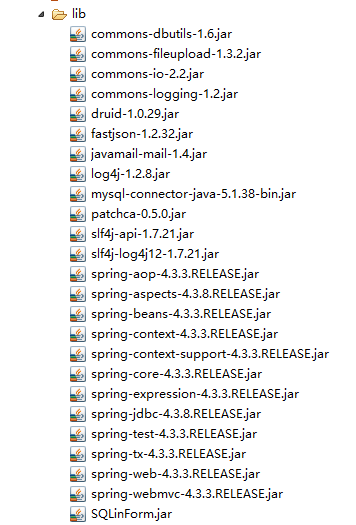
一,lib目录下加入spring一般所需的jar包
二,配置web.xml
<?xml version="1.0" encoding="UTF-8"?>

<web-app xmlns:xsi="http://www.w3.org/2001/XMLSchema-instance"

xmlns="http://java.sun.com/xml/ns/javaee" xmlns:web="http://java.sun.com/xml/ns/javaee/web-app_2_5.xsd"

xsi:schemaLocation="http://java.sun.com/xml/ns/javaee http://java.sun.com/xml/ns/javaee/web-app_3_0.xsd"

id="WebApp_ID" version="3.0">

<display-name>songtian</display-name>

<!-- Spring 全局上下文的 监听器,必须有spring上下文配置文件,否则报错 -->

<listener>

<listener-class>org.springframework.web.context.ContextLoaderListener</listener-class>

</listener>

<!-- Spring上下文配置, 默认为classpath:applicationContext.xml -->

<context-param>

<param-name>contextConfigLocation</param-name>

<param-value>classpath:spring-config.xml</param-value>

</context-param>

<!-- 字符集编码过滤器characterEncoding -->

<filter>

<filter-name>characterEncoding</filter-name>

<filter-class>org.springframework.web.filter.CharacterEncodingFilter</filter-class>

<init-param>

<param-name>encoding</param-name>

<param-value>UTF-8</param-value>

</init-param>

</filter>

<filter-mapping>

<filter-name>characterEncoding</filter-name>

<url-pattern>/*</url-pattern>

</filter-mapping>

<!-- spring mvc -->

<servlet>

<servlet-name>springmvc</servlet-name>

<servlet-class>org.springframework.web.servlet.DispatcherServlet</servlet-class>

<!-- DispatcherServlet上下文配置, 默认为/WEB-INF/${servlet-name}-servlet.xml -->

<init-param>

<param-name>contextConfigLocation</param-name>

<param-value>classpath:spring-mvc.xml</param-value>

</init-param>

<load-on-startup>1</load-on-startup>

</servlet>

<servlet-mapping>

<servlet-name>springmvc</servlet-name>

<url-pattern>*.do</url-pattern>

</servlet-mapping>

<welcome-file-list>

<welcome-file>pages/sys/login/pages/signin.html</welcome-file>

</welcome-file-list>

</web-app>
三(1),配置spring-mvc.xml
<?xml version="1.0" encoding="utf-8"?>

<beans xmlns="http://www.springframework.org/schema/beans" xmlns:xsi="http://www.w3.org/2001/XMLSchema-instance"

	xmlns:context="http://www.springframework.org/schema/context"

	xmlns:aop="http://www.springframework.org/schema/aop"

	xmlns:tx="http://www.springframework.org/schema/tx"

	xmlns:mvc="http://www.springframework.org/schema/mvc"

	xsi:schemaLocation="http://www.springframework.org/schema/beans

	http://www.springframework.org/schema/beans/spring-beans.xsd

	http://www.springframework.org/schema/context

	http://www.springframework.org/schema/context/spring-context.xsd

	http://www.springframework.org/schema/aop

	http://www.springframework.org/schema/aop/spring-aop.xsd

	http://www.springframework.org/schema/tx

	http://www.springframework.org/schema/tx/spring-tx.xsd

	http://www.springframework.org/schema/mvc

	http://www.springframework.org/schema/mvc/spring-mvc.xsd">

	<!-- 扫描controller -->

	<context:component-scan base-package="com.st"/>

	<!-- 注解驱动:配置映射器和适配器驱动 -->

	<mvc:annotation-driven>

		<mvc:message-converters>

			<!-- 用fastjson替换默认的jackjson序列化方案 -->

			<bean class="com.alibaba.fastjson.support.spring.FastJsonHttpMessageConverter">

				<property name="supportedMediaTypes">

					<list>

						<value>application/json;charset=utf-8</value>

					</list>

				</property>

			</bean>

		</mvc:message-converters>

	</mvc:annotation-driven>

</beans>
三(2),配置spring-config.xml
<?xml version="1.0" encoding="utf-8"?>

<beans xmlns="http://www.springframework.org/schema/beans" xmlns:xsi="http://www.w3.org/2001/XMLSchema-instance"

	xmlns:context="http://www.springframework.org/schema/context"

	xmlns:aop="http://www.springframework.org/schema/aop"

	xmlns:tx="http://www.springframework.org/schema/tx"

	xmlns:mvc="http://www.springframework.org/schema/mvc"

	xsi:schemaLocation="http://www.springframework.org/schema/beans

	http://www.springframework.org/schema/beans/spring-beans.xsd

	http://www.springframework.org/schema/context

	http://www.springframework.org/schema/context/spring-context.xsd

	http://www.springframework.org/schema/aop

	http://www.springframework.org/schema/aop/spring-aop.xsd

	http://www.springframework.org/schema/tx

	http://www.springframework.org/schema/tx/spring-tx.xsd

	http://www.springframework.org/schema/mvc

	http://www.springframework.org/schema/mvc/spring-mvc.xsd">

	<!-- jdbc.properteis 以下的 三(3) 指定数据源路径-->

	<context:property-placeholder location="classpath:jdbc.properties"/>

	<!-- DataSource 配置数据源 -->

    <bean id="dataSource" class="com.alibaba.druid.pool.DruidDataSource" init-method="init" destroy-method="close">

        <property name="driverClassName" value="${mysql.driver}"/>

		<property name="url" value="${mysql.url}"/>

		<property name="username" value="${mysql.user}"/>

		<property name="password" value="${mysql.password}"/>

        <property name="initialSize" value="${initialSize}" />

        <property name="maxActive" value="${maxActive}" />

        <property name="minIdle" value="${minIdle}" />

        <property name="maxWait" value="${maxWait}" />

        <property name="testOnBorrow" value="true" />

        <property name="testOnReturn" value="true" />

        <property name="testWhileIdle" value="true" />

        <property name="removeAbandoned" value="true" />

        <property name="logAbandoned" value="true" />

        <property name="timeBetweenEvictionRunsMillis" value="60000" />

        <property name="minEvictableIdleTimeMillis" value="300000" />

        <property name="removeAbandonedTimeout" value="1800" />

        <property name="validationQuery" value="select 1 from dual" />

    </bean>

    <!-- 配置事务开始 -->

    <bean id="proxyDataSource" class="org.springframework.jdbc.datasource.TransactionAwareDataSourceProxy">

		<constructor-arg>

			<ref bean="dataSource" />

		</constructor-arg>

	</bean>

	<bean id="transactionManager" class="org.springframework.jdbc.datasource.DataSourceTransactionManager">

		<property name="dataSource" ref="proxyDataSource" />

	</bean>

	<tx:annotation-driven transaction-manager="transactionManager"/>

    <!-- 配置事务结束 -->

    <!-- 使用构造方法加载数据源  -->

    <bean id="queryRunner" class="org.apache.commons.dbutils.QueryRunner">

    	<!-- <constructor-arg index="0" ref="proxyDataSource"></constructor-arg> -->

    	<constructor-arg>

			<ref bean="proxyDataSource"/>

		</constructor-arg>

    </bean>

    <!-- 发送邮件配置开始 -->

    <bean id="javaMailSender" class="org.springframework.mail.javamail.JavaMailSenderImpl">

     <property name="host" value="smtp.163.com"/>

     <property name="port" value="25"/>

     <property name="username" value="163邮箱"/>

     <property name="password" value="邮箱授权码"/>

     <property name="javaMailProperties">

            <props>

              <prop key="mail.smtp.auth">true</prop>

              <prop key="mail.smtp.timeout">25000</prop>

            </props>

      </property>

    </bean>

    <bean id="simpleMailMessage" class="org.springframework.mail.SimpleMailMessage">

        <property name="from" value="163邮箱"/>

        <property name="subject" value="发送邮件验证码" />

    </bean>

    <!-- 发送邮件结束 -->

    <!-- 支持上传文件 -->

    <bean id="multipartResolver" class="org.springframework.web.multipart.commons.CommonsMultipartResolver">

             <!-- 设置上传文件的最大尺寸为5MB -->

            <property name="maxUploadSize">

                 <value>5242880</value>

            </property>

    </bean>

</beans>
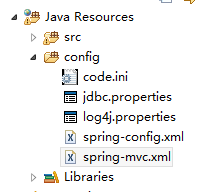
三(3)数据库连接配置 jdbc.properties
#mysql

mysql.driver=com.mysql.jdbc.Driver

mysql.url=jdbc:mysql://localhost:3306/db?useUnicode=true&characterEncoding=utf8

mysql.user=root

mysql.password=

initialSize=5

maxActive=100

minIdle=10

maxWait=6000
SpringMVC配置环境的更多相关文章
- SpringMVC配置环境中一般用的jar包
配置SpringMVC需要把这些jar包加入lib目录下 下载地址,复制到地址栏.回车即可下载 http://files.cnblogs.com/files/QW-lzm/SpringMVC----. ...
- idea spring+springmvc+mybatis环境配置整合详解
idea spring+springmvc+mybatis环境配置整合详解 1.配置整合前所需准备的环境: 1.1:jdk1.8 1.2:idea2017.1.5 1.3:Maven 3.5.2 2. ...
- Spring学习资料以及配置环境
一.Spring4 1.介绍 新特性 SpringIDE 插件 IOC DI 在 Spring 中配置 Bean 自动装配 Bean 之间的关系(依赖.继承) Bean 的作用域 使用外部属性文件 S ...
- 构建web应用之——maven创建以及SpringMVC配置
构建web应用第一步需要创建以及配置maven项目管理,同时配置启动SpringMVC,这里推荐参考CSDN的一篇文章链接:https://blog.csdn.net/weixin_42222334/ ...
- 基于java代码的springmvc配置
在我的印象中,开发一个web项目首选当然是springmvc,而配置springmvc无非就是web.xml里配置其核心控制器DispatcherServlet.然后把所有的请求都交给它处理,再配个视 ...
- SpringMVC配置多视图-内容协商原理
SpringMVC配置多视图-内容协商原理 2014年03月06日 16:46:59 日积月累_滴水石穿 阅读数:10964更多 个人分类: SpringMVC Spring Framework ...
- Spring Boot2 系列教程(十八)Spring Boot 中自定义 SpringMVC 配置
用过 Spring Boot 的小伙伴都知道,我们只需要在项目中引入 spring-boot-starter-web 依赖,SpringMVC 的一整套东西就会自动给我们配置好,但是,真实的项目环境比 ...
- Spring Boot 中自定义 SpringMVC 配置,到底继承谁哪一个类或则接口?
看了这篇文章,写的非常的言简意赅,特此记录下: 1.Spring Boot 1.x 中,自定义 SpringMVC 配置可以通过继承 WebMvcConfigurerAdapter 来实现. 2.Sp ...
- Linux系统下配置环境变量
一.环境变量文件介绍 转自:http://blog.csdn.net/cscmaker/article/details/7261921 Linux中环境变量包括系统级和用户级,系统级的环境变量是每个登 ...
随机推荐
- postman 快捷方式--启动图标
下载,解压,安装,(此安装位置在/opt) 1.创建全局变量,也就是在任何地方都可以执行postman,不用去到安装目录,执行 : sudo ln -s /opt/postman/Postman /u ...
- rman备份OBSOLETE和EXPIRED参数来历及区别
http://blog.itpub.net/30496894/viewspace-2096221/
- 【微信小程序】开发实战 之 「配置项」与「逻辑层」
微信小程序作为微信生态重要的一环,在实际生活.工作.商业中的应用越来越广泛.想学习微信小程序开发的朋友也越来越多,本文将在小程序框架的基础上就微信小程序项目开发所必需的基础知识及语法特点进行了详细总结 ...
- 将文件从已Root Android手机中copy出来的几个cmd窗口命令
将文件从已Root Android手机中copy出来的几个cmd窗口命令: 以shell身份登录adbadb shell进入adb后切换至root用户su更改文件的所属chown shell *更改文 ...
- Eclipse FindBugs的安装
原文:http://blog.sina.com.cn/s/blog_62186b460100l3mx.html 1安装:首先到官方网站下载最新版本FindBugs http://findbugs ...
- CVE-2014-4114 和 CVE-2014-3566
这两天关注安全的人员都会特别留意这两个新披露的漏洞:CVE-2014-4114 和 CVE-2014-3566.以下我们就针对这两个漏洞最一些简要说明. CVE-2014-4114------- ...
- Python--学习过程
基础篇 Python基础篇 Python的数据类型 作业总结
- js团购倒计时函数代码
<h1>团购啦!</h1><p>还剩<span id="times"></span></p> <SCR ...
- 【Leetcode】经典的Jump Game in JAVA
Given an array of non-negative integers, you are initially positioned at the first index of the arra ...
- ArcGIS教程:分水岭
摘要 确定栅格中一组像元之上的汇流区域. 使用方法 · 各个分水岭的值将取自输入栅格中源的值或者要素倾泻点数据.假设倾泻点为栅格数据集,则使用像元值.假设倾泻点为点要素数据集,则从指定的字段中获取值. ...