
IdentityServer4专题之六:Resource Owner Password Credentials

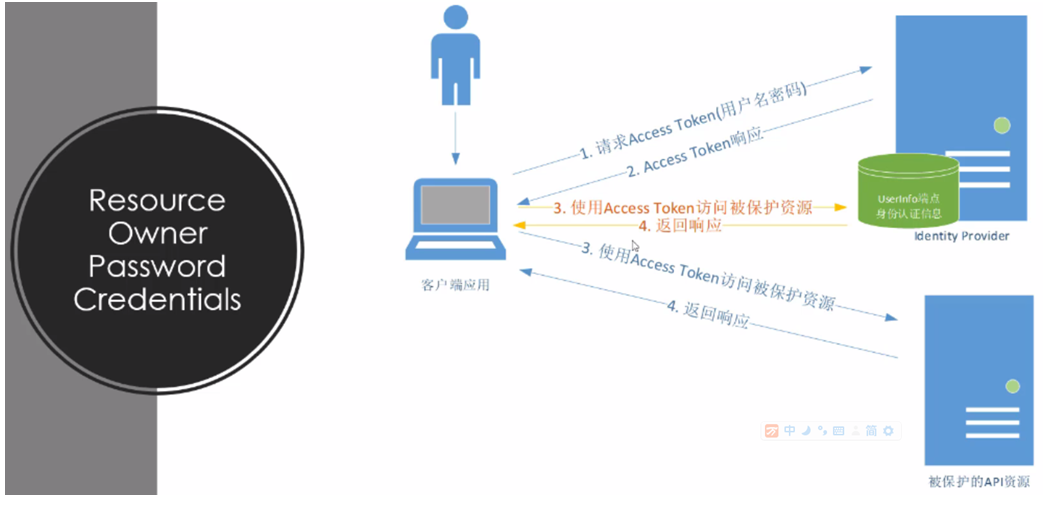
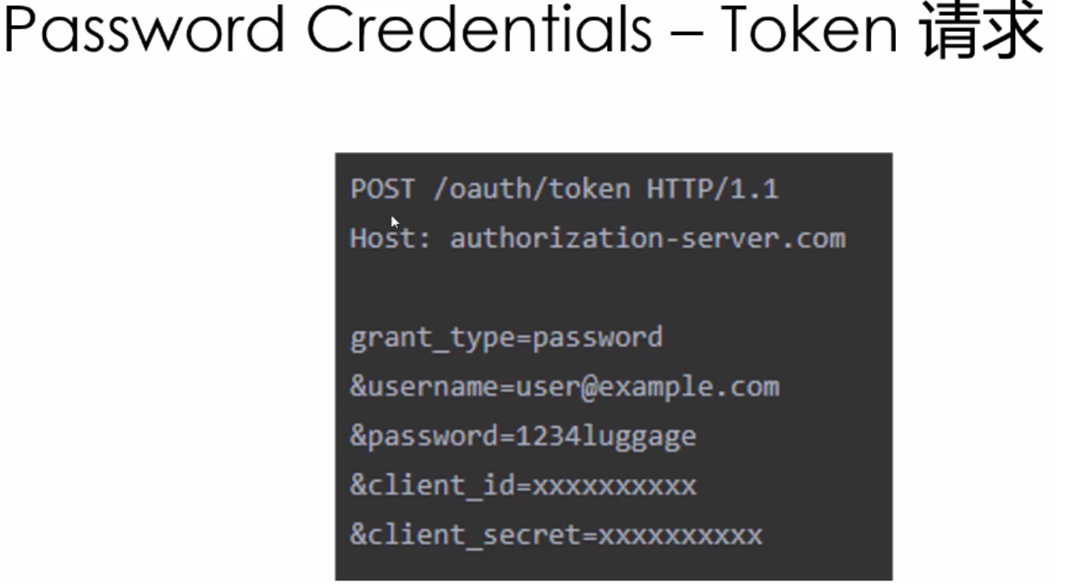
实现代码:
(1)IdentityServer4授权服务器代码:
public static class Config
{ public static IEnumerable<IdentityResource> GetIdentityResources() //对身份资源的配置
{
return new IdentityResource[]
{
new IdentityResources.OpenId(), //此项必选
new IdentityResources.Profile(),
new IdentityResources.Email(),
new IdentityResources.Phone(),
new IdentityResources.Address(),
};
}
public static IEnumerable<ApiResource> GetApis() //对API的配置
{
return new ApiResource[]
{
new ApiResource("api1", "My API #1")
};
}
public static IEnumerable<Client> GetClients() //配置可访问客户
{
return new[]
{
// client credentials flow client
new Client
{
ClientId = "console client",
ClientName = "Client Credentials Client",
AllowedGrantTypes = GrantTypes.ClientCredentials,
ClientSecrets = { new Secret("511536EF-F270-4058-80CA-1C89C192F69A".Sha256()) },
AllowedScopes = {"api1" }
},
new Client
{
ClientId="password client",
AllowedGrantTypes=GrantTypes.ResourceOwnerPassword,
ClientSecrets={new Secret("password secret".Sha256())},
AllowedScopes={"api1",IdentityServerConstants.StandardScopes.OpenId,
IdentityServerConstants.StandardScopes.Profile,
IdentityServerConstants.StandardScopes.Address,
IdentityServerConstants.StandardScopes.Phone,
IdentityServerConstants.StandardScopes.Email
}
}
};
}
}
(2)对API的配置同ClientCredential,完全相同
(3)客户端代码,客户端还是需要NUGET安装IdentityModel库
static async Task Main(string[] args)
{
//Discovery endpoint
Console.WriteLine("Hello World!");
var client = new HttpClient();
var disco = await client.GetDiscoveryDocumentAsync("http://localhost:5000");
if (disco.IsError)
{
Console.WriteLine(disco.Error);
return;
}
//request access token
var tokenResponse = await client.RequestPasswordTokenAsync(new PasswordTokenRequest
{
Address=disco.TokenEndpoint,
ClientId="password client",
ClientSecret="password secret",
Scope="api1 openid profile email phone address",
UserName="bob", //此处设置的密码应在identityserver4的TestUsers类中有定义
Password="bob"
});
if(tokenResponse.IsError)
{
Console.WriteLine(tokenResponse.Error);
return;
}
Console.WriteLine(tokenResponse.Json.ToString());
var clientApi = new HttpClient();
clientApi.SetBearerToken(tokenResponse.AccessToken);
var apiResponse =await clientApi.GetAsync("http://localhost:5002/api/values");
if (!apiResponse.IsSuccessStatusCode)
{
Console.WriteLine(apiResponse.StatusCode);
return;
}
var content = await apiResponse.Content.ReadAsStringAsync();
Console.WriteLine(content);
var clientUserInfo = new HttpClient();
clientUserInfo.SetBearerToken(tokenResponse.AccessToken);
var userinfoResponse = await clientUserInfo.GetAsync(disco.UserInfoEndpoint);
if(!userinfoResponse.IsSuccessStatusCode)
{
Console.WriteLine(userinfoResponse.StatusCode);
return;
}
var contentuserinfo = await userinfoResponse.Content.ReadAsStringAsync();
Console.WriteLine(contentuserinfo);
Console.WriteLine("llll");
}
}
}
IdentityServer4专题之六:Resource Owner Password Credentials的更多相关文章
- IdentityServer4之Resource Owner Password Credentials(资源拥有者密码凭据许可)
IdentityServer4之Resource Owner Password Credentials(资源拥有者密码凭据许可) 参考 官方文档:2_resource_owner_passwords ...
- asp.net core IdentityServer4 实现 resource owner password credentials(密码凭证)
前言 OAuth 2.0默认四种授权模式(GrantType) 授权码模式(authorization_code) 简化模式(implicit) 密码模式(resource owner passwor ...
- IdentityServer4 之 Resource Owner Password Credentials 其实有点尴尬
前言 接着IdentityServer4的授权模式继续聊,这篇来说说 Resource Owner Password Credentials授权模式,这种模式在实际应用场景中使用的并不多,只怪其太开放 ...
- 不要使用Resource Owner Password Credentials
不要使用Resource Owner Password Credentials 文章链接在这里 前言 最近公司项目在做一些重构,因为公司多个业务系统各自实现了一套登录逻辑,比较混乱.所以,现在需要做一 ...
- 使用Resource Owner Password Credentials Grant授权发放Token
对应的应用场景是:为自家的网站开发手机 App(非第三方 App),只需用户在 App 上登录,无需用户对 App 所能访问的数据进行授权. 客户端获取Token: public string Get ...
- 基于 IdentityServer3 实现 OAuth 2.0 授权服务【密码模式(Resource Owner Password Credentials)】
密码模式(Resource Owner Password Credentials Grant)中,用户向客户端提供自己的用户名和密码.客户端使用这些信息,向"服务商提供商"索要授权 ...
- 基于OWIN WebAPI 使用OAuth授权服务【客户端验证授权(Resource Owner Password Credentials Grant)】
适用范围 前面介绍了Client Credentials Grant ,只适合客户端的模式来使用,不涉及用户相关.而Resource Owner Password Credentials Grant模 ...
- OAuth2.0学习(1-6)授权方式3-密码模式(Resource Owner Password Credentials Grant)
授权方式3-密码模式(Resource Owner Password Credentials Grant) 密码模式(Resource Owner Password Credentials Grant ...
- ABP中使用OAuth2(Resource Owner Password Credentials Grant模式)
ABP目前的认证方式有两种,一种是基于Cookie的登录认证,一种是基于token的登录认证.使用Cookie的认证方式一般在PC端用得比较多,使用token的认证方式一般在移动端用得比较多.ABP自 ...
随机推荐
- 拼接 字典序min
给定一个字符串类型的数组strs,找到一种拼接方式,使得把所有字符串拼起来之后形成的字符串具有最低的字典序. 输入一个正整数数组,把数组里所有数字拼接起来排成一个数,打印能拼接出的所有数字中最小的一个 ...
- Python基础模块整理
1.shutil :可以用来对文件进行基本操作(拷贝,剪切等) 2.glob :提供了一个函数用于从目录通配符搜索中生成文件列表 3.datetime :日期和时间的处理 4.zlib ...
- ModBus的小于3.5S间隔的理解
modbus协议中规定:至少3.5个字符传输时间的停顿间隔时间标志了消息的结束. 我的理解如下:约定参数:9600bps,8数据位,无奇偶校验,1起始位,1停止位. 9600bps代表在9600的波特 ...
- 关于vscode的配置
Git插件 通过GitLens -- Git supercharged可以很方便的查看历史作者 Setting.json(谨慎使用,因为对import进行排序改变后可能导致类的循环引用,因此不要轻易改 ...
- HDU1495 非常可乐(BFS/数论)
大家一定觉的运动以后喝可乐是一件很惬意的事情,但是seeyou却不这么认为.因为每次当seeyou买了可乐以后,阿牛就要求和seeyou一起分享这一瓶可乐,而且一定要喝的和seeyou一样多.但see ...
- java里判断字符串是否为数字类型的方法
String type = "数字类型";if(StringUtils.isNotBlank(value)){ //区分正负数 if(value.startsWith(" ...
- java 第三次课后作业
1.java字段初始化的规律 public class gouzao { public static void main(String[] args) { test te=new test(); Sy ...
- Spring AOP 中 advice 的四种类型 before after throwing advice around
spring AOP(Aspect-oriented programming) 是用于切面编程,简单的来说:AOP相当于一个拦截器,去拦截一些处理,例如:当一个方法执行的时候,Spring 能够拦截 ...
- Hive的安装与基础指令
一.Hive安装 Hive的安装相对比较简单,Hive是基于Hadoop来使用的,所以搭建Hadoop伪分布式或完全分布式即可,Hive安装过程如下: ①安装并启动Hadoop 在博主的其他博客中有安 ...
- python requirements.txt批量下载安装离线
有些情况下我们需要下载N个第三方包,或者下载的包依赖其它包,一个个下载非常浪费时间.这时我们可以通过如下两种方式的命令批量下载. 方式1 pip download -d /tmp/packagesdi ...