
prometheus学习笔记(2)-利用java client写入数据
继续学习prometheus,上一节演示了用http方式使用curl向pushgateway发送数据,本节将研究如何利用client jar包,以java代码的方式写入数据。
一、依赖的jar包


 1 <dependency>

 2     <groupId>io.prometheus</groupId>

 3     <artifactId>simpleclient</artifactId>

 4     <version>0.9.0</version>

 5 </dependency>

 6

 7 <dependency>

 8     <groupId>io.prometheus</groupId>

 9     <artifactId>simpleclient_pushgateway</artifactId>

10     <version>0.9.0</version>

11 </dependency>
主要就是上面2个(这是最小配置),考虑到我们通常是在spring环境中使用,一般还要加1个spring依赖,完整pom如下:
<?xml version="1.0" encoding="UTF-8"?>

<project xmlns="http://maven.apache.org/POM/4.0.0" xmlns:xsi="http://www.w3.org/2001/XMLSchema-instance"

         xsi:schemaLocation="http://maven.apache.org/POM/4.0.0 https://maven.apache.org/xsd/maven-4.0.0.xsd">

    <modelVersion>4.0.0</modelVersion>

    <groupId>com.cnblogs.yjmyzz</groupId>

    <artifactId>spring-boot-demo</artifactId>

    <version>0.0.1-SNAPSHOT</version>

    <properties>

        <java.version>1.8</java.version>

    </properties>

    <dependencies>

        <!-- spring应用最小依赖-->

        <dependency>

            <groupId>org.springframework</groupId>

            <artifactId>spring-context</artifactId>

            <version>5.2.4.RELEASE</version>

        </dependency>

        <!-- The client -->

        <dependency>

            <groupId>io.prometheus</groupId>

            <artifactId>simpleclient</artifactId>

            <version>0.9.0</version>

        </dependency>

        <dependency>

            <groupId>io.prometheus</groupId>

            <artifactId>simpleclient_pushgateway</artifactId>

            <version>0.9.0</version>

        </dependency>

        <!--        下面2个也常用,但在本例中用不到-->

        <!--        <dependency>-->

        <!--            <groupId>io.prometheus</groupId>-->

        <!--            <artifactId>simpleclient_hotspot</artifactId>-->

        <!--            <version>0.9.0</version>-->

        <!--        </dependency>-->

        <!--        <dependency>-->

        <!--            <groupId>io.prometheus</groupId>-->

        <!--            <artifactId>simpleclient_httpserver</artifactId>-->

        <!--            <version>0.9.0</version>-->

        <!--        </dependency>-->

    </dependencies>

    <build>

        <plugins>

            <plugin>

                <artifactId>maven-compiler-plugin</artifactId>

                <version>3.1</version>

                <configuration>

                    <source>1.8</source>

                    <target>1.8</target>

                </configuration>

            </plugin>

        </plugins>

    </build>

</project>
二、示例代码
package com.cnblogs.yjmyzz.springbootdemo;

import io.prometheus.client.Counter;

import io.prometheus.client.Gauge;

import io.prometheus.client.exporter.PushGateway;

import org.springframework.context.annotation.AnnotationConfigApplicationContext;

import org.springframework.context.annotation.Bean;

import org.springframework.context.annotation.ComponentScan;

import java.io.IOException;

import java.util.Random;

/**

 * @author 菩提树下的杨过(http : / / yjmyzz.cnblogs.com)

 * 利用client写入prometheus示例

 */

@ComponentScan("com.cnblogs.yjmyzz")

public class SampleApplication {

    /**

     * push网关

     *

     * @return

     */

    @Bean

    public PushGateway getPushGateway() {

        return new PushGateway("localhost:9091");

    }

    /**

     * counter实例

     *

     * @return

     */

    @Bean

    public Counter getCounter() {

        return Counter.build()

                .name("blog_visit") //这里模拟博客访问量

                .labelNames("blog_id") //博客id

                .help("counter_blog_visit") //这个名字随便起

                .register(); //注:通常只能注册1次,1个实例中重复注册会报错

    }

    @Bean

    public Gauge getGauge() {

        return Gauge.build()

                .name("blog_fans") //这里模拟粉丝数(注:这里我们没设置label)

                .help("gauge_blog_fans")

                .register();

    }

    public static void main(String[] args) throws IOException, InterruptedException {

        AnnotationConfigApplicationContext context = new AnnotationConfigApplicationContext(SampleApplication.class);

        //从spring上下文中取出这些实例

        Counter counter = context.getBean(Counter.class);

        Gauge gauge = context.getBean(Gauge.class);

        PushGateway gateway = context.getBean(PushGateway.class);

        Random rnd = new Random();

        //粉丝数先预设50

        gauge.inc(50);

        while (true) {

            //随机生成1个blogId

            int blogId = rnd.nextInt(100000);

            //该blogId的访问量+1

            counter.labels(blogId + "").inc();

            //模拟粉丝数的变化

            if (blogId % 2 == 0) {

                gauge.inc();

            } else {

                gauge.dec();

            }

            //利用网关采集数据

            gateway.push(counter, "job-counter-test");

            gateway.push(gauge, "job-gauge-test");

            //辅助输出日志

            System.out.println("blogId:" + blogId);

            Thread.sleep(5000);

        }

    }

}
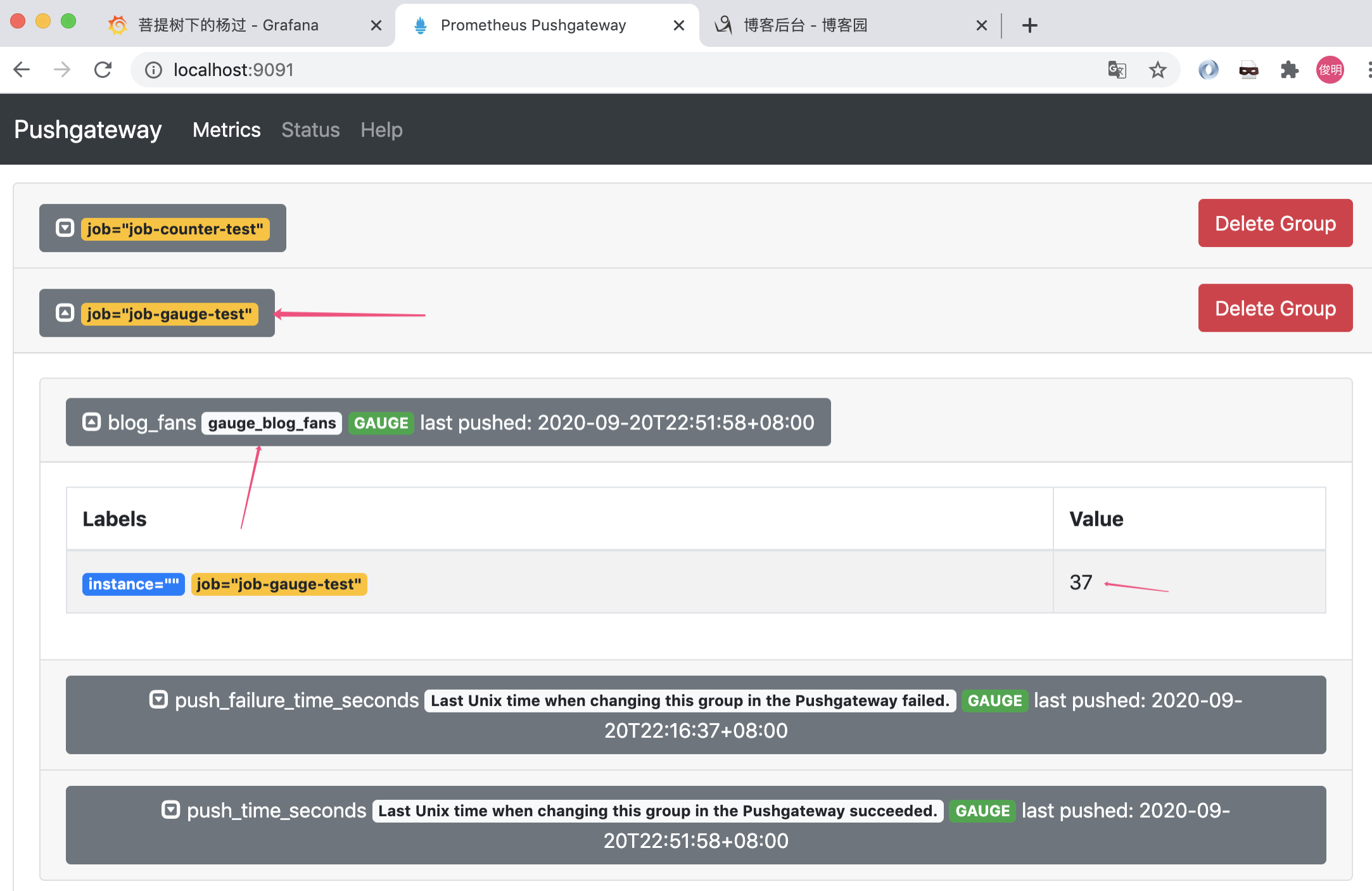
代码运行起来后,可以通过http://localhost:9091,确认job是否执行成功
三、配置grafana图表
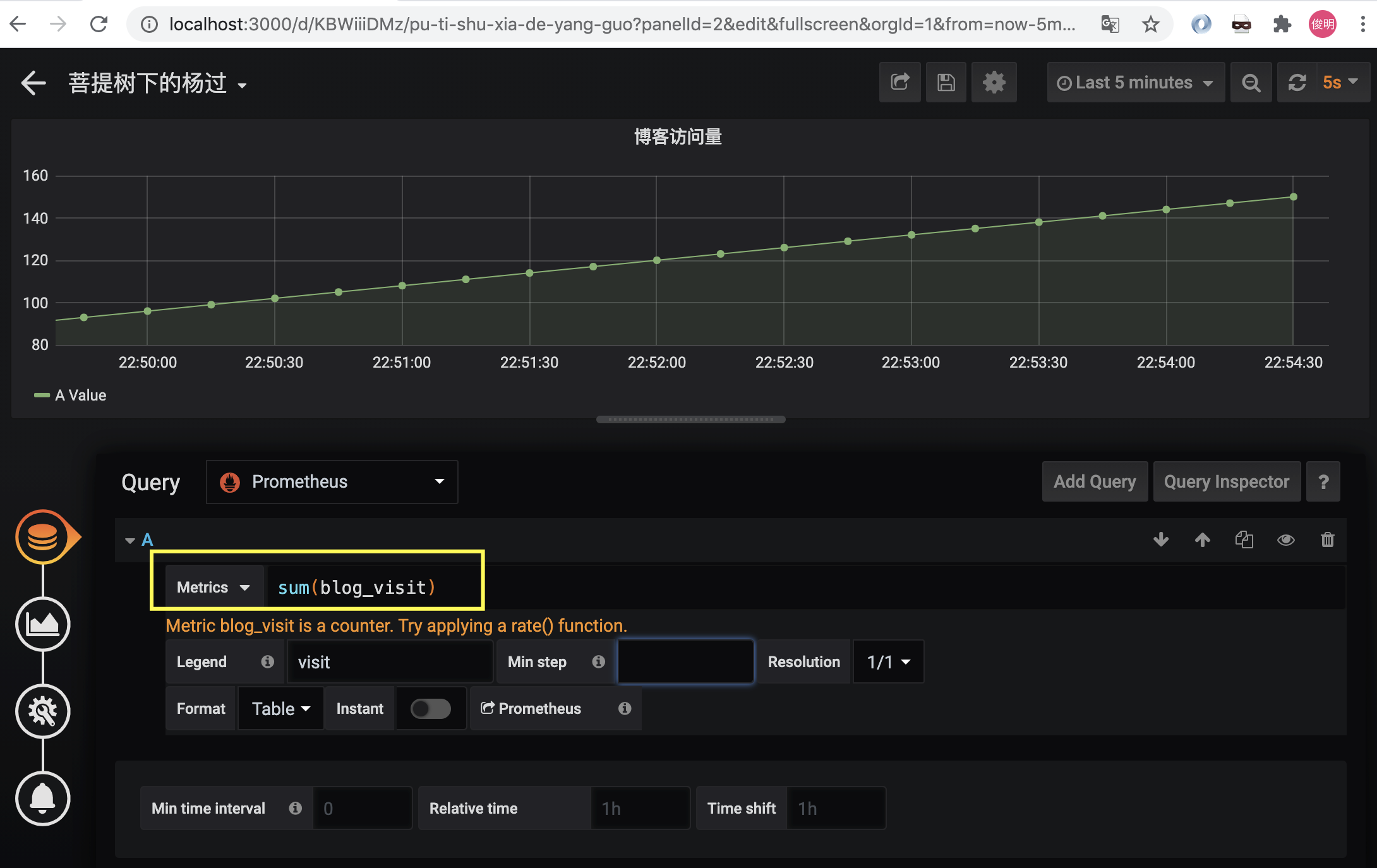
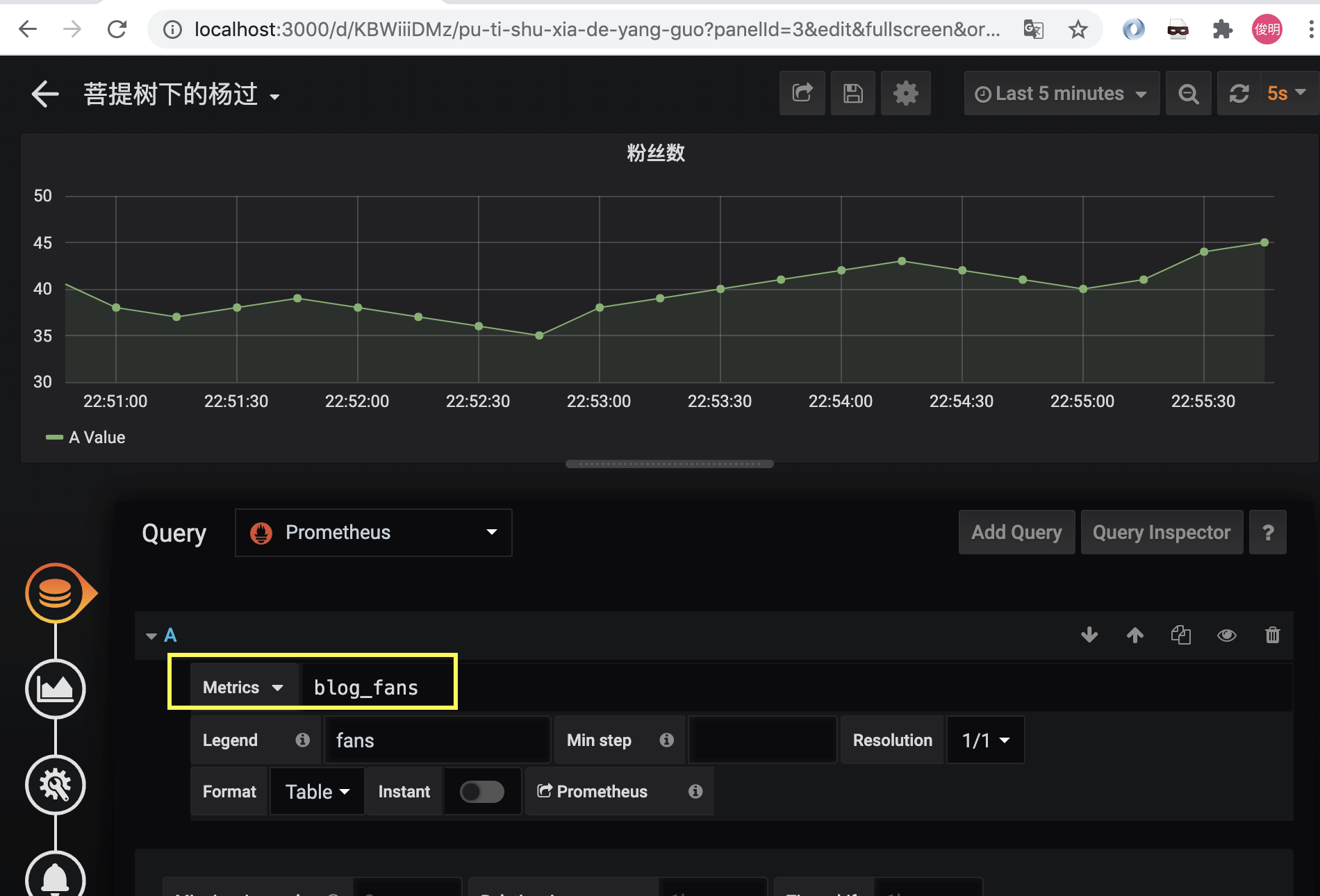
写入成功后,grafana里就能识别出这2个指标了:
参考文章:
https://github.com/prometheus/client_java
prometheus学习笔记(2)-利用java client写入数据的更多相关文章
- Java学习笔记之[ 利用扫描仪Scanner进行数据输入 ]
/*********数据的输入********//**利用扫描仪Scanner进行数据输入 怎么使用扫描仪Scanner *1.放在类声明之前,引入扫描仪 import java.util.Scann ...
- JVM学习笔记一:Java运行时数据区域
1. 程序计数器 当前线程所执行的字节码的行号指示器. 2. Java虚拟机栈 线程私有,与线程具有相同生命周期.用于存储局部变量表.操作数栈.动态链表.方法出口等信息. 局部变量表存放内容: 基本数 ...
- Java学习笔记:基本输入、输出数据操作实例分析
Java学习笔记:基本输入.输出数据操作.分享给大家供大家参考,具体如下: 相关内容: 输出数据: print println printf 输入数据: Scanner 输出数据: JAVA中在屏幕中 ...
- 学习笔记:利用GDI+生成简单的验证码图片
学习笔记:利用GDI+生成简单的验证码图片 /// <summary> /// 单击图片时切换图片 /// </summary> /// <param name=&quo ...
- 学习笔记(三)--->《Java 8编程官方参考教程(第9版).pdf》:第十章到十二章学习笔记
回到顶部 注:本文声明事项. 本博文整理者:刘军 本博文出自于: <Java8 编程官方参考教程>一书 声明:1:转载请标注出处.本文不得作为商业活动.若有违本之,则本人不负法律责任.违法 ...
- 机器学习实战(Machine Learning in Action)学习笔记————09.利用PCA简化数据
机器学习实战(Machine Learning in Action)学习笔记————09.利用PCA简化数据 关键字:PCA.主成分分析.降维作者:米仓山下时间:2018-11-15机器学习实战(Ma ...
- Spring MVC 学习笔记2 - 利用Spring Tool Suite创建一个web 项目
Spring MVC 学习笔记2 - 利用Spring Tool Suite创建一个web 项目 Spring Tool Suite 是一个带有全套的Spring相关支持功能的Eclipse插件包. ...
- 【Spring学习笔记-MVC-4】SpringMVC返回Json数据-方式2
<Spring学习笔记-MVC>系列文章,讲解返回json数据的文章共有3篇,分别为: [Spring学习笔记-MVC-3]SpringMVC返回Json数据-方式1:http://www ...
- 【Spring学习笔记-MVC-3】SpringMVC返回Json数据-方式1
<Spring学习笔记-MVC>系列文章,讲解返回json数据的文章共有3篇,分别为: [Spring学习笔记-MVC-3]SpringMVC返回Json数据-方式1:http://www ...
- ASP.NET MVC 学习笔记-7.自定义配置信息 ASP.NET MVC 学习笔记-6.异步控制器 ASP.NET MVC 学习笔记-5.Controller与View的数据传递 ASP.NET MVC 学习笔记-4.ASP.NET MVC中Ajax的应用 ASP.NET MVC 学习笔记-3.面向对象设计原则
ASP.NET MVC 学习笔记-7.自定义配置信息 ASP.NET程序中的web.config文件中,在appSettings这个配置节中能够保存一些配置,比如, 1 <appSettin ...
随机推荐
- PACS千万家,好看耐用第一家---基于JAVA开发的跨平台PACS系统
随着2011年成功上线全院级PACS,期间软件版本不断的更新和优化,也得到了不少HIS厂商及同行友商的支持,目前已有医院客户达到了300多家遍布全国各个省份,随着时间的推移,PACS老客户的数据量在不 ...
- Java编程--设计模式之装饰者模式
目录 装饰者模式 简介 做馒头实例 生产汽车实例 常见使用 装饰者模式 简介 装饰者模式的主要功能就是对一个类的功能进行扩充! 对于需要对某个类扩充,但是该类是final类,不能被继承,这是时候可以用 ...
- [java与https]第一篇、证书杂谈
一.算法.密钥(对).证书.证书库 令狐冲是个马场老板,这天,他接到店里伙计电话,说有人已经签了租马合同,准备到马场提马,,他二话不说,突突突就去了,到了之后,发现不认识租客. 令狐冲说,你把你租马合 ...
- 去除string前面或后面的空白符
去除string前面或后面的空白符 // trim from start (construct new string) inline std::string ltrim(const std::stri ...
- scikit-learn生成随机数据集
%matplotlib inline from sklearn import datasets import matplotlib.pyplot as plt import numpy as np s ...
- QQ会员首页HTML+CSS
作为一个穷人,唯一一次逛这么久的会员首页还是因为要写最头大的web~苦涩 效果图 源码 <!DOCTYPE html> <html> <head> <meta ...
- Excel批量插入checkbox的宏代码
来源网络,作为个人记录使用 手动在excel中添加勾选框不复杂,但是添加多个的时候会很麻烦,特别是在做数据分析时,选择框属性应该绑定在对应单元格下,使用普通的填充方式无法到达要求,因此使用VBA宏命令 ...
- 第9讲、深入理解Scaled Dot-Product Attention
Scaled Dot-Product Attention是Transformer架构的核心组件,也是现代深度学习中最重要的注意力机制之一.本文将从原理.实现和应用三个方面深入剖析这一机制. 1. 基本 ...
- Intellij Idea 通过svn或者git提交代码时速度慢的解决办法
问题分析:在使用 IntelliJ IDEA 操作Git的时候,Git响应速度特别满,等待差不多10秒.甚至更长时间才完成操作,真是等的花儿都谢了. 解决方案:更改IntelliJ IDE ...
- 【中英】【吴恩达课后测验】Course 2 - 改善深层神经网络 - 第三周测验
[中英][吴恩达课后测验]Course 2 - 改善深层神经网络 - 第三周测验 上一篇:[课程2 - 第二周编程作业]※※※※※ [回到目录]※※※※※下一篇:[课程2 - 第三周编程作业] 第3周 ...