
Android 开发添加控件事件的三种方式
- import android.app.Activity;
- import android.os.Bundle;
- import android.view.View;
- import android.view.View.OnClickListener;
- import android.widget.Button;
- import android.widget.Toast;
- public class HelloActivity extends Activity {
- /** Called when the activity is first created. */
- @Override
- public void onCreate(Bundle savedInstanceState) {
- super.onCreate(savedInstanceState);
- setContentView(R.layout.main);
- Button btnMethod01;
- Button btnMethod02;
- Button btnMethod03;
- btnMethod01 = (Button)findViewById(R.id.button1);
- btnMethod02 = (Button)findViewById(R.id.button2);
- btnMethod03 = (Button)findViewById(R.id.button3);
- //第一种方法:匿名类
- btnMethod01.setOnClickListener(new Button.OnClickListener(){
- public void onClick(View v){
- Toast.makeText(HelloActivity.this,R.string.method01
- ,Toast.LENGTH_SHORT).show();
- }
- });
- //添加监听事件
- btnMethod02.setOnClickListener(new button1OnClickListener());
- }
- //第二种方法:内部类实现 有两部 1.写内部类 2.添加监听事件
- private class button1OnClickListener implements OnClickListener{
- public void onClick(View v){
- Toast.makeText(HelloActivity.this,R.string.method02,
- Toast.LENGTH_SHORT).show();
- }
- }
- //第三种方法:用xml方法配置,该名称要与 main.xml 中button03的
- //android:onClick="OnClickButton03"的名字一样
- public void OnClickButton03(View v){
- Toast.makeText(HelloActivity.this,R.string.method03
- ,Toast.LENGTH_SHORT).show();
- }
- }
import android.app.Activity;

import android.os.Bundle;

import android.view.View;

import android.view.View.OnClickListener;

import android.widget.Button;

import android.widget.Toast;

public class HelloActivity extends Activity {

    /** Called when the activity is first created. */

    @Override

    public void onCreate(Bundle savedInstanceState) {

        super.onCreate(savedInstanceState);

        setContentView(R.layout.main);

        Button btnMethod01;

        Button btnMethod02;

        Button btnMethod03;

        btnMethod01 = (Button)findViewById(R.id.button1);

        btnMethod02 = (Button)findViewById(R.id.button2);

        btnMethod03 = (Button)findViewById(R.id.button3);

        //第一种方法:匿名类

        btnMethod01.setOnClickListener(new Button.OnClickListener(){

            public void onClick(View v){

                Toast.makeText(HelloActivity.this,R.string.method01

                        ,Toast.LENGTH_SHORT).show();

            }

        });

        //添加监听事件

        btnMethod02.setOnClickListener(new button1OnClickListener());

    }

    //第二种方法:内部类实现  有两部 1.写内部类 2.添加监听事件

    private class button1OnClickListener implements OnClickListener{

        public void onClick(View v){

            Toast.makeText(HelloActivity.this,R.string.method02,

                    Toast.LENGTH_SHORT).show();

        }

    }

    //第三种方法:用xml方法配置,该名称要与  main.xml 中button03的

    //android:onClick="OnClickButton03"的名字一样

    public void OnClickButton03(View v){

        Toast.makeText(HelloActivity.this,R.string.method03

                ,Toast.LENGTH_SHORT).show();

    }

}
- <?xml version="1.0" encoding="utf-8"?>
- <LinearLayout xmlns:android="http://schemas.android.com/apk/res/android"
- android:layout_width="fill_parent"
- android:layout_height="fill_parent"
- android:orientation="vertical">
- <Button
- android:id="@+id/button1"
- android:layout_width="match_parent"
- android:layout_height="wrap_content"
- android:text="@string/method01"/>
- <Button
- android:id="@+id/button2"
- android:layout_width="match_parent"
- android:layout_height="wrap_content"
- android:text="@string/method02"/>
- <Button
- android:onClick="OnClickButton03"
- android:id="@+id/button3"
- android:layout_width="match_parent"
- android:layout_height="wrap_content"
- android:text="@string/method03"/>
- </LinearLayout>
<?xml version="1.0" encoding="utf-8"?>

<LinearLayout xmlns:android="http://schemas.android.com/apk/res/android"

    android:layout_width="fill_parent"

    android:layout_height="fill_parent"

    android:orientation="vertical">

    <Button

        android:id="@+id/button1"

        android:layout_width="match_parent"

        android:layout_height="wrap_content"

        android:text="@string/method01"/>

    <Button

        android:id="@+id/button2"

        android:layout_width="match_parent"

        android:layout_height="wrap_content"

        android:text="@string/method02"/>

    <Button

        android:onClick="OnClickButton03"

        android:id="@+id/button3"

        android:layout_width="match_parent"

        android:layout_height="wrap_content"

        android:text="@string/method03"/>

</LinearLayout>
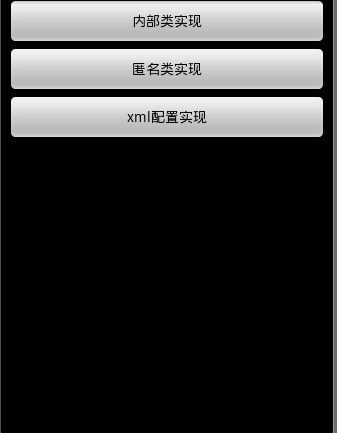
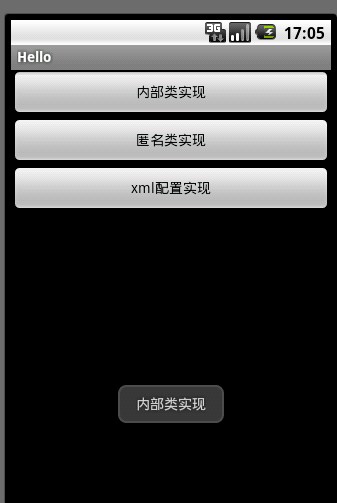
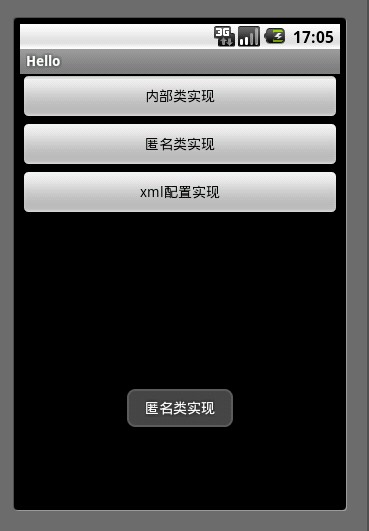

Android 开发添加控件事件的三种方式的更多相关文章
- CAD控件,CAD插件使用教程:Android开发使用控件--开发环境的搭建
Android开发使用控件入门--环境搭建 2014-12-24 09:57 14人阅读 评论(0) 收藏 编辑 删除 CAD控件.CAD三维控件,手机 ...
- Android开发使用控件入门--环境搭建
Android开发使用控件入门--环境搭建 软件名称(,梦,,想.CAD ,控件) 1. 环境搭建: 3 1.1. 安装Eclipse 3 1.2. 下载JDK 3 1.3. 下载Android S ...
- 【VS开发】在VS2010中开发ActiveX控件设置测试容器的方式
在VS2010中开发ActiveX控件设置测试容器的方式 借鉴文章http://blog.csdn.net/waxgourd0/article/details/7374669 在VS2010中开发MF ...
- 怎样在Android开发中FPS游戏实现的两种方式比较
怎样在Android开发中FPS游戏实现的两种方式比较 如何用Android平台开发FPS游戏,其实现过程有哪些方法,这些方法又有哪些不同的地方呢?首先让我们先了解下什么是FPS 英文名:FPS (F ...
- Android Material Design控件学习(三)——使用TextInputLayout实现酷市场登录效果
前言 前两次,我们学习了 Android Material Design控件学习(一)--TabLayout的用法 Android Material Design控件学习(二)--Navigation ...
- Android 触发Button按钮事件的三种方式
1.新创建一个类 2.使用内部类 3.当多个button按钮时,为简化代码而创建的实例listener 贴代码: MainActivity.Java 文件: package com.android. ...
- 界面跳转+Android Studio Button事件的三种方式
今天学习界面跳转 java类总是不能新建成功 看了网上教程 (20条消息) 关于android studio无法创建类或者接口问题的解决方法_qq_39916160的博客-CSDN博客 可以新建了 但 ...
- Android - 页面返回上一页面的三种方式
今年刚刚跳槽到了新公司,也开始转型做Android,由此开始Android的学习历程. 最近在解很多UI的bug,在解bug过程中,总结了在UI的实现过程中,页面返回上一页面的几种实现方式. 一. 自 ...
- NGUI注册事件的三种方式
1.第一种方式 当一个元素要执行某个方法,而这个方法在此元素赋予的脚本上有,那么直接会调用此方法,但此方法的名称必须是内置的固定名称,例如OnClick,OnMouseOver,OnMouseOut等 ...
随机推荐
- CSS“隐藏”元素的几种方法的对比
本文地址:http://luopq.com/2016/02/15/css-tricks-of-hide-element/,转载请注明 一说起CSS隐藏元素,我想大部分小伙伴们都会想到的第一种方法就是设 ...
- sqlserver的convert函数
定义和用法 CONVERT() 函数是把日期转换为新数据类型的通用函数. CONVERT() 函数可以用不同的格式显示日期/时间数据. 语法 CONVERT(data_type(length),dat ...
- suricata 命令行解释【转】
suricata命令行 转载地址:http://blog.sina.com.cn/s/blog_6f8edcde0101gcha.html suricata命令行选项说明 你能两种方式使用命令行选项, ...
- easymock快速入门
easymock是众多mock之中的很容易用的mock,今天刚开始学习,来个简单的教程.以购物车结算为例子,比如首先是每一个商品项的pojo. public class Item { private ...
- 使用import简化spring的配置 spring import 标签的解析 使用import或加载spring配置时,报错误There is no ID/IDREF 多个Spring配置文件import resource路径配置
spring-import 标签的解析.使用案例: 对于spring配置文件的编写,我想,对于经历过庞大项目的人,都有那种恐惧的心理,太多的配置文件.不过,分模块都是大多数人能想到的方法,但是,怎么分 ...
- 深入解读键值产生原理,linux中的软链接和硬链接(转)
键值 = 文件标示符 + 项目ID 当用到进程间的通信时, 必须要注意到的是键值是怎么产生的,我们知道任何一个文件时通过文件名来访问的, 而内核在对应的给其一个值,也就是文件标示符. 系统建立IPC通 ...
- The method getServletContext() is undefined for the type HttpServletRequest
request.getServletContext().getRealPath("/") 已经加入了 sun runtime library但是还是提示错误 是因为 写法过时了改成 ...
- Ubuntu菜鸟入门(十)—— Flash控件安装
一.用firefox打开视频时发现,ubuntu并没有自带flash插件,所以流媒体视频无法正常播放,为了解决这个问题,这里我们需要来安装Adobe® Flash® Player插件,这是一款轻量级浏 ...
- Android静默安装实现方案,仿360手机助手秒装和智能安装功能
转载请注明出处:http://blog.csdn.net/guolin_blog/article/details/47803149 之前有非常多朋友都问过我.在Android系统中如何才干实现静默安装 ...
- 从sys/power/state分析并实现S3C2416的睡眠和唤醒
环境: PC: debian-7.6.0 ARM CPU: S3C2416 Linux-Kernel: 3.6.0(FriendlyARM) U-boot: 1.3.4 一.问题来源 依据须要,在S3 ...