
Windows Community Toolkit 4.0 - DataGrid - Overview
概述
Windows Community Toolkit 4.0 于 2018 月 8 月初发布:Windows Community Toolkit 4.0 Release Note. 4.0 版本相较于 3.0,增加了 DataGrid 等控件,Sample App 支持了 Fluent Design 设计和明暗两种风格,修复了遗留的控件 BUG,接下来我们主要看一下 DataGrid 控件的实现。
DataGrid 控件是一个可以展示多行多列数据集合的控件,相信大家在 Silverlight WPF 等平台开发中都有过接触,该控件非常适合用来展示数据表格,可以完全是文本内容展示,也可以在数据中包含按钮等操作;另外控件还支持筛选,分组等操作需求。
由于 DataGrid 控件涉及到的功能比较复杂,代码量也比较大,我们会分为几篇文章来详细讲解。而本篇,我们会先针对 DataGrid 控件的整体实现和使用做介绍。
下面是 Windows Community Toolkit Sample App 的示例截图和 code/doc 地址:
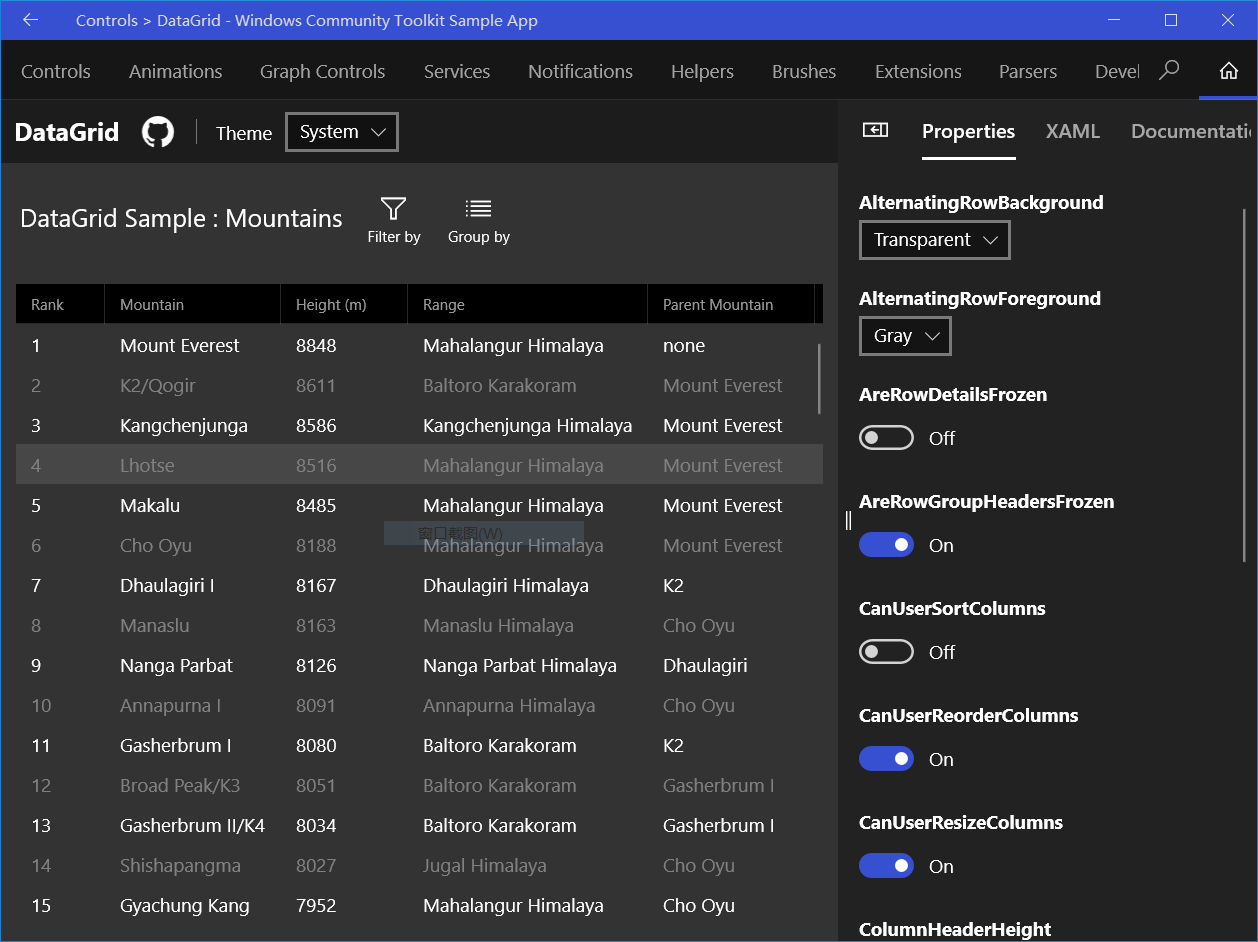
Windows Community Toolkit Doc - DataGrid
Windows Community Toolkit Source Code - DataGrid
Namespace: Microsoft.Toolkit.Uwp.UI.Controls; Nuget: Microsoft.Toolkit.Uwp.UI.Controls.DataGrid;
开发过程
代码结构分析
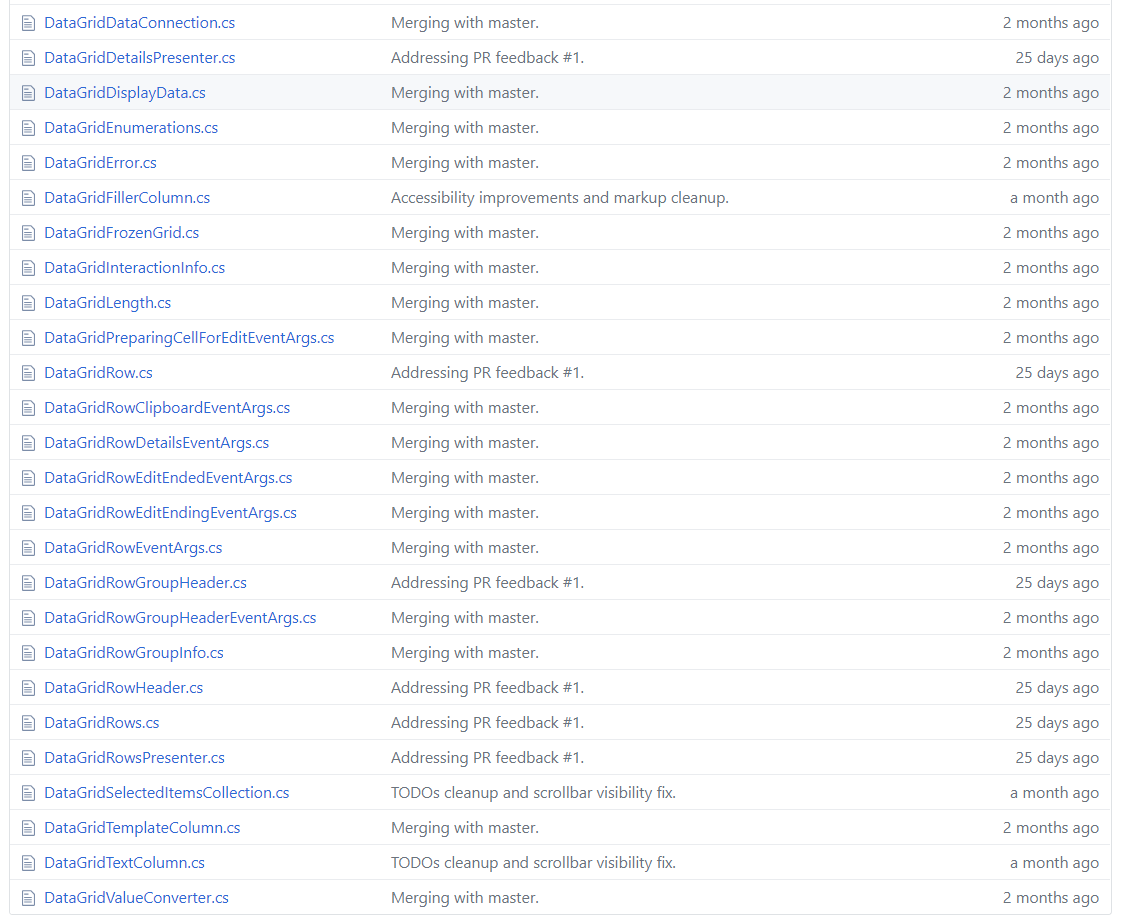
本篇我们先对 DataGrid 的整体代码结构做概览分析,后续会分几篇文章来分析每个重要的类和方法实现。来看一下 DataGrid 的代码结构:

可以看到,DataGrid 的代码结构上是一整个 Project,而在 Nuget 上也能体现。接下看一下几个文件夹的组成和其中重要的类:
1. CollectionViews
CollectionViews 是 DataGrid 的数据部分,可以看到 CollectionView 是基类,EnumerableCollectionView 和 ListCollectionView 继承自它,而这两个类分别代表枚举类的集合,以及列表类的集合。这两个类,都会在 DataGrid 获取数据源时被使用到。

2. Utilities
Utilities 是 DataGrid 控件的基础类和帮助类集合,可以看到涉及到绑定,数值相等(接近)判断,扩展功能,索引值映射,键盘帮助类,值范围,类型帮助类,UI 设置帮助类,校验类,可视状态类和内存管理监听类;后面我们会详细讲解每个类的重点实现部分。

3. DataGrid
DataGrid 控件的最重要实现在 DataGrid 文件夹中,一共有 50 多个类。我们可以先看一遍这里类的大致作用,后面会详细讲解每个类的代码实现:
- Automation - DataGrid UIA 实现
- DataGrid,DataGridColumn,DataGridRow,DataGridCell 控件类,控件头,基于这些类的实现类;
- DataGrid,DataGridColumn,DataGridRow,DataGridCell 相关事件处理类;
- DataGrid,DataGridColumn,DataGridRow,DataGridCell 相关数据类;

调用示例
我们来看一下 DataGrid 控件的调用方式,先看一下 XAML 的简单实现:
xmlns:controls="using:Microsoft.Toolkit.Uwp.UI.Controls"

<controls:DataGrid x:Name="dataGrid1"
    Height="600" Margin="12"
    AutoGenerateColumns="True"
    ItemsSource="{x:Bind MyViewModel.Customers}" />
接着看一下数据源的简单代码:
public class Customer
{
    public String FirstName { get; set; }
    public String LastName { get; set; }
    public String Address { get; set; }
    public Boolean IsNew { get; set; }

    public Customer(String firstName, String lastName,
        String address, Boolean isNew)
    {
        this.FirstName = firstName;
        this.LastName = lastName;
        this.Address = address;
        this.IsNew = isNew;
    }

    public static List<Customer> Customers()
    {
        ] {
            new Customer("A.", "Zero",
                "12 North Third Street, Apartment 45",
                false),
            new Customer("B.", "One",
                "34 West Fifth Street, Apartment 67",
                false),
            new Customer("C.", "Two",
                "56 East Seventh Street, Apartment 89",
                true),
            new Customer("D.", "Three",
                "78 South Ninth Street, Apartment 10",
                true)
        });
    }
}
看一下运行结果:

总结
到这里我们就把 Windows Community Toolkit 4.0 中的 DataGrid 概览和代码整体结构讲解完成了,希望能对大家更好的理解和使用这个功能有所帮助。后续会对该控件做系列的详细讲解。
最后,再跟大家安利一下 WindowsCommunityToolkit 的官方微博:https://weibo.com/u/6506046490, 大家可以通过微博关注最新动态。
衷心感谢 WindowsCommunityToolkit 的作者们杰出的工作,感谢每一位贡献者,Thank you so much, ALL WindowsCommunityToolkit AUTHORS !!!
Windows Community Toolkit 4.0 - DataGrid - Overview的更多相关文章
- Windows Community Toolkit 4.0 - DataGrid - Part01
概述 在上面一篇 Windows Community Toolkit 4.0 - DataGrid - Overview 中,我们对 DataGrid 控件做了一个概览的介绍,今天开始我们会做进一步的 ...
- Windows Community Toolkit 4.0 - DataGrid - Part03
概述 在上面一篇 Windows Community Toolkit 4.0 - DataGrid - Part02 中,我们针对 DataGrid 控件的 Utilities 部分做了详细分享.而在 ...
- Windows Community Toolkit 4.0 - DataGrid - Part02
概述 在上面一篇 Windows Community Toolkit 4.0 - DataGrid - Part01 中,我们针对 DataGrid 控件的 CollectionView 部分做了详细 ...
- Windows Community Toolkit 3.0 - UniformGrid
概述 UniformGrid 控件是一个响应式的布局控件,允许把 items 排列在一组均匀分布的行或列中,以填充整体的可用显示空间,形成均匀的多个网格.默认情况下,网格中的每个单元格大小相同. 这是 ...
- Windows Community Toolkit 3.0 - InfiniteCanvas
概述 InfiniteCanvas 是一个 Canvas 控件,它支持无限画布的滚动,支持 Ink,文本,格式文本,画布缩放操作,撤销重做操作,导入和导出数据. 这是一个非常实用的控件,在“来画视频” ...
- Windows Community Toolkit 3.0 - Gaze Interaction
概述 Gaze Input & Tracking - 也就是视觉输入和跟踪,是一种和鼠标/触摸屏输入非常不一样的交互方式,利用人类眼球的识别和眼球方向角度的跟踪,来判断人眼的目标和意图,从而非 ...
- Windows Community Toolkit 3.0 - CameraPreview
概述 Windows Community Toolkit 3.0 于 2018 年 6 月 2 日 Release,同时正式更名为 Windows Community Toolkit,原名为 UWP ...
- Windows Community Toolkit 3.0 新功能 在WinForms 和 WPF 使用 UWP 控件
本文告诉大家一个令人震惊的消息,Windows Community Toolkit 有一个大更新,现在的版本是 3.0 .最大的提升就是 WinForm 和 WPF 程序可以使用部分 UWP 控件. ...
- Windows Automation API 3.0 Overview
https://www.codemag.com/article/0810042 While general accessibility requirements (such as font color ...
随机推荐
- gitlab汉化
是上一片,我已经介绍了,如何安装gitlab 这篇文章讲解一下如何安装使用汉化gitlab 如需要查看如何安装gitlab,请访问:https://www.cnblogs.com/ws17345067 ...
- [转] Vue生命周期
Vue生命周期 这是Vue文档里关于实例生命周期的解释图 那么下面我们来进行测试一下 <section id="app-8"> {{data}} </sectio ...
- 测者的测试技术笔记:Screenplay 模式(Journey 模式)
Screenplay模式 Junit的Screenplay 举例 Actor theReceptionist =newActor().with(WebBrowsing.ability()) theRe ...
- (python)数据结构---集合
一.描述 set翻译为集合 set是可变的.无序的.不可重复的 set的元素要求可哈西(不可变的数据类型可哈西,可变的数据类型不可哈希) set是无序的,因此不可以索引,也不可以修改 线型结构的查询时 ...
- Scala链式编程内幕
package big.data.analyse.scala /** * 链式编程原理 * Created by zhen on 2018/12/16. */ class Computer{def c ...
- 非常全面的SQL Server巡检脚本来自sqlskills团队的Glenn Berry
非常全面的SQL Server巡检脚本来自sqlskills团队的Glenn Berry Glenn Berry 曾承诺对这个脚本持续更新 -- SQL Server 2012 Diagnostic ...
- nodejs 第一天
一.nodejs 安装 略过 二.IDE :webstorm(汉化) 三.nodejs 和 js 的区别 1.在ECMAScript 部分node和js 是一样的,比如数据类型的定义,语法结构,内置对 ...
- LeetCode算法题-Binary Watch(Java实现)
这是悦乐书的第216次更新,第229篇原创 01 看题和准备 今天介绍的是LeetCode算法题中Easy级别的第84题(顺位题号是401).二进制手表顶部有4个LED,代表小时(0-11),底部的6 ...
- layui 的 GitHub 及 Gitee (码云) 仓库
GitHub: https://github.com/sentsin/layui/ Gitee:https://gitee.com/sentsin/layui
- MacBook Pro维修过程
上个月买了2016款无touchbar的MacBook Pro,这款的键盘跟15年版本的很不一样. 在用了三周左右,就发现有个键按着不灵活了,像是进了水一样,黏住感觉,必须要大力按才会出来.思来想去, ...