
使用PHP连接数据库实现留言板功能
PHP实现留言板功能:
1 首先是登录页面:
<!DOCTYPE html>
<html>
<head>
<meta charset="UTF-8">
<title>留言板登录</title>
<script src="bootstrap/js/jquery-1.11.2.min.js"></script>
<script src="bootstrap/js/bootstrap.min.js"></script>
<link href="bootstrap/css/bootstrap.min.css" rel="stylesheet" type="text/css"/>
</head>
<style>
.header{
margin-left: 550px;
margin-top: 150px;
height: 300px;
max-width: 300px;
}
.xiugai{
max-width: 200px;
}
.login{
margin-top: 10px;
}
</style>
<body>
<form action="messloginchuli.php" method="post">
<div class="header">
<h2>开发部内部留言板</h2>
<div class="input-group xiugai">
<span class="input-group-addon" style="margin-top: 20px;">用户名:</span>
<input type="text" class="form-control" name="uid" placeholder="请输入用户名">
</div>
<div class="input-group xiugai" style="margin-top: 10px;">
<span class="input-group-addon">口令:</span>
<input type="text" class="form-control" name="pwd" placeholder="请输入口令">
</div>
<button type="submit" class="btn btn-success login">登录</button>
</div>
</form>
</body>
</html>
2 登录页面完成后要进入登录处理页面了,也就是上面提交到的messloginchuli.php
<?php
session_start(); // 登录之后要把所包含登录的页面连接起来,开启session
$uid = $_POST["uid"];
$pwd = $_POST["pwd"];
require_once "./DBDA.class.php";
$db = new DBDA();
$sql = "select password from yuangong where username='{$uid}'";
$arr = $db->query($sql,0);
//var_dump($arr[0][0]);
if($arr[0][0]=$pwd && !empty($pwd)){
$_SESSION["uid"]=$uid;
header("location:message.php");
}
?>
登录页面效果如图:
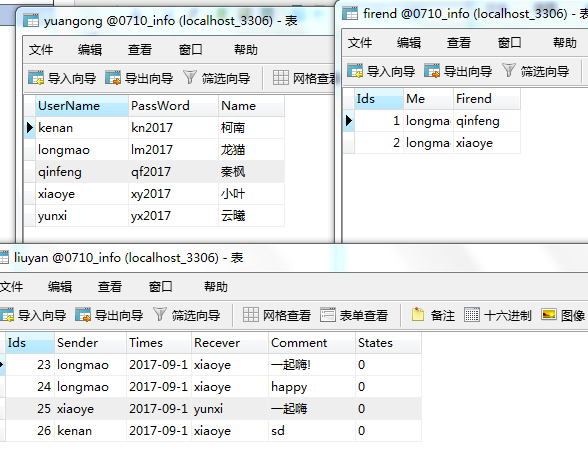
3.登录完成后是进入主页面,也就是显示自己收到的对话内容,下面是设计的数据库的表格和主页面的代码:
<!DOCTYPE html>
<html>
<head>
<meta charset="UTF-8">
<title></title>
<script src="bootstrap/js/jquery-1.11.2.min.js"></script>
<script src="bootstrap/js/bootstrap.min.js"></script>
<link href="bootstrap/css/bootstrap.min.css" rel="stylesheet" type="text/css"/>
</head>
<style>
.mess{
max-width: 800px;
margin-left: 250px;
margin-top: 150px;
}
</style>
<body>
<?php
session_start();
$uid = $_SESSION["uid"];
if(empty($_SESSION["uid"])){
header("location:messlogin.php");
exit;
}
?>
<div style="margin-left: 880px; margin-top: 50px;font-size: 20px;" >
<a href="publish_info.php" >发布信息</a>
<a href="tuichuchuli.php">退出系统</a>
</div>
<table class="table table-bordered mess" style="margin-top: -40px;">
<caption style="font-size: 20px;">
留言信息:
</caption>
<thead>
<tr>
<th>发送人</th>
<th>发送时间</th>
<th>接收人</th>
<th>信息内容</th>
</tr>
</thead>
<tbody>
<?php
require_once "./DBDA.class.php";
$db = new DBDA();
$sql = "select * from liuyan where recever='{$uid}' or recever='all'";
$arr = $db->query($sql,0);
foreach($arr as $v){
echo "<tr>
<td>{$v[1]}</td>
<td>{$v[2]}</td>
<td>{$v[3]}</td>
<td>{$v[4]}</td>
</tr>";
}
?>
</tbody>
</table>
</body>
</html>
退出登录系统实现用户注销,返回登录页面功能代码如下:
<?php
session_start();
$uid = $_SESSION["uid"];
unset($uid);
header("location:messlogin.php");
?>
代码写到这里,比较重要的部分就完成了,下面是要进入发布信息页面了,相当于之前写的添加的页面,其处理页面也是和之前没什么区别的,差别在于现在的处理页面是在用户登录的情况下操作的,需要用session把所有的登录情况下的页面连接起来
主页面效果如图:

4.最后是信息发布页面,可以给任何人发送信息
代码如下:
<!DOCTYPE html>
<html>
<head>
<meta charset="UTF-8">
<title>发布信息界面</title>
<script src="bootstrap/js/jquery-1.11.2.min.js"></script>
<script src="bootstrap/js/bootstrap.min.js"></script>
<link href="bootstrap/css/bootstrap.min.css" rel="stylesheet" type="text/css"/>
</head>
<style>
.mess{
max-width: 200px;
margin-top: 10px;
}
.mess1{
margin-top: 10px;
}
.opt{
max-width: 200px;
margin-left: 80px;
}
.txt{
max-width: 200px;
}
</style>
<body>
<?php
session_start();
$uid = $_SESSION["uid"];
if (empty($_SESSION["uid"])) {
header("location:messlogin.php");
exit ;
}
?>
<div style="margin-left: 500px; margin-top: 150px;">
<div style="margin-left: 60px; margin-bottom: 20px;font-size: 20px;" >
<a href="message.php" >查看信息</a>
<a href="seemess.php" style="margin-left: 80px;" >查看发送信息</a>
</div>
<form class="form-horizontal" role="form" action="infochuli.php" method="post">
<div class="form-group">
<label for="firstname" class="col-sm-2 control-label mess1">接收人:</label>
<div class="form-group ">
<select class="form-control opt" name="recever">
<option value="all">所有人</option>
<?php
require_once "./DBDA.class.php";
$db = new DBDA();
//这里可以给特定的朋友发送信息的sql语句
//$sql = "select firend.firend,yuangong.name from firend,yuangong where firend.firend
//= yuangong.username and firend.me = '{$uid}'";
$sname = "select * from yuangong where username not in ('{$uid}')";
$arr = $db->query($sname,0);
//var_dump($arr[0][2]);
foreach($arr as $v){
echo "<option value='{$v[0]}'>{$v[2]}</option>";
}
?>
</select>
</div>
</div>
<div class="form-group">
<label for="lastname" class="col-sm-2 control-label mess1">信息内容:</label>
<div class="col-sm-10">
<textarea class="form-control txt" rows="3" name="content"></textarea>
</div>
</div>
<div class="form-group">
<div class="col-sm-offset-2 col-sm-10">
<button type="submit" class="btn btn-default">
发送
</button>
</div>
</div>
</form>
</div>
</body>
</html>
发信息页面如图: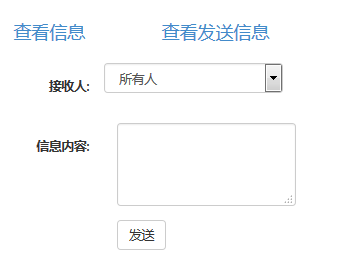
5.发布信息完成后要进入处理页面了,也就是提交到的infochuli.php,最后返回发送信息界面
<?php
session_start();
$uid = $_SESSION["uid"];
$recever = $_POST["recever"];
$content = $_POST["content"];
$arr = $_POST["recever"];
$t = date("Y-m-d H:i:s");
require_once "./DBDA.class.php";
$db = new DBDA();
$sql = "insert into liuyan values('','{$uid}','{$t}','{$recever}','{$content}',0)";
$arr = $db->query($sql);
if($arr && !empty($arr)){
header("location:publish_info.php");
}else{
echo "发送失败!";
}
?>
使用PHP连接数据库实现留言板功能的更多相关文章
- jsp中运用application实现共享留言板功能
jsp中application的知识点总结: 1.一个Web应用程序启动后,将会自动创建一个application对象,在整个应用程序的运行过程中只有这一个application对象,即所有访问该网站 ...
- Web开发从零单排之二:在自制电子请帖中添加留言板功能,SAE+PHP+MySql
在上一篇博客中介绍怎样在SAE平台搭建一个html5的电子请帖网站,收到很多反馈,也有很多人送上婚礼的祝福,十分感谢! web开发从零学起,记录自己学习过程,各种前端大神们可以绕道不要围观啦 大婚将至 ...
- 利用反馈字段给帝国cms添加留言板功能(图文教程)
帝国cms的插件中提供信息反馈字段,很多人却不会用.这里谢寒教大家如何来给自己的帝国cms网站添加留言板功能 1.找到添加地址 2.添加字段 3.你可以在字段中添加多种字段类型(有文本域,单行文本框, ...
- php实现留言板功能
这个小小的留言板功能适合班级内或者公司内部之间的讨论,对话和留言,非常的方便,更重要的是无需网络,对于公司管理层来说是非常乐于常见的, 下面是这个留言板的写法: 1 首先是登录页面: <form ...
- JS原生编写实现留言板功能
实现这个留言板功能比较简单,所以先上效果图: 实现用户留言内容,留言具体时间. <script> window.onload = function(){ var oMessageBox = ...
- 原生JS实现简单留言板功能
原生JS实现简单留言板功能,实现技术:css flex,原生JS. 因为主要是为了练手js,所以其中布局上的一些细节并未做处理. <!DOCTYPE html> <html lang ...
- 用php(session)实现留言板功能----2017-05-09
要实现留言功能,发送者和接受者必不可少,其次就是留言时间留言内容. 要实现的功能: 1.登录者只能查看自己和所有人的信息,并能够给好友留言 2.留言板页面,好友采取下拉列表,当留言信息为空时,显示提示 ...
- Vue之简易的留言板功能
今天我将带大家通过Vue的todolist案例来完成一个简易的网页留言板! LES'T GO! 首先我们需要在页面上搭建一个input文本输入框,并设置提交按钮,通过循环指令来完成输入框的信息提交! ...
- Django web框架开发基础-django实现留言板功能
1.创建项目 cmd django-admin startpoject cloudms 2.创建APP cmd django-admin startapp msgapp 3.修改settings,T ...
随机推荐
- iptables防火墙详解(三)
linux 高级路由 策略路由(mangle表) lartc(linux advanced routing and traffic control) http://www.lartc.org # rp ...
- Gym - 100989E
Islam is usually in a hurry. He often types his passwords incorrectly. He hates retyping his passwor ...
- SSH出现Connection refused错误
笔者在使用ssh localhost时出现Connection refused提示,初步判断是22端口未开启服务,也有可能是防火墙未正确配置. 测试 使用netstat | grep 22测试,发现2 ...
- LOJ#3023 老C的键盘
给定树,每条边有个大于号或者小于号,表示两个节点编号的大小关系.问有多少种树满足条件.n <= 100 解:树形DP. 设fij表示以i为根的子树中i是第j小的.转移的时候要乘上两个组合数. # ...
- css之文本两端对齐
在进行网页设计时,我们经常会看到这样的样式:文本两端对齐. css为我们提供了一个属性可以实现这样的效果:text-align: justify.不过这个只能用来设置多行文本(除最后一行).如果只有单 ...
- memset()函数及其作用(转)
1. memset()函数原型是extern void *memset(void *buffer, int c, int count) buffer:为指针或是数组, c:是赋给buffer的值, c ...
- Codeforces Round #523 (Div. 2) B Views Matter
传送门 https://www.cnblogs.com/violet-acmer/p/10005351.html 这是一道贪心题么???? 题意: 某展览馆展览一个物品,此物品有n堆,第 i 堆有a[ ...
- windows远程桌面无法粘贴复制的问题解决方法
这两天遇到一个困扰我很久的问题,每次通过winodws远程桌面,本地的数据无法通过复制粘贴到远程服务器上.现把我找到的解决方案记录下来分享给大家 一般出现问题可能性比较大的原因就是rdpclip.ex ...
- Lucas定理学习笔记(没有ex_lucas)
题目链接\(Click\) \(Here\) \(ex\_lucas\)实在是不能学的东西...简单学了一下\(Lucas\)然后打算就这样鸽着了\(QwQ\)(奶一口不可能考) 没什么复杂的,证明的 ...
- Microsoft Windows CVE-2017-8464 LNK 远程代码执行漏洞(复现)
2017年6月13日,微软官方发布编号为CVE-2017-8464的漏洞公告,官方介绍Windows系统在解析快捷方式时存在远程执行任意代码的高危漏洞,黑客可以通过U盘.网络共享等途径触发漏洞,完全控 ...