
PhoenixFD插件流体模拟——UI布局【Foam】详解
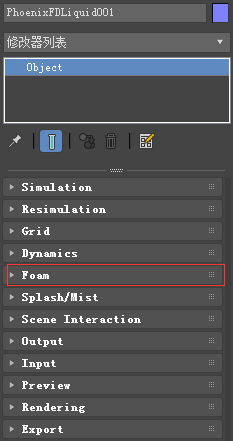
- Overview 综述
- Parameters 参数
综述
The foam simulation follows several simple rules: underwater bubbles rise up, bubbles in the air fall down, bubbles can stick to each other and can be resistant to external pressure.
泡沫模拟遵循几个简单的规则:水下泡沫上升,空气中的泡沫下降,泡沫可以相互粘在一起,可以抵抗外部压力。
The foam may be born from the liquid, splash droplets, a Source, or a script.泡沫可能是由液体、飞溅的液滴、源或脚本生成的。
The foam disappears when it exits the grid (see the Max Outside Age parameter), or randomly (see the Half Life parameter). 退出网格时泡沫消失(见最大外部年龄参数),或随机(见半衰期参数)。
You can see the FLIP Particles Life Cycle for more information on how Foam particles are created or destroyed.您可以查看FLIP粒子的生命周期,了解更多关于泡沫粒子是如何创建或销毁的信息。
UI Path: ||Select Liquid Simulator | LiquidSim object|| > Modify panel > Foam rollout
参数

Enable | foam – Enables the birth and simulation of Foam particles. 启用泡沫
产生
Foam Amount | fbirth – Specifies the number of particles to be born when a given cell meets the birth condition, in thousands per second.指定给定细胞满足出生条件时要出生的粒子数,单位为每秒数千个。
This parameter does not affect the foam born by splashes.此参数不影响飞溅产生的泡沫。
Birth Threshold | fbthres – Foam birth occurs when a liquid experiences turbulent movement.当液体经历湍流运动时就会产生泡沫。值越大越不容易产生泡沫。
This parameter specifies the velocity threshold above which the liquid is considered turbulent enough for foam birth.这个参数指定了速度阈值,超过这个阈值,液体就被认为是足够湍流的泡沫诞生。
This is measured as the difference in velocity at a distance of 1. 这是用距离为1时的速度差来测量的。
For more information, see the Birth Threshold example below.
Birth Volume | usefbconfgeom, fbconfgeom – When enabled, allows the foam to be born naturally by the simulation only inside a specified geometry object.当启用时,只允许泡沫在指定的几何对象内通过模拟自然生成。
This includes foam born according to the conditions set by the Foam Amount and Birth Threshold parameters of the Foam, as well as the Foam on Hit parameters of the Splash.
这包括根据泡沫数量和泡沫的出生阈值参数所设定的条件所产生的泡沫,以及泡沫对飞溅命中参数的影响。
The foam born inside the Birth Volume can travel outside the volume without a problem.在出生体积内产生的泡沫可以毫无问题地在体积外移动。
The difference between this approach and spawning foam inside a volume manually from a Source object is that using a Birth Volume, the foam birth will follow the simulation criteria of the simulation and will look and behave more naturally.这种方法与从源对象手动在卷中生成泡沫的区别在于,使用此方法,泡沫生成将遵循模拟的模拟标准,并且看起来和行为都更加自然。
! By default, the birth volume geometry is not automatically converted to a non-solid and it will behave as a rigid body in your simulation.默认情况下,出生体几何形状不会自动转换为非实体,在模拟中它将表现为刚体。
In this case, the Volume Fadeout can be used to expand an area around the object where Foam/Splash births are possible.在这种情况下,可以使用体淡出来扩展对象周围可能出现泡沫/飞溅的区域。
You can convert the geometry to a non-solid from its PhoenixFD properties.您可以将几何图形从PhoenixFD属性转换为非实体。
Volume Fade Dist | fbconfgeomfade – Controls how far the foam particles will spawn around the specified Birth Volume geometry object.控制泡沫颗粒围绕指定的出生体几何对象产生的距离。
寿命

! The particle Age channel must be exported in order for these options to take effect (from the Source or from the Output panel, depending on the way the foam is generated).
为了使这些选项生效,必须导出颗粒年龄通道(从源或从输出面板,取决于泡沫的生成方式)。
Half Life | fhlf – The time span when a given bubble will burst with a probability of 50%, in seconds.给定泡沫破裂的概率为50%的时间跨度,以秒为单位。
Affects only the foam bubbles above the liquid surface - those inside the volume will not burst until they reach the surface.只对表面泡沫起作用。
You can force this process by increasing the Rising Speed.
Vary | hlvary – In nature, not all the bubbles have the same half life.在自然界中,并不是所有的泡泡都有相同的半衰期。
Bigger bubbles burst quicker than smaller ones, and bubbles inside foam live longer.大泡泡比小泡泡破裂得更快,泡沫内的泡泡寿命更长。
When this option is enabled, the Half Life of each bubble is modified taking into account its size and its surroundings.启用此选项后,每个气泡的半衰期将根据其大小和周围环境进行修改。
Max Outside Age | foutlife – If a particle exits the grid, and its age (in seconds) exceeds this parameter, the particle will be killed instantly.如果一个粒子离开网格,并且它的年龄(以秒为单位)超过这个参数,这个粒子将立即被杀死。
尺寸

Size | fsize – Specifies the size of the bubbles.指定泡沫尺寸。
! Larger bubbles rise faster while they are underwater, while smaller ones rise more slowly.在水底,大泡沫上升的快。
Variation Small | fshrink – Specifies how much smaller the bubbles can be, relative to the Size parameter. 指定相对于Size参数,气泡可以小多少。
0 means that all bubbles are always at least as big as Size. 1 means that the smallest bubbles are two times smaller than Size. 10 means that the smallest bubbles are 11 times smaller than Size. For more information, see the Variation Small examplebelow.
Variation Large | fsizevar – Specifies how much larger the bubbles can be, relative to the Size parameter.
0 means that all bubbles are never larger than Size. 1 means that the largest bubbles are two times larger than Size. 10 means that the largest bubbles are 11 times larger than Size. You can also use the Distribution parameter to control the balance between the number of small and large bubbles.
Distribution | fszdstrb – Specifies how many times the amount of average bubbles exceeds the amount of the biggest bubbles. 指定平均气泡数量超过最大气泡数量的多少倍。
0 means that all sizes will be equally distributed. 100 means that there will be 100 times more bubbles with the average size than the biggest ones. For more information, see the Distribution example below.
动力学

B2B Interaction | fcycles – Controls the internal interaction between bubbles (bubble-to-bubble interaction).控制气泡之间的内部相互作用(气泡与气泡之间的相互作用)。
This option is used when the foam should have a volume. It forces a proper distance between the bubbles and keeps them stuck together. This parameter controls the number of interactions per second. Higher values result in better preservation of the foam's volume. This parameter has linear growth order. In other words, the time taken for calculation is longer when the value is higher. For more information, see the B2B Interaction below.
Rising Speed | frise – Affects only the foam particles which are inside the liquid volume.水中气泡上升速度。
This is the maximal speed of ascent of the average-sized bubbles. Bubbles larger than Size rise faster and smaller bubbles rise more slowly. Note that bubbles inside the liquid volume are carried by the velocity of the liquid, and also affected by this parameter. For more information, see the Rising Speed examplebelow.
Falling Speed | ffall – Affects only the foam particles which are outside of the liquid volume. 气泡下落速度。
This parameter controls the drag force of foam flying through the air. Lowering this parameter towards zero would cause foam to rapidly slow down when flying in the air, or hang in the air for a long time until it falls down. Note that this parameter affects only foam which is outside the liquid volume, while foam inside of the liquid mesh or which is mixed up with flying Liquid particles would have the same velocity as the liquid. In the second case, if the Falling Speed is too low, the foam might abruptly slow down at the moment it separates from the liquid that carries it. as For more information, see the Falling Speed examplebelow.
!The Falling Speed parameter affects how far a flying foam particle may travel.下降速度参数会影响飞行的泡沫颗粒的飞行距离。
A higher Falling Speed may lead to separate bubbles thrown far away from the simulator which leads to huge bounding box and thus slower rendering. 较高的下降速度可能会导致分离的气泡抛出远离模拟器,这将导致巨大的边界框,从而降低渲染速度。
Therefore, this parameter can dramatically affect the rendering speed.
Sticky Foam | fsticky – Controls the ability of the bubbles to stick to a geometry.控制气泡粘附在几何体上的能力。
This option requires that the B2B interaction is greater than zero.此参数要求B2B的值大于0。
Surface Lock | fsrflock – Affects the bubbles placed on the liquid surface.影响放置在液体表面的气泡。
It controls the influence of the liquid movement over the surface bubbles.它控制液体表面运动对气泡的影响。
In most cases, this parameter is used together with the patterns generator.在大多数情况下,此参数与模式生成器一起使用。
It can dramatically change the result.它可以极大地改变模拟结果。
样式

Strength | fptrn – Controls the simulation of the foam patterns caused by the fine vertical liquid movement. 控制模拟泡沫形态引起的精细垂直液体运动。
For more information, see the Strength example below.
Radius | fptrnsz – The average radius in scene units of a single circular pattern core.单个圆形图案核的场景单位的平均半径。
PhoenixFD插件流体模拟——UI布局【Foam】详解的更多相关文章
- PhoenixFD插件流体模拟——UI布局【Simulation】详解
前言 之前使用RealFlow做流体模拟,但是总得和3ds导来导去,略显麻烦,特意学习PhoenixFD插件,直接在3ds中进行流体模拟.若读者有更好的流体模拟方法,欢迎在评论区交流. 原文地址:ht ...
- PhoenixFD插件流体模拟——UI布局【Output】详解
Liquid Output 流体输出 本文主要讲解Output折叠栏中的内容.原文地址:https://docs.chaosgroup.com/display/PHX3MAX/Liquid+Outp ...
- PhoenixFD插件流体模拟——UI布局【Rendering】详解
Liquid Rendering 流体渲染 本文主要讲解Rendering折叠栏中的内容.原文地址:https://docs.chaosgroup.com/display/PHX3MAX/Liqui ...
- PhoenixFD插件流体模拟——UI布局【Splash | Mist】详解
液体飞溅 | 水雾 本文主要讲解Splash | Mist折叠栏中的内容.原文地址:https://docs.chaosgroup.com/display/PHX3MAX/Liquid+Splash+ ...
- PhoenixFD插件流体模拟——UI布局【Export】详解
Liquid Export 流体导出 本文主要讲解Export折叠栏中的内容.原文地址:https://docs.chaosgroup.com/display/PHX3MAX/Liquid+Expor ...
- PhoenixFD插件流体模拟——UI布局【Input】详解
Liquid Input 流体输入 本文主要讲解Input折叠栏中的内容.原文地址:https://docs.chaosgroup.com/display/PHX3MAX/Liquid+Input 主 ...
- PhoenixFD插件流体模拟——UI布局【Dynamics】详解
流体动力学 本文主要讲解Dynamics折叠栏中的内容.原文地址:https://docs.chaosgroup.com/display/PHX3MAX/Liquid+Dynamics 主要内容 Ov ...
- PhoenixFD插件流体模拟——UI布局【Resimulation】详解
Liquid Resimulation 流体再(重)渲染 本文主要讲解Resimulation折叠栏中的内容 主要内容 Overview 综述 Parameters 参数 综述 Liquid Resi ...
- PhoenixFD插件流体模拟——UI布局【Preview】详解
Liquid Preview 流体预览 本文主要讲解Preview折叠栏中的内容.原文地址:https://docs.chaosgroup.com/display/PHX3MAX/Liquid+Pr ...
随机推荐
- JS语法基础
js声明 <!--在head标签中使用script标签进行js代码域声明--> <script type="text/javascript" language=& ...
- 【kubenetus】kubenetus运维
重启K8S服务 systemctl stop kubelet systemctl stop kube-apiserver systemctl stop kube-proxy systemctl sto ...
- 7.2.5 多层嵌套的if语句
7.2.5 多层嵌套的if语句 在编写程序的代码之前要先规划好.首先,要总体设计一下程序. 为方便起见,程序应该使用一个连续的循环让用户能连续输入待测试的 数.这样,测试一个新的数字不必每次都要重新运 ...
- Ubuntu16.04 apt源更新
更新源 安装好系统后,先更新源,方便后面能比较快地下载各种软件包. 备份/etc/apt/sources.list,然后将内容全部替代为: # deb cdrom:[Ubuntu 16.04 LTS ...
- AX2012 ERP “系统慢”调优---跟踪SQL执行,优化代码
对于用户来说,系统是:慢的,难用的.你看xxx,多好用,多快,多人性化. 对于AX ERP系统也不例外,调优是必须的,调优一般分为几种: 系统性监测针对瓶劲环节提升,如:用户--应用服务器--DB-- ...
- Ehcart整合百度地图
最近上班有些时间,学习了一下Ehcart的知识,自己制作了一份Ehcart整合百度地图的示例代码. GItHub地址:https://github.com/TianYanFd/tianjin-powe ...
- Specify 的含义 ------ 转载
specify block用来描述从源点(source:input/inout port)到终点(destination:output/inout port)的路径延时(path delay),由sp ...
- 关于RandomAccessFile一个坑!!!!
最近正好遇到了使用RandomAccessFile做断点下载的情况,被一个问题坑了好多次 本来的代码: RandomAccessFile randomAccessFile = new RandomAc ...
- Linux下Oracle开机启动
参考:http://blog.csdn.net/huangyanlong/article/details/36942155 一.保证dbstart能用:vi $ORACLE_HOME/bin/dbst ...
- Open CDN 2.0管控端和节点端安装
原文:http://www.safecdn.cn/cdn/2018/12/opencdn-2-0/1076.html OpenCDN是一套快速部署CDN加速的工具,针对专门提供CDN加速服务的企业或对 ...