
Elasticsearch索引操作
一、索引初始化操作
插件推荐使用head、marvel (收费)
1.1 创建新索引
curl -XPUT 'http://localhost:9200/test' -d '

{

    "settings":{

        "index":{

            "number_of_shards": 5,

            "number_of_replicas": 1

        }

    }

}
'
返回如下内容即为成功:
{

    "acknowledged": true,

    "shards_acknowledged": true,

    "index": "test"

}
number_of_replicas可以替换为:
blocks.read_only : 设为true, 则当前索引只允许读,不允许写或更新;
blocks.read : 设为true , 则禁止读操作;
blocks.write : 设为true , 则禁止写操作;
blocks.metadata : 设为true , 则禁止对metadata操作。
1.2 查询索引的设置信息
curl -XGET 'http://localhost:9200/test/_settings?pretty'
curl -XGET 'http://localhost:9200/test,test2/_settings?pretty'
curl -XGET 'http://localhost:9200/_all/_settings?pretty'
1.3 创建文档
curl -XPUT 'http://localhost:9200/test/book/1' -d '

{

    "title": "ZQW Book",

    "name": {

        "first": "Z",

        "last": "QW"

     },

    "publish_date": "2017-11-20",

    "price": "39.99"

}

'
不设置文档ID
curl -XPOST 'http://localhost:9200/test/book/' -d '

{

    "title": "No ID",

    "name": {

        "first": "Z",

        "last": "QW"

     },

    "publish_date": "2017-11-20",

    "price": "39.99"

}

'
1.4 获取文档
curl -XGET 'http://localhost:9200/test/book/1'
1.5 通过 _source 获取指定字段
curl -XGET localhost:9200/test/book/1?_source=title

curl -XGET localhost:9200/test/book/1?_source=title,price

curl -XGET localhost:9200/test/book/1?_source
1.6 更新文档
curl -XPOST 'http://localhost:9200/test/book/1/_update' -d '

{

  "doc" : {

        "price" : "free"

    }

}

'
1.7 删除文档
curl -XDELETE 'http://localhost:9200/test/book/1'

curl -XDELETE 'http://localhost:9200/test/book'

curl -XDELETE 'http://localhost:9200/test'
1.8 _mget 批量获取
curl -XPOST 'http://localhost:9200/_mget' -d '

#### docs 属组 ####
{

  "docs": [

    {

      "_index": "library",

      "_type": "book",

      "_id": 2

    },

    {

      "_index": "library",

      "_type": "book",

      "_id": 3,
#####只获取指定数据#####
    "_source" : "price"

    },

    {

      "_index": "shop",

      "_type": "apple",

      "_id": 1

    }

  ]

}

'
相同index,type下通过不同ID批量寻找文档
curl -XPOST 'http://localhost:9200/library/book/_mget' -d '

{

    "docs" : [

           {  "_id" : 1  },

           {  "_type" : "book", "_id" : 2  }

    ]

}

#####或者如下#####

{

  "ids": [    0,    1,    2,    3,    4  ]

}
'
1.9 bulk 批量操作
实现多个文档的 create、index、update 或 delete 操作
请求体格式(不能如同常规JSON格式一般美化展示):
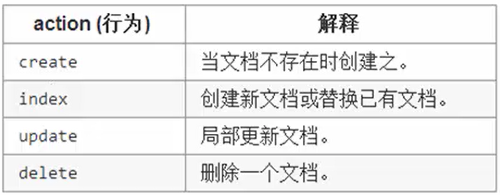
{action:{metadata}}\n
{request body}\n
ex: { "delete" : { "_index" : "test","_type" : "type","_id" : "1" } }
curl -XPOST 'http://localhost:9200/test/type/_bulk' -d '

{ "index": {"_id": 0}}

{ "title" : "test00","exist": "true"}

{ "index": {"_id": 1}}

{ "title" : "test01","exist": "true"}

{ "index": {"_id": 2}}

{ "title" : "test02","exist": "true"}

{ "index": {"_id": 3}}

{ "title" : "test03","exist": "true"}

{ "index": {"_id": 4}}

{ "title" : "test04","exist": "true"}

'
批量操作:
curl -XPOST 'http://localhost:9200/test/type/_bulk?pretty' -d '

{"delete": {"_index": "test","_type": "type","_id" : ""}}

{"create": {"_index": "meta","_type":"mtype","_id":""}}

{"title":"meta_type01","exist":"true"}

{"index":{"_index": "meta","_type":"mtype"}}

{"title":"meta_type02","exist":"true"}

{"update":{"_index":"test","_type":"type","_id":""}}

{"doc":{"exist":"false"}}

'
bulk处理文档大小的最佳值:
- 数据加载在每个节点的RAM里
- 请求的数据超过一定的大小,那bulk的 处理性能就回降低
- 文档数据大小跟数据配置,文档复杂度,以及当前集群的负载有关
2.0 版本控制
- 悲观锁:假定会发生并发冲突,屏蔽一切可能违反数据完整性的操作。(安全)
- 乐观锁:假定不会发生并发冲突,只在提交操作时检查是否违反数据的完整性。
Elasticsearch 内置使用的是乐观锁:
- 内部版本控制:每次修改后,_version自增长
- 外部版本控制:手动修改_version
curl -XPUT 'http://localhost:9200/test/type/3?version=5&version_type=external' -d '

{

"title":""

}

'
Elasticsearch索引操作的更多相关文章
- Elasticsearch 索引操作
一.创建 语法: PUT /索引库名称 { "settings": { "number_of_shards": 分片数量, "number_of_re ...
- ElasticSearch Index操作源码分析
ElasticSearch Index操作源码分析 本文记录ElasticSearch创建索引执行源码流程.从执行流程角度看一下创建索引会涉及到哪些服务(比如AllocationService.Mas ...
- ElasticSearch+Kibana 索引操作( 附源码)
一 前言 ElasticiSearch 简介 ElasticSearch是一个基于Lucene的搜索服务器.它提供了一个分布式多用户能力的全文搜索引擎,基于RESTful web接口.Elastics ...
- ElasticSearch+Kibana 索引操作
ElasticSearch+Kibana 索引操作 一 前言 ElasticiSearch 简介 ElasticSearch是一个基于Lucene的搜索服务器.它提供了一个分布式多用户能力的全文搜索引 ...
- Elasticsearch索引和文档操作
列出所有索引 现在来看看我们的索引 GET /_cat/indices?v 响应 health status index uuid pri rep docs.count docs.deleted st ...
- elasticsearch的索引操作和文档操作总结
参考文档:https://es.xiaoleilu.com/010_Intro/00_README.html 一.索引操作 1.查看当前节点的所有的index 查看当前节点的所有的index [roo ...
- ElasticSearch 基本概念 and 索引操作 and 文档操作 and 批量操作 and 结构化查询 and 过滤查询
基本概念 索引: 类似于MySQL的表.索引的结构为全文搜索作准备,不存储原始的数据. 索引可以做分布式.每一个索引有一个或者多个分片 shard.每一个分片可以有多个副本 replica. 文档: ...
- Elasticsearch索引(company)_Centos下CURL增删改
目录 返回目录:http://www.cnblogs.com/hanyinglong/p/5464604.html 1.Elasticsearch索引说明 a. 通过上面几篇博客已经将Elastics ...
- Elasticsearch-PHP 索引操作(转)
索引操作 本节通过客户端来介绍一下索引API的各种操作.索引操作包含任何管理索引本身(例如,创建索引,删除索引,更改映射等等). 我们通过一些常见的操作的代码片段来介绍,然后在表格中列出剩下的方法.R ...
随机推荐
- main.js中的Vue.config.productionTip = false
开发模式:npm run dev是前端自己开发用的生产模式:npm run build 打包之后给后端放在服务端上用的Vue.config.productionTip = false1上面这行代码的意 ...
- MariaDB知识点总结03--从主+多主集群
一.从主架构 1.从主复制原理 从库生成两个线程,一个I/O线程,一个SQL线程: i/o线程去请求主库 的binlog,并将得到的binlog日志写到relay log(中继日志) 文件中:主库会生 ...
- smoothscroll
smoothscroll是一款jQuery插件,可以平滑地滚动到指定的地方. 可以解决chrome锚点失效的问题. 官方网站 http://iamdustan.com/smoothscroll/ gi ...
- AspxGridView 弹框选择器 JS
function Dictionary() { this.data = new Array(); this.put = function (key, value) { this.data[key] = ...
- php 解决跨域问题
header('Access-Control-Allow-Origin:*');header('Access-Control-Allow-Methods:POST,GET,OPTIONS');head ...
- Oracle-DQL 6- 子查询
子查询: --查询emp表中工资高于allen的员工信息SELECT sal FROM empWHERE ename = 'ALLEN'; SELECT * FROM empWHERE sal > ...
- Java实现二叉树地遍历、求深度和叶子结点的个数
一.分析 二叉树是n个结点所构成的集合,它或为空树,或为非空树.对于非空树,它有且仅有一个根结点,且除根结点以外的其余结点分为两个互不相交的子集,分别称为左子树和右子树,它们本身又都是二叉树. 显而易 ...
- mount.nfs: access denied by server while mounting
在利用centos7系统搭建NFS服务时出现如下问题,百度后才解决 因为当时在服务器端vim /etc/exports 时, 我只写了 这一行 /home/wjs-nfs *(ro) (没想到偷懒出 ...
- T100——接口代码记录,jsonArray和json
{<section id="cs_t1client.description" >} #應用 a00 樣板自動產生(Version:) #+ Version..: T10 ...
- 史上最全的MySQL高性能优化实战总结!
1.1 前言 MySQL对于很多Linux从业者而言,是一个非常棘手的问题,多数情况都是因为对数据库出现问题的情况和处理思路不清晰.在进行MySQL的优化之前必须要了解的就是MySQL的查询过程,很多 ...