
Seaborn线性关系数据可视化
regplot()
绘制两个变量的线性拟合图。
sns.regplot(

    x,

    y,

    data=None,

    x_estimator=None,

    x_bins=None,

    x_ci='ci',

    scatter=True,

    fit_reg=True,

    ci=95,

    n_boot=1000,

    units=None,

    order=1,

    logistic=False,

    lowess=False,

    robust=False,

    logx=False,

    x_partial=None,

    y_partial=None,

    truncate=False,

    dropna=True,

    x_jitter=None,

    y_jitter=None,

    label=None,

    color=None,

    marker='o',

    scatter_kws=None,

    line_kws=None,

    ax=None,

)

Docstring:

Plot data and a linear regression model fit.

There are a number of mutually exclusive options for estimating the

regression model. See the :ref:`tutorial <regression_tutorial>` for more

information.

Parameters

----------

x, y: string, series, or vector array

    Input variables. If strings, these should correspond with column names

    in ``data``. When pandas objects are used, axes will be labeled with

    the series name.

data : DataFrame

    Tidy ("long-form") dataframe where each column is a variable and each

    row is an observation.

x_estimator : callable that maps vector -> scalar, optional

    Apply this function to each unique value of ``x`` and plot the

    resulting estimate. This is useful when ``x`` is a discrete variable.

    If ``x_ci`` is given, this estimate will be bootstrapped and a

    confidence interval will be drawn.

x_bins : int or vector, optional

    Bin the ``x`` variable into discrete bins and then estimate the central

    tendency and a confidence interval. This binning only influences how

    the scatterplot is drawn; the regression is still fit to the original

    data.  This parameter is interpreted either as the number of

    evenly-sized (not necessary spaced) bins or the positions of the bin

    centers. When this parameter is used, it implies that the default of

    ``x_estimator`` is ``numpy.mean``.

x_ci : "ci", "sd", int in [0, 100] or None, optional

    Size of the confidence interval used when plotting a central tendency

    for discrete values of ``x``. If ``"ci"``, defer to the value of the

    ``ci`` parameter. If ``"sd"``, skip bootstrapping and show the

    standard deviation of the observations in each bin.

scatter : bool, optional

    If ``True``, draw a scatterplot with the underlying observations (or

    the ``x_estimator`` values).

fit_reg : bool, optional

    If ``True``, estimate and plot a regression model relating the ``x``

    and ``y`` variables.

ci : int in [0, 100] or None, optional

    Size of the confidence interval for the regression estimate. This will

    be drawn using translucent bands around the regression line. The

    confidence interval is estimated using a bootstrap; for large

    datasets, it may be advisable to avoid that computation by setting

    this parameter to None.

n_boot : int, optional

    Number of bootstrap resamples used to estimate the ``ci``. The default

    value attempts to balance time and stability; you may want to increase

    this value for "final" versions of plots.

units : variable name in ``data``, optional

    If the ``x`` and ``y`` observations are nested within sampling units,

    those can be specified here. This will be taken into account when

    computing the confidence intervals by performing a multilevel bootstrap

    that resamples both units and observations (within unit). This does not

    otherwise influence how the regression is estimated or drawn.

order : int, optional

    If ``order`` is greater than 1, use ``numpy.polyfit`` to estimate a

    polynomial regression.

logistic : bool, optional

    If ``True``, assume that ``y`` is a binary variable and use

    ``statsmodels`` to estimate a logistic regression model. Note that this

    is substantially more computationally intensive than linear regression,

    so you may wish to decrease the number of bootstrap resamples

    (``n_boot``) or set ``ci`` to None.

lowess : bool, optional

    If ``True``, use ``statsmodels`` to estimate a nonparametric lowess

    model (locally weighted linear regression). Note that confidence

    intervals cannot currently be drawn for this kind of model.

robust : bool, optional

    If ``True``, use ``statsmodels`` to estimate a robust regression. This

    will de-weight outliers. Note that this is substantially more

    computationally intensive than standard linear regression, so you may

    wish to decrease the number of bootstrap resamples (``n_boot``) or set

    ``ci`` to None.

logx : bool, optional

    If ``True``, estimate a linear regression of the form y ~ log(x), but

    plot the scatterplot and regression model in the input space. Note that

    ``x`` must be positive for this to work.

{x,y}_partial : strings in ``data`` or matrices

    Confounding variables to regress out of the ``x`` or ``y`` variables

    before plotting.

truncate : bool, optional

    By default, the regression line is drawn to fill the x axis limits

    after the scatterplot is drawn. If ``truncate`` is ``True``, it will

    instead by bounded by the data limits.

{x,y}_jitter : floats, optional

    Add uniform random noise of this size to either the ``x`` or ``y``

    variables. The noise is added to a copy of the data after fitting the

    regression, and only influences the look of the scatterplot. This can

    be helpful when plotting variables that take discrete values.

label : string

    Label to apply to ether the scatterplot or regression line (if

    ``scatter`` is ``False``) for use in a legend.

color : matplotlib color

    Color to apply to all plot elements; will be superseded by colors

    passed in ``scatter_kws`` or ``line_kws``.

marker : matplotlib marker code

    Marker to use for the scatterplot glyphs.

{scatter,line}_kws : dictionaries

    Additional keyword arguments to pass to ``plt.scatter`` and

    ``plt.plot``.

ax : matplotlib Axes, optional

    Axes object to draw the plot onto, otherwise uses the current Axes.

Returns

-------

ax : matplotlib Axes

    The Axes object containing the plot.

See Also

--------

lmplot : Combine :func:`regplot` and :class:`FacetGrid` to plot multiple

         linear relationships in a dataset.

jointplot : Combine :func:`regplot` and :class:`JointGrid` (when used with

            ``kind="reg"``).

pairplot : Combine :func:`regplot` and :class:`PairGrid` (when used with

           ``kind="reg"``).

residplot : Plot the residuals of a linear regression model.
#设置风格

sns.set_style('whitegrid')

#导入数据

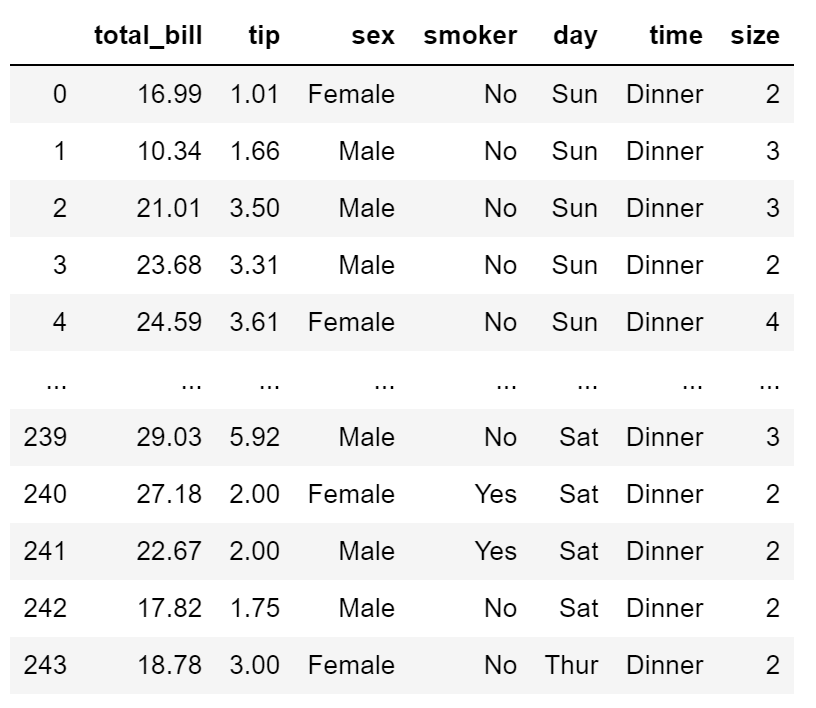
tips = sns.load_dataset('tips', data_home='seaborn-data')

tips
#回归图

#regplot()

ax = sns.regplot(x='total_bill', y='tip', data=tips)

#离散回归图

ax = sns.regplot(x='size', y='total_bill', data=tips)

#离散回归图

#x_estimator设置离散数据显示的方式(mean表示平均值),ci置信区间默认95%

ax = sns.regplot(x='size', y='total_bill', data=tips, x_estimator=np.mean)

#创建正态分布的数组

np.random.seed(8)

mean = (4, 6)

cov = [[1.5,0.7], [0.7,1]]

x,y = np.random.multivariate_normal(mean, cov, 100).T

#绘制回归图

ax= sns.regplot(x=x, y=y, color='g')

#ci设置置信区间(68表示68%)

ax = sns.regplot(x=x, y=y, ci=68)

#robust设置稳健回归,ci=None设置不显示置信区间

ax = sns.regplot(x=x, y=y, robust=True, ci=None)

#x_bins把连续数据分割为离散数据

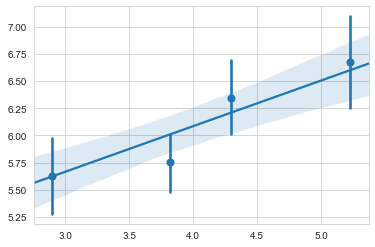
ax = sns.regplot(x=x, y=y, x_bins=4)
#非线性拟合:order设置拟合的项次(1表示线性,2,3,4...非线性)

ax = sns.regplot(x=x, y=y, order=2)

#转换成pandas Series数据格式

px = pd.Series(x, name='x_var')

py = pd.Series(y, name='y_var')

ax = sns.regplot(x=px, y=py, marker='+')

#logistic regression 逻辑回归

tips['big_tip'] = (tips.tip / tips.total_bill) > 0.175

ax = sns.regplot(x='total_bill', y='big_tip', data=tips,

                 logistic=True, n_boot=500, y_jitter=0.03)

#对数回归log

ax = sns.regplot(x='size', y='total_bill', data=tips,

                 x_estimator=np.mean, logx=True)

lmplot()
与regplot()功能相似,但结合regplot() 与 FacetGrid 功能。
sns.lmplot(

    x,

    y,

    data,

    hue=None,

    col=None,

    row=None,

    palette=None,

    col_wrap=None,

    height=5,

    aspect=1,

    markers='o',

    sharex=True,

    sharey=True,

    hue_order=None,

    col_order=None,

    row_order=None,

    legend=True,

    legend_out=True,

    x_estimator=None,

    x_bins=None,

    x_ci='ci',

    scatter=True,

    fit_reg=True,

    ci=95,

    n_boot=1000,

    units=None,

    order=1,

    logistic=False,

    lowess=False,

    robust=False,

    logx=False,

    x_partial=None,

    y_partial=None,

    truncate=False,

    x_jitter=None,

    y_jitter=None,

    scatter_kws=None,

    line_kws=None,

    size=None,

)

Docstring:

Plot data and regression model fits across a FacetGrid.

This function combines :func:`regplot` and :class:`FacetGrid`. It is

intended as a convenient interface to fit regression models across

conditional subsets of a dataset.

When thinking about how to assign variables to different facets, a general

rule is that it makes sense to use ``hue`` for the most important

comparison, followed by ``col`` and ``row``. However, always think about

your particular dataset and the goals of the visualization you are

creating.

There are a number of mutually exclusive options for estimating the

regression model. See the :ref:`tutorial <regression_tutorial>` for more

information.

The parameters to this function span most of the options in

:class:`FacetGrid`, although there may be occasional cases where you will

want to use that class and :func:`regplot` directly.

Parameters

----------

x, y : strings, optional

    Input variables; these should be column names in ``data``.

data : DataFrame

    Tidy ("long-form") dataframe where each column is a variable and each

    row is an observation.

hue, col, row : strings

    Variables that define subsets of the data, which will be drawn on

    separate facets in the grid. See the ``*_order`` parameters to control

    the order of levels of this variable.

palette : palette name, list, or dict, optional

    Colors to use for the different levels of the ``hue`` variable. Should

    be something that can be interpreted by :func:`color_palette`, or a

    dictionary mapping hue levels to matplotlib colors.

col_wrap : int, optional

    "Wrap" the column variable at this width, so that the column facets

    span multiple rows. Incompatible with a ``row`` facet.

height : scalar, optional

    Height (in inches) of each facet. See also: ``aspect``.

aspect : scalar, optional

    Aspect ratio of each facet, so that ``aspect * height`` gives the width

    of each facet in inches.

markers : matplotlib marker code or list of marker codes, optional

    Markers for the scatterplot. If a list, each marker in the list will be

    used for each level of the ``hue`` variable.

share{x,y} : bool, 'col', or 'row' optional

    If true, the facets will share y axes across columns and/or x axes

    across rows.

{hue,col,row}_order : lists, optional

    Order for the levels of the faceting variables. By default, this will

    be the order that the levels appear in ``data`` or, if the variables

    are pandas categoricals, the category order.

legend : bool, optional

    If ``True`` and there is a ``hue`` variable, add a legend.

legend_out : bool, optional

    If ``True``, the figure size will be extended, and the legend will be

    drawn outside the plot on the center right.

x_estimator : callable that maps vector -> scalar, optional

    Apply this function to each unique value of ``x`` and plot the

    resulting estimate. This is useful when ``x`` is a discrete variable.

    If ``x_ci`` is given, this estimate will be bootstrapped and a

    confidence interval will be drawn.

x_bins : int or vector, optional

    Bin the ``x`` variable into discrete bins and then estimate the central

    tendency and a confidence interval. This binning only influences how

    the scatterplot is drawn; the regression is still fit to the original

    data.  This parameter is interpreted either as the number of

    evenly-sized (not necessary spaced) bins or the positions of the bin

    centers. When this parameter is used, it implies that the default of

    ``x_estimator`` is ``numpy.mean``.

x_ci : "ci", "sd", int in [0, 100] or None, optional

    Size of the confidence interval used when plotting a central tendency

    for discrete values of ``x``. If ``"ci"``, defer to the value of the

    ``ci`` parameter. If ``"sd"``, skip bootstrapping and show the

    standard deviation of the observations in each bin.

scatter : bool, optional

    If ``True``, draw a scatterplot with the underlying observations (or

    the ``x_estimator`` values).

fit_reg : bool, optional

    If ``True``, estimate and plot a regression model relating the ``x``

    and ``y`` variables.

ci : int in [0, 100] or None, optional

    Size of the confidence interval for the regression estimate. This will

    be drawn using translucent bands around the regression line. The

    confidence interval is estimated using a bootstrap; for large

    datasets, it may be advisable to avoid that computation by setting

    this parameter to None.

n_boot : int, optional

    Number of bootstrap resamples used to estimate the ``ci``. The default

    value attempts to balance time and stability; you may want to increase

    this value for "final" versions of plots.

units : variable name in ``data``, optional

    If the ``x`` and ``y`` observations are nested within sampling units,

    those can be specified here. This will be taken into account when

    computing the confidence intervals by performing a multilevel bootstrap

    that resamples both units and observations (within unit). This does not

    otherwise influence how the regression is estimated or drawn.

order : int, optional

    If ``order`` is greater than 1, use ``numpy.polyfit`` to estimate a

    polynomial regression.

logistic : bool, optional

    If ``True``, assume that ``y`` is a binary variable and use

    ``statsmodels`` to estimate a logistic regression model. Note that this

    is substantially more computationally intensive than linear regression,

    so you may wish to decrease the number of bootstrap resamples

    (``n_boot``) or set ``ci`` to None.

lowess : bool, optional

    If ``True``, use ``statsmodels`` to estimate a nonparametric lowess

    model (locally weighted linear regression). Note that confidence

    intervals cannot currently be drawn for this kind of model.

robust : bool, optional

    If ``True``, use ``statsmodels`` to estimate a robust regression. This

    will de-weight outliers. Note that this is substantially more

    computationally intensive than standard linear regression, so you may

    wish to decrease the number of bootstrap resamples (``n_boot``) or set

    ``ci`` to None.

logx : bool, optional

    If ``True``, estimate a linear regression of the form y ~ log(x), but

    plot the scatterplot and regression model in the input space. Note that

    ``x`` must be positive for this to work.

{x,y}_partial : strings in ``data`` or matrices

    Confounding variables to regress out of the ``x`` or ``y`` variables

    before plotting.

truncate : bool, optional

    By default, the regression line is drawn to fill the x axis limits

    after the scatterplot is drawn. If ``truncate`` is ``True``, it will

    instead by bounded by the data limits.

{x,y}_jitter : floats, optional

    Add uniform random noise of this size to either the ``x`` or ``y``

    variables. The noise is added to a copy of the data after fitting the

    regression, and only influences the look of the scatterplot. This can

    be helpful when plotting variables that take discrete values.

{scatter,line}_kws : dictionaries

    Additional keyword arguments to pass to ``plt.scatter`` and

    ``plt.plot``.

See Also

--------

regplot : Plot data and a conditional model fit.

FacetGrid : Subplot grid for plotting conditional relationships.

pairplot : Combine :func:`regplot` and :class:`PairGrid` (when used with

           ``kind="reg"``).
#回归图

ax = sns.lmplot(x='total_bill', y='tip', data=tips)

#hue添加分类, markers设置散点样式

ax = sns.lmplot(x='total_bill', y='tip',

                hue="smoker", data=tips,

                markers=['o','x']

               )

#palette设置调色板

ax = sns.lmplot(x='total_bill', y='tip',

                hue='smoker', data=tips,

                palette='Set1'

               )

#palette设置调色板

ax = sns.lmplot(x='total_bill', y='tip',

                hue='smoker', data=tips,

                palette=dict(Yes='g', No='m')

               )

#col设置分栏绘制

ax = sns.lmplot(x='total_bill', y='tip',

                col='smoker', data=tips

               )

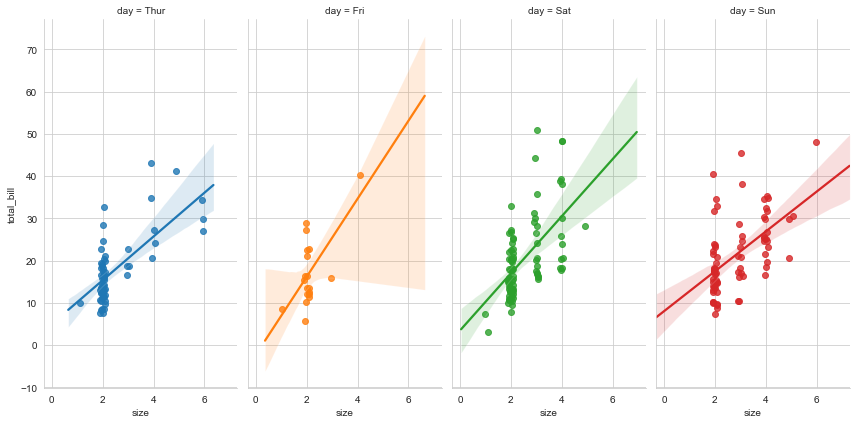
#heigtht图高,aspect宽/高比例,x_jitter添加数据噪点

ax = sns.lmplot(x='size', y='total_bill', hue='day',

                col='day', data=tips,

                height=6, aspect=0.5,

                x_jitter=.1

               )
#col_wrap设置多行显示

ax = sns.lmplot(x='total_bill', y='tip', hue='day',

                col='day', data=tips,

                col_wrap=2, height=3

               )

#多行多栏显示

ax = sns.lmplot(x='total_bill', y='tip',

                row='sex', col='time',

                data=tips, height=3

               )

ax = sns.lmplot(x='total_bill', y='tip',

                row='sex', col='time',

                data=tips, height=3

               )

#设置图形参数

ax = ax.set_axis_labels("Total bill (US Dollars)", "Tip")

ax = ax.set(xlim=(0,60), ylim=(0,12),

            xticks=[10, 30, 50], yticks=[2, 6, 10])

ax = ax.fig.subplots_adjust(wspace=.02)

Seaborn线性关系数据可视化的更多相关文章
- seaborn线性关系数据可视化:时间线图|热图|结构化图表可视化
一.线性关系数据可视化lmplot( ) 表示对所统计的数据做散点图,并拟合一个一元线性回归关系. lmplot(x, y, data, hue=None, col=None, row=None, p ...
- seaborn分类数据可视化
转载:https://cloud.tencent.com/developer/article/1178368 seaborn针对分类型的数据有专门的可视化函数,这些函数可大致分为三种: 分类数据散点图 ...
- seaborn分类数据可视化:散点图|箱型图|小提琴图|lv图|柱状图|折线图
一.散点图stripplot( ) 与swarmplot() 1.分类散点图stripplot( ) 用法stripplot(x=None, y=None, hue=None, data=None, ...
- 用seaborn对数据可视化
以下用sns作为seaborn的别名 1.seaborn整体布局设置 sns.set_syle()函数设置图的风格,传入的参数可以是"darkgrid", "whiteg ...
- seaborn分布数据可视化:直方图|密度图|散点图
系统自带的数据表格(存放在github上https://github.com/mwaskom/seaborn-data),使用时通过sns.load_dataset('表名称')即可,结果为一个Dat ...
- Python图表数据可视化Seaborn:3. 线性关系数据| 时间线图表| 热图
1. 线性关系数据可视化 lmplot( ) import numpy as np import pandas as pd import matplotlib.pyplot as plt import ...
- Seaborn数据可视化入门
在本节学习中,我们使用Seaborn作为数据可视化的入门工具 Seaborn的官方网址如下:http://seaborn.pydata.org 一:definition Seaborn is a Py ...
- Python Seaborn综合指南,成为数据可视化专家
概述 Seaborn是Python流行的数据可视化库 Seaborn结合了美学和技术,这是数据科学项目中的两个关键要素 了解其Seaborn作原理以及使用它生成的不同的图表 介绍 一个精心设计的可视化 ...
- seaborn教程4——分类数据可视化
https://segmentfault.com/a/1190000015310299 Seaborn学习大纲 seaborn的学习内容主要包含以下几个部分: 风格管理 绘图风格设置 颜色风格设置 绘 ...
- Python数据可视化-seaborn库之countplot
在Python数据可视化中,seaborn较好的提供了图形的一些可视化功效. seaborn官方文档见链接:http://seaborn.pydata.org/api.html countplot是s ...
随机推荐
- 【LeetCode栈与队列#03】删除字符串中所有的相邻重复项
删除字符串中所有的相邻重复项 力扣题目链接(opens new window) 给出由小写字母组成的字符串 S,重复项删除操作会选择两个相邻且相同的字母,并删除它们. 在 S 上反复执行重复项删除操作 ...
- 教你如何用Keepalived和HAproxy配置高可用 Kubernetes 集群
本文分享自华为云社区<使用 Keepalived 和 HAproxy 创建高可用 Kubernetes 集群>,作者:江晚正愁余. 高可用 Kubernetes 集群能够确保应用程序在运行 ...
- 【Azure 服务总线】Azure门户获取ARM模板,修改Service Bus的TLS版本
问题描述 在Azure中创建Sverice Bus服务后,如果想修改服务的TLS版本,是否有办法呢? 问题解答 通过Service Bus的ARM模板,修改属性值中的 minimumTlsVersio ...
- 【Azure 应用服务】记一次 App Service 部分请求一直返回 401 "No Authority" 的情况
问题描述 发现部署在App Service上的 WCF 应用对于所请求的接口出现部分返回 401 - No Authority 消息,10次中有一次这样的概率.比较疑惑的问题是,应用没有更新,所以怀疑 ...
- MVVM框架模式
MVC框架模式 MVP框架模式 MVVM框架模式 MVVM模式即: 1.Model:数据层.网络数据操作,file文件操作,本地数据库操作: 2.View:视图层.布局加载,ui交互. 3.ViewM ...
- STL-vector模拟实现
#pragma once #include<assert.h> #include<iostream> using std::cout; using std::endl; usi ...
- Java 属性赋值的先后顺序
1 package com.bytezero.circle; 2 /** 3 * 4 * @Description 5 * @author Bytezero·zhenglei! Email:42049 ...
- vue和xml复习
复习 JS知识梳理 JS定义的位置 行内js(事件名="javascript:js代码"),内部js(
- 5-事件组&任务通知
获取某个事件 获取若干事件中的某个事件 获取若干事件中的全部事件 !!!!不可获得若干事件中的几个事件 创建事件组,设置事件,等待事件 static EventGroupHandle_t xEvent ...
- Swing 使用 beautyeye_lnf.jar 美化
Springboot整合Swing制作简单GUI客户端项目记录 https://blog.csdn.net/Youdmeng/article/details/106549991