
run a Freight robot (3)
5.Logging In
Once the robot is turned on and the robot is on the network, ssh into the computer of the robot using the default fetch user account:
$ ssh fetch@<robot_name_or_ip>
robot_name_or_ip will be either an IPv4 network address, or a network name, depending on the configuration of your local network. If your computer and network is setup for multicast DNS (mDNS) then you may be able to use fetchXYZ.local as the network name where XYZ will be the serial number of your robot (remove any leading zeros from the serial number).
Default User Account
Each robot ships with a default user account, with username fetch and password robotics. It is recommended to change the password when setting up the robot.
Creating User Accounts
It is recommended that each user create their own account on the robot, especially when developing from source. To create an account on the robot, ssh into the robot as the fetch user, and run the following commands
$ sudo adduser USERNAME

$ sudo usermod -G adm,cdrom,sudo,dip,plugdev,lpadmin,sambashare USERNAME
6. Moving the Base with your Keyboard
Note
You will need a computer with ROS installed to properly communicate with the robot. Please consult the ROS Wiki for more information. We strongly suggest an Ubuntu machine with ROS Indigo installed.
To teleoperate the robot base in simulation, we recommend using the teleop_twist_keyboard.py script from teleop_twist_keyboard package.
$ export ROS_MASTER_URI=http://<robot_name_or_ip>:11311

$ rosrun teleop_twist_keyboard teleop_twist_keyboard.py
Using Software Runstop
To activate the software runstop, publish True to the /enable_software_runstop topic.
Alternately, with the teleop runstop enabled, pressing both of the right trigger buttons (buttons 9 and 11) will activate the software runstop. The software_runstop.py script in fetch_bringup can be modified to change the button(s) for the software runstop.
Once activated, the software runstop can be deactivated by (1) toggling the hardware runstop, or (2) disabling the software runstop by passing False to the /enable_software_runstop topic.
Enable Teleop Software Runstop
Note
In order to edit the robot.launch file, you will need to use a terminal editor (such as nano or vim), or use the -X flag with SSH to use a graphical editor (such as gedit). Additionally, the editor must be launched with sudo. Instructions below use nano.
To enable the software runstop, first SSH into the robot, and then modify the robot drivers launch file to use it.
We need to modify the robot.launch file to pass the correct arg to the software runstop script:
$ sudo nano /etc/ros/indigo/robot.launch
In this file there should be a Software Runstop entry near the end. By default this entry contains an args line, with a value of “-a -b -g”. To add teleop control, add the “-t” flag as well. This section will then look like the below. If your robot is an older one and does not have a Software Runstop entry, you will want to simply copy the block the below.
<!-- Software Runstop -->

<include file="$(find fetch_bringup)/launch/include/runstop.launch.xml">

  <arg name="flags" value="-a -b -g -t" />

</include>
Note that the -a, -b, -g flags correspond to letting the software runstop control the arm, base and gripper breakers, respectively.
Additionally, if completely disabling the software runstop functionality is desired, the above section in robot.launch can be commented out or removed.
Finally, restart the drivers so that our changes take effect:
$ sudo service robot stop && sudo service robot start
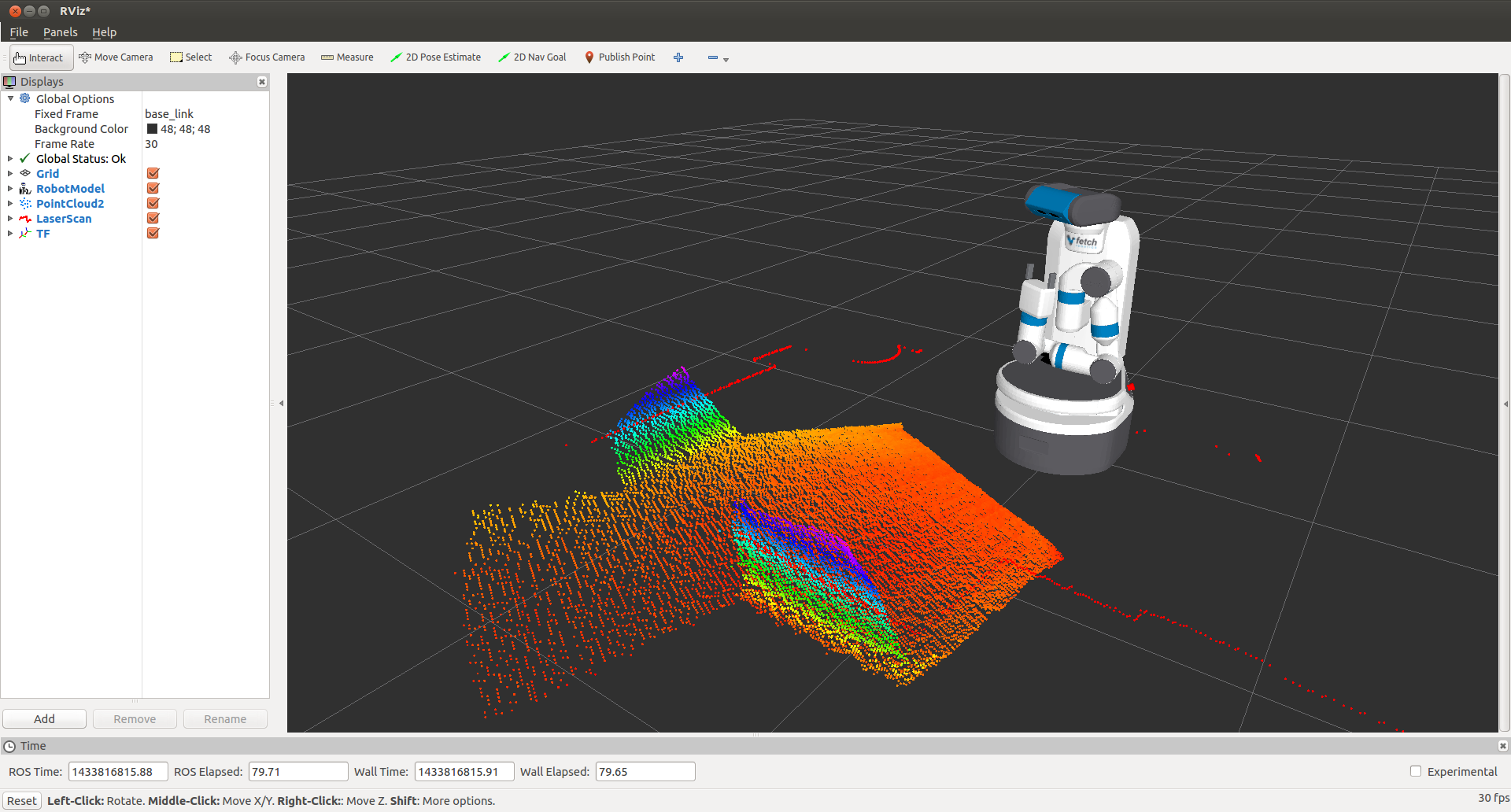
7. Visualizing Data
$ export ROS_MASTER_URI=http://<robot_name_or_ip>:11311

$ rosrun rviz rviz
Note
You will need a computer with ROS installed to properly communicate with the robot. Please consult the ROS Wiki for more information. We strongly suggest an Ubuntu machine with ROS Indigo installed.
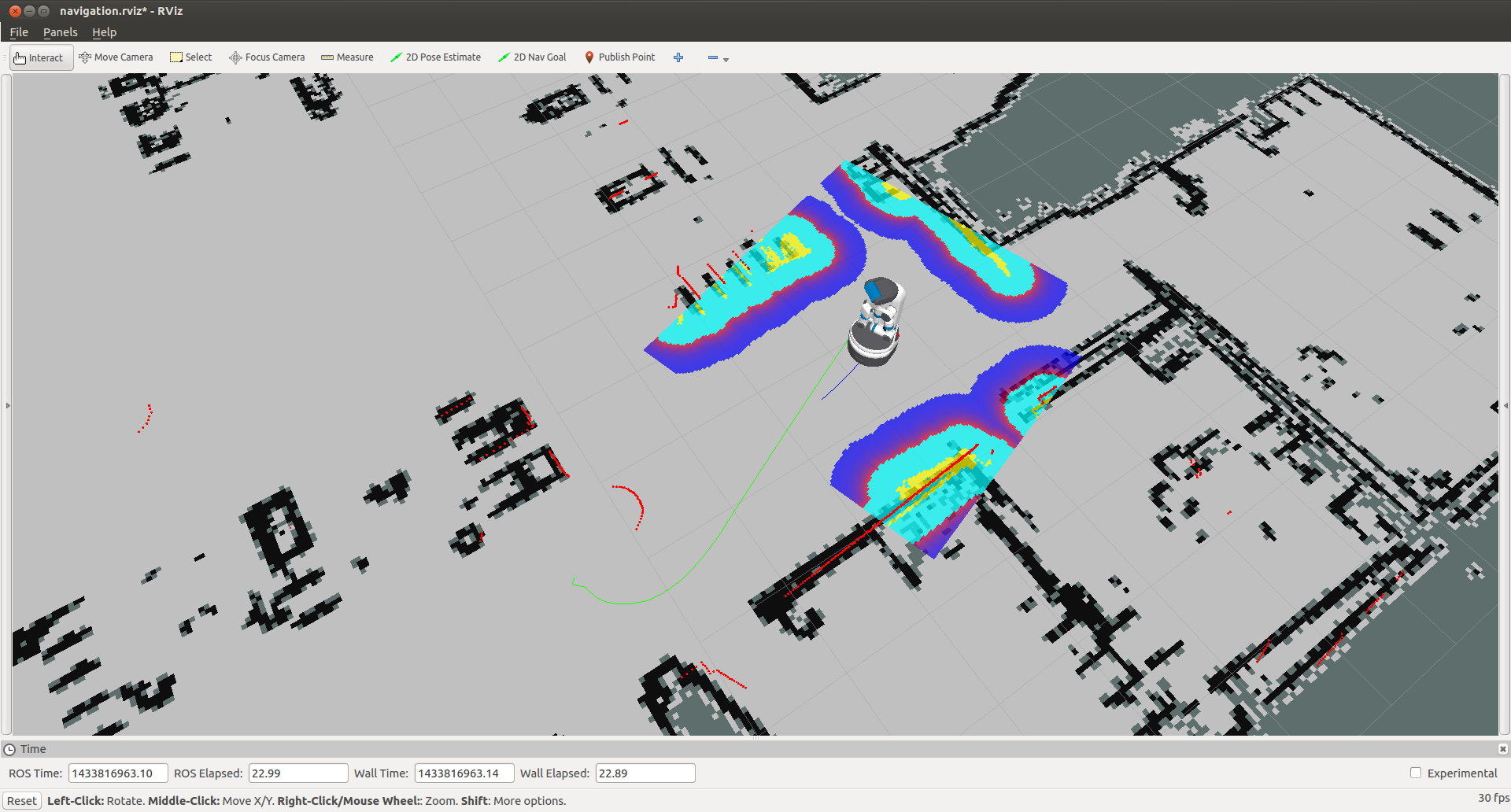
You can now manually set up your RVIZ visualization or re-run RVIZ with a configuration file using the command line. The default .rviz configuration file for Fetch can be loaded using:
$ roscd fetch_navigation/config

$ export ROS_MASTER_URI=http://<robot_name_or_ip>:11311

$ rviz -d navigation.rviz
run a Freight robot (3)的更多相关文章
- run a Freight robot (1)
1. Freight robot The Fetch and Freight Research Edition Robots are indoor laboratory robots. Coordin ...
- run a Freight robot (2)
3. Network Setup Connecting Freight to a Monitor The easiest way to configure the wireless networki ...
- Simulating a Freight robot in Gazebo
Installation Before installing the simulation environment, make sure your desktop is setup with a st ...
- implement "slam_karto" package on a Freight robot
1. login ssh fetch@<robot ip or robot name> 2. set robot master modify .bashrc in robot's com ...
- 几个bat文件(关于robot freamwork安装)
如果安装后 没有这几文件,或者在运行后 提示 文件缺少这个文件 , 就需要手动创建. 一般文件在 :C:\Python27\Scripts 这个目录下 1.pybot.bat文件: @echo o ...
- robot framework + win7 64 上的安装
1.安装 python 2.7 2.cmd 管理模式 python -m pip install --upgrade pip pip install robotframework==3. ...
- Robot Framework(一)入门
1.1简介 Robot Framework是一个基于Python的,可扩展的关键字驱动的测试自动化框架,用于端到端验收测试和验收测试驱动开发(ATDD).它可用于测试分布式异构应用程序,其中验证需要涉 ...
- robotframework笔记19
后处理输出 使用时自动测试 在测试执行报告和日志生成,并使用它 分别允许创建自定义报告和日志以及结合 和合并的结果. 使用Rebot 简介 rebot [options] robot_outputs ...
- robotframework笔记1
机器人框架是一个基于Python的,可扩展的关键字驱动的自动化测试最终到终端的验收测试和验收测试驱动开发(ATDD)框架.它可用于检测分布式异类应用程序,其中,验证要求感人几种技术和接口. 下面列出了 ...
随机推荐
- oracle日期函数2!
1.日期时间间隔操作 当前时间减去7分钟的时间 select sysdate,sysdate - interval '7' MINUTE from dual 当前时间减去7小时的时间 ...
- maven在windows环境下加载settings.xml文件
今天发现maven在windows环境下加载的settings.xml文件是c:下的,就算修改conf下的settings.xml里的<localRepository>给他明确指向也没用.
- iOS中 项目开发易错知识点总结
点击return取消textView 的响应者 - (BOOL)textFieldShouldReturn:(UITextField *)textField { [_contactTextFiled ...
- PHP删除MySQL数据库下的所有数据表
<?php //[数据无价,请谨慎操作!] $hostname ='localhost'; $userid = 'username'; $password = 'password'; $d ...
- JavaEE基础(十八)/集合
1.集合框架(Map集合概述和特点) A:Map接口概述 查看API可以知道: 将键映射到值的对象 一个映射不能包含重复的键 每个键最多只能映射到一个值 B:Map接口和Collection接口的不同 ...
- android5.x以上 状态栏透明的问题
1.先在style中把 statusBarColor 设置为透明 如下 <item name="android:statusBarColor">@android:co ...
- 【转】MYSQL入门学习之二:使用正则表达式搜索
转载地址:http://www.2cto.com/database/201212/173869.html 一.正则表达式介绍 www.2cto.com 正则表达式是用来匹配文本的特殊的串(字符 ...
- 【转】在Eclipse中建立第一个Servlet程序
转载地址:http://kin111.blog.51cto.com/738881/163354 继上篇在Eclipse中搭好了tomcat环境后,我们建立一个最简单的servlet程序,这个serve ...
- java初学。加载图片
public class GameFrame extends Frame{ private static final int WIDTH=900; private static final int H ...
- python 数据加密以及生成token和token验证
代码如下: # -*- coding: utf-8 -*- from passlib.apps import custom_app_context as pwd_context import conf ...