
linux下部署git服务器
我这里用的是redhat7.4, 直接开始吧.
环境
服务端: Redhat7.4 + git(version 1.8.3.1) IP:192.168.137.168

客户端: win7 + git (version 2.19.1)
Git
server:
[root@localhost gittest.git]# git --version

git version 1.8.3.1
我这里是有的, 没有的话
yum install git -y
client:
官网地址: https://git-for-windows.github.io/
服务器操作
- 新建git用户与赋予密码
useradd git

passwd git
注:这里的密码我用1234
- 为服务器创建一个git用的文件夹(git仓库)
mkdir /usr/local/gittest.git
注:这个目录可以随便建(项目在哪就放哪), 只要后面授权给git用户管理就行
- 初始化
git init --bare /usr/local/gittest.git
- 授权
chown -R git:git /usr/local/gittest.git
注:这个就很简单了,在/usr/local/gittest.git下会看到生成了目录
客户端操作
注:这一波用的不是powershell或者cmd, 确定客户端的git已安装.
- 简介
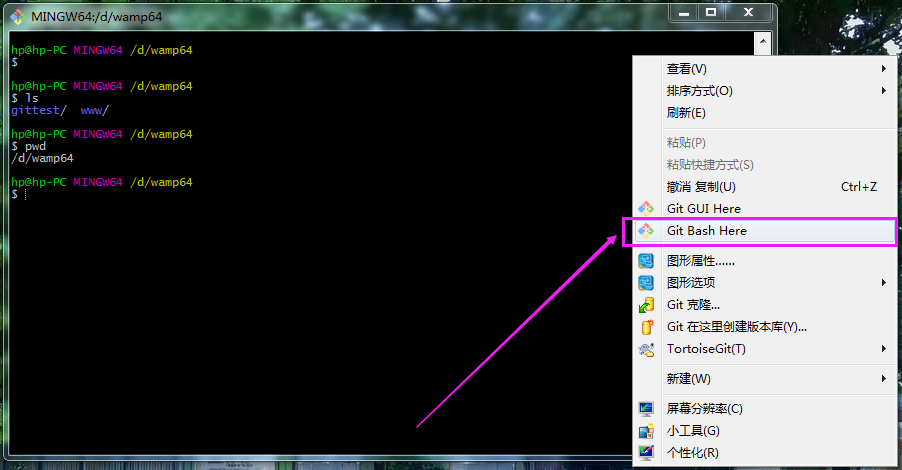
- 新建目录
hp@hp-PC MINGW64 /d/wamp64

$ mkdir gittest_gitbash

hp@hp-PC MINGW64 /d/wamp64

$ ls

gittest/  gittest_gitbash/  www/

c

hp@hp-PC MINGW64 /d/wamp64

$ cd gittest_gitbash/

hp@hp-PC MINGW64 /d/wamp64/gittest_gitbash

$ pwd

/d/wamp64/gittest_gitbash
- clone项目
git clone git@192.168.137.168:/usr/local/gittest.git
注:这个就很容易理解了, 将服务器上面的文件夹下的东西拉取到本地(就是这个目录下d:\wamp64\gittest_gitbash)
- 自动弹出提示
The authenticity of host '192.168.137.168 (192.168.137.168)' can't be established.

RSA key fingerprint is SHA256:Ve6WV/SCA059EqoUOzbFoZdfmMh3B259nigfmvdadqQ.

Are you sure you want to continue connecting (yes/no)? yes
成功!
- 发现
此时会在本地C:\Users\用户名\.ssh 下生成文件 known_hosts
- 创建公钥私钥
ssh-keygen -t rsa -C "邮箱"
注:此时C:\Users\用户名\.ssh 下会多出两个文件 id_rsa 和 id_rsa.pub

- 服务器Git打开rsa认证
[root@localhost gittest.git]# cd /etc/ssh/

[root@localhost ssh]# ls

moduli      sshd_config         ssh_host_ecdsa_key.pub  ssh_host_ed25519_key.pub  ssh_host_rsa_key.pub

ssh_config  ssh_host_ecdsa_key  ssh_host_ed25519_key    ssh_host_rsa_key

[root@localhost ssh]# vim sshd_config
- 打开三个注释
RSAAuthentication yes

PubkeyAuthentication yes

AuthorizedKeysFile .ssh/authorized_keys

- 重启sshd
systemctl stop sshd.service

systemctl start sshd.service
- 在git用户目录新建.ssh目录
mkdir /home/git/.ssh
- 授权
chown -R git:git /home/git
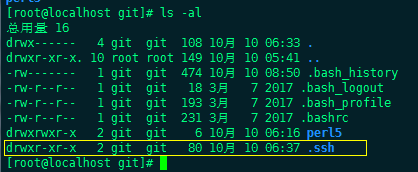
- 将客户端公钥上传到服务器端git用户目录.ssh
cd C:\Users\用户

ssh git@192.168.137.168 'cat >> .ssh/authorized_keys' < ~/.ssh/id_rsa.pub
注:这里要切换到.ssh的上一级目录, 因为要将authorized_keys文件当前内容上传到服务器中
- 再看一下服务器上面的目录
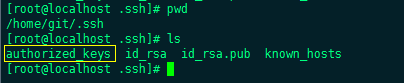
- 客户端再次clone远程仓库
git clone git@192.168.137.168:/usr/local/gittest.git
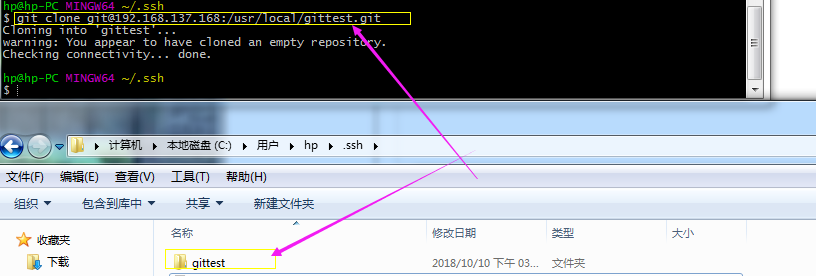
结尾
- 禁止git用户ssh登录
vim /etc/passwd

将

git:x:1004:1005::/home/git:/bin/bash

改为

git:x:1004:1005::/home/git:/bin/git-shell
Git服务器搭建完毕!
后续
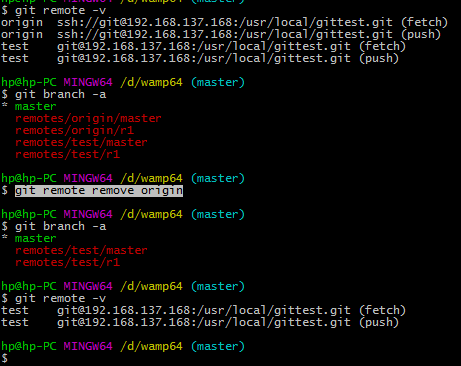
- 删除远程分支点
git remote remove origin
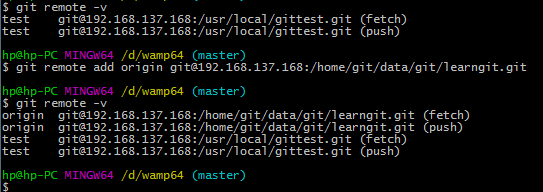
- 新建远程分支点
origin 为远程仓库别名 后面http 为远程仓库地址
git remote add origin git@192.168.137.168:/home/git/data/git/learngit.git
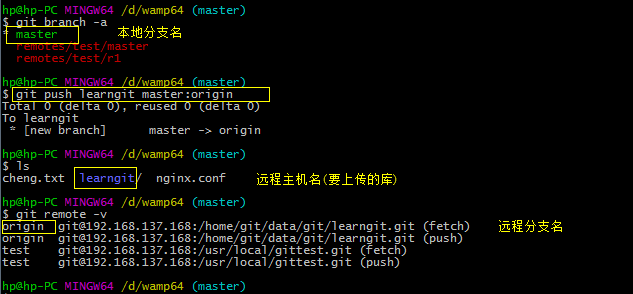
- 本地库提交到远程分支(上传)
git push <远程主机名> <本地分支名>:<远程分支名>
git push learngit master:origin
- 本地分支拉取远程分支(下载)
linux下部署git服务器的更多相关文章
- 【转】在Linux下搭建Git服务器
在 Linux 下搭建 Git 服务器 环境: 服务器 CentOS6.6 + git(version 1.7.1)客户端 Windows10 + git(version 2.8.4.windows. ...
- Linux下部署FTP服务器
Linux下部署FTP服务器 下载安装包 在这里介绍的是离线部署FTP,首先下载对应的rpm包,下载链接为: 下载vsftpd服务 下载FTP客户端 安装ftp服务器 关闭防火墙 service ip ...
- Linux下搭建Git服务器
1.安装Git 见 Jenkins持续集成环境部署 第四节 2.创建Git用户和用户组 groupadd git useradd git -g git 3.创建证书切换到git用户创建证书 su gi ...
- 在 Linux 下搭建 Git 服务器
环境: 服务器 CentOS6.6 + git(version 1.7.1)客户端 Windows10 + git(version 2.8.4.windows.1) ① 安装 Git Linux 做为 ...
- 在Linux下搭建Git服务器的方法是什么样?
第一步 安装git:可以通过命令的方式快速安装,不同的linux的安装方法可能不一样,我的是采用的yum方法.ubuntu可以用apt-get命令.sudo yum install git 第二步 添 ...
- 在 Linux 下搭建 Git 服务器(yum安装)
服务端(linux): 1. 安装git [root@localhost ~]# yum -y install git 2. 增加一个git账户 为了管理的方便,在linux下面增添一个 " ...
- 在Linux下搭建Git服务器步骤
环境: 服务器 CentOS6.6 + git(version 1.7.1) 客户端 Windows10 + git(version 2.8.4.windows.1) ① 安装 Git Linux ...
- Linux 下搭建Git 服务器详细步骤
参考: https://www.cnblogs.com/dee0912/p/5815267.html#_label0 https://blog.csdn.net/carfge/article/deta ...
- kali linux 下搭建git服务器
参考:http://www.cnblogs.com/dee0912/p/5815267.html https://www.liaoxuefeng.com/wiki/001373951630592960 ...
随机推荐
- case insensitive in php
date: 2017-07-27 PHP的命名空间是否区分大小写? 结论:不区分大小写,与类名一样(不区分大小写). 不区分大小写的包括 函数名 方法名 类名 控制语句(if, else, for, ...
- 制作正式版10.11 OS X El Capitan 安装U盘(优盘)
一.准备工作:1.准备一个 8GB 或以上容量的 U 盘,确保里面的数据已经妥善备份好(该过程会抹掉 U 盘全部数据)2.从官网Appstore下载下来的 “安装 OS X El Capitan”,当 ...
- Unable to update the EntitySet 'T_JsAPI' because it has a DefiningQuery and no <InsertFunction> element exists in the <ModificationFunctionMapping> element to support the current operation.
前几天使用EF6的Db First模式改造了支付中心的数据访问层,废弃了ado.net. 同时,使用T4把实体类生成到了model层的PO目录下. 今天在db里新建了一张表,在edmx文件里更新模型( ...
- unity3d-多媒体与网络
1.音乐 unity3d 共支持4种音乐的格式文件 aiff:适用于较短的音乐文件,可用于游戏音效 wav:适用于较短的音乐文件,可用于游戏音效 mp3:适用于较长的音乐文件,可用于游戏音乐 ogg: ...
- c# 修改xml格式config文件
xml 格式的config文件如下: <?xml version="1.0" encoding="utf-8"?> <configuratio ...
- Web界面进行用户管理
Web界面进行用户管理 添加用户 Tags:表示账号的角色 Admin:超级管理员 No access :表示没有可以访问的virtual host虚拟机(相当于数据库) ...
- 15. 3Sum(字典)
Given an array nums of n integers, are there elements a, b, c in nums such that a + b + c = 0? Find ...
- 在统一软件开发过程中使用UML
如何在统一软件开发过程中使用UML? 起始阶段常用UML图 在起始阶段,通常有用例图.类图.活动图.顺序图等UML图的参与. 获取用户需求之后首先要将这些需求转化为系统的顶层用例图. 在确定了用例之后 ...
- HTML5特性&&canvas
1.HTML5是由W3C(万维网联盟,专注于XHTML 2.0)和WHATWG(专注于web表单和应用程序)共同合作的结果,2014年10月完成标准制定! 主要设计目的:为了在移动设备上支持多媒体. ...
- 【Elasticsearch学习之二】Elasticsearch Rest风格操作
环境 虚拟机:VMware 10 Linux版本:CentOS-6.5-x86_64 客户端:Xshell4 FTP:Xftp4 jdk8 elasticsearch-2.2.0 一.Rest简介Re ...