
WPF路径动画(动态逆向动画)
WPF 中的Path.Data 不再多介绍,M开始坐标点 C弧度坐标点 L 直线坐标点
  <Path x:Name="path0" Data="M 10,100 C 35,0 135,0 160,100 180,190 285,200 310,100" Height="135.32"

                  Stretch="Uniform" Stroke="#FF61E70A" StrokeThickness=""    HorizontalAlignment="Center" VerticalAlignment="Center" />

  <Path x:Name="path0" Data="M95,50 L324.67997,50 324.67997,119.67997 234.67998,119.67997 234.67998,184.68002

                  344.67999,184.68002 394.68,134.67999 C394.,134.67999 394.68,189.68005

                  394.68,129.68002 394.68,69.679984 434.68002,89.679985 434.68002,89.679985

                  L477.,132.18003 477.18005,164.68004 419.68006,164.6800" Height="135.32"

                  Stretch="Uniform" Stroke="#FF61E70A" StrokeThickness=""    HorizontalAlignment="Center" VerticalAlignment="Center" />

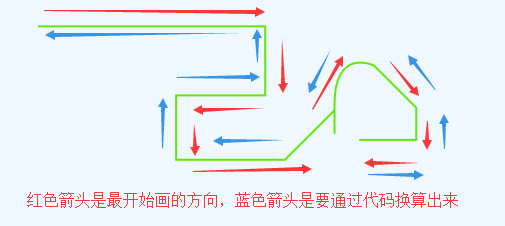
个人写了关于Path.Data数据反向,意思就是把Path的数据逆转,但是图形是没有变化的
Xaml代码如下:
<Window x:Class="WPFPathReverse.MainWindow"

        xmlns="http://schemas.microsoft.com/winfx/2006/xaml/presentation"

        xmlns:x="http://schemas.microsoft.com/winfx/2006/xaml"

        xmlns:d="http://schemas.microsoft.com/expression/blend/2008"

        xmlns:mc="http://schemas.openxmlformats.org/markup-compatibility/2006"

        xmlns:local="clr-namespace:WPFPathReverse"

        mc:Ignorable="d"

        Title="MainWindow" Height="" Width="">

    <Grid>

        <Grid.RowDefinitions>

            <RowDefinition Height=""></RowDefinition>

            <RowDefinition></RowDefinition>

            <RowDefinition></RowDefinition>

        </Grid.RowDefinitions>

        <StackPanel Orientation="Horizontal">

            <Button Content="正向动画" Width="" Margin="" Click="btnPositive_Click"></Button>

            <Button Content="反向动画" Width="" Margin="" Click="btnRevPositive_Click"></Button>

        </StackPanel>

        <Canvas Grid.Row="" >

            <Path x:Name="path0" Data="M1,1 L230.67997,1 230.67997,70.67997 140.67998,70.67997 140.67998,135.68002 300.68,85.67999 C300.68,85.67999 300.68,140.68005 300.68,80.68002 300.68,20.679984 340.68002,40.679985 340.68002,40.679985 L383.18005,83.18003 383.18005,115.68004 325.68006,115.68" Height="136.68"

                  Stretch="None" Stroke="#FF61E70A" StrokeThickness=""  Width="384.18"   />

        </Canvas>

        <Canvas x:Name="canvas" Grid.Row=""></Canvas>

    </Grid>

</Window>
Code代码如下
using System;

using System.Collections.Generic;

using System.Linq;

using System.Text;

using System.Text.RegularExpressions;

using System.Threading.Tasks;

using System.Windows;

using System.Windows.Controls;

using System.Windows.Data;

using System.Windows.Documents;

using System.Windows.Input;

using System.Windows.Media;

using System.Windows.Media.Animation;

using System.Windows.Media.Imaging;

using System.Windows.Navigation;

using System.Windows.Shapes;

namespace WPFPathReverse

{

    /// <summary>

    /// MainWindow.xaml 的交互逻辑

    /// </summary>

    public partial class MainWindow : Window

    {

        public MainWindow()

        {

            InitializeComponent();

            this.Loaded += MainWindow_Loaded;

        }

        private void MainWindow_Loaded(object sender, RoutedEventArgs e)

        {

            string data = this.path0.Data.ToString();

            var result = ConvertReverseData(data);

            Path newpath = new Path();

            newpath.Data = PathGeometry.CreateFromGeometry(Geometry.Parse(result));

            newpath.HorizontalAlignment = HorizontalAlignment.Center;

            newpath.VerticalAlignment = VerticalAlignment.Center;

            newpath.Stretch = this.path0.Stretch;

            newpath.Stroke = new SolidColorBrush(Colors.Red);

            newpath.StrokeThickness = ;

            newpath.Width = this.path0.Width;

            newpath.Height = this.path0.Height;

            canvas.Children.Add(newpath);

        }

        /// <summary>

        /// 反向Data数据

        /// </summary>

        /// <param name="data"></param>

        /// <returns></returns>

        string ConvertReverseData(string data)

        {

            data = data.Replace("M", "").Replace(" ", "/");

            Regex regex = new Regex("[a-z]", RegexOptions.IgnoreCase);

            MatchCollection mc = regex.Matches(data);

            //item1 从上一个位置到当前位置开始的字符 (match.Index=原始字符串中发现捕获的子字符串的第一个字符的位置。)

            //item2 当前发现的匹配符号(L C Z M)

            List<Tuple<string, string>> tmpList = new List<Tuple<string, string>>();

            int curPostion = ;

            for (int i = ; i < mc.Count; i++)

            {

                Match match = mc[i];

                if (match.Index != curPostion)

                {

                    string str = data.Substring(curPostion, match.Index - curPostion);

                    tmpList.Add(new Tuple<string, string>(str, match.Value));

                }

                curPostion = match.Index + match.Length;

                if (i +  == mc.Count)//last

                {

                    tmpList.Add(new Tuple<string, string>(data.Substring(curPostion), match.Value));

                }

            }

            //char[] spChar = new char[2] { 'C', 'L' };

            //var tmpList = data.Split(spChar);

            List<string[]> spList = new List<string[]>();

            for (int i = ; i < tmpList.Count; i++)

            {

                var cList = tmpList[i].Item1.Split('/');

                spList.Add(cList);

            }

            List<string> strList = new List<string>();

            for (int i = spList.Count - ; i >= ; i--)

            {

                string[] clist = spList[i];

                for (int j = clist.Length - ; j >= ; j--)

                {

                    if (j == clist.Length - )//对于第二个元素增加 L或者C的标识

                    {

                        var pointWord = tmpList[i - ].Item2;//获取标识

                        strList.Add(pointWord + clist[j]);

                    }

                    else

                    {

                        strList.Add(clist[j]);

                    }

                }

            }

            string reverseData = "M" + string.Join(" ", strList);

            return reverseData;

        }

        private void btnPositive_Click(object sender, RoutedEventArgs e)

        {

            MatrixStory(, this.path0.Data.ToString());

        }

        private void btnRevPositive_Click(object sender, RoutedEventArgs e)

        {

            string data = this.path0.Data.ToString();

            var result = ConvertReverseData(data);

            MatrixStory(, result);

        }

        /// <summary>

        ///

        /// </summary>

        /// <param name="orientation">0正向 1反向</param>

        /// <param name="data">路径数据</param>

        private void MatrixStory(int orientation, string data)

        {

            Border border = new Border();

            border.Width = ;

            border.Height = ;

            border.Visibility = Visibility.Collapsed;

            if (orientation==)

            {

                border.Background = new SolidColorBrush(Colors.Blue);

            }

            else

            {

                border.Background = new SolidColorBrush(Colors.Green);

            }

            this.canvas.Children.Add(border);

            Canvas.SetLeft(border, -border.Width / );

            Canvas.SetTop(border, -border.Height / );

            border.RenderTransformOrigin = new Point(0.5, 0.5);

            MatrixTransform matrix = new MatrixTransform();

            TransformGroup groups = new TransformGroup();

            groups.Children.Add(matrix);

            border.RenderTransform = groups;

            //NameScope.SetNameScope(this, new NameScope());

            string registname = "matrix" + Guid.NewGuid().ToString().Replace("-", "");

            this.RegisterName(registname, matrix);

            MatrixAnimationUsingPath matrixAnimation = new MatrixAnimationUsingPath();

            matrixAnimation.PathGeometry = PathGeometry.CreateFromGeometry(Geometry.Parse(data));

            matrixAnimation.Duration = new Duration(TimeSpan.FromSeconds());

            matrixAnimation.DoesRotateWithTangent = true;//旋转

            //matrixAnimation.FillBehavior = FillBehavior.Stop;

            Storyboard story = new Storyboard();

            story.Children.Add(matrixAnimation);

            Storyboard.SetTargetName(matrixAnimation, registname);

            Storyboard.SetTargetProperty(matrixAnimation, new PropertyPath(MatrixTransform.MatrixProperty));

            #region 控制显示与隐藏

            ObjectAnimationUsingKeyFrames ObjectAnimation = new ObjectAnimationUsingKeyFrames();

            ObjectAnimation.Duration = matrixAnimation.Duration;

            DiscreteObjectKeyFrame kf1 = new DiscreteObjectKeyFrame(Visibility.Visible, TimeSpan.FromMilliseconds());

            ObjectAnimation.KeyFrames.Add(kf1);

            story.Children.Add(ObjectAnimation);

            //Storyboard.SetTargetName(border, border.Name);

            Storyboard.SetTargetProperty(ObjectAnimation, new PropertyPath(UIElement.VisibilityProperty));

            #endregion

            story.FillBehavior = FillBehavior.Stop;

            story.Begin(border, true);

        }

    }

}
执行效果如下:
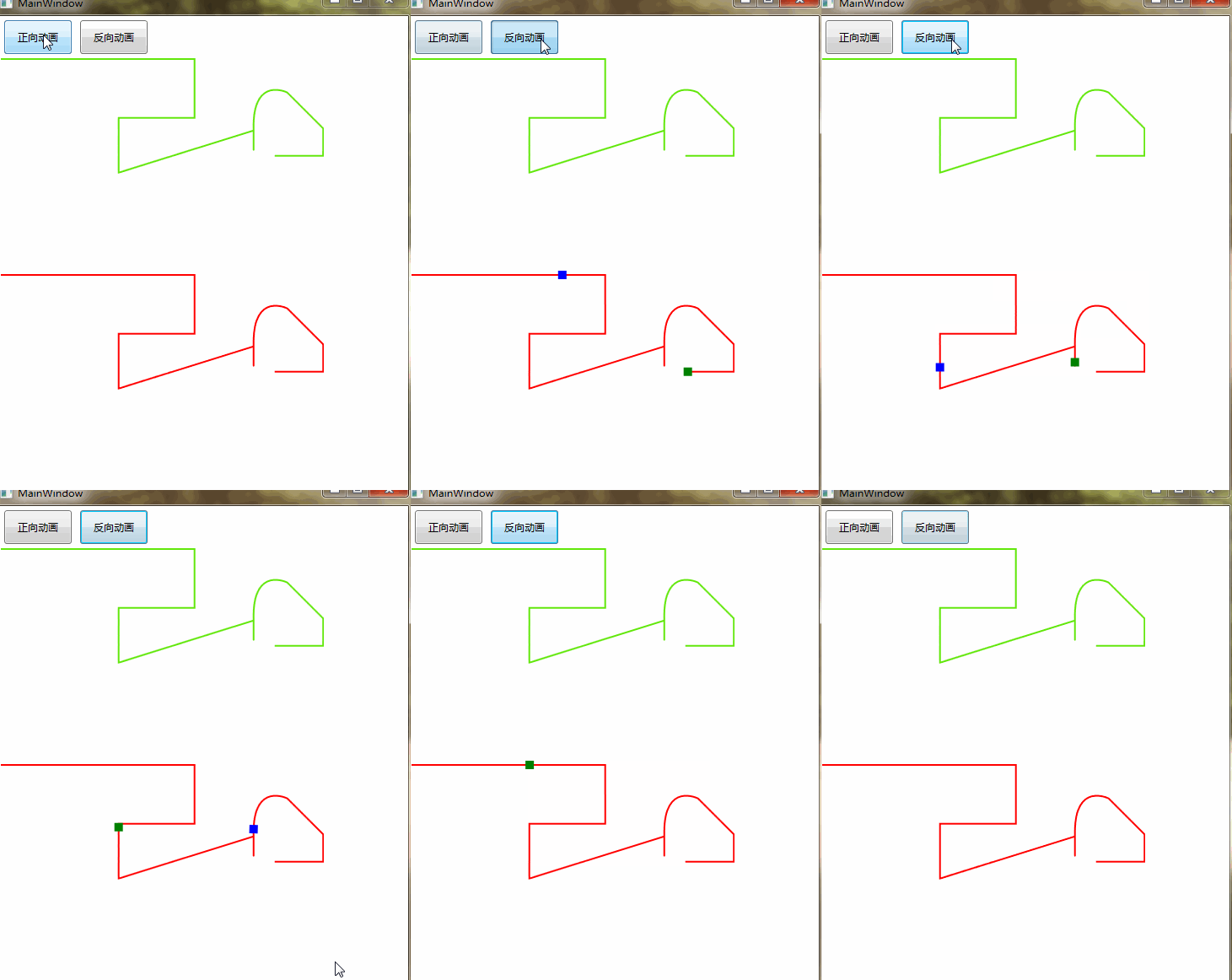
写这个Path反转的目的是动态生成动画的时候,可以逆向执行动画,而不必为逆向动画重新画一个Path.
上面代码中反转Path有bug(各种不同的Path数据格式,下面是修复后的代码)
 string ConvertReverseData(string data)

        {

            data = data.Replace("M", "");

            Regex regex = new Regex("[a-z]", RegexOptions.IgnoreCase);

            MatchCollection mc = regex.Matches(data);

            //item1 从上一个位置到当前位置开始的字符 (match.Index=原始字符串中发现捕获的子字符串的第一个字符的位置。)

            //item2 当前发现的匹配符号(L C Z M)

            List<Tuple<string, string>> tmpList = new List<Tuple<string, string>>();

            int curPostion = ;

            for (int i = ; i < mc.Count; i++)

            {

                Match match = mc[i];

                if (match.Index != curPostion)

                {

                    string str = data.Substring(curPostion, match.Index - curPostion);

                    tmpList.Add(new Tuple<string, string>(str, match.Value));

                }

                curPostion = match.Index + match.Length;

                if (i +  == mc.Count)//last

                {

                    tmpList.Add(new Tuple<string, string>(data.Substring(curPostion), match.Value));

                }

            }

            List<string[]> spList = new List<string[]>();

            Regex regexnum = new Regex(@"(\-?\d+\.?\d*)", RegexOptions.IgnoreCase);

            for (int i = ; i < tmpList.Count; i++)

            {

                //处理坐标数据 ex M 96 288 C 576 0, 0 0, 480 288

                //ex M 10,100 C 35,0 135,0 160,100 180,190 285,200 310,100

                //ex M95,50 L324.67997,50 324.67997,119.67997 234.67998,119.67997 234.67998,184.68002

                //344.67999,184.68002 394.68,134.67999 C394.68,134.67999 394.68,189.68005

                //394.68,129.68002 394.68,69.679984 434.68002,89.679985 434.68002,89.679985

                // L477.18005,132.18003 477.18005,164.68004 419.68006,164.6800

                MatchCollection childMcs = regexnum.Matches(tmpList[i].Item1);

                if (childMcs.Count %  != )

                {

                    //分组数据有问题

                    continue;

                }

                int groups = childMcs.Count / ;

                var strTmp = new string[groups];

                for (int j = ; j < groups; j++)

                {

                    string cdatas = childMcs[j * ] + "," + childMcs[j *  + ];//重组数据

                    strTmp[j] = cdatas;

                }

                spList.Add(strTmp);

            }

            #region 逆向数据

            List<string> strList = new List<string>();

            for (int i = spList.Count - ; i >= ; i--)

            {

                string[] clist = spList[i];

                for (int j = clist.Length - ; j >= ; j--)

                {

                    if (j == clist.Length -  && i > )//对于第二个元素增加 L或者C的标识

                    {

                        var pointWord = tmpList[i - ].Item2;//获取标识

                        strList.Add(pointWord + clist[j]);

                    }

                    else

                    {

                        strList.Add(clist[j]);

                        //M10,50 L44.679973,69.679973 C43.627604,76.057983 43.410881,76.928271 41.082803,81.687898

                        if (clist.Length ==  && i > )//说明只有一个元素 ex L44.679973,69.679973

                        {

                            strList.Add(tmpList[i - ].Item2);

                        }

                    }

                }

            }

            string reverseData = "M" + string.Join(" ", strList);

            #endregion

            return reverseData;

        }
如果大家在使用过程中还有发现算法bug,请在下方评论并把data贴出来。粘贴格式如下:
<Path x:Name="path0" Data="M 96 288 C 576 0, 0 0, 480 288"

Stretch="None" Stroke="#FF61E70A" StrokeThickness="" />
WPF路径动画(动态逆向动画)的更多相关文章
- WPF学习之绘图和动画
如今的软件市场,竞争已经进入白热化阶段,功能强.运算快.界面友好.Bug少.价格低都已经成为了必备条件.这还不算完,随着计算机的多媒体功能越来越强,软件的界面是否色彩亮丽.是否能通过动画.3D等效果是 ...
- WPF学习之绘图和动画--DarrenF
Blend作为专门的设计工具让WPF如虎添翼,即能够帮助不了解编程的设计师快速上手,又能够帮助资深开发者快速建立图形或者动画的原型. 1.1 WPF绘图 与传统的.net开发使用GDI+进行绘图不 ...
- WPF学习(12)动画
本篇来学习WPF的动画.什么是动画?动画就是一系列帧.在WPF中,动画就是在一段时间内修改依赖属性值的行为,它是基于时间线Timeline的.有人会说,要动画干嘛,华而不实,而且添加了额外的资源消耗而 ...
- 《深入浅出WPF》笔记——绘画与动画
<深入浅出WPF>笔记——绘画与动画 本篇将记录一下如何在WPF中绘画和设计动画,这方面一直都不是VS的强项,然而它有一套利器Blend:这方面也不是我的优势,幸好我有博客园,能记录一 ...
- WPF:完美自定义MeaagseBox 动画 反弹 背景模糊 扁平化
不知道为什么,WPF的MeaageBox的风格还停留在Win 2000的风格... 很久前就想自己封装一个MessageBox出来,但是都只是简单的封装,不怎么具有通用性.这次终于搞完了. 使用方法和 ...
- WPF圆形环绕的Loading动画
原文:WPF圆形环绕的Loading动画 版权声明:本文为博主原创文章,未经博主允许不得转载. https://blog.csdn.net/yangyisen0713/article/details/ ...
- WPF编游戏系列 之七 动画效果(2)
原文:WPF编游戏系列 之七 动画效果(2) 上一篇已经对关闭窗口图标进行了动画效果处理,本篇将对窗口界面的显示和关闭效果进行处理.由于所有的动画效果都是针对窗口界面的Canvas,所以 ...
- WPF编游戏系列 之六 动画效果(1)
原文:WPF编游戏系列 之六 动画效果(1) 本篇主要针对界面进行动画效果处理.首先在打开或关闭界面时,使其产生动态效果而不是生硬的显示或消失(如下图).其次在鼠标放到关闭窗口图标上时, ...
- [WPF] 玩玩彩虹文字及动画
1. 前言 兴致来了玩玩 WPF 的彩虹文字.不是用 LinearGradientBrush 制作渐变色那种,是指每个文字独立颜色那种彩虹文字.虽然没什么实用价值,但希望这篇文章里用 ItemsCon ...
随机推荐
- informatica powercenter学习笔记(LookUp 使用)
LOOKUP TRANSFORMATION的使用点评: LOOKUP基本用法不熟的话请参考下附属信息. 用法感受: 1 LOOKUP的作用跟我们以前在EXCEL的函数功能类似,就是隔表取值.优点就是用 ...
- ORACLE口令管理
口令文件介绍 在ORALCE数据库系统中,用户如果要以特权用户身份(SYS/SYSDBA/SYSOPER)登录ORALCE数据库可以有两种身份验证的方法:即使用与操作系统集成的身份验证或使用ORALC ...
- linux 中/proc 详解
proc 文件系统 在Linux中有额外的机制可以为内核和内核模块将信息发送给进程-- /proc 文件系统.最初设计的目的是允许更方便的对进程信息进行访问(因此得名),现在它被每一个有有趣的东西报告 ...
- HADOOP HDFS的设计
Hadoop提供的对其HDFS上的数据的处理方式,有以下几种, 1 批处理,mapreduce 2 实时处理:apache storm, spark streaming , ibm streams 3 ...
- monkeyrunner之安卓开发环境搭建(一)
在学习monkeyrunner之前,让我们先搭建好eclipse安卓开发环境. 对于程序开发人员而言,eclipse并不陌生,它提供了一个非常广阔的平台来开发程序.同样也可以用它来开发android程 ...
- ssh连接失败,排错经验
一.场景描述 ssh连接服务器,发现连接失败,但是对应服务器的ip能够ping通. 场景: [root@yl-web ~]# ssh root@10.1.101.35 ssh_exchange_ide ...
- VIJOS1476旅游规划[树形DP 树的直径]
描述 W市的交通规划出现了重大问题,市政府下决心在全市的各大交通路口安排交通疏导员来疏导密集的车流.但由于人员不足,W市市长决定只在最需要安排人员的路口安放人员.具体说来,W市的交通网络十分简单,它包 ...
- java 26 - 6 网络编程之 TCP协议 传输思路 以及 代码
TCP传输 Socket和ServerSocket 建立客户端和服务器 建立连接后,通过Socket中的IO流进行数据的传输 关闭socket 同样,客户端与服务器是两个独立的应用程序 TCP协议发送 ...
- 转:软件架构入门 (from 阮一峰)
说明:其中讲到了 5 种的架构模型,很不错. from: http://www.ruanyifeng.com/blog/2016/09/software-architecture.html
- 转:[版本控管]TortoiseSVN 使用,抓出兇手,使用 Blame 查看每一行最後修改的人是誰
类似的官方的使用手段有: https://tortoisesvn.net/docs/nightly/TortoiseSVN_zh_CN/tsvn-dug-blame.html from: http:/ ...