
ArcGIS Engine开发之地图导出
关于地图导出的方法有很多,但是核心技术就那么一点。下面是从项目实战中总结的一部分地图导出的方法:(以全域导出和区域导出为例)
1.由于地图导出用到的函数和方法容易重复,增加了工作量故首先将其进行封装成类(ExportMap类):用到的主要接口为:IActiveView(活动视图接口)、IGeometry(几何接口)、IRgbColor(颜色接口)、IElement(要素接口)等。
具体的封装代码如下:
   class ExportMap

     {

         #region 输出视图

         public static void ExportView(IActiveView view, IGeometry pGeo, int Outputresoultion, int Width, int Height, string ExpPath, bool bRegion)

         {

             IExport pExport = null;

             tagRECT exportrect = new tagRECT();

             IEnvelope pEnvelop = pGeo.Envelope;

             string sType = System.IO.Path.GetExtension(ExpPath);

             switch (sType)

             {

                 case ".jpg":

                     pExport = new ExportJPEGClass();

                     break;

                 case ".bmp":

                     pExport = new ExportBMPClass();

                     break;

                 case ".gif":

                     pExport = new ExportGIFClass();

                     break;

                 case ".tif":

                     pExport = new ExportTIFFClass();

                     break;

                 case ".png":

                     pExport = new ExportPNGClass();

                     break;

                 case ".pdf":

                     pExport = new ExportPDFClass();

                     break;

                 default:

                     MessageBox.Show("没有输出格式,默认JPEG");

                     pExport = new ExportJPEGClass();

                     break;

             }

             pExport.ExportFileName = ExpPath;

             exportrect.left = ;

             exportrect.top = ;

             exportrect.right = Width;

             exportrect.bottom = Height;

             if (bRegion)

             {

                 view.GraphicsContainer.DeleteAllElements();

                 view.Refresh();

             }

             IEnvelope envelop = new EnvelopeClass();

             envelop.PutCoords((double)exportrect.left, (double)exportrect.top, (double)exportrect.right, (double)exportrect.bottom);

             pExport.PixelBounds = envelop;

             view.Output(pExport.StartExporting(), Outputresoultion, ref exportrect, pEnvelop, null);

             pExport.FinishExporting();

             pExport.Cleanup();

         }

         #endregion

         #region 获取RGB颜色

         private static  IRgbColor GetRgbColor(int intR,int intG,int intB)

         {

             IRgbColor pRgbColor=null;

             if(intR<||intR>||intG<||intG>||intB<||intB>)

             {

                 return pRgbColor;

             }

             pRgbColor=new RgbColorClass();

             pRgbColor.Red=intR;

             pRgbColor.Green=intG;

             pRgbColor.Blue=intB;

             return pRgbColor;

         }

         #endregion

         #region 创建图形元素

         /// <summary>

         ///

         /// </summary>

         /// <param name="pGeomentry">几何图形</param>

         /// <param name="lineColor">边框颜色</param>

         /// <param name="fillColor">填充颜色</param>

         /// <returns></returns>

         public static IElement CreateElement(IGeometry pGeomentry, IRgbColor lineColor, IRgbColor fillColor)

         {

             if (pGeomentry == null || lineColor == null || fillColor == null)

             {

                 return null;

             }

             IElement pElem = null;

             try

             {

                 if (pGeomentry is IEnvelope)

                     pElem = new RectangleElementClass();

                 else if (pGeomentry is IPolygon)

                     pElem = new PolygonElementClass();

                 else if (pGeomentry is ICircularArc)

                 {

                     ISegment pSegCircle = pGeomentry as ISegment;

                     ISegmentCollection pSegColl = new PolygonClass();

                     object o = Type.Missing;

                     pSegColl.AddSegment(pSegCircle, ref o, ref o);

                     IPolygon pPolygon = pSegCircle as IPolygon;

                     pGeomentry = pPolygon as IGeometry;

                     pElem = new CircleElementClass();

                 }

                 else if (pGeomentry is IPolyline)

                     pElem = new LineElementClass();

                 if (pElem == null)

                     return null;

                 pElem.Geometry = pGeomentry;

                 IFillShapeElement pFElem = pElem as IFillShapeElement;

                 ISimpleFillSymbol pSymbol = new SimpleFillSymbolClass();

                 pSymbol.Color=fillColor ;

                 pSymbol.Outline.Color=lineColor;

                 pSymbol.Style = esriSimpleFillStyle.esriSFSCross;//图形元素的样式

                 if (pSymbol == null)

                 {

                     return null;

                 }

                 pFElem.Symbol = pSymbol;

             }

             catch(Exception ex)

             {

                 MessageBox.Show(ex.Message );

             }

             return pElem;

         }

         #endregion

         #region 视图窗口绘制几何图形元素

         /// <summary>

         ///

         /// </summary>

         /// <param name="pGeometry">几何图形</param>

         /// <param name="activeView">活动视图</param>

         public static void AddElement(IGeometry pGeometry,IActiveView activeView)

         {

             IRgbColor fillColor=GetRgbColor(,,);

             IRgbColor lineColor=GetRgbColor(,,);

             IElement pEle=CreateElement(pGeometry,lineColor,fillColor );//调用图形元素的函数

             IGraphicsContainer pGC = activeView.GraphicsContainer;

             if (pGC != null)

             {

                 pGC.AddElement(pEle, );

                 activeView.PartialRefresh(esriViewDrawPhase.esriViewGraphics, pEle, null);

             }

         }

         #endregion

         #region 全域导出

         /// <summary>

         /// 全域导出

         /// </summary>

         /// <param name="OutputResolution">输出分辨率</param>

         /// <param name="ExpPath">输出路径</param>

         /// <param name="view">视图</param>

         public static void ExportActiveView(int OutputResolution, string ExpPath, IActiveView view)

         {

             IExport pExport = null;

             tagRECT exportRect;

             IEnvelope envelop2 = view.Extent;

             int num = (int)Math.Round(view.ScreenDisplay.DisplayTransformation.Resolution);

             string sType = System.IO.Path.GetExtension(ExpPath);

             switch (sType)

             {

                 case ".jgp":

                     pExport = new ExportJPEGClass();

                     break;

                 case ".bmp":

                     pExport = new ExportBMPClass();

                     break;

                 case ".gif":

                     pExport = new ExportGIFClass();

                     break;

                 case ".tif":

                     pExport = new ExportTIFFClass();

                     break;

                 case ".png":

                     pExport = new ExportPNGClass();

                     break;

                 case ".pdf":

                     pExport = new ExportPDFClass();

                     break;

                 default: MessageBox.Show("No Export Foemat,the default format is JPEG!");

                     pExport = new ExportJPEGClass();

                     break;

             }

             pExport.ExportFileName = ExpPath;

             exportRect.left = ; exportRect.top = ;

             exportRect.right = (int)Math.Round((double)(view.ExportFrame.right * (((double)OutputResolution) / ((double)num))));

             exportRect.bottom = (int)Math.Round((double)(view.ExportFrame.bottom * (((double)OutputResolution) / ((double)num))));

             IEnvelope envelop = new EnvelopeClass();

             envelop.PutCoords((double)exportRect.left, (double)exportRect.top, (double)exportRect.right, (double)exportRect.bottom);

             pExport.PixelBounds = envelop;

             view.Output(pExport.StartExporting(), OutputResolution, ref exportRect, envelop2, null);

             pExport.FinishExporting();

             pExport.Cleanup();

         }

         #endregion

         #region  区域导出

         /// <summary>

         /// 区域导出

         /// </summary>

         /// <param name="pGeo">输出的图形</param>

         /// <param name="OutputResolution">输出的范围</param>

         /// <param name="ExpPath">输出路径</param>

         /// <param name="view">视图</param>

         public static void ExportRegion(IGeometry pGeo, int OutputResolution, string ExpPath, IActiveView view)

         {

             IExport export = null;

             IWorldFileSettings setting = null;

             IEnvelope envelope2 = pGeo.Envelope;

             string str = ExpPath.Substring(ExpPath.Length - , ).ToUpper();

             switch (str)

             {

                 case "JPG":

                     setting = new ExportJPEGClass();

                     export = new ExportJPEGClass();

                     setting = export as IWorldFileSettings;

                     setting.MapExtent = envelope2;

                     setting.OutputWorldFile = false;

                     break;

                 case "BMP":

                     setting = new ExportBMPClass();

                     export = new ExportBMPClass();

                     setting = export as IWorldFileSettings;

                     setting.MapExtent = envelope2;

                     setting.OutputWorldFile = false;

                     break;

                 case "TIF":

                     setting = new ExportTIFFClass();

                     export = new ExportTIFFClass();

                     setting = export as IWorldFileSettings;

                     setting.MapExtent = envelope2;

                     setting.OutputWorldFile = false;

                     break;

                 case "PNG":

                     setting = new ExportPNGClass();

                     export = new ExportPNGClass();

                     setting = export as IWorldFileSettings;

                     setting.MapExtent = envelope2;

                     setting.OutputWorldFile = false;

                     break;

                 default: break;

             }

             if (setting == null)

             {

                 export.ExportFileName = ExpPath;

                 int num = (int)Math.Round(view.ScreenDisplay.DisplayTransformation.Resolution);

                 tagRECT grect2 = new tagRECT();//实例化矩形

                 IEnvelope envelop3 = new EnvelopeClass();

                 view.ScreenDisplay.DisplayTransformation.TransformRect(envelope2, ref grect2, );

                 grect2.left = ;

                 grect2.top = ;

                 grect2.right = (int)Math.Round((double)(grect2.right - grect2.left) * (((double)OutputResolution) / ((double)num)));

                 grect2.bottom = (int)Math.Round((double)((grect2.bottom - grect2.top) * (((double)OutputResolution) / ((double)num))));

                 envelop3.PutCoords((double)grect2.left, (double)grect2.top, (double)grect2.right, (double)grect2.bottom);

                 export.PixelBounds = envelop3;

                 view.GraphicsContainer.DeleteAllElements();

                 view.Output(export.StartExporting(), OutputResolution, ref grect2, envelope2, null);

                 export.FinishExporting();

                 export.Cleanup();

                 AddElement(pGeo, view);

             }

         }

         #endregion

     }
2.添加输出设置窗体,分别有,输出图片的高、宽、分辨率、输出保存路径、导出按钮。
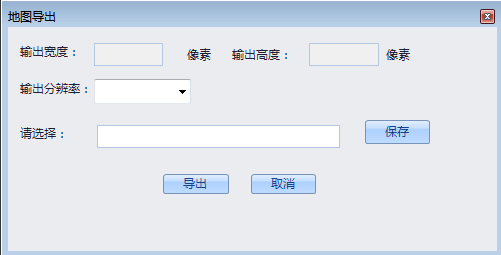
具体的设置代码如下:
 public partial class ExportMapForm : DevExpress.XtraEditors.XtraForm

     {

         //定义全局变量

         private string pSavePath = "";

         private IActiveView pActiveView;

         private IGeometry pGeometry = null;

         #region 只读属性,地图导出空间图形

         public IGeometry GetGeometry

         {

             set { pGeometry = value; }

         }

         private bool bRegion = true;

         #endregion

         /// <summary>

         /// 只读属性,是全域导出还是区域导出

         /// </summary>

         public bool IsRegion

         {

             set { bRegion = value; }

         }

         //获取主窗口的MapControl控件

         public ExportMapForm(AxMapControl mainAxMapControl)

         {

             InitializeComponent();

             pActiveView = mainAxMapControl.ActiveView;

         }

         private void ExportMapForm_Load(object sender, EventArgs e)

         {

         }

         #region 输入窗口的大小

         private void InitFormSize()

         {

             cboResoultion.Text = pActiveView.ScreenDisplay.DisplayTransformation.Resolution.ToString();

             cboResoultion.Items.Add(cboResoultion.Text);

             if (bRegion)

             {

                 IEnvelope pEnvelop = pGeometry.Envelope;

                 tagRECT pRECT = new tagRECT();

                 pActiveView.ScreenDisplay.DisplayTransformation.TransformRect(pEnvelop, ref pRECT,);

                 if (cboResoultion.Text != "")

                 {

                     txtWidth.Text = pRECT.right.ToString();

                     txtHeight.Text = pRECT.bottom.ToString();

                 }

             }

             else

             {

                 if (cboResoultion.Text != "")

                 {

                     txtWidth.Text = pActiveView.ExportFrame.right.ToString();

                     txtHeight.Text = pActiveView.ExportFrame.bottom.ToString();

                 }

             }

         }

         #endregion

         #region combox的ChangeIndex事件

         private void cboResoultion_SelectedIndexChanged(object sender, EventArgs e)

         {

             double num = (int)Math.Round(pActiveView.ScreenDisplay.DisplayTransformation.Resolution);

             if (cboResoultion.Text == "")

             {

                 txtWidth.Text = "";

                 txtHeight.Text = "";

                 return;

             }

             if (bRegion)

             {

                 IEnvelope pEnvelop = pGeometry.Envelope;

                 tagRECT pRECT = new tagRECT();

                 pActiveView.ScreenDisplay.DisplayTransformation.TransformRect(pEnvelop, ref pRECT,);

                 if (cboResoultion.Text != "")

                 {

                     txtWidth.Text = Math.Round((double)(pRECT.right * (double.Parse(cboResoultion.Text) / (double)num))).ToString();

                 }

             }

             else

             {

                 txtWidth.Text = Math.Round((double)(pActiveView.ExportFrame.right * (double.Parse(cboResoultion.Text) / (double)num))).ToString();

                 txtHeight.Text = Math.Round((double)(pActiveView.ExportFrame.bottom * (double.Parse(cboResoultion.Text) / (double)num))).ToString();

             }

         }

         #endregion

         #region 保存按钮的单击事件

         private void btnExPath_Click(object sender, EventArgs e)

         {

             SaveFileDialog sfdExportMap = new SaveFileDialog();

             sfdExportMap.DefaultExt = "jpg|bmp|gif|tif|png|pdf";

             sfdExportMap.Filter = "JPGE 文件(*.jpg)|*.jpg|BMP 文件(*.bmp)|*.bmp|GIF 文件(*.gif)|*.gif|TIF 文件(*.tif)|*.tif|PNG 文件(*.png)|*.png|PDF 文件(*.pdf)|*.pdf";

             sfdExportMap.OverwritePrompt = true;//重复写入时提示错误

             sfdExportMap.Title = "保存为";

             txtExPath.Text = "";

             if (sfdExportMap.ShowDialog() != DialogResult.Cancel)

             {

                 pSavePath = sfdExportMap.FileName;

                 txtExPath.Text = sfdExportMap.FileName;

             }

         }

         #endregion

         #region 导出按钮单击事件

         private void btnExPort_Click(object sender, EventArgs e)

         {

             if (txtExPath.Text == "")

             {

                 MessageBox.Show("请先确定导出路径!", "提示", MessageBoxButtons.OK, MessageBoxIcon.Information);

                 return;

             }

             else if (cboResoultion.Text == "")

             {

                 if (txtExPath.Text == "")

                 {

                     MessageBox.Show("请输入分辨率!", "提示", MessageBoxButtons.OK, MessageBoxIcon.Information);

                     return;

                 }

             }

             else if (Convert.ToInt16(cboResoultion.Text) == )

             {

                 MessageBox.Show("请正确输入分辨率!", "提示", MessageBoxButtons.OK, MessageBoxIcon.Information);

                 return;

             }

             else

             {

                 try

                 {

                     int resoultion = int.Parse(cboResoultion.Text);//输出图片的分辨率

                     int width = int.Parse(cboResoultion.Text);//输出图片的宽度

                     int height = int.Parse(cboResoultion.Text);//输出图片的高度

                     ExportMap.ExportView(pActiveView, pGeometry, resoultion, width, height, pSavePath, bRegion);

                     pActiveView.GraphicsContainer.DeleteAllElements();

                     pActiveView.Refresh();

                     MessageBox.Show("导出成功!", "提示", MessageBoxButtons.OK, MessageBoxIcon.Information);

                 }

                 catch (Exception)

                 {

                     MessageBox.Show("导出失败!", "提示", MessageBoxButtons.OK, MessageBoxIcon.Information);

                 }

             }

         }

         #endregion

         #region 取消按钮的单击事件

         private void btnCancel_Click(object sender, EventArgs e)

         {

             //局部导出时没有导出图像就退出

             pActiveView.GraphicsContainer.DeleteAllElements();

             pActiveView.Refresh();

             Dispose();

         }

         #endregion

         #region 图片导出窗口Close事件

         private void ExportMapForm_FormClosed(object sender, FormClosedEventArgs e)

         {

             //局部导出时没有导出图像就关闭

             pActiveView.GraphicsContainer.DeleteAllElements();

             pActiveView.Refresh();

             Dispose();

         }

         #endregion
3.在main窗体中进行实例化输出窗体:private ExportMapForm frmExpMap = null;
4.在MainMap Control_OnMouseDown中进行写入case:(只适合区域导出,单击选择边框)
 #region 地图的区域导出

                     case "ExportRegion":

                         //删除视图中的数据

                         mainMapControl.ActiveView.GraphicsContainer.DeleteAllElements();

                         mainMapControl.ActiveView.Refresh();

                         IPolygon pPolygon = DrawPolygon(mainMapControl);

                         if (pPolygon == null) return;

                         ExportMap.AddElement(pPolygon, mainMapControl.ActiveView);

                         if (frmExpMap == null || frmExpMap.IsDisposed)

                         {

                             frmExpMap = new ExportMapForm(mainMapControl);

                         }

                         frmExpMap.IsRegion = true;

                         frmExpMap.GetGeometry = pPolygon as IGeometry;

                         frmExpMap.Show();

                         frmExpMap.Activate();

                         break;

                     #endregion
5.全域导出和区域导出按钮的单击事件代码:
       #region 地图导出之全域导出

         private void btnExportMap_ItemClick(object sender, ItemClickEventArgs e)

         {

             if (frmExpMap == null || frmExpMap.IsDisposed)

             {

                 frmExpMap = new ExportMapForm(mainMapControl);

             }

             frmExpMap.IsRegion = false;

             frmExpMap.GetGeometry = mainMapControl.ActiveView.Extent;

             frmExpMap.Show();

             frmExpMap.Activate();

         }

         #endregion

         #region 地图导出之区域导出

         private void btnExportRegionMap_ItemClick(object sender, ItemClickEventArgs e)

         {

             mainMapControl.CurrentTool = null;

             mainMapControl.MousePointer = esriControlsMousePointer.esriPointerCrosshair;

             pMouseOperate = "ExportRegion";

         }

         #endregion
ArcGIS Engine开发之地图导出的更多相关文章
- ArcGIS Engine开发之地图基本操作(4)
ArcGIS Engine开发中数据库的加载 1.加载个人地理数据库数据 个人地理数据库(Personal Geodatabase)使用Miscrosoft Access文件(*.mdb)进行空间数据 ...
- ArcGIS Engine开发之地图基本操作(3)
地图数据的加载 一.加载Shapefile数据 Shapefile文件是目前主流的一种空间数据的文件存储方式,也是不同GIS软件进行数据格式转换常用的中间格式.加载Shapefile数据的方式有两种: ...
- ArcGIS Engine开发之地图基本操作(2)
地图数据的加载 1.加载地图文档 ArcGIS Engine支持加载多种类型的数据,有矢量数据的Coverage.Shapefile.dwg/dxf文件,栅格数据的BMP.GRID.控件数据库等.很多 ...
- ArcGIS Engine开发之地图基本操作(1)
ArcGIS提供的各类数据形式以及相应接口 1. 空间数据 在GIS软件中,空间数据有多种不同的形式存在.按照不同的划分标准可以分为矢量数据和栅格数据.GIS格式数据和非GIS格式数据(CAD格式). ...
- ArcGIS Engine开发之地图浏览
地图的浏览功能包括缩放.移动.量测旋转等. 1.放大与缩小 无论是放大还是缩小,都是通过改变MapControl中当前视图的范围Extent属性来实现的,主要用到包络线(Envelope)类. 包络线 ...
- ArcGIS Engine开发前基础知识(2)
ArcGIS基本控件简介 ArcGIS Engine控件是一组可视化的开发组件,每个ArcGIS Engine控件都是一个COM组件.这些组件包括MapControl,PageLayoutContro ...
- C#,ArcGIS Engine开发入门教程
C#,ArcGIS Engine开发入门教程 转自:http://blog.csdn.net/yanleigis/article/details/2233674 目录(?)[+] 五实现 一 加载A ...
- ArcGIS Engine开发基础总结(一)
标准Engine功能 地图浏览 地图制作 数据查询 数据分析 及 所有的开发控件 —MapControl, PageLayout, Toolbar, TOC, ArcReader 对所有矢量和栅 ...
- ArcGIS Engine开发鹰眼图的功能(基础篇)
鹰眼是用于调节全视域范围内主地图显示范围情况的副地图.它体现了地图整体与详细局部的关系. 用户可以通过鼠标单击或者画框等动作实现鹰眼与主地图的交互情况. 鹰眼功能的原理是通过主地图窗口的地图控件和鹰眼 ...
随机推荐
- ubuntu进行子域名爆破
好记性不如烂笔头,此处记录一下,ubuntu进行子域名的爆破. 先记录一个在线的子域名爆破网址,无意中发现,很不错的网址,界面很干净,作者也很用心,很感谢. https://phpinfo.me/do ...
- 关于Hadoop用户体系的设想(胡思乱想)
关于Hadoop的用户体系设计设想 Hadoop并没有一个完整的用户体系,其权限控制的对象,主要是Linux的其它用户(即非安装Hadoop的用户),控制方式也和Linux的文件权限很像,目前权限控制 ...
- Visual Studio Code预览版Ver 0.3.0试用体验
当你开始阅读这篇文章时,请先不要把Visual Studio Code和.net.Windows联想到一起,因为VS Code是一个跨平台,支持30多种语言的开箱代码编辑器.不管你是.Net.Java ...
- Java在DOS命令下的运行及其API文档制作过程
该文档主要描述java程序在DOS命令下的运行,以及一些常用的命令 常用DOS命令: d: 回车 盘符切换 dir(directory):列出当前目录下的文件以及文件夹 md (make direct ...
- es6之let和const
在javascript中,我们都知道使用var来声明变量.javascript是函数级作用域,函数内可以访问函数外的变量,函数外不能访问函数内的变量. 函数级作用域会导致一些问题就是某些代码块内的变量 ...
- ★Kali信息收集~2.Whois :域名信息
Web地址:http://whois.chinaz.com/ | http://www.whois.net/ 软件参数:whois 常用命令:whois 域名 (重点看whois server和R ...
- 05.GitHub实战系列~5.发布版本之分支操作+Tag讲解 2015-12-14
GitHub实战系列汇总:http://www.cnblogs.com/dunitian/p/5038719.html ———————————————————————————————————————— ...
- Javascript的“上下文”(context)
一:JavaScript中的“上下文“指的是什么 百科中这样定义: 上下文是从英文context翻译过来,指的是一种环境. 在软件工程中,上下文是一种属性的有序序列,它们为驻留在环境内的对象定义环境. ...
- ITTC数据挖掘平台介绍(五) 数据导入导出向导和报告生成
一. 前言 经过了一个多月的努力,软件系统又添加了不少新功能.这些功能包括非常实用的数据导入导出,对触摸进行优化的画布和画笔工具,以及对一些智能分析的报告生成模块等.进一步加强了平台系统级的功能. 马 ...
- [SQL] SQL 基础知识梳理(二) - 查询基础
SQL 基础知识梳理(二) - 查询基础 [博主]反骨仔 [原文]http://www.cnblogs.com/liqingwen/p/5904824.html 序 这是<SQL 基础知识梳理( ...