
MVVM框架下,WPF实现Datagrid里的全选和选择
最近的一个项目是用MVVM实现,在实现功能的时候,就会有一些东西,和以前有很大的区别,项目中就用到了常用的序号,就是在Datagrid里的一个字段,用checkbox来实现。
既然是MVVM,就要用到ModleView,View和Model三层。
先看一下效果
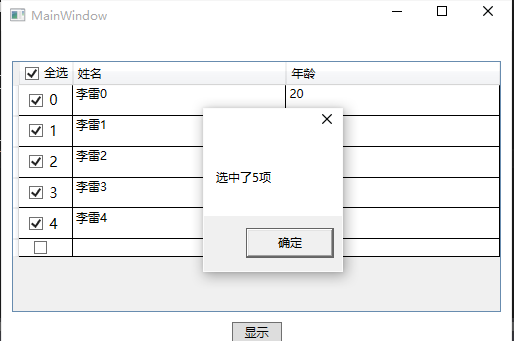
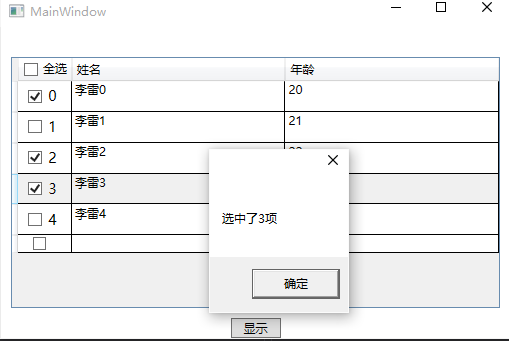
当然,也可以确定是哪一项被选中了,这个代码里有。
实现这个全选功能,用到了三个DLL文件,分别为GalaSoft.MvvmLight.Extras.WPF4.dll,GalaSoft.MvvmLight.WPF4.dll,System.Windows.Interactivity.dll
Model曾需要实现INotifyPropertyChanged接口,以方便向客户端通知属性被更改了
public class MainModel:INotifyPropertyChanged

    {

        public event PropertyChangedEventHandler PropertyChanged;

        private void INotifyPropertyChanged(string name)

        {

            if (PropertyChanged != null)

            {

                PropertyChanged(this, new PropertyChangedEventArgs(name));

            }

        }

        private int xh;

        public int Xh

        {

            get { return xh; }

            set { xh = value; }

        }

        private string name;

        public string Name

        {

            get { return name; }

            set { name = value;

            INotifyPropertyChanged("Name");

            }

        }

        private int age;

        public int Age

        {

            get { return age; }

            set { age = value;

            INotifyPropertyChanged("Age");

            }

        }

        private bool isSelected;

        public bool IsSelected

        {

            get { return isSelected; }

            set { isSelected = value;

            INotifyPropertyChanged("IsSelected");

            }

        }

    }
Model
Model层里除了Datagrid里显示的序号,姓名和年龄意外,还有一个就是IsSelected,是用来确定是否选中的。
ViewModel层继承ViewModelBase,它来自GalaSoft.MvvmLight命名空间,重点是用到了里面的RaisePropertyChanged
全选的checkbox和下面选中的checkbox是分开来写的,各自有各自的Command,选中和不选中都有,IsSelectAll是用来标识是不是全选中
public class MainViewModel : ViewModelBase

    {

        public MainViewModel()

        {

            DataGridBaseInfo = AddDataGridInfo();

        }

        /// <summary>

        /// 给Datagrid绑定的属性

        /// </summary>

        private List<MainModel> dataGridBaseInfo;

        public List<MainModel> DataGridBaseInfo

        {

            get { return dataGridBaseInfo; }

            set

            {

                dataGridBaseInfo = value;

                RaisePropertyChanged("DataGridBaseInfo");

            }

        }

        /// <summary>

        /// 显示按钮

        /// </summary>

        private RelayCommand buttonCommand;

        public RelayCommand ButtonCommand

        {

            get

            {

                return buttonCommand ?? (buttonCommand = new RelayCommand(

                    () =>

                    {

                        int count = DataGridBaseInfo.ToList().FindAll(p => p.IsSelected == true).Count;

                        MessageBox.Show("选中了" + count + "项");

                        //for (int i = 0; i < count; i++)

                        //    MessageBox.Show(DataGridBaseInfo.ToList().FindAll(p=>p.IsSelected==true)[i].Name + "," + DataGridBaseInfo.ToList().FindAll(p=>p.IsSelected==true)[i].Age);

                    }));

            }

        }

        public List<MainModel> AddDataGridInfo()

        {

            MainModel model;

            List<MainModel> list = new List<MainModel>();

            for (int i = ; i < ; i++)

            {

                model = new MainModel();

                model.Xh = i;

                model.Name = "李雷" + i;

                model.Age =  + i;

                list.Add(model);

            }

            return list;

        }

        /// <summary>

        /// 选中

        /// </summary>

        private RelayCommand selectCommand;

        public RelayCommand SelectCommand

        {

            get

            {

                return selectCommand ?? (selectCommand = new RelayCommand(

                    () =>

                    {

                        int selectCount = DataGridBaseInfo.ToList().Count(p => p.IsSelected == false);

                        if (selectCount.Equals())

                        {

                            IsSelectAll = true;

                        }

                    }));

            }

        }

        /// <summary>

        /// 取消选中

        /// </summary>

        private RelayCommand unSelectCommand;

        public RelayCommand UnSelectCommand

        {

            get

            {

                return unSelectCommand ?? (unSelectCommand = new RelayCommand(

                    () =>

                    {

                        IsSelectAll = false;

                    }));

            }

        }

        private bool isSelectAll = false;

        public bool IsSelectAll

        {

            get { return isSelectAll; }

            set

            {

                isSelectAll = value;

                RaisePropertyChanged("IsSelectAll");

            }

        }

        /// <summary>

        /// 选中全部

        /// </summary>

        private RelayCommand selectAllCommand;

        public RelayCommand SelectAllCommand

        {

            get

            {

                return selectAllCommand ?? (selectAllCommand = new RelayCommand(ExecuteSelectAllCommand, CanExecuteSelectAllCommand));

            }

        }

        private void ExecuteSelectAllCommand()

        {

            if (DataGridBaseInfo.Count < ) return;

            DataGridBaseInfo.ToList().FindAll(p => p.IsSelected = true);

        }

        private bool CanExecuteSelectAllCommand()

        {

            if (DataGridBaseInfo != null)

            {

                return DataGridBaseInfo.Count > ;

            }

            else

                return false;

        }

        /// <summary>

        /// 取消全部选中

        /// </summary>

        private RelayCommand unSelectAllCommand;

        public RelayCommand UnSelectAllCommand

        {

            get { return unSelectAllCommand ?? (unSelectAllCommand = new RelayCommand(ExecuteUnSelectAllCommand, CanExecuteUnSelectAllCommand)); }

        }

        private void ExecuteUnSelectAllCommand()

        {

            if (DataGridBaseInfo.Count < )

                return;

            if (DataGridBaseInfo.ToList().FindAll(p => p.IsSelected == false).Count != )

                IsSelectAll = false;

            else

                DataGridBaseInfo.ToList().FindAll(p => p.IsSelected = false);

        }

        private bool CanExecuteUnSelectAllCommand()

        {

            if (DataGridBaseInfo != null)

            {

                return DataGridBaseInfo.Count > ;

            }

            else

            {

                return false;

            }

        }

    }
ViewModel
View层需要 xmlns:i="http://schemas.microsoft.com/expression/2010/interactivity" ,xmlns:Custom="http://www.galasoft.ch/mvvmlight" 两个命名空间
由于序号是绑定过来的,因此是用了stackpanel把checkbox和label放到了一起
<Grid>

        <Grid.RowDefinitions>

            <RowDefinition Height="20"/>

            <RowDefinition Height="*"/>

            <RowDefinition Height="20"/>

        </Grid.RowDefinitions>

        <DataGrid Grid.Row="1" ItemsSource="{Binding DataGridBaseInfo, Mode=TwoWay}" Margin="10" AutoGenerateColumns="False">

            <DataGrid.Columns>

                <DataGridTemplateColumn>

                    <DataGridTemplateColumn.Header>

                        <CheckBox Content="全选" IsChecked="{Binding IsSelectAll,Mode=TwoWay,UpdateSourceTrigger=PropertyChanged}">

                            <i:Interaction.Triggers>

                                    <i:EventTrigger EventName="Checked">

                                        <Custom:EventToCommand Command="{Binding DataContext.SelectAllCommand, RelativeSource={RelativeSource AncestorType={x:Type DataGrid}}}" CommandParameter="{Binding IsSelectAll, ElementName=qx}"/>

                                    </i:EventTrigger>

                                    <i:EventTrigger EventName="Unchecked">

                                        <Custom:EventToCommand Command="{Binding DataContext.UnSelectAllCommand,  RelativeSource={RelativeSource AncestorType={x:Type DataGrid}}}" CommandParameter="{Binding IsSelectAll, ElementName=qx}"/>

                                    </i:EventTrigger>

                            </i:Interaction.Triggers>

                        </CheckBox>

                    </DataGridTemplateColumn.Header>

                    <DataGridTemplateColumn.CellTemplate>

                        <DataTemplate>

                            <StackPanel Orientation="Horizontal" HorizontalAlignment="Center" VerticalAlignment="Center">

                                <CheckBox x:Name="cbXh"  VerticalAlignment="Center" IsChecked="{Binding IsSelected, Mode=TwoWay, UpdateSourceTrigger=PropertyChanged}">

                                    <i:Interaction.Triggers>

                                        <i:EventTrigger EventName="Checked">

                                            <Custom:EventToCommand Command="{Binding DataContext.SelectCommand, RelativeSource={RelativeSource AncestorType={x:Type DataGrid}}}" CommandParameter="{Binding IsChecked, ElementName=cbXh}"/>

                                        </i:EventTrigger>

                                        <i:EventTrigger EventName="Unchecked">

                                            <Custom:EventToCommand Command="{Binding DataContext.UnSelectCommand,  RelativeSource={RelativeSource AncestorType={x:Type DataGrid}}}" CommandParameter="{Binding IsChecked, ElementName=cbXh}"/>

                                        </i:EventTrigger>

                                    </i:Interaction.Triggers>

                                </CheckBox>

                                <Label Content="{Binding Xh}" FontSize="14"/>

                            </StackPanel>

                        </DataTemplate>

                    </DataGridTemplateColumn.CellTemplate>

                </DataGridTemplateColumn>

                <DataGridTextColumn Header="姓名" Binding="{Binding Name}" Width="*"/>

                <DataGridTextColumn Header="年龄" Binding="{Binding Age}" Width="*"/>

            </DataGrid.Columns>

        </DataGrid>

        <Button Content="显示" Grid.Row="2" Width="50" Command="{Binding ButtonCommand}"/>

    </Grid>
View
当时实现这个功能的时候也花了不少时间,希望给需要的人一点帮助。
MVVM框架下,WPF实现Datagrid里的全选和选择的更多相关文章
- MVVM框架下 WPF隐藏DataGrid一列
最近的一个项目,需要在部分用户登录的时候,隐藏DataGrid中的一列,但是常规的绑定不好使,在下面举个例子. XAML部分代码 <Window x:Class="DataGridCo ...
- MVVM框架从WPF移植到UWP遇到的问题和解决方法
MVVM框架从WPF移植到UWP遇到的问题和解决方法 0x00 起因 这几天开始学习UWP了,之前有WPF经验,所以总体感觉还可以,看了一些基础概念和主题,写了几个测试程序,突然想起来了前一段时间在W ...
- MVVM模式下WPF动态绑定展示图片
MVVM模式下WPF动态展示图片,界面选择图标,复制到项目中固定目录下面,保存到数据库的是相对路径,再次读取的时候是根据数据库的相对路径去获取项目中绝对路径的图片展示. 首先在ViewModel中 / ...
- easyui datagrid里的复选框置灰方法
easyui datagrid里的复选框置灰方法: $('.datagrid input').prop('disabled',true);//复选框置灰
- wpf DataGrid CheckBox列全选
最近在wpf项目中遇到当DataGrid的header中的checkbox选中,让该列的checkbox全选问题,为了不让程序员写自己的一堆事件,现写了一个自己的自定义控件 在DataGrid的 &l ...
- WPF MVVM框架下,VM界面写控件
MVVM正常就是在View页面写样式,ViewModel页面写逻辑,但是有的时候纯在View页面写样式并不能满足需求.我最近的这个项目就遇到了,因此只能在VM页面去写样式控件,然后绑定到View页面. ...
- 关于使用MVVM模式在WPF的DataGrid控件中实现ComboBox编辑列
最近在做一个组态软件的项目,有一个需求需要在建立IO设备变量的时候选择变量的类型等. 建立IO变量的界面是一个DataGrid实现的,可以一行一行的新建变量,如下如所示: 这里需要使用带有ComboB ...
- mvvm框架下页面与ViewModel的各种参数传递方式
传单个参数的话在xaml用 Command={Binding ViewModel的事件处理名称} CommandParameter={Binding 要传递的控件名称} ViewMode ...
- 【WPF】一组CheckBox的全选/全不选功能
需求:给一组CheckBox做一个全选/全不选的按钮. 思路:CheckBox不像RadioButton那样拥有GroupName属性来分组,于是我想的方法是将这组CheckBox放到一个布局容器中, ...
随机推荐
- BZOJ 2152 & 点分治
Description: 只是打法法塔前测试一下板子 Code: /*================================= # Created time: 2016-04-20 14:3 ...
- 谷歌浏览器如何查看或获取Cookie字符串
注:此博客仅供非web开发人员查看,以下内容都基于谷歌浏览器. 在网页空白处点击鼠标右键,在弹出菜单中选择[审查元素],可以看到网页下方出现审查元素相关界面. 在审查元素相关界面,点击[Network ...
- AppDomain对于静态对象的独享引用
AppDomain可以理解为一个独立的沙箱,当有独立的第静态对象在appDomain中被访问时,会在appDomain中产生独立的内存对象.比如appDomain1 appDomain2同时对 静态对 ...
- .net工具
程序名称 作者 说明 文件结构与元数据查看看 AssemblyView1.0 可以查看.net平台下exe,dll源代码的类结构,比如变量,属性,函数,事件的定义. Anakrino 源代码开 ...
- 【转】你所不知道的Android Studio调试技巧
这篇写Android studio debug技巧个人觉得写得不错,转自:http://www.jianshu.com/p/011eb88f4e0d# Android Studio目前已经成为开发An ...
- TP5与TP3.X对比
首先声明本章节并非是指导升级旧的项目到5.0,而是为了使用3.X版本的开发者更快的熟悉并上手这个全新的版本.同时也强烈建议开发者抛弃之前旧的思维模式,因为5.0是一个全新的颠覆重构版本. 需要摒弃的3 ...
- java的poi技术读取和导入Excel
项目结构: http://www.cnblogs.com/hongten/gallery/image/111987.html 用到的Excel文件: http://www.cnblogs.com/h ...
- 今年第一季全球PC出貨量同比下降5.2%
市場調研公司Gartner上周發佈報告稱,隨著企業支出的下滑,今年第一季全球PC出貨量同比下降5.2%迪士尼美語評價.英特爾稱,第一季筆記本晶片出貨量同比增長3%,但是筆記本晶片的平均銷售價格下降了3 ...
- java身份证验证
import java.text.ParseException; import java.text.SimpleDateFormat; import java.util.Calendar; impor ...
- 6.数组和Hash表
当显示多条结果时,存储在变量中非常智能,变量类型会自动转换为一个数组. 在下面的例子中,使用GetType()可以看到$a变量已经不是我们常见的string或int类型,而是Object类型,使用-i ...