
今天遇到的一些关于vsftp的坑!!!
起因:最近在捣鼓Linux,配置vsftp的时候发现权限问题很坑,头疼了一天,发现了一点小问题
常见的身份验证方式:
1.使用系统的用户认证
例如vsftp这种软件,如果想建立一个可以登录FTP的用户我们建议不要给予该用户可以登录系统shell的权限
useradd -s /sbin/nologin xxx

使用段代码我们可以指定该用户没有登录系统shell的权限但是他可以作为一个用户登录FTP,默认情况下该用户登录到FTP服务器的目录实在自己的家目录下,那我们如果想给用户指定他登录到FTP服务所在的固定目录,那我们可以在新建用户的时候加入-d参数指定用户的家目录就可以实现
2.使用软件本身的身份验证机制
例如samba这样的软件,他虽然也需要在Linux系统建立用户但是真正的身份验证服务是由samba本身提供的,我们只需要在系统上建立账户然后使用smbpasswd -a给新建的用户创建密码
3.使用有公信力的第三方机构
例如Kerberos这样的认证服务器,也可以提供身份认证
接下来说我遇到的坑
放上小弟的配置文件
# Example config file /etc/vsftpd/vsftpd.conf

#

# The default compiled in settings are fairly paranoid. This sample file

# loosens things up a bit, to make the ftp daemon more usable.

# Please see vsftpd.conf. for all compiled in defaults.

#

# READ THIS: This example file is NOT an exhaustive list of vsftpd options.

# Please read the vsftpd.conf. manual page to get a full idea of vsftpd's

# capabilities.

#

# Allow anonymous FTP? (Beware - allowed by default if you comment this out).

anonymous_enable=NO

allow_writeable_chroot=YES

# Uncomment this to allow local users to log in.

# When SELinux is enforcing check for SE bool ftp_home_dir

local_enable=YES

#

# Uncomment this to enable any form of FTP write command.

write_enable=YES

#

# Default umask for local users is . You may wish to change this to ,

# if your users expect that ( is used by most other ftpd's)

local_umask=

#

# Uncomment this to allow the anonymous FTP user to upload files. This only

# has an effect if the above global write enable is activated. Also, you will

# obviously need to create a directory writable by the FTP user.

# When SELinux is enforcing check for SE bool allow_ftpd_anon_write, allow_ftpd_full_access

anon_upload_enable=YES

#

# Uncomment this if you want the anonymous FTP user to be able to create

# new directories.

anon_mkdir_write_enable=YES

#

# Activate directory messages - messages given to remote users when they

# go into a certain directory.

dirmessage_enable=YES

#

# Activate logging of uploads/downloads.

xferlog_enable=YES

#

# Make sure PORT transfer connections originate from port  (ftp-data).

connect_from_port_20=YES

#

# If you want, you can arrange for uploaded anonymous files to be owned by

# a different user. Note! Using "root" for uploaded files is not

# recommended!

# chown_uploads=YES

# chown_username=whoever

#

# You may override where the log file goes if you like. The default is shown

# below.

xferlog_file=/var/log/xferlog

#

# If you want, you can have your log file in standard ftpd xferlog format.

# Note that the default log file location is /var/log/xferlog in this case.

xferlog_std_format=YES

#

# You may change the default value for timing out an idle session.

#idle_session_timeout=

#

# You may change the default value for timing out a data connection.

#data_connection_timeout=

#

# It is recommended that you define on your system a unique user which the

# ftp server can use as a totally isolated and unprivileged user.

#nopriv_user=ftpsecure

#

# Enable this and the server will recognise asynchronous ABOR requests. Not

# recommended for security (the code is non-trivial). Not enabling it,

# however, may confuse older FTP clients.

#async_abor_enable=YES

#

# By default the server will pretend to allow ASCII mode but in fact ignore

# the request. Turn on the below options to have the server actually do ASCII

# mangling on files when in ASCII mode. The vsftpd.conf() man page explains

# the behaviour when these options are disabled.

# Beware that on some FTP servers, ASCII support allows a denial of service

# attack (DoS) via the command "SIZE /big/file" in ASCII mode. vsftpd

# predicted this attack and has always been safe, reporting the size of the

# raw file.

# ASCII mangling is a horrible feature of the protocol.

#ascii_upload_enable=YES

#ascii_download_enable=YES

#

# You may fully customise the login banner string:

#ftpd_banner=Welcome to blah FTP service.

#

# You may specify a file of disallowed anonymous e-mail addresses. Apparently

# useful for combatting certain DoS attacks.

#deny_email_enable=YES

# (default follows)

#banned_email_file=/etc/vsftpd/banned_emails

#

# You may specify an explicit list of local users to chroot() to their home

# directory. If chroot_local_user is YES, then this list becomes a list of

# users to NOT chroot().

# (Warning! chroot'ing can be very dangerous. If using chroot, make sure that

# the user does not have write access to the top level directory within the

# chroot)

chroot_local_user=YES

local_root=/var/ftp

#chroot_list_enable=YES

# (default follows)

#chroot_list_file=/etc/vsftpd/chroot_list

#

# You may activate the "-R" option to the builtin ls. This is disabled by

# default to avoid remote users being able to cause excessive I/O on large

# sites. However, some broken FTP clients such as "ncftp" and "mirror" assume

# the presence of the "-R" option, so there is a strong case for enabling it.

#ls_recurse_enable=YES

#

# When "listen" directive is enabled, vsftpd runs in standalone mode and

# listens on IPv4 sockets. This directive cannot be used in conjunction

# with the listen_ipv6 directive.

listen=NO

#

# This directive enables listening on IPv6 sockets. By default, listening

# on the IPv6 "any" address (::) will accept connections from both IPv6

# and IPv4 clients. It is not necessary to listen on *both* IPv4 and IPv6

# sockets. If you want that (perhaps because you want to listen on specific

# addresses) then you must run two copies of vsftpd with two configuration

# files.

# Make sure, that one of the listen options is commented !!

listen_ipv6=YES

pam_service_name=vsftpd

userlist_enable=NO

tcp_wrappers=YES
关于文件夹的属主和属组

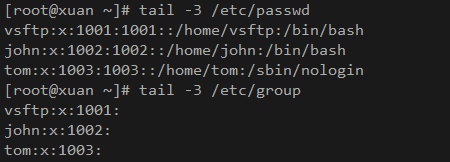
本人实测的两个Linux系统,Ubuntu16.04和redhat7.6
在Ubuntu里面安装vsftp成功之后默认创建的用户和组都是ftp
而Redhat默认创建的用户和组是vsftp

Ubuntu
Redhat
本人一直觉得不能因为方便就把selinux关了,所以经过测试,只有打开ftpd_full_access的bool值设置为on的时候可以实现正常的ftp功能,如果要允许任意用户上传文件的话需要打开ftpd_anon_write,如果要使用FTP的被动模式需要打开ftpd_use_passive_mode
打开的语句可以参照
setsebool -P ftpd_full_access

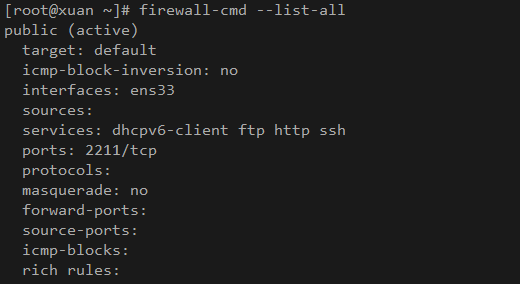
同理我们也要在防火墙上放行FTP这个服务
命令参考
firewall-cmd --add-service=ftp

firewall-cmd --add-service=ftp --permanent

firewall-cmd --reload
如上第一条是临时放行FTP服务,重启之后失效,第二条是写进底层,重启之后任然生效但是必须重启才可以生效,所以一二条搭配使用,或者执行二三条也可以达到同样的效果
然后就是关于目录的文件夹权限设置,在Redhat上推荐把/var/ftp目录的权限设置为755,属主和属组设置成vsftp
本地用户上传的文件权限一般为644,文件夹一般为755,这是因为配置文件中默认的权限掩码umask=022的作用
暂时就这些,大佬们多多指正

今天遇到的一些关于vsftp的坑!!!的更多相关文章
- 记一次搭建vsftp服务器坑
避免踩坑,特此记录... yum -y install vsftpd useradd -d /www -s /sbin/nologin sui # 修改vsftpd配置文件/etc/vsftpd/vs ...
- vsftp新建用户及目录时遇到的坑
1.有关vsftp配置及用户权限设置,请参考: http://blog.sina.com.cn/s/blog_3edc5e2e0102vzv8.html 2.需求:公司另一部门要求单独建一目录,来存在 ...
- asp.net core 简单部署之FTP配置(CentOS 7.0安装配置Vsftp服务器)
配置过程原文地址:http://www.osyunwei.com/archives/9006.html 坑和结果 正确的跟着这个内容走,是靠谱的. 我自己给自己踩了个坑,请参照文章的朋友注意第七条:七 ...
- 记一次ftp服务器搭建走过的坑
记一次ftp服务器搭建走过的坑 1.安装 ①下载 wget https://security.appspot.com/downloads/vsftpd-3.0.3.tar.gz #要FQ ②解压 ta ...
- centos7之vsftp安装和使用
日常用作中,我们常用的是windows的共享,但是我们都知道windows运行不稳定.原来我们用的是centos6.5上的vsftpd,最近决定把centos6.*上的服务都移植到centos7上,好 ...
- linux与ubuntu下vsftp的安装使用
vsftp工具是linux与类linux系统上常用的ftp传输工具,按百度上的说法,它的不同点与好处有九点,不明觉厉,有兴趣的可以深入验证: 一.它是一个安全.高速.稳定的FTP服务器: 二.它可以做 ...
- linux入门系列15--文件传输之vsftp服务
前面的系列文章基本讲完了linux管理相关的基础知识,从本篇开始讲解centos7中服务程序的部署和配置,以便为外部提供各种服务. 日常工作和娱乐中,我们所需的各种资源都离不开网络以及各种服务,我们通 ...
- 如何一步一步用DDD设计一个电商网站(九)—— 小心陷入值对象持久化的坑
阅读目录 前言 场景1的思考 场景2的思考 避坑方式 实践 结语 一.前言 在上一篇中(如何一步一步用DDD设计一个电商网站(八)—— 会员价的集成),有一行注释的代码: public interfa ...
- 多线程爬坑之路-Thread和Runable源码解析之基本方法的运用实例
前面的文章:多线程爬坑之路-学习多线程需要来了解哪些东西?(concurrent并发包的数据结构和线程池,Locks锁,Atomic原子类) 多线程爬坑之路-Thread和Runable源码解析 前面 ...
随机推荐
- Wordpress未授权查看私密内容漏洞 分析(CVE-2019-17671)
目录 0x00 前言 0x01 分析 0x02 思考 0x03 总结 0x04 参考 0x00 前言 没有 0x01 分析 这个漏洞被描述为"匿名用户可访问私密page",由此推断 ...
- day20191106
笔记: 一.#{}和${}的区别是什么 1)#{}是预编译处理,${}是字符串替换.2)Mybatis 在处理#{}时,会将 sql 中的#{}替换为?号,调用 PreparedStatement 的 ...
- re实战记录
re实战记录 针对网页中的空格符 一般使用的.,但是它不能匹配\n,所以使用[\s\S]或者[\d\D]匹配所有字符 import re l1=r''' <div class="thu ...
- java 算法之 两个字符串中最大相同的子串
public class String_intern { public static void main(String[] args) { String old="aaaaabc1" ...
- 关于软件定义IT基础设施的未来,深信服是这么思考的
在今年的深信服创新大会上,软件定义IT基础设施成为非常重要的议题之一,深信服与2,000余位客户的CIO和合作伙伴一起围绕IT基础设施在数字化时代中的作用与价值进行了深入的探讨. 此外,深信服还联合I ...
- MySQL必知必会(创建计算字段(field))
#字段(field)基本上和列(column)的意思相同 SELECT Concat(vend_name, ' (', vend_country, ')') FROM vendors ORDER BY ...
- python实现十大核心算法(桶排没实例)
# author:sevenduke # 2019-06-11 # 一.交换排序 # 排序算法的温故:冒泡排序 def dubblesort(arr): for i in range(0, len(a ...
- openlayers5-webpack 入门开发系列结合 echarts4 实现散点图(附源码下载)
前言 openlayers5-webpack 入门开发系列环境知识点了解: node 安装包下载webpack 打包管理工具需要依赖 node 环境,所以 node 安装包必须安装,上面链接是官网下载 ...
- Selenium 4.0 Alpha更新日志
早在2018年8月,整个测试自动化社区就发生了一件重大新闻:Selenium的创始成员Simon Stewart在班加罗尔Selenium会议上正式确认了Selenium 4的发布日期和一些重要更新. ...
- python爬虫学习---爬取微软必应翻译(中英互译)
前言本文的文字及图片来源于网络,仅供学习.交流使用,不具有任何商业用途,版权归原作者所有,如有问题请及时联系我们以作处理.作者:OSinooO 本人属于python新手,刚学习的 python爬虫基础 ...