
Python_散点图与折线图绘制
在数据分析的过程中,经常需要将数据可视化,目前常使用的:散点图 折线图
需要import的外部包 一个是绘图 一个是字体导入
import matplotlib.pyplot as plt

from matplotlib.font_manager import FontProperties
在数据处理前需要获取数据,从TXT XML csv excel 等文本中获取需要的数据,保存到list
 def GetFeatureList(full_path_file):

     file_name = full_path_file.split('\\')[-1][0:4]

     # print(file_name)

     # print(full_name)

     K0_list = []

     Area_list = []

     all_lines = []

     f = open(full_path_file,'r')

     all_lines = f.readlines()

     lines_num = len(all_lines)

     # 数据清洗

     if lines_num > 5000:

         for i in range(3,lines_num-1):

             temp_k0 = int(all_lines[i].split('\t')[1])

             if temp_k0 == 0:

                 K0_list.append(ComputK0(all_lines[i]))

             else:

                 K0_list.append(temp_k0)

             Area_list.append(float(all_lines[i].split('\t')[15]))

         # K0_Scatter(K0_list,Area_list,file_name)

     else:

         print('{} 该样本量少于5000'.format(file_name))

     return K0_list, Area_list,file_name
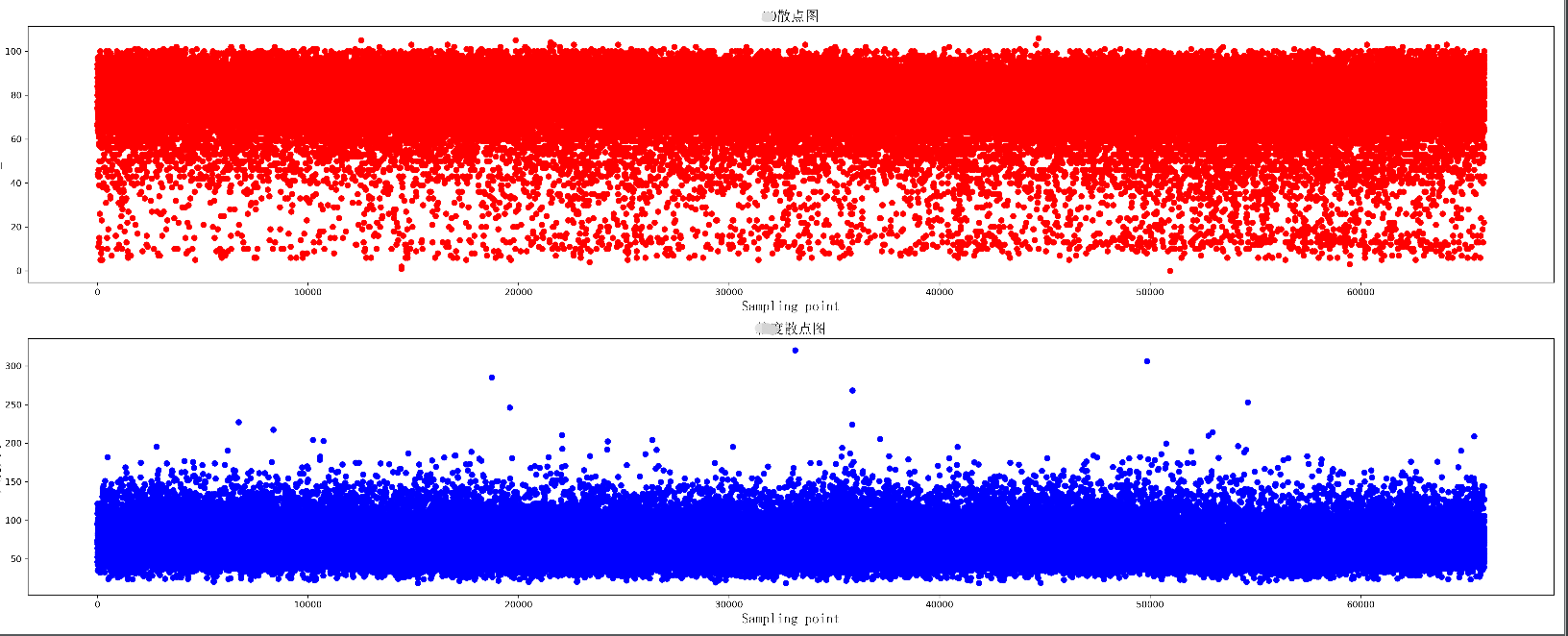
绘制两组数据的散点图,同时绘制两个散点图,上下分布在同一个图片中
 def K0_Scatter(K0_list, area_list, pic_name):

     plt.figure(figsize=(25, 10), dpi=300)

     # 导入中文字体,及字体大小

     zhfont = FontProperties(fname='C:/Windows/Fonts/simsun.ttc', size=16)

     ax = plt.subplot(211)

     # print(K0_list)

     ax.scatter(range(len(K0_list)), K0_list, c='r', marker='o')

     plt.title(u'散点图', fontproperties=zhfont)

     plt.xlabel('Sampling point', fontproperties=zhfont)

     plt.ylabel('K0_value', fontproperties=zhfont)

     ax = plt.subplot(212)

     ax.scatter(range(len(area_list)), area_list, c='b', marker='o')

     plt.xlabel('Sampling point', fontproperties=zhfont)

     plt.ylabel(u'大小', fontproperties=zhfont)

     plt.title(u'散点图', fontproperties=zhfont)

     # imgname = 'E:\\' + pic_name + '.png'

     # plt.savefig(imgname, bbox_inches = 'tight')

     plt.show()
散点图显示
绘制一个折线图 每个数据增加标签
 def K0_Plot(X_label, Y_label, pic_name):

     plt.figure(figsize=(25, 10), dpi=300)

     # 导入中文字体,及字体大小

     zhfont = FontProperties(fname='C:/Windows/Fonts/simsun.ttc', size=16)

     ax = plt.subplot(111)

     # print(K0_list)

     ax.plot(X_label, Y_label, c='r', marker='o')

     plt.title(pic_name, fontproperties=zhfont)

     plt.xlabel('coal_name', fontproperties=zhfont)

     plt.ylabel(pic_name, fontproperties=zhfont)

     # ax.xaxis.grid(True, which='major')

     ax.yaxis.grid(True, which='major')

     for a, b in zip(X_label, Y_label):

         str_label = a + str(b) + '%'

         plt.text(a, b, str_label, ha='center', va='bottom', fontsize=10)

     imgname = 'E:\\' + pic_name + '.png'

     plt.savefig(imgname, bbox_inches = 'tight')

     # plt.show()

绘制多条折线图
 def K0_MultPlot(dis_name, dis_lsit, pic_name):

     plt.figure(figsize=(80, 10), dpi=300)

     # 导入中文字体,及字体大小

     zhfont = FontProperties(fname='C:/Windows/Fonts/simsun.ttc', size=16)

     ax = plt.subplot(111)

     X_label = range(len(dis_lsit[1]))

     p1 = ax.plot(X_label, dis_lsit[1], c='r', marker='o',label='Euclidean Distance')

     p2 = ax.plot(X_label, dis_lsit[2], c='b', marker='o',label='Manhattan Distance')

     p3 = ax.plot(X_label, dis_lsit[4], c='y', marker='o',label='Chebyshev Distance')

     p4 = ax.plot(X_label, dis_lsit[5], c='g', marker='o',label='weighted Minkowski Distance')

     plt.legend()

     plt.title(pic_name, fontproperties=zhfont)

     plt.xlabel('coal_name', fontproperties=zhfont)

     plt.ylabel(pic_name, fontproperties=zhfont)

     # ax.xaxis.grid(True, which='major')

     ax.yaxis.grid(True, which='major')

     for a, b,c in zip(X_label, dis_lsit[5],dis_name):

         str_label = c + '_'+ str(b)

         plt.text(a, b, str_label, ha='center', va='bottom', fontsize=5)

     imgname = 'E:\\' + pic_name + '.png'

     plt.savefig(imgname,bbox_inches = 'tight')

     # plt.show()

图形显示还有许多小技巧,使得可视化效果更好,比如坐标轴刻度的定制,网格化等,后续进行整理
Python_散点图与折线图绘制的更多相关文章
- Qt数据可视化(散点图、折线图、柱状图、盒须图、饼状图、雷达图)开发实例
目录 散点图 折线图 柱状图 水平柱状图 水平堆叠图 水平百分比柱状图 盒须图 饼状图 雷达图 Qt散点图.折线图.柱状图.盒须图.饼状图.雷达图开发实例. 在开发过程中我们会使用多各种各样的图 ...
- python 绘图---2D、3D散点图、折线图、曲面图
python中绘制2D曲线图需要使用到Matplotlib,Matplotlib 是一个 Python 的 2D绘图库,它以各种硬拷贝格式和跨平台的交互式环境生成出版质量级别的图形,通过 Matplo ...
- qt外部数据传入实现动态的折线图绘制
在嵌入式开发中,实现数据收集与显示很常见,对于希望数据稳定的应用来说, 折现图的表现形式很符合条件. 本实现是通过qt的signal-slot来 ...
- [Python Study Notes]折线图绘制
''''''''''''''''''''''''''''''''''''''''''''''''''''''''''''''''''''''''''''''''''''''''''''''''''' ...
- JAVA Swing使用JFreeChart实现折线图绘制
效果如下: 实现步骤: 1.导入JAR包 jfreechart官网下载的zip文件中包含这两个jar包 2.代码编写 import org.jfree.chart.ChartFactory; impo ...
- matplotlib常见绘图基础代码小结:折线图、散点图、条形图、直方图、饼图
一.折线图 二.散点图 三.条形图 四.直方图 五.饼图 一.折线图折线图用于显示随时间或有序类别的变化趋势 from matplotlib import pyplot as plt x = rang ...
- Matplotlib数据可视化(4):折线图与散点图
In [1]: from matplotlib import pyplot as plt import numpy as np import matplotlib as mpl mpl.rcParam ...
- OpenGL——折线图柱状图饼图绘制
折线图绘制代码: #include<iostream> //旧版本 固定管线 #include<Windows.h> #include <GL/glut.h> // ...
- R in action读书笔记(15)第十一章 中级绘图 之二 折线图 相关图 马赛克图
第十一章 中级绘图 本节用到的函数有: plot legend corrgram mosaic 11.2折线图 如果将散点图上的点从左往右连接起来,那么就会得到一个折线图. 创建散点图和折线图: &g ...
随机推荐
- android 百度地图入门01 (史上最详没有之一)
最近一直和百度地图打交道,写几篇博客记录一下吧,目前最新版是4.0的 ,之前我用的是3.7的, 就以4.0的为例说一下最基本的配置流程吧. 一.准备工作 1.申请一个百度地图开发者账户--地址:htt ...
- .Net基础篇_学习笔记_第六天_for循环语法_正序输出和倒序输出
for TAB 和 forr TAB using System; using System.Collections.Generic; using System.Linq; using System. ...
- GlusterFs卷类型分析及创建、使用(结合kubernetes集群分析)
引言 本文通过对卷类型的分析对比,来帮助读者选取生产环境最符合服务的挂载存储,命令可结合<glusterfs详解及kubernetes 搭建heketi-glusterfs>进行实验,下面 ...
- 如何在spingboot项目中自定义自己的配置
在实际开发中,为了方便我们常常会考虑把配置文件的某一类配置映射到配置类上,方便spring容器加载,实现方法如下: 1. 书写配置文件信息:书写某一类特定字段开头的配置信息,例如在yml配置文件中可以 ...
- 基于DevExpress的SpreadsheetControl实现对Excel的打开、预览、保存、另存为、打印(附源码下载)
场景 Winform控件-DevExpress18下载安装注册以及在VS中使用: https://blog.csdn.net/BADAO_LIUMANG_QIZHI/article/details/1 ...
- Spring 7大模块的解说
先看以下Spring的组成图: 7大模块包括:core.AOP.ORM.DAO.WEB.Context.WebMvc. 1:core:spring的容器,主要组成是BeanFactury.也是Spri ...
- 安装完oracle11g_2x64位数据库后使用PL Developer链接oracle报错“请确认是否安装了32位oracle和TNS错误”解决方案
解决使用PL Developer登录oracle报错没有配置TNS错误.首先安装好oracle11g数据库,安装PL developer32位 1,下载“instantclient-basic-win ...
- 渐进深入理解Nginx
文章原创于公众号:程序猿周先森.本平台不定时更新,喜欢我的文章,欢迎关注我的微信公众号. 之前其实写过一篇文章具体介绍过:最基础的Nginx教学,当时有提到过Nginx有一个重要的功能:负载均衡.所以 ...
- DOM之事件(一)
DOM事件,就是浏览器或用户针对页面可以做出的某种动作,我们称这些动作为DOM事件.它是用户和页面交互的核心.当动作发生(事件触发)时,我们可以为其绑定一个或多个事件处理程序(函数),来完成我们想要实 ...
- Java假期样卷 简易通讯录
score.java package score; public class score { String name; String num; int age; boolean sex; double ...