
opencv python:直线检测 与 圆检测
霍夫直线变换介绍
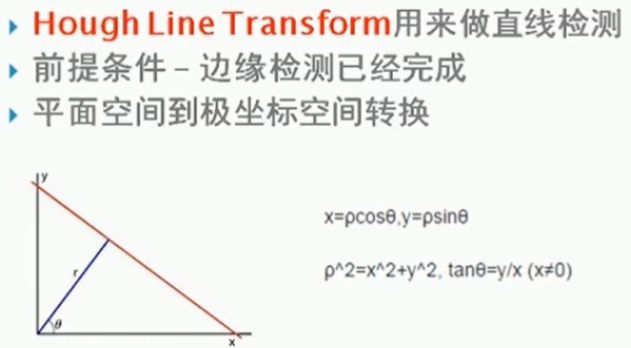
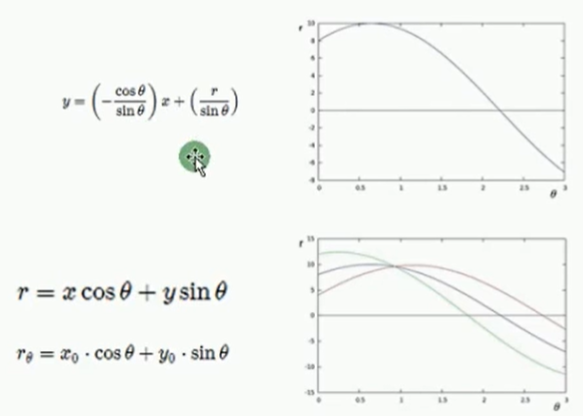
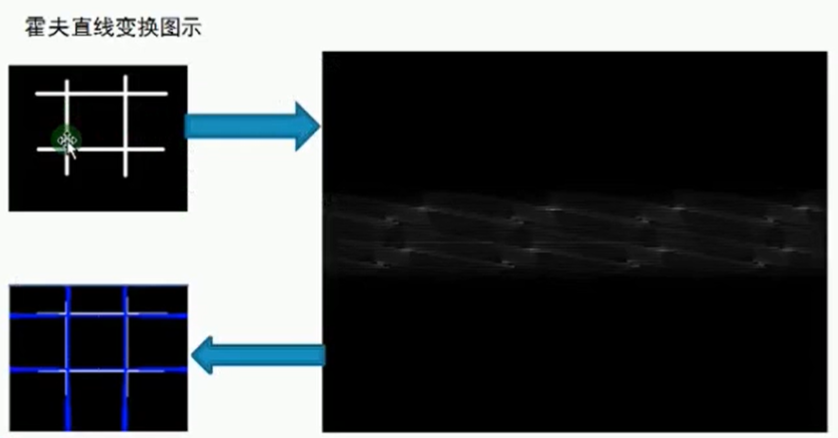
霍夫圆检测
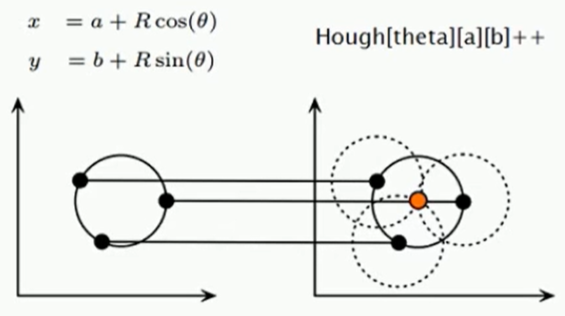
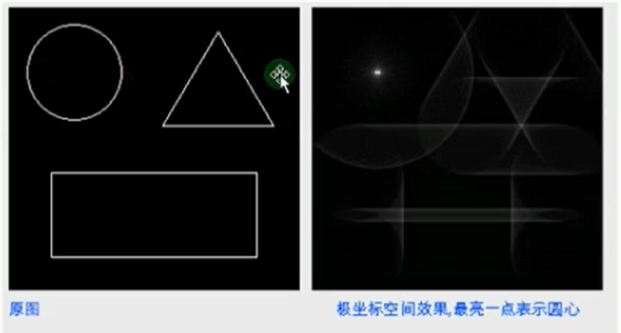

现实中:
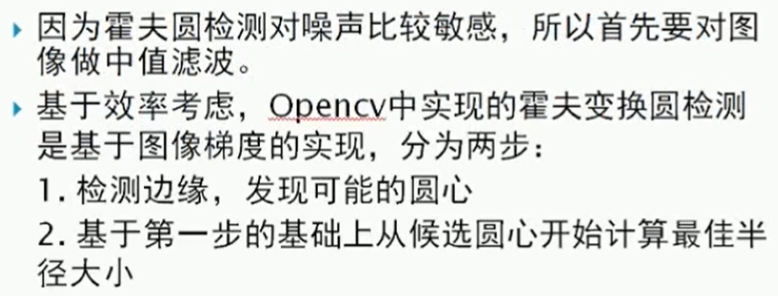
example
import cv2 as cv

import numpy as np

# 关于霍夫变换的相关知识可以看看这个博客:https://blog.csdn.net/kbccs/article/details/79641887

def line_detection(image):

    gray = cv.cvtColor(image, cv.COLOR_BGR2GRAY)

    edges = cv.Canny(gray, 50, 150, apertureSize=3)

    # cv2.HoughLines()返回值就是(ρ,θ)。ρ 的单位是像素,θ 的单位是弧度。

    # 这个函数的第一个参数是一个二值化图像,所以在进行霍夫变换之前要首先进行二值化,或者进行 Canny 边缘检测。

    # 第二和第三个值分别代表 ρ 和 θ 的精确度。第四个参数是阈值,只有累加其中的值高于阈值时才被认为是一条直线,

    # 也可以把它看成能 检测到的直线的最短长度(以像素点为单位)。

    lines = cv.HoughLines(edges, 1, np.pi/180, 200)

    for rho, theta in lines[0]:

        a = np.cos(theta)

        b = np.sin(theta)

        x0 = a * rho

        y0 = b * rho

        x1 = int(x0 + 1000*(-b))

        y1 = int(y0 + 1000*(a))

        x2 = int(x0 - 1000*(-b))

        y2 = int(y0 - 1000*(a))

        cv.line(image, (x1, y1), (x2, y2), (0, 0, 255), 2)

    cv.imshow("line_detection", image)

def line_detection_possible_demo(image):

    gray = cv.cvtColor(image, cv.COLOR_BGR2GRAY)

    edges = cv.Canny(gray, 50, 150, apertureSize=3)

    minLineLength = 100

    maxLineGap = 10

    lines = cv.HoughLinesP(edges, 1, np.pi / 180, 100, minLineLength, maxLineGap)

    for x1, y1, x2, y2 in lines[0]:

        cv.line(image, (x1, y1), (x2, y2), (0, 255, 0), 2)

    cv.imshow('hough_lines', image)

# Hough Circle 在xy坐标系中一点对应Hough坐标系中的一个圆,xy坐标系中圆上各个点对应Hough坐标系各个圆,

# 相加的一点,即对应xy坐标系中圆心

# 现实考量:Hough圆对噪声比较敏感,所以做hough圆之前要中值滤波,

# 基于效率考虑,OpenCV中实现的霍夫变换圆检测是基于图像梯度的实现,分为两步:

# 1. 检测边缘,发现可能的圆心候选圆心开始计算最佳半径大小

# 2. 基于第一步的基础上,从

def detection_circles_demo(image):

    dst = cv.pyrMeanShiftFiltering(image, 10, 100)  # 均值迁移,sp,sr为空间域核与像素范围域核半径

    gray = cv.cvtColor(dst, cv.COLOR_BGR2GRAY)

    """

    .   @param image 8-bit, single-channel, grayscale input image.

    .   @param circles Output vector of found circles. Each vector is encoded as  3 or 4 element

    .   floating-point vector \f$(x, y, radius)\f$ or \f$(x, y, radius, votes)\f$ .

    .   @param method Detection method, see #HoughModes. Currently, the only implemented method is #HOUGH_GRADIENT

    .   @param dp Inverse ratio of the accumulator resolution to the image resolution. For example, if

    .   dp=1 , the accumulator has the same resolution as the input image. If dp=2 , the accumulator has

    .   half as big width and height.

        累加器图像的分辨率。这个参数允许创建一个比输入图像分辨率低的累加器。

        (这样做是因为有理由认为图像中存在的圆会自然降低到与图像宽高相同数量的范畴)。

        如果dp设置为1,则分辨率是相同的;如果设置为更大的值(比如2),累加器的分辨率受此影响会变小(此情况下为一半)。

        dp的值不能比1小。

    .   @param minDist Minimum distance between the centers of the detected circles. If the parameter is

    .   too small, multiple neighbor circles may be falsely detected in addition to a true one. If it is

    .   too large, some circles may be missed.

        该参数是让算法能明显区分的两个不同圆之间的最小距离。

    .   @param param1 First method-specific parameter. In case of #HOUGH_GRADIENT , it is the higher

    .   threshold of the two passed to the Canny edge detector (the lower one is twice smaller).

        用于Canny的边缘阀值上限,下限被置为上限的一半。

    .   @param param2 Second method-specific parameter. In case of #HOUGH_GRADIENT , it is the

    .   accumulator threshold for the circle centers at the detection stage. The smaller it is, the more

    .   false circles may be detected. Circles, corresponding to the larger accumulator values, will be

    .   returned first.

        累加器的阀值。

    .   @param minRadius Minimum circle radius.

        最小圆半径

    .   @param maxRadius Maximum circle radius. If <= 0, uses the maximum image dimension. If < 0, returns

    .   centers without finding the radius.

        最大圆半径。

    """

    circles = cv.HoughCircles(gray, cv.HOUGH_GRADIENT, 1, 20, param1=40, param2=30, minRadius=0, maxRadius=0)

    circles = np.uint16(np.around(circles))

    print(circles.shape)

    for i in circles[0,:]:  # draw the outer circle

        cv.circle(image, (i[0], i[1]), i[2], (0, 255, 0), 2) # draw the center of the circle

        cv.circle(image, (i[0], i[1]), 2, (0, 0, 255), 3)

    cv.imshow('detected circles', image)

def main():

    src = cv.imread("../images/sudoku.png")

    cv.imshow("demo",src)

    line_detection(src)

    # line_detection_possible_demo(src)

    # img = cv.imread("../images/circle.png")

    # detection_circles_demo(img)

    cv.waitKey(0)  # 等有键输入或者1000ms后自动将窗口消除,0表示只用键输入结束窗口

    cv.destroyAllWindows()  # 关闭所有窗口

if __name__ == '__main__':

    main()
opencv python:直线检测 与 圆检测的更多相关文章
- OpenCV——霍夫变换(直线检测、圆检测)
x #include <opencv2/opencv.hpp> #include <iostream> #include <math.h> using namesp ...
- 14、OpenCV Python 直线检测
__author__ = "WSX" import cv2 as cv import numpy as np #-----------------霍夫变换------------- ...
- 【python+opencv】直线检测+圆检测
Python+OpenCV图像处理—— 直线检测 直线检测理论知识: 1.霍夫变换(Hough Transform) 霍夫变换是图像处理中从图像中识别几何形状的基本方法之一,应用很广泛,也有很多改进 ...
- OpenCV 学习笔记03 直线和圆检测
检测边缘和轮廓不仅重要,还经常用到,它们也是构成其他复杂操作的基础. 直线和形状检测与边缘和轮廓检测有密切的关系. 霍夫hough 变换是直线和形状检测背后的理论基础.霍夫变化是基于极坐标和向量开展的 ...
- Python+OpenCV图像处理(十五)—— 圆检测
简介: 1.霍夫圆变换的基本原理和霍夫线变换原理类似,只是点对应的二维极径.极角空间被三维的圆心和半径空间取代.在标准霍夫圆变换中,原图像的边缘图像的任意点对应的经过这个点的所有可能圆在三维空间用圆心 ...
- OpenCV + Python 人脸检测
必备知识 Haar-like opencv api 读取图片 灰度转换 画图 显示图像 获取人脸识别训练数据 探测人脸 处理人脸探测的结果 实例 图片素材 人脸检测代码 人脸检测结果 总结 下午的时候 ...
- opencv —— HoughCircles 霍夫圆变换原理及圆检测
霍夫圆变换原理 霍夫圆变换的基本原理与霍夫线变换(https://www.cnblogs.com/bjxqmy/p/12331656.html)大体类似. 对直线来说,一条直线能由极径极角(r,θ)表 ...
- cv2.cornerHarris()详解 python+OpenCV 中的 Harris 角点检测
参考文献----------OpenCV-Python-Toturial-中文版.pdf 参考博客----------http://www.bubuko.com/infodetail-2498014. ...
- OpenCV + python 实现人脸检测(基于照片和视频进行检测)
OpenCV + python 实现人脸检测(基于照片和视频进行检测) Haar-like 通俗的来讲,就是作为人脸特征即可. Haar特征值反映了图像的灰度变化情况.例如:脸部的一些特征能由矩形特征 ...
随机推荐
- hadoop搭建HA集群之后不能自动切换namenode
在搭好HA集群之后,想测试一下集群的高可用性,于是先把active的namenode给停掉: hadoop-daemon.sh stop namenode 或者直接kill掉该节点namenode的对 ...
- Visibility Graph Analysis of Geophysical Time Series: Potentials and Possible Pitfalls
Tasks: invest papers 3 篇. 研究主动权在我手里. I have to. 1. the benefit of complex network: complex networ ...
- SVN提交时没有写注释
会报错: Error: Commit blocked by pre-commit hook (exit code 1) with output: Error: [Commit failed]: Emp ...
- ajax中的参数
function login() { $.ajax({ //几个参数需要注意一下 type: "POST",//方法类型 dataType: "json",// ...
- word doc转pdf
from win32com.client import constants, gencache # TODO pip install pywin32 -i http://mirrors.aliyun. ...
- 变色html css js
<!DOCTYPE html><html> <head> <meta charset="utf-8" /> <title> ...
- codeforce D. White Lines
二维前缀和 给你一个n*n的矩阵,里面有两种字符,‘W’和‘B’,代表black 和white .其实这个矩阵就是一个方形画板,你有一个k*k的橡皮只能用一次,使k*k的矩阵里的B变成W,问完全空白的 ...
- php中文乱码问题的终极解决方案汇总
乱码是我们在开发可能经常遇见,也是最让人头疼的一个问题了,下面这篇文章主要介绍了在php开发中,可能遇见中文乱码问题的终极解决方案,文中介绍好几个情况下的解决方法,需要的朋友可以参考借鉴,下面来一起看 ...
- 题解【洛谷P5483】[JLOI2011]小A的烦恼
我们可以灵活运用\(C++\)的语法来解决此题. 解释一下代码中会出现的语法: \(string::iterator\ it\)表示定义了一个\(string\)类型的迭代器\(it\),\(^*it ...
- angular项目实现mqtt的订阅与发布 ngx-mqtt
angular项目实现mqtt的订阅与发布 如果要写一个exe可执行文件,可以使用angular编写,然后使用electron打包成一个exe文件. https://github.com/maxime ...