
[cocos2d-x]关于3.x的触摸机制
触摸机制的概念
通过对要监听触摸的节点进行注册,然后自定义相应的触摸函数,由事件监听器实现对触摸的监听并且实现相应的响应动作。
触摸的分类
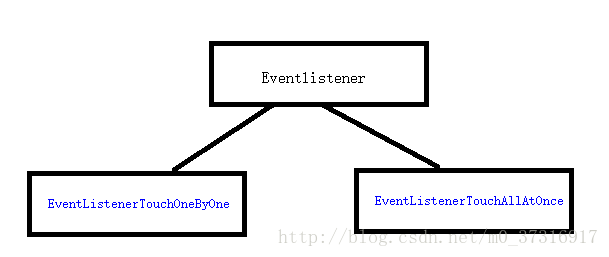
单点触摸
下面是实现单点触摸监听的步骤:
//第一步:先创建一个要进行触摸检测的精灵

auto spr=Sprite::create("helloworld.png");

//第二步:创建一个事件监听器

auto touchListener= EventListenerTouchOneByOne::create();

//第三步:设置不让触摸检测传递到下一层

touchListener->setSwallowTouches(true);

//******重点*****

//第四步(第一种方法):设置相应的触摸函数

//先在头文件中声明四个回调函数:

std::function<bool(Touch*t, Event*)>onTouchBegan;

std::function<void(Touch*, Event*)>onTouchMoved;

std::function<void(Touch*, Event*)>onTouchEnded;

std::function<void(Touch*, Event*)> onTouchCancelled;

//然后在设置对应函数:

listner>onTouchBegan=CC_CALLBACK_2(GameTest::onTouchBegan,this);

listner->onTouchMoved=CC_CALLBACK_2(GameTest::onTouchMoved, this);

listner->onTouchEnded=CC_CALLBACK_2(GameTest::onTouchEnded, this);

//将监听器添加带事件派发器中

_eventDispatcher->addEventListenerWithSceneGraphPriority(listner, spr);

//给监听器设置优先级,越高越先响应

listner->setFixedPriority(1);

//第四步(第二种方法):使用lambda表达式,这种更加方便

listner->onTouchBegan = [](Touch*t, Event*e) {  return true; };

listner->onTouchMoved = [](Touch*t, Event*e) {};

listner->onTouchEnded = [](Touch*t, Event*e) {};
多点触摸
多点触摸和单点触摸类似,不过使用的参数使用vector数组来存储了多个touch触摸点的坐标位置,下面是不同的地方
std::function<void(conststd::vector<Touch*>&,Event*)> onTouchesBegan;

std::function<void(conststd::vector<Touch*>&,Event*)> onTouchesMoved;

std::function<void(conststd::vector<Touch*>&,Event*)> onTouchesEnded;

std::function<void(conststd::vector<Touch*>&,Event*)> onTouchesCancelled;
触摸函数的两个参数的含义
Touch*的作用:传入触摸点的坐标位置,下面是Touch类中提供的一些方法。
    Vec2 getLocation() const;

    /** Returns the previous touch location in OpenGL coordinates.

     *

     * @return The previous touch location in OpenGL coordinates.

     */

    Vec2 getPreviousLocation() const;

    /** Returns the start touch location in OpenGL coordinates.

     *

     * @return The start touch location in OpenGL coordinates.

     */

    Vec2 getStartLocation() const;

    /** Returns the delta of 2 current touches locations in screen coordinates.

     *

     * @return The delta of 2 current touches locations in screen coordinates.

     */

    Vec2 getDelta() const;

    /** Returns the current touch location in screen coordinates.

     *

     * @return The current touch location in screen coordinates.

     */

    Vec2 getLocationInView() const;

    /** Returns the previous touch location in screen coordinates.

     *

     * @return The previous touch location in screen coordinates.

     */

    Vec2 getPreviousLocationInView() const;

    /** Returns the start touch location in screen coordinates.

     *

     * @return The start touch location in screen coordinates.

     */

    Vec2 getStartLocationInView() const;

    /** Set the touch information. It always used to monitor touch event.

     *

     * @param id A given id

     * @param x A given x coordinate.

     * @param y A given y coordinate.

*/Event*作用:主要是传入要进行操作的对象比如:键盘,鼠标,游戏手柄等等,下面是它提供的一些函数。
    Type getType() const { return _type; }

    /** Stops propagation for current event.

     */

    void stopPropagation() { _isStopped = true; }

    /** Checks whether the event has been stopped.

     *

     * @return True if the event has been stopped.

     */

    bool isStopped() const { return _isStopped; }

    /** Gets current target of the event.

     * @return The target with which the event associates.

     * @note It's only available when the event listener is associated with node.

     *        It returns 0 when the listener is associated with fixed priority.

     */

    Node* getCurrentTarget() { return _currentTarget; }
其他注意事项
virtual bool onTouchBegan( Touch *Touch, Event *Event);
①如果返回false,则本层的onTouchMoved(),onTouchEnded()不会再接收到消息,但是本层之下的其它层会接收到消息
②如果返回true,则本层的onTouchMoved(),onTouchEnded()可以接收到消息,但是本层之下的其它层不能再接收到消息
[cocos2d-x]关于3.x的触摸机制的更多相关文章
- cocos2d-x 源代码分析 : EventDispatcher、EventListener、Event 源代码分析 (新触摸机制,新的NotificationCenter机制)
源代码版本号来自3.x,转载请注明 cocos2d-x 源代码分析总文件夹 http://blog.csdn.net/u011225840/article/details/31743129 1.继承结 ...
- Cocos2D v3.x中关于重叠触摸层优先级的问题
在Cocos2D v2.x版本中可以通过以下方法设置本层的触摸优先级: [[CCDirector sharedDirector].touchDispatcher addTargetedDelegate ...
- cocos2dx 3.0 触摸机制
在cocos2dx 3.0版本号中,废弃了以往2.x版本号的写法,我们先来看一下Layer.h中的一段代码 /* Callback function should not be deprecated, ...
- [cocos2d] 谁摸了我一下----触摸事件处理
1. 设置接受触摸事件,可在init方法里面写上 [self setTouchEnabled: YES]; 旧版为self.isTouchEnabled = YES; xcode会报Deprecati ...
- 初识Android触摸事件传递机制
前言 今天总结的一个知识点是Andorid中View事件传递机制,也是核心知识点,相信很多开发者在面对这个问题时候会觉得困惑,另外,View的另外一个难题滑动冲突,比如在ScrollView中嵌套Li ...
- cocos2d-x 事件分发机制 ——触摸事件监听
cocos2d-x 3.0 出来已经好久了,也已经用3.0写了几个小游戏,感觉3.0的事件触发机制太赞了,随这里总结一下.也算是对知识的一种回顾和加深理解. 3.0的事件分发机制中.须要也只须要通过创 ...
- cocos2d-x游戏引擎核心(3.x)----事件分发机制之事件从(android,ios,desktop)系统传到cocos2dx的过程浅析
(一) Android平台下: cocos2dx 版本3.2,先导入一个android工程,然后看下AndroidManifest.xml <application android:label= ...
- Cocos2d-x3.0触摸
cocos2d-x 3.0開始採用C++11,并開始脱离OC风格,在触摸处理上也作出了改变 C++11带来了Lambda表达式(匿名函数),它将简化程序编写,可使代码更清晰易懂 在旧2.x版本号的触摸 ...
- 【Cocos2d-x 3.x】 事件处理机制源码分析
在游戏中,触摸是最基本的,必不可少的.Cocos2d-x 3.x中定义了一系列事件,同时也定义了负责监听这些事件的监听器,另外,cocos定义了事件分发类,用来将事件派发出去以便可以实现相应的事件. ...
- cocos2d-x 事件分发机制 ——加速计事件监听
加速计事件监听机制 在上一篇中介绍了cocos2d-x中的触摸事件机制,这篇来介绍下游戏中也常常常使用到的加速计事件,这些都是游戏中的常常要用到的. 移动设备上一个非常重要的输入源是设备的方向.大多数 ...
随机推荐
- 齐博X1到底是个什么鬼?
什么是齐博/齐博CMS之X1? 齐博X1是齐博软件基于thinkphp5开发的内容管理系统,拓展性非常强,后台一键升级,后台提供丰富的频道模块云市插件市场.风格市场.钩子市场,所有都是一键在线安装. ...
- 6.YAML文件详解、PyYaml操作
YAML简介: yaml是一种数据格式,支持注释,换行,多行字符串,裸字符串(正序,字符串) YAML作用: 用于全局的配置文件 用于测试用例编写 YAML语法规则: 区分大小写 使用缩进 ...
- LINQ使用小贴士
LINQ中的排序操作符 OrderBy:按升序对序列的元素进行排序.OrderByDescending:按降序对序列的元素排序.ThenBy:按升序对序列中的元素执行后续排序.ThenByDescen ...
- vue2 解决跨域
vue2.x 解决跨域 通过devServer将接口代理到本地在开发的时候,需要请求同局域网内的接口,发现直接使用http://对方的ip地址/接口路径,会出现类似下图的跨域报错 找到并打开vue.c ...
- 【性能测试】Loadrunner12.55(二)-飞机订票系统-脚本录制
1.1 飞机订票系统 Loadrunner 12.55不会自动安装飞机订票系统,要自己手动安装. 我们需要下载Web Tools以及一个小插件strawberry https://marketplac ...
- 高精度加法(Java)
题目描述 高精度加法,相当于 a+b problem,不用考虑负数. 输入格式 分两行输入. a , b ≤ 10^500 输出格式 输出只有一行,代表 a + b 的值. 思路 使用数组进行模拟, ...
- 不借助idea开发工具构建一个Javaweb项目
不借助idea开发工具构建一个Javaweb项目 目录结构 webappsroot |----------WEB-INF |----------classes(存放字节码) |----------li ...
- 2流高手速成记(之九):基于SpringCloudGateway实现服务网关功能
咱们接上回 上一节我们基于Sentinel实现了微服务体系下的限流和熔断,使得整个微服务架构的安全性和稳定性上升了一个台阶 篇尾我们引出了一个问题,众多的微服务节点,我们如何部署才能满足客户端简洁高效 ...
- apt-mirror 制作麒麟桌面版内网源
apt-mirror 制作麒麟桌面版内网源 一.修改apt软件安装源 1.修改source.list安装源 vi /etc/apt/sources.list 添加: deb http://archiv ...
- 【zookeeper】Zookeeper相关概念、重难点(myid)、语法、使用、工具
1234567890 1请按照我是想额度插入fvtgb6yhn7ujm8ik,9ol.