
TCAM and CAM memory usage inside networking devices(转)
TCAM and CAM memory usage inside networking devices Valter Popeskic Equipment and tools, Physical layer, Routing, Switching 8 Comments
As this is networking blog I will focus mostly on the usage of CAM and TCAM memory in routers and switches. I will explain TCAM role in router prefix lookup process and switch mac address table lookup.
However, when we talk about this specific topic, most of you will ask: how is this memory made from architectural aspect?
How is it made in order to have the capability of making lookups faster than any other hardware or software solution? That is the reason for the second part of the article where I will try to explain in short how are the most usual TCAM memory build to have the capabilities they have.
CAM AND TCAM MEMORY
When using TCAM – Ternary Content Addressable Memory inside routers it’s used for faster address lookup that enables fast routing.
In switches CAM – Content Addressable Memory is used for building and lookup of mac address table that enables L2 forwarding decisions. By implementing router prefix lookup in TCAM, we are moving process of Forwarding Information Base lookup from software to hardware.
When we implement TCAM we enable the address search process not to depend on the number of prefix entries because TCAM main characteristic is that it is able to search all its entries in parallel. It means that no matter how many address prefixes are stored in TCAM, router will find the longest prefix match in one iteration. It’s magic, right?
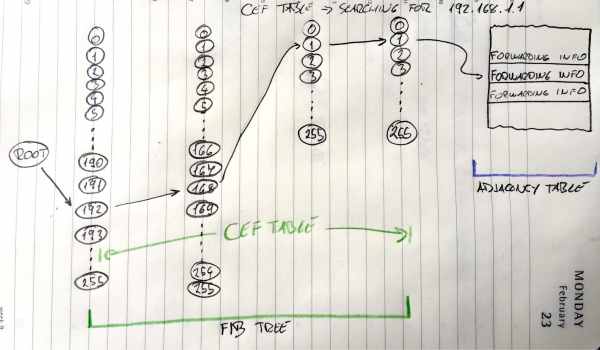
CEF Lookup
Image 1 shows how FIB lookup functions and points to an entry in the adjacency table. Search process goes through all entries in TCAM table in one iteration.
ROUTER
In routers, like High-End Cisco ones, TCAM is used to enable CEF – Cisco Express Forwarding in hardware. CEF is building FIB table from RIB table (Routing table) and Adjacency table from ARP table for building pre-prepared L2 headers for every next-hop neighbour.
TCAM finds, in one try, every destination prefix inside FIB. Every prefix in FIB points to adjacency table’s pre-prepared L2 header for every outgoing interface. Router glues the header to packet in question and send it out that interface. It seems fast to do it that way? It is fast!
SWITCH
In Layer 2 world of switches, CAM memory is most used as it enables the switch to build and lookup MAC address tables. MAC address is always unique and so CAM architecture and ability to search for only exact matches is perfect for MAC address lookup. That gives the switch ability to go over all MAC addresses of all host connected to all ports in one iteration and resolve where to send received packets.
CAM is so perfect here as the architecture of CAM provides the result of two kinds 0 or 1. So then we make the lookup on CAM table it will only get us with true (1) result if we searched for the exact same bits. L2 forwarding decisions are the one using this fast magical electronics!
MORE THAN PLAIN ROUTING AND SWITCHING
Besides Longest-Prefix Matching, TCAM in today’s Routers and Multilayer Switch devices are used to store ACL, QoS and other things from upper-layer processing. TCAM architecture and the ability of fast lookup enables us to implement Access-Lists without an impact on router/switch performance.
Devices with this ability mostly have more TCAM memory modules in order to implement Access-List in both directions and QoS at the same time at the same port without any performance impact. All those different functions and their lookup process towards a decision is made in parallel.
MORE ON TCAM
TCAM is basically a special version of CAM constructed for rapid table lookups. Not mentioned before, TCAM can get Us with three different results when doing lookups: 0, 1, and X (I don’t care state).
With this strange third state, TCAM is perfect for building and searching tables for stored longest matches in IP routing tables.
There is just one condition that IP prefixes need to be sorted before they are stored in TCAM so that longest prefixes are on upper position with higher priority (lower address location) in a table. This enables us to always select the longest prefix from given results an thus enables Longest-Prefix Matching.
TCAM ARCHITECTURE
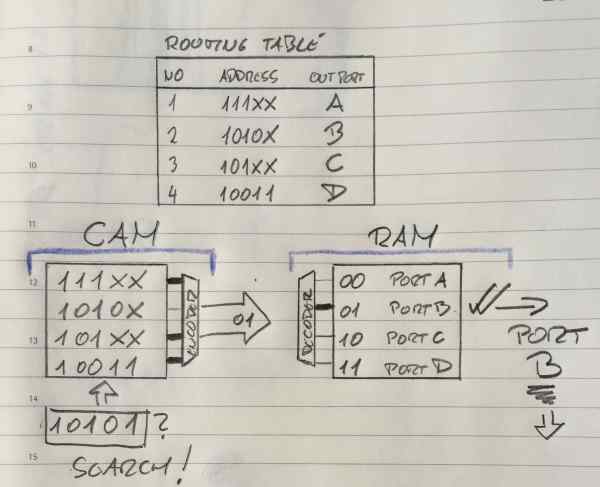
In the Image 2 here below I showed, (please disregard my style), one of the simplest CEF Explanations I could find in scientific articles around. It is basically showing you usage of FIB on the left and Adjacency table on the right. FIB stored in TCAM table and Adjacency table stored in RAM memory. Great, it shows without words what we spoked about before in “ROUTER” section.
TCAM FIB
Image 2 FIB implemented in TCAM, adjacency table implemented in RAM
Ok, Here you must know that IP addresses in the example are smaller that real ones. Here we have addresses of 5 bits not 32 like IPv4, all other is the same as the real stuff.
We are looking on the left side now at the CAM part, it is basically explained for TCAM.
So in TCAM world in order to get the longest match like in the Image 2 above here, before populating the TCAM we need to sort the entries so that longer prefixes are always situated on higher priority places. As the lookup goes from top downwards it means that higher priority is higher in the table, closer to the top. OK, now that we solved this it is easy to see that TCAM here is searching in parallel from left to right all four address entries.
Entries here in TCAM are numbered 00,01,02,03 from top to bottom. Not like in Routing table above where they are numbered 1,2,3,4. Don’t let that confuse you.
Second and third entry (01 and 02 entry) are the same as the one we search in first three bits. When it comes to the fourth bit, he is “X” for entry 02.
X means don’t care or the third possible solution that can come out of TCAM table query. In the situation above, if we look at the second and third line of TCAM table, this search will make a match for both of entries. The fourth bit of “01” is matched and the fifth bit does not care. For “02” it will show true value at the encoder entrance as a fourth and fifth place do not care!
Based on the priority order from above, line “01” is the longest-prefix match and it is selected and send to encoder who will link that entry to Adjacency table entry for making the packet L2 ready. Remember, on this image, “01” is sent to Adjacency table as a pointer. It is pointing to Adjacency table entry 01 which will then be used use for this packet creation.
L2 header will be added to that packet and the packet will be sent out on port B to the neighbour.
TCAM PARALLEL SEARCH PROCESS INSIDE CIRCUITRY
Actually with CAM and TCAM chips the logic is slightly different that you might think.
For all entries that are matching the searched one, encoder entry will get “true” signal, and all not matched entries will show “false” output, no problems there. The catch is in the beginning of the process. Before search begins all entries when entered inside TCAM are closing the circuitry on TCAM word entry and show “true” at encoder side. All entries are temporarily in the match state. When parallel search is done it will brake all entries that have at least one bit that does not match the searched entry.
Here is the explanation of the “don’t care bit”, in the search process when the search gets to X bit (“don’t care bit”) it will not change the state of that matchline. That’s why No 2 and No3 lines made a match, and that’s why TCAM is perfect for longest-prefix lookup.
This also explains why TCAM memory is so power hungry. It needs to power on all circuits to be able to make a search not only the matched ones. Limited memory space and power consumption associated with a large amount of parallel active circuitry are the main issues with TCAM.
If we look at the right side of the Image 2 now, we see that adjacency table is built in RAM memory. Adjacency table uses ARP table and Routing table data for building pre-prepared L2 headers for every next-hop neighbour. As described before in “Router” section it will prepare the packet to be sent to Layer 1 and out the interface in a flash. Entries need to keep L2 data and this data does not change often. RAM memory is consequently perfect fit for adjacency table. Quick, not expensive, not space limited and not so power hungry.
TCAM and CAM memory usage inside networking devices(转)的更多相关文章
- GPU Memory Usage占满而GPU-Util却为0的调试
最近使用github上的一个开源项目训练基于CNN的翻译模型,使用THEANO_FLAGS='floatX=float32,device=gpu2,lib.cnmem=1' python run_nn ...
- Shell script for logging cpu and memory usage of a Linux process
Shell script for logging cpu and memory usage of a Linux process http://www.unix.com/shell-programmi ...
- 5 commands to check memory usage on Linux
Memory Usage On linux, there are commands for almost everything, because the gui might not be always ...
- SHELL:Find Memory Usage In Linux (统计每个程序内存使用情况)
转载一个shell统计linux系统中每个程序的内存使用情况,因为内存结构非常复杂,不一定100%精确,此shell可以在Ghub上下载. [root@db231 ~]# ./memstat.sh P ...
- Why does the memory usage increase when I redeploy a web application?
That is because your web application has a memory leak. A common issue are "PermGen" memor ...
- Reducing and Profiling GPU Memory Usage in Keras with TensorFlow Backend
keras 自适应分配显存 & 清理不用的变量释放 GPU 显存 Intro Are you running out of GPU memory when using keras or ten ...
- 【转】C++ Incorrect Memory Usage and Corrupted Memory(模拟C++程序内存使用崩溃问题)
http://www.bogotobogo.com/cplusplus/CppCrashDebuggingMemoryLeak.php Incorrect Memory Usage and Corru ...
- Memory usage of a Java process java Xms Xmx Xmn
http://www.oracle.com/technetwork/java/javase/memleaks-137499.html 3.1 Meaning of OutOfMemoryError O ...
- Redis: Reducing Memory Usage
High Level Tips for Redis Most of Stream-Framework's users start out with Redis and eventually move ...
- detect data races The cost of race detection varies by program, but for a typical program, memory usage may increase by 5-10x and execution time by 2-20x.
小结: 1. conflicting access 2.性能危害 优化 The cost of race detection varies by program, but for a typical ...
随机推荐
- MRS_Debug仿真相关问题汇总
解决问题如下: Debug时,看不到外设寄存器选项 Debug时,更改变量显示类型 Debug时,断点异常 跳过所有断点 取消仿真前自动下载程序 Debug时仅擦除程序代码部分flash空间 保存De ...
- appium如何获取到APP的启动activity
方法一: adb shell monkey -p 包名 -v -v -v 1 方法二: aapt dump bading apk所在路径\apk名字(或者直接把apk拖进命令行) 运行后的结果中以下两 ...
- 0源码基础学习Spring源码系列(一)——Bean注入流程
作者:京东科技 韩国凯 通过本文,读者可以0源码基础的初步学习spring源码,并能够举一反三从此进入源码世界的大米! 由于是第一次阅读源码,文章之中难免存在一些问题,还望包涵指正! 一. @Auto ...
- Vue36 hash模式和history模式
1 简介 路由模块的本质就是建立起url和页面之间的映射关系.hash模式url里面永远带着#号,history没有,开发当中默认使用hash模式. 2 hash模式和history的区别 1)has ...
- StartAllBack使用教程
StartAllBack简介 StartAllBack是一款Win11开始菜单增强工具,为Windows11恢复经典样式的Windows7主题风格开始菜单和任务栏,功能包括:自定义开始菜单样式和操作, ...
- C#获取html标签内容的方法
C# 获取html标签内容的方法: /// <summary> /// 获取html网页标签内容 /// 例如:<span class="index_infoItem__E ...
- elasticsearch之日期类型有点怪
一.Date类型简介 elasticsearch通过JSON格式来承载数据的,而JSON中是没有Date对应的数据类型的,但是elasticsearch可以通过以下三种方式处理JSON承载的Date数 ...
- STM32F4库函数初始化系列:串口DMA接收
1 u8 _data1[4]; 2 void Configuration(void) 3 { 4 USART_InitTypeDef USART_InitStructure; 5 DMA_InitTy ...
- 【译】.NET 7 中的性能改进(一)
原文 | Stephen Toub 翻译 | 郑子铭 一年前,我发布了.NET 6 中的性能改进,紧接着是.NET 5..NET Core 3.0..NET Core 2.1和.NET Core 2. ...
- Cesium源码之flyTo(一)
1 /** 2 * Flies the camera from its current position to a new position. 3 * 4 * @param {Object} opti ...