
消息队列中间件(二)使用 ActiveMQ
ActiveMQ 介绍
Active MQ 是由 Apache 出品的一款流行的功能强大的开源消息中间件,它速度快,支持跨语言的客户端,具有易于使用的企业集成模式和许多的高级功能,同时完全支持 JSM1.1 和 J2EE1.4 。
默认管理页面:http://127.0.0.1:8161/admin/
默认用户名和密码为admin / admin。您可以在conf / jetty-real.properties文件中进行配置。
默认服务端口:61616
ActiveMQ 特点
- 支持Java,C,C ++,C#,Ruby,Perl,Python,PHP等各种跨语言客户端和协议,如 OpenWire , Stomp , AMQP , MQTT.
- 完全支持JMS 1.1和 J2EE 1.4,支持瞬态,持久,事务和XA消息传递。
- 对 Spring 框架的支持以便ActiveMQ可以轻松嵌入到Spring应用程序中。
- 通过了常见的 J2EE 服务器测试,如 TomEE,Geronimo,JBoss,GlassFish 和 WebLogic 。
- 连接方式的多样化,ActiveMQ 提供了多种连接模式,例如 in-VM、TCP、SSL、NIO、UDP、多播、JGroups、JXTA。
- 可以通过使用 JDBC 和 journal 实现消息的快速持久化。
- 专为高性能群集,客户端 - 服务器,点对点通信而设计。
- 提供与语言无关的 REST API。
- 支持 Ajax 方式调用 ActiveMQ。
- ActiveMQ 可以轻松地与 CXF、Axis 等 Web Service 技术整合,以提供可靠的消息传递。
- 可用作为内存中的 JMS 提供者,非常适合 JMS 单元测试。
ActiveMQ 消息
- 点对点队列模式
消息到达消息系统,被保留在消息队列中,然后由一个或者多个消费者消费队列中的消息,一个消息只能被一个消费者消费,然后就会被移除。例如订单处理系统。 - 发布-订阅模式
消息发送时指定主题(或者说通道),消息被保留在指定的主题中,消费者可以订阅多个主题,并使用主题中的所有的消息,例如现实中的电视与电视频道。所有客户端包括发布者和订阅者,主题中的消息可以被所有的订阅者消费,消费者只能消费订阅之后发送到主题中的消息。
ActiveMQ 概念
- Broker,消息代理,表示消息队列服务器实体,接受客户端连接,提供消息通信的核心服务。
- Producer,消息生产者,业务的发起方,负责生产消息并传输给 Broker 。
- Consumer,消息消费者,业务的处理方,负责从 Broker 获取消息并进行业务逻辑处理。
- Topic,主题,发布订阅模式下的消息统一汇集地,不同生产者向 Topic 发送消息,由 Broker 分发到不同的订阅者,实现消息的广播。
- Queue,队列,点对点模式下特定生产者向特定队列发送消息,消费者订阅特定队列接收消息并进行业务逻辑处理。
- Message,消息体,根据不同通信协议定义的固定格式进行编码的数据包,来封装业务 数据,实现消息的传输。
ActiveMQ 工程实例
下面是使用 ActiveMQ 的队列模式和发布-订阅模式的 Java 代码示例。
POM 依赖
        <!-- Active-MQ -->

        <dependency>

            <groupId>org.apache.activemq</groupId>

            <artifactId>activemq-all</artifactId>

            <version>5.15.5</version>

        </dependency>
队列模式消费者
import org.apache.activemq.ActiveMQConnectionFactory;

import javax.jms.*;

/**

 * <p>

 * 消息消费者,用于消费消息

 *

 * @Author niujinpeng

 * @Date 2018/9/4 23:45

 */

public class AppConsumer {

    private static final String url = "tcp://127.0.0.1:61616";

    private static final String queueName = "queue-test";

    public static void main(String[] args) throws JMSException {

        // 1.创建ConnectionFactory

        ActiveMQConnectionFactory connectionFactory = new ActiveMQConnectionFactory();

        // 2.创建Connection

        Connection connection = connectionFactory.createConnection();

        // 3.启动连接

        connection.start();

        // 4.创建会话,false,不使用事务,自动应答模式

        Session session = connection.createSession(false, Session.AUTO_ACKNOWLEDGE);

        // 5.创建一个目标

        Destination destination = session.createQueue(queueName);

        // 6.创建消费者

        MessageConsumer consumer = session.createConsumer(destination);

        // 7.创建一个监听器

        consumer.setMessageListener(new MessageListener() {

            public void onMessage(Message message) {

                TextMessage textMessage = (TextMessage) message;

                try {

                    System.out.println("接收消息:" + textMessage.getText());

                } catch (JMSException e) {

                    e.printStackTrace();

                }

            }

        });

        // 8.关闭连接

        //connection.close();

    }

}
队列模式生产者
import org.apache.activemq.ActiveMQConnectionFactory;

import javax.jms.*;

/**

 * <p>

 * 消息提供者,用于向消息中间件发送消息

 *

 * @Author niujinpeng

 * @Date 2018/9/4 23:28

 */

public class AppProducer {

    private static final String url = "tcp://127.0.0.1:61616";

    private static final String queueName = "queue-test";

    public static void main(String[] args) throws JMSException {

        // 1.创建ConnectionFactory

        ActiveMQConnectionFactory connectionFactory = new ActiveMQConnectionFactory();

        // 2.创建Connection

        Connection connection = connectionFactory.createConnection();

        // 3.启动连接

        connection.start();

        // 4.创建会话,false,不使用事务,自动应答模式

        Session session = connection.createSession(false, Session.AUTO_ACKNOWLEDGE);

        // 5.创建一个目标

        Destination destination = session.createQueue(queueName);

        // 6.创建生产者

        MessageProducer producer = session.createProducer(destination);

        // 7.创建消息并发送

        for (int i = 0; i < 10; i++) {

            // 创建消息

            TextMessage textMessage = session.createTextMessage("textMessage" + i);

            // 发布消息

            producer.send(textMessage);

            System.out.println("发送消息:" + textMessage.getText());

        }

        // 8.关闭连接

        connection.close();

    }

}
发布订阅模式生产者
import org.apache.activemq.ActiveMQConnectionFactory;

import javax.jms.*;

/**

 * <p>

 * 主题模式

 * 消息消费者,用于消费消息

 *

 * @Author niujinpeng

 * @Date 2018/9/4 23:45

 */

public class AppConsumer {

    private static final String url = "tcp://127.0.0.1:61616";

    private static final String topicName = "topic-test";

    public static void main(String[] args) throws JMSException {

        // 1.创建ConnectionFactory

        ActiveMQConnectionFactory connectionFactory = new ActiveMQConnectionFactory();

        // 2.创建Connection

        Connection connection = connectionFactory.createConnection();

        // 3.启动连接

        connection.start();

        // 4.创建会话,false,不使用事务,自动应答模式

        Session session = connection.createSession(false, Session.AUTO_ACKNOWLEDGE);

        // 5.创建一个目标

        Destination destination = session.createTopic(topicName);

        // 6.创建消费者

        MessageConsumer consumer = session.createConsumer(destination);

        // 7.创建一个监听器

        consumer.setMessageListener(new MessageListener() {

            public void onMessage(Message message) {

                TextMessage textMessage = (TextMessage) message;

                try {

                    System.out.println("接收消息:" + textMessage.getText());

                } catch (JMSException e) {

                    e.printStackTrace();

                }

            }

        });

        // 8.关闭连接

        //connection.close();

    }

}
发布订阅模式生产者
import org.apache.activemq.ActiveMQConnectionFactory;

import javax.jms.*;

/**

 * <p>

 * 主题模式

 * 消息提供者,用于向消息中间件发送消息

 *

 * @Author niujinpeng

 * @Date 2018/9/4 23:28

 */

public class AppProducer {

    private static final String url = "tcp://127.0.0.1:61616";

    private static final String topicName = "topic-test";

    public static void main(String[] args) throws JMSException {

        // 1.创建ConnectionFactory

        ActiveMQConnectionFactory connectionFactory = new ActiveMQConnectionFactory();

        // 2.创建Connection

        Connection connection = connectionFactory.createConnection();

        // 3.启动连接

        connection.start();

        // 4.创建会话,false,不使用事务,自动应答模式

        Session session = connection.createSession(false, Session.AUTO_ACKNOWLEDGE);

        // 5.创建一个目标

        Destination destination = session.createTopic(topicName);

        // 6.创建生产者

        MessageProducer producer = session.createProducer(destination);

        // 7.创建消息并发送

        for (int i = 0; i < 10; i++) {

            // 创建消息

            TextMessage textMessage = session.createTextMessage("textMessage" + i);

            // 发布消息

            producer.send(textMessage);

            System.out.println("发送消息:" + textMessage.getText());

        }

        // 8.关闭连接

        connection.close();

    }

}
GitHub源码:https://github.com/niumoo/message-queue
Spring 整合 ActiveMQ
在 Spring 中配置 Active MQ 就像Spring 整合其他功能一样,我们需要在 XML 配置中配置几个关键的实例即可。在 Active MQ 中有几个对象的实例是至关重要的,如 Active MQ jms 连接工厂,为了减少连接断开性能时间消耗的 jms 连接池以及生产者消费者等。
下面是一些详细说明。
- ConnectionFactory 用于管理连接的连接工厂(Spring提供)。
- 一个 Spring 为我们提供的连接池。
- JmsTemplate 每次发送都会重新创建连接,会话和 Productor。
- Spring 中提供了SingleConnectionFactory 和CachingConnectionFactory(增加了缓存功能)。
- JmsTemplate 是用于发送和接收消息的模板类。
- 是spring提供的,只需要向Spring 容器内注册这个类就可以使用 JmsTemplate 方便的操作jms。
- JmsTemplate 类是线程安全的,可以在整个应用范围使用。
- MessageListerner 消息监听器
- 使用一个onMessage方法,该方法只接收一个Message参数。
POM 依赖
<properties>

        <spring.version>5.0.4.RELEASE</spring.version>

    </properties>

    <dependencies>

        <dependency>

            <groupId>junit</groupId>

            <artifactId>junit</artifactId>

            <version>4.11</version>

            <scope>test</scope>

        </dependency>

        <dependency>

            <groupId>org.springframework</groupId>

            <artifactId>spring-context</artifactId>

            <version>${spring.version}</version>

        </dependency>

        <dependency>

            <groupId>org.springframework</groupId>

            <artifactId>spring-jms</artifactId>

            <version>5.1.1.RELEASE</version>

        </dependency>

        <dependency>

            <groupId>org.springframework</groupId>

            <artifactId>spring-test</artifactId>

            <version>${spring.version}</version>

        </dependency>

        <!-- 这个版本的Spring需要使用JMS 2.0版本,但spring-jms的依赖没有自动导入JMS 2.0,而activemq-core会导入JMS 1.1的依赖 -->

        <dependency>

            <groupId>javax.jms</groupId>

            <artifactId>javax.jms-api</artifactId>

            <version>2.0.1</version>

        </dependency>

        <dependency>

            <groupId>org.apache.activemq</groupId>

            <artifactId>activemq-core</artifactId>

            <version>5.7.0</version>

            <exclusions>

                <exclusion>

                    <artifactId>spring-context</artifactId>

                    <groupId>org.springframework</groupId>

                </exclusion>

                <exclusion>

                    <groupId>org.apache.geronimo.specs</groupId>

                    <artifactId>geronimo-jms_1.1_spec</artifactId>

                </exclusion>

            </exclusions>

        </dependency>

    </dependencies>
XML 配置
XML 公共配置
为了份文件配置方便管理,下面是提取出来的公共配置,为了在独立配置生产者和消费者 XML文件时引入,当然也可以直接把生产者和消费者以及所有的 XML bean 配置在一个文件里。
<?xml version="1.0" encoding="UTF-8"?>

<beans xmlns="http://www.springframework.org/schema/beans"

       xmlns:xsi="http://www.w3.org/2001/XMLSchema-instance"

       xmlns:content="http://www.springframework.org/schema/context"

       xsi:schemaLocation="http://www.springframework.org/schema/beans http://www.springframework.org/schema/beans/spring-beans.xsd http://www.springframework.org/schema/context http://www.springframework.org/schema/context/spring-context.xsd">

    <content:annotation-config/>

    <!-- ActiveMQ为我们提供的connection factory -->

    <bean id="targerConnectionFactory" class="org.apache.activemq.ActiveMQConnectionFactory">

        <property name="brokerURL" value="tcp://127.0.0.1:61616"/>

    </bean>

    <!-- spring jms为我们提供的连接池 -->

    <bean id="connectionFactory" class="org.springframework.jms.connection.SingleConnectionFactory">

        <property name="targetConnectionFactory" ref="targerConnectionFactory"/>

    </bean>

    <!-- 一个队列模式目的地(队列名称),点对点的消息模式 -->

    <bean id="queueDestination" class="org.apache.activemq.command.ActiveMQQueue">

        <constructor-arg value="queue-spring"/>

    </bean>

    <!-- 一个主题模式目的地(主题名称),发布订阅消息模式 -->

    <bean id="topicDestination" class="org.apache.activemq.command.ActiveMQTopic">

        <constructor-arg value="topic-spring"/>

    </bean>

</beans>
XML 消费者
消费者主要是一个消息监听器,监听指定的队列或者主题的消息信息,来有消息时调用回调监听处理方法。这里我注释掉了监听的队列模式,指定了主题模式。
<?xml version="1.0" encoding="UTF-8"?>

<beans xmlns="http://www.springframework.org/schema/beans"

       xmlns:xsi="http://www.w3.org/2001/XMLSchema-instance"

       xmlns:content="http://www.springframework.org/schema/context"

       xsi:schemaLocation="http://www.springframework.org/schema/beans http://www.springframework.org/schema/beans/spring-beans.xsd http://www.springframework.org/schema/context http://www.springframework.org/schema/context/spring-context.xsd">

    <!-- 导入公共配置 -->

    <import resource="common.xml"/>

    <!-- 配置消息监听器 -->

    <bean id="consumerMessageListener" class="net.codingme.jms.consumer.ConsumerMessageListener"/>

    <!-- 配置消息监听容器 -->

    <bean id="jmsContainer" class="org.springframework.jms.listener.DefaultMessageListenerContainer">

        <property name="connectionFactory" ref="connectionFactory"/>

        <!-- 队列模式 -->

        <!--<property name="destination" ref="queueDestination"/>-->

        <!-- 主题模式 -->

        <property name="destination" ref="topicDestination"/>

        <property name="messageListener" ref="consumerMessageListener"/>

    </bean>

</beans>
XML 生产者
生成者的配置主要是使用 spring jms 模版对象,创建生产者实例用于生产消息。
<?xml version="1.0" encoding="UTF-8"?>

<beans xmlns="http://www.springframework.org/schema/beans"

       xmlns:xsi="http://www.w3.org/2001/XMLSchema-instance"

       xmlns:content="http://www.springframework.org/schema/context"

       xsi:schemaLocation="http://www.springframework.org/schema/beans http://www.springframework.org/schema/beans/spring-beans.xsd http://www.springframework.org/schema/context http://www.springframework.org/schema/context/spring-context.xsd">

    <!-- 导入公共配置 -->

    <import resource="common.xml"/>

    <!-- jms模版-->

    <bean id="jmsTemplate" class="org.springframework.jms.core.JmsTemplate">

        <property name="connectionFactory" ref="connectionFactory"/>

    </bean>

    <bean class="net.codingme.jms.producer.ProducerServiceImpl"></bean>

</beans>
生产者编写
1. 定义接口
package net.codingme.jms.producer;

/**

 * <p>

 *

 * @Author niujinpeng

 * @Date 2018/11/2518:19

 */

public interface ProducerService {

    public void sendMessage(String message);

}
2. 主题模式生产者
package net.codingme.jms.producer;

import org.springframework.beans.factory.annotation.Autowired;

import org.springframework.jms.core.JmsTemplate;

import org.springframework.jms.core.MessageCreator;

import javax.annotation.Resource;

import javax.jms.*;

/**

 * <p>

 *

 * @Author niujinpeng

 * @Date 2018/11/25 19:24

 */

public class ProducerServiceImpl implements ProducerService {

    @Autowired

    JmsTemplate jmsTemplate;

    /**

     * 主题模式

     */

    @Resource(name = "topicDestination")

    Destination destination;

    @Override

    public void sendMessage(String message) {

        // 使用jmsTemplate发送消息

        jmsTemplate.send(destination, new MessageCreator() {

            // 创建消息

            @Override

            public Message createMessage(Session session) throws JMSException {

                TextMessage textMessage = session.createTextMessage(message);

                return textMessage;

            }

        });

        System.out.println("发送消息:" + message);

    }

}
3. Spring 启动 生产者
package net.codingme.jms.producer;

import org.springframework.context.support.ClassPathXmlApplicationContext;

/**

 * <p>

 * 启动器

 *

 * @Author niujinpeng

 * @Date 2018/11/25 21:48

 */

public class AppProducer {

    public static void main(String[] args) {

        // 装载配置文件

        ClassPathXmlApplicationContext context = new ClassPathXmlApplicationContext("classpath:producer.xml");

        ProducerService service = context.getBean(ProducerService.class);

        for (int i = 0; i < 10; i++) {

            service.sendMessage("test" + i);

        }

        context.close();

    }

}
消费者编写
Spring启动和生产者类似。下面是消费者监听器的实现。
package net.codingme.jms.consumer;

import javax.jms.JMSException;

import javax.jms.Message;

import javax.jms.MessageListener;

import javax.jms.TextMessage;

/**

 * <p>

 * 消息监听器

 *

 * @Author niujinpeng

 * @Date 2018/11/25 22:28

 */

public class ConsumerMessageListener implements MessageListener {

    @Override

    public void onMessage(Message message) {

        TextMessage textMessage = (TextMessage) message;

        try {

            System.out.println("接收消息:" + textMessage.getText());

        } catch (JMSException e) {

            e.printStackTrace();

        }

    }

}
运行测试
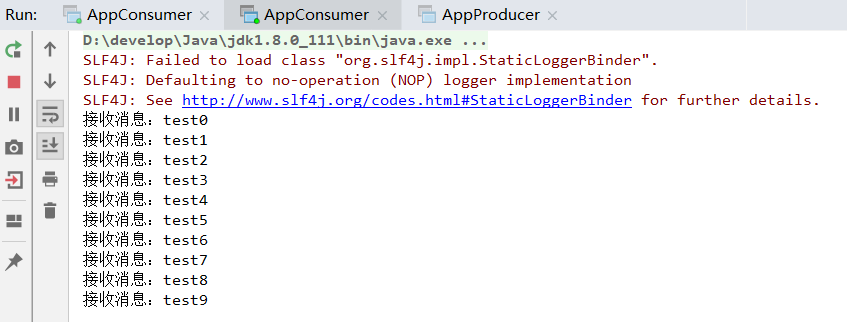
首先主题模式下启动两个消费者,使用生产者推送10条消息。
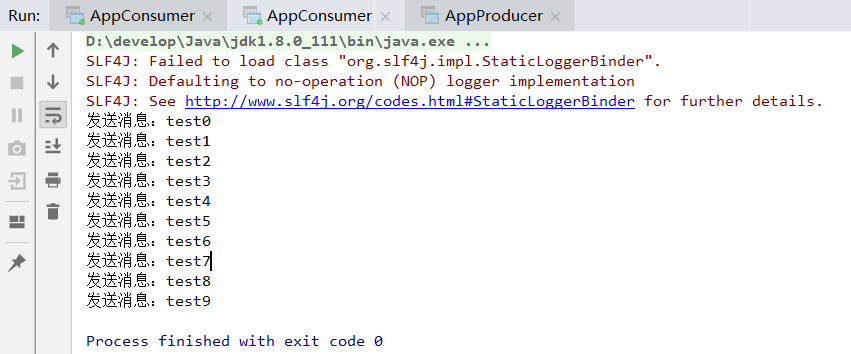
在每个消费者下面都可以看到推送的完整消息。
文中代码已经上传到GitHub:https://github.com/niumoo/message-queue
<完>
本文原发于个人博客:https://www.codingme.net 转载请注明出处
消息队列中间件(二)使用 ActiveMQ的更多相关文章
- 初试kafka消息队列中间件二(采用java代码收发消息)
初试kafka消息队列中间件二(采用java代码收发消息) 上一篇 初试kafka消息队列中间件一 今天的案例主要是将采用命令行收发信息改成使用java代码实现,根据上一篇的接着写: 先启动Zooke ...
- ActiveMQ RabbitMQ RokcetMQ Kafka实战 消息队列中间件视频教程
附上消息队列中间件百度网盘连接: 链接: https://pan.baidu.com/s/1FFZQ5w17e1TlLDSF7yhzmA 密码: hr63
- 基于硬件的消息队列中间件 Solace 简介之二
前言...... 前面简单介绍了Solace来自于哪家公司, 主要能做哪些事情. 本篇主要进一步介绍Solace作为消息传递的中间件如何工作的. 传统意义上来讲, 每当我们谈到消息中间件时, 首先想到 ...
- 常用的消息队列中间件mq对比
原文地址:https://blog.csdn.net/qq_30764991/article/details/80239076 消息队列中间件是分布式系统中重要的组件,主要解决应用耦合,异步消息,流量 ...
- c#开源消息队列中间件EQueue 教程
一.简介 EQueue是一个参照RocketMQ实现的开源消息队列中间件,兼容Mono,具体可以参看作者的文章<分享一个c#写的开源分布式消息队列equeue>.项目开源地址:https: ...
- nodejs一个函数实现消息队列中间件
消息队列中间件(Message Queue)相信大家不会陌生,如Kafka.RabbitMQ.RocketMQ等,已经非常成熟,在大大小小的公司和项目中也已经广泛使用. 有些项目中,如果是只使用初步的 ...
- Delayer 基于 Redis 的延迟消息队列中间件
Delayer 基于 Redis 的延迟消息队列中间件,采用 Golang 开发,支持 PHP.Golang 等多种语言客户端. 参考 有赞延迟队列设计 中的部分设计,优化后实现. 项目链接:http ...
- 初试kafka消息队列中间件一 (只适合初学者哈)
初试kafka消息队列中间件一 今天闲来有点无聊,然后就看了一下关于消息中间件的资料, 简单一点的理解哈,网上都说的太高大上档次了,字面意思都想半天: 也就是用作消息通知,比如你想告诉某某你喜欢他,或 ...
- 在 CentOS7 上安装 RabbitMQ 消息队列中间件
RabbitMQ 是流行的开源消息队列系统,是 AMQP(Advanced Message Queuing Protocol 高级消息队列协议)的标准实现,用 erlang 语言开发.RabbitMQ ...
随机推荐
- mysql import error
mysql导入文件一直出错,显示ERROR 1290 (HY000): The MySQL server is running with the --secure-file-priv option s ...
- kvm+libvirt虚拟机快照浅析[转]
浅析snapshots, blockcommit,blockpull 作者:Kashyap Chamarthy <kchamart#redhat.com> Date: Tue, 23 Oc ...
- pyhton 监听文件输入实例
def tail(filename): f = open(filename,encoding='utf-8') while True: line = f.readline() if line.stri ...
- day03笔记
1.list操作stus = ['xiaohei','xiaobai','xiaohuang','cxdser'] #数组.list.array#增加stus.append('原宝')#在list末尾 ...
- 最新鲜最详细的Android SDK下载安装及配置教程
//来源: http://www.cnblogs.com/summary-2017/p/8073225.html 最近Neo突发神经,想要将学过的一些计算机视觉.机器学习中的算法都放到移动设备上去跑跑 ...
- 微信小程序60秒倒计时
微信小程序发送短信验证码后60秒倒计时功能,效果图: 完整代码 index.wxml <!--index.wxml--> <view class="container&qu ...
- 限制oracle某用户仅能从某IP登录
system用户创建触发器,登录后触发检查 CREATE OR REPLACE TRIGGER system.check_ip_addresses_test AFTER logon ON DATABA ...
- Linux下CenOS系统 安装Mysql-5.7.19
1.输入网址https://www.mysql.com/downloads/,进入downloads,选择Community 2.选择对应的版本和系统: 输入命令:wget https://cdn.m ...
- [Swift]LeetCode393. UTF-8 编码验证 | UTF-8 Validation
A character in UTF8 can be from 1 to 4 bytes long, subjected to the following rules: For 1-byte char ...
- [Swift]LeetCode953. 验证外星语词典 | Verifying an Alien Dictionary
In an alien language, surprisingly they also use english lowercase letters, but possibly in a differ ...