
Xshell设置主机名高亮
修改后的效果:
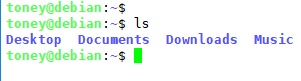
操作步骤:
情况①:如果是Ubuntu或者Debian,按照下面的流程,两步解决:
- 打开
~/.bashrc。 - 修改参数
force_color_prompt=yes去掉前面的注释#。
情况②:如果是CentOS中,按照下面的流程,两步解决:
- 打开
~/.bashrc。 - 在文件末尾添加如下内容:
# set a fancy prompt (non-color, unless we know we "want" color)
case "$TERM" in
    xterm-color|*-256color) color_prompt=yes;;
esac

# uncomment for a colored prompt, if the terminal has the capability; turned
# off by default to not distract the user: the focus in a terminal window
# should be on the output of commands, not on the prompt
force_color_prompt=yes

if [ -n "$force_color_prompt" ]; then
    if [ -x /usr/bin/tput ] && tput setaf 1 >&/dev/null; then
    # We have color support; assume it's compliant with Ecma-48
    # (ISO/IEC-6429). (Lack of such support is extremely rare, and such
    # a case would tend to support setf rather than setaf.)
    color_prompt=yes
    else
    color_prompt=
    fi
fi

if [ "$color_prompt" = yes ]; then
    PS1='${debian_chroot:+($debian_chroot)}\[\033[01;32m\]\u@\h\[\033[00m\]:\[\033[01;34m\]\w\[\033[00m\]\$ '
else
    PS1='${debian_chroot:+($debian_chroot)}\u@\h:\w\$ '
fi
unset color_prompt force_color_prompt
Xshell设置主机名高亮的更多相关文章
- centos7的网络配置以及设置主机名和绑定IP的问题
CentOS 7.0系统是一个很新的版本哦,很多朋友都不知道CentOS 7.0系统是怎么去安装配置的哦,因为centos7.0与以前版本是有很大的改进哦. 说明:截止目前CentOS 7.x最新版本 ...
- linux查看与设置主机名
1.设置主机名 通过编辑/etc/sysconfig/network文件中的HOSTNAME字段就可以修改主机名.如下所示: [root@zijuan /]# vim /etc/sysc ...
- 用户管理_组管理_设置主机名_UGO_文件高级权限_ACL权限
用户管理: 添加用户:useradd tom 设置密码:passwd tom 切换账户: su - tom (不加-也能切换,但是 -会有两点不同 1.有-会切换到该用户的主目录 2.会切换到该用户 ...
- 【Centos7】hostnamectl 设置主机名
Centos7中提供了设置主机名的工具 hostnamectl hostname有三种状态 static(永久) transient(瞬态) pretty (灵活) 查看主机名状态 [oracle@h ...
- Centos7】hostnamectl 设置主机名
Centos7中提供了设置主机名的工具 hostnamectl hostname有三种状态 static(永久) transient(瞬态) pretty (灵活) 查看主机名状态 [oracle@h ...
- CentOS7 设置主机名及IP映射
1.设置主机名 查看本机的主机名,使用如下三个命令中任意一个即可 # hostname # uname -n # cat /proc/sys/kernel/hostname 使用 vi 编辑器打开 / ...
- Linux命令之hostname - 显示或设置主机名
我使用过的Linux命令之hostname - 显示或设置主机名 本文链接:http://codingstandards.iteye.com/blog/804648 (转载请注明出处) 用途说明 ...
- 利用iis创建网站后为什么不能设置主机名
主机名 主机名就是网站的域名,通俗说就是网站地址(如:www.baidu.com). 设置了主机名,而IIS确不知道主机名对应的地址在哪里. 举个例子,把www.baidu.com做为IIS网站的主机 ...
- linux 查看和设置主机名
1.设置主机名 通过编辑/etc/sysconfig/network文件中的HOSTNAME字段就可以修改主机名.如下所示: [root@zijuan /]# vim /etc/sysconfig/n ...
随机推荐
- ZROI2018提高day6t1
传送门 分析 我们发现这个四元组可以分解成一个逆序对拼上一个顺序对,这个线段树搞搞然后乘一下就可以求出来了,但是我们发现可能有(a,b)为逆序对且(b,c)为顺序对的情况,所以要进行容斥,我们只需要枚 ...
- String的字符串相加是怎么实现的?
http://bbs.csdn.net/topics/60485130 首先看 String str = "a" + "b" + "c"; ...
- 数据结构_bubble_sort
问题描述 给定一个 1~N 的排列 P,即 1 到 N 中的每个数在 P 都只出现一次. 现在要对排列 P 进行冒泡排序,代码如下:for (int i = 1; i <= N; ++i)for ...
- ServletContext接口(六)
javax.servlet.ServletContext接口 ServletContext(上下文)是公用的,就是.net中的application,主要用到的就是全局set设置值,get获取值,ja ...
- 国外物联网平台(2):微软Azure IoT
国外物联网平台(2)——微软Azure IoT 马智 平台定位 连接设备.其它 M2M 资产和人员,以便在业务和操作中更好地利用数据. 连接 IoT 设备 将所有设备连接到云,从这些设备接收大规模数据 ...
- mysql字段名与关键字冲突(near "to":syntax error)
今天遇到个问题,mysql字段为 to ,但是插入时报语法错误,仔细分析to是关键词 使用单引号和双引号 全部失败!!!! 仔细看 mysql的字段都是`(键盘Esc下面那个符号)括起来的, 试了一下 ...
- Apache Spark
1. 用Apache Spark进行大数据处理——第一部分:入门介绍 2.
- [51nod1190]最小公倍数之和V2(莫比乌斯反演)
题解 传送门 题解 我是真的不明白这玩意儿是怎么跟反演扯上关系的-- 首先 \[ \begin{align} ans &=b\sum_{d|b}{1\over d}\sum_{i=a}^{b} ...
- StampedLock原理
原文链接:https://blog.csdn.net/sunhaoning/article/details/68924625 StamppedLock是Java 8中引入的一种新的锁机制.读写锁虽然分 ...
- 数据结构5: 链表(单链表)的基本操作及C语言实现
逻辑结构上一个挨一个的数据,在实际存储时,并没有像顺序表那样也相互紧挨着.恰恰相反,数据随机分布在内存中的各个位置,这种存储结构称为线性表的链式存储. 由于分散存储,为了能够体现出数据元素之间的逻辑关 ...