
Entity Framework Tutorial Basics(32):Enum Support
Enum in Entity Framework:
You can now have an Enum in Entity Framework 5.0 onwards. EF 5 should target .NET framework 4.5 in order to use Enum.
Enum can be created for the following data types:
- Int16
- Int32
- Int64
- Byte
- SByte
You can create and use an Enum type in your entity data model in three ways:
- Convert an existing property of entity to Enum from EDM designer
- Add a new Enum from EDM designer
- Use an existing Enum type from different namespace
For the purposes of this demo, we have included the TeacherType integer column in the Teacher table of SchoolDB. TeacherType 1 is for permanent teachers, 2 is for contractor teachers, and 3 is for guest teachers.
1. Convert an existing property to Enum:
Next, we will see how to convert a TeacherType to an Enum.
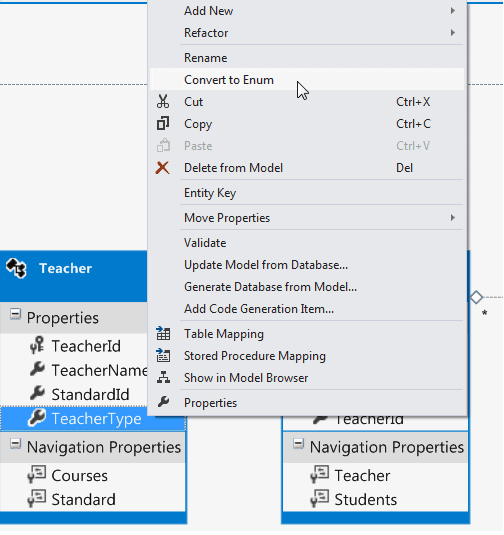
First, right click on the TeacherType property of a Teacher entity and click 'Convert to Enum' in the context menu.
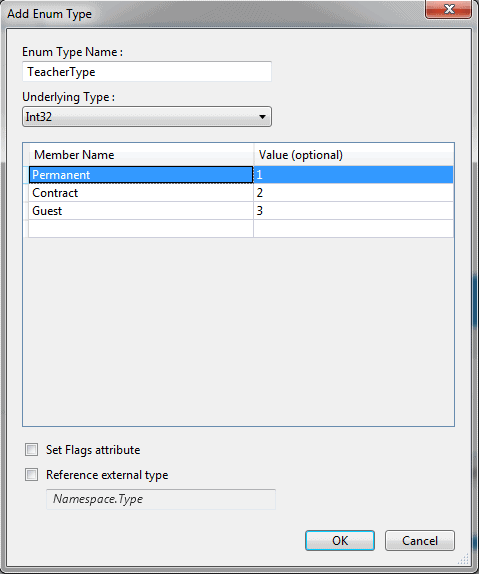
It will open the 'Add Enum Type' dialog box where you can enter the 'Enum Type Name' and, select 'Underlying Type' and Enum member names. For example:
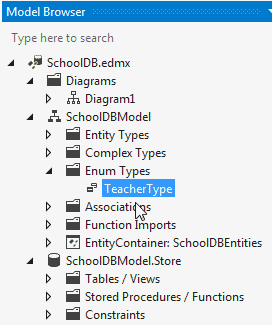
After converting it to Enum, you can see TeacherType as Enum Type in the Model Browser, as shown below:
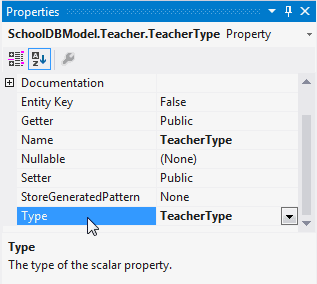
Also, you can see that the type of the TeacherType property is converted to TeacherType Enum:
Now, you can use TeacherType Enum in CRUD operation using DBContext. For example:
using (var ctx = new SchoolDBEntities())

{

      Teacher tchr = new Teacher();

      tchr.TeacherName = "New Teacher";

      //assign enum value

      tchr.TeacherType = TeacherType.Permanent;

      ctx.Teachers.Add(tchr);

      ctx.SaveChanges();

}
2. Add New Enum from Designer:
You can also add a new Enum by right clicking on EDM designer and selecting Add → Enum Type. It will open the same 'Add Enum Type' dialog box, where you can enter enum members.
After creating an Enum Type you can change the type of the TeacherType property to the newly created TeacherType Enum from the property window.
3. If you already have Enum type created in your code, then you can use that as a data type of any entity property.
To use an existing Enum type, right click on designer → Add New → Enum Type. Enter the Enum Type Name in the dialog box. Do not enter the member as you already have that in your code.
Now, select 'Reference external type' checkbox and enter the namespace of your existing enum and click OK. This will add the Enum type in the Model browser. Then, you can assign this Enum type to any property of an entity from the property window.
Note: Select 'Set Flags attribute' if you want to use bitwise operators with your Enum.
Entity Framework Tutorial Basics(32):Enum Support的更多相关文章
- Entity Framework Tutorial Basics(1):Introduction
以下系列文章为Entity Framework Turial Basics系列 http://www.entityframeworktutorial.net/EntityFramework5/enti ...
- Entity Framework Tutorial Basics(4):Setup Entity Framework Environment
Setup Entity Framework Environment: Entity Framework 5.0 API was distributed in two places, in NuGet ...
- Entity Framework Tutorial Basics(43):Download Sample Project
Download Sample Project: Download sample project for basic Entity Framework tutorials. Sample projec ...
- Entity Framework Tutorial Basics(42):Colored Entity
Colored Entity in Entity Framework 5.0 You can change the color of an entity in the designer so that ...
- Entity Framework Tutorial Basics(41):Multiple Diagrams
Multiple Diagrams in Entity Framework 5.0 Visual Studio 2012 provides a facility to split the design ...
- Entity Framework Tutorial Basics(37):Lazy Loading
Lazy Loading: One of the important functions of Entity Framework is lazy loading. Lazy loading means ...
- Entity Framework Tutorial Basics(36):Eager Loading
Eager Loading: Eager loading is the process whereby a query for one type of entity also loads relate ...
- Entity Framework Tutorial Basics(34):Table-Valued Function
Table-Valued Function in Entity Framework 5.0 Entity Framework 5.0 supports Table-valued functions o ...
- Entity Framework Tutorial Basics(33):Spatial Data type support in Entity Framework 5.0
Spatial Data type support in Entity Framework 5.0 MS SQL Server 2008 introduced two spatial data typ ...
随机推荐
- unity3d IO操作
前几天有个朋友问我为什么在IOS平台中可以正常的读写文件可是在Android平台中就无法正常的读写.当时因为在上班所以我没时间来帮他解决,晚上回家后我就拿起安卓手机真机调试很快就定位 ...
- 快速构建一个 Springboot
快速构建一个 Springboot 官网:http://projects.spring.io/spring-boot/ Spring Boot可以轻松创建可以“运行”的独立的,生产级的基于Spring ...
- java 简单实现socket
server端 package socket; import java.io.BufferedReader; import java.io.IOException; import java.io.In ...
- C#获取路由器外网IP,MAC地址
C#实现的获取路由器MAC地址,路由器外网地址.对于要获取路由器MAC地址,一定需要知道路由器web管理系统的用户名和密码.至于获取路由器的外网IP地址,可以不需要知道路由器web管理系统的用户名和密 ...
- 第二篇 Mysql常用操作记录(转载)
我们在创建网站的时候,一般需要用到数据库.考虑到安全性,建议使用非root用户.常用命令如下: 1.新建用户 //登录MYSQL@>mysql -u root -p@>密码//创建用户my ...
- java从键盘输入数,分解质因数,
总结:1.break;的用法 当最小质因数不能被输入的值整除时,需要继续循环.k++. 当然输入的数,本身就是质数时,那么 package com.b; import java.util.Scanne ...
- JAVA基础知识(13)-----Lock接口
Lock接口:多线程在JDK1.5版本升级时,推出一个接口Lock接口.解决线程安全问题使用同步的形式,(同步代码块,要么同步函数)其实最终使用的都是锁机制. 到了后期版本,直接将锁封装成了对象.线程 ...
- Oracle Sql中输入特殊字符 转义字符
1.单引号,出现在单引号对中的'号必须成对出现,每对代表一个', 例如select '''' from dual; 结果:' 前后两个'代表正常字符串,中间两个''代表一个',此语句输出结果只有一个'
- OpenGL渲染流水线
其实OpenGL的流水线,对我学习来说只能算是一个概念性的东西.毕竟OpenGL也在发展,流水线也不会是一成不变的. 不过理解流水线的过程,重点在于理解每一步的作用,进而可以如何衔接起来,完成整个绘制 ...
- JavaScript语言基础-对象与数组