
WPF 基础 - 绘画 2) Path
1. Path 霸中霸
既可以替代其他几种图形,也可以将直线、圆弧、贝尔赛曲线组合起来;
重要属性:Geometry Data;
其中 Geometry 为抽象类,不可实例化,可使用其子类:
LineGeometry、RectangleGeometry、EllipseGeometry、PathGeometry、
StreamGeometry、CombinedGeometry、GeometryGroup
<StackPanel Margin="20 5">

    <StackPanel.Resources>

        <LinearGradientBrush x:Key="DefaultColor">

            <GradientStop Color="#ff4b1f" Offset="0.1"/>

            <GradientStop Color="#1fddff" Offset="1"/>

        </LinearGradientBrush>

    </StackPanel.Resources>

        <StackPanel Margin="4 0">

        <Line Stroke="{StaticResource DefaultColor}" StrokeThickness="1" Margin="0 5"

              X1="0" Y1="0" X2="20" Y2="20" />

        <Path Stroke="{StaticResource DefaultColor}" StrokeThickness="1">

            <Path.Data>

                <LineGeometry StartPoint="0,0" EndPoint="20,20"/>

            </Path.Data>

        </Path>

    </StackPanel>

    <StackPanel Margin="4 0">

        <Rectangle Stroke="{StaticResource DefaultColor}" StrokeThickness="1" VerticalAlignment="Top" Margin="0 5"

                   Width="20" Height="20"/>

        <Path Stroke="{StaticResource DefaultColor}" StrokeThickness="1">

            <Path.Data>

                <RectangleGeometry Rect="0.5,0.5 19,19"/>

            </Path.Data>

        </Path>

    </StackPanel>

    <StackPanel Margin="4 0">

        <Ellipse StrokeThickness="1" Stroke="{StaticResource DefaultColor}" VerticalAlignment="Top" Margin="0 5"

                 Width="20" Height="20" />

        <Path Stroke="{StaticResource DefaultColor}" StrokeThickness="1">

            <Path.Data>

                <EllipseGeometry RadiusX="10" RadiusY="10" Center="10,10"/>

            </Path.Data>

        </Path>

    </StackPanel>

    <Path Stroke="{StaticResource DefaultColor}" StrokeThickness="1">

        <Path.Data>

            <PathGeometry>

                <PathFigure StartPoint="0,5" IsClosed="True" >

                    <LineSegment Point="15,10"></LineSegment>

                    <ArcSegment Point="30,20" Size="20,30" SweepDirection="Counterclockwise"></ArcSegment>

                    <BezierSegment Point1="30,45" Point2="50,30" Point3="40,50"></BezierSegment>

                </PathFigure>

            </PathGeometry>

        </Path.Data>

    </Path>

</StackPanel>
效果:

PathGeometry 的 Figures 属性可以容纳 PathFigure 对象,PathFigure 的 Segments 属性又可以容纳各种线段用于结合成复杂图形;
默认内容属性可以简化标签写法。
1.1 线段类型
- LineSegment 直线段
- ArgSegment 圆弧
- BezierSegment 贝塞尔曲线段
- QuadraticBezierSegment 二次方贝塞尔曲线段
- PolyLineSegment 多直线段
- PolyBezierSegment 多贝塞尔曲线段
- PolyQuadraticBezierSegment 多二次方贝塞尔曲线段
这些线段都以上一个线段的终点作为自己的起点,而第一个线段你的起点就是 PathFigure 的 StartPoint。
LineSegment : Point 表示终点

ArcSegment : Size 属性是完成椭圆的横、纵轴半径,

             SweepDirection 表明圆弧是顺/逆时针,Clockwise/Counterclockwise

             IsLargeArc 属性用于指明是否使用大弧去连接,

             RotationAngle 圆弧母椭圆的旋转角度

BezierSegment : Point1 表示起点先沿 Point1 点的方向走

                Point2 表示再沿 Point2 点的方向走

                Point3 最后到达 Point3 点(的平滑曲线)

QuadraticBezierSegment : 比 BezierSegment 少一个控制点
1.2 GeometryGroup
GeometryGroup 可以把多个 PathGeometry 的形状叠在一起。
1.3 路径标记语法
一条线段是一条标签,路径标记语法避免一个图形包括数十条线段导致数十行代码。
"M" 表示起点

<LineSegment Point="150, 50"/> = "L 150,50"

"H 180" 表示一条水平线段,横坐标到 180

"V 180" 表示垂直

"A 180,80 45 1 1 150,150" 圆弧 Size、

                               RotationAngle、

                               IsLargeArc(1=True)、

                               SweepDirection(1=Clockwise)、

                               Point

"C 250,0 50,200 300,200" 三次方贝塞尔BezierSegment Point1、Point2、Point3

"Q 150,-100 300,200" 二次方贝塞尔QuadraticBezierSegment Point1、Point2、Point3

"S 100,200 200,300" 平滑三次贝塞尔

"T 200,300" 平滑二次贝塞尔

"Z" 表示闭合
S、T 比较特殊,S 以前一条贝塞尔曲线的最后一个控制点以起点为对称中心的对称点作为自己的第一控制点,细品。平滑。
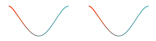
两者等价

<Path Data="M 0,0 C 6,0 18,30 30,30 S 51,0 60,0" Stroke="{StaticResource DefaultColor}" Margin="10 0"/>

<Path Data="M 0,0 C 6,0 18,30 30,30 C 42,30 51,0 60,0" Stroke="{StaticResource DefaultColor}"/>
效果:
1.4 Clip 窗口剪影
<Window x:Class="WpfAppTemplate.BrushWindow"

        xmlns="http://schemas.microsoft.com/winfx/2006/xaml/presentation"

        xmlns:x="http://schemas.microsoft.com/winfx/2006/xaml"

        xmlns:d="http://schemas.microsoft.com/expression/blend/2008"

        xmlns:mc="http://schemas.openxmlformats.org/markup-compatibility/2006"

        xmlns:coll="clr-namespace:System.Collections;assembly=mscorlib"

        mc:Ignorable="d"

        Title="BrushWindow" Height="700" Width="700">

    <StackPanel>

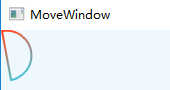
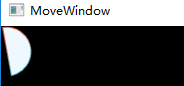
        <Path x:Name="PP" Visibility="Collapsed" Data="M 10,10 A 130,130 0 1 1 100,500 Z"/>

        <Button Content="Clip the Window" Width="90" Height="40" Click="Button_Click_1"/>

    </StackPanel>

</Window>

private void Button_Click_1(object sender, RoutedEventArgs e)

{

    this.Clip = this.PP.Data;

}
 =>
=> 
WPF 基础 - 绘画 2) Path的更多相关文章
- WPF 基础 - 绘画 1) 线段、矩形、圆弧及填充色
1. 绘画 1.1 图形类型 Line X1.Y1.X2.Y2,Stroke,StrokeThickness Rectangle 矩形 Ellipse 椭圆 Polygon 多边形(自动闭合) Pol ...
- [Qt扒手] PyQt5 基础绘画例子
[说明] 好吧,坦白从宽,我是Qt扒手(不要鄙视我).这是我根据qt官网提供的C++版本的例子(http://doc.qt.io/qt-5/qtwidgets-painting-basicdrawin ...
- WPF基础到企业应用系列6——布局全接触
本文转自:http://knightswarrior.blog.51cto.com/1792698/365351 一. 摘要 首先很高兴这个系列能得到大家的关注和支持,这段时间一直在研究Windows ...
- WPF 基础到企业应用系列索引
转自:http://www.cnblogs.com/zenghongliang/archive/2010/07/09/1774141.html WPF 基础到企业应用系列索引 WPF 基础到企业应用系 ...
- WPF笔记(1.1 WPF基础)——Hello,WPF!
原文:WPF笔记(1.1 WPF基础)--Hello,WPF! Example 1-1. Minimal C# WPF application// MyApp.csusing System;using ...
- WPF编程,通过Path类型制作沿路径运动的动画一种方法。
原文:WPF编程,通过Path类型制作沿路径运动的动画一种方法. 版权声明:我不生产代码,我只是代码的搬运工. https://blog.csdn.net/qq_43307934/article/de ...
- WPF编程,通过Path类型制作沿路径运动的动画另一种方法。
原文:WPF编程,通过Path类型制作沿路径运动的动画另一种方法. 版权声明:我不生产代码,我只是代码的搬运工. https://blog.csdn.net/qq_43307934/article/d ...
- C# WPF基础巩固
时间如流水,只能流去不流回. 学历代表你的过去,能力代表你的现在,学习能力代表你的将来. 学无止境,精益求精. 一.写作目的 做C# WPF开发,无论是工作中即将使用,还是只应付跳槽面试,开发基础是非 ...
- WPF基础知识、界面布局及控件Binding(转)
WPF是和WinForm对应的,而其核心是数据驱动事件,在开发中显示的是UI界面和逻辑关系相分离的一种开放语言.UI界面是在XAML语言环境下开发人员可以进行一些自主设计的前台界面,逻辑关系还是基于c ...
随机推荐
- [Golang]-1 Slice与数组的区别
目录 数组 1.创建数组: 2.数组是值拷贝传递: 切片(slice) 1.首先看看slice的源码结构: 2.slice的创建: 3.slice使用make创建 4.切片作为参数传递 5.Golan ...
- SVG 与 Canvas 对比
SVG 与 Canvas 对比 技术选型 SVG vs Canvas 应用场景 性能 GPU 加速 XML 数据存储 Canvas 2D Canvas 3D WebGL / OpenGL ES thr ...
- js function call hacker
js function call hacker you don't know javascript function https://developer.mozilla.org/en-US/docs/ ...
- bili & library bundler
bili & library bundler https://bili.egoist.sh/#/#quick-start # Node.js 8 or above: $ npm i -D bi ...
- SVG & convert polygon/polyline to path
SVG & convert polygon/polyline to path SVG Polygon/Polyline to Path Converter https://codepen.io ...
- 去中心化预言机如何助力NGK DeFi 项目发展?
早在 2014 年前后,协议智能合约就已经出现了,最初协议很笨重,包含了许多不同的部分,每个部分都是一个单独的智能合约,你需要在区块链本身的协议中添加不同的智能合约,这需要几个月甚至几年的时间,而之后 ...
- PAUL ADAMS ARCHITECT:费城东北区的房地产市场逆势而行
根据Zillow.com的房产数据,大费城地区前三季度成交房产的平均价格为27.2万美元,较去年同期增长了13.4%,为10年同期最高.即使如此,27.2万的均价与纽约相比依然相距甚远,其中尤其是费城 ...
- BGV上线17小时最高888.88美金,投资最高回报率近+1778倍, 带动NGK内存暴涨
至12月3日BGV币上线A网交易所DeFi板块以来,BGV价值飙升长.,据非小号的数据显示,BGV币价是718美元(东八区时间2020年12月4日早上九点四十),相较昨日涨幅达70.14%,以718美 ...
- CodeMirror动态修改代码(关键: editor.getDoc().setValue(data); editor.refresh();)
在使用codemirror时,其原理是根据form中的textarea标签,自动加载其内容,获得代码行的显示.(具体使用方式参见 codemirror官网使用手册 http://codemirror. ...
- 行业动态 | Apache Pulsar 对现代数据堆栈至关重要的四个原因
与 Kafka 相比,Pulsar 的架构使它在跨地域复制.扩展.多租户和队列等方面具有重要的优势. 1 月 27 日,DataStax 宣布收购Kesque(Pulsar 即服务),加入到了 P ...