
吴裕雄--天生自然 R语言开发学习:方差分析

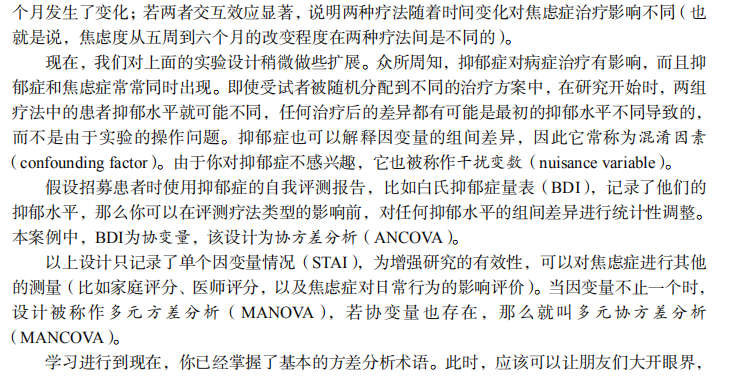
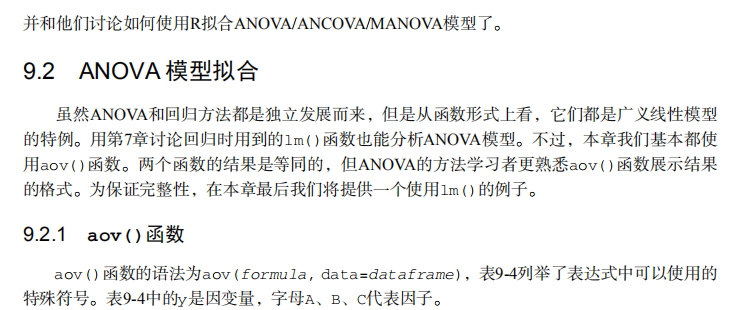
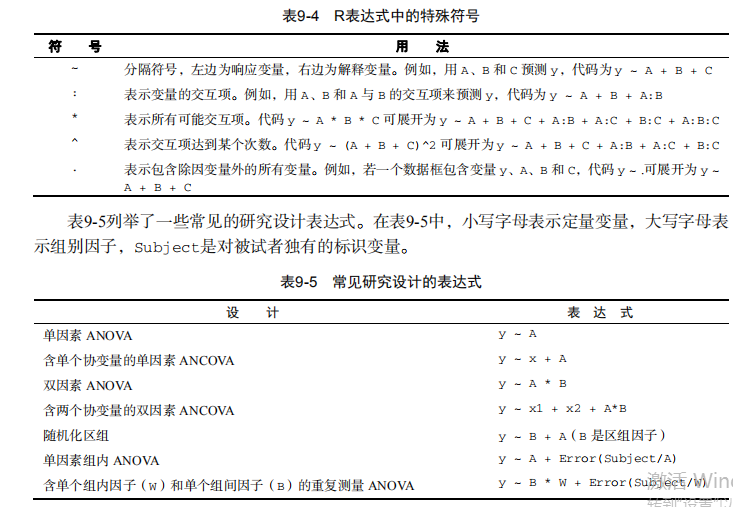
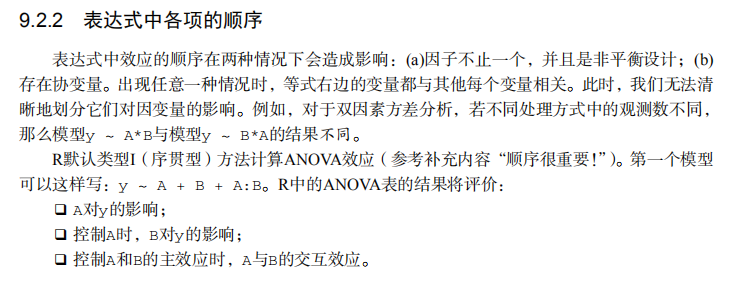




#-------------------------------------------------------------------#

# R in Action (2nd ed): Chapter 9                                   #

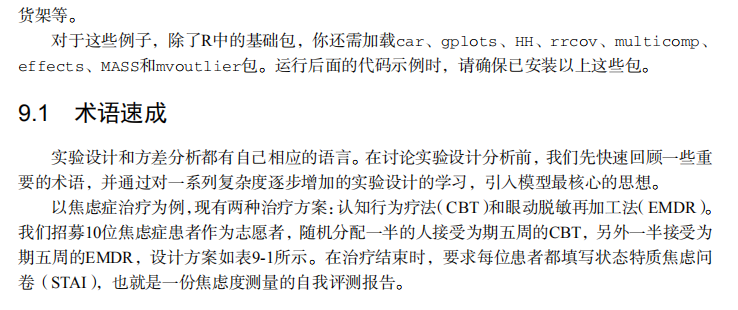
# Analysis of variance                                              #

# requires packages multcomp, gplots, car, HH, effects,             #

#                   rrcov, mvoutlier to be installed                #

# install.packages(c("multcomp", "gplots", "car", "HH", "effects",  #

#                    "rrcov", "mvoutlier"))                         #

#-------------------------------------------------------------------#

par(ask=TRUE)

opar <- par(no.readonly=TRUE) # save original parameters

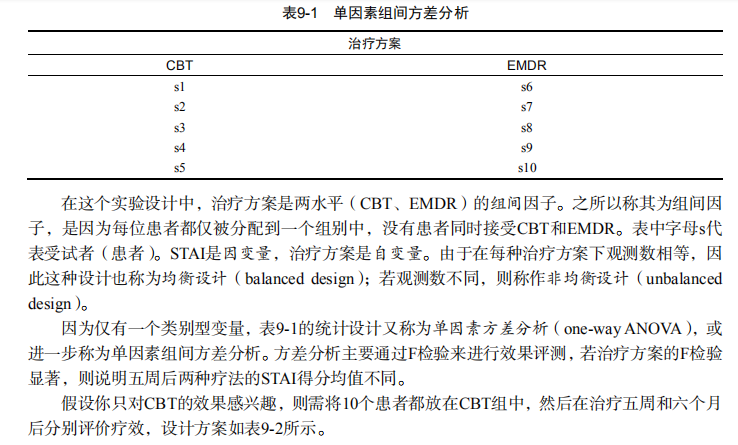
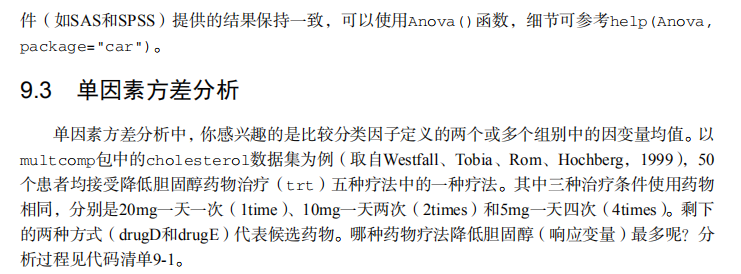
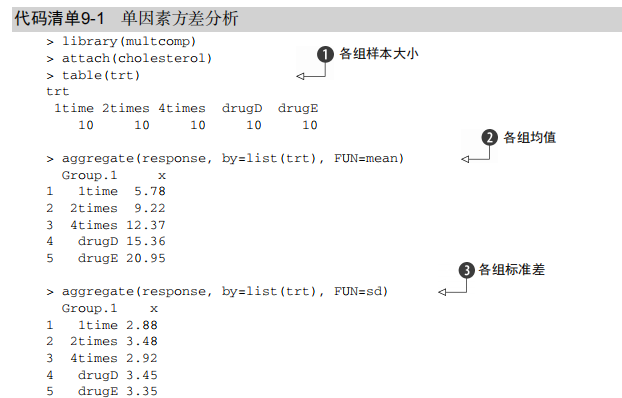
# Listing 9.1 - One-way ANOVA

library(multcomp)

attach(cholesterol)

table(trt)

aggregate(response, by=list(trt), FUN=mean)

aggregate(response, by=list(trt), FUN=sd)

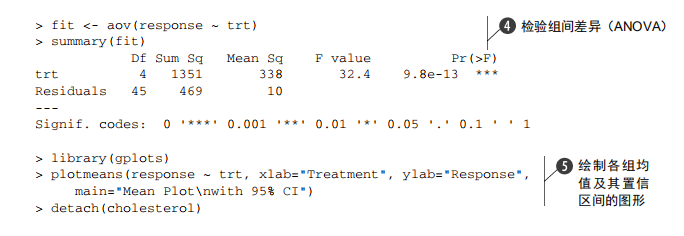
fit <- aov(response ~ trt)

summary(fit)

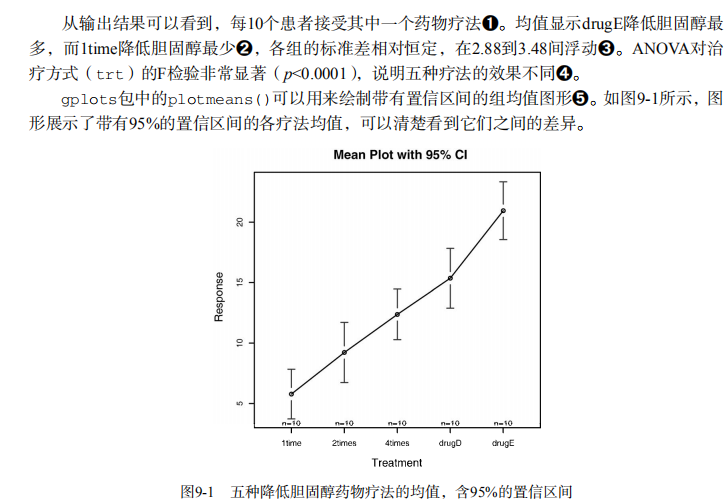
library(gplots)

plotmeans(response ~ trt, xlab="Treatment", ylab="Response",

          main="Mean Plot\nwith 95% CI")

detach(cholesterol)

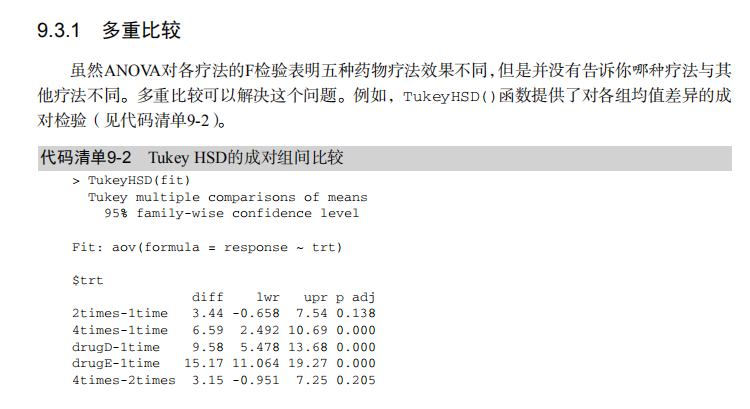
# Listing 9.2 - Tukey HSD pairwise group comparisons

TukeyHSD(fit)

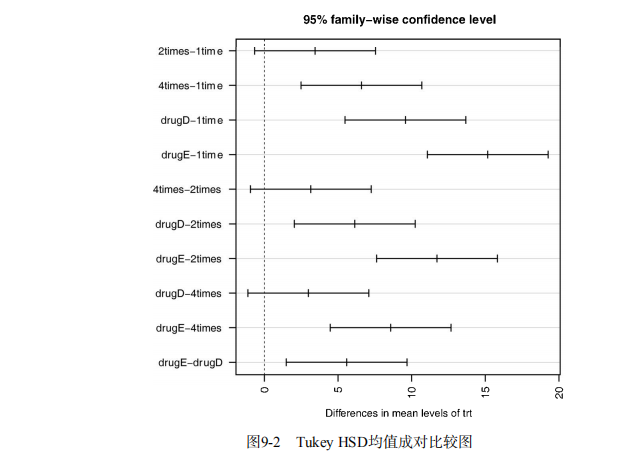
par(las=2)

par(mar=c(5,8,4,2))

plot(TukeyHSD(fit))

par(opar)

# Multiple comparisons the multcomp package

library(multcomp)

par(mar=c(5,4,6,2))

tuk <- glht(fit, linfct=mcp(trt="Tukey"))

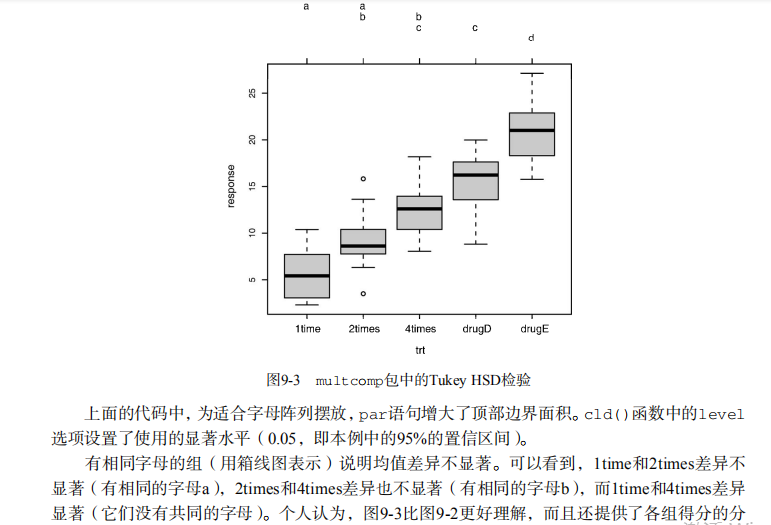
plot(cld(tuk, level=.05),col="lightgrey")

par(opar)

# Assessing normality

library(car)

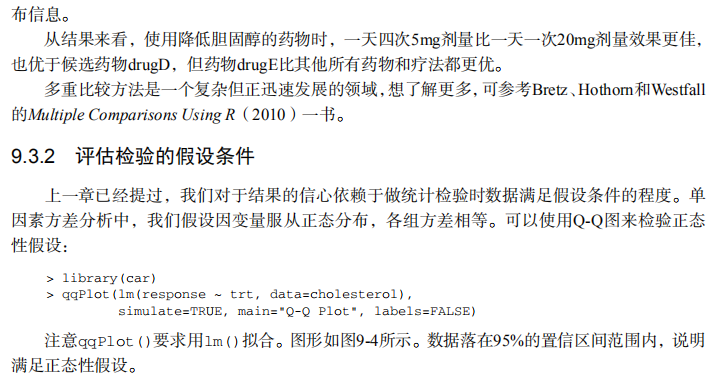
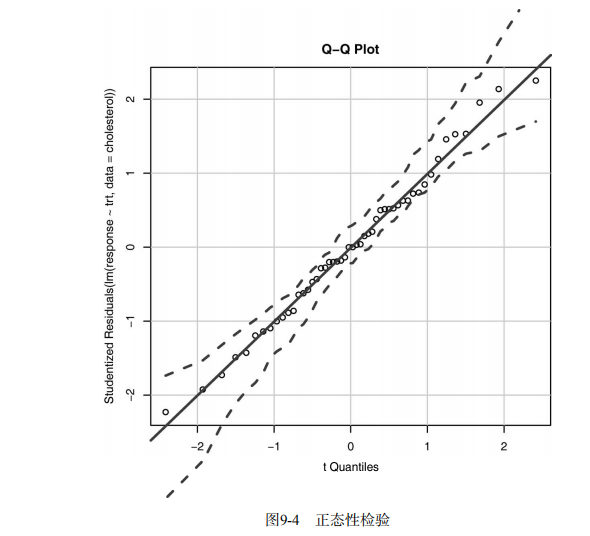
qqPlot(lm(response ~ trt, data=cholesterol),

       simulate=TRUE, main="Q-Q Plot", labels=FALSE)

# Assessing homogeneity of variances

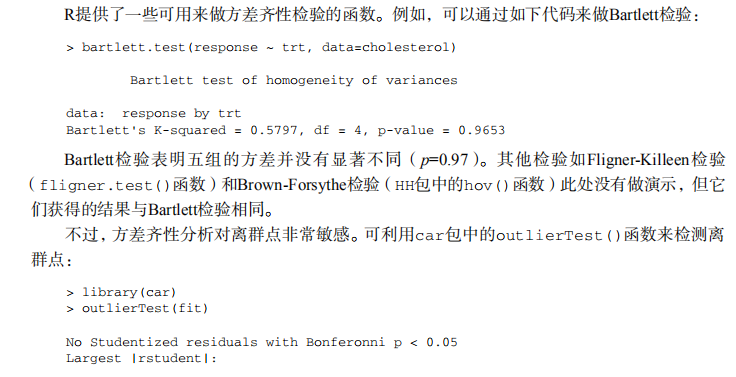
bartlett.test(response ~ trt, data=cholesterol)

# Assessing outliers

library(car)

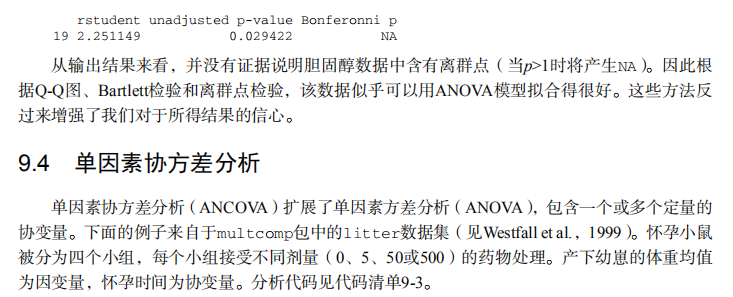
outlierTest(fit)

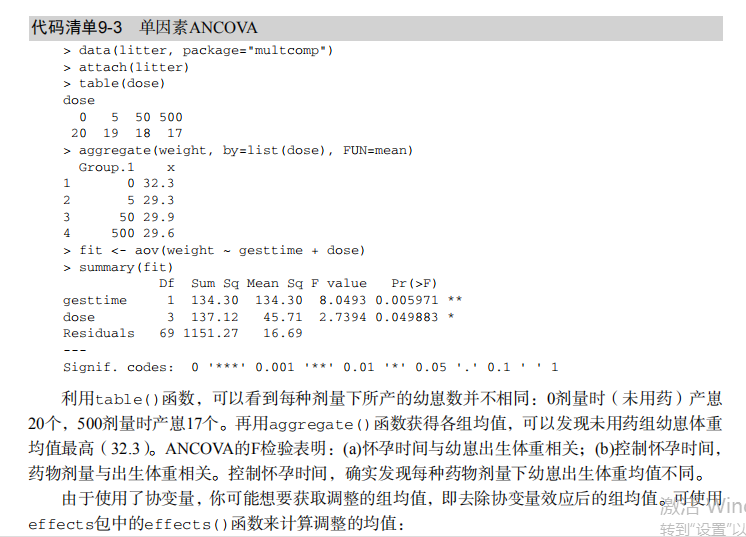
# Listing 9.3 - One-way ANCOVA

data(litter, package="multcomp")

attach(litter)

table(dose)

aggregate(weight, by=list(dose), FUN=mean)

fit <- aov(weight ~ gesttime + dose)

summary(fit)

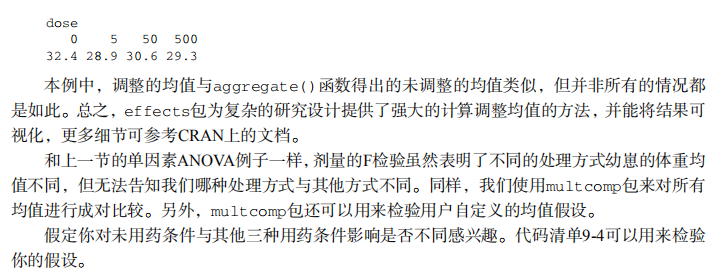
# Obtaining adjusted means

library(effects)

effect("dose", fit)

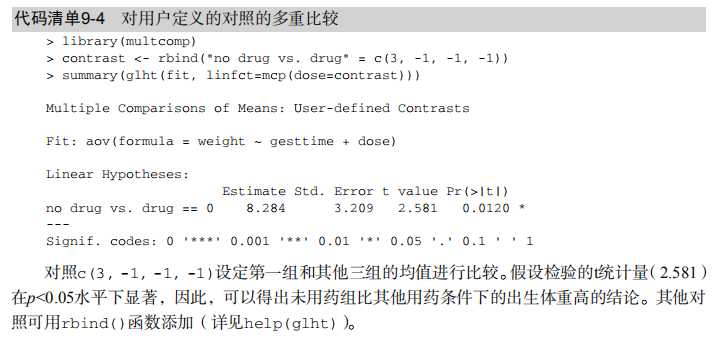
#  Listing 9.4 - Multiple comparisons using user supplied contrasts

library(multcomp)

contrast <- rbind("no drug vs. drug" = c(3, -1, -1, -1))

summary(glht(fit, linfct=mcp(dose=contrast)))

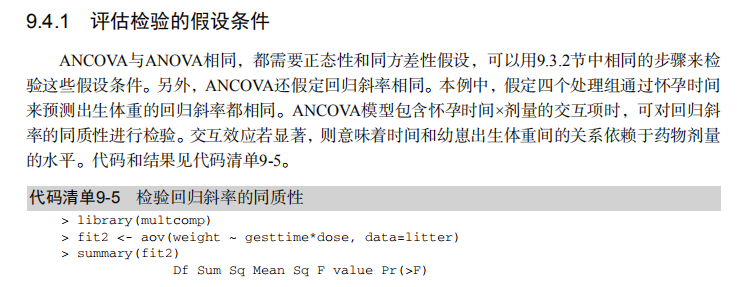
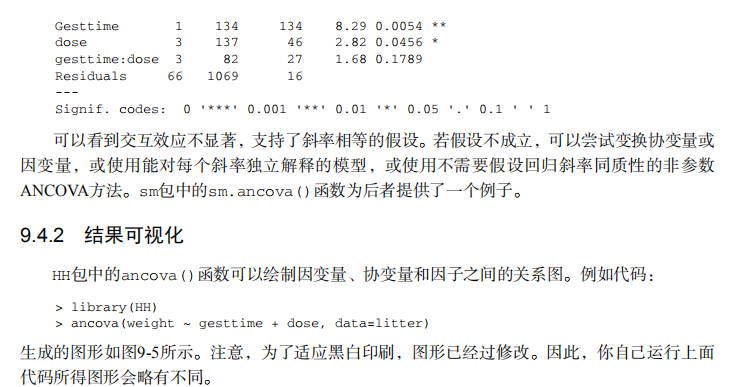
# Listing 9.5 - Testing for homegeneity of regression slopes

library(multcomp)

fit2 <- aov(weight ~ gesttime*dose, data=litter)

summary(fit2)

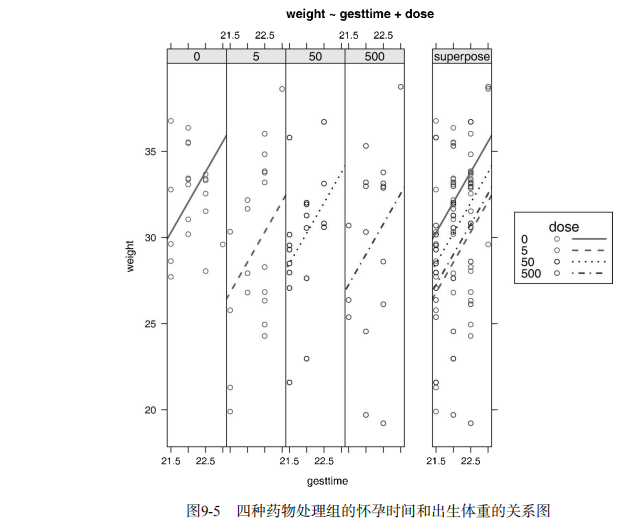
# Visualizing a one-way ANCOVA

library(HH)

ancova(weight ~ gesttime + dose, data=litter)

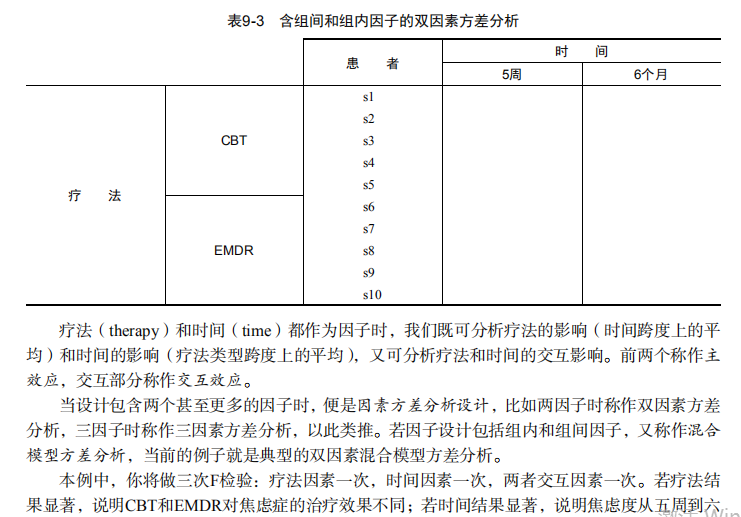
# Listing 9.6 - Two way ANOVA

attach(ToothGrowth)

table(supp,dose)

aggregate(len, by=list(supp,dose), FUN=mean)

aggregate(len, by=list(supp,dose), FUN=sd)

dose <- factor(dose)

fit <- aov(len ~ supp*dose)

summary(fit)

# plotting interactions

interaction.plot(dose, supp, len, type="b",

                 col=c("red","blue"), pch=c(16, 18),

                 main = "Interaction between Dose and Supplement Type")

library(gplots)

plotmeans(len ~ interaction(supp, dose, sep=" "),

          connect=list(c(1, 3, 5),c(2, 4, 6)),

          col=c("red","darkgreen"),

          main = "Interaction Plot with 95% CIs",

          xlab="Treatment and Dose Combination")

library(HH)

interaction2wt(len~supp*dose)

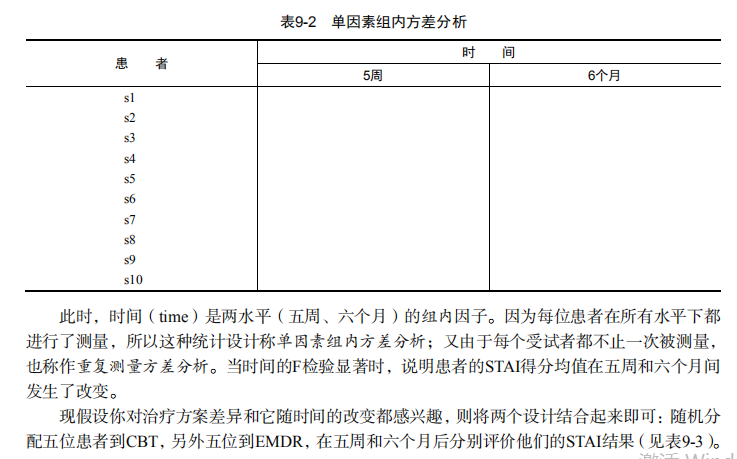
#  Listing 9.7 - Repeated measures ANOVA with one between and within groups factor

CO2$conc <- factor(CO2$conc)

w1b1 <- subset(CO2, Treatment=='chilled')

fit <- aov(uptake ~ (conc*Type) + Error(Plant/(conc)), w1b1)

summary(fit)

par(las=2)

par(mar=c(10,4,4,2))

with(w1b1,

     interaction.plot(conc,Type,uptake,

                      type="b", col=c("red","blue"), pch=c(16,18),

                      main="Interaction Plot for Plant Type and Concentration"))

boxplot(uptake ~ Type*conc, data=w1b1, col=(c("gold","green")),

        main="Chilled Quebec and Mississippi Plants",

        ylab="Carbon dioxide uptake rate (umol/m^2 sec)")

par(opar)

# Listing 9.8 - One-way MANOVA

library(MASS)

attach(UScereal)

shelf <- factor(shelf)

y <- cbind(calories, fat, sugars)

aggregate(y, by=list(shelf), FUN=mean)

cov(y)

fit <- manova(y ~ shelf)

summary(fit)

summary.aov(fit)

#  Listing 9.9 - Assessing multivariate normality

center <- colMeans(y)

n <- nrow(y)

p <- ncol(y)

cov <- cov(y)

d <- mahalanobis(y,center,cov)

coord <- qqplot(qchisq(ppoints(n),df=p),

                d, main="QQ Plot Assessing Multivariate Normality",

                ylab="Mahalanobis D2")

abline(a=0,b=1)

identify(coord$x, coord$y, labels=row.names(UScereal))

# multivariate outliers

library(mvoutlier)

outliers <- aq.plot(y)

outliers

# Listing 9.10 - Robust one-way MANOVA

library(rrcov)

Wilks.test(y,shelf, method="mcd")  # this can take a while

# Listing 9.11 - A regression approach to the Anova problem

fit.lm <- lm(response ~ trt, data=cholesterol)

summary(fit.lm)

contrasts(cholesterol$trt)
吴裕雄--天生自然 R语言开发学习:方差分析的更多相关文章
- 吴裕雄--天生自然 R语言开发学习:R语言的安装与配置
下载R语言和开发工具RStudio安装包 先安装R
- 吴裕雄--天生自然 R语言开发学习:数据集和数据结构
数据集的概念 数据集通常是由数据构成的一个矩形数组,行表示观测,列表示变量.表2-1提供了一个假想的病例数据集. 不同的行业对于数据集的行和列叫法不同.统计学家称它们为观测(observation)和 ...
- 吴裕雄--天生自然 R语言开发学习:导入数据
2.3.6 导入 SPSS 数据 IBM SPSS数据集可以通过foreign包中的函数read.spss()导入到R中,也可以使用Hmisc 包中的spss.get()函数.函数spss.get() ...
- 吴裕雄--天生自然 R语言开发学习:使用键盘、带分隔符的文本文件输入数据
R可从键盘.文本文件.Microsoft Excel和Access.流行的统计软件.特殊格 式的文件.多种关系型数据库管理系统.专业数据库.网站和在线服务中导入数据. 使用键盘了.有两种常见的方式:用 ...
- 吴裕雄--天生自然 R语言开发学习:R语言的简单介绍和使用
假设我们正在研究生理发育问 题,并收集了10名婴儿在出生后一年内的月龄和体重数据(见表1-).我们感兴趣的是体重的分 布及体重和月龄的关系. 可以使用函数c()以向量的形式输入月龄和体重数据,此函 数 ...
- 吴裕雄--天生自然 R语言开发学习:基础知识
1.基础数据结构 1.1 向量 # 创建向量a a <- c(1,2,3) print(a) 1.2 矩阵 #创建矩阵 mymat <- matrix(c(1:10), nrow=2, n ...
- 吴裕雄--天生自然 R语言开发学习:图形初阶(续二)
# ----------------------------------------------------# # R in Action (2nd ed): Chapter 3 # # Gettin ...
- 吴裕雄--天生自然 R语言开发学习:图形初阶(续一)
# ----------------------------------------------------# # R in Action (2nd ed): Chapter 3 # # Gettin ...
- 吴裕雄--天生自然 R语言开发学习:图形初阶
# ----------------------------------------------------# # R in Action (2nd ed): Chapter 3 # # Gettin ...
- 吴裕雄--天生自然 R语言开发学习:基本图形(续二)
#---------------------------------------------------------------# # R in Action (2nd ed): Chapter 6 ...
随机推荐
- echars 柱状图点击事件
drawlineCRK() { let _this = this; ///绘制echarts 柱状图 let mycharts = this.$echarts.i ...
- 求素数的一个快速算法 Python 快速输出素数算法
思想 以100以内为例. 生成一个全是True的101大小的数组 2开始,遇到2的倍数(4,6,8,10...)都赋值为False 因为这些数字都有因子 2 3开始,遇到3的倍数(6,9,12...) ...
- Python—使用列表构造栈数据结构
class Stack(object): """ 使用列表实现栈 """ def __init__(self): self.stack = ...
- cygwin下命令行下切换目录
比我们正常切换目录多个挂载的文件夹 cygdrive
- idea远程调试tomcat部署项目(windows环境)
1.tomcat启动之前,修改apache-tomcat-8.5.34\bin\catalina.bat文件,设置调试端口 如下设置(windows环境): rem ----------------- ...
- reactor-core
<dependency> <groupId>io.projectreactor</groupId> <artifactId>reactor-core&l ...
- $identify 的 “identify” 表示一个Perl标识符,即 identifier
$identify 的 “identify” 表示一个Perl标识符,即 identifier
- skip-list(跳表)原理及C++代码实现
跳表是一个很有意思的数据结构,它实现简单,但是性能又可以和平衡二叉搜索树差不多. 据MIT公开课上教授的讲解,它的想法和纽约地铁有异曲同工之妙,简而言之就是不断地增加“快线”,从而降低时间复杂度. 当 ...
- SpringBoot集成ssm-druid-通用mapper
简单介绍 springboot 首先什么是springboot? springboot是spring的另外一款框架,设计目的是用来简化新的spring应用的搭建和开发时所需要的特定的配置,从而使开发过 ...
- 二十、linux文件系统讲解
1.分区和文件系统的关系: 为什么需要格式化呢?这是因为分区文件系统在没有格式化前,操作系统是无法识别系统分区的格式的,就没办法组织文件目录属性和权限等内容,把分区格式化成操作系统支持的某个文件系统后 ...