
【demo练习四】:WPF用户控件案例
首先,新建vs中“用户控件(WPF)”,右键项目名 =>"添加"按钮 => 选择“新建项”。

然后选择“用户控件(WPF)” => 起名字 => 点击“添加”按钮。

最后生成用户控件界面。
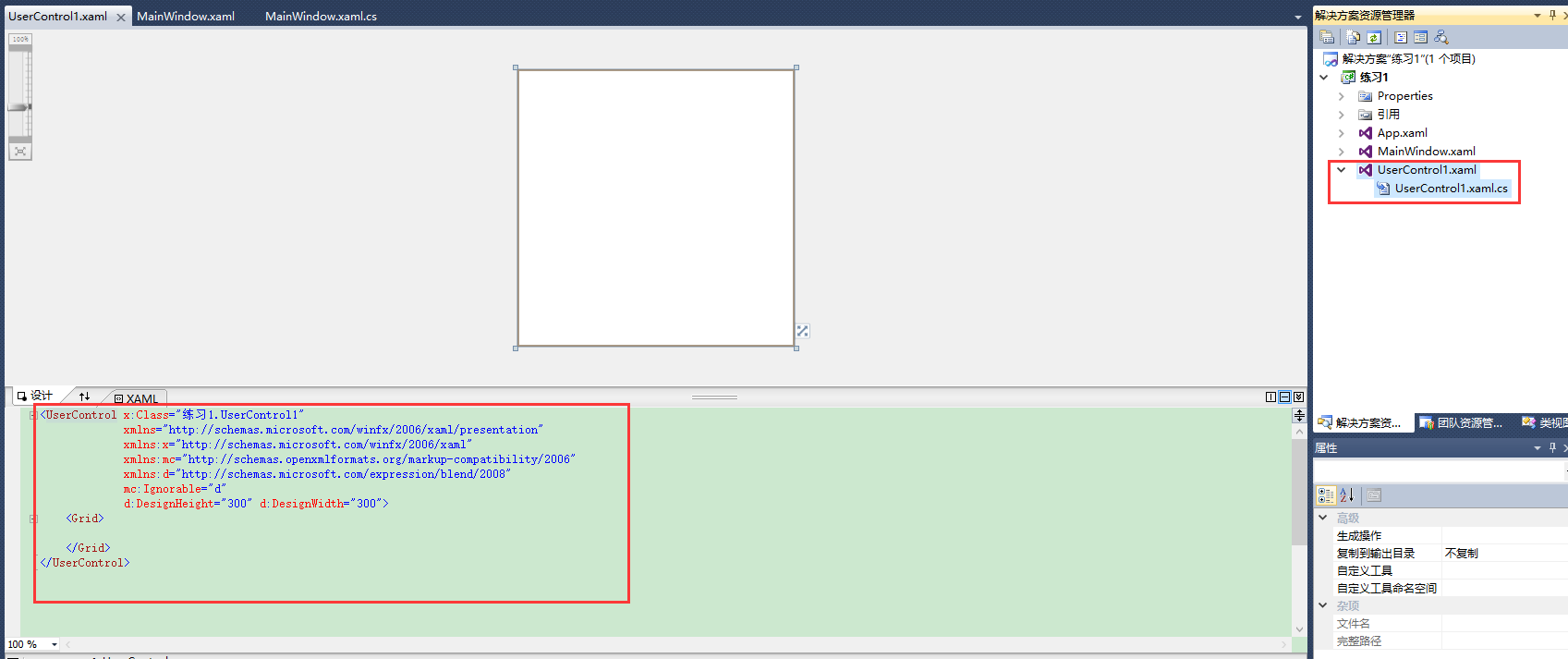
建好用户控件后开始累代码,如下:
方法一:直接在前台页面调用“用户控件”。
主界面前台:
 <Window x:Class="自定义用户控件.MainWindow"

         xmlns="http://schemas.microsoft.com/winfx/2006/xaml/presentation"

         xmlns:local="clr-namespace:自定义用户控件"

         xmlns:x="http://schemas.microsoft.com/winfx/2006/xaml"

         Title="MainWindow" Height="" Width="">

     <Viewbox>

         <Canvas x:Name="canvas_1" Background="SkyBlue" Width="" Height="">

           <local:UserControl1  Width="300" Height="300"/>

         </Canvas>

     </Viewbox>

 </Window>
用户控件前台:
 <UserControl x:Class="自定义用户控件.UserControl1"

              xmlns="http://schemas.microsoft.com/winfx/2006/xaml/presentation"

              xmlns:x="http://schemas.microsoft.com/winfx/2006/xaml"

              xmlns:mc="http://schemas.openxmlformats.org/markup-compatibility/2006"

              xmlns:d="http://schemas.microsoft.com/expression/blend/2008"

              mc:Ignorable="d"

              Background="Red"

              d:DesignHeight="" d:DesignWidth="">

     <Canvas Width="" Height="">

         <Button Width="" Height="" Canvas.Left="" Content="按钮" Canvas.Top="" Click="Button_Click" />

     </Canvas>

 </UserControl>
用户控件的后台:
 using System;

 using System.Collections.Generic;

 using System.Linq;

 using System.Text;

 using System.Windows;

 using System.Windows.Controls;

 using System.Windows.Data;

 using System.Windows.Documents;

 using System.Windows.Input;

 using System.Windows.Media;

 using System.Windows.Media.Imaging;

 using System.Windows.Navigation;

 using System.Windows.Shapes;

 namespace 自定义用户控件

 {

     /// <summary>

     /// UserControl1.xaml 的交互逻辑

     /// </summary>

     public partial class UserControl1 : UserControl

     {

         public UserControl1()

         {

             InitializeComponent();

         }

         private void Button_Click(object sender, RoutedEventArgs e)

28         {

29             MessageBox.Show("ddd");

30         }

     }

 }
方法二:利用主界面的后台调用“用户控件”。
主界面前台:
 <Window x:Class="自定义用户控件.MainWindow"

         xmlns="http://schemas.microsoft.com/winfx/2006/xaml/presentation"

         xmlns:local="clr-namespace:自定义用户控件"

         Loaded="Window_Loaded"

         xmlns:x="http://schemas.microsoft.com/winfx/2006/xaml"

         Title="MainWindow" Height="" Width="">

     <Viewbox>

         <Canvas x:Name="canvas_1" Background="SkyBlue" Width="" Height="">

         </Canvas>

     </Viewbox>

 </Window>
用户控件前台:
 <UserControl x:Class="自定义用户控件.UserControl1"

              xmlns="http://schemas.microsoft.com/winfx/2006/xaml/presentation"

              xmlns:x="http://schemas.microsoft.com/winfx/2006/xaml"

              xmlns:mc="http://schemas.openxmlformats.org/markup-compatibility/2006"

              xmlns:d="http://schemas.microsoft.com/expression/blend/2008"

              mc:Ignorable="d" Loaded="UserControl_Loaded"

              Background="Red"

              d:DesignHeight="" d:DesignWidth="">

     <Canvas Width="" Height="">

         <Button Width="" Height="" Canvas.Left="" Content="按钮" Canvas.Top="" Click="Button_Click" />

     </Canvas>

 </UserControl>
用户界面后台:
 using System;

 using System.Collections.Generic;

 using System.Linq;

 using System.Text;

 using System.Windows;

 using System.Windows.Controls;

 using System.Windows.Data;

 using System.Windows.Documents;

 using System.Windows.Input;

 using System.Windows.Media;

 using System.Windows.Media.Imaging;

 using System.Windows.Navigation;

 using System.Windows.Shapes;

 namespace 自定义用户控件

 {

     /// <summary>

     /// UserControl1.xaml 的交互逻辑

     /// </summary>

     public partial class UserControl1 : UserControl

     {

         public UserControl1()

         {

             InitializeComponent();

         }

         private void Button_Click(object sender, RoutedEventArgs e)

         {

             MessageBox.Show("ddd");

         }

         private void UserControl_Loaded(object sender, RoutedEventArgs e)

33         {

34             MessageBox.Show("控件加载");

35         }

     }

 }
主界面后台:
 using System;

 using System.Collections.Generic;

 using System.Linq;

 using System.Text;

 using System.Windows;

 using System.Windows.Controls;

 using System.Windows.Data;

 using System.Windows.Documents;

 using System.Windows.Input;

 using System.Windows.Media;

 using System.Windows.Media.Imaging;

 using System.Windows.Navigation;

 using System.Windows.Shapes;

 namespace 自定义用户控件

 {

     /// <summary>

     /// MainWindow.xaml 的交互逻辑

     /// </summary>

     public partial class MainWindow : Window

     {

         public MainWindow()

         {

             InitializeComponent();

         }

         private void Window_Loaded(object sender, RoutedEventArgs e)

         {

             for (int i = ; i < ; i++)

             {

                 uc_test1 _uc_test1 = new uc_test1();

32                 _uc_test1.Width = _uc_test1.Height = 300;

33                 canvas_1.Children.Add(_uc_test1);

                 Canvas.SetLeft(_uc_test1, i * );

             }

         }

     }

 }
以上两种方法调用“用户控件”。
【demo练习四】:WPF用户控件案例的更多相关文章
- 创建WPF用户控件
wpf用户自定义控件和winform创建方法类似,这里先纠正一个误区,就是有很多人也是添加,然后新建,然后是新建用户控件库,但是为什么编译好生成后Debug目录下还是只有exe文件而没有dll文件呢? ...
- WPF 用户控件嵌入网页
WPF使用用户控件嵌入网页,直接使用WebBrowser或Frame会产生报错,报错信息如下: 1.使用WebBrowser,<WebBrowser Source="http://19 ...
- WPF 用户控件的自定义依赖属性在 MVVM 模式下的使用备忘
依赖属性相当于扩充了 WPF 标签的原有属性列表,并可以使用 WPF 的绑定功能,可谓是十分方便的:用户控件则相当于代码重用的一种方式:以上几点分开来还是比较好理解的,不过要用到MVVM 模式中,还是 ...
- WPF用户控件库 嵌入外部(VLC)exe
综合网上资源完成的自己的第一篇博客 ------------------------------------------------------------------------ 网上类似的贴子挺多 ...
- WPF之路——用户控件对比自定义控件UserControl VS CustomControl)
将多个现有的控件组合成一个可重用的“组”. 由一个XAML文件和一个后台代码文件. 不能使用样式和模板. 继承自UserControl类. 自定义控件(扩展) 在现有的控件上进行扩展,增加一些新的属性 ...
- WPF 创建用户控件并引用
项目源码地址:https://github.com/lizhiqiang0204/WpfControlLibrary.git 首先创建新项目->WPF用户控件库项目 在UserControl1. ...
- ASP.Net用户控件的使用
一.概述: 与WEB窗体页相同,程序员可以使用任何文本编辑器创作用户控件,或者使用代码隐藏类开发用户控件.此外,与WEB窗体页一样,用户控件可以在第一次请求时被编译并存储在服务器内存中,从而缩短以后请 ...
- 【WPF学习】第六十四章 构建基本的用户控件
创建一个简单用户控件是开始自定义控件的好方法.本章主要介绍创建一个基本的颜色拾取器.接下来分析如何将这个控件分解成功能更强大的基于模板的控件. 创建基本的颜色拾取器很容易.然而,创建自定义颜色拾取器仍 ...
- 【WPF学习笔记】之如何点击“新建”按钮,在面板中加载一条条的“用户控件”的信息:动画系列之(四)
...... 承接上一系列动画三. 在主界面后台代码设置嵌套第二个用户控件. using System; using System.Collections.Generic; using System. ...
随机推荐
- 一个关于集合的问题,为什么添加进List集合中的元素被莫名其妙的改变了
以前自己理解的不够深刻,特此记录一下提醒自己,如果正好也帮到了你,我会很开心.相信只有自己正好遇到这个问题,才觉得哦,原来这样.自己小白,大神莫喷 为什么添加进List集合中的元素被莫名其妙的改变了? ...
- function in Postgres
CREATE or REPLACE FUNCTION fn_attr_category() RETURNS void AS $BODY$ declare v_tmp_rec record; begin ...
- Codeforces 777D Cloud of Hashtags(贪心)
题目链接 Cloud of Hashtags 题目还是比较简单的,直接贪心,但是因为我有两个细节没注意,所以FST了: 1.用了cin读入,但是没有加 std::ios::sync_with_stdi ...
- 详解Tomcat系列(一)-从源码分析Tomcat的启动
在整个Tomcat系列文章讲解之前, 我想说的是虽然整个Tomcat体系比较复杂, 但是Tomcat中的代码并不难读, 只要认真花点功夫, 一定能啃下来. 由于篇幅的原因, 很难把Tomcat所有的知 ...
- Vue中this.$router.push参数获取
传递参数的方法:1.Params 由于动态路由也是传递params的,所以在 this.$router.push() 方法中path不能和params一起使用,否则params将无效.需要用name来 ...
- [AHOI2005] SHUFFLE 洗牌
1965: [Ahoi2005]SHUFFLE 洗牌 Time Limit: 3 Sec Memory Limit: 64 MBSubmit: 952 Solved: 630[Submit][St ...
- ios开发 - 获取从http上下载文件的大小
- (void)connectionNSURLConnection *)connection didReceiveResponseNSURLResponse *)response{ NSHTTPURL ...
- ios svn学习笔记(一)
1, 遇到问题 git add in Xcode generates com.apple.dt.IDESourceControlErrorDomain error -70 这个错误发生在要右键选择要c ...
- dedecms调用新闻文章列表
效果如下: 代码如下: <div class="list"> <ul class="d6 ico4"> {dede:list pages ...
- MFC中 给基于CFormView的单文档添加背景图片
关于基于CFormView的单文档应用程序,添加一个图片背景的方法之一如下: 下面是利用LoadImage实现.(先在程序目录中添加背景图片back.bmp) 1.在view类中添加类成员变量:(为C ...