
iOS-CALayer && CAAnimation
一、CALayer
1.CALayer
CALayer属于QuartzCore.framework框架,从Xcode5起我们不必要手动导入这个库。
CALayer我们可以简单理解为一个层。当我们绘制的UIView能在屏幕显示,其实质是因为这个层。
我们下面通过代码理解一下CALayer的基本用法。
    CALayer *caLayer = [CALayer layer];

    caLayer.backgroundColor = [UIColor cyanColor].CGColor;

    caLayer.frame = CGRectMake(10, 20, 100, 100);

    caLayer.cornerRadius = 20;
    caLayer.masksToBounds = YES;

    [self.view.layer addSublayer:caLayer];
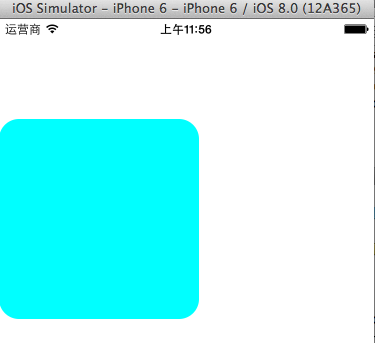
当我们执行上述代码的时候,会在view上添加一个layer层。其效果如下图所示。

其中cornerRadius值的大小决定layer的形状,在四个角用它的长度做半切圆。我们也可以设置边框,边框颜色等信息。
    CALayer *caLayer1 = [CALayer layer];

    caLayer1.frame = CGRectMake(10, 20, 200, 200);

    caLayer1.contents = (id)[UIImage imageNamed:@"health.jpg"].CGImage;

    caLayer1.cornerRadius = 100;

    caLayer1.masksToBounds = YES;

    caLayer1.borderWidth = 10;

    caLayer1.borderColor = [UIColor greenColor].CGColor;

    [self.view.layer addSublayer:caLayer1];
效果如下: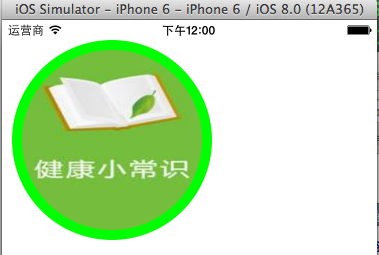
CALayer还有一个重要的属性position(锚点默认0.5,0.5),和caLayer.anchorPoint(0-1)
我们可以通过下图理解:
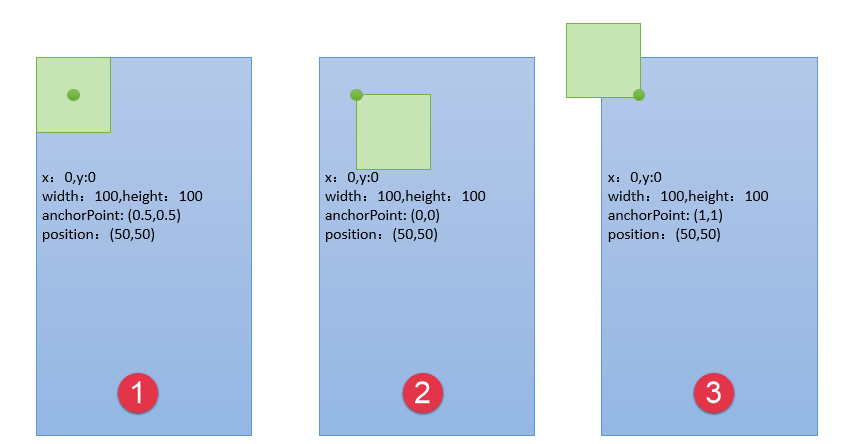
执行下面代码:
    CALayer *caLayer = [CALayer layer];

    caLayer.backgroundColor = [UIColor cyanColor].CGColor;

    caLayer.cornerRadius = ;

    caLayer.bounds = CGRectMake(, , , );

    caLayer.position = CGPointMake(, );

    caLayer.anchorPoint = CGPointMake(0.5, );

    caLayer.masksToBounds = YES;

    [self.view.layer addSublayer:caLayer];
效果为:
2.CATextLayer
CATextLayer是CALayer的子类。我们可以在上面写文字,设置字体等信息。
    CATextLayer *caTextlayer = [CATextLayer layer];

    caTextlayer.frame = CGRectMake(10, 20, 300, 100);

    caTextlayer.string = @"Roy says hello";

    caTextlayer.foregroundColor = [UIColor orangeColor].CGColor;

    [self.view.layer addSublayer:caTextlayer];
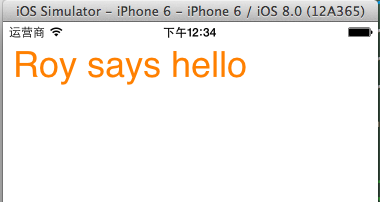
3.CAGradientLayer
这个类也是继承CALayer.可以实现颜色渐变。
    CAGradientLayer *dLayer = [CAGradientLayer layer];

    dLayer.colors = @[(id)[UIColor yellowColor].CGColor,(id)[UIColor grayColor].CGColor,(id)[UIColor redColor].CGColor,(id)[UIColor greenColor].CGColor];

    dLayer.startPoint = CGPointMake(0, 0);

    dLayer.endPoint = CGPointMake(1, 1);

    dLayer.locations = @[@0.0,@0.2,@0.5,@01];//0-1

    dLayer.frame = CGRectMake(10, 20, 320, 100);

    [self.view.layer addSublayer:dLayer];

二、CAAnimation
关于CAAnimation,能够看懂下面一幅图和下面的代码即可。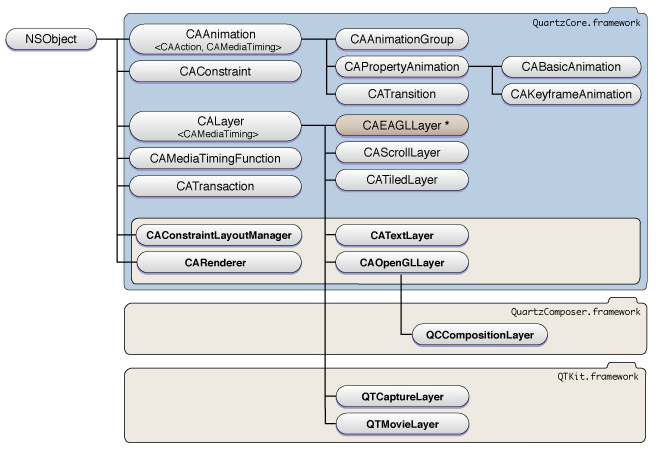
#import "ViewController.h"

@interface ViewController ()

{

    CALayer *layer;

}

@end

@implementation ViewController

- (void)viewDidLoad {

    [super viewDidLoad];

    // Do any additional setup after loading the view, typically from a nib.

    layer = [CALayer layer];

    layer.frame = CGRectMake(, , , );

    layer.backgroundColor = [UIColor grayColor].CGColor;

    [self.view.layer addSublayer:layer];

    UIButton *button = [UIButton buttonWithType:UIButtonTypeCustom];

    button.frame = CGRectMake(, , , );

    button.backgroundColor = [UIColor purpleColor];

    [button addTarget:self action:@selector(btnClick) forControlEvents:UIControlEventTouchUpInside];

    [self.view addSubview:button];

   // [self basicAnimation];

   // [self keyframeAnimation];

   // [self groupAnimation];

}

-(void)btnClick

{

    //过渡动画,只有在点击事件中才能执行

     [self transitionAnimation];

}

//基础动画,继承属性动画

-(void)basicAnimation

{

    /*

        //背景颜色变换动画

        CABasicAnimation *animation = [CABasicAnimation animation];

        //The key-path describing the property to be animated

        animation.keyPath = @"backgroundColor";

        //动画周期

        animation.duration = 2;

        //从哪个属性开始动画

        animation.fromValue = (id)[UIColor grayColor].CGColor;

        //到哪个属性结束动画

        animation.toValue = (id)[UIColor greenColor].CGColor;

        [layer addAnimation:animation forKey:nil];

     */

    //位置移动

    CABasicAnimation *animation = [CABasicAnimation animation];

    animation.keyPath = @"position";

    animation.fromValue = [NSValue valueWithCGPoint:CGPointMake(, )];

    animation.toValue = [NSValue valueWithCGPoint:CGPointMake(, )];

    animation.duration = ;

    [layer addAnimation:animation forKey:nil];

}

//帧动画,继承属性动画

-(void)keyframeAnimation

{

    /*

    CAKeyframeAnimation *animation = [CAKeyframeAnimation animation];

    //动画的属性

    animation.keyPath = @"backgroundColor";

    //动画过渡值

    animation.values = @[(id)[UIColor redColor].CGColor,(id)[UIColor greenColor].CGColor,(id)[UIColor purpleColor].CGColor];

    //动画过渡时间

    animation.keyTimes = @[@0.0,@0.5,@1];

    animation.duration = 2;

    [layer addAnimation:animation forKey:nil];

     */

    CAKeyframeAnimation *animation = [CAKeyframeAnimation animation];

    animation.keyPath = @"position";

    animation.values = @[[NSValue valueWithCGPoint:CGPointMake(, )],[NSValue valueWithCGPoint:CGPointMake(, )],[NSValue valueWithCGPoint:CGPointMake(, )],[NSValue valueWithCGPoint:CGPointMake(, )],[NSValue valueWithCGPoint:CGPointMake(, )],[NSValue valueWithCGPoint:CGPointMake(, )]];

    animation.autoreverses = YES;

    animation.duration = ;

    [layer addAnimation:animation forKey:nil];

}

//组动画,组合动画,多个动画同时执行

-(void)groupAnimation

{

    //移动

    CABasicAnimation *basic =[CABasicAnimation animation ];

    basic.keyPath = @"position";

    basic.duration = ;

    basic.autoreverses = YES;

    basic.fromValue = [NSValue valueWithCGPoint:layer.position];

    basic.byValue = [NSValue valueWithCGPoint:CGPointMake(, )];

    //颜色变化

    CAKeyframeAnimation *keyframe = [CAKeyframeAnimation animation];

    keyframe.keyPath = @"backgroundColor";

    keyframe.values =  @[(id)[UIColor redColor].CGColor,(id)[UIColor yellowColor].CGColor,(id)[UIColor greenColor].CGColor];

    keyframe.duration = ;

    keyframe.autoreverses = YES;

    CAAnimationGroup *group = [CAAnimationGroup animation];

    group.animations = @[basic,keyframe];

    //这边时间是以group的时间为主的

    group.duration = ;

    [layer addAnimation:group forKey:nil];

}

//过渡动画

- (void)transitionAnimation

{

    CATransition *animation = [CATransition animation];

    animation.type = @"pageUnCurl";

    animation.delegate = self;

    animation.duration = ;

    animation.autoreverses = YES;

    [layer addAnimation:animation forKey:nil];

}

- (void)didReceiveMemoryWarning {

    [super didReceiveMemoryWarning];

    // Dispose of any resources that can be recreated.

}

@end
Animation
其中过度动画的类型,我们可以使用下面的效果。
cube 方块
suckEffect 三角
rippleEffect 水波抖动
pageCurl 上翻页
pageUnCurl 下翻页
cameraIrisHollowOpen 镜头快门开
cameraIrisHollowClose 镜头快门开
iOS-CALayer && CAAnimation的更多相关文章
- iOS开发CAAnimation详解
Core Animation,即为核心动画,它是一组非常强大的动画处理API,使用它能做出非常炫丽的动画效果,而且往往是事半功倍.也就是说,使用少量的代码就可以实现非常强大的功能.Core Anima ...
- IOS CALayer的属性和使用
一.CALayer的常用属性 1.@propertyCGPoint position; 图层中心点的位置,类似与UIView的center:用来设置CALayer在父层中的位置:以父层的左上角为原点( ...
- iOS CALayer应用详解
跟着大神一起进步,本篇博客原文地址:http://blog.csdn.net/hello_hwc?viewmode=contents 一 CALayer是什么? Layers是绘图和动画的基础, L ...
- IOS CALayer(二)
UIview内部有个默认的CALayer对象层,虽然我门不可以重新创建它,但是我门可以再其上面添加子层. 我们知道,UIView有 addSubview:方法,同样,CALayer也有addSubla ...
- IOS CALayer(一)
对于一个app的好坏,我们首要判断的便是app的界面,而界面的建立则是在图形的处理基础上的,说到图形处理又不得不提及Quartz2D,CALayer. 在iOS系统中,你能看得见摸得着的东西基本上都是 ...
- iOS CALayer动画中使用的3个tree
在网上经常看到关于layer的tree的描述,不太理解,今天找到了官方文档,原文在Core Animation Programming Guide 中. Layer Trees Reflect Dif ...
- IOS CALayer是什么
大家在开发IOS程序时,经常会遇到self.view.layer这个东西,我以前也是不求甚解,后来觉得有必要整理下. 简单介绍layer: 在IOS中,你能看得见摸得着的东西都是UIView,比如一个 ...
- iOS - CALayer 绘图层
1.CALayer 绘图层 在 iOS 系统中,你能看得见摸得着的东西基本上都是 UIView,比如一个按钮.一个文本标签.一个文本输入框.一个图标等等,这些都是 UIView.其实 UIView 之 ...
- iOS CALayer使用
CALayer使用 iOS的设备中,我们之所以能看到各种各样的控件.文字.图片,都是Core Animation框架的功劳.它通过图层的合成,最终显示在屏幕上.而今天这篇文章讲的就是Core Anim ...
- iOS CALayer之CAEmitterLayer粒子发射器的神奇效果
https://www.jianshu.com/p/c54ffd7412e7 想必以前QQ空间的点赞效果大家都知道吧,点赞之后按钮周围会有一圈爆裂的小圆点:还有微信的红包雨表情动画等,以及烟花,火焰效 ...
随机推荐
- mysql命令行导出导入,附加数据库
MySQL命令行导出数据库:1,进入MySQL目录下的bin文件夹:cd MySQL中到bin文件夹的目录如我输入的命令行:cd C:\Program Files\MySQL\MySQL Server ...
- x86,x64,i386,i686
x64其实就是64位, x86其实就是32位. 1. i386 适用于intel和AMD所有32位的cpu.以及via采用X86架构的32的cpu. intel平台包括8086,80286,80386 ...
- Caesars Cipher-freecodecamp算法题目
Caesars Cipher(凯撒密码.移位密码) 要求 字母会按照指定的数量来做移位. 一个常见的案例就是ROT13密码,字母会移位13个位置.由'A' ↔ 'N', 'B' ↔ 'O',以此类推. ...
- Linux常用文档操作命令--2
4.文档压缩与解压操作 在Linux中常见的压缩文件有:*.tar.gz.*.tgz.*.gz.*.Z.*bz2等.其每种不同的压缩文件对印的压缩和解压命令也不同. *.tar.gz :tar程序打包 ...
- mysql数据库使用mybatis 插入数据时返回主键
为了体现题目,特指的是mysql,先贴上代码: <insert id="saveBizProdOrderDetail" useGeneratedKeys="true ...
- OAuth认证协议中的HMACSHA1加密算法
<?php function hmacsha1($key,$data) { $blocksize=64; $hashfunc='sha1'; if (strlen($key)>$block ...
- MySQL_8.0.15_Windows10_X64 安装教程
最近学习的内容涉及到MySQL的知识,所以安装一个MySQL非常有必要,参考别人的教程安装过程还算顺利,其中遇到了一些问题查了一些也解决了,这里把整个安装过程梳理一遍,给大家一个参考. 我手里的电脑是 ...
- python基础学习笔记——正则表达式
1.什么是正则? 正则就是用一些具有特殊含义的符号组合到一起(称为正则表达式)来描述字符或者字符串的方法.或者说:正则就是用来描述一类事物的规则.(在Python中)它内嵌在Python中,并通过 r ...
- 26、android上跑apache的ftp服务
一.为啥 在android设备跑ftp服务,在现场方便查看日志,目前就是这么用的. 二.前提: 从apache的官网下载依赖包:http://mina.apache.org/ftpserver-pro ...
- Linux中 find 常见用法示例
Linux中find常见用法示例 #find path -option [ -print ] [ -exec -ok command ] {} \; #-print 将查找到的文件输出到标准输出 #- ...