
ASP.NET Core3.1使用IdentityServer4中间件系列随笔(四):创建使用[ResourceOwnerPassword-资源所有者密码凭证]授权模式的客户端
配套源码:https://gitee.com/jardeng/IdentitySolution
本篇将创建使用[ResourceOwnerPassword-资源所有者密码凭证]授权模式的客户端,来对受保护的API资源进行访问。
接上一篇项目,在IdentityServer项目Config.cs中添加一个客户端

/// 资源所有者密码凭证(ResourceOwnerPassword)

///     Resource Owner其实就是User,所以可以直译为用户名密码模式。

///     密码模式相较于客户端凭证模式,多了一个参与者,就是User。

///     通过User的用户名和密码向Identity Server申请访问令牌。

new Client

{

    ClientId = "client1",

    AllowedGrantTypes = GrantTypes.ResourceOwnerPassword,

    ClientSecrets = { new Secret("secret".Sha256()) },

    AllowedScopes = { "api1" }

}
再添加一个用户的集合(测试数据来自IdentityServer官方)。
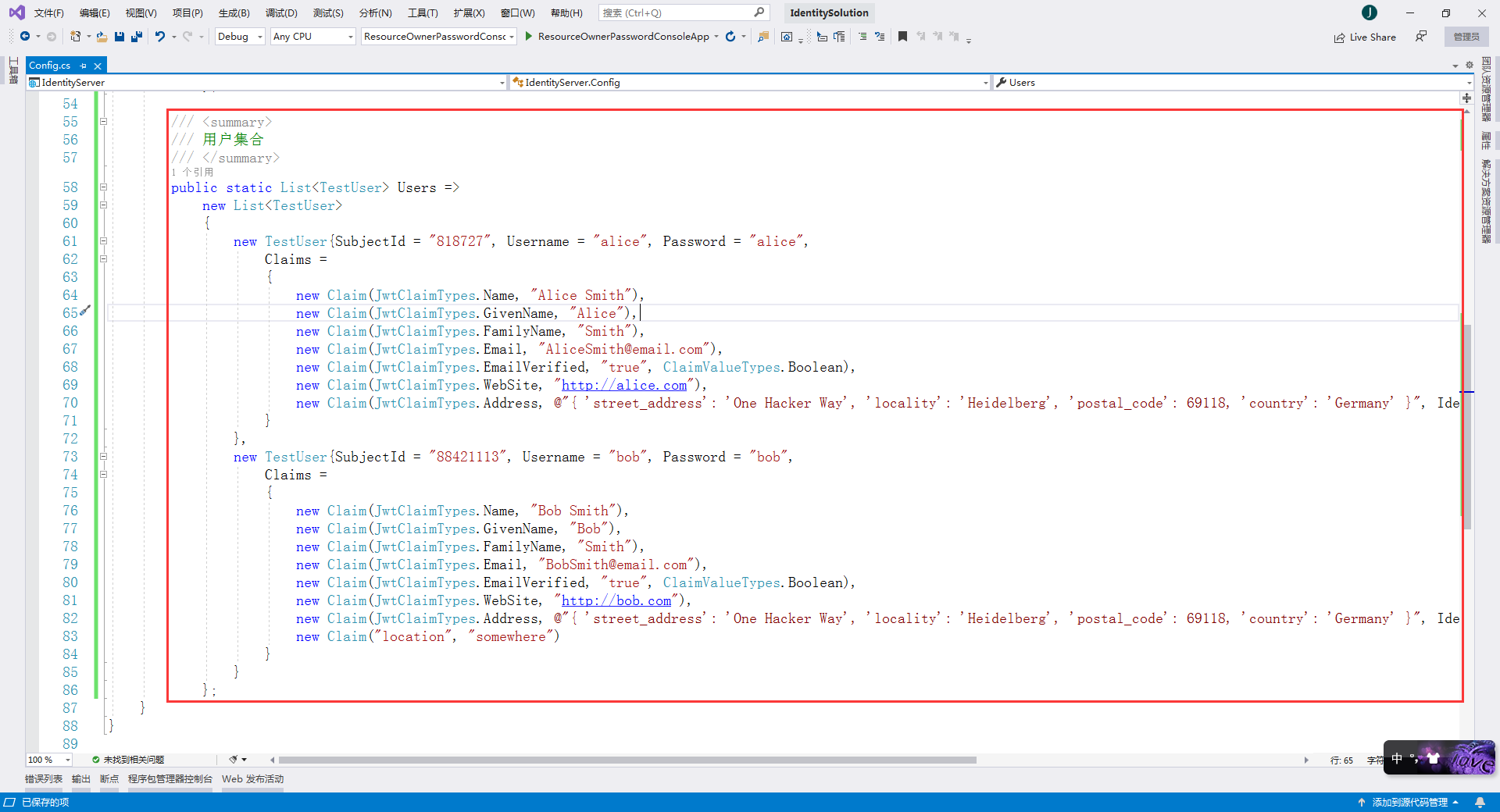
完整的Config.cs代码
using System.Collections.Generic;

using System.Security.Claims;

using IdentityModel;

using IdentityServer4.Models;

using IdentityServer4.Test;

namespace IdentityServer

{

    /// <summary>

    /// IdentityServer资源和客户端配置文件

    /// </summary>

    public static class Config

    {

        /// <summary>

        /// API资源集合

        ///     如果您将在生产环境中使用此功能,那么给您的API取一个逻辑名称就很重要。

        ///     开发人员将使用它通过身份服务器连接到您的api。

        ///     它应该以简单的方式向开发人员和用户描述您的api。

        /// </summary>

        public static IEnumerable<ApiResource> Apis => new List<ApiResource> { new ApiResource("api1", "My API") };

        /// <summary>

        /// 客户端集合

        /// </summary>

        public static IEnumerable<Client> Clients =>

            new List<Client>

            {

                /// 客户端模式(Client Credentials)

                ///     可以将ClientId和ClientSecret视为应用程序本身的登录名和密码。

                ///     它将您的应用程序标识到身份服务器,以便它知道哪个应用程序正在尝试与其连接。

                new Client

                {

                    //客户端标识

                    ClientId = "client",

                    //没有交互用户,使用clientid/secret进行身份验证,适用于和用户无关,机器与机器之间直接交互访问资源的场景。

                    AllowedGrantTypes = GrantTypes.ClientCredentials,

                    //认证密钥

                    ClientSecrets = { new Secret("secret".Sha256()) },

                    //客户端有权访问的作用域

                    AllowedScopes = { "api1" }

                },

                /// 资源所有者密码凭证(ResourceOwnerPassword)

                ///     Resource Owner其实就是User,所以可以直译为用户名密码模式。

                ///     密码模式相较于客户端凭证模式,多了一个参与者,就是User。

                ///     通过User的用户名和密码向Identity Server申请访问令牌。

                new Client

                {

                    ClientId = "client1",

                    AllowedGrantTypes = GrantTypes.ResourceOwnerPassword,

                    ClientSecrets = { new Secret("secret".Sha256()) },

                    AllowedScopes = { "api1" }

                }

            };

        /// <summary>

        /// 用户集合

        /// </summary>

        public static List<TestUser> Users =>

            new List<TestUser>

            {

                new TestUser{SubjectId = "", Username = "alice", Password = "alice",

                    Claims =

                    {

                        new Claim(JwtClaimTypes.Name, "Alice Smith"),

                        new Claim(JwtClaimTypes.GivenName, "Alice"),

                        new Claim(JwtClaimTypes.FamilyName, "Smith"),

                        new Claim(JwtClaimTypes.Email, "AliceSmith@email.com"),

                        new Claim(JwtClaimTypes.EmailVerified, "true", ClaimValueTypes.Boolean),

                        new Claim(JwtClaimTypes.WebSite, "http://alice.com"),

                        new Claim(JwtClaimTypes.Address, @"{ 'street_address': 'One Hacker Way', 'locality': 'Heidelberg', 'postal_code': 69118, 'country': 'Germany' }", IdentityServer4.IdentityServerConstants.ClaimValueTypes.Json)

                    }

                },

                new TestUser{SubjectId = "", Username = "bob", Password = "bob",

                    Claims =

                    {

                        new Claim(JwtClaimTypes.Name, "Bob Smith"),

                        new Claim(JwtClaimTypes.GivenName, "Bob"),

                        new Claim(JwtClaimTypes.FamilyName, "Smith"),

                        new Claim(JwtClaimTypes.Email, "BobSmith@email.com"),

                        new Claim(JwtClaimTypes.EmailVerified, "true", ClaimValueTypes.Boolean),

                        new Claim(JwtClaimTypes.WebSite, "http://bob.com"),

                        new Claim(JwtClaimTypes.Address, @"{ 'street_address': 'One Hacker Way', 'locality': 'Heidelberg', 'postal_code': 69118, 'country': 'Germany' }", IdentityServer4.IdentityServerConstants.ClaimValueTypes.Json),

                        new Claim("location", "somewhere")

                    }

                }

            };

    }

}
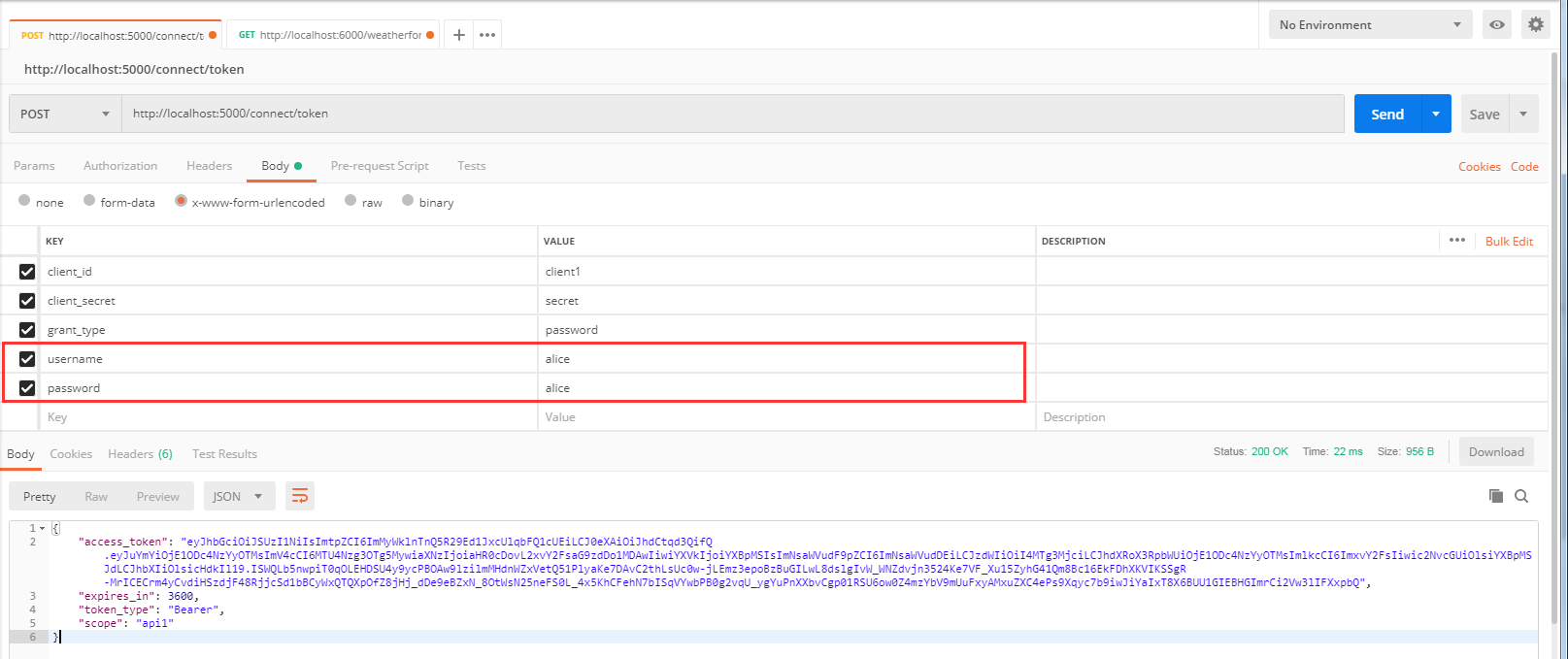
我们使用Postman来获取ResourceOwnerPassword这种模式的AcceccToken
与上一种 Client Credentials 模式不同的是 client_id 使用 client1,grant_type 由原来的 client_credentials 改为 password,多了 username 和 password 两个参数,使用用户名密码 alice / alice 来登录
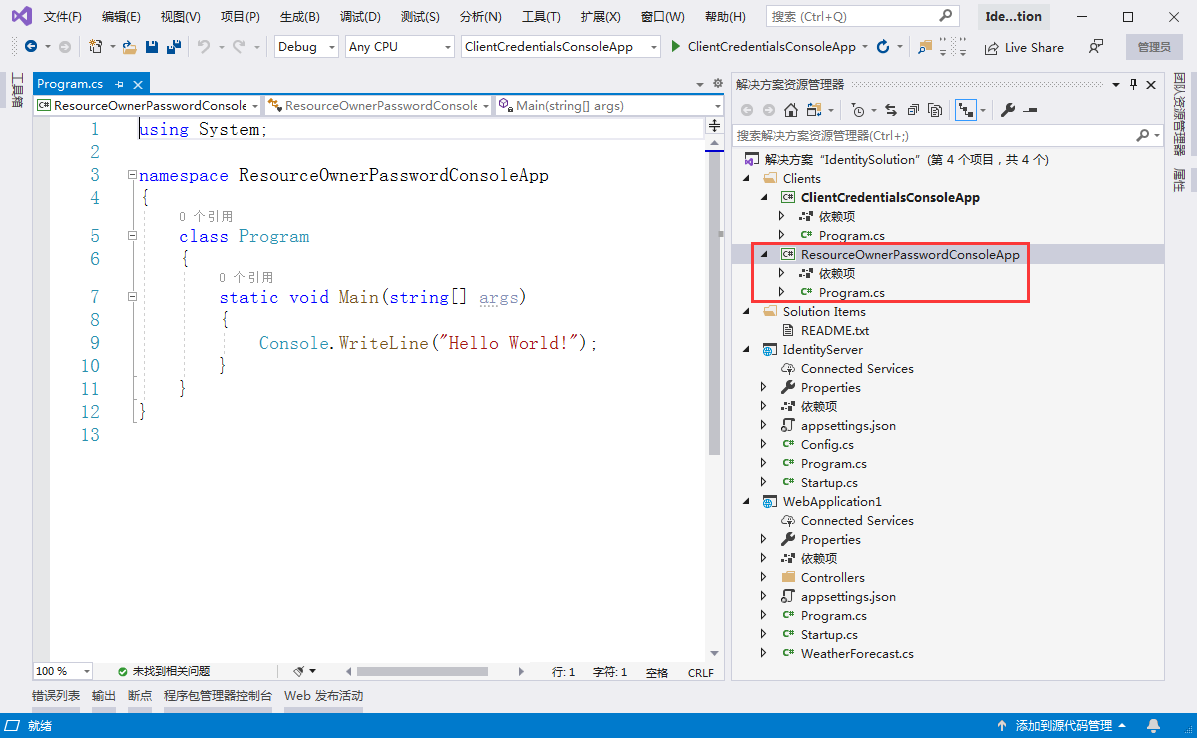
2、创建一个名为 ResourceOwnerPasswordConsoleApp 的控制台客户端应用。

创建完成后的项目截图
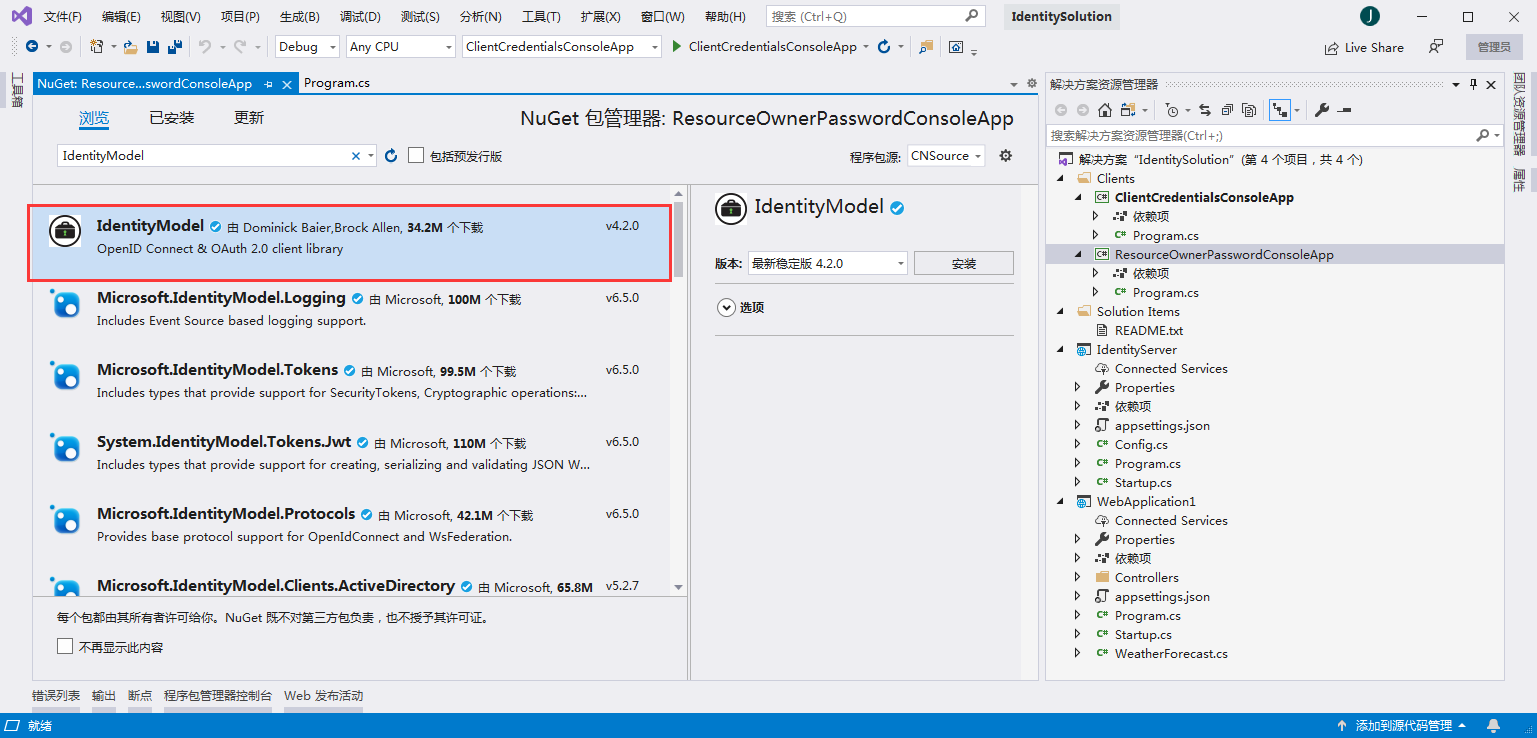
3、添加nuget包:IdentityModel
在Program.cs编写代码
using System;

using System.Net.Http;

using System.Threading.Tasks;

using IdentityModel.Client;

using Newtonsoft.Json.Linq;

namespace ResourceOwnerPasswordConsoleApp

{

    class Program

    {

        static async Task Main(string[] args)

        {

            bool verifySuccess = false;

            TokenResponse tokenResponse = null;

            while (!verifySuccess)

            {

                Console.WriteLine("请输入用户名:");

                string userName = Console.ReadLine();

                Console.WriteLine("请输入密码:");

                string password = Console.ReadLine();

                //discovery endpoint - 发现终结点

                HttpClient client = new HttpClient();

                DiscoveryDocumentResponse disco = await client.GetDiscoveryDocumentAsync("http://localhost:5000");

                if (disco.IsError)

                {

                    Console.WriteLine($"[DiscoveryDocumentResponse Error]: {disco.Error}");

                    return;

                }

                //request assess token - 请求访问令牌

                tokenResponse = await client.RequestPasswordTokenAsync(new PasswordTokenRequest

                {

                    Address = disco.TokenEndpoint,

                    ClientId = "client1",

                    ClientSecret = "secret",

                    Scope = "api1",

                    UserName = userName,

                    Password = password

                });

                if (tokenResponse.IsError)

                {

                    //ClientId 与 ClientSecret 错误,报错:invalid_client

                    //Scope 错误,报错:invalid_scope

                    //UserName 与 Password 错误,报错:invalid_grant

                    string errorDesc = tokenResponse.ErrorDescription;

                    if (string.IsNullOrEmpty(errorDesc)) errorDesc = "";

                    if (errorDesc.Equals("invalid_username_or_password"))

                    {

                        Console.WriteLine("用户名或密码错误,请重新输入!");

                    }

                    else

                    {

                        Console.WriteLine($"[TokenResponse Error]: {tokenResponse.Error}, [TokenResponse Error Description]: {errorDesc}");

                    }

                    Console.WriteLine("");

                    continue;

                }

                else

                {

                    Console.WriteLine("");

                    Console.WriteLine($"Access Token: {tokenResponse.AccessToken}");

                    verifySuccess = true;

                }

            }

            //call API Resource - 访问API资源

            HttpClient apiClient = new HttpClient();

            apiClient.SetBearerToken(tokenResponse?.AccessToken);

            HttpResponseMessage response = await apiClient.GetAsync("http://localhost:6000/weatherforecast");

            if (!response.IsSuccessStatusCode)

            {

                Console.WriteLine($"API Request Error, StatusCode is : {response.StatusCode}");

            }

            else

            {

                string content = await response.Content.ReadAsStringAsync();

                Console.WriteLine("");

                Console.WriteLine($"Result: {JArray.Parse(content)}");

            }

            Console.ReadKey();

        }

    }

}
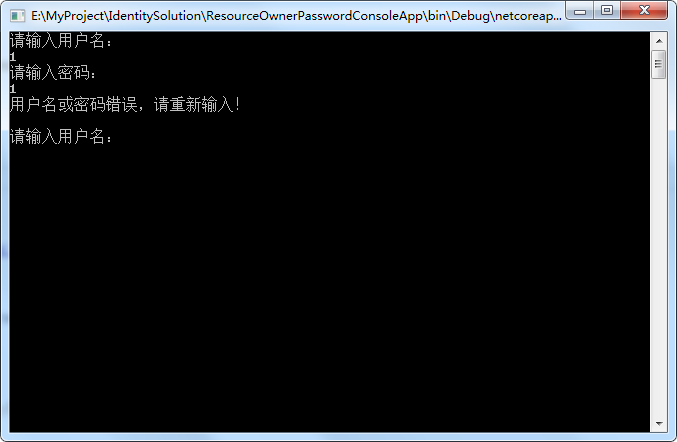
用户名密码错误的话,会一直提示重新输入
我们使用用户名密码 alice / alice 进行登录
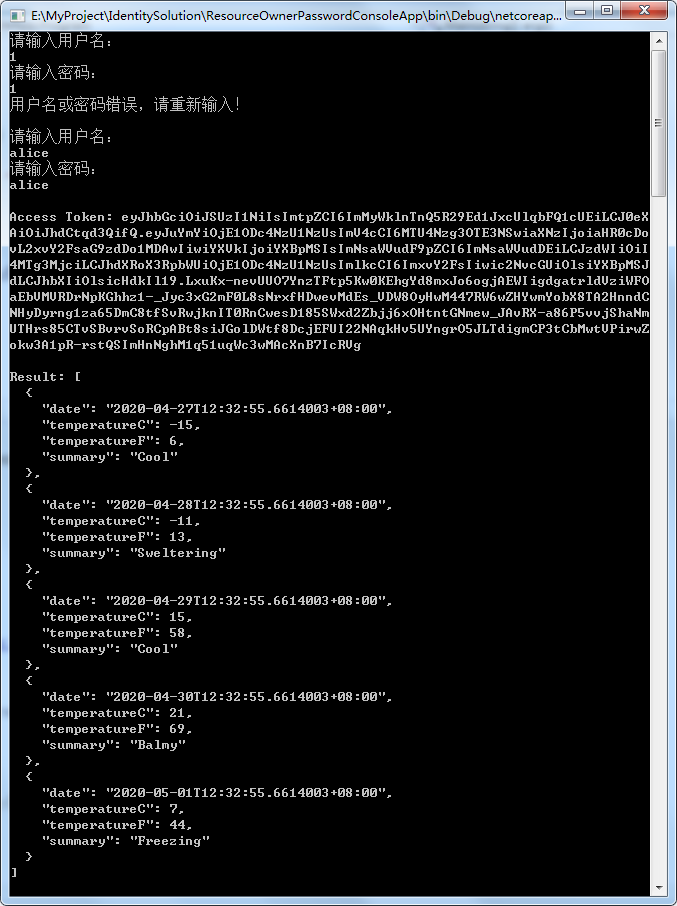
可以看到,成功获取到AccessToken,并使用AccessToken访问到受保护的API获取到结果。
ASP.NET Core3.1使用IdentityServer4中间件系列随笔(四):创建使用[ResourceOwnerPassword-资源所有者密码凭证]授权模式的客户端的更多相关文章
- ASP.NET Core3.1使用IdentityServer4中间件系列随笔(三):创建使用[ClientCredentials客户端凭证]授权模式的客户端
配套源码:https://gitee.com/jardeng/IdentitySolution 上一篇<ASP.NET Core3.1使用IdentityServer4中间件系列随笔(二):创建 ...
- ASP.NET Core3.1使用IdentityServer4中间件系列随笔(二):创建API项目,配置IdentityServer保护API资源
配套源码:https://gitee.com/jardeng/IdentitySolution 接上一篇<ASP.NET Core3.1使用IdentityServer4中间件系列随笔(一):搭 ...
- ASP.NET Core3.1使用IdentityServer4中间件系列随笔(五):创建使用[Code-授权码]授权模式的客户端
配套源码:https://gitee.com/jardeng/IdentitySolution 本篇将创建使用[Code-授权码]授权模式的客户端,来对受保护的API资源进行访问. 1.接上一篇项目, ...
- ASP.NET Core3.1使用IdentityServer4中间件系列随笔(一):搭建认证服务器
配套源码:https://gitee.com/jardeng/IdentitySolution 1.创建ASP.NET Core Web应用程序,选择空模板. 去掉HTTPS 2.添加nuget包:I ...
- IdentityServer4(8)- 使用密码认证方式控制API访问(资源所有者密码授权模式)
一.前言 本文已经更新到 .NET Core 2.2 OAuth 2.0 资源所有者密码模式允许客户端向令牌服务发送用户名和密码,并获取代表该用户的访问令牌. 除了通过无法浏览器进行交互的应用程序之外 ...
- IdentityServer4系列 | 资源密码凭证模式
一.前言 从上一篇关于客户端凭证模式中,我们通过创建一个认证授权访问服务,定义一个API和要访问它的客户端,客户端通过IdentityServer上请求访问令牌,并使用它来控制访问API.其中,我们也 ...
- asp.net core IdentityServer4 实现 resource owner password credentials(密码凭证)
前言 OAuth 2.0默认四种授权模式(GrantType) 授权码模式(authorization_code) 简化模式(implicit) 密码模式(resource owner passwor ...
- 认证授权:IdentityServer4 - 各种授权模式应用
前言: 前面介绍了IdentityServer4 的简单应用,本篇将继续讲解IdentityServer4 的各种授权模式使用示例 授权模式: 环境准备 a)调整项目结构如下: b)调整cz.Id ...
- 探索Asp net core3中的 项目文件、Program.cs和通用host(译)
引言 原文地址 在这篇博客中我将探索一些关于Asp.net core 3.0应用的基础功能--.csproj 项目文件和Program源文件.我将会描述他们从asp.net core 2.X在默认模版 ...
随机推荐
- python基础day4_列表list
list列表 li = ['alex',[1,2,3],'hjh','nvshen '] l1= li[0] print(l1) # alex l3= li[0:3]#['alex', [1, 2, ...
- PHP easter_date() 函数
------------恢复内容开始------------ 实例 输出不同年份的复活节日期: <?phpecho easter_date() . "<br />" ...
- springboot多数据源启动报错:required a single bean, but 6 were found:
技术群: 816227112 参考:https://stackoverflow.com/questions/43455869/could-not-autowire-there-is-more-than ...
- PEP8之常用编码规范-摘自官网
PEP8是广泛应用于Python编码中的规范,这里只会记录最重要的一部分:摘自官网 使用4个空格缩进,不要使用制表符. 4个空格是一个在小缩进(允许更大的嵌套深度)和大缩进(更容易阅读)的一种很好的折 ...
- Spring bean自定义命名策略(注解实现)
我们都知道项目后台开发是从 控制层——业务层——mybatis层,@Controller.@Service.@Mapper...等等注解可以将对象自动加载到bean容器中,还能实现相应的功能,使用起来 ...
- VSCode C++环境配置(个人使用)
tasks.json { "version": "2.0.0", "command": "g++", "arg ...
- 2018-04-19:innodb和myisam区别
福哥答案2020-04-19:
- Quartz.Net的基础使用方法,单任务执行
1.先创建一个控制台应用程序 2.应用Quartz的NuGet包 3.编写执行任务代码 using System; using System.Threading.Tasks; using Quar ...
- Visual Studio 2017版本15.9现在可用
本文转自 https://blogs.msdn.microsoft.com/visualstudio/2018/11/19/visual-studio-2017-version-15-9-now-av ...
- 检查型异常和非检查型异常——Java
文章目录 检查型异常和非检查型异常--Java 检查型异常 非检查型异常 结语 检查型异常和非检查型异常--Java Java语言规范将派生于Error类或RuntimeExceprion类的所有异常 ...