
认证授权:IdentityServer4 - 各种授权模式应用
前言:
前面介绍了IdentityServer4 的简单应用,本篇将继续讲解IdentityServer4 的各种授权模式使用示例
授权模式:
环境准备
a)调整项目结构如下:
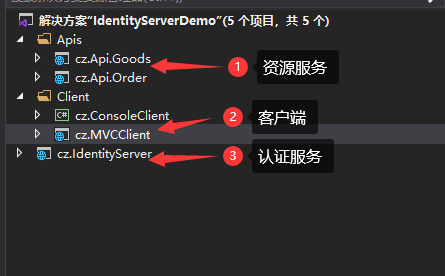
b)调整cz.IdentityServer项目中Statup文件如下
public class Startup

  {

        public void ConfigureServices(IServiceCollection services)

        {

            services.AddControllersWithViews();

            services.Configure<CookiePolicyOptions>(options =>

            {

                options.MinimumSameSitePolicy = SameSiteMode.Strict;

            });

            services.AddIdentityServer()

              .AddDeveloperSigningCredential()

              //api资源

              .AddInMemoryApiResources(InMemoryConfig.GetApiResources())

              //4.0版本需要添加,不然调用时提示invalid_scope错误

              .AddInMemoryApiScopes(InMemoryConfig.GetApiScopes())

              .AddTestUsers(InMemoryConfig.Users().ToList())

              .AddInMemoryIdentityResources(InMemoryConfig.GetIdentityResourceResources())

              .AddInMemoryClients(InMemoryConfig.GetClients());

        }

        // This method gets called by the runtime. Use this method to configure the HTTP request pipeline.

        public void Configure(IApplicationBuilder app, IWebHostEnvironment env)

        {

            if (env.IsDevelopment())

            {

                app.UseDeveloperExceptionPage();

            }

            app.UseRouting();

            app.UseStaticFiles();

            app.UseCookiePolicy();

            app.UseIdentityServer();

            app.UseAuthentication();

            //使用默认UI,必须添加

            app.UseAuthorization();

            app.UseEndpoints(endpoints =>

            {

                endpoints.MapControllerRoute(name: "default", pattern: "{controller=Home}/{action=Index}/{id?}");

            });

  }
}
c)在cz.Api.Order项目中添加控制器:IdentityController
namespace cz.Api.Order.Controllers

{

    [Route("identity")]

    [ApiController]

    [Authorize]

    public class IdentityController : ControllerBase

    {

        [HttpGet]

        public IActionResult Get()

        {

            return new JsonResult(from c in User.Claims select new { c.Type, c.Value });

        }

    }

}
1、客户端模式
a)在InMemoryConfig中GetClients方法中添加客户端:
new Client

{

    ClientId = "credentials_client", //访问客户端Id,必须唯一

    ClientName = "ClientCredentials Client",

    //使用客户端授权模式,客户端只需要clientid和secrets就可以访问对应的api资源。

    AllowedGrantTypes = GrantTypes.ClientCredentials,

    ClientSecrets =

        {

            new Secret("secret".Sha256())

        },

    AllowedScopes = {

        IdentityServerConstants.StandardScopes.OpenId,

        IdentityServerConstants.StandardScopes.Profile,

        "goods"

    },

},
b)在cz.ConsoleClient项目中安装Nuget包:IdentityModel,在Program中添加如下方法:
/// <summary>

/// 客户端认证模式

/// </summary>

private static void ClientCredentials_Test()

{

    Console.WriteLine("ClientCredentials_Test------------------->");

    var client = new HttpClient();

    var disco = client.GetDiscoveryDocumentAsync("http://localhost:5600/").Result;

    if (disco.IsError)

    {

        Console.WriteLine(disco.Error);

        return;

    }

    //请求token

    var tokenResponse = client.RequestClientCredentialsTokenAsync(new ClientCredentialsTokenRequest

    {

        Address = disco.TokenEndpoint,

        ClientId = "credentials_client",

        ClientSecret = "secret",

        Scope = "goods"

    }).Result;

    if (tokenResponse.IsError)

    {

        Console.WriteLine(tokenResponse.Error);

        return;

    }

    Console.WriteLine(tokenResponse.Json);

    //调用认证api

    var apiClient = new HttpClient();

    apiClient.SetBearerToken(tokenResponse.AccessToken);

    var response = apiClient.GetAsync("http://localhost:5601/identity").Result;

    if (!response.IsSuccessStatusCode)

    {

        Console.WriteLine(response.StatusCode);

    }

    else

    {

        var content = response.Content.ReadAsStringAsync().Result;

        Console.WriteLine(content);

    }

}
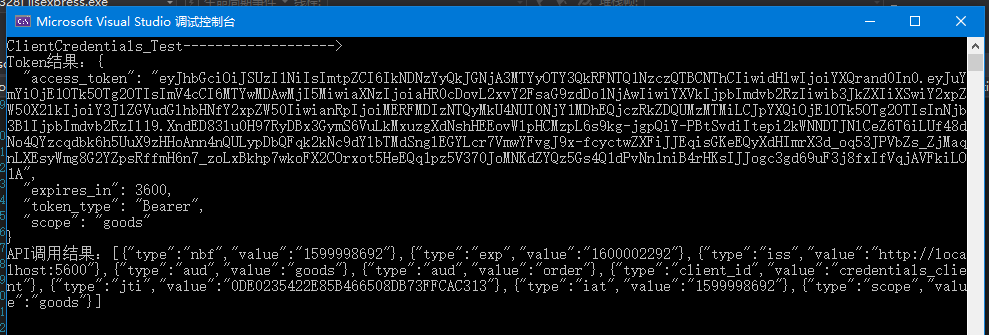
运行该程序结果如下:
2、密码模式
a)在InMemoryConfig中GetClients方法中添加客户端:
new Client

{

    ClientId = "password_client",

    ClientName = "Password Client",

    ClientSecrets = new [] { new Secret("secret".Sha256()) },

    //这里使用的是通过用户名密码换取token的方式.

    AllowedGrantTypes = GrantTypes.ResourceOwnerPassword,

    AllowedScopes = {

        IdentityServerConstants.StandardScopes.OpenId,

        IdentityServerConstants.StandardScopes.Profile,

        "order","goods",

    }

},
b)cz.ConsoleClient项目,继续在Program中添加如下方法:
/// <summary>

/// 用户名密码模式

/// </summary>

public static void ResourceOwnerPassword_Test()

{

    Console.WriteLine("ResourceOwnerPassword_Test------------------->");

    // request token

    var client = new HttpClient();

    var disco = client.GetDiscoveryDocumentAsync("http://localhost:5600/").Result;

    var tokenResponse = client.RequestPasswordTokenAsync(new PasswordTokenRequest()

    {

        Address = disco.TokenEndpoint,

        ClientId = "password_client",

        ClientSecret = "secret",

        UserName = "cba",

        Password = "cba",

        Scope = "order goods",

    }).Result;

    if (tokenResponse.IsError)

    {

        Console.WriteLine(tokenResponse.Error);

        return;

    }

    Console.WriteLine(tokenResponse.Json);

    // call api

    var apiClient = new HttpClient();

    client.SetBearerToken(tokenResponse.AccessToken);

    var response = apiClient.GetAsync("http://localhost:5601/identity").Result;

    if (!response.IsSuccessStatusCode)

    {

        Console.WriteLine(response.StatusCode);

    }

    else

    {

        var content = response.Content.ReadAsStringAsync().Result;

        Console.WriteLine(content);

    }

}
运行该程序结果同上:
3、简化模式
a)在InMemoryConfig中GetClients方法中添加客户端:
new Client

{

    ClientId = "implicit_client",

    ClientName = "Implicit Client",

    ClientSecrets = new [] { new Secret("secret".Sha256()) },

    AllowedGrantTypes = GrantTypes.Implicit,

    AllowedScopes = {

        "order","goods",

        IdentityServerConstants.StandardScopes.OpenId,

        IdentityServerConstants.StandardScopes.Profile

    },

    RedirectUris = { "http://localhost:5021/signin-oidc" },

    PostLogoutRedirectUris = { "http://localhost:5021" },

    //是否显示授权提示界面

    RequireConsent = true,

},
b)调整在cz.MVCClient中Statup文件中内容如下:
public class Startup

{

    public Startup(IConfiguration configuration)

    {

        Configuration = configuration;

    }

    public IConfiguration Configuration { get; }

    // This method gets called by the runtime. Use this method to add services to the container.

    public void ConfigureServices(IServiceCollection services)

    {

        services.Configure<CookiePolicyOptions>(options =>

        {

          // This lambda determines whether user consent for non-essential cookies is needed for a given request.

          options.CheckConsentNeeded = context => true;

            options.MinimumSameSitePolicy = SameSiteMode.Lax;

        });

        JwtSecurityTokenHandler.DefaultMapInboundClaims = false;

        services.AddControllersWithViews();

        services.AddAuthentication(options =>

        {

            options.DefaultScheme = "Cookies";

            options.DefaultChallengeScheme = "oidc";

        })

        .AddCookie("Cookies")

        .AddOpenIdConnect("oidc", options =>

        {

            options.RequireHttpsMetadata = false;

            options.Authority = "http://localhost:5600";

            options.ClientId = "implicit_client";

            options.ClientSecret = "secret";

        });

    }

    // This method gets called by the runtime. Use this method to configure the HTTP request pipeline.

    public void Configure(IApplicationBuilder app, IWebHostEnvironment env)

    {

        if (env.IsDevelopment())

        {

            app.UseDeveloperExceptionPage();

        }

        else

        {

            app.UseExceptionHandler("/Home/Error");

        }

        app.UseStaticFiles();

        app.UseCookiePolicy();

        app.UseRouting();

        app.UseAuthentication();

        app.UseAuthorization();

        app.UseEndpoints(endpoints =>

        {

            endpoints.MapControllerRoute(

                name: "default",

                pattern: "{controller=Home}/{action=Index}/{id?}");

        });

    }

}
c)在cz.MVCClient中添加Nuget包:IdentityServer4.AccessTokenValidation、Microsoft.AspNetCore.Authentication.OpenIdConnect;在HomeController中添加方法:
[Authorize]

public IActionResult Secure()

{

    ViewData["Message"] = "Secure page.";

    return View();

}

//注销

public IActionResult Logout()

{

    return SignOut("oidc", "Cookies");

}
d)界面调整:
在_Layout.cshtml文件中添加导航按钮:Secure、Logout
<li class="nav-item">

    <a class="nav-link text-dark" asp-area="" asp-controller="Home" asp-action="Secure">Secure</a>

</li>

@if (User.Identity.IsAuthenticated)

{

    <li class="nav-item">

        <a class="nav-link text-dark" asp-area="" asp-controller="Home" asp-action="Logout">Logout</a>

    </li>

}
添加视图:Secure.cshtml文件:
@{

    ViewData["Title"] = "Secure";

}

<h2>@ViewData["Title"]</h2>

<h3>User claims</h3>

<dl>

    @foreach (var claim in User.Claims)

    {

        <dt>@claim.Type</dt>

        <dd>@claim.Value</dd>

    }

</dl>
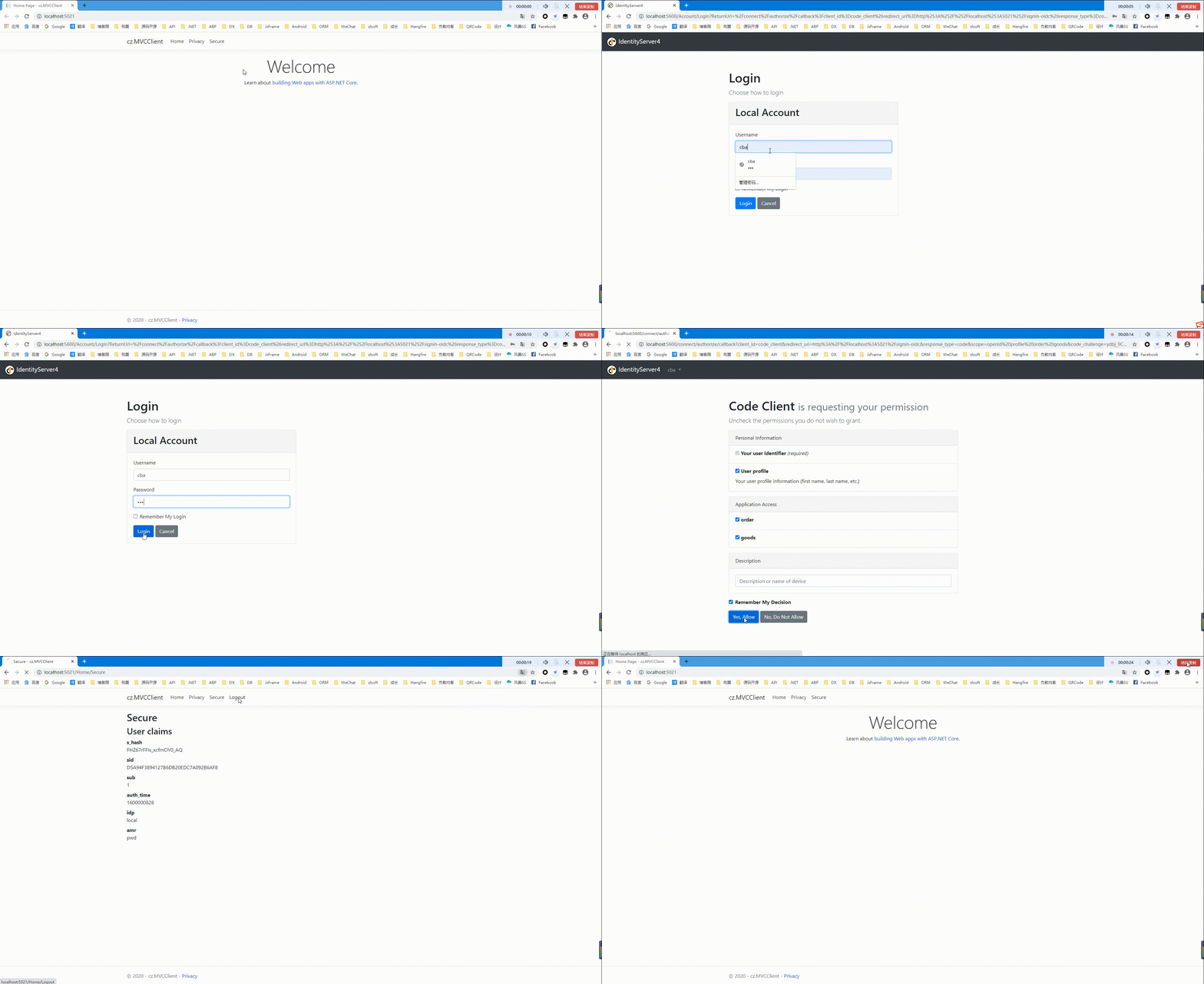
e)运行结果如下:
简化模式还支持在Js客户端中运行可以查看官方说明文档:https://identityserver4.readthedocs.io/en/latest/quickstarts/4_javascript_client.html
4、授权码模式
a)在InMemoryConfig中GetClients方法中添加客户端:
new Client

{

    ClientId = "code_client",

    ClientName = "Code Client",

    ClientSecrets = new [] { new Secret("secret".Sha256()) },

    AllowedGrantTypes = GrantTypes.Code,

    RedirectUris = { "http://localhost:5021/signin-oidc" },

    PostLogoutRedirectUris = { "http://localhost:5021/signout-callback-oidc" },
   //是否显示授权提示界面

    RequireConsent= true,

    AllowedScopes = {

        "order","goods",

        IdentityServerConstants.StandardScopes.OpenId,

        IdentityServerConstants.StandardScopes.Profile

    }

},
b)调整在cz.MVCClient中Statup文件中ConfigureServices方法内容如下:
// This method gets called by the runtime. Use this method to add services to the container.

    public void ConfigureServices(IServiceCollection services)

    {

        services.Configure<CookiePolicyOptions>(options =>

        {

            // This lambda determines whether user consent for non-essential cookies is needed for a given request.

            options.CheckConsentNeeded = context => true;

            options.MinimumSameSitePolicy = SameSiteMode.Lax;

        });

        JwtSecurityTokenHandler.DefaultMapInboundClaims = false;

        services.AddControllersWithViews();

        services.AddAuthentication(options =>

        {

            options.DefaultScheme = "Cookies";

            options.DefaultChallengeScheme = "oidc";

        })

        .AddCookie("Cookies")

        .AddOpenIdConnect("oidc", options =>

        {

            options.RequireHttpsMetadata = false;

            options.Authority = "http://localhost:5600";

            options.ClientId = "code_client";

            options.ClientSecret = "secret";

            options.ResponseType = "code";

            options.SaveTokens = true;

            options.Scope.Add("order");

            options.Scope.Add("goods");

            options.GetClaimsFromUserInfoEndpoint = true;

        });

    }
c)运行结果如下:同简化模式运行效果相同
5、混合模式(Hybrid)
a)在InMemoryConfig中GetClients方法中添加客户端:
new Client

{

    ClientId = "hybrid_client",

    ClientName = "Hybrid Client",

    ClientSecrets = new [] { new Secret("secret".Sha256()) },

    AllowedGrantTypes = GrantTypes.Hybrid,

    //是否显示授权提示界面

    RequireConsent = true,

    AllowedScopes = {

        "order","goods",

        IdentityServerConstants.StandardScopes.OpenId,

        IdentityServerConstants.StandardScopes.Profile

    }

}
b)调整在cz.MVCClient中Statup文件中ConfigureServices方法内容如下:
public void ConfigureServices(IServiceCollection services)

{

    services.Configure<CookiePolicyOptions>(options =>

    {

        // This lambda determines whether user consent for non-essential cookies is needed for a given request.

        options.CheckConsentNeeded = context => true;

        options.MinimumSameSitePolicy = SameSiteMode.Lax;

    });

    JwtSecurityTokenHandler.DefaultMapInboundClaims = false;

    services.AddControllersWithViews();

    services.AddAuthentication(options =>

    {

        options.DefaultScheme = "Cookies";

        options.DefaultChallengeScheme = "oidc";

    })

    .AddCookie("Cookies")

    .AddOpenIdConnect("oidc", options =>

    {

        options.RequireHttpsMetadata = false;

        options.Authority = "http://localhost:5600";

        options.ClientId = "hybrid_client";

        options.ClientSecret = "secret";

        options.ResponseType = "code token id_token";

        options.SaveTokens = true;

        options.ResponseMode = "fragment";

        options.GetClaimsFromUserInfoEndpoint = true;

        options.Scope.Add("order");

        options.Scope.Add("goods");

    });

}
总结:
应用场景总结
- 客户端模式(Client Credentials):和用户无关,应用于应用程序与 API 资源之间的交互场景。
- 密码模式:和用户有关,常用于第三方登录。
- 简化模式:可用于前端或无线端。
- 混合模式:推荐使用,包含 OpenID 认证服务和 OAuth 授权,针对的是后端服务调用。
过程中遇到的坑:
- Postman调用时总是提示:invalid_scope异常;
解决:在添加IdentityServer服务时:调用AddInMemoryApiScopes方法注册Scope
- MVC项目登录成功后跳转时,找不到http://localhost:5020/signin-oidc路径:
解决:在Statup文件中添加services.Configure<CookiePolicyOptions>(options =>{options.CheckConsentNeeded = context => true;options.MinimumSameSitePolicy = SameSiteMode.Lax; });
- 登录时授权界面展示展示:
解决:客户端注册时,指定属性RequireConsent= true
Git地址:https://github.com/cwsheng/IdentityServer.Demo.git
认证授权:IdentityServer4 - 各种授权模式应用的更多相关文章
- 授权认证(IdentityServer4)
区别 OpenId: Authentication :认证 Oauth: Aurhorize :授权 输入账号密码,QQ确认输入了正确的账号密码可以登录 --->认证 下面需要勾选的复选框(获取 ...
- IdentityServer4 (3) 授权码模式(Authorization Code)
写在前面 1.源码(.Net Core 2.2) git地址:https://github.com/yizhaoxian/CoreIdentityServer4Demo.git 2.相关章节 2.1. ...
- IdentityServer4系列 | 授权码模式
一.前言 在上一篇关于简化模式中,通过客户端以浏览器的形式请求IdentityServer服务获取访问令牌,从而请求获取受保护的资源,但由于token携带在url中,安全性方面不能保证.因此,我们可以 ...
- IdentityServer4 自定义授权模式
IdentityServer4除了提供常规的几种授权模式外(AuthorizationCode.ClientCredentials.Password.RefreshToken.DeviceCode), ...
- .Net Core身份认证:IdentityServer4实现OAuth 2.0 客户端模式 - 简书
原文:.Net Core身份认证:IdentityServer4实现OAuth 2.0 客户端模式 - 简书 一.客户端模式介绍 客户端模式(Client Credentials Grant)是指客户 ...
- (转)基于OWIN WebAPI 使用OAuth授权服务【客户端模式(Client Credentials Grant)】
适应范围 采用Client Credentials方式,即应用公钥.密钥方式获取Access Token,适用于任何类型应用,但通过它所获取的Access Token只能用于访问与用户无关的Open ...
- 基于 IdentityServer3 实现 OAuth 2.0 授权服务【客户端模式(Client Credentials Grant)】
github:https://github.com/IdentityServer/IdentityServer3/ documentation:https://identityserver.githu ...
- 基于OWIN WebAPI 使用OAuth授权服务【客户端模式(Client Credentials Grant)】
适应范围 采用Client Credentials方式,即应用公钥.密钥方式获取Access Token,适用于任何类型应用,但通过它所获取的Access Token只能用于访问与用户无关的Open ...
- ASP.NET Core 认证与授权[5]:初识授权
经过前面几章的姗姗学步,我们了解了在 ASP.NET Core 中是如何认证的,终于来到了授权阶段.在认证阶段我们通过用户令牌获取到用户的Claims,而授权便是对这些的Claims的验证,如:是否拥 ...
- OAuth2.0学习(1-6)授权方式3-密码模式(Resource Owner Password Credentials Grant)
授权方式3-密码模式(Resource Owner Password Credentials Grant) 密码模式(Resource Owner Password Credentials Grant ...
随机推荐
- C#LeetCode刷题之#232-用栈实现队列(Implement Queue using Stacks)
问题 该文章的最新版本已迁移至个人博客[比特飞],单击链接 https://www.byteflying.com/archives/4108 访问. 使用栈实现队列的下列操作: push(x) -- ...
- effectivejava(破坏单例)
以下代码是最普通的双重锁的单例实现形式 package com.edu.character02; import java.io.Serializable; /** * <p> * 双重锁 ...
- vs2017引用vue组件中文乱码
原因:文件默认编码格式为ASNI编码,需要改成UTF-8编码 解决方案: ①用记事本打开component.js文件 ②另存文件,修改编码为UTF-8编码,保存
- 初期web渗透的学习路线
成长路线 信息安全 前端安全 web安全 基础,书籍推荐 <网站入侵与脚本攻防修炼> 什么是web漏洞 什么是sql注入漏洞 什么是数据库 什么是文件上传漏洞 什么是跨站脚本攻击 < ...
- 深度学习 | sklearn的train_test_split()各函数参数含义解释(超级全)
在机器学习中,我们通常将原始数据按照比例分割为"测试集"和"训练集",从 sklearn.model_selection 中调用train_test_split ...
- WIN10家庭版安装ORACLE的问题
第一次安装成功后可启动ORACLE服务,重启计算机后服务监听无法启动,建议替换系统
- dotnet cli
前言 dotnet cli (Command-Line Interface) .net 源代码和二进制文件管理工具.需要安装 .NET Core SDK. 终端执行 dotnet --info 可以打 ...
- Hbase写入流程图
写入流程图
- LINUX进程ps -ef和ps -aux的区别及格式详解
Linux下显示系统进程的命令ps,最常用的有ps -ef 和ps aux.这两个到底有什么区别呢?两者没太大差别,讨论这个问题,要追溯到Unix系统中的两种风格,System V风格和BSD 风格, ...
- HDFS概述和Shell操作
大数据技术之Hadoop(HDFS) 第一章 HDFS概述 HDFS组成架构 HDFS文件块大小 第二章 HDFS的Shell操作(开发重点) 1.基本语法 bin/hadoop fs 具体命令 ...