
Gridview导出EXCEL(多页) z
using System;

using System.Collections.Generic;

using System.ComponentModel;

using System.Data;

using System.Drawing;

using System.IO;

using DevExpress.XtraGrid.Views.BandedGrid;

using DevExpress.XtraPrintingLinks;

using DevExpress.XtraPrinting;

private void Form1_Load(object sender, EventArgs e)

{

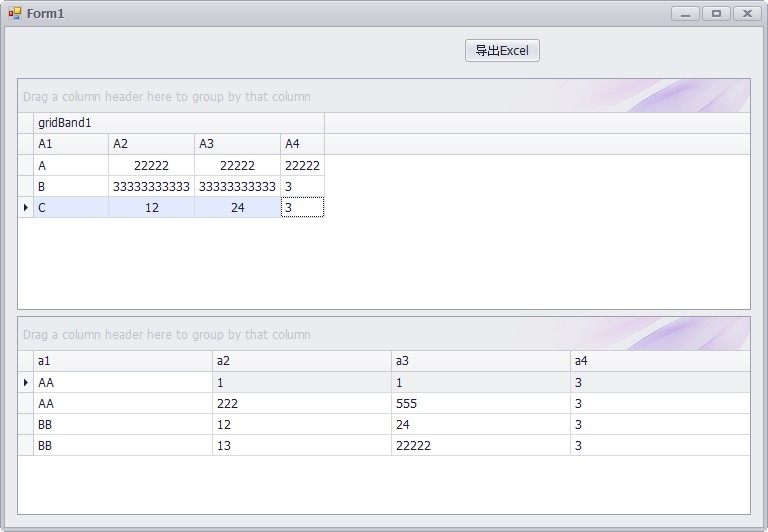
DataTable dt1 = new DataTable();

dt1.Columns.Add("a1");

dt1.Columns.Add("a2");

dt1.Columns.Add("a3");

dt1.Columns.Add("a4");

DataTable dt2 = dt1.Copy();

dt1.Rows.Add("A", "22222", "22222", "22222");

dt1.Rows.Add("B", "33333333333", "33333333333", "3");

dt1.Rows.Add("C", "12", "24", "3");

dt2.Rows.Add("AA", "1", "1", "3");

dt2.Rows.Add("AA", "222", "555", "3");

dt2.Rows.Add("BB", "12", "24", "3");

dt2.Rows.Add("BB", "13", "22222", "3");

gridControl1.DataSource = dt1;

gridControl3.DataSource = dt2;

}

private void Btn_Excel_Click(object sender, EventArgs e)

{

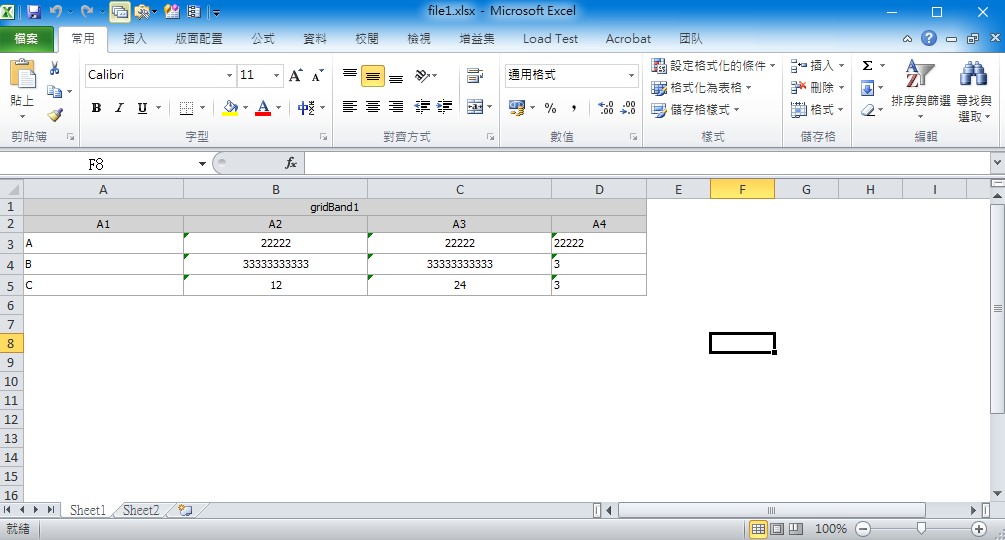
CompositeLink complink = new CompositeLink(new PrintingSystem());

PrintableComponentLink link = new PrintableComponentLink();

link.Component = gridControl1;

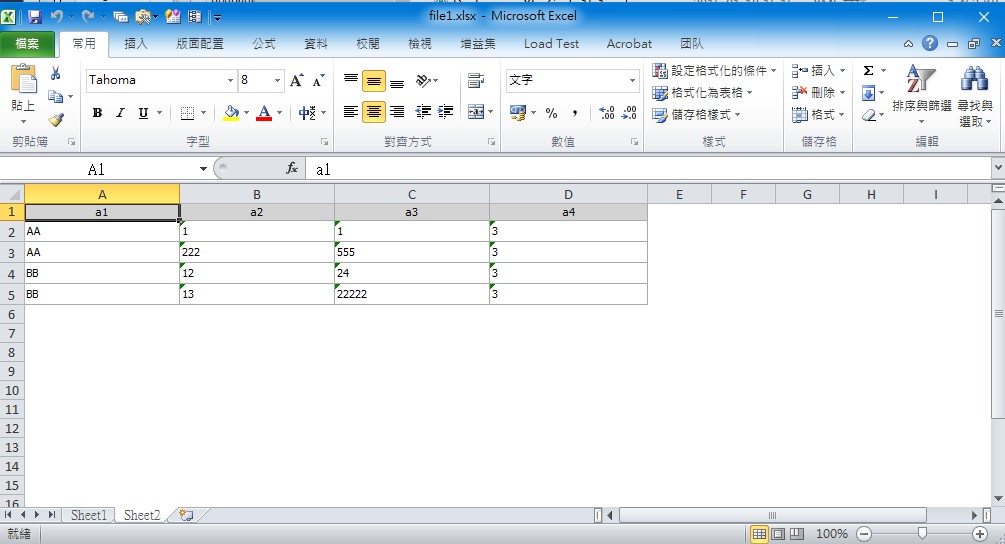
PrintableComponentLink link2 = new PrintableComponentLink();

link2.Component = gridControl3;

complink.Links.Add(link);

complink.Links.Add(link2);

complink.CreatePageForEachLink();

complink.ExportToXlsx("file1.xlsx", new XlsxExportOptions() { ExportMode = XlsxExportMode.SingleFilePageByPage });

}
Gridview导出EXCEL(多页) z的更多相关文章
- GridView导出Excel的超好样例
事实上网上有非常多关于Excel的样例,可是不是非常好,他们的代码没有非常全,读的起来还非常晦涩.经过这几天的摸索,最终能够完毕我想要导出报表Excel的效果了.以下是我的效果图. 一.前台的页面图 ...
- Asp.net Gridview导出Excel
前台页面放一个GridView什么的就不说了,要注意的是在 <%@ Page Language="C#" AutoEventWireup="true" C ...
- C#实现GridView导出Excel
using System.Data;using System.Web;using System.Web.UI;using System.Web.UI.WebControls;using System. ...
- ASP.NET gridview导出excel,防止繁体产生有乱码的方式
//1.先引用比如 : using System; using System.Collections.Generic; using System.Linq; using System.Web; usi ...
- GridView导出excel格式问题
在导出的点击事件中,代码如下: //指定导出对应单元格为文本样式 string style = @"<style> .test { vnd.ms-excel.numberform ...
- C# GridView 导出Excel表
出错1:类型“GridView”的控件“GridView1”必须放在具有 runat=server 的窗体标记内解决方案:在后台文件中重载VerifyRenderingInServerForm方法,如 ...
- GridView导出Excel(中文乱码)
public void OUTEXCEL(string items,string where) { DataSet ds = new StudentBLL().GetTable(items,where ...
- GridView导出Excel
public void OUTEXCEL() { DataSet ds = new GW_T_DemandDAL().GetWzH(GetPersonInfoData(UserInfo), Reque ...
- GridView 导出Excel
protected void btnExcel_Click(object sender, EventArgs e) { ) { ExportGridViewForUTF8(GridView1, Dat ...
随机推荐
- BZOJ2733 [HNOI2012]永无乡
直接平衡树启发式合并就好了...貌似是个很高端的东西.. 貌似可以证明splay的启发式合并是均摊$O(nlogn)$的...而其他平衡树都不行,所以其他的复杂度都是$O(nlog^2n)的$的 所以 ...
- web相关概念
1.web概念:web1.0:静态页面为主(传统企业的页面)特点:由网站提供方来更新和维护内容web2.0:以动态页面为主,以用户为中心,网站由用户参与或编辑web3.0:智能化人与人与机器的交流(各 ...
- IOS开发UI篇—导航控制器属性和基本使用
IOS开发UI篇—导航控制器属性和基本使用 一.导航控制器的一些属性和基本使用 1.把子控制器添加到导航控制器中的四种方法 (1) 1.创建一个导航控制器 UINavigationController ...
- Gridview布局界面练习Base Adapter
aaarticlea/png;base64,iVBORw0KGgoAAAANSUhEUgAAAZcAAAJVCAIAAACdzC94AAAgAElEQVR4nOy953Ij2bGuLTVJmFrelf
- Java中final的作用
Java中Final可以被用于变量,方法,类.具体来说: 1, Final 变量 修饰主类型时,制定变量为常数,不希望被改变 修饰类类型时,表示变量的句柄不变,不能被指定指向新的变量 修饰参数时,参数 ...
- linux命令每日一练习-top free
top看看进程的内存使用情况 free产看内存使用情况 top -n 2 -b > log.txt 将更新两次的结果输入到log.txt cat > log.txt //清空文件并写入 ...
- 黑马程序员——OC语言 核心语法(1)
Java培训.Android培训.iOS培训..Net培训.期待与您交流! (以下内容是对黑马苹果入学视频的个人知识点总结) (一)点语法 点语法其实本质上还是方法调用 当使用点语法时,编译器会自动展 ...
- [安卓]应用程序资源(App Resources)
谷歌推荐我们,在开发安卓系统应用程序的时候,要把资源从代码中分离出来,这样便于我们单独维护它们.采取分离的资源设计,我们还可以提供可选资源,支持特定的设备配置譬如不同的语言或屏幕尺寸,随着越来越多的A ...
- web前端基础篇③
1.video视频 audio音频 controls出现控件 loop循环 autoplay自动播放例:<video/audio src=“地址” controls=“controls” loo ...
- 5、Linux下面桌面的安装
搭建本地yum仓库的方法 http://www.cnblogs.com/lql123/p/5952788.html 1.yum grouplist (列出yum仓库里的软件组列表) .y ...