
[原创]android自定义控件的最大高度MaxHeightView
代码地址:https://github.com/Carbs0126/MaxHeightView
android中部分控件具有maxHeight功能,如button等,但是对于ViewGroup类的控件,没有此属性,当我们需要限制某些view的高度时,(比如限制屏幕下方对话框的最大高度)那么,就需要一种可以限制其子view最大高度的ViewGroup。如何为自定义ViewGroup添加一个最大高度的属性呢?其实很简单,主要就是使用onMeasure()函数,在函数中控制高度即可。
先看下效果图:
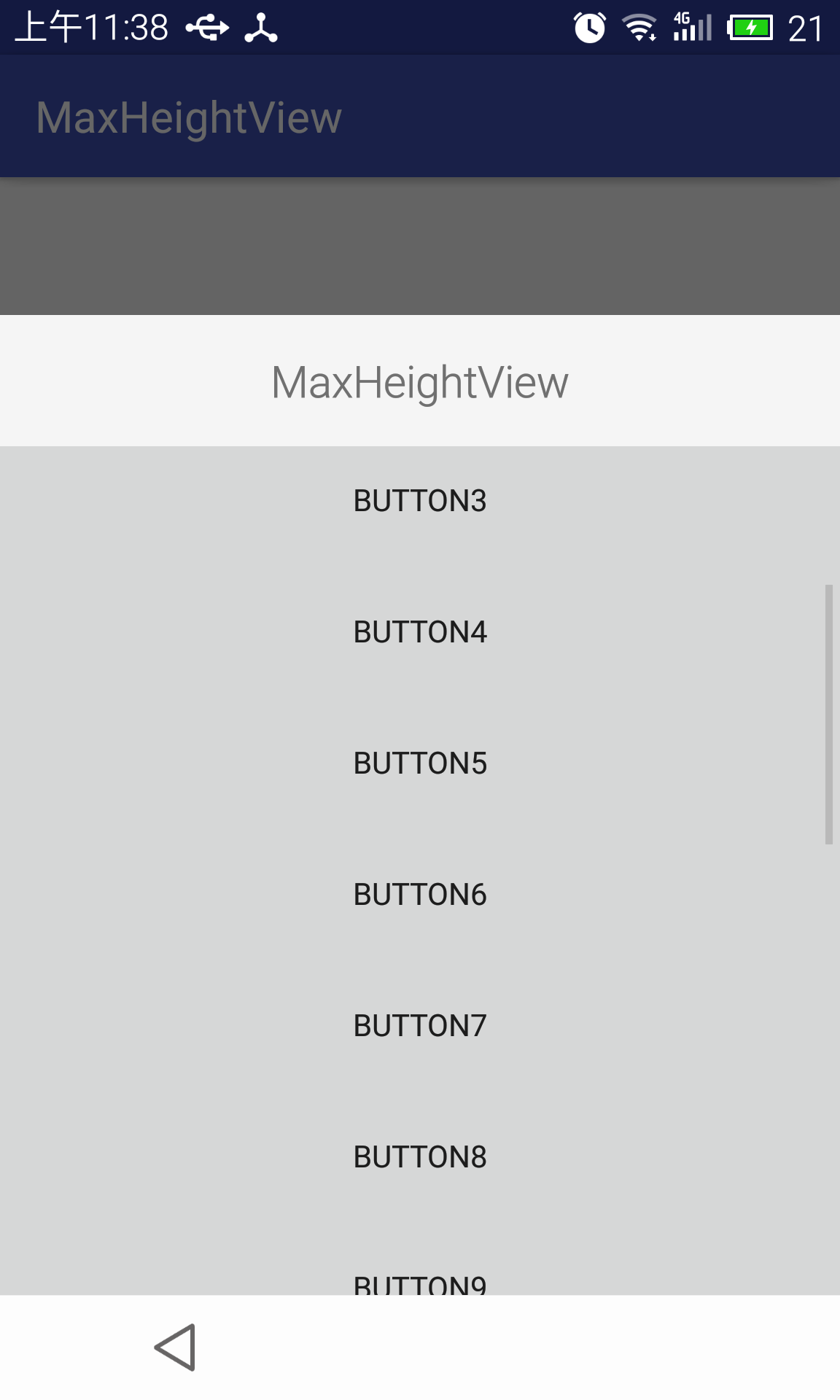
这是一个dialog,dialog中添加了共有20个button,如果不使用最大高度可控的viewgroup,则会充满整个屏幕。
java代码实现如下:
 package cn.carbs.android.maxheightview.library;

 /**

  * Created by carbs on 2016/5/12.

  */

 import android.content.Context;

 import android.content.res.TypedArray;

 import android.util.AttributeSet;

 import android.view.WindowManager;

 import android.widget.FrameLayout;

 /**

  * 先判断是否设定了mMaxHeight,如果设定了mMaxHeight,则直接使用mMaxHeight的值,

  * 如果没有设定mMaxHeight,则判断是否设定了mMaxRatio,如果设定了mMaxRatio的值 则使用此值与屏幕高度的乘积作为最高高度

  *

  * @author Carbs

  */

 public class MaxHeightView extends FrameLayout {

     private static final float DEFAULT_MAX_RATIO = 0.6f;

     private static final float DEFAULT_MAX_HEIGHT = 0f;

     private float mMaxRatio = DEFAULT_MAX_RATIO;// 优先级高

     private float mMaxHeight = DEFAULT_MAX_HEIGHT;// 优先级低

     public MaxHeightView(Context context) {

         super(context);

         init();

     }

     public MaxHeightView(Context context, AttributeSet attrs) {

         super(context, attrs);

         initAttrs(context, attrs);

         init();

     }

     public MaxHeightView(Context context, AttributeSet attrs, int defStyle) {

         super(context, attrs, defStyle);

         initAttrs(context, attrs);

         init();

     }

     private void initAttrs(Context context, AttributeSet attrs) {

         TypedArray a = context.obtainStyledAttributes(attrs,

                 R.styleable.MaxHeightView);

         final int count = a.getIndexCount();

         for (int i = 0; i < count; ++i) {

             int attr = a.getIndex(i);

             if(attr == R.styleable.MaxHeightView_mhv_HeightRatio){

                 mMaxRatio = a.getFloat(attr, DEFAULT_MAX_RATIO);

             }else if(attr == R.styleable.MaxHeightView_mhv_HeightDimen){

                 mMaxHeight = a.getDimension(attr, DEFAULT_MAX_HEIGHT);

             }

         }

         a.recycle();

     }

     private void init(){

         if (mMaxHeight <= 0) {

             mMaxHeight = mMaxRatio * (float) getScreenHeight(getContext());

         } else {

             mMaxHeight = Math.min(mMaxHeight, mMaxRatio * (float) getScreenHeight(getContext()));

         }

     }

     @Override

     protected void onMeasure(int widthMeasureSpec, int heightMeasureSpec) {

         int heightMode = MeasureSpec.getMode(heightMeasureSpec);

         int heightSize = MeasureSpec.getSize(heightMeasureSpec);

         if (heightMode == MeasureSpec.EXACTLY) {

             heightSize = heightSize <= mMaxHeight ? heightSize

                     : (int) mMaxHeight;

         }

         if (heightMode == MeasureSpec.UNSPECIFIED) {

             heightSize = heightSize <= mMaxHeight ? heightSize

                     : (int) mMaxHeight;

         }

         if (heightMode == MeasureSpec.AT_MOST) {

             heightSize = heightSize <= mMaxHeight ? heightSize

                     : (int) mMaxHeight;

         }

         int maxHeightMeasureSpec = MeasureSpec.makeMeasureSpec(heightSize,

                 heightMode);

         super.onMeasure(widthMeasureSpec, maxHeightMeasureSpec);

     }

     /**

      * 获取屏幕高度

      *

      * @param context

      */

     private int getScreenHeight(Context context) {

         WindowManager wm = (WindowManager) context

                 .getSystemService(Context.WINDOW_SERVICE);

         return wm.getDefaultDisplay().getHeight();

     }

 }
属性文件如下:
<?xml version="1.0" encoding="utf-8"?>

<resources>

    <declare-styleable name="MaxHeightView">

        <attr name="mhv_HeightRatio" format="reference|float" />

        <attr name="mhv_HeightDimen" format="reference|dimension" />

    </declare-styleable>

</resources>
使用方法:
在布局中使用如下代码:
<cn.carbs.android.maxheightview.library.MaxHeightView

        android:id="@+id/maxview"

        android:layout_width="match_parent"

        android:layout_height="wrap_content"

        app:mhv_HeightRatio="0.7">

        <LinearLayout

            android:layout_width="match_parent"

            android:layout_height="wrap_content"

            android:orientation="vertical">

            <TextView

                android:layout_width="match_parent"

                android:layout_height="60dp"

                android:gravity="center"

                android:text="MaxHeightView"

                android:textSize="20sp"/>

            <ScrollView

                android:layout_width="match_parent"

                android:layout_height="wrap_content">

                <LinearLayout

                    android:layout_width="match_parent"

                    android:layout_height="wrap_content"

                    android:orientation="vertical">

                    <Button

                        android:layout_width="match_parent"

                        android:layout_height="60dp"

                        android:text="button0"/>

                    <Button

                        android:layout_width="match_parent"

                        android:layout_height="60dp"

                        android:text="button1"/>

                     ..........

                </LinearLayout>

            </ScrollView>

        </LinearLayout>

    </cn.carbs.android.maxheightview.library.MaxHeightView>
实现原理:
1.在构造方法中获取最大高度或者最大高度的比例;
2.在onMeasure()中通过获取heightMeasureSpec的size判断是否大于限定最大高度,如果大于,则将size设置为限定最大高度,并重新生成heightMeasureSpec,并调用super.onMeasure(widthMeasureSpec, maxHeightMeasureSpec);以完成onMeasure对控件大小的设定
注意事项:
此自定义view继承自FrameLayout,使用时最好嵌套一个ScrollView,以提高用户体验。
此view不完善的地方有,暂时不支持通过代码生成MaxHeightView,不过可以通过修改只有一个构造方法的public MaxHeightView(Context context)添加对应的mMaxHeight或者Ratio来限制大小。
代码项目地址:
https://github.com/Carbs0126/MaxHeightView
欢迎指正。
[原创]android自定义控件的最大高度MaxHeightView的更多相关文章
- Android自定义控件之自定义ViewGroup实现标签云
前言: 前面几篇讲了自定义控件绘制原理Android自定义控件之基本原理(一),自定义属性Android自定义控件之自定义属性(二),自定义组合控件Android自定义控件之自定义组合控件(三),常言 ...
- Android自定义控件之自定义组合控件
前言: 前两篇介绍了自定义控件的基础原理Android自定义控件之基本原理(一).自定义属性Android自定义控件之自定义属性(二).今天重点介绍一下如何通过自定义组合控件来提高布局的复用,降低开发 ...
- Android自定义控件之基本原理
前言: 在日常的Android开发中会经常和控件打交道,有时Android提供的控件未必能满足业务的需求,这个时候就需要我们实现自定义一些控件,今天先大致了解一下自定义控件的要求和实现的基本原理. 自 ...
- android自定义控件——以滑动开关为例
0.引言 (1)Android从4.0开始提供了switch的滑动开关效果组件,但是之前版本却没有 (2)很多时候我们写程序,都希望把有用的通用的通用的东西封装起来,以便以后重用. 本文根据组件开发思 ...
- Android自定义控件之基本原理(一)
前言: 在日常的Android开发中会经常和控件打交道,有时Android提供的控件未必能满足业务的需求,这个时候就需要我们实现自定义一些控件,今天先大致了解一下自定义控件的要求和实现的基本原理. 自 ...
- Android自定义控件之自定义组合控件(三)
前言: 前两篇介绍了自定义控件的基础原理Android自定义控件之基本原理(一).自定义属性Android自定义控件之自定义属性(二).今天重点介绍一下如何通过自定义组合控件来提高布局的复用,降低开发 ...
- Android自定义控件实现带有清除按钮的EditText
首先声明我也是参考了别人的思路,只是稍微做了下修改,增加显示密码与隐藏密码,没有输入字符串时让EditText进行抖动,废话少说这里附上效果图 效果很赞有木有 那么怎么实现这种效果呢?那就跟着我一起来 ...
- [转]Android自定义控件:进度条的四种实现方式(Progress Wheel的解析)
最近一直在学习自定义控件,搜了许多大牛们Blog里分享的小教程,也上GitHub找了一些类似的控件进行学习.发现读起来都不太好懂,就想写这么一篇东西作为学习笔记吧. 一.控件介绍: 进度条在App中非 ...
- Android自定义控件之自定义属性
前言: 上篇介绍了自定义控件的基本要求以及绘制的基本原理,本篇文章主要介绍如何给自定义控件自定义一些属性.本篇文章将继续以上篇文章自定义圆形百分比为例进行讲解.有关原理知识请参考Android自定义控 ...
随机推荐
- URAL 1915 Titan Ruins: Reconstruction of Bygones(思路)
搞这个题差不多是从比赛开始到结束. 从自信慢慢的看题一直到wrong到死. 这个题目可以说成是思路题,以为我们只要明白一点,这道题就成了纯暴力的水题, 那就是当操作数不足栈中数字数目的时候,我们就没有 ...
- We have detected that MySQL products under the Commercial license are installed. In order to proceed with this GPL installation these Commercial
下载了MySQL 5.6.15,在安装时,出现了下面的提示信息: 按提示信息的要求单击“是”,结果安装就无法进行下去. 从提示信息上看,意思是指电脑中原来安装有商业版的许可,现在要转换成为GPL许可. ...
- ORACLE修改用户表所属表空间的步骤
ORACLE修改用户表所属表空间的步骤 使用脚本进行修改.据目前所了解,正长情况下需要修改表的空间和表的索引的空间,如果涉及到BOLB字段的表,修改的方式又不一样了!正常情况下的修改脚本:1.修改表的 ...
- 博客恢复更新 工作环境转移到Linux
嗯, 回来了. 工作了, 以后学习和写博的时间只能靠挤了, 相信挤一挤总会有的.最近的一些计划: 重拾基础 玩好linux wid, 2014-04-27
- ASP.NET MVC请求处理管道生命周期的19个关键环节(7-12)
在上一篇"ASP.NET MVC请求处理管道生命周期的19个关键环节(1-6) ",体验了1-6关键环节,本篇继续. ⑦根据IsapiWorkerRequest对象,HttpRun ...
- HTTP权威指南阅读笔记三:HTTP报文
报文的组成部分 报文由三部分组成:对报文进行描述的起始行(start line).包含属性的首部(header),以及可选的.包含数据的主体(body)部分. 请求报文格式 <method> ...
- Fiddler初探
我们知道监视Http和Https请求的工具有多种,例如:HttpWatch,FireBug等.但是今天接触到一种新的工具Fiddler.Fiddler能记录所有客户端和服务器的http和https请求 ...
- intellij自动缩进排版
用鼠标选中需要缩进的代码块,然后输入命令 ctrl+alt+i ref: http://stackoverflow.com/questions/12264127/how-to-reindent-lin ...
- paip.sqlite 管理最好的工具 SQLite Expert 最佳实践总结
paip.sqlite 管理最好的工具 SQLite Expert 最佳实践总结 一般的管理工具斗可以...就是要是sqlite没正常地关闭哈,有shm跟wal文件..例如ff的place.sqlit ...
- paip.突破 网站 手机 验证码 的 破解 总结
paip.突破 网站 手机 验证码 的 破解 总结 作者Attilax 艾龙, EMAIL:1466519819@qq.com 来源:attilax的专栏 地址:http://blog.csdn ...