
Hystrix集群及监控turbine
Hystrix集群及监控turbine
前面Dashboard演示的仅仅是单机服务监控,实际项目基本都是集群,所以这里集群监控用的是turbine。
turbine是基于Dashboard的。
先搞个集群;
再microservice-student-provider-hystrix-1004项目的基础上再搞一个microservice-student-provider-hystrix
代码和配置都复制一份,然后修改几个地方;
1、yml配置
---

server:

  port: 1004

  context-path: /

spring:

  datasource:

    type: com.alibaba.druid.pool.DruidDataSource

    driver-class-name: com.mysql.jdbc.Driver

    url: jdbc:mysql://localhost:3306/t224?useUnicode=true&characterEncoding=utf8

    username: root

    password: 123

  jpa:

    hibernate:

      ddl-auto: update

    show-sql: true

  application:

    name: microservice-student

  profiles: provider-hystrix-1004

eureka:

  instance:

    hostname: localhost

    appname: microservice-student

    instance-id: microservice-student:1004

    prefer-ip-address: true

  client:

    service-url:

      defaultZone: http://eureka2001.liuwenwu.com:2001/eureka/,http://eureka2002.liuwenwu.com:2002/eureka/,http://eureka2003.liuwenwu.com:2003/eureka/

info:

  groupId: com.liuwenwu.springcloud

  artifactId: microservice-student-provider-hystrix-1004

  version: 1.0-SNAPSHOT

  userName: http://liuwenwu.com

  phone: 123456

hystrix:

  command:

    default:

      execution:

        isolation:

          thread:

            timeoutInMilliseconds: 1500

---

server:

  port: 1005

  context-path: /

spring:

  datasource:

    type: com.alibaba.druid.pool.DruidDataSource

    driver-class-name: com.mysql.jdbc.Driver

    url: jdbc:mysql://localhost:3306/t224?useUnicode=true&characterEncoding=utf8

    username: root

    password: 123

  jpa:

    hibernate:

      ddl-auto: update

    show-sql: true

  application:

    name: microservice-student

  profiles: provider-hystrix-1005

eureka:

  instance:

    hostname: localhost

    appname: microservice-student

    instance-id: microservice-student:1005

    prefer-ip-address: true

  client:

    service-url:

      defaultZone: http://eureka2001.liuwenwu.com:2001/eureka/,http://eureka2002.liuwenwu.com:2002/eureka/,http://eureka2003.liuwenwu.com:2003/eureka/

info:

  groupId: com.liuwenwu.springcloud

  artifactId: microservice-student-provider-hystrix-1005

  version: 1.0-SNAPSHOT

  userName: http://liuwenwu.com

  phone: 123456

hystrix:

  command:

    default:

      execution:

        isolation:

          thread:

            timeoutInMilliseconds: 1500

---

server:

  port: 1006

  context-path: /

spring:

  datasource:

    type: com.alibaba.druid.pool.DruidDataSource

    driver-class-name: com.mysql.jdbc.Driver

    url: jdbc:mysql://localhost:3306/t224?useUnicode=true&characterEncoding=utf8

    username: root

    password: 123

  jpa:

    hibernate:

      ddl-auto: update

    show-sql: true

  application:

    name: microservice-student

  profiles: provider-hystrix-1006

eureka:

  instance:

    hostname: localhost

    appname: microservice-student

    instance-id: microservice-student:1006

    prefer-ip-address: true

  client:

    service-url:

      defaultZone: http://eureka2001.liuwenwu.com:2001/eureka/,http://eureka2002.liuwenwu.com:2002/eureka/,http://eureka2003.liuwenwu.com:2003/eureka/

info:

  groupId: com.liuwenwu.springcloud

  artifactId: microservice-student-provider-hystrix-1006

  version: 1.0-SNAPSHOT

  userName: http://liuwenwu.com

  phone: 123456

hystrix:

  command:

    default:

      execution:

        isolation:

          thread:

            timeoutInMilliseconds: 1500
2、启动类配置
package com.liuwenwu.microservicestudentproviderhystrix;

import org.springframework.boot.SpringApplication;

import org.springframework.boot.autoconfigure.SpringBootApplication;

import org.springframework.boot.autoconfigure.domain.EntityScan;

import org.springframework.cloud.client.circuitbreaker.EnableCircuitBreaker;

import org.springframework.cloud.netflix.eureka.EnableEurekaClient;

@EnableCircuitBreaker

@EntityScan("com.liuwenwu.*.*")

@EnableEurekaClient

@SpringBootApplication

public class MicroserviceStudentProviderHystrixApplication {

    public static void main(String[] args) {

        SpringApplication.run(MicroserviceStudentProviderHystrixApplication.class, args);

    }

}
这样的话 就有了 hystrix集群服务;
3、我们新建项目microservice-student-consumer-hystrix-turbine-91
pom.xml加下依赖
<dependency>

    <groupId>org.springframework.boot</groupId>

    <artifactId>spring-boot-starter-actuator</artifactId>

</dependency>

<dependency>

    <groupId>org.springframework.cloud</groupId>

    <artifactId>spring-cloud-starter-turbine</artifactId>

</dependency>
4、application.yml
server:

  port: 91

  context-path: /

eureka:

  client:

    service-url:

      defaultZone: http://eureka2001.liuwenwu.com:2001/eureka/,http://eureka2002.liuwenwu.com:2002/eureka/,http://eureka2003.liuwenwu.com:2003/eureka/

turbine:

  app-config: microservice-student   # 指定要监控的应用名称

  clusterNameExpression: "'default'" #表示集群的名字为default

spring:

  application:

    name: turbine
1、新建启动类MicroserviceStudentConsumerHystrixTurbine91Application 加注解:@EnableTurbine
package com.liuwenwu.microservicestudentconsumerhystrixturbine91;

import org.springframework.boot.SpringApplication;

import org.springframework.boot.autoconfigure.SpringBootApplication;

import org.springframework.boot.autoconfigure.jdbc.DataSourceAutoConfiguration;

import org.springframework.boot.autoconfigure.orm.jpa.HibernateJpaAutoConfiguration;

import org.springframework.cloud.netflix.turbine.EnableTurbine;

@SpringBootApplication(exclude={DataSourceAutoConfiguration.class, HibernateJpaAutoConfiguration.class})

@EnableTurbine

public class MicroserviceStudentConsumerHystrixTurbine91Application {

    public static void main(String[] args) {

        SpringApplication.run(MicroserviceStudentConsumerHystrixTurbine91Application.class, args);

    }

}
测试:
先启动三个eureka,然后把1004 1005 带hystrix的服务都启动;
microservice-student-consumer-80这个也启动,方便测试;
dashboard,turbine启动;
这样的话 http://localhost/student/hystrix 就能调用服务集群;
http://localhost:91/turbine.stream 可以监控数据,实时ping 返回data
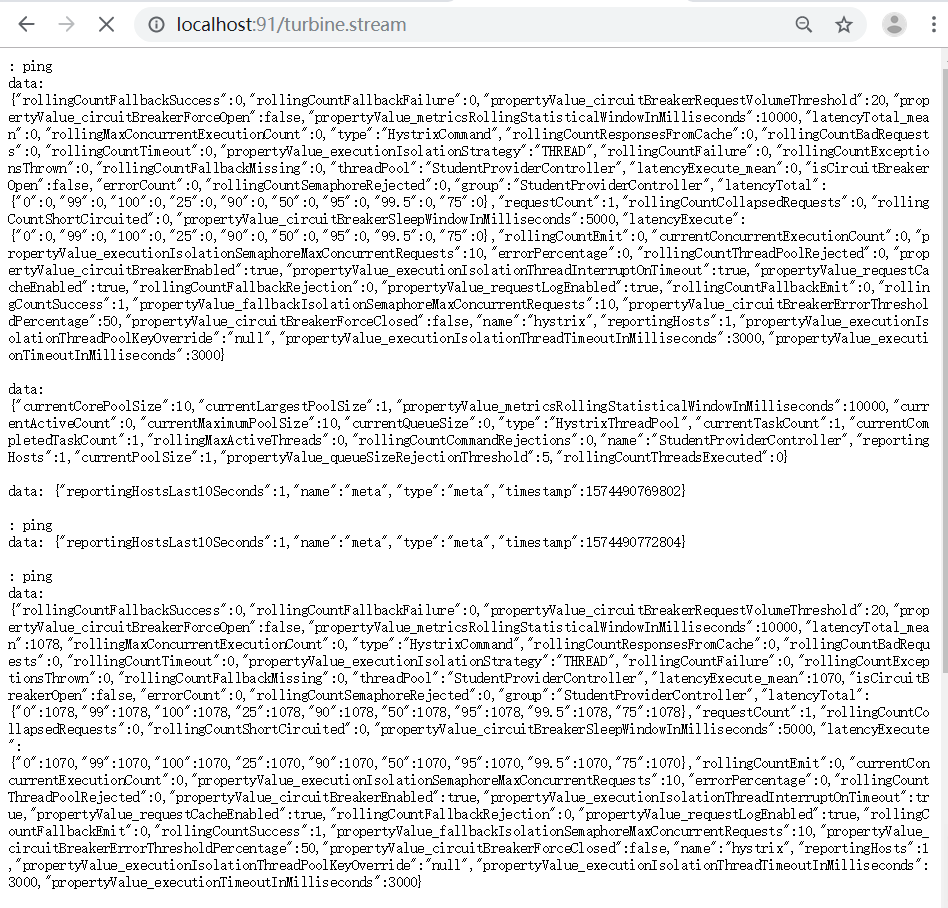

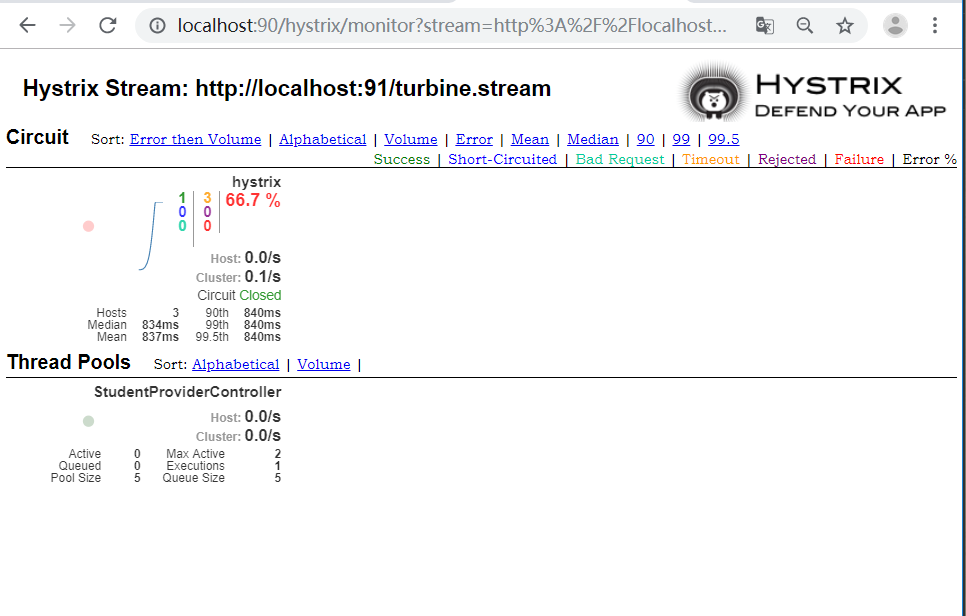
输入http://localhost:90/hystrix进入仪表盘,输入地址

点击 进入集群监控仪表:
Feign、Hystrix整合
前面的代码,用@HystrixCommand fallbackMethod是很不好的,因为和业务代码耦合度太高,不利于维护,所以需要解耦,这我们讲下Feign Hystrix整合。
1、microservice-student-provider-hystrix项目修改
我们不用原先那套。按照正常的逻辑来写;
StudentService加新的接口方法:
/**

 * 测试Hystrix服务降级

 * @return

 */

public Map<String,Object> hystrix();
StudentServiceImpl写具体实现:
@Override

public Map<String, Object> hystrix() {

    Map<String,Object> map=new HashMap<String,Object>();

    map.put("code", 200);

    map.put("info","工号【"+port+"】正在为您服务");

    return map;

}
StudentProviderController正常调用service方法:
/**

     * 测试Hystrix服务降级

     * @return

     * @throws InterruptedException

     */

    @ResponseBody

    @GetMapping(value="/hystrix")

    @HystrixCommand(fallbackMethod="hystrixFallback")

    public Map<String,Object> hystrix() throws InterruptedException{

        Thread.sleep(2000);

//        Map<String,Object> map=new HashMap<String,Object>();

//        map.put("code", 200);

//        map.put("info","工号【"+port+"】正在为您服务");

        return studentService.hystrix();

    }
2、microservice-common项目新建FallbackFactory类,解耦服务熔断服务降级
StudentClientService接口,新增getInfo方法;
/**

 * 服务熔断降级

 * @return

 */

@GetMapping(value="/student/hystrix")

public Map<String,Object> hystrix();
新建 StudentClientFallbackFactory 类,实现FallbackFactory<StudentClientService>接口;
package com.liuwenwu.microservicecommon.FallbackFactory;

import com.liuwenwu.microservicecommon.entity.Student;

import com.liuwenwu.microservicecommon.service.StudentClientService;

import feign.hystrix.FallbackFactory;

import org.springframework.stereotype.Component;

import java.util.HashMap;

import java.util.List;

import java.util.Map;

/**

 * @author LWW

 * @site www.lww.com

 * @company

 * @create 2019-11-23 14:50

 *

 * 作用,将所有service层业务方法可能出现故障,需要定义对应的快速返回方法的处理集合

 * add/del/edit/query...

 * StudentClientFallbackFactory

 * add/del/edit/query...对应的快速回退措施

 *

 */

@Component

public class StudentClientFallbackFactory implements FallbackFactory<StudentClientService> {

    @Override

    public StudentClientService create(Throwable throwable) {

        return new StudentClientService() {

            @Override

            public Student get(Integer id) {

                return null;

            }

            @Override

            public List<Student> list() {

                return null;

            }

            @Override

            public boolean save(Student student) {

                return false;

            }

            @Override

            public boolean delete(Integer id) {

                return false;

            }

            @Override

            public String ribbon() {

                return null;

            }

            @Override

            public Map<String, Object> hystrix() {

                Map<String,Object> map=new HashMap<String,Object>();

                map.put("code", 500);

                map.put("info", "系统繁忙,稍后重试");

                return map;

            }

        };

    }

}
StudentClientService接口的@FeignClient注解加下 fallbackFactory属性
@FeignClient(value="MICROSERVICE-STUDENT",fallbackFactory=StudentClientFallbackFactory.class)
这类我们实现了 降级处理方法实现;
3、microservice-student-consumer-feign-80修改 支持Hystrix
StudentConsumerFeignController新增方法调用
/**

 * Feign整合Hystrix服务熔断降级

 * @return

 * @throws InterruptedException

 */

@GetMapping(value="/hystrix")

public Map<String,Object> hystrix() throws InterruptedException{

    return studentClientService.hystrix();

}
4、microservice-common的application.yml加上hystrix支持
feign:

  hystrix:

    enabled: true
测试开启三个eureka,以及带hystrix的provider,和带feign,hystrix的consummer。
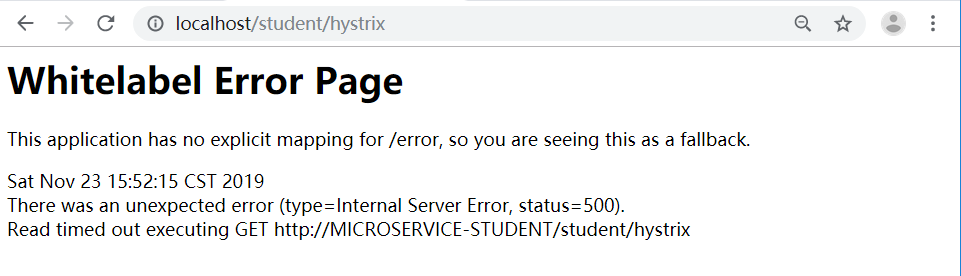
测试的话,也是没问题的。0.9秒的话,返回正常信息;超过1秒的话,就返回错误提示;
集群后超时设置
上面错误是什么原因呢,咱们明明在Hystrix中的application.yml中设置了
hystrix:

  command:

    default:

      execution:

        isolation:

          thread:

            timeoutInMilliseconds: 1500
这里因为还有一个 feign 也有一个超时时间的设置,当然feign底层是 ribbon的封装,所以 直接配置ribbon,ribbon默认超时也是1秒。
所以这里都是强制要求,ribbon的超时时间要大于hystrix的超时时间,否则 hystrix自定义的超时时间毫无意义。
所以还得microservice-student-consumer-feign-80上加个 ribbon超时时间设置
ribbon:

  ReadTimeout: 10000

  ConnectTimeout: 9000
这样就完工了。可以自行测试。

Hystrix集群及监控turbine的更多相关文章
- Hystrix集群及集群监控turbine
Hystrix集群及监控turbine 前面Dashboard演示的仅仅是单机服务监控,实际项目基本都是集群,所以这里集群监控用的是turbine. turbine是基于Dashboard的. 先搞个 ...
- SpringCloud之Hystrix集群及集群监控turbine
目的: Hystrix集群及监控turbine Feign.Hystrix整合之服务熔断服务降级彻底解耦 集群后超时设置 Hystrix集群及监控turbine 新建一个springboot工程mic ...
- Spring Cloud第八篇 | Hystrix集群监控Turbine
本文是Spring Cloud专栏的第八篇文章,了解前七篇文章内容有助于更好的理解本文: Spring Cloud第一篇 | Spring Cloud前言及其常用组件介绍概览 Spring Clo ...
- Spring Cloud Turbine微服务集群实时监控
本文代码下载地址: https://gitlab.com/mySpringCloud/turbine SpringBoot版本:1.5.9.RELEASE (稳定版) SpringCloud版本:Ed ...
- cAdvisor0.24.1+InfluxDB0.13+Grafana4.0.2搭建Docker1.12.3 Swarm集群性能监控平台
目录 [TOC] 1.基本概念 既然是对Docker的容器进行监控,我们就不自己单独搭建cAdvisor.InfluxDB.Grarana了,本文中这三个实例,主要以Docker容器方式运行. 本 ...
- Kubernetes集群的监控报警策略最佳实践
版权声明:本文为博主原创文章,未经博主同意不得转载. https://blog.csdn.net/M2l0ZgSsVc7r69eFdTj/article/details/79652064 本文为Kub ...
- 高可用Kubernetes集群-14. 部署Kubernetes集群性能监控平台
参考文档: Github介绍:https://github.com/kubernetes/heapster Github yaml文件: https://github.com/kubernetes/h ...
- Prometheus 监控K8S集群资源监控
Prometheus 监控K8S集群中Pod 目前cAdvisor集成到了kubelet组件内,可以在kubernetes集群中每个启动了kubelet的节点使用cAdvisor提供的metrics接 ...
- 大数据运维尖刀班 | 集群_监控_CDH_Docker_K8S_两项目_腾讯云服务器
说明:大数据时代,传统运维向大数据运维升级换代很常见,也是个不错的机会.如果想系统学习大数据运维,个人比较推荐通信巨头运维大咖的分享课:https://url.cn/5HIqOOr,主要是实战强.含金 ...
随机推荐
- vue目首屏添加skeleton骨架屏
1. 安装插件:npm install vue-skeleton-webpack-plugin 2. 在src目录下创建 Skeleton.vue <template> <div c ...
- PHP 接受提交变量过滤类
Filter.class.php : 1 <?php 2 class Filter{ 3 4 /** 5 * 将\n转化为<br/> 6 * 7 * @param stri ...
- 论文笔记:(2019)LDGCNN : Linked Dynamic Graph CNN-Learning on PointCloud via Linking Hierarchical Features
目录 摘要 一.引言 A.基于视图的方法 B.基于体素的方法 C.基于几何的方法 二.材料 三.方法 A.问题陈述 B.图生成 C.图特征提取 D.变换不变函数 E.LDGCNN架构 F.冻结特征提取 ...
- 开机时自动启动的AutoHotkey脚本
;;; 开机时自动启动的AutoHotkey脚本;; 此脚本修改时间 2019年06月18日20时48分;; 计时器创建代码段 ------------------------------------ ...
- Mybatis学习笔记-日志
日志工厂 如果一个数据库操作出现异常,在排错时,则需要日志 SLF4J Apache Commons Logging(COMMONS_LOGGING) LOG4J LOG4J2 JDK logging ...
- 最全总结 JavaScript Array 方法详解
JavaScript Array 指南.png Array API 大全 (公众号: 前端自学社区).png 前言 我们在日常开发中,与接口打交道最多了,前端通过访问后端接口,然后将接口数据二次处理渲 ...
- Nginx 配置错误导致漏洞
目录 1.CRLF注入漏洞 2.目录穿越漏洞 参考链接 1.CRLF注入漏洞 CRLF是"回车+换行"(\r\n)的简称,其十六进制编码分别为0x0d和0x0a.先看payload ...
- (1)用 if语句 区间判断
/*此例子只做比喻演示*/ 1 #include <stdio.h> 2 int main() 3 { 4 5 int p; 6 scanf("%d",&p); ...
- 【笔记】numpy.array的常用基本运算以及对数据的操作
numpy.array的基本运算以及对数据的操作 设置一个问题,例如 这种只需要基本的运算就可以实现 类似的 numpy对向量的运算进行了优化,速度是相当快的,这种被称为universal funct ...
- xv6学习笔记(3):中断处理和系统调用
xv6学习笔记(3):中断处理和系统调用 1. tvinit函数 这个函数位于main函数内 表明了就是设置idt表 void tvinit(void) { int i; for(i = 0; i & ...