
appium 3-31603调试分析方法
1.Appium Log
清晰记录了所有的请求和结果
 @Test

   public void testDebug() throws InterruptedException,IOException{

        MobileElement tiaoguo = (MobileElement) driver.findElementByXPath("//*[@text='跳过']");

        FileUtils.copyFile(new File("tiaoguo.png"),tiaoguo.getScreenshotAs(OutputType.FILE));

        Thread.sleep(15000);

    }
IDE执行结果:提示方法没有实现
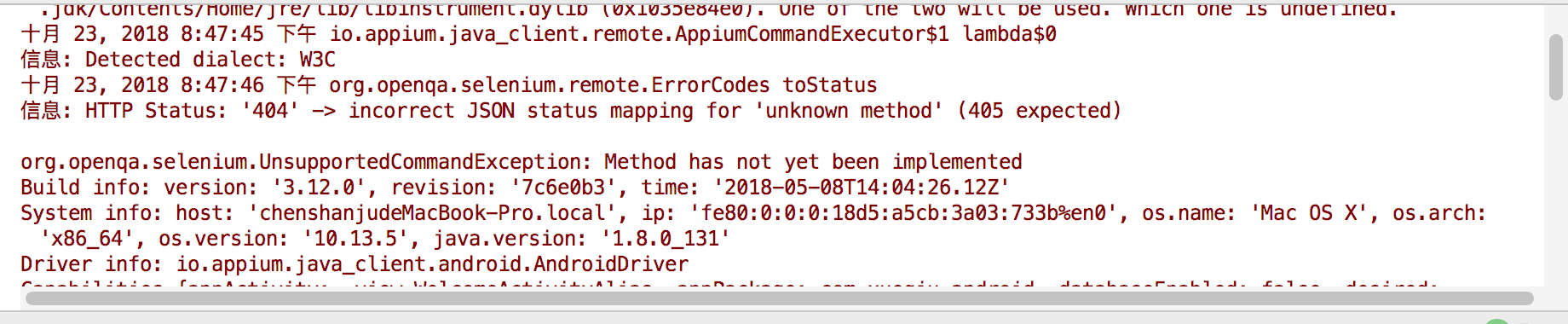
appium日志
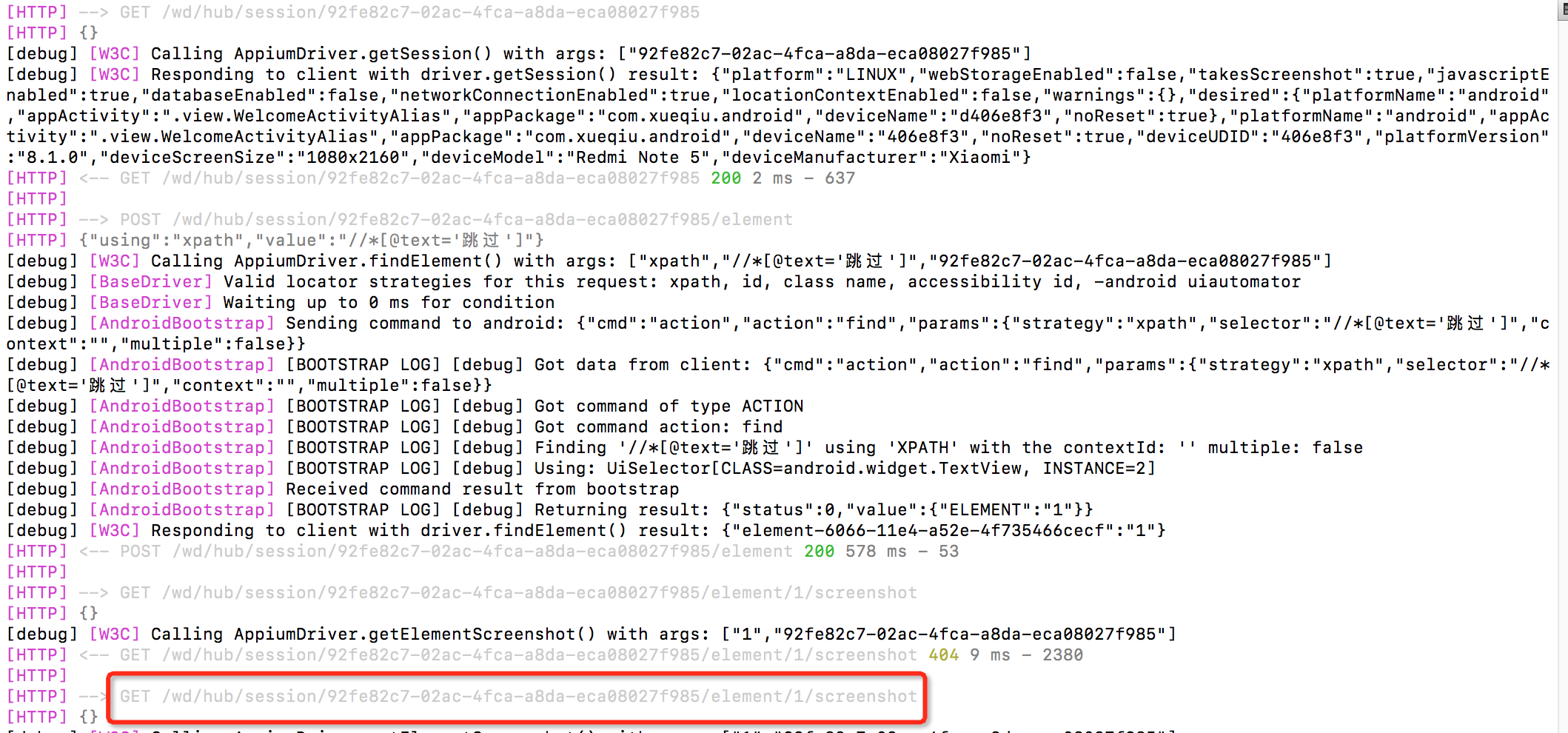
通过log中可以获取更多的信息,如
在screenshot方法执行时,有URL链接,加上IP和port,访问就可以获取到更多信息。
127.0.0.1:4723/wd/hub/session/92fe82c7-02ac-4fca-a8da-eca08027f985/element/1/screenshot
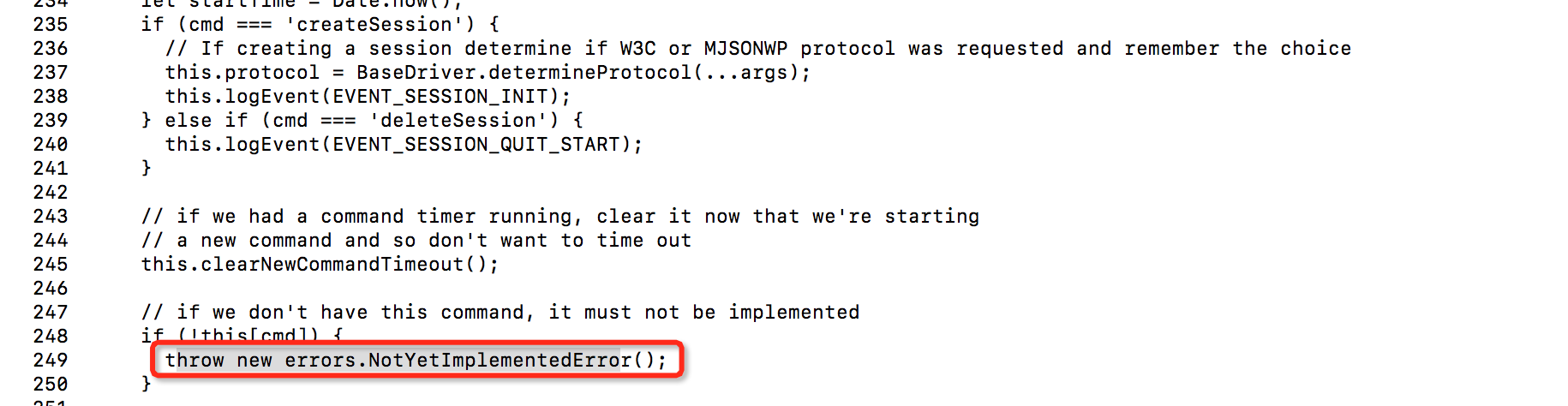
可以看到/appium/node_modules/appium-base-driver/lib/basedriver/driver.js:249:13中方法未实现
{"value":{"error":"unknown method","message":"Method has not yet been implemented","stacktrace":"NotYetImplementedError: Method has not yet been implemented\n at AndroidDriver.executeCommand$ (/usr/local/lib/node_modules/appium/node_modules/appium-base-driver/lib/basedriver/driver.js:249:13)\n at tryCatch (/usr/local/lib/node_modules/appium/node_modules/babel-runtime/regenerator/runtime.js:67:40)\n at GeneratorFunctionPrototype.invoke [as _invoke] (/usr/local/lib/node_modules/appium/node_modules/babel-runtime/regenerator/runtime.js:315:22)\n at GeneratorFunctionPrototype.prototype.(anonymous function) [as next] (/usr/local/lib/node_modules/appium/node_modules/babel-runtime/regenerator/runtime.js:100:21)\n at invoke (/usr/local/lib/node_modules/appium/node_modules/babel-runtime/regenerator/runtime.js:136:37)\n at enqueueResult (/usr/local/lib/node_modules/appium/node_modules/babel-runtime/regenerator/runtime.js:185:17)\n at Promise (<anonymous>)\n at F (/usr/local/lib/node_modules/appium/node_modules/core-js/library/modules/$.export.js:30:36)\n at AsyncIterator.enqueue (/usr/local/lib/node_modules/appium/node_modules/babel-runtime/regenerator/runtime.js:184:12)\n at AsyncIterator.prototype.(anonymous function) [as next] (/usr/local/lib/node_modules/appium/node_modules/babel-runtime/regenerator/runtime.js:100:21)\n at Object.runtime.async (/usr/local/lib/node_modules/appium/node_modules/babel-runtime/regenerator/runtime.js:209:12)\n at AndroidDriver.executeCommand (/usr/local/lib/node_modules/appium/node_modules/appium-base-driver/build/lib/basedriver/driver.js:271:34)\n at AppiumDriver.executeCommand$ (/usr/local/lib/node_modules/appium/lib/appium.js:377:50)\n at tryCatch (/usr/local/lib/node_modules/appium/node_modules/babel-runtime/regenerator/runtime.js:67:40)\n at GeneratorFunctionPrototype.invoke [as _invoke] (/usr/local/lib/node_modules/appium/node_modules/babel-runtime/regenerator/runtime.js:315:22)\n at GeneratorFunctionPrototype.prototype.(anonymous function) [as next] (/usr/local/lib/node_modules/appium/node_modules/babel-runtime/regenerator/runtime.js:100:21)\n at GeneratorFunctionPrototype.invoke (/usr/local/lib/node_modules/appium/node_modules/babel-runtime/regenerator/runtime.js:136:37)\n at <anonymous>\n at process._tickCallback (internal/process/next_tick.js:169:7)"}}
cat -n /usr/local/lib/node_modules/appium/node_modules/appium-base-driver/lib/basedriver/driver.js
2.getPageSource
界面的完整dom结构.xml文件
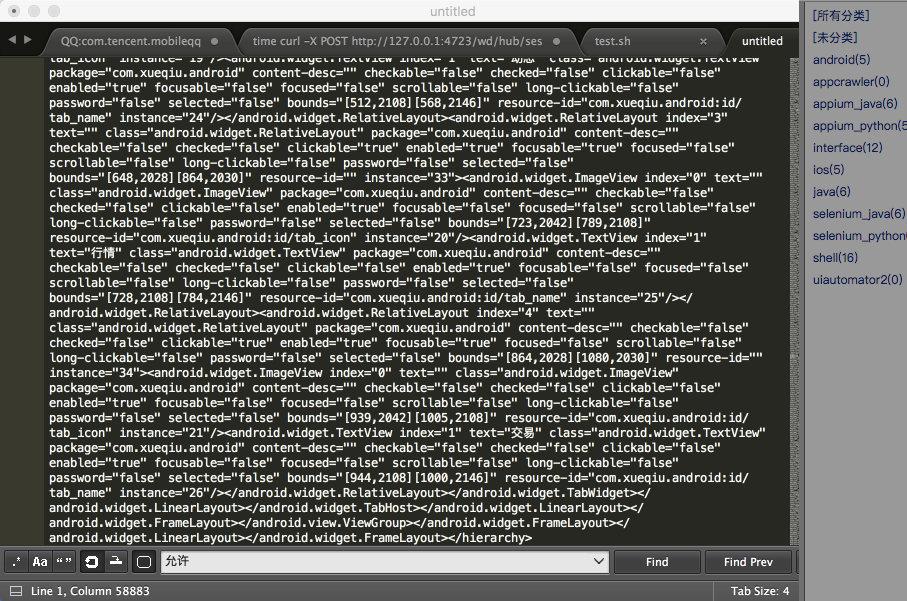
封装locate方法,加入异常处理,将获取的节点信息在编辑器中打开,检索控件。
    public WebElement locate(String locate){

        try {

            if (locate.matches("\\/\\/.*")) {

                return driver.findElementByXPath(locate);

            } else {

                return driver.findElementById(locate);

            }

        }catch (org.openqa.selenium.NoSuchElementException EX){

            System.out.println(locate);

            System.out.println(driver.getPageSource());

            return null;//没有返回值,代码会报错

        }

    }

    @Test

    public void TestDriver() throws InterruptedException{

        Thread.sleep(5000);

        //driver.findElementByXPath("//*[@text=\"允许\"]").click();

        locate("//*[@text=\"允许\"]").click();

        Thread.sleep(2000);

    }
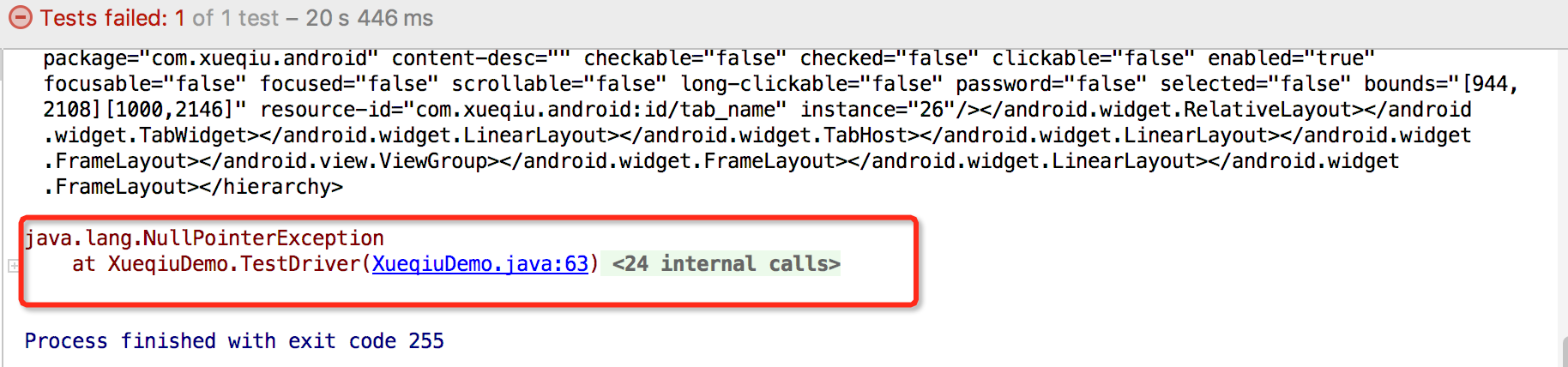
因为locate中返回的null,click找不到会因找不到控件报ava.lang.NullPointerException错误
3.脚本内调试
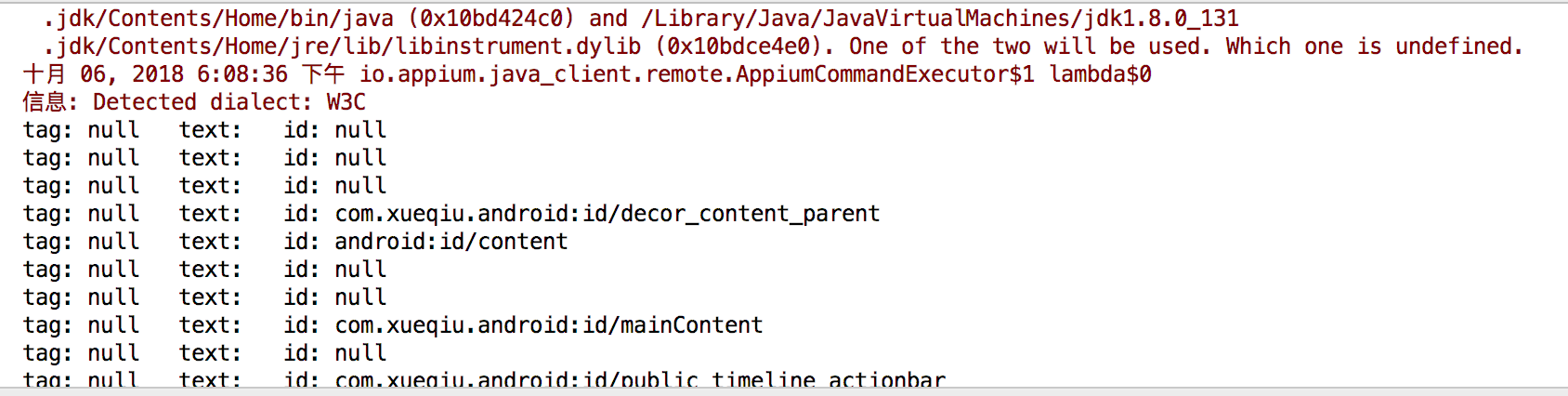
利用xpath获取所有匹配的元素 driver.findElementByXpath("//*")
    public WebElement locate(String locate) throws InterruptedException{

        try {

            if (locate.matches("\\/\\/.*")) {

                return driver.findElementByXPath(locate);

            } else {

                return driver.findElementById(locate);

            }

        }catch (org.openqa.selenium.NoSuchElementException EX){

            List<AndroidElement> lists = driver.findElementsByXPath("//*");

            for(AndroidElement e:lists){

                System.out.print("tag: "+e.getTagName()+"\t");

                System.out.print("text: "+e.getText()+"\t");

                System.out.println("id: "+e.getAttribute("resourceId"));

                //System.out.println(e.getAttribute("contentDesc"));该属性有误,content-desc也不可用

                Thread.sleep(500);

            }

            return null;

        }

    }
FAQ
1.tagName打印null
   @Test

    public void TestDriver() throws InterruptedException{

        Thread.sleep(5000);

        List<AndroidElement> lists66 = driver.findElementsByXPath("//*");

        for(AndroidElement e66:lists66){

            System.out.print("tag: "+e66.getTagName()+"\t");

            System.out.print("text: "+e66.getText()+"\t");

            System.out.println("id: "+e66.getAttribute("resourceId"));

            Thread.sleep(500);

        }

        Thread.sleep(20000);

    }
appium 3-31603调试分析方法的更多相关文章
- Appium调试分析方法
在使用appium做自动化测试的时候,发现用例报错,如何排查原因? 查看appium日志 appium日志大概是分为以下部分 culr命令调试 在理解appium协议的基础上,可以直接用shell发送 ...
- Appium Server 源码分析之启动运行Express http服务器
通过上一个系列Appium Android Bootstrap源码分析我们了解到了appium在安卓目标机器上是如何通过bootstrap这个服务来接收appium从pc端发送过来的命令,并最终使用u ...
- Appium Android Bootstrap源代码分析之启动执行
通过前面的两篇文章<Appium Android Bootstrap源代码分析之控件AndroidElement>和<Appium Android Bootstrap源代码分析之命令 ...
- Appium Server源码分析之作为Bootstrap客户端
Appium Server拥有两个主要的功能: 它是个http服务器,它专门接收从客户端通过基于http的REST协议发送过来的命令 他是bootstrap客户端:它接收到客户端的命令后,需要想办法把 ...
- iOS 苹果官方 Crash文件分析方法 (iOS系统Crash文件分析方法)
时间2013-08-20 12:49:20 GoWhich原文 http://www.gowhich.com/blog/view/id/343 苹果官方 Crash文件分析方法 (iOS系统Cras ...
- IDA 调试 Android 方法及简单的脱壳实现
IDA 调试 Android 方法及简单的脱壳实现 标签: android原创逆向调试dalvik 2016-05-24 14:24 9286人阅读 评论(3) 收藏 举报 分类: 原创(25) An ...
- WinDbg调试分析 net站点 CPU100%问题
WinDbg调试分析 asp.net站点 CPU100%问题 公司为了节省成本,最近有一批服务器降了配置,CPU从8核降到了2核.本身是小站点,访问量也不高,CPU总是会飙到100%而且可以一直持续几 ...
- 基于appium的常用元素定位方法
一.元素定位工具 app应用的元素使用的是控件定位,不同于web网页,web网页定位元素通常使用的是F12工具,那么在app当中我们则要借助其它的工具来辅助定位. 1.uiautomatorviewe ...
- [Android]第一个cm调试分析
0x00:写在前面 一直想入门Android安全,当时是极客大挑战出题的时候,被cx表哥甩锅强行去学了点android的开发,之后慢慢接触,感觉还是挺有意思的.cx表哥说先从逆向分析入门吧,之后可以 ...
随机推荐
- 用MyEclipse JPA创建项目(一)
MyEclipse 3.15 Style——在线购买低至75折!火爆开抢>> [MyEclipse最新版下载] 本教程介绍了MyEclipse中的一些基于JPA的功能. 阅读本教程时,了解 ...
- Elasticsearch利用scroll查询获取所有数据
Elasticsearch有两种分页方式,一种是通过from和size条件来实现,但是该方法开销比较大,另一种是利用scroll来实现,通过scroll来实现分页获取所有的数据,下面是利用python ...
- 爬虫从网页中去取的数据中包含 空格
爬虫从网页中爬取的数据中带了一个 这样的空格,使用trim()函数和replace(" ", "")去掉不了,找了一下资料发现,空格有两种一种是从键盘输入的对应 ...
- (转)spring hibernate properties详解
转载地址:http://blog.sina.com.cn/s/blog_692d0a650100xyqx.html Hibernate配置属性 hibernate.dialect:一个Hibernat ...
- cocos2dx 3.1.1移植安卓apk (lua项目交叉编译 mac环境下)
cocos2dx 3.1.1 lua项目安卓交叉编译 mac环境下 本文基于ant,sdk,ndk,adt等软件和环境已经事前设置好 1\新建项目 在mac的终端下输入命令: cocos new te ...
- 《DSP using MATLAB》Problem 3.8
2018年元旦,他乡加班中,外面尽是些放炮的,别人的繁华与我无关. 代码: %% ----------------------------------------------------------- ...
- Boosting学习笔记(Adboost、GBDT、Xgboost)
转载请注明出处:http://www.cnblogs.com/willnote/p/6801496.html 前言 本文为学习boosting时整理的笔记,全文主要包括以下几个部分: 对集成学习进行了 ...
- C# NPOI导出Excel和EPPlus导出Excel
转自:http://www.cnblogs.com/tanpeng/p/6155749.html 系统中经常会使用导出Excel的功能.之前使用的是NPOI,但是导出数据行数多就报内存溢出. 最近看到 ...
- vulcanjs 简单package 编写
vulcanjs 功能是以包进行管理,包里面包含了运行依赖的组件以及对于路由的注册 参考项目 项目结构 ├── README.md ├── license.md ├── package-lock.js ...
- Selenium(ThoughtWorks公司开发的web自动化测试工具)
Selenium也是一个用于Web应用程序测试的工具.Selenium测试直接运行在浏览器中,就像真正的用户在操作一样.支持的浏览器包括IE(7.8.9).Mozilla Firefox.Mozill ...