
《DSP using MATLAB》Problem 3.8
2018年元旦,他乡加班中,外面尽是些放炮的,别人的繁华与我无关。
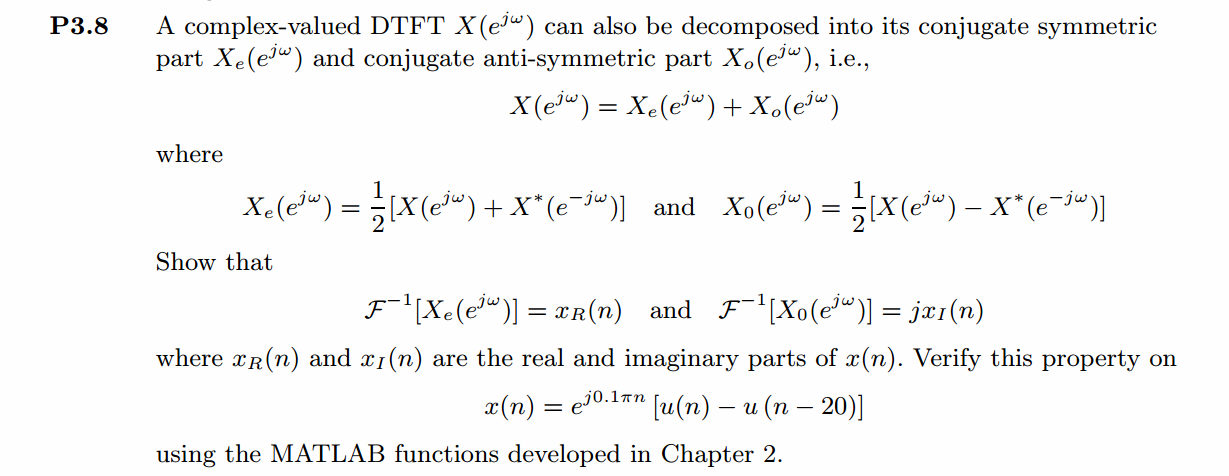
代码:
%% ------------------------------------------------------------------------

%%            Output Info about this m-file

fprintf('\n***********************************************************\n');

fprintf('        <DSP using MATLAB> Problem 3.8 \n\n');

banner();

%% ------------------------------------------------------------------------

n_start = -5; n_end = 30;

n = [n_start:n_end];

x = exp(j*0.1*pi*n) .* (stepseq(0, n_start, n_end)-stepseq(20, n_start, n_end));

figure('NumberTitle', 'off', 'Name', 'Problem 3.8 x(n)')

set(gcf,'Color',[1,1,1])                  % 改变坐标外围背景颜色

subplot(2,1,1); stem(n, real(x)); title('x sequence Real Part');

xlabel('n'); ylabel('Real[x(n)]') ;

% axis([-10,10,0,1.2])

grid on

subplot(2,1,2); stem(n, imag(x)); title('x sequence Imag Part');

xlabel('n'); ylabel('Imag[x(n)]');

grid on;

% ----------------------------------------------------

%                       DTFT of x(n)

% ----------------------------------------------------

MM = 500;

k = [-MM:MM];        % [-pi, pi]

%k = [0:M];          % [0, pi]

w = (pi/MM) * k;

[X] = dtft(x, n, w);

magX = abs(X); angX = angle(X); realX = real(X); imagX = imag(X);

figure('NumberTitle', 'off', 'Name', 'Problem 3.8 X(w)--DTFT of x(n)');

set(gcf,'Color','white');

subplot(2,1,1); plot(w/pi, magX); grid on;

title('Magnitude Part of X(w)');

xlabel('frequency in \pi units'); ylabel('Magnitude');

subplot(2,1,2); plot(w/pi, angX); grid on;

title('Angle Part of X(w)');

xlabel('frequency in \pi units'); ylabel('Radians');

figure('NumberTitle', 'off', 'Name', 'Problem 3.8 Real and Imag of X(w)');

set(gcf,'Color','white');

subplot('2,1,1'); stem(w/pi, realX); grid on;

title('Real Part of X(w)');

xlabel('frequency in \pi units'); ylabel('Real');

subplot('2,1,2'); stem(w/pi, imagX); grid on;

title('Imaginary Part of X(w)');

xlabel('frequency in \pi units'); ylabel('Imaginary');

%% ----------------------------------------------------

%%            Even and Odd part of X(jw)

%% ----------------------------------------------------

[XE, XO, m] = evenodd_cv(X, w/pi*500);

figure('NumberTitle', 'off', 'Name', 'Problem 3.8 XE(m)--Even of X(w)')

set(gcf,'Color',[1,1,1])

subplot(2,1,1); stem(m/500, real(XE)); title('Real Part of Even Sequence');

xlabel('m in \pi units'); ylabel('Real[XE(m)]');

%axis([-10,10,0,1.2])

grid on

subplot(2,1,2); stem(m/500, imag(XE)); title('Imag Part of Even Sequence');

xlabel('m in \pi units'); ylabel('Imag[XE(m)]');

%axis([-10,10,0,1.2])

grid on

figure('NumberTitle', 'off', 'Name', 'Problem 3.8 XO(m)--Odd of X(w)')

set(gcf,'Color','white')

subplot(2,1,1); stem(m/500, real(XO)); title('Real Part of Odd Sequence');

xlabel('m in \pi units'); ylabel('Real[XO(m)]');

%axis([-10,10,0,1.2])

grid on

subplot(2,1,2); stem(m/500, imag(XO)); title('Imag Part of Odd Sequence');

xlabel('m in \pi units'); ylabel('Imag[XO(m)]');

%axis([-10,10,0,1.2])

grid on

% ---------------------------------------------------

%                   DTFT of Realx(n)

% ---------------------------------------------------

MM = 500;

k = [-MM:MM];        % [-pi, pi]

%k = [0:M];        % [0, pi]

w = (pi/MM) * k;

[RX] = dtft(real(x), n, w);

magRX = abs(RX); angRX = angle(RX); realRX = real(RX); imagRX = imag(RX);

figure('NumberTitle', 'off', 'Name', 'Problem 3.8 RX(w)--DTFT of Realx(n)');

set(gcf,'Color','white');

subplot(2,1,1); plot(w/pi, magRX); grid on;

title('Magnitude Part');

xlabel('frequency in \pi units'); ylabel('Magnitude');

subplot(2,1,2); plot(w/pi, angRX); grid on;

title('Angle Part');

xlabel('frequency in \pi units'); ylabel('Radians');

figure('NumberTitle', 'off', 'Name', 'Problem 3.8 Real and Imag of RX(w)');

set(gcf,'Color','white');

subplot('2,1,1'); plot(w/pi, realRX); grid on;

title('Real Part');

xlabel('frequency in \pi units'); ylabel('Real');

subplot('2,1,2'); plot(w/pi, imagRX); grid on;

title('Imaginary Part');

xlabel('frequency in \pi units'); ylabel('Imaginary');

% -------------------------------------------------------

%                      DTFT of Imagx(n)

% -------------------------------------------------------

MM = 500;

k = [-MM:MM];        % [-pi, pi]

%k = [0:M];        % [0, pi]

w = (pi/MM) * k;

[IX] = dtft(j*imag(x), n, w);

magIX = abs(IX); angIX = angle(IX); realIX = real(IX); imagIX = imag(IX);

figure('NumberTitle', 'off', 'Name', 'Problem 3.8 IX(w)--DTFT of Imagx(n)');

set(gcf,'Color','white');

subplot(2,1,1); plot(w/pi, magIX); grid on;

title('Magnitude Part');

xlabel('frequency in \pi units'); ylabel('Magnitude');

subplot(2,1,2); plot(w/pi, angIX); grid on;

title('Angle Part');

xlabel('frequency in \pi units'); ylabel('Radians');

figure('NumberTitle', 'off', 'Name', 'Problem 3.8 Real and Imag of IX(w)');

set(gcf,'Color','white');

subplot('2,1,1'); plot(w/pi, realIX); grid on;

title('Real Part');

xlabel('frequency in \pi units'); ylabel('Real');

subplot('2,1,2'); plot(w/pi, imagIX); grid on;

title('Imaginary Part');

xlabel('frequency in \pi units'); ylabel('Imaginary');

% ------------------------------------------

%             Verify

% ------------------------------------------

figure('NumberTitle', 'off', 'Name', 'Problem 3.8 RX(w) and RealXE');

set(gcf,'Color','white');

subplot('2,1,1'); plot(w/pi, realRX); grid on;

title('Real Part of RX(w)');

xlabel('frequency in \pi units'); ylabel('Real');

subplot('2,1,2'); plot((m/500), real(XE)); grid on;

title('Real Part of XE(w)');

xlabel('frequency in \pi units'); ylabel('Real');

figure('NumberTitle', 'off', 'Name', 'Problem 3.8 IX(w) and ImagXO');

set(gcf,'Color','white');

subplot('2,1,1'); plot(w/pi, imagIX); grid on;

title('Imaginary Part of IX(w)');

xlabel('frequency in \pi units'); ylabel('Imaginary');

subplot('2,1,2'); plot((m/500), imag(XO)); grid on;

title('Imaginary Part of XO(w)');

xlabel('frequency in \pi units'); ylabel('Imaginary');
运行结果:
1、原始序列及其DTFT
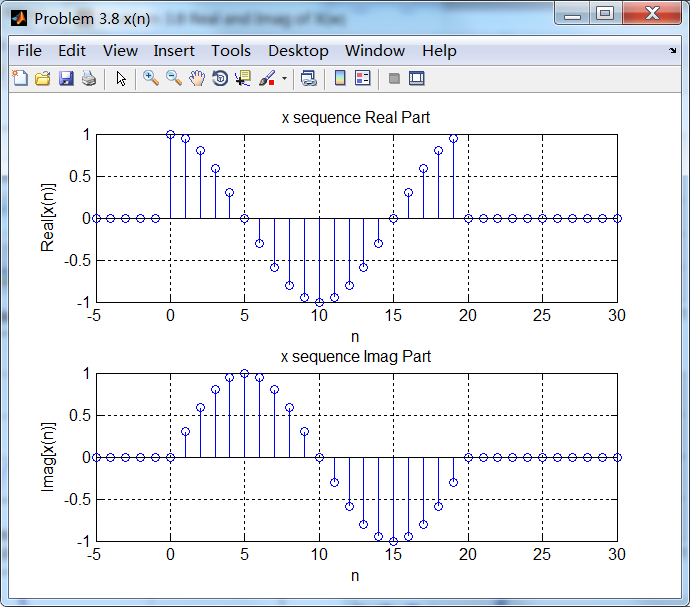
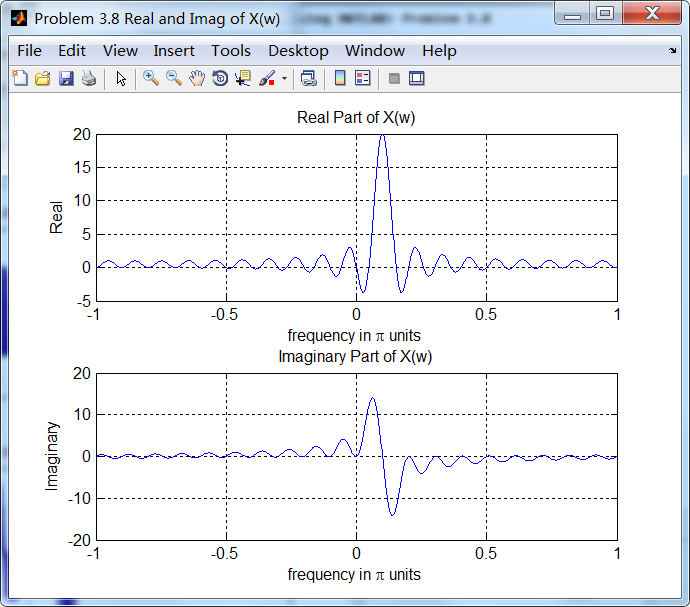
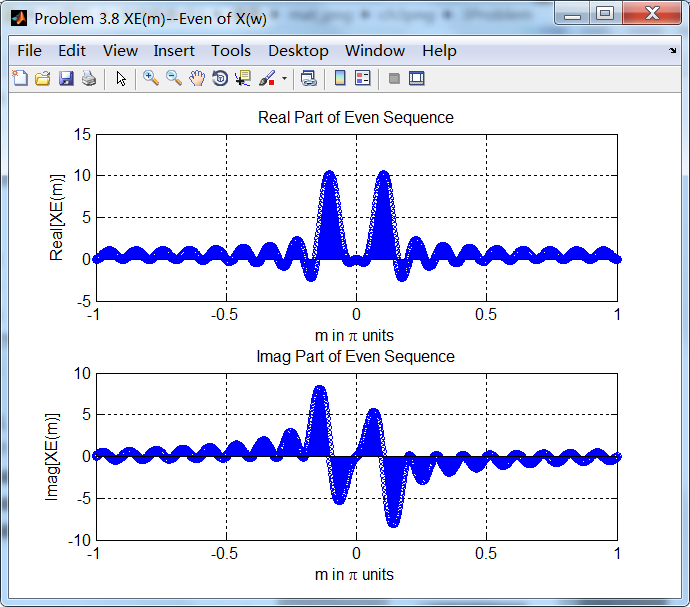
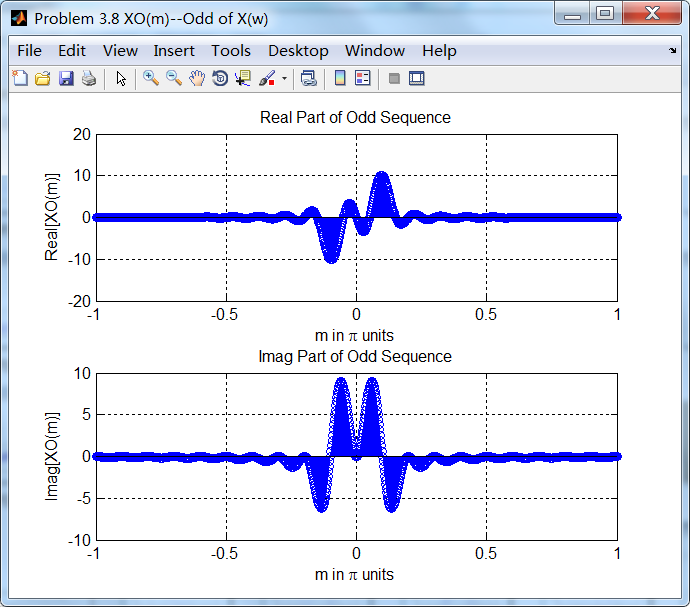
2、序列DTFT进行共轭奇偶对称分解

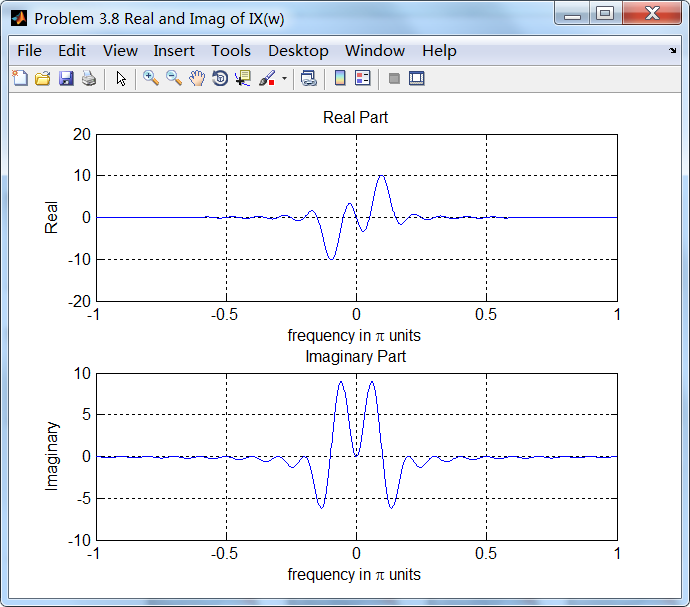
3、原始序列实部和虚部的DTFT

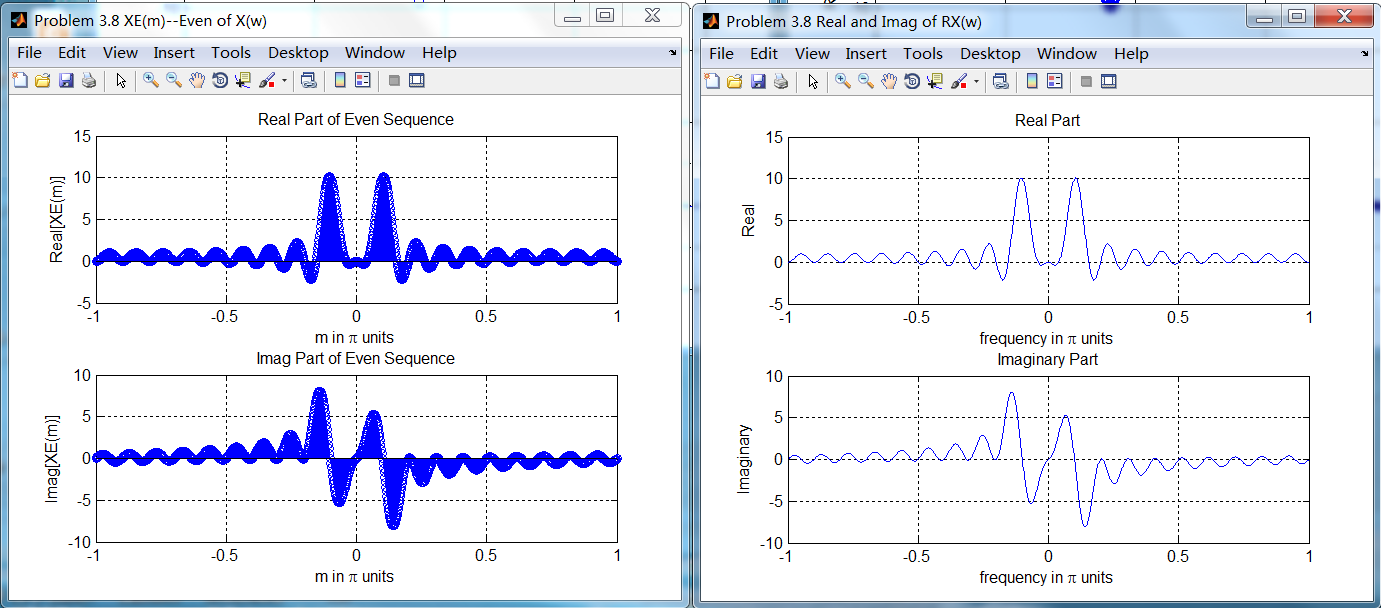
4、对比结果
序列DTFT的共轭偶对称分量和序列实部的DTFT结果相同;
序列DTFT的共轭奇对称分量和序列虚部的DTFT结果相同;

《DSP using MATLAB》Problem 3.8的更多相关文章
- 《DSP using MATLAB》Problem 7.27
代码: %% ++++++++++++++++++++++++++++++++++++++++++++++++++++++++++++++++++++++++++++++++ %% Output In ...
- 《DSP using MATLAB》Problem 7.26
注意:高通的线性相位FIR滤波器,不能是第2类,所以其长度必须为奇数.这里取M=31,过渡带里采样值抄书上的. 代码: %% +++++++++++++++++++++++++++++++++++++ ...
- 《DSP using MATLAB》Problem 7.25
代码: %% ++++++++++++++++++++++++++++++++++++++++++++++++++++++++++++++++++++++++++++++++ %% Output In ...
- 《DSP using MATLAB》Problem 7.24
又到清明时节,…… 注意:带阻滤波器不能用第2类线性相位滤波器实现,我们采用第1类,长度为基数,选M=61 代码: %% +++++++++++++++++++++++++++++++++++++++ ...
- 《DSP using MATLAB》Problem 7.23
%% ++++++++++++++++++++++++++++++++++++++++++++++++++++++++++++++++++++++++++++++++ %% Output Info a ...
- 《DSP using MATLAB》Problem 7.16
使用一种固定窗函数法设计带通滤波器. 代码: %% ++++++++++++++++++++++++++++++++++++++++++++++++++++++++++++++++++++++++++ ...
- 《DSP using MATLAB》Problem 7.15
用Kaiser窗方法设计一个台阶状滤波器. 代码: %% +++++++++++++++++++++++++++++++++++++++++++++++++++++++++++++++++++++++ ...
- 《DSP using MATLAB》Problem 7.14
代码: %% ++++++++++++++++++++++++++++++++++++++++++++++++++++++++++++++++++++++++++++++++ %% Output In ...
- 《DSP using MATLAB》Problem 7.13
代码: %% ++++++++++++++++++++++++++++++++++++++++++++++++++++++++++++++++++++++++++++++++ %% Output In ...
- 《DSP using MATLAB》Problem 7.12
阻带衰减50dB,我们选Hamming窗 代码: %% ++++++++++++++++++++++++++++++++++++++++++++++++++++++++++++++++++++++++ ...
随机推荐
- html css 伪样式
伪类的分类及作用: 引自W3School教程伪元素的分类及作用: 这里就不进行多的描述,原文地址:http://www.it165.net/design/html/201406/2643.html
- wpf窗口阴影
https://www.cnblogs.com/yiyan127/p/6362509.html
- php--------合并2个数字键数组的值
开发中遇到了,数组合并并去除重复这个功能,查阅资料, 找到了一个方法,分享一下. <?php /** * PHP合并2个数字键数组的值 * * @param array $arr1 * @par ...
- linux 不解压日志压缩包直接搜索里面的内容
- 负载均衡中使用 Redis 实现共享 Session
最近在研究Web架构方面的知识,包括数据库读写分离,Redis缓存和队列,集群,以及负载均衡(LVS),今天就来先学习下我在负载均衡中遇到的问题,那就是session共享的问题. 一.负载均衡 负载均 ...
- 检测Linux glibc幽灵漏洞和修补漏洞
1.首先安装rpm : sudo apt-get install rpm wget -OGHOST-test.sh http://www.antian365.com/lab/linux0day/G ...
- zzuli1731 矩阵(容斥)
1731: 矩阵 Time Limit: 3 Sec Memory Limit: 128 MBSubmit: 600 Solved: 106 SubmitStatusWeb Board Descr ...
- C#加密方法汇总(SHA1加密字符串,MD5加密字符串,可逆加密等)
using System;using System.Collections.Generic;using System.Text; namespace StringEncry{ class Encode ...
- Eclipse用了官方汉化后,无法输入
解决方法:Rclipse右键→属性→兼容性→windows vista
- 微信小程序 -- 数据请求
微信小程序 -- 数据请求 微信小程序请求数据,并不是一个可以在url打开有数据就可以拿到数据那么简单 浏览器地址输入 可以获取参数的url 微信小程序中 代码展示 wxml <view> ...