
asp.net core for vs code
1,命令
dotnet new --help 查询命令帮助
D:\github\test2>dotnet run 启动web程序
dotnet build 编译代码
dotnet restore 还原包
dotnet publish 发布项目
2,模板
using System;

using System.Collections.Generic;

using System.Diagnostics;

using System.Linq;

using System.Threading.Tasks;

using Microsoft.AspNetCore.Mvc;

using test3.Models;

namespace test3.Controllers

{

    public class HomeController : Controller

    {

        public IActionResult Index()

        {

            return View();

        }

        public IActionResult About()

        {

            ViewData["Message"] = "Your application description page.";

            return View();

        }

        public IActionResult Contact()

        {

            ViewData["Message"] = "Your contact page.";

            return View();

        }

        public IActionResult Error()

        {

            return View(new ErrorViewModel { RequestId = Activity.Current?.Id ?? HttpContext.TraceIdentifier });

        }

    }

}
Controller模板
3,更换启动浏览器

windows下启动浏览器命令: C:\Windows\System32>cmd.exe /C start http://localhost:5000/api/values
"launchBrowser": {

                "enabled": true,

                "args": "${auto-detect-url}",

                "windows": {

                    "command": "C:\\Users\\Hunter\\AppData\\Local\\Google\\Chrome\\Application\\chrome.exe",

                    "args": "${auto-detect-url}"

                },

                "osx": {

                    "command": "open"

                },

                "linux": {

                    "command": "xdg-open"

                }

            },
更新配置
4,vscode使用nuget
①安装nuget

② ctrl + shift +P 选择nuget,然后输入包名称回车下载

③包版本变更
打开.csproj文件,直接更改PackageReference下的Version
然后dotnet restore
5,使用ef migration
dotnet ef migrations add initialCreate Add-Migration【添加更新实体】
dotnet ef database update Update-Database【向数据库更新】
dotnet ef migrations remove Remove-Migration【删除最后一个migration文件,前提是该migration文件为update到数据库】
dotnet ef database update LastGoodMigration Update-Database LastGoodMigration【回滚到指定的migration文件。不会删除migration文件。如果不需要migration文件可以通过dotnet ef migrations remove删除掉】
dotnet ef migrations script Script-Migration【打印出数据库变更脚本】
6,配置.net core的工作目录

7,使用dotnet ef migrations命令
需要在工程文件中加入
<PackageReference Include="Microsoft.EntityFrameworkCore.Tools" Version="2.0.2"/> 和 <DotNetCliToolReference Include="Microsoft.EntityFrameworkCore.Tools.DotNet" Version="2.0.2"/>
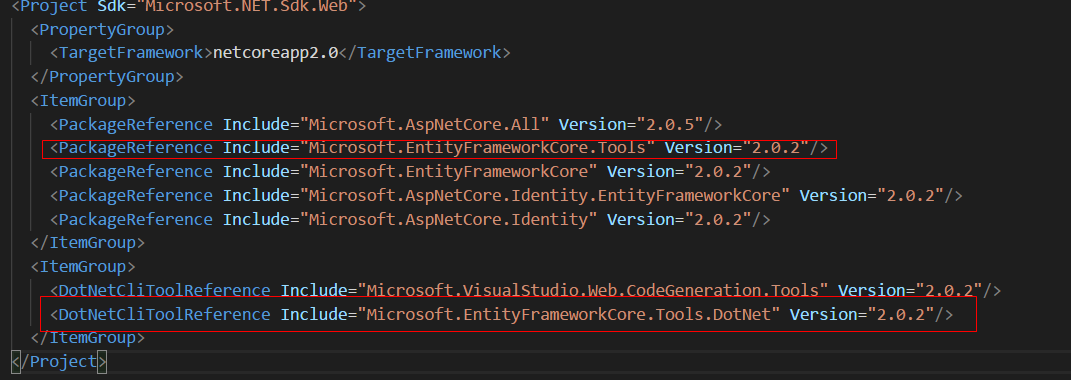
8,指定migration生成的目录
dotnet ef migrations add init -o Data/Migrations

以后再添加不用使用 -o Data/Migrations 直接会添加在Data/Migrations文件夹下
9,vscode使用Bower
①vscode安装Bower扩展
Ctrl + Shift + p 就可以使用Bower了
②在项目中添加.bowerrc文件指定包安装路径
{

    "directory": "wwwroot/lib"

}
③添加bower.json文件
{

  "name": "MvcDemo2",

  "private": true,

  "dependencies": {

    "jquery": "3.1.1",

    "bootstrap": "3.3.7",

    "zTree":"3.5.33"

  }

}
10,引用项目
asp.net core for vs code的更多相关文章
- asp.net core 使用EF7 Code First 创建数据库,同时使用命令创建数据库
1.首先下载vs2015的Asp.Net Core(RC2)的插件工具(https://www.microsoft.com/net/core#windows)2.创建一个asp.net Core的项目 ...
- ASP.NET Core EFCore 之Code First
1.在.NET Core项目中使用Nuget引用包 Sql Server 请安装 Microsoft.EntityFrameworkCore.SqlServer 2.添加实体类 [Table(&quo ...
- ASP.NET Core模块概述
原文地址:ASP.NET Core Module overview By Tom Dykstra, Rick Strahl, and Chris Ross ASP.NET Core模块(ANCM)让你 ...
- ASP.NET Core Module overview模块概述
原文地址:ASP.NET Core Module overview By Tom Dykstra, Rick Strahl, and Chris Ross ASP.NET Core模块(ANCM)让你 ...
- 如何在ASP.NET Core Web API中使用Mini Profiler
原文如何在ASP.NET Core Web API中使用Mini Profiler 由Anuraj发表于2019年11月25日星期一阅读时间:1分钟 ASPNETCoreMiniProfiler 这篇 ...
- asp.net core使用identity+jwt保护你的webapi(三)——refresh token
前言 上一篇已经介绍了identity的注册,登录,获取jwt token,本篇来完成refresh token. 开始 开始之前先说明一下为什么需要refresh token. 虽然jwt toke ...
- docker4dotnet #3 在macOS上使用Visual Studio Code和Docker开发asp.net core和mysql应用
.net猿遇到了小鲸鱼,觉得越来越兴奋.本来.net猿只是在透过家里那田子窗看外面的世界,但是看着海峡对岸的苹果园越来越茂盛,实在不想再去做一只宅猿了.于是,.net猿决定搭上小鲸鱼的渡轮到苹果园去看 ...
- ASP.NET Core 中文文档 第二章 指南(1)用 Visual Studio Code 在 macOS 上创建首个 ASP.NET Core 应用程序
原文:Your First ASP.NET Core Application on a Mac Using Visual Studio Code 作者:Daniel Roth.Steve Smith ...
- Windows下构建ASP.NET Core+Code First+Docker
背景介绍 本文将会示范如何在Windows系统下基于ASP.NET Core构建跨平台服务,并通过Docker容器运行发布. 首先说一下为什么选择这一套组合: 我本人和我们Code4Thought团队 ...
随机推荐
- Android的网络通信机制
1. Socket接口 不常用 2.HttpURLConnection接口 3. HttpClient接口 http://blog.csdn.net/ccc20134/article/details/ ...
- 2018-2019-2 网络对抗技术 20165320 Exp2 后门原理与实践
后门原理与实践 windows获取Linux操作Shell 获取本机的IP netcat介绍:一个进行基本的TCP.UDP数据收发的工具 相关的参数与具体用法 windows打开监听: ncat.ex ...
- MR架构
MapReduce框架结构 Map/Reduce是一个用于大规模数据处理的分布式计算模型,它最初是由Google工程师设计并实现的,Google已经将它完整的MapReduce论文公开发布了.其中对它 ...
- SpringMVC使用Redis作为缓存提供者
(1)pom添加依赖项 <dependency> <groupId>org.springframework.data</groupId> <artifactI ...
- spring session使用小记
在并发量大的WEB系统中,Session一般不使用容器Session,而通常使用Redis作为Session的存储.如果为了保持Servlet规范中的Session接口继续可用,往往需要重新实现Ses ...
- ES系列十一、ES的index、store、_source、copy_to和all的区别
1.基本概念 1.1._source 存储的原始数据._source中的内容就是搜索api返回的内容,如: { "query":{ "term":{ &q ...
- win10安装virtualBox创建CentOS6.5虚拟机
1.安装virtualBox 1.1.下载安装包,安装 搜索一下,或者去 VirtualBox官网下载一个. 下载第一个,兼容64,32位. 2.创建64位虚拟机 2.1.解决无法创建64位的问题 2 ...
- C++编程命名规则
原文地址:http://www.cnblogs.com/ggjucheng/archive/2011/12/15/2289291.html 如果想要有效的管理一个稍微复杂一点的体系,针对其中事物的一套 ...
- javascript中的return、return true、return false、continue区别
1.语法为:return 表达式; 2.w3c中的解释: 语句结束函数执行,返回调用函数,而且把表达式的值作为函数的结果 也就是:当代码执行到return语句时,函数返回一个结果就结束运行了,ret ...
- caffe:fine-tuning
http://blog.csdn.net/u010402786/article/details/70141261 https://zhuanlan.zhihu.com/p/22624331