
asp.net core 使用EF7 Code First 创建数据库,同时使用命令创建数据库
1.首先下载vs2015的Asp.Net Core(RC2)的插件工具(https://www.microsoft.com/net/core#windows)
2.创建一个asp.net Core的项目,这里我创建一个最简单的项目,就是一个console,在这个基础上我准备一步一步搭建一个Asp.Net Core的项目
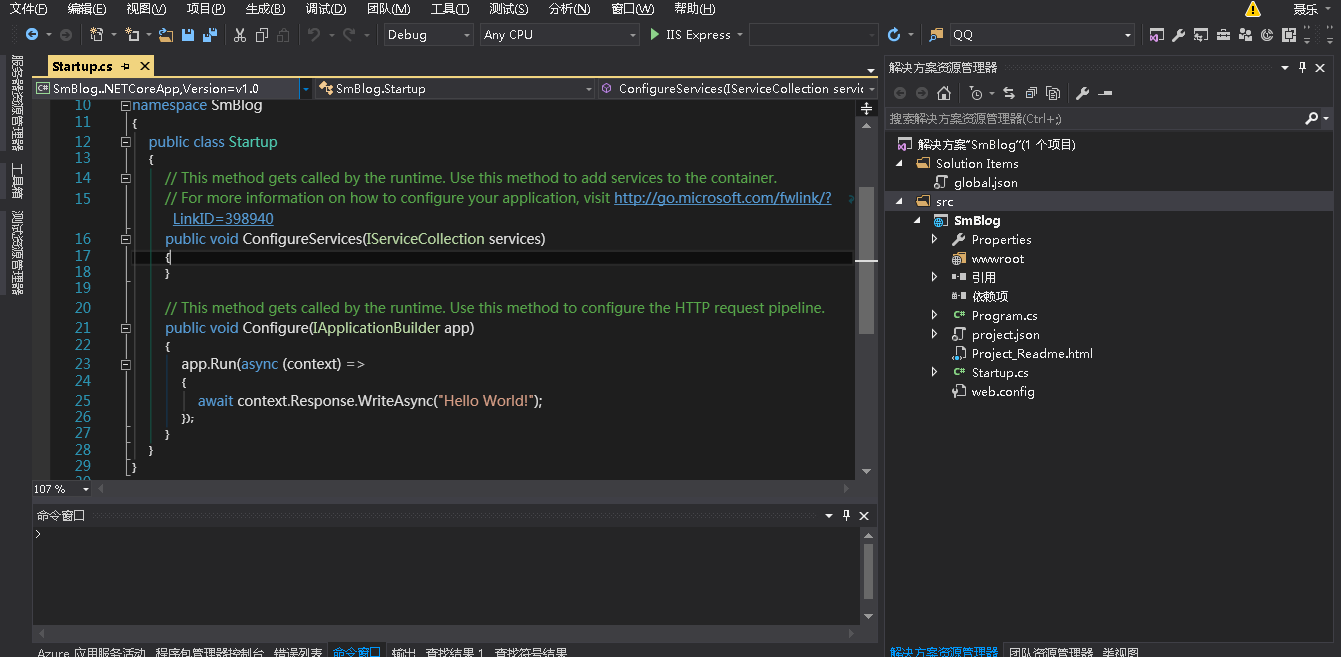
3.添加相关的依赖(mvc的依赖和EF的依赖)在projecr.json中:
{

  "dependencies": {

    "Microsoft.NETCore.App": {

      "version": "1.0.0-rc2-3002702",

      "type": "platform"

    },

    "Microsoft.AspNetCore.Server.IISIntegration": "1.0.0-rc2-final",

    "Microsoft.AspNetCore.Server.Kestrel": "1.0.0-rc2-final",

    "Microsoft.AspNetCore.StaticFiles": "1.0.0-rc2-final",

    "Microsoft.AspNetCore.Mvc": "1.0.0-rc2-final",

    "Microsoft.AspNetCore.Razor.Tools": {

      "version": "1.0.0-preview1-final",

      "type": "build"

    },

    "Npgsql.EntityFrameworkCore.PostgreSQL": "1.0.0-rc2-release1",

    "Microsoft.EntityFrameworkCore.Tools": {

      "version": "1.0.0-preview1-final",

      "type": "build"

    },

    "Microsoft.Extensions.Configuration.EnvironmentVariables": "1.0.0-rc2-final",

    "Microsoft.Extensions.Configuration.Json": "1.0.0-rc2-final",

    "Microsoft.Extensions.Logging": "1.0.0-rc2-final",

    "Microsoft.Extensions.Logging.Console": "1.0.0-rc2-final",

    "Microsoft.Extensions.Logging.Debug": "1.0.0-rc2-final"

  },

  "tools": {

    "Microsoft.AspNetCore.Razor.Tools": {

      "version": "1.0.0-preview1-final",

      "imports": "portable-net45+win8+dnxcore50"

    },

    "Microsoft.AspNetCore.Server.IISIntegration.Tools": {

      "version": "1.0.0-preview1-final",

      "imports": "portable-net45+win8+dnxcore50"

    },

    "Microsoft.EntityFrameworkCore.Tools": {

      "version": "1.0.0-preview1-final",

      "imports": [

        "portable-net45+win8+dnxcore50",

        "portable-net45+win8"

      ]

    }

  },

  "frameworks": {

    "netcoreapp1.0": {

      "imports": [

        "dotnet5.6",

        "dnxcore50",

        "portable-net45+win8"

      ]

    }

  },

  "buildOptions": {

    "emitEntryPoint": true,

    "preserveCompilationContext": true

  },

  "runtimeOptions": {

    "gcServer": true

  },

  "publishOptions": {

    "include": [

      "wwwroot",

      "web.config"

    ]

  },

  "scripts": {

    "postpublish": [ "dotnet publish-iis --publish-folder %publish:OutputPath% --framework %publish:FullTargetFramework%" ]

  }

}
4。在Startup.cs 文件中做如下修改:
using System;

using System.Collections.Generic;

using System.Linq;

using System.Threading.Tasks;

using Microsoft.AspNetCore.Builder;

using Microsoft.AspNetCore.Hosting;

using Microsoft.AspNetCore.Http;

using Microsoft.Extensions.DependencyInjection;

using Microsoft.Extensions.Configuration;

using Microsoft.Extensions.Logging;

namespace SmBlog

{

    public class Startup

    {

        public Startup(IHostingEnvironment env)

        {

            var builder = new ConfigurationBuilder()

               .SetBasePath(env.ContentRootPath)

               .AddJsonFile("appsettings.json", optional: true, reloadOnChange: true)

               .AddJsonFile($"appsettings.{env.EnvironmentName}.json", optional: true);

            if (env.IsDevelopment())

            {

            }

            builder.AddEnvironmentVariables();

            Configuration = builder.Build();

        }

        public IConfigurationRoot Configuration { get; }

        public void ConfigureServices(IServiceCollection services)

        {

            services.AddMvc();

        }

        // This method gets called by the runtime. Use this method to configure the HTTP request pipeline.

        public void Configure(IApplicationBuilder app, IHostingEnvironment env, ILoggerFactory loggerFactory)

        {

            loggerFactory.AddConsole(Configuration.GetSection("Logging"));

            loggerFactory.AddDebug();

            app.UseStaticFiles();

            app.UseMvc(routes =>

            {

                routes.MapRoute(

                    name: "default",

                   template: "{controller=Home}/{action=Index}/{id?}");

            }

            );

        }

    }

}
现在并没有添加Ef的服务。
5.新建一个appsettings.json 文件用于项目相关配置,在Startup.cs中的log的配置,以及后来的EF数据库的配置都在这个文件中。
{

  "ConnectionStrings": {

    "PostgreSql": "User ID=postgres;Password=123456;Host=localhost;Port=5432;Database=smbloh"

  },

  "Logging": {

    "IncludeScopes": false,

    "LogLevel": {

      "Default": "Debug",

      "System": "Information",

      "Microsoft": "Information"

    }

  }

}
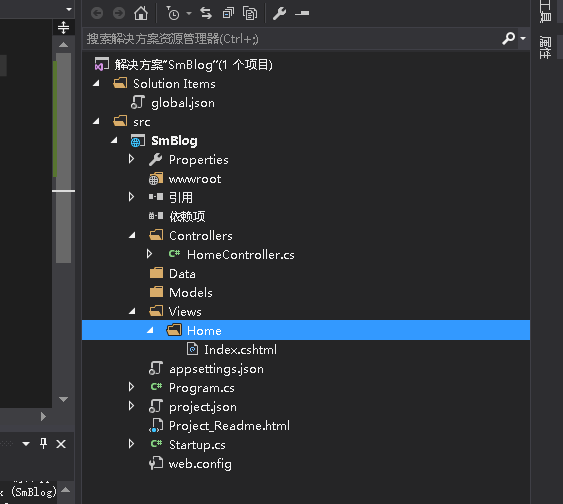
6.依照MVC5中的项目目录结构创建如Controllers 和Views和Models文件如下图所示,新建一个HomeController 和Index Action和Index的视图,用于测试。
7.用过dotnet的方式运行(dotnet 相当于之前的dnx) 看到这个结果说明mvc6项目搭建完成

8.开始Ef的操作。在Models中新建一个实体Article简单的给他三个字段
    public class Article

    {

        public int Id { set; get; }

        public string Title { set; get; }

        public string Description { set; get; }

    }
9.在Models中新建一个SMContext(ef上下文对象)代码如下:
 public class SMContext : DbContext

    {

        public SMContext(DbContextOptions option) : base(option)

        {

        }

        public DbSet<Article> Articles { set; get; }

        protected override void OnModelCreating(ModelBuilder modelBuilder)

        {

            base.OnModelCreating(modelBuilder);

        }

    }
10.修改Startup.cs 文件。增加对Ef的支持:代码如下
     public void ConfigureServices(IServiceCollection services)

        {

            services.AddMvc();

            services.AddDbContext<SMContext>(option => option.UseNpgsql(Configuration.GetConnectionString("PostgreSql")));

        }
11.为了初始化数据库,在此新建一个SampleData类,在项目启动的时候,调用此类,进行数据库的初始化。代码如下:
namespace SmBlog.Models

{

    public class SampleData

    {

        public async static Task InitDB(IServiceProvider service)

        {

            var db = service.GetService<SMContext>();

            if (db.Database != null && db.Database.EnsureCreated())

            {

                Article article = new Article

                {

                    Title = "test",

                    Description = "SMBlog Test"

                };

                db.Articles.Add(article);

                await db.SaveChangesAsync();

            }

        }

    }

}
这个地方比较灵活,我们初始化创建数据库的时候可以插入一条数据,也可以不插入。我在这个地方插入了一条文章的数据。当然系统中有用户,插入管理员是比较适当的操作的。
12.再次修改Startup文件 调用SampleData 在加载项目的时候创建数据库 并初始化。代码如下:
  public async void Configure(IApplicationBuilder app, IHostingEnvironment env, ILoggerFactory loggerFactory)

        {

            loggerFactory.AddConsole(Configuration.GetSection("Logging"));

            loggerFactory.AddDebug();

            app.UseStaticFiles();

            app.UseMvc(routes =>

            {

                routes.MapRoute(

                    name: "default",

                   template: "{controller=Home}/{action=Index}/{id?}");

            }

            );

            await SampleData.InitDB(app.ApplicationServices);

        }
13.再次启动项目,我的数据已经创建成功,并且插入一条数据。如图:

14.数据库迁移 。当我们增加一个User实体,并且修改了Article的实体,现在要进行数据库的迁移,不是简单的把数据库删除重新建立。要保证原有的数据不变,修改数据库结构。
增加的User实体如下:
    public class User

    {

        public int Id { set; get; }

        public string UserName { set; get; }

        public string Password { set; get; }

    }
修改后的Article实体如下,加了个Label的字段
   public class Article

    {

        public int Id { set; get; }

        public string Title { set; get; }

        public string Description { set; get; }

        public string Label { set; get; }
    }
在SMContext文件中,增加User的DbConetxt;
如下代码:
public DbSet<User> Users { set; get; }
15.在vs的PM命令输入 Add-Migration newBook
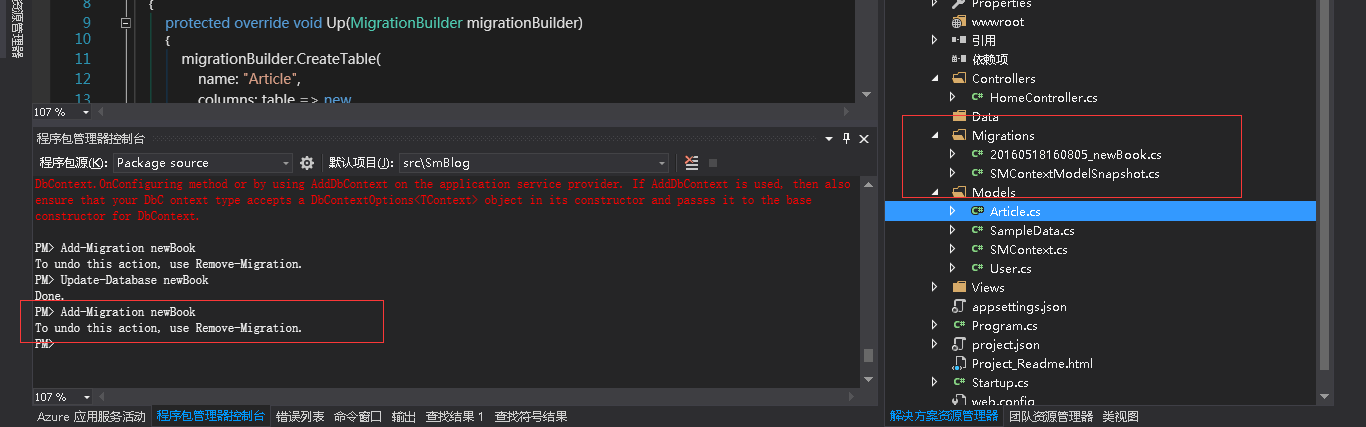
成功后会在项目中产生一个Migrations文件夹。里面有个快照文件和一个迁移的文件。在此不扩展了。
在执行命令: Update-Database newBook 发现报错了
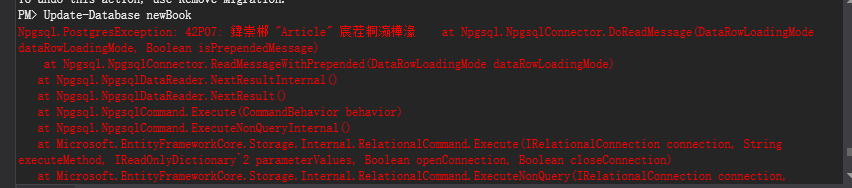
问题解决,不用SampleData来初始化数据库,用 Add-Migration init Update-Database init 来初始化数据库。
注:也可以在cmd控制台输入命令来实现code first
首先打开cmd 切换到项目的project.json 文件所在文件。执行如下命令
dotnet ef migrations add FirstMigration

dotnet ef database update
asp.net core 使用EF7 Code First 创建数据库,同时使用命令创建数据库的更多相关文章
- 创建基于ASP.NET core 3.1 的RazorPagesMovie项目(一)-创建和使用默认的模板
声明:参考于asp.net core 3.1 官网(以后不再说明) 本教程是系列教程中的第一个教程,介绍生成 ASP.NET Core Razor Pages Web 应用的基础知识. 在本系列结束时 ...
- 学习ASP.NET Core Razor 编程系列十一——把新字段更新到数据库
学习ASP.NET Core Razor 编程系列目录 学习ASP.NET Core Razor 编程系列一 学习ASP.NET Core Razor 编程系列二——添加一个实体 学习ASP.NET ...
- 在ASP.NET Core中如何支持每个租户数据存储策略的数据库
在ASP.NET Core中如何支持每个租户数据存储策略的数据库 不定时更新翻译系列,此系列更新毫无时间规律,文笔菜翻译菜求各位看官老爷们轻喷,如觉得我翻译有问题请挪步原博客地址 本博文翻译自: ht ...
- ASP.NET Core EFCore 之Code First
1.在.NET Core项目中使用Nuget引用包 Sql Server 请安装 Microsoft.EntityFrameworkCore.SqlServer 2.添加实体类 [Table(&quo ...
- asp.net core for vs code
1,命令 2,模板 3,更换启动浏览器 4,vscode使用nuget 5,使用ef migration 6,配置.net core的工作目录 7,使用dotnet ef migrations命令 8 ...
- ASP.NET Core 中文文档 第二章 指南(2)用 Visual Studio 和 ASP.NET Core MVC 创建首个 Web API
原文:Building Your First Web API with ASP.NET Core MVC and Visual Studio 作者:Mike Wasson 和 Rick Anderso ...
- Docker 为 ASP.NET Core WebApi 应用程序生成 Docker 映像,创建容器并运行
1.使用VS2017新建ASP.NET Core WebApi项目 选择API启用Docker支持 2.为 ASP.NET Core WebApi 应用程序生成 Docker 映像,并创建容器运行 生 ...
- kubernetes高级之创建只读文件系统以及只读asp.net core容器
系列目录 使用docker创建只读文件系统 容器化部署对应用的运维带来了极大的方便,同时也带来一些新的安全问题需要考虑.比如黑客入侵到容器内,对容器内的系统级别或者应用级别文件进行修改,会造成难以估量 ...
- Asp.Net Core 项目实战之权限管理系统(3) 通过EntityFramework Core使用PostgreSQL
0 Asp.Net Core 项目实战之权限管理系统(0) 无中生有 1 Asp.Net Core 项目实战之权限管理系统(1) 使用AdminLTE搭建前端 2 Asp.Net Core 项目实战之 ...
随机推荐
- java自带工具-javap使用
javap是JDK自带的反汇编器,可以查看java编译器为我们生成的字节码.通过它,我们可以对照源代码和字节码,从而了解很多编译器内部的工作,有助与我们更加理解java特性. javap(反汇编命令) ...
- java中System.getenv和System.getProperties的区别
System.getenv获取的是系统的环境变量(就是用户在操作系统中设置的环境变量),windows和linux下环境变量的设置就不说了哦. System.getProperties获取的是系统的相 ...
- Excel自文本导入内容时如何做到单元格内换行
前言:今天在处理数据的时候,在数据库中用到了\n换行符号,目的是在同表格内做到数据多行显示,比如 字段名1 字段名2 字段名3 1 数据一行 数据二行 数据三行 例子是在sql查询后的结果 ...
- 【小白的CFD之旅】13 敲门实例【续3】
接上文[小白的CFD之旅]12 敲门实例[续2] 4 Results4.1 计算监测图形4.2 Graphics4.2.1 壁面温度分布4.2.2 创建截面4.2.3 显示截面物理量4.2.4 Pat ...
- Python版本2.7切3.5和3.5切2.7
在Ubuntu上是自带Python2.7和3.5的 当你在终端输入Python的时候是显示Python2.7的 叫大家你怎么切换到Python3.5版本 1,查看是否存在python3.5终端输入 c ...
- 并查集补集作法 codevs 1069 关押罪犯
1069 关押罪犯 2010年NOIP全国联赛提高组 时间限制: 1 s 空间限制: 128000 KB 题目等级 : 钻石 Diamond 题解 题目描述 Description ...
- 【Python数据分析】四级成绩分布 -matplotlib,xlrd 应用
最近获得了一些四级成绩数据,大概500多个,于是突发奇想是否能够看看这些成绩数据是否满足所谓的正态分布呢?说干就干,于是有了这篇文章.文章顺带介绍了xlrd模块的一些用法和matplotlib画自定义 ...
- 有关sql server 2008无法导入数据库mdf文件的处理方法
解决方法1:根据该博客中的引导,加上自己安装版本的细节,可以添加成功 http://www.2cto.com/database/201408/328930.html 解决方法2: 根据<数据库系 ...
- xcode6 beta 中智能提示(自动完成)功能有时不显示的问题
xcode6 beta 中智能提示(自动完成)功能有时不显示的问题 周银辉 xcode6 beta 中智能提示(自动完成)功能有时不显示,这让人很郁闷啊,网上老外的视频中看人家用的好好的. ...
- gradle项目中资源文件的相对路径打包处理技巧
开发java application时,不管是用ant/maven/gradle中的哪种方式来构建,通常最后都会打包成一个可执行的jar包程序,而程序运行所需的一些资源文件(配置文件),比如jdbc. ...