
Android中SharedPerforences的简单使用示例 --Android基础
SharedPreferences是Android平台上一个轻量级的存储类,用来保存应用的一些常用配置,比如Activity状态,Activity暂停时,将此activity的状态保存到SharedPereferences中;当Activity重载,系统回调方法onSaveInstanceState时,再从SharedPreferences中将值取出……。下面通过一个小小的案例,分享一下我之前做的。
1、最终效果图
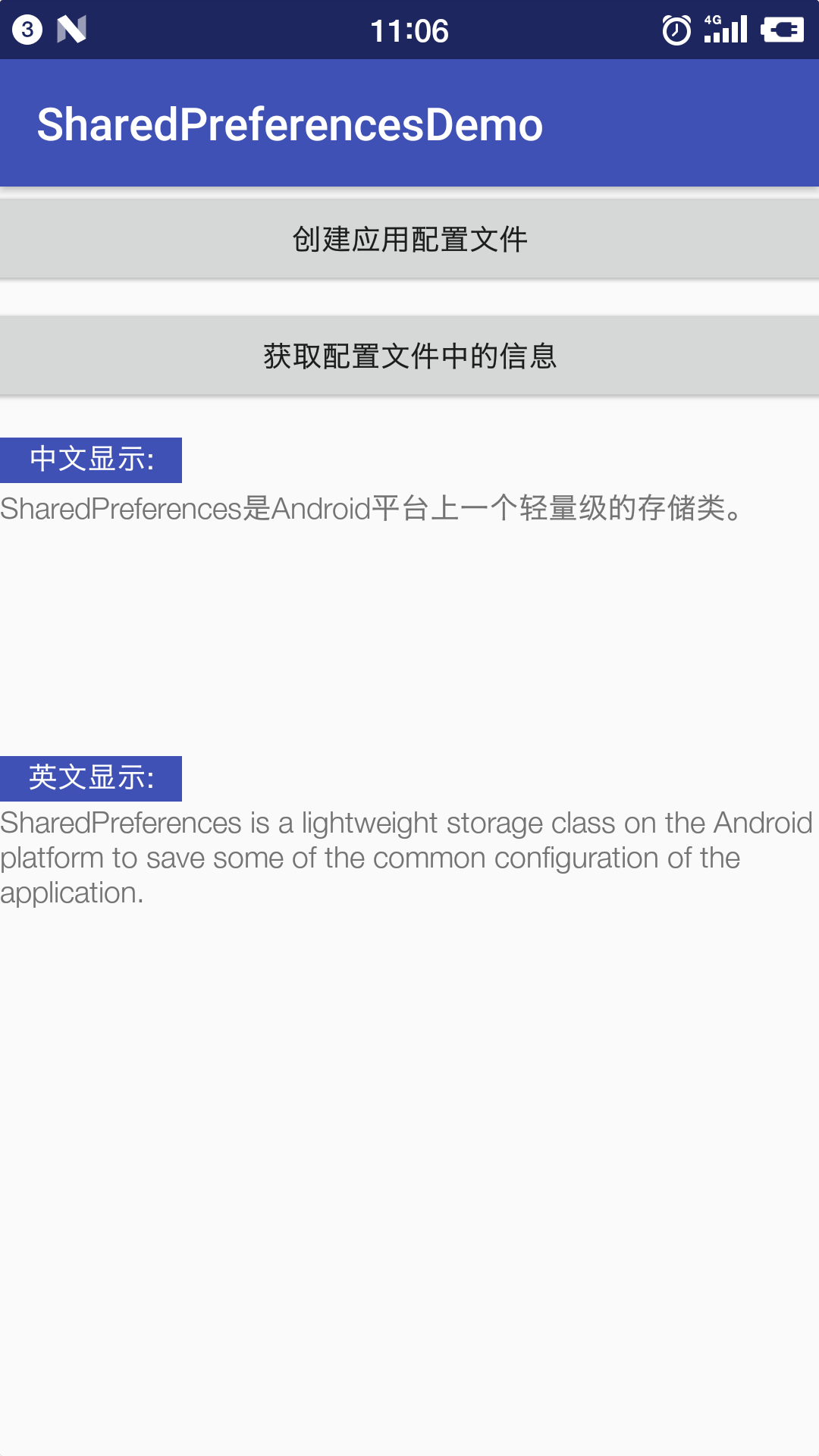
大致就是通过SharedPreferences存储类创建一个配置文件(这里是通过按钮去触发的),然后向配置文件中写入配置信息,最后就是读配置中“键”对应的“值”(这里通过按钮触发将读到的值显示出来)。还是比较简单,很容易的。
2、布局文件
activity_main.xml:
 <?xml version="1.0" encoding="utf-8"?>

 <android.support.constraint.ConstraintLayout xmlns:android="http://schemas.android.com/apk/res/android"

     xmlns:app="http://schemas.android.com/apk/res-auto"

     xmlns:tools="http://schemas.android.com/tools"

     android:layout_width="match_parent"

     android:layout_height="match_parent"

     tools:context="thonlon.example.cn.sharedpreferencesdemo.MainActivity">

     <Button

         android:id="@+id/btn_create"

         android:layout_width="396dp"

         android:layout_height="46dp"

         android:text="@string/btn_create_sp"

         app:layout_constraintBottom_toBottomOf="parent"

         app:layout_constraintLeft_toLeftOf="parent"

         app:layout_constraintRight_toRightOf="parent"

         app:layout_constraintTop_toTopOf="parent"

         app:layout_constraintVertical_bias="0.0" />

     <Button

         android:id="@+id/btn_getInfo"

         android:layout_width="396dp"

         android:layout_height="46dp"

         android:layout_marginLeft="0dp"

         android:text="@string/btn_getInfo_sp"

         app:layout_constraintBottom_toBottomOf="parent"

         app:layout_constraintLeft_toLeftOf="parent"

         app:layout_constraintRight_toRightOf="parent"

         app:layout_constraintTop_toTopOf="parent"

         app:layout_constraintVertical_bias="0.1" />

     <TextView

         android:id="@+id/textView1"

         android:layout_width="80dp"

         android:layout_height="20dp"

         android:background="@color/colorPrimary"

         android:text="英文显示:"

         android:textAlignment="center"

         android:textColor="@color/colorWhite"

         app:layout_constraintBottom_toBottomOf="parent"

         app:layout_constraintHorizontal_bias="0.0"

         app:layout_constraintLeft_toLeftOf="parent"

         app:layout_constraintRight_toRightOf="parent"

         app:layout_constraintTop_toTopOf="parent"

         app:layout_constraintVertical_bias="0.465" />

     <TextView

         android:id="@+id/textView2"

         android:layout_width="80dp"

         android:layout_height="20dp"

         android:background="@color/colorPrimary"

         android:text="中文显示:"

         android:textAlignment="center"

         android:textColor="@color/colorWhite"

         app:layout_constraintBottom_toBottomOf="parent"

         app:layout_constraintHorizontal_bias="0"

         app:layout_constraintLeft_toLeftOf="parent"

         app:layout_constraintRight_toRightOf="parent"

         app:layout_constraintTop_toTopOf="parent"

         app:layout_constraintVertical_bias="0.205" />

     <TextView

         android:id="@+id/tv1"

         android:layout_width="wrap_content"

         android:layout_height="wrap_content"

         app:layout_constraintBottom_toBottomOf="parent"

         app:layout_constraintHorizontal_bias="0.0"

         app:layout_constraintLeft_toLeftOf="parent"

         app:layout_constraintRight_toRightOf="parent"

         app:layout_constraintTop_toTopOf="parent"

         app:layout_constraintVertical_bias="0.244" />

     <TextView

         android:id="@+id/tv2"

         android:layout_width="wrap_content"

         android:layout_height="wrap_content"

         app:layout_constraintBottom_toBottomOf="parent"

         app:layout_constraintHorizontal_bias="0.0"

         app:layout_constraintLeft_toLeftOf="parent"

         app:layout_constraintRight_toRightOf="parent"

         app:layout_constraintTop_toTopOf="parent"

         app:layout_constraintVertical_bias="0.53" />

 </android.support.constraint.ConstraintLayout>
3、activity文件
MainActivity.java
 package thonlon.example.cn.sharedpreferencesdemo;

 import android.content.SharedPreferences;

 import android.support.v7.app.AppCompatActivity;

 import android.os.Bundle;

 import android.view.View;

 import android.widget.Button;

 import android.widget.TextView;

 import android.widget.Toast;

 public class MainActivity extends AppCompatActivity {

     private SharedPreferences sharedPreferences;

     private Button btn_create, btn_getInfo;

     private TextView textView1, textView2;

     @Override

     protected void onCreate(Bundle savedInstanceState) {

         super.onCreate(savedInstanceState);

         setContentView(R.layout.activity_main);

         btn_create = (Button) findViewById(R.id.btn_create);

         btn_getInfo = (Button) findViewById(R.id.btn_getInfo);

         textView1 = (TextView) findViewById(R.id.tv1);

         textView2 = (TextView) findViewById(R.id.tv2);

 //        设置配置文件的名称和配置文件的被访问权限

         sharedPreferences = getSharedPreferences("config", MODE_ENABLE_WRITE_AHEAD_LOGGING);

         btn_create.setOnClickListener(new View.OnClickListener() {

             @Override

             public void onClick(View view) {

                 write();

             }

             private void write() {

                 //得到配置编辑器

                 SharedPreferences.Editor edit = sharedPreferences.edit();

                 //写入配置信息到配置文件中

                 edit.putString("Chinese", "SharedPreferences是Android平台上一个轻量级的存储类。");

                 edit.putString("English", "SharedPreferences is a lightweight storage class on the Android platform to save some of the common configuration of the application.");

                 //注意以上只是将配置信息写入了内存

                 edit.commit();//提交内存配置信息到本地

                 Toast.makeText(getApplicationContext(), "成功创建文件", Toast.LENGTH_LONG).show();

             }

         });

         btn_getInfo.setOnClickListener(new View.OnClickListener() {

             @Override

             public void onClick(View view) {

                 read();

             }

             private void read() {

                 String chinese_info = sharedPreferences.getString("Chinese", "");

                 String english_info = sharedPreferences.getString("English", "");

                 textView1.setText(chinese_info);

                 textView2.setText(english_info);

             }

         });

     }

 }
4、源码下载
百度云下载链接:https://pan.baidu.com/s/1PRY5fdlAt5ZSl05NGniWrw 密码:tpr0
Android中SharedPerforences的简单使用示例 --Android基础的更多相关文章
- [原创]Android中LocationManager的简单使用,获取当前位置
Android中LocationManager的提供了一系列方法来地理位置相关的问题,包括查询上一个已知位置:注册/注销来自某个 LocationProvider的周期性的位置更新:以及注册/注销接近 ...
- 解决Android中No resource found that matches android:TextAppearance.Material.Widget.Button.Inverse问题
解决Android中No resource found that matches android:TextAppearance.Material.Widget.Button.Inverse问题http ...
- Android中ProgressDialog的简单示例
网上一般对进度条的示例都是如何显示,没有在任务结束如何关闭的文章,参考其他文章经过试验之后把整套进度条显示的简单示例如下: 建立android工程等工作都略去,Google一下就可以了. 下面来介绍主 ...
- android中的回调简单认识
首先说一下最抽象的形式--2个类,A类和B类.A类含有1个接口.1个接口变量.(可能含有)1个为接口变量赋值的方法以及1个会使用接口变量的"地方";B类实现A中的接口,(可能)含有 ...
- Android中Tomcat的简单配置和使用
因为学Android已经有一段时间了,但是在学校,服务器方面是个短板啊,没有专门的服务器拿给我们学生练手,所以只有自己找办法了.当然,Tomcat就是不二的选择了. 在网上看了看资料,还是觉得自己记录 ...
- Android笔记(二十八) Android中图片之简单图片使用
用户界面很大程度上决定了APP是否被用户接收,为了提供友好的界面,就需要在应用中使用图片了,Android提供了丰富的图片处理功能. 简单使用图片 使用Drawable对象 为Android应用增加了 ...
- iOS 和Android中的正则表达式简单使用
ios 中需要使用NSRegularExpression类,NSTextCheckingResult类. 下面给出最基本的实现代码 NSRegularExpression *regex = [NSRe ...
- Android中Fragment的简单介绍
Android是在Android 3.0 (API level 11)引入了Fragment的,中文翻译是片段或者成为碎片(个人理解),可以把Fragment当成Activity中的模块,这个模块有自 ...
- Android中SharePreferences的简单实现
Android中提供SharePreferences这种轻量级的数据存储模式,这种模式能够存储少量数据,并能为自身和其他应用提供数据接口.相对于其他数据存储方式,SharePreferences更加轻 ...
随机推荐
- day 26 元类
一.isinstance issubclass class Person: passclass Student(Person): passstu1=Student()#判断是不是实例print(isi ...
- Python3 tkinter基础 Entry state 不可写 不可选 不可复制的输入框
Python : 3.7.0 OS : Ubuntu 18.04.1 LTS IDE : PyCharm 2018.2.4 Conda ...
- RabbitMQ 入门指南——初步使用
MQ的消息持久化 https://www.rabbitmq.com/tutorials/tutorial-two-java.html When RabbitMQ quits or crashes it ...
- 洛谷luogu2782
P2782 友好城市 题目描述 有一条横贯东西的大河,河有笔直的南北两岸,岸上各有位置各不相同的N个城市.北岸的每个城市有且仅有一个友好城市在南岸,而且不同城市的友好城市不相同.每对友好城市都向政府申 ...
- 全排列+字符串查找|扑克排序|2014年蓝桥杯A组题解析第六题-fishers
标题:扑克序列 A A 2 2 3 3 4 4, 一共4对扑克牌.请你把它们排成一行. 要求:两个A中间有1张牌,两个2之间有2张牌,两个3之间有3张牌,两个4之间有4张牌. 请填写出所有符合要求的排 ...
- Linux邮件服务入门
前言 想定期查询天气并提示我,很容易想到了创建定时任务然后给我自己发邮件,进而学习了linux如何发邮件,下面就开始吧. 开启邮件服务(Ubuntu) 首先执行mail命令看有没有安装,没有的话会提示 ...
- [蓝桥] 算法训练 P0505
时间限制:1.0s 内存限制:256.0MB 一个整数n的阶乘可以写成n!,它表示从1到n这n个整数的乘积.阶乘的增长速度非常快,例如,13!就已经比较大了,已经无法存放在一个整型变量中:而35!就更 ...
- Hexo搭建(VPS)
都说 hexo 是静态的 Blog,当时不明觉厉= =.后来终于知道了什么意思......所谓的静态,其实就是因为你不能改云端,而是依赖本地数据,然后使用命令将本地数据变成 web 数据再使用浏览器进 ...
- 七、面向对象编程(OOP)
面向对象编程:一种程序设计思想.OOP把对象作为程序的基本单元,一个对象包含了数据和操作数据的函数. 1.类(class) class:自定义的对象数据类型.基于类创建多个对象,每个对象具备类的通用行 ...
- Jquery loading 效果
function showLoad(tipInfo) { var eTip = document.createElement('div'); eTip.setAttribute('id', 'tipD ...