
『练手』通过注册表 获取 VS 和 SQLServer 文件路径
获取任意 VS 和 SQLServer 的 磁盘安装目录。
背景需求:如果磁盘电脑安装了 VS 或者 SQLServer 则 认定这台计算机 的使用者 是一名 软件研发人员,则让程序 以最高权限运行。
代码如下:(基于注册表读取、exe版权信息校验)
        static void Main(string[] args)

        {

            string vsPath = FindVisualStudioPath();

            Console.WriteLine(vsPath);

            string sqlPath = FindSQLServerPath();

            Console.WriteLine(sqlPath);

            Console.ReadKey();

        }

        private static string FindVisualStudioPath()

        {

            RegistryKey studioKey = Registry.LocalMachine.CreateSubKey(@"SOFTWARE\MICROSOFT\VISUALSTUDIO");

            string studioPath = studioKey == null ? string.Empty : (studioKey.GetValue("VSPATH") ?? string.Empty).ToString();

            if (File.Exists(studioPath))

            {

                if (studioKey != null) studioKey.Close();

                return studioPath;

            }

            RegistryKey devenvKey = Registry.LocalMachine.OpenSubKey(@"SOFTWARE\MICROSOFT\WINDOWS\CURRENTVERSION\APP PATHS\DEVENV.EXE");

            string devenvPath = devenvKey == null ? string.Empty : (devenvKey.GetValue(string.Empty) ?? string.Empty).ToString();

            if (devenvKey != null) devenvKey.Close();

            if (File.Exists(devenvPath))

            {

                FileVersionInfo fileVersion = FileVersionInfo.GetVersionInfo(devenvPath);

                string companyName = fileVersion.CompanyName ?? string.Empty;

                string productName = fileVersion.ProductName ?? string.Empty;

                if (companyName.IndexOf("Microsoft", StringComparison.InvariantCultureIgnoreCase) >=  && productName.IndexOf("Visual Studio", StringComparison.InvariantCultureIgnoreCase) >= )

                {

                    studioPath = fileVersion.FileName;

                    if (studioKey != null && File.Exists(studioPath))

                    {

                        studioKey.SetValue("VSPATH", studioPath);

                        studioKey.Flush();

                        studioKey.Close();

                        return studioPath;

                    }

                }

            }

            return string.Empty;

        }

        private static string FindSQLServerPath()

        {

            RegistryKey sqlKey = Registry.LocalMachine.CreateSubKey(@"SOFTWARE\MICROSOFT\MICROSOFT SQL SERVER");

            string sqlPath = sqlKey == null ? string.Empty : (sqlKey.GetValue("MSSQLPATH") ?? string.Empty).ToString();

            if (File.Exists(sqlPath))

            {

                if (sqlKey != null) sqlKey.Close();

                return sqlPath;

            }

            RegistryKey svcRootKey = Registry.LocalMachine.OpenSubKey(@"SYSTEM\CURRENTCONTROLSET\SERVICES");

            if (svcRootKey != null)

            {

                string[] svcArray = svcRootKey.GetSubKeyNames();

                foreach (string svc in svcArray)

                {

                    RegistryKey svcKey = svcRootKey.OpenSubKey(svc);

                    if (svcKey == null) { continue; }

                    string tempPath = (svcKey.GetValue("ImagePath") ?? string.Empty).ToString();

                    svcKey.Close();

                    if (string.IsNullOrEmpty(tempPath)) { continue; }

                    int index = tempPath.IndexOf("sqlservr.exe", StringComparison.InvariantCultureIgnoreCase);

                    if (index < ) { continue; }

                    tempPath = tempPath.Substring(, index + "sqlservr.exe".Length).Trim().Trim('\'', '"').Trim();

                    if (File.Exists(tempPath))

                    {

                        FileVersionInfo fileVersion = FileVersionInfo.GetVersionInfo(tempPath);

                        string companyName = fileVersion.CompanyName ?? string.Empty;

                        string productName = fileVersion.ProductName ?? string.Empty;

                        if (companyName.IndexOf("Microsoft", StringComparison.InvariantCultureIgnoreCase) >=  && productName.IndexOf("Microsoft SQL Server", StringComparison.InvariantCultureIgnoreCase) >= )

                        {

                            sqlPath = fileVersion.FileName;

                            if (File.Exists(sqlPath))

                            {

                                if (sqlKey != null) { sqlKey.SetValue("MSSQLPATH", sqlPath); sqlKey.Flush(); sqlKey.Close(); }

                                return sqlPath;

                            }

                        }

                    }

                }

            }

            return string.Empty;

        }
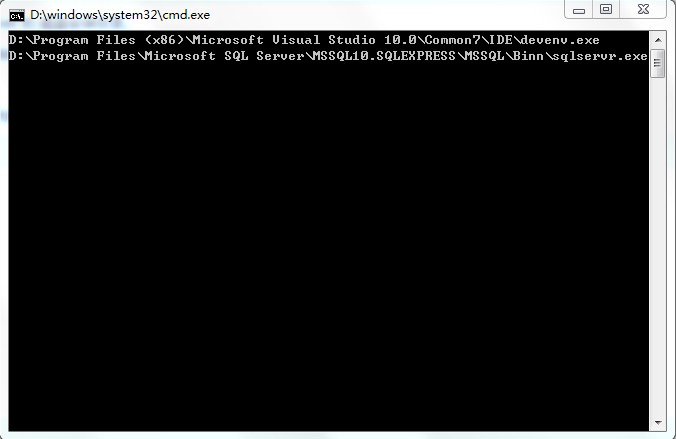
运行结果:
『练手』通过注册表 获取 VS 和 SQLServer 文件路径的更多相关文章
- 『练手』005 Laura.SqlForever历史遗留 的 架构思想缺陷
005 Laura.SqlForever历史遗留 的 架构思想缺陷 我们 比较一下 Laura.WinFramework 和 Laura.XtraFramework 的差异: Laura.WinFra ...
- 『练手』003 Laura.SqlForever如何扩展 兼容更多数据库引擎
003 Laura.SqlForever如何扩展 兼容更多数据库引擎 数据库引擎插件 在 界面上的体现 导航窗体 的 工具栏 中的 引擎下拉列表 导航窗体 的 树形控件 中的 引擎主节 ...
- 『练手』手写一个独立Json算法 JsonHelper
背景: > 一直使用 Newtonsoft.Json.dll 也算挺稳定的. > 但这个框架也挺闹心的: > 1.影响编译失败:https://www.cnblogs.com/zih ...
- 『练手』001 Laura.SqlForever架构基础(Laura.XtraFramework 的变迁)
001 Laura.SqlForever架构的基础(Laura.XtraFramework 的变迁之路) Laura.XtraFramework 到底是 做什么的? Laura.XtraFramewo ...
- 『练手』004 Laura.SqlForever如何扩展 导航栏 工具栏 右键菜单 插件
004 Laura.SqlForever如何扩展 导航栏 工具栏 右键菜单 插件 导航栏 插件扩展 比如下图的 窗口 > 关闭所有文档 这个导航栏: 在 任何程序集,任何命名空间,任 ...
- C# 系统应用之通过注册表获取USB使用记录(一)
该文章是“个人电脑历史记录清除软件”项目的系统应用系列文章.前面已经讲述了如何清除IE浏览器的历史记录.获取Windows最近访问文件记录.清除回收站等功能.现在我需要完成的是删除USB设备上的U盘. ...
- 练手爬虫用urllib模块获取
练手爬虫用urllib模块获取 有个人看一段python2的代码有很多错误 import re import urllib def getHtml(url): page = urllib.urlope ...
- delphi 获取 TreeView选中的文件路径
//获取 TreeView选中的文件路径 unit Unit1; interface uses Windows, Messages, SysUtils, Variants, Classes, G ...
- C# 根据注册表获取当前用户的常用目录整理
1.使用C#获取当前程序或解决方案的路径 2.使用C#获取当前登录用户的相关目录 3.也可以获取当前系统通用目录 4.获取Windows系统的目录,从注册表中获取. 一.当前用户的目录,HKEY_Cu ...
随机推荐
- Linux开发-makefile
makefile 介绍 make命令执行时,需要一个 makefile 文件,以告诉make命令如何去编译和链接程序. 首先,我们用一个示例来说明makefile的书写规则.以便给大家一个感性认识.这 ...
- hihocoder1391 Country
题解的那种前缀和以前没学过,感觉是种套路 #include<bits/stdc++.h> using namespace std; const int INF = 0x3f3f3f3f; ...
- Linux下使用Nginx端口转发出现502错误的一种解决办法
今天圈里的一个朋友在配置完nfinx80端口转发到5000后,发现一个问题 问题描述: 正确配置了Nginx80端口转5000端口,在CentOS上把.Net core WebAPI站点上传到cent ...
- 关于C#委托的一些学习笔记
1.什么是委托就是把方法作为参数传给另一个方法.委托说指向的函数,必须和函数具有相同的签名(返回值和参数类型) Public delegate void DelSayHi(string name); ...
- RobotFramework下的http接口自动化Get Response Status 关键字的使用
Get Response Status 关键字用来获取http请求返回的http状态码. 示例1:访问苏宁易购网站上的http推荐接口,使用Get Response Status 关键字来获取返回的h ...
- STM32高级定时器TIM1产生两路互补的PWM波(带死区)
测试环境:Keil 5.20.0.0 STM32F103RBT6 固件库版本:STM32F10x_StdPeriph_Lib_V3.5.0(2011) 本文使用TIM1的通道1,通道2,产生两路1kh ...
- datatable 参数详细说明
页面参数说明 var docrTable = $('#docrevisontable').dataTable({ language:lang, //提示信息 autoWidth: false, //禁 ...
- AngularJS中Model和Controller传值问题
最近由于工作原因,开始写点前端的东西.前两天刚开始了解AngularJS这门技术,当然,新手免不了会爬坑! 今天分享一篇关于--> 模型传参给Controller的实例: 需求: 具体是 首先 ...
- 解决:安装oracle客户端,提示“oracle11g所选的主目录位于基目录外”
安装oracle客户端,第三步下一步的时候,提示"oracle11g所选的主目录位于基目录外": 默认 Oracle基目录:D:\app\xxx 原 软件位置:F:\p ...
- PHP 获取访问来源
原文:http://www.upwqy.com/details/16.html $_SERVER['HTTP_REFERER'] 通过这个全局变量可以获取访问的链接是来源于哪里 比如说从博客园 htt ...