
SpringBoot项目中,获取配置文件信息
1.在配置文件中设置信息,格式如下
wechat:

  mpAppId: wxdf2b09f280e6e6e2

  mpAppSecret: f924b2e9f140ac98f9cb5317a8951c71
如果是多级目录,则
project:

  url:

    sell: http://localhost:8080
2.获取配置文件信息(三种方法)
2.1@ConfigurationProperties
package com.xiong.sell.config;

import lombok.Data;

import org.springframework.boot.context.properties.ConfigurationProperties;

import org.springframework.stereotype.Component;

@Data

@Component

@ConfigurationProperties(prefix = "wechat")

public class WechatAccountConfig {

    private String mpAppId;

    private String mpAppSecret;

}
2.2@Value
package com.xiong.sell.config;

import lombok.Data;

import org.springframework.beans.factory.annotation.Value;

import org.springframework.boot.context.properties.ConfigurationProperties;

import org.springframework.stereotype.Component;

@Component

@Data

//@ConfigurationProperties(prefix = "project.url")

public class ProjectUrlConfig {

    @Value("${project.url.sell}")

    private String sell;

}
单元测试结果

2.3org.springframework.core.env.Environment;
package com.xiong.sell.config;

import lombok.extern.slf4j.Slf4j;

import org.junit.Test;

import org.junit.runner.RunWith;

import org.springframework.beans.factory.annotation.Autowired;

import org.springframework.boot.test.context.SpringBootTest;

import org.springframework.core.env.Environment;

import org.springframework.test.context.junit4.SpringRunner;

@RunWith(SpringRunner.class)

@SpringBootTest(webEnvironment = SpringBootTest.WebEnvironment.RANDOM_PORT)

@Slf4j

public class ConfigTest {

    @Autowired

    private Environment environment;

    @Test

    public void test2(){

        String sell = environment.getProperty("project.url.sell");

        log.info("project.url.sell = {}",sell);

    }

}
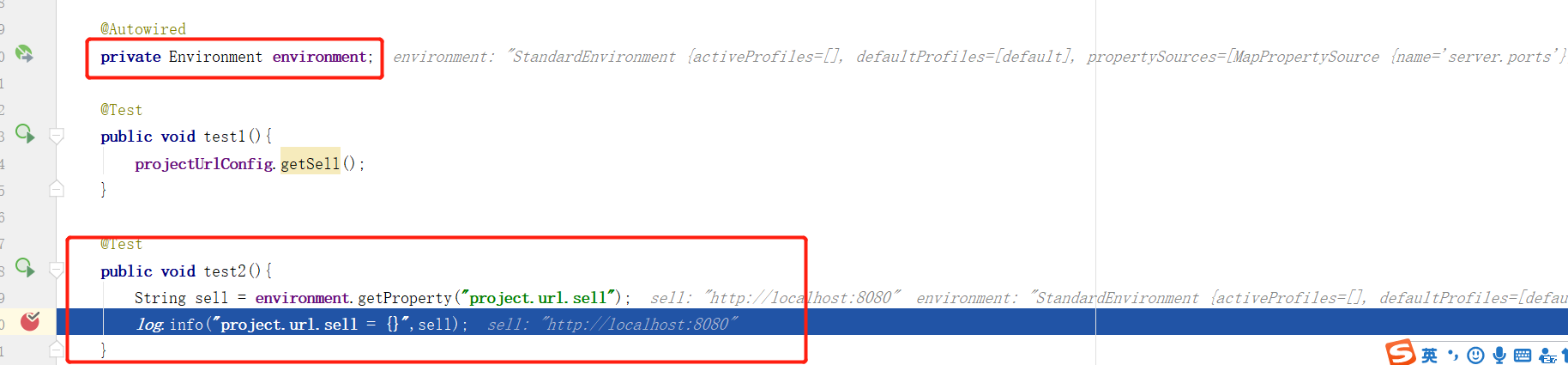
单元测试结果
SpringBoot项目中,获取配置文件信息的更多相关文章
- springboot 项目中获取默认注入的序列化对象 ObjectMapper
在 springboot 项目中使用 @SpringBootApplication 会自动标记 @EnableAutoConfiguration 在接口中经常需要使用时间类型,Date ,如果想要格式 ...
- 在springboot项目中获取pom.xml中的信息
最近做了一个新项目,用到了springboot.在搭建框架的过程中,需要读取pom.xml中version的值,本来想着是用自己用java解析xml来着.没想到maven提供了这么一个包,可以直接获取 ...
- SpringBoot项目中获取applicationContext对象
ApplicationContext 对象是Spring开源框架的上下文对象实例,也就是我们常说的Spring容器,一般情况下我们是不用手动来管理它,而是由Spring框架自己来维护bean之间的关系 ...
- linux环境下在springboot项目中获取项目路径(用于保存文件等)
//application.properties中设置:(file.path=static/qrfile/)//保存到static文件夹下的qrfile目录@Value("${file.pa ...
- SpringBoot项目中遇到的BUG
1.启动项目的时候报错 1.Error starting ApplicationContext. To display the auto-configuration report re-run you ...
- SpringBoot12 QueryDSL01之QueryDSL介绍、springBoot项目中集成QueryDSL
1 QueryDSL介绍 1.1 背景 QueryDSL的诞生解决了HQL查询类型安全方面的缺陷:HQL查询的扩展需要用字符串拼接的方式进行,这往往会导致代码的阅读困难:通过字符串对域类型和属性的不安 ...
- 五分钟后,你将学会在SpringBoot项目中如何集成CAT调用链
买买买结算系统 一年一度的双十一购物狂欢节就要到了,又到剁手党们开始表演的时刻了.当我们把种草很久的商品放入购物车以后,点击"结算"按钮时,就来到了买买买必不可少的结算页面了.让我 ...
- PowerShell_零基础自学课程_6_PS中获取帮助信息详解、管道、格式化输
前些文章陆续的说了一些关于这些主题,但是讨论的都不够深入,今天我们深入的了解一下获取帮助信息.管道以及格式化输出的内容. 一.获取帮助信息 在PS中获取帮助信息,最常用的有: -? .get-comm ...
- nginx的rewrite ,如何在flask项目中获取重写前的url
1. 在flask配一个重写到哪的路由,假设是/rewite/,然后到nginx的配置文件写重写规则,我这里重写全部的请求,接着测试能否重写成功 1. 添加一个路由 配置重写规则 测试成功 2.接下来 ...
随机推荐
- hue改下载行数
参考: https://blog.csdn.net/lingbo229/article/details/85991230 修改hue所在机器的默认配置后,重启hue即可 find / -name be ...
- poj3264(简单线段树)
题目链接:https://vjudge.net/problem/POJ-3264 题意:线段树简单应用题,区间查询最大值和最小值的差. 思路:用线段树维护区间的最大值和最小值即可. AC代码: #in ...
- [转帖]etcd 在超大规模数据场景下的性能优化
etcd 在超大规模数据场景下的性能优化 阿里系统软件技术 2019-05-27 09:13:17 本文共5419个字,预计阅读需要14分钟. http://www.itpub.net/2019/ ...
- C++学习 之 继承方式(笔记)
1.继承方式的分类 继承方式有公有继承,私有继承,保护继承.不同之处在于指定派生类的基类时使用的关键字不同:公有继承使用关键字public,私有继承使用关键字private,保护继承使用关键字prot ...
- # [爬虫Demo] pyquery+csv爬取猫眼电影top100
目录 [爬虫Demo] pyquery+csv爬取猫眼电影top100 站点分析 代码君 [爬虫Demo] pyquery+csv爬取猫眼电影top100 站点分析 https://maoyan.co ...
- Reatful规范
Reatful规范 drf框架的作用 作用:写接口 什么是接口: URL(前后台信息交互的媒介) 明确了请求方式,提供对应后台所需参数,请求url链接可以得到后台的相应数据 怎么写接口: 参照某种规则 ...
- SpringMVC实现全局异常处理器 (转)
出处: SpringMVC实现全局异常处理器 我们知道,系统中异常包括:编译时异常和运行时异常RuntimeException,前者通过捕获异常从而获取异常信息,后者主要通过规范代码开发.测试通过手 ...
- 关于__name__=='__main__'的理解
一.总的来说,如果__name__=='__main__'成立,表示当前模块就是主程序, 如果__name__=='__main__'不成立,表示当前模块是被导入到某个模块中的,而此时__name__ ...
- 无法加载文件 C:\Program Files\nodejs\npm.ps1,因为在此系统上禁止运行脚本。
今天使用npm安装插件时出现了以下错误: 经查,原因:现用执行策略是 Restricted(默认设置) 解决办法: 1.win+X键,使用管理员身份运行power shell 2.输入命令:set-e ...
- selenium 模拟登陆豆瓣,爬取武林外传的短评
selenium 模拟登陆豆瓣,爬去武林外传的短评: 在最开始写爬虫的时候,抓取豆瓣评论,我们从F12里面是可以直接发现接口的,但是最近豆瓣更新,数据是JS异步加载的,所以没有找到合适的方法爬去,于是 ...