
Spring Cloud 注册中心Eureka
一、简介
最近在看Spring Cloud微服务,接下来的时间和大家一起分享我所看到的,公司现在用的是dubbo ,之后有时间也去了解了解dubbo的源码。与dubbo相比较,Spring Cloud 在微服务方面有很多全面的实践。今天主要和大家简单介绍一下其中的一个组件Eureka注册中心。Eureka同其他服务注册中心一样,支持高可用配置。如果Eureka以集群模式不熟,当集群中有分片出现故障时,那么Eureka就转入自我保护模式。它允许在分片故障期间继续提供服务的发现和注册,当故障分片恢复运行时,集群的其他分片会把它们的状态再次同步回来。
二、实践
首先我们创建一个Spring Boot的maven工程,名为micro-service-integration。下面有一个子模块名为registration-center-web,该子模块就是我们今天介绍的注册中心。其工程目录如下:
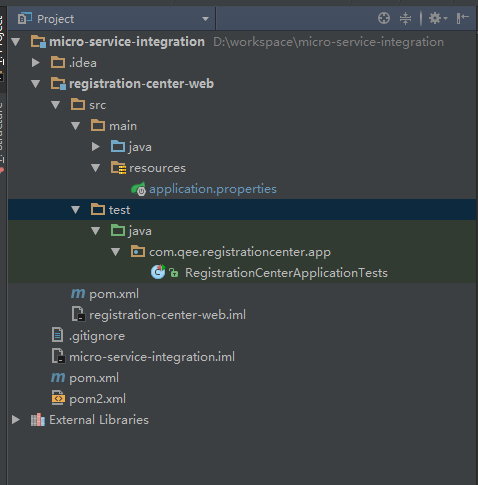
在父工程中pom.xml文件的内容如下:
<?xml version="1.0" encoding="UTF-8"?>

<project xmlns="http://maven.apache.org/POM/4.0.0"

         xmlns:xsi="http://www.w3.org/2001/XMLSchema-instance"

         xsi:schemaLocation="http://maven.apache.org/POM/4.0.0 http://maven.apache.org/xsd/maven-4.0.0.xsd">

    <modelVersion>4.0.0</modelVersion>

    <groupId>spring.cloud</groupId>

    <artifactId>micro-service-integration</artifactId>

    <packaging>pom</packaging>

    <version>1.0-SNAPSHOT</version>

    <modules>

        <module>registration-center-web</module>

    </modules>

    <name>micro-service-integration</name>

    <description>Demo project for Spring Boot</description>

    <parent>

        <groupId>org.springframework.boot</groupId>

        <artifactId>spring-boot-starter-parent</artifactId>

        <version>1.5.2.RELEASE</version>

    </parent>

    <dependencyManagement>

        <dependencies>

            <dependency>

                <groupId>org.springframework.cloud</groupId>

                <artifactId>spring-cloud-dependencies</artifactId>

                <version>Dalston.RELEASE</version>

                <type>pom</type>

                <scope>import</scope>

            </dependency>

            <dependency>

                <groupId>org.springframework.boot</groupId>

                <artifactId>spring-boot-starter-test</artifactId>

                <version>1.5.2.RELEASE</version>

                <scope>test</scope>

            </dependency>

        </dependencies>

    </dependencyManagement>

</project>
在该父模块引入 spring-boot-starter-parent作为其父模块,这样可以简单的默认的使用Spring Boot 配置。并且引入Spring Cloud 的版本为Dalston.RELEASE。
而在子模块 registration-center-web 的pom.xml 依赖该Spring Cloud的版本。以后的其他服务也依赖该版本的Spring Cloud。下面是该pom.xml的内容
<?xml version="1.0" encoding="UTF-8"?>

<project xmlns="http://maven.apache.org/POM/4.0.0"

         xmlns:xsi="http://www.w3.org/2001/XMLSchema-instance"

         xsi:schemaLocation="http://maven.apache.org/POM/4.0.0 http://maven.apache.org/xsd/maven-4.0.0.xsd">

    <parent>

        <artifactId>micro-service-integration</artifactId>

        <groupId>spring.cloud</groupId>

        <version>1.0-SNAPSHOT</version>

    </parent>

    <modelVersion>4.0.0</modelVersion>

    <artifactId>registration-center-web</artifactId>

    <dependencies>

        <dependency>

            <groupId>org.springframework.cloud</groupId>

            <artifactId>spring-cloud-starter-eureka-server</artifactId>

        </dependency>

        <dependency>

            <groupId>org.springframework.boot</groupId>

            <artifactId>spring-boot-starter-test</artifactId>

            <scope>test</scope>

        </dependency>

    </dependencies>

    <profiles>

        <profile>

            <id>register-first</id>

            <properties>

                <final.project.name>registration-center-first</final.project.name>

                <server.port>8881</server.port>

            </properties>

            <activation>

                <activeByDefault>true</activeByDefault>

            </activation>

        </profile>

        <profile>

            <id>register-second</id>

            <properties>

                <final.project.name>registration-center-second</final.project.name>

                <server.port>8882</server.port>

            </properties>

        </profile>

        <profile>

            <id>register-third</id>

            <properties>

                <final.project.name>registration-center-third</final.project.name>

                <server.port>8883</server.port>

            </properties>

        </profile>

    </profiles>

    <build>

        <finalName>${final.project.name}</finalName>

        <resources>

            <resource>

                <directory>src/main/resources</directory>

                <filtering>true</filtering>

            </resource>

        </resources>

    </build>

</project>
在该pom.xml 中,可以根据profile中来制定不同的服务启动端口。
接下来我们来看一下java代码
package com.qee.registrationcenter.app;

import org.springframework.boot.SpringApplication;

import org.springframework.boot.autoconfigure.SpringBootApplication;

import org.springframework.cloud.netflix.eureka.server.EnableEurekaServer;

@SpringBootApplication

@EnableEurekaServer

public class RegistrationCenterApplication {

	public static void main(String[] args) {

		SpringApplication.run(RegistrationCenterApplication.class, args);

	}

}
非常的简单,主要通过main函数启动该工程,2个注解 @SpringBootApplication 和 @EnableEurekaServer。然后我们来看一下我们application.properties文件。
server.port=@server.port@

spring.application.name=registration-center-web

server.register.port1=8881

server.register.port2=8882

server.register.port3=8883

eureka.instance.hostname=register.center.com

#由于该应用为注册中心,所以设置为false,代表不向注册中心注册自己

eureka.client.register-with-eureka=true

#由于注册中心的职责就是维护服务实例,所以他不需要去检索服务

eureka.client.fetch-registry=true

eureka.server.enable-self-preservation=false

#默认的注册域

#eureka.client.serviceUrl.defaultZone=http://${eureka.instance.hostname}:${server.port}/eureka/

eureka.client.serviceUrl.defaultZone=http://${eureka.instance.hostname}:${server.register.port1}/eureka/,http://${eureka.instance.hostname}:${server.register.port2}/eureka/

#控制台彩色输出

spring.output.ansi.enabled=ALWAYS
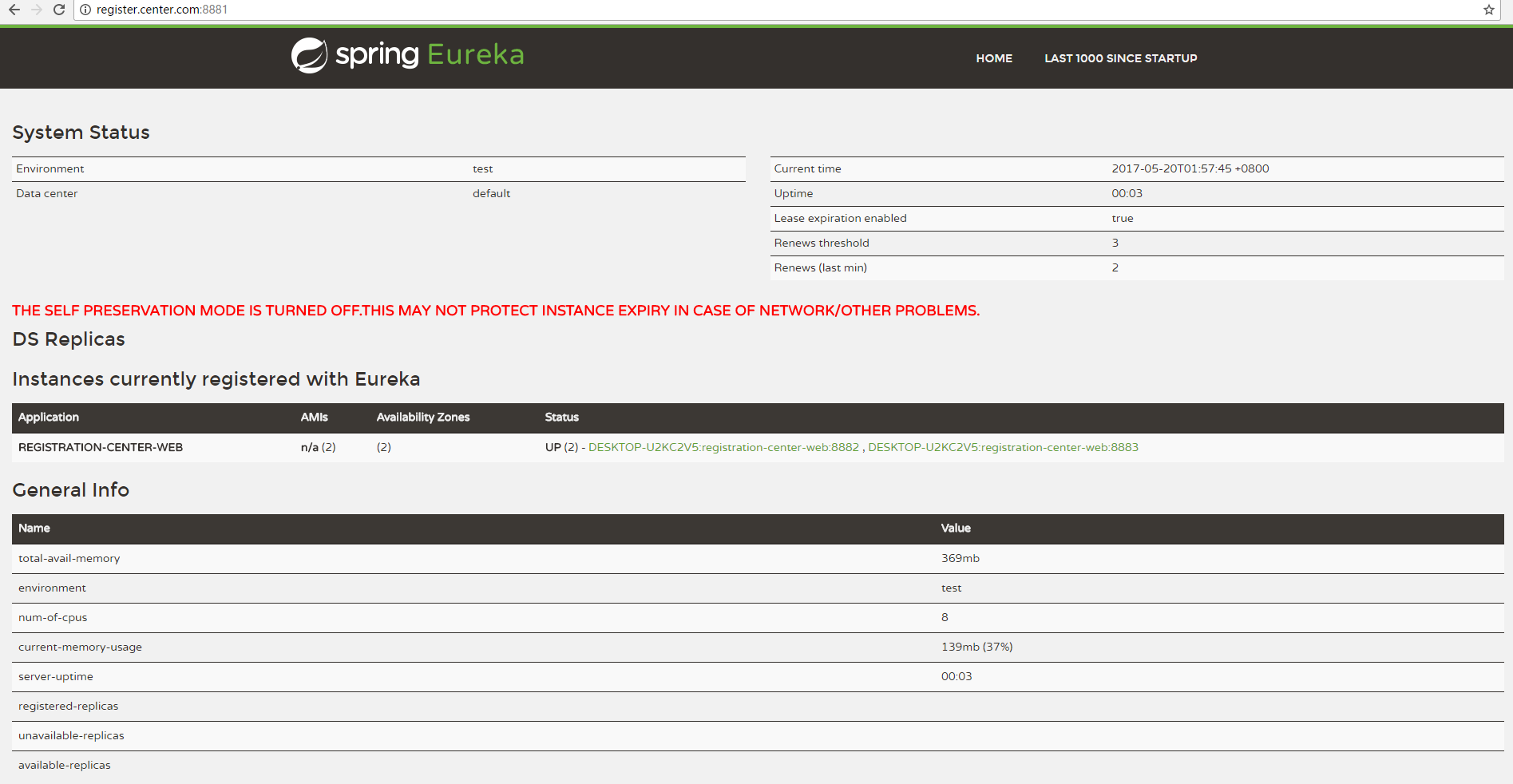
这里我们是搭建一个高可用的注册中心,其中有三个注册中心分别为K1,K2,K3,其中K1的端口为8881 ,K2的端口为8882,K3的端口为8883。接着然后K1向K2,K3注册中心注册自己,而K2向K1,K3注册中心注册自己,而K3向K1,K2注册中心注册自己。由于在启动K1注册中心时,K2和K3注册中心还没开启,所以K1会报异常,但是服务还是会正常启动,同理K2也会由于K3没有启动,所以也会报异常,但是启动K3的时候,K1和K2注册中心已经正常启动,所以K3不会报异常。最后在各自的注册中心可以看到其他2个注册中心最为服务注册上去。各自的访问地址为 http://register.center.com:8881、http://register.center.com:8882、http://register.center.com:8883。
接着我们启动三个注册中心,我们看下如下结果:
三、分析
@EnableEurekaServer 该注解启动一个服务注册中心提供给其他应用进行对话。
eureka.client.register-with-eureka : 该参数代表该Eureka应用(包括注册中心)是否注册到注册中心中,如果只是一个单一注册中心,那么把该参数设置为false,代表不向注册中心注册自己。如果是搭建高可用的集群注册中心,则该属性设置为true。该属性值默认true。
eureka.client.fetch-registry : 该参数代表是否需要检索服务,如果是单一注册中心则不需要去检索服务,则设置为false。该参数默认值为true。
eureka.client.serviceUrl.defaultZone : 该参数指定默认注册中心的注册地址,其他的微服务应用就是通过该属性值来注册服务。
eureka.server.enable-self-preservation :设置为false 代表关闭注册中心的保护机制,默认为true。

其他的详细属性和配置可以查看官方文档。或者留言大家一起讨论。
该工程的gitHub地址为:https://github.com/vOoT/micro-service-integration.git
Spring Cloud 注册中心Eureka的更多相关文章
- spring cloud 注册中心--eureka注册与发现
本文详细介绍spring cloud微服务的默认注册中心--eureka注册与发现.开发环境需要Windows系统.jdk和intellij idea.与zookeeper注册中心相比,eureka不 ...
- kubernetes部署spring cloud注册中心 Eureka
系统环境 java JDK 1.8 Docker 18.09.6 kubernetes 1.16 创建Eureka Server 1.Maven引入相应的jar 引入 SpringBoot 做基础框架 ...
- JAVA Spring Cloud 注册中心 Eureka 相关配置
转载至 https://www.cnblogs.com/fangfuhai/p/7070325.html Eureka客户端配置 1.RegistryFetchIntervalSecon ...
- Spring Cloud注册中心Eureka设置访问权限并自定义鉴权页面
原文:https://blog.csdn.net/a823007573/article/details/88971496 使用Spring Security实现鉴权 1. 导入Spring Secur ...
- Spring Cloud注册中心高可用搭建
Spring Cloud的注册中心可以由Eureka.Consul.Zookeeper.ETCD等来实现,这里推荐使用Spring Cloud Eureka来实现注册中心,它基于Netfilix的Eu ...
- spring cloud - 注册中心
服务注册与发现 这里我们会用到Spring Cloud Netflix,该项目是Spring Cloud的子项目之一,主要内容是对Netflix公司一系列开源产品的包装,它为Spring Boot应用 ...
- Spring Cloud注册中心之Consul
Consul简介 Consul是HashiCorp公司使用Golang语言开发的一中多服务解决方案工具,相比于其他服务注册中心来说,Consul的功能更为强大,丰富,其中最基本的功能包含下面几点(翻译 ...
- Spring Cloud注册中心之Zookeeper
zookeeper可以作为分布式服务的注册中心 在服务端安装zookeeper 参考:https://www.cnblogs.com/conly/p/12267506.html 创建spring bo ...
- spring cloud 服务注册中心eureka高可用集群搭建
spring cloud 服务注册中心eureka高可用集群搭建 一,准备工作 eureka可以类比zookeeper,本文用三台机器搭建集群,也就是说要启动三个eureka注册中心 1 本文三台eu ...
随机推荐
- 所谓“脚本(Script)”——个人见解浅谈
编程初学者,在学习的时候总会听人说到或者看到“脚本”这个词汇,我初学的时候也不清楚脚本是什么,所以每每看到有人说你会写“脚本”的时候,总以为是一些高深深奥的编程技术.然而事实正好相反,脚本语言是一种比 ...
- TCP/IP、HTTP、Socke、UDP的区别
一.TCP/IP.Http.Socket的区别 [http://jingyan.baidu.com/article/08b6a591e07ecc14a80922f1.html](http://jing ...
- https证书申请流程和简介
HTTPS证书是什么 HTTPS(全称:Hyper Text Transfer Protocol over Secure Socket Layer),是以安全为目标的HTTP通道,简单讲是HTTP的安 ...
- 混合式app ionic2.x 手动搭建开发环境教程分享(nodejs,jdk,ant,androidsdk)
1.ionic简介 为什么选用ionic: 彻底开源且免费 性能优异 基于红的发紫的AngularJs 漂亮的UI 强大的命令行(基于更热门的nodejs) 开发团队非常活跃 ngCordova,将主 ...
- linux sort命令详解(转)
sort命令是帮我们依据不同的数据类型进行排序,其语法及常用参数格式: sort [-bcfMnrtk][源文件][-o 输出文件] 补充说明:sort可针对文本文件的内容,以行为单位来排序. 参 数 ...
- less学习笔记(一)
less的写法如下 .content { ul{ list-style: none; } li{ height: 25px; line-height: 25px; padding-left: 15px ...
- ios animation 动画效果实现
1.过渡动画 CATransition CATransition *animation = [CATransition animation]; [animation setDuration:1.0]; ...
- 关于sql、mysql语句的模糊查询分类与详解,包括基本用法和mapper.xml文件里插入写法
欢迎猿类加qq:2318645572,共同学习进步 实际例子: ssm框架:service业务层->dao层->mappers.xml->junit/test测试 1:service ...
- druid查询
查询是发送HTTP请求到,Broker, Historical或者Realtime节点.查询的JSON表达和每种节点类型公开相同的查询接口. Queries are made using an HTT ...
- 使用nodejs进行WEB开发
这里,准备从零开始用nodejs实现一个微博系统.功能包括路由控制.页面模板.数据库访问.用户注册.登录.用户会话等内容. 将会介绍Express框架.MVC设计模式.ejs模板引擎以及MongoDB ...