
Spring Cloud注册中心之Consul
Consul简介
Consul是HashiCorp公司使用Golang语言开发的一中多服务解决方案工具,相比于其他服务注册中心来说,Consul的功能更为强大,丰富,其中最基本的功能包含下面几点(翻译自官网):
- 服务发现:Consul的客户端可以注册服务,如api或mysql,其他客户端可以使用Consul来发现给定服务的提供者。使用DNS或HTTP,应用程序可以很容易地找到它们所依赖的服务。
- 运行状况检查:Consul客户端可以提供任意数量的运行状况检查,这些检查要么与给定的服务相关(“web服务器是否返回200 OK”),要么与本地节点相关(“内存利用率是否低于90%”)。操作员可以使用此信息监视群集运行状况,服务发现组件也可以使用此信息将通信路由到远离不正常主机的位置。
- Kvstore:应用程序可以将Consul的分层密钥/值存储用于任何目的,包括动态配置、特征标记、协调、领导选择等。简单的HTTP API使其易于使用。
- 安全服务通信:Consul可以为服务生成和分发TLS证书,以建立相互的TLS连接。意图可用于定义允许哪些服务进行通信。使用可以实时更改的意图,而不是使用复杂的网络拓扑和静态防火墙规则,可以轻松地管理服务分段。
- 多数据中心:Consul支持多个现成的数据中心。这意味着Consul的用户不必担心构建额外的抽象层来扩展到多个区域。
Consul服务的提供者都需要运行一个consul agent,agent负责服务和节点的健康检测。agent与一个或多个Consul Server进行交互,Consul Server用于存放和复制数据,Consul服务节点数一般为奇数个(建议3,5,7),类似于zookeeper的节点设置方案,consul节点之间也会通过自己的协议选举出leader,Consul可以单节点运行,但作为数据服务中心为保证服务的高可用,一般都是集群部署。
Consul Server和Client启动都可以通过agent的方式启动,启动客户端时agent并不是必须的,Consul启动可以通过浏览器访问可视化界面管理服务。
具体文档官方介绍:https://www.consul.io/intro/index.html,
Consul安装
- 下载地址:https://www.consul.io/downloads.html
- Linux安装:
下载后的文件是一个zip文件,使用unzip命令解压后得到一个可执行文件,使用./consul命令执行后,看到如下界面表示安装完成,展示Consul相关 的命令和使用案例Usage: consul [--version] [--help] <command> [<args>]
Available commands are:
acl Interact with Consul's ACLs
agent Runs a Consul agent
catalog Interact with the catalog
config Interact with Consul's Centralized Configurations
connect Interact with Consul Connect
debug Records a debugging archive for operators
event Fire a new event
exec Executes a command on Consul nodes
force-leave Forces a member of the cluster to enter the "left" state
info Provides debugging information for operators.
intention Interact with Connect service intentions
join Tell Consul agent to join cluster
keygen Generates a new encryption key
keyring Manages gossip layer encryption keys
kv Interact with the key-value store
leave Gracefully leaves the Consul cluster and shuts down
lock Execute a command holding a lock
login Login to Consul using an auth method
logout Destroy a Consul token created with login
maint Controls node or service maintenance mode
members Lists the members of a Consul cluster
monitor Stream logs from a Consul agent
operator Provides cluster-level tools for Consul operators
reload Triggers the agent to reload configuration files
rtt Estimates network round trip time between nodes
services Interact with services
snapshot Saves, restores and inspects snapshots of Consul server state
tls Builtin helpers for creating CAs and certificates
validate Validate config files/directories
version Prints the Consul version
watch Watch for changes in Consul
- Windows安装:
下载Consul后解压是一个可执行文件,双击无法运行,需要把consul.exe配置到Windos的环境变量中,在cmd中使用consul的命令即可。
Consul Server
安装后,通过命令启动Consul Server
consul agent -server -bind=x.x.x.x -client=0.0.0.0 -bootstrap-expect=3 -data-dir=/consul/data -node=server1 -ui
- agent:表示使用agent启动
- -server:以服务端启动Consul
- -bind:绑定服务器节点的某个网卡,针对服务器多网卡环境
- -client:允许连接到server端的client IP地址,0.0.0.0表示任何地址都可以访问
- -bootstrap-expect:server节点数低于这个阈值,将无法正常工作
- -data-dir:consul server数据存放节点,此目录须存在
- -node:该节点在管理端的服务名称
- -ui:开启浏览器端web界面访问
服务启动后可以通过默认端口8500,在浏览器端访问,http://localhost:8500
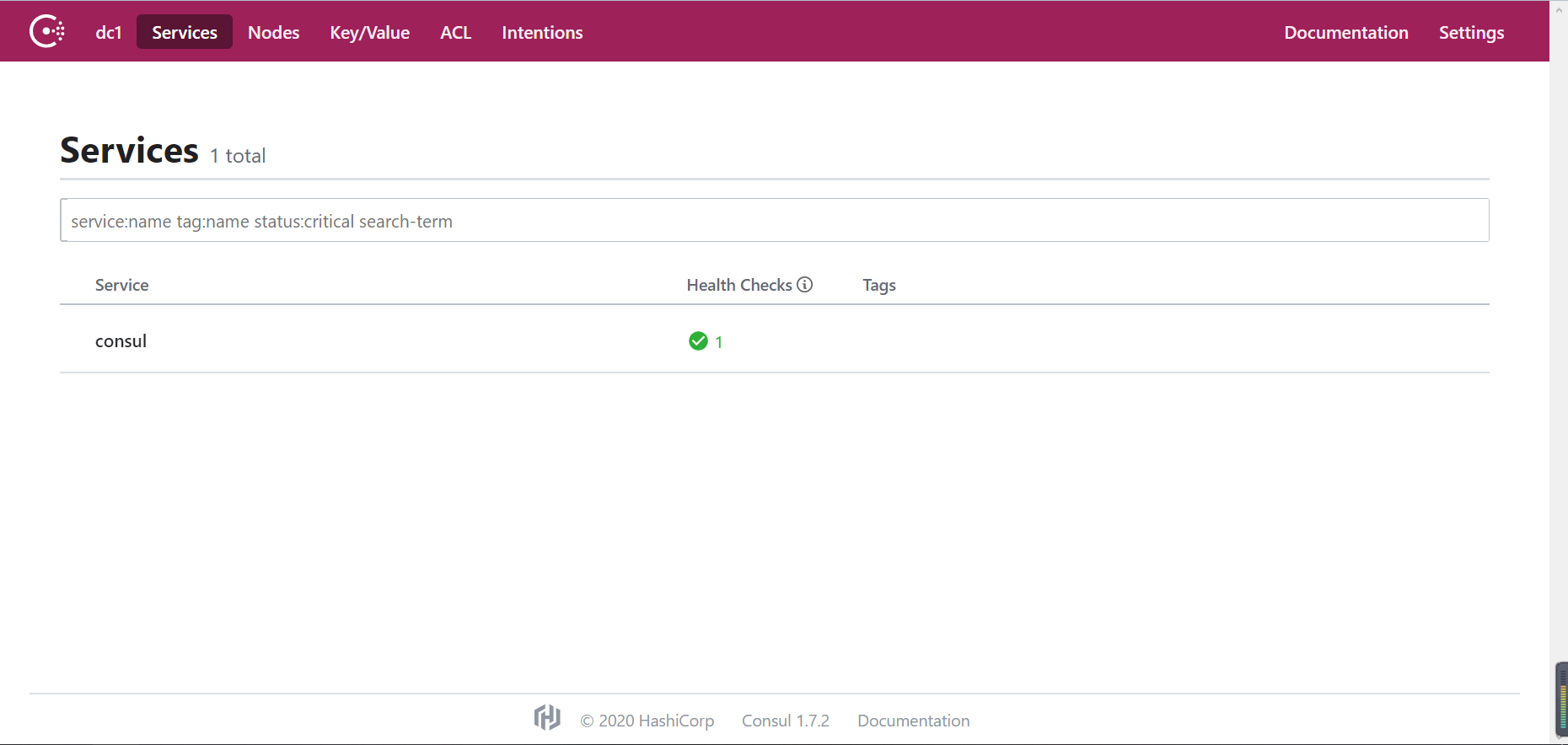
使用consul members查看节点信息,当前只有一个节点
Node             Address         Status  Type    Build  Protocol  DC   Segment

DESKTOP-4BMJIRJ  127.0.0.1:8301  alive   server  1.7.2  2         dc1  <all>
在多个服务节点上启动服务端,每个服务端之间可以通过命令来管理Consul Server,加入或者离开集群
consul join ip

consul leave ip
Consul可以使用config-dir来配置服务启动信息,该文件夹下的所有.json结尾的文件都会被加载。
    {

        "ports": {

        "http": 8500,

        "dns": 8600,

        "rpc": 8400,

        "serf_lan": 8301,

        "serf_wan": 8302,

        "server": 8300

        }

    }
Consul Discovery
Spring Cloud Eureka发布声明将不再维护Eureka 2.X版本,但是Eureka 1.x仍然是一个活跃的项目
Eureka 2.0 (Discontinued)
The existing open source work on eureka 2.0 is discontinued. The code base and artifacts that were released as part of the existing repository of work on the 2.x branch is considered use at your own risk.
Eureka 1.x is a core part of Netflix's service discovery system and is still an active project.
技术总是再不停的迭代发展,既然Eureka不再维护,Spring Cloud Consul可以作为其替代品,而且功能更为强大,和Spring Cloud整合也是非常简单。
创建Spring cloud项目
pom文件引入spring cloud consul
<!--web-->

<dependency>

    <groupId>org.springframework.boot</groupId>

    <artifactId>spring-boot-starter-web</artifactId>

</dependency>

<!--actuator-->

<dependency>

    <groupId>org.springframework.boot</groupId>

    <artifactId>spring-boot-starter-actuator</artifactId>

</dependency>

<!-- consul discovery-->

<dependency>

    <groupId>org.springframework.cloud</groupId>

    <artifactId>spring-cloud-starter-consul-discovery</artifactId>

</dependency>

<!-- consul config-->

<dependency>

    <groupId>org.springframework.cloud</groupId>

    <artifactId>spring-cloud-starter-consul-config</artifactId>

</dependency>
编写主启动类
  @SpringBootApplication

  @EnableDiscoveryClient

  @RestController

  public class ConsulApplication {

      public static void main(String[] args) {

          SpringApplication.run(ConsulApplication.class,args);

      }

      @Value("${server.port}")

      private String serverPort;

      @RequestMapping("consul")

      public String getInfo() {

          return "Spring Cloud Consul :"+serverPort + UUID.randomUUID().toString();

      }

  }
配置application.yml
  spring:

    application:

      name: consul-client

    cloud:

      consul:

        enabled: true

        host: 127.0.0.1 #连接的服务端IP

        port: 8500  #服务端口

        discovery:

  	    enabled: true #是否启用服务发现

  	    register: true

  	    deregister: true #服务停止时取消注册

  	    health-check-path: /actuator/health #健康检查地址

  	    health-heck-interval: 15s #健康检查间隔

  	    health-check-critical-timeout: #清理不健康服务间隔时长

  	    instance-id: consul-client1 #服务注册ID

  	    service-name: consul-client #服务注册名称

  	    tags: version 1.0,Chsoul Test Consul

        config:

  	    enabled: true #启用consul config

  	    prefix: config

  	    format: yaml

      server:

        port: 8080
启动服务
访问http://localhost:8080/consul
Spring Cloud Consul :8080 ecc5da16-ad08-40a6-9d98-4f729dee70f3
每次刷新页面随之变化
访问http://localhost:8500
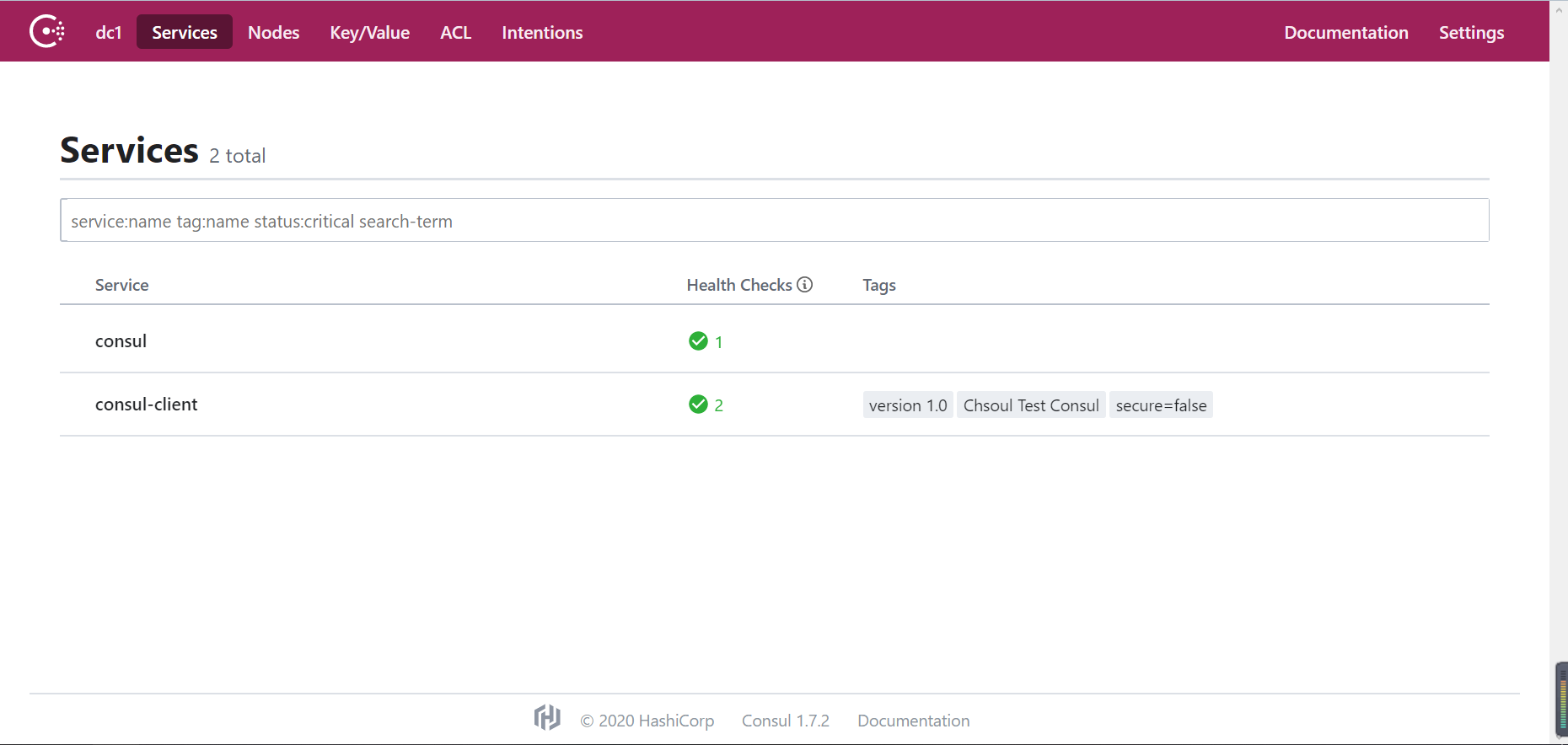
可以看到已经注册进来的服务信息,健康状态等。
Spring Cloud注册中心之Consul的更多相关文章
- Spring Cloud注册中心高可用搭建
Spring Cloud的注册中心可以由Eureka.Consul.Zookeeper.ETCD等来实现,这里推荐使用Spring Cloud Eureka来实现注册中心,它基于Netfilix的Eu ...
- Spring Cloud配置中心之Consul
Consul不仅可以作为Spring Cloud中服务的注册中心,也可以作为其配置中心,这样一个系统就可以实现服务发现和统一配置,减少系统维护的麻烦,其中在使用Consul作为配置中心使用的过程中可以 ...
- Spring Cloud 注册中心Eureka
一.简介 最近在看Spring Cloud微服务,接下来的时间和大家一起分享我所看到的,公司现在用的是dubbo ,之后有时间也去了解了解dubbo的源码.与dubbo相比较,Spring Cloud ...
- spring cloud 注册中心--eureka注册与发现
本文详细介绍spring cloud微服务的默认注册中心--eureka注册与发现.开发环境需要Windows系统.jdk和intellij idea.与zookeeper注册中心相比,eureka不 ...
- spring cloud - 注册中心
服务注册与发现 这里我们会用到Spring Cloud Netflix,该项目是Spring Cloud的子项目之一,主要内容是对Netflix公司一系列开源产品的包装,它为Spring Boot应用 ...
- kubernetes部署spring cloud注册中心 Eureka
系统环境 java JDK 1.8 Docker 18.09.6 kubernetes 1.16 创建Eureka Server 1.Maven引入相应的jar 引入 SpringBoot 做基础框架 ...
- Spring Cloud注册中心之Zookeeper
zookeeper可以作为分布式服务的注册中心 在服务端安装zookeeper 参考:https://www.cnblogs.com/conly/p/12267506.html 创建spring bo ...
- JAVA Spring Cloud 注册中心 Eureka 相关配置
转载至 https://www.cnblogs.com/fangfuhai/p/7070325.html Eureka客户端配置 1.RegistryFetchIntervalSecon ...
- Spring Cloud注册中心Eureka设置访问权限并自定义鉴权页面
原文:https://blog.csdn.net/a823007573/article/details/88971496 使用Spring Security实现鉴权 1. 导入Spring Secur ...
随机推荐
- 利用Docker搭建开发环境
一. 前言 随着平台的不断壮大,项目的研发对于开发人员而言,对于外部各类环境的依赖逐渐增加,特别是针对基础服务的依赖.这些现象导致开 发人员常常是为了简单从而直接使用公有的基础组件进行协同开发,在出现 ...
- <!DOCTYPE>,<address>,<applet>的用法
希望以下内容能让大家有所收获 HTML <!DOCTYPE> 标签 实例 <!DOCTYPE html> <html> <head> <title ...
- 【Flutter 混合开发】与原生通信-MethodChannel
Flutter 混合开发系列 包含如下: 嵌入原生View-Android 嵌入原生View-iOS 与原生通信-MethodChannel 与原生通信-BasicMessageChannel 与原生 ...
- 国内首个 .NET 5 框架 Fur 斩获 1000 stars,1.0.0-rc.final.20 发布
Fur 是 .NET 5 平台下企业应用开发最佳实践框架. 通往牛逼的路上,风景差得让人只想说脏话,但我在意的是远方. 啥环境 早在 1998 年微软公司对外发布 .NET/C# 平台的那 ...
- abp(net core)+easyui+efcore实现仓储管理系统——出库管理之三(五十二)
abp(net core)+easyui+efcore实现仓储管理系统目录 abp(net core)+easyui+efcore实现仓储管理系统--ABP总体介绍(一) abp(net core)+ ...
- pyqt设置窗口图标
import sys from PyQt5.QtWidgets import QMainWindow,QApplication from PyQt5.QtGui import QIcon ''' 窗口 ...
- day75:luffy:路飞学城项目后端环境搭建&Git相关知识点
目录 1.Xadmin 1.Xadmin介绍 2.Xadmin安装 3.Xadmin的使用 2.项目环境搭建 1.外部依赖 2.依赖包安装 3.搭建项目 3.Git 4.日志配置 5.异常处理 6.创 ...
- windows上visual studio 2019配置libtorch
参考链接: https://blog.csdn.net/clx55555/article/details/98172762 https://zhuanlan.zhihu.com/p/68901339 ...
- TCP的粘包和拆包问题及解决办法(C#)
本文参考:https://blog.csdn.net/wxy941011/article/details/80428470 原因 如果客户端连续不断的向服务端发送数据包时,服务端接收的数据会出现两个数 ...
- 【SpringCloud】07.应用间的通信
应用间通信 HTTP vs RPC Spring Cloud (HTTP) Dubbo (RPC) 1.SpringCloud中服务间两种restful调用方式 RestTemplate Feign ...