
libgdx学习记录3——动画Animation
libgdx动画采用Animation实现,即通过帧动画实现。
代码如下:
 package com.fxb.newtest;

 import com.badlogic.gdx.ApplicationAdapter;

 import com.badlogic.gdx.Gdx;

 import com.badlogic.gdx.graphics.GL10;

 import com.badlogic.gdx.graphics.Texture;

 import com.badlogic.gdx.graphics.g2d.Animation;

 import com.badlogic.gdx.graphics.g2d.SpriteBatch;

 import com.badlogic.gdx.graphics.g2d.TextureRegion;

 public class Lib002_Animation extends ApplicationAdapter{

     Texture texture;

     Animation animation;

     SpriteBatch batch;

     float currentTime = 0;

     @Override

     public void create() {

         // TODO Auto-generated method stub

         batch = new SpriteBatch();

         texture = new Texture( Gdx.files.internal( "data/koalio.png" ) );

         TextureRegion region = new TextureRegion( texture );

         TextureRegion[] regions = region.split( 18, 26 )[0];

         animation = new Animation( 0.1f, regions[1], regions[2], regions[3], regions[4] );

     }

     @Override

     public void render() {

         // TODO Auto-generated method stub

         Gdx.gl.glClearColor( 1, 1, 1, 1 );

         Gdx.gl.glClear( GL10.GL_COLOR_BUFFER_BIT );

         currentTime += Gdx.graphics.getDeltaTime();

         TextureRegion region = animation.getKeyFrame( currentTime, true );

         batch.begin();

         batch.draw( region, 100, 100, region.getRegionWidth(), region.getRegionHeight() );

         batch.end();

     }

     @Override

     public void dispose() {

         // TODO Auto-generated method stub

         super.dispose();

     }

 }
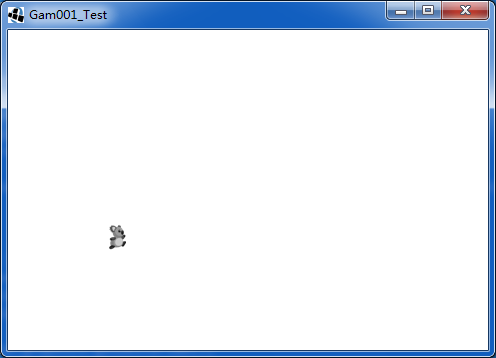
运行效果:
libgdx学习记录3——动画Animation的更多相关文章
- libgdx学习记录5——演员Actor
Actor也是libgdx中非常重要的一个元素,一般与stage配合一起使用.Actor能够设置大小,位置,旋转和动画等. 我们自定义的Actor一般需要继承于Actor,并且重写其中的act和dra ...
- libgdx学习记录2——文字显示BitmapFont
libgdx对中文支持不是太好,主要通过Hireo和ttf字库两种方式实现.本文简单介绍最基本的bitmapfont的用法. 代码如下: package com.fxb.newtest; import ...
- libgdx学习记录26——Polygon多边形碰撞检测
libgdx中Math封装了Polygon这个类,它是由多个定点进行描述实现的,在进行物体间的碰撞时,物体轮廓有时候是不规则的,这时候可以用一个多边形勾勒出其大概的轮廓,对其进行模拟. Polygon ...
- libgdx学习记录22——3d物体创建
libgdx是一个强大的游戏框架,不仅支持2d部分,同时还支持3d部分. libgdx的3d部分投影主要通过PerspectiveCamera实现. 物体的显示过程: 1. 创建远景相机,角度一般设为 ...
- libgdx学习记录20——多线程MultiThread资源处理
在libgdx中,一般的逻辑流程都在rende()函数中执行,这个函数是由opengl的渲染线程调用的,一般的图形显示和逻辑处理都在这个线程中. 一般情形下,在这个线程中处理就行了.但是当某些逻辑处理 ...
- libgdx学习记录19——图片动态打包PixmapPacker
libgdx中,opengl 1.x要求图片长宽必须为2的整次幂,一般有如下解决方法 1. 将opengl 1.x改为opengl 2.0.(libgdx 1.0版本后不支持1.x,当然不存在这个问题 ...
- libgdx学习记录18——Box2d物理引擎
libgdx封装了Box2D物理引擎,通过这个引擎能够模拟物理现实,使设计出的游戏更具有真实感. libgdx中,Box2d程序的大概过程: 1. 创建物理世界world,并设置重力加速度. 2. 创 ...
- libgdx学习记录17——照相机Camera
照相机在libgdx中的地位举足轻重,贯穿于整个游戏开发过程的始终.一般我们都通过Stage封装而间接使用Camera,同时我们也可以单独使用Camera以完成背景的移动.元素的放大.旋转等操作. C ...
- libgdx学习记录16——资源加载器AssetManager
AssetManager用于对游戏中的资源进行加载.当游戏中资源(图片.背景音乐等)较大时,加载时会需要较长时间,可能会阻塞渲染线程,使用AssetManager可以解决此类问题. 主要优点: 1. ...
随机推荐
- 双硬盘,win10安装到固态盘
1.PE下格式化固态盘的系统盘 2.打开DG分区工具,查看固态盘的系统盘是否为激活状态,红色为激活,如果不是,激活一下 3.用windows安装器,或者hdd安装win10到固态盘 4.bios中启动 ...
- Vue 获取元素样式 元素高度
看到这个问题我第一时间想的竟然是JS 不知道你是怎么想的 不过昨天有一个小哥哥 问我一个Vue的 哈哈哈 get了 我当时问他为什么不用JS获取 他说 这个性能更高 那我们来看看这个高性能的获取元素高 ...
- web自动化上传附件 2
当我们进行某一项web自动化脚本编写时,有上传附件操作,点击附件直接打开了windows窗口,而有的点击添加附件打开一个小窗体,再点击‘浏览’才打开windows窗口, 中间多了这么一个小窗体的操作, ...
- sqoop mysql导入hive 数值类型变成null的问题分析
问题描述:mysql通过sqoop导入到hive表中,发现有个别数据类型为int或tinyint的列导入后数据为null.设置各种行分隔符,列分隔符都没有效果. 问题分析:hive中单独将有问题的那几 ...
- 洛谷 P1338 末日的传说
题目链接:https://www.luogu.org/problemnew/show/P1338 题目描述 只要是参加jsoi活动的同学一定都听说过Hanoi塔的传说:三根柱子上的金片每天被移动一次, ...
- 关于mysql存储过程中传decimal值会自动四舍五入的这个坑
容我说几句题外话:我的工作日常是用微软系的,SQL SERVICE 存储过程很强大,我也很习惯很喜欢用存储过程.和MySQL结缘,是在五年前,因为一些原因,公司要求用开源免费的数据库.很多时候,用my ...
- 第二阶段第六次spring会议
昨天我将对初始页面进行加工和修改. 我用两个小动物作为按钮分别进入动物便签界面和植物便签界面,可以让用户自由选择. 今天我将尝试对软件进行添加搜索引擎的界面. private void linkLab ...
- mysql传统主从配置与主从监控
主从简介 在现代企业中,数据显得尤为重要,而存储数据的数据库选择又五花八门,但无论是何种数据库,均存在着一种隐患. 当数据规模非常大,读写量也很高时,一台数据库已经无法负担全部读写任务,就需要多台数据 ...
- PCL-CMAKELIST书写格式
cmake_minimum_required(VERSION 2.6 FATAL_ERROR)//cmake最小版本 find_package(PCL 1.3 REQUIRED COMPONENTS ...
- ibatis的xml中resultmap是实体类与查询结果的一个映射
resultmap可以少于实体类的属性,但是resultmap中的映射列,必须在查询结果中有