
Spring容器启动源码解析
1. 前言
最近搭建的工程都是基于SpringBoot,简化配置的感觉真爽。但有个以前的项目还是用SpringMvc写的,看到满满的配置xml文件,却有一种想去深入了解的冲动。折腾了好几天,决心去写这篇关于Spring启动的博客,自己是个刚入职的小白,技术水平有限,也是硬着头皮看源码去Debug,很多不懂的地方还请谅解!
2. 概述
先给出几个让我头皮发麻的概念:web容器,Spring容器,SpringMvc容器
容器就是管理对象的地方,例如web容器就是管理servlet的地方,Spring容器就是管理Service,dao等Bean的地方,SpringMvc就是管理Controller等bean的地方(下文会做解释)。一个SpringMvc项目的启动离不开上述三个容器。所以这就是这篇文章的讲点,各个容器的启动过程解析。
3. Web容器初始化过程
官方文档是对于Web容器初始化时是这样描述的(英文不懂,已翻译成中文)
1. 部署描述文件(web.xml)中的<listener>标记的监听器会被创建和初始化
2. 对于实现了ServletContextListener的监听器,会执行它的初始化方法 contextInitialized()
3. 部署描述文件中的<filter>标记的过滤器会被创建和初始化,调用其init()方法
4. 部署描述文件中的<servlet>标记的servlet会根据<load-on-startup>中的序号创建和初始化,调用init()方法
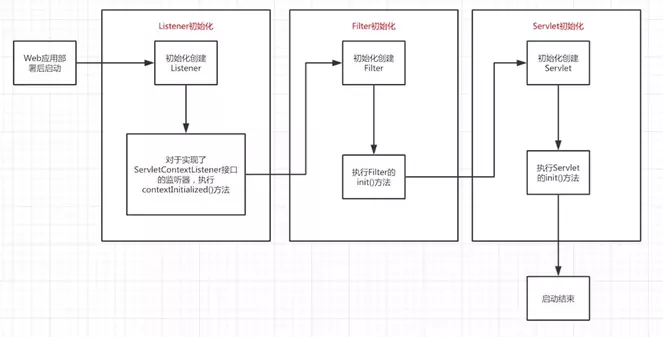
大致流程了解之后,结合自己的SpringMvc项目一步步深入,先贴一下基本的web.xml文件
<?xml version="1.0" encoding="UTF-8"?>

<web-app xmlns:xsi="http://www.w3.org/2001/XMLSchema-instance" xmlns:web="http://java.sun.com/xml/ns/javaee" xmlns="http://java.sun.com/xml/ns/javaee" xsi:schemaLocation="http://java.sun.com/xml/ns/javaee http://java.sun.com/xml/ns/javaee/web-app_2_5.xsd" id="WebApp_ID" version="2.5">

  <display-name>dmpserver</display-name>

  <welcome-file-list>

    <welcome-file>login.jsp</welcome-file>

  </welcome-file-list>

  <context-param>

    <param-name>contextConfigLocation</param-name>

    <param-value>classpath:spring.xml</param-value>

  </context-param>

  <context-param>

    <param-name>log4jConfigLocation</param-name>

    <param-value>classpath:log4jConfig.xml</param-value>

  </context-param>

  <filter>

    <filter-name>encodingFilter</filter-name>

    <filter-class>org.springframework.web.filter.CharacterEncodingFilter</filter-class>

    <init-param>

      <param-name>encoding</param-name>

      <param-value>utf-8</param-value>

    </init-param>

  </filter>

  <filter-mapping>

    <filter-name>encodingFilter</filter-name>

    <url-pattern>/*</url-pattern>

  </filter-mapping>

  <listener>

    <listener-class>org.springframework.web.context.ContextLoaderListener</listener-class>

  </listener>

   <listener>

    <listener-class>org.springframework.web.util.Log4jConfigListener</listener-class>

  </listener>

  <servlet>

    <description>spring mvc servlet</description>

    <servlet-name>rest</servlet-name>

    <servlet-class>org.springframework.web.servlet.DispatcherServlet</servlet-class>

    <init-param>

        <param-name>contextConfigLocation</param-name>

        <param-value>

            classpath:spring-mvc.xml

        </param-value>

    </init-param>

    <load-on-startup>1</load-on-startup>

  </servlet>

</web-app>
1. 容器会先解析<context-param>中的键值对(上述代码重点关注Spring配置文件Spring.xml)
2. 容器创建一个application内置对象servletContext(可以理解为servlet上下文或web容器),用于全局变量共享
3. 将解析的<context-param>键值对存放在application即servletContext中
4. 读取<listener>中的监听器,一般会使用ContextLoaderListener类,调用其contextInitialized方法,创建IOC容器(Spring容器)webApplicationContext。将webApplication容器放入application(servlet上下文)中作为根IOC容器,键名为WebApplicationContext.ROOT_WEB_APPLICATION_CONTEXT_ATTRIBUTE 注意的是,webApplicationContext是全局唯一的,一个web应用只能有一个根IOC容器。因为这个根IOC容器是读取<context-param>配置的键值对来创建Bean,这个根IOC容器只能访问spring.xml中配置的Bean,我们在Spring.xml中一般配置的是service,dao等Bean。所以根IOC容器(Spring容器)只能管理service,dao等Bean
5. listener加载完毕后,加载filter过滤器
6. 加载servlet,一般springMvc项目中会优先加载 DispatcherServlet(现在开始加载SpringMvc容器了)
7. DispatcherServlet的父类FrameworkServlet重写了其父类的initServletBean()方法,在初始化时调用initWebApplicationContext()方法和onRefresh()方法
8. initWebApplicationContext()方法会在servletContext(即当前servlet上下文)创建一个子IOC容器(即SpringMvc容器),如果存在上述的根IOC容器,就设置根IOC容器作为父容器,如果不存在,就将父容器设置为NULL
9. 读取<servlet>标签的<init-param>配置的xml文件并加载相关Bean。此时加载的是Spring-mvc.xml配置文件,管理的是Controller等Bean
10. onRefresh()加载其他组件
4. 启动过程分析
4.1 listener初始化Spring容器
tomcat启动后,<context-param>标签的内容读取后会被放进application中,做为Web应用的全局变量使用,接下来创建listener时会使用到这个全局变量,因此,Web应用在容器中部署后,进行初始化时会先读取这个全局变量,之后再进行上述讲解的初始化启动过程。
查看ContextLoaderListener源码
public class ContextLoaderListener extends ContextLoader implements ServletContextListener {

    public ContextLoaderListener() {

    }

    public ContextLoaderListener(WebApplicationContext context) {

        super(context);

    }

    public void contextInitialized(ServletContextEvent event) {

        this.initWebApplicationContext(event.getServletContext());

    }

    public void contextDestroyed(ServletContextEvent event) {

        this.closeWebApplicationContext(event.getServletContext());

        ContextCleanupListener.cleanupAttributes(event.getServletContext());

    }

}
据官方文档说明,实现ServletContextListener接口,执行contextInitialized(),进入initWebApplicationContext方法。contextInitialized()和contextDestroyed()方法会在web容器启动或销毁时执行。网上查了下此处设计模式用到的是观察者模式和代理模式,自己也不懂就不做详解了
查看ContextLoader.class中的initWebApplicationContext方法
public WebApplicationContext initWebApplicationContext(ServletContext servletContext) {

        /*

        首先通过WebApplicationContext.ROOT_WEB_APPLICATION_CONTEXT_ATTRIBUTE

        这个String类型的静态变量获取一个根IoC容器,根IoC容器作为全局变量

        存储在application对象中,如果存在则有且只能有一个

        如果在初始化根WebApplicationContext即根IoC容器时发现已经存在

        则直接抛出异常,因此web.xml中只允许存在一个ContextLoader类或其子类的对象

        */

        if (servletContext.getAttribute(WebApplicationContext.ROOT_WEB_APPLICATION_CONTEXT_ATTRIBUTE) != null) {

            throw new IllegalStateException("Cannot initialize context because there is already a root application context present - check whether you have multiple ContextLoader* definitions in your web.xml!");

        } else {

            Log logger = LogFactory.getLog(ContextLoader.class);

            servletContext.log("Initializing Spring root WebApplicationContext");

            if (logger.isInfoEnabled()) {

                logger.info("Root WebApplicationContext: initialization started");

            }

            long startTime = System.currentTimeMillis();

            try {

                if (this.context == null) {

                    // 创建一个根IOC容器

                    this.context = this.createWebApplicationContext(servletContext);

                }

                if (this.context instanceof ConfigurableWebApplicationContext) {

                    ConfigurableWebApplicationContext cwac = (ConfigurableWebApplicationContext)this.context;

                    if (!cwac.isActive()) {

                        if (cwac.getParent() == null) {

                            // 为根IOC容器设置一个父容器

                            ApplicationContext parent = this.loadParentContext(servletContext);

                            cwac.setParent(parent);

                        }

                        this.configureAndRefreshWebApplicationContext(cwac, servletContext);

                    }

                }

                //将创建好的IoC容器放入到application对象中,并设置key为WebApplicationContext.ROOT_WEB_APPLICATION_CONTEXT_ATTRIBUTE

                servletContext.setAttribute(WebApplicationContext.ROOT_WEB_APPLICATION_CONTEXT_ATTRIBUTE, this.context);

                ClassLoader ccl = Thread.currentThread().getContextClassLoader();

                if (ccl == ContextLoader.class.getClassLoader()) {

                    currentContext = this.context;

                } else if (ccl != null) {

                    currentContextPerThread.put(ccl, this.context);

                }

                if (logger.isDebugEnabled()) {

                    logger.debug("Published root WebApplicationContext as ServletContext attribute with name [" + WebApplicationContext.ROOT_WEB_APPLICATION_CONTEXT_ATTRIBUTE + "]");

                }

                if (logger.isInfoEnabled()) {

                    long elapsedTime = System.currentTimeMillis() - startTime;

                    logger.info("Root WebApplicationContext: initialization completed in " + elapsedTime + " ms");

                }

                return this.context;

            } catch (RuntimeException var8) {

                logger.error("Context initialization failed", var8);

                servletContext.setAttribute(WebApplicationContext.ROOT_WEB_APPLICATION_CONTEXT_ATTRIBUTE, var8);

                throw var8;

            } catch (Error var9) {

                logger.error("Context initialization failed", var9);

                servletContext.setAttribute(WebApplicationContext.ROOT_WEB_APPLICATION_CONTEXT_ATTRIBUTE, var9);

                throw var9;

            }

        }

    }
initWebApplicationContext方法的主要目的是创建一个根IOC容器,并放入servlet上下文中。看上述源码可知,根IOC容器只能仅有一个,作为全局变量存储在servletContext中。将根IoC容器放入到application对象之前进行了IoC容器的配置和刷新操作,调用了configureAndRefreshWebApplicationContext()方法,该方法源码如下:
protected void configureAndRefreshWebApplicationContext(ConfigurableWebApplicationContext wac, ServletContext sc) {

        String configLocationParam;

        if (ObjectUtils.identityToString(wac).equals(wac.getId())) {

            configLocationParam = sc.getInitParameter("contextId");

            if (configLocationParam != null) {

                wac.setId(configLocationParam);

            } else {

                wac.setId(ConfigurableWebApplicationContext.APPLICATION_CONTEXT_ID_PREFIX + ObjectUtils.getDisplayString(sc.getContextPath()));

            }

        }

        wac.setServletContext(sc);

        /*

            在容器启动时,会把<context-param>中的内容放入servlet上下文的全局变量中,

            此时获取key为contextConfigLocation的变量,及Spring.xml配置文件

            将其放入到webApplicationContext中

        */

        configLocationParam = sc.getInitParameter("contextConfigLocation");

        if (configLocationParam != null) {

            wac.setConfigLocation(configLocationParam);

        }

        ConfigurableEnvironment env = wac.getEnvironment();

        if (env instanceof ConfigurableWebEnvironment) {

            ((ConfigurableWebEnvironment)env).initPropertySources(sc, (ServletConfig)null);

        }

        this.customizeContext(sc, wac);

        wac.refresh();

    }
configureAndRefreshWebApplicationContext方法比较重要的是把配置文件信息放入根IOC容器中。方法最后调用了refresh()方法,对配置文件信息(Bean)进行加载。因为refresh()这是个ConfigurableApplication-Context接口方法,想到了它的常用实现类ClassPathXmlApplicationContext,一层层进去找到了Abstract-ApplicationContext,实现了refresh(),见如下源码:
public void refresh() throws BeansException, IllegalStateException {

        Object var1 = this.startupShutdownMonitor;

        synchronized(this.startupShutdownMonitor) {

            this.prepareRefresh();

            ConfigurableListableBeanFactory beanFactory = this.obtainFreshBeanFactory();

            this.prepareBeanFactory(beanFactory);

            try {

                this.postProcessBeanFactory(beanFactory);

                this.invokeBeanFactoryPostProcessors(beanFactory);

                this.registerBeanPostProcessors(beanFactory);

                this.initMessageSource();

                this.initApplicationEventMulticaster();

                this.onRefresh();

                this.registerListeners();

                this.finishBeanFactoryInitialization(beanFactory);

                this.finishRefresh();

            } catch (BeansException var9) {

                if (this.logger.isWarnEnabled()) {

                    this.logger.warn("Exception encountered during context initialization - cancelling refresh attempt: " + var9);

                }

                this.destroyBeans();

                this.cancelRefresh(var9);

                throw var9;

            } finally {

                this.resetCommonCaches();

            }

        }

    }
该方法主要用于创建并初始化contextConfigLocation类配置的xml文件中的Bean,因此,如果我们在配置Bean时出错,在Web应用启动时就会抛出异常,而不是等到运行时才抛出异常。因为技术能力有限加上此处方法太多,就不在一一解析了。到此为止,整个Spring容器加载完毕,下面开始加载SpringMVC容器
4.2 Filter初始化
因为Filter的操作没有涉及IOC容器,此处不做详解,上面web.xml中配置的是一个UTF8编码过滤器
5. 总结
时间有限,只大致介绍了Spring容器的初始化,后面还没来得及整理,对于springMvc容器的创建和初始化下篇文章见
Spring容器启动源码解析的更多相关文章
- Spring容器启动源码分析
1. 前言 最近搭建的工程都是基于SpringBoot,简化配置的感觉真爽.但有个以前的项目还是用SpringMvc写的,看到满满的配置xml文件,却有一种想去深入了解的冲动.折腾了好几天,决心去写这 ...
- Spring Boot 启动源码解析结合Spring Bean生命周期分析
转载请注明出处: 1.SpringBoot 源码执行流程图 2. 创建SpringApplication 应用,在构造函数中推断启动应用类型,并进行spring boot自动装配 public sta ...
- Spring Security 解析(七) —— Spring Security Oauth2 源码解析
Spring Security 解析(七) -- Spring Security Oauth2 源码解析 在学习Spring Cloud 时,遇到了授权服务oauth 相关内容时,总是一知半解,因 ...
- Feign 系列(05)Spring Cloud OpenFeign 源码解析
Feign 系列(05)Spring Cloud OpenFeign 源码解析 [TOC] Spring Cloud 系列目录(https://www.cnblogs.com/binarylei/p/ ...
- spring boot @Value源码解析
Spring boot 的@Value只能用于bean中,在bean的实例化时,会给@Value的属性赋值:如下面的例子: @SpringBootApplication @Slf4j public c ...
- 异步任务spring @Async注解源码解析
1.引子 开启异步任务使用方法: 1).方法上加@Async注解 2).启动类或者配置类上@EnableAsync 2.源码解析 虽然spring5已经出来了,但是我们还是使用的spring4,本文就 ...
- Spring @Import注解源码解析
简介 Spring 3.0之前,创建Bean可以通过xml配置文件与扫描特定包下面的类来将类注入到Spring IOC容器内.而在Spring 3.0之后提供了JavaConfig的方式,也就是将IO ...
- Spring Security 访问控制 源码解析
上篇 Spring Security 登录校验 源码解析 分析了使用Spring Security时用户登录时验证并返回token过程,本篇分析下用户带token访问时,如何验证用户登录状态及权限问 ...
- SpringMvc启动源码解析
1. 前言 上篇文章介绍了Spring容器的初始化https://www.cnblogs.com/xiaobingblog/p/11738747.html,接下来介绍SpringMvc容器的初始化 2 ...
随机推荐
- 微信小程序全局变量的设置、使用、修改
1. 全局变量的设置 在miniprogram > app.js 文件中设置,globalData对象就是存储全局变量的. App({ globalData: { hasLogin: false ...
- 线控性能比拼,MKZ与CRV作为自动驾驶开发平台的全面测评
全球自动驾驶创业公司最主流的测试开发用车是林肯MKZ,这是因为其高性能高精度的线控能力表现,易于使用逆向工程实现改装,以及存在成熟的线控改造服务提供商AS和Dataspeed,共同为自动驾驶初创及辅助 ...
- Android 正 N 边形圆角头像的实现
卖一下广告,欢迎大家关注我的微信公众号,扫一扫下方二维码或搜索微信号 stormjun94(徐公码字),即可关注. 目前专注于 Android 开发,主要分享 Android开发相关知识和一些相关的优 ...
- 略学扩展Eculid算法
扩展 Euclid 算法 Euclid 算法 辗转相除法 计算两个数最大公因数 \(\text{gcd}(a,\,b) = \text{gcd}(b,\,a\%b)\) exEuclid 算法 裴蜀定 ...
- 常见MySQL数据库语句
##############Author: Fan ################# (1)数据库 # 查看所有的数据库 SHOW DATABASES ; # 创建一个数据库 ...
- linux&shell学习系列
1.VMware安装Centos7虚拟机 2.Linux之vim详解 3.linux后台运行的几种方式 4.linux权限管理 5.linux之用户和用户组管理详解 6.grep文本搜索工具详解 7. ...
- Enum枚举的使用实现
业务中涉及到的状态字段或者简单的选择项的使用. 例如: 1.定义enum枚举类. package com.yjl.enums; import java.util.Objects; public enu ...
- Angular ngx-echarts图表
1. 安装echarts包.ngx-echarts包 npm install echarts --save npm install ngx-echarts --save 2. angular.json ...
- .NET进阶篇-丑话先说,Flag先立
作为开发者,工作了几年,也总觉得技术栈和刚毕业区别不大,用的技术还都是N年前的,每每看到新东西,也只心里哇塞惊叹一下,然后就回归于忙碌.怪自己的技术池太浅,热门的令人称奇的技术也都是在其他巨人的肩膀上 ...
- git 查看日志记录
1.git log 如果日志特别多的话,在git bash中,按向下键来查看更多,按q键退出查看日志. 2.git show 查看最近一次commit内容,也可以后面加commit号,单独查看此次版本 ...