
NAND Flash驱动
硬件原理及分析
管脚说明
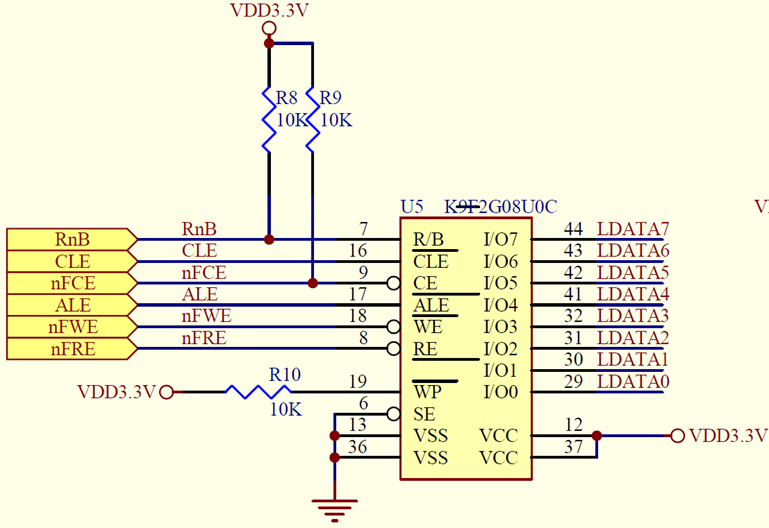
|
Pin Name |
Pin Function |
|
R/B(RnB) |
The R/B output indicates the status of the device operation. When low, it indicates that a program, erase or random read operation is in process and returns to high state upon completion. It is an open drain output and does not float to high-z condition when the chip is deselected or when outputs are disabled. |
|
CLE(CLE) |
The CLE input controls the activating path for commands sent to the command register. When active high, commands are latched into the command register through the I/O ports on the rising edge of the WE signal. |
|
CE(nFCE) |
The CE input is the device selection control. When the device is in the Busy state, CE high is ignored, and the device does not return to standby mode in program or erase operation. |
|
ALE(ALE) |
The ALE input controls the activating path for address to the internal address registers. Addresses are latched on the rising edge of WE with ALE high. |
|
WE(nFWE) |
The WE input controls writes to the I/O port. Commands, address and data are latched on the rising edge of the WE pulse. |
|
RE(nFRE) |
The RE input is the serial data-out control, and when active drives the data onto the I/O bus. Data is valid tREA after the falling edge of RE which also increments the internal column address counter by one. |
|
I/O(LDATA0-LDATA7) |
The I/O pins are used to input command, address and data, and to output data during read operations. The I/O pins float to high-z when the chip is deselected or when the outputs are disabled. |
在U-BOOT上操作Nand Flash
NAND FLASH
S3C2440
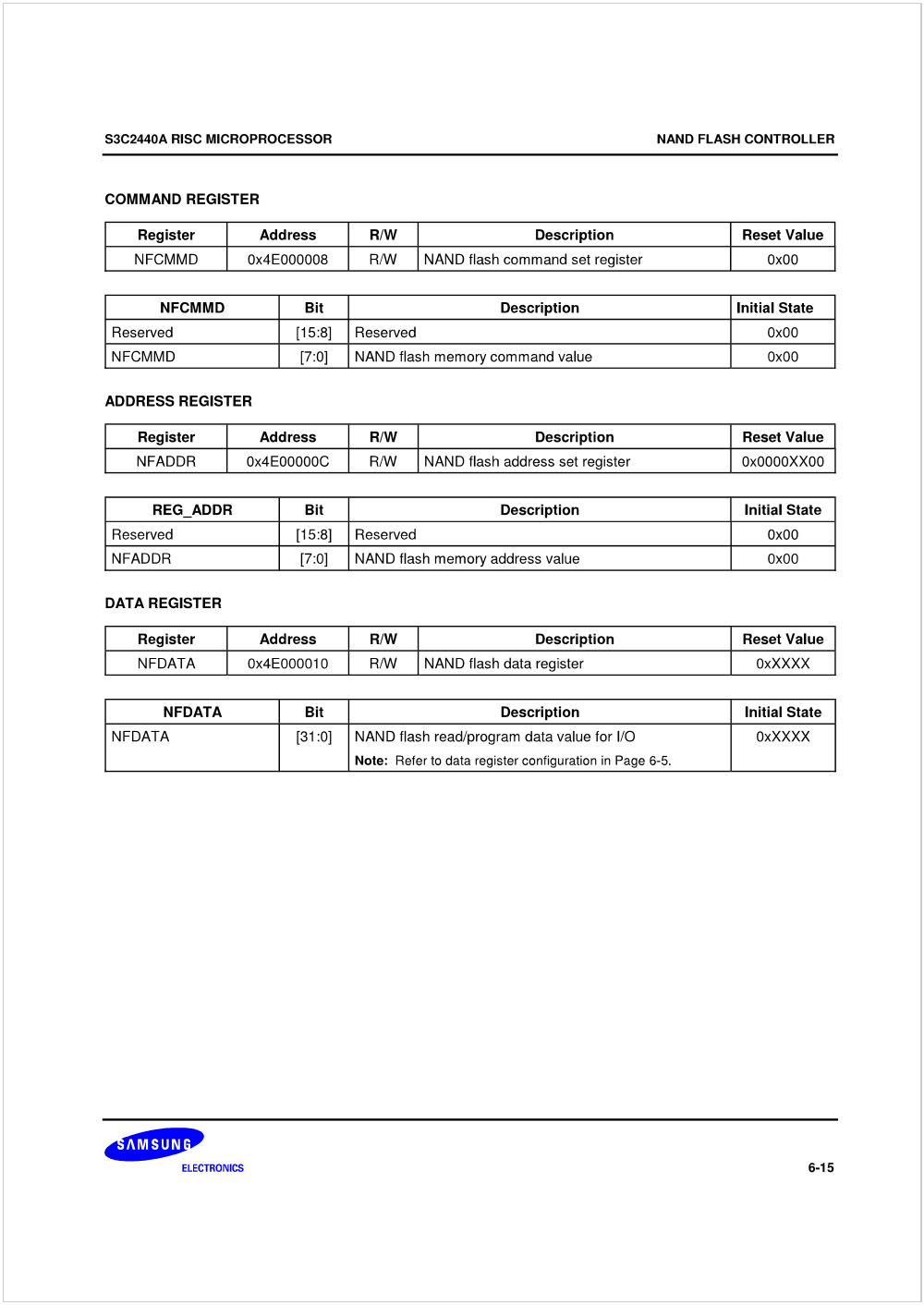
发命令 选中芯片
CLE设为高电平 NFCMMD=命令值
在DATA0~DATA7上输出命令值
发出一个写脉冲
发地址 选中芯片 NFADDR=地址值
ALE设为高电平
在DATA0~DATA7上输出地址值
发出一个写脉冲
发数据 选中芯片 NFDATA=数据值
ALE,CLE设为低电平
在DATA0~DATA7上输出数据值
发出一个写脉冲
读数据 选中芯片 val=NFDATA
发出读脉冲
读DATA0~DATA7的数据
OpenJTAG> help md
md [.b, .w, .l] address [# of objects]
- memory display
OpenJTAG> help mw
mw [.b, .w, .l] address value [count]
- write memory
•b 1字节
•W 2字节
•l 4字节
1. 读ID
|
S3C2440 |
u-boot |
|
选中 NFCONT的bit1设为0 |
md.l 0x4E000004 1; mw.l 0x4E000004 1 |
|
发出命令0x90 NFCMMD=0x90 |
mw.b 0x4E000008 0x90 |
|
发出地址0x00 NFADDR=0x00 |
mw.b 0x4E00000C 0x00 |
|
读数据得到0xEC val=NFDATA |
md.b 0x4E000010 1 |
|
读数据得到device code val=NFDATA |
md.b 0x4E000010 1 |
|
退出读ID的状态 NFCMMD=0xff |
mw.b 0x4E000008 0xff |
2. 读内容: 读0地址的数据
使用UBOOT命令:
nand dump 0
Page 00000000 dump:
17 00 00 ea 14 f0 9f e5 14 f0 9f e5 14 f0 9f e5
|
S3C2440 |
u-boot |
|
选中 NFCONT的bit1设为0 |
md.l 0x4E000004 1; mw.l 0x4E000004 1 |
|
发出命令0x00 NFCMMD=0x00 |
mw.b 0x4E000008 0x00 |
|
发出地址0x00 NFADDR=0x00 |
mw.b 0x4E00000C 0x00 |
|
发出地址0x00 NFADDR=0x00 |
mw.b 0x4E00000C 0x00 |
|
发出地址0x00 NFADDR=0x00 |
mw.b 0x4E00000C 0x00 |
|
发出地址0x00 NFADDR=0x00 |
mw.b 0x4E00000C 0x00 |
|
发出地址0x00 NFADDR=0x00 |
mw.b 0x4E00000C 0x00 |
|
发出命令0x30 NFCMMD=0x30 |
mw.b 0x4E000008 0x30 |
|
读数据得到0x17 val=NFDATA |
md.b 0x4E000010 1 |
|
读数据得到0x00 val=NFDATA |
md.b 0x4E000010 1 |
|
读数据得到0x00 val=NFDATA |
md.b 0x4E000010 1 |
|
读数据得到0xea val=NFDATA |
md.b 0x4E000010 1 |
|
退出读状态 NFCMMD=0xff |
mw.b 0x4E000008 0xff |
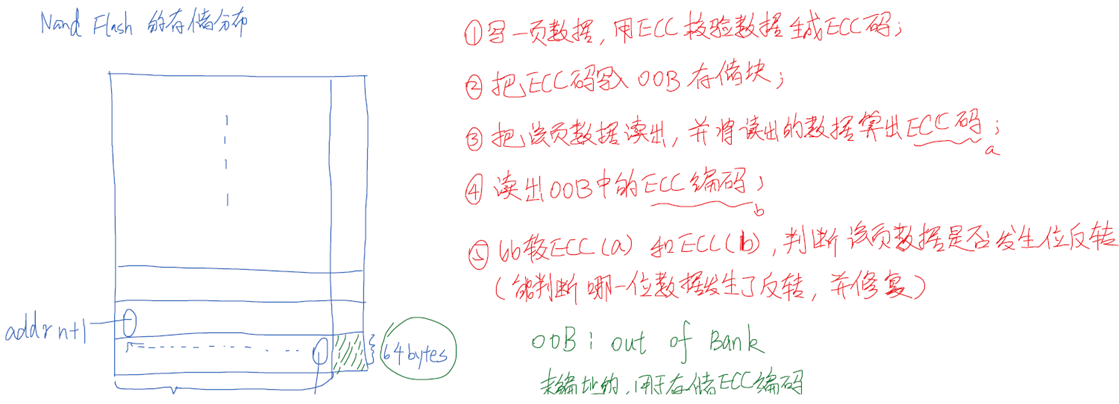
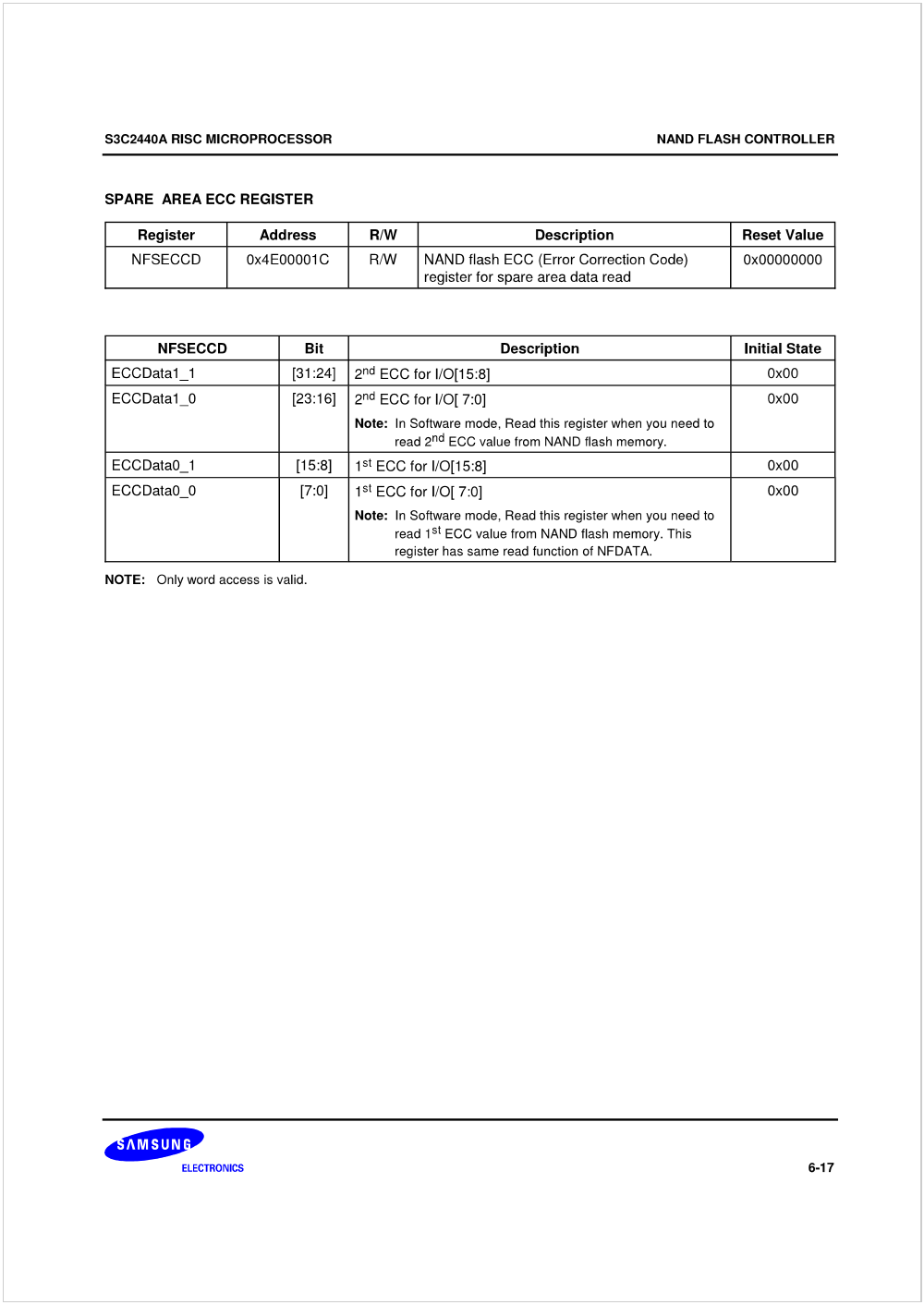
ECC的作用

S3C2440-Nand Flash Controller Register






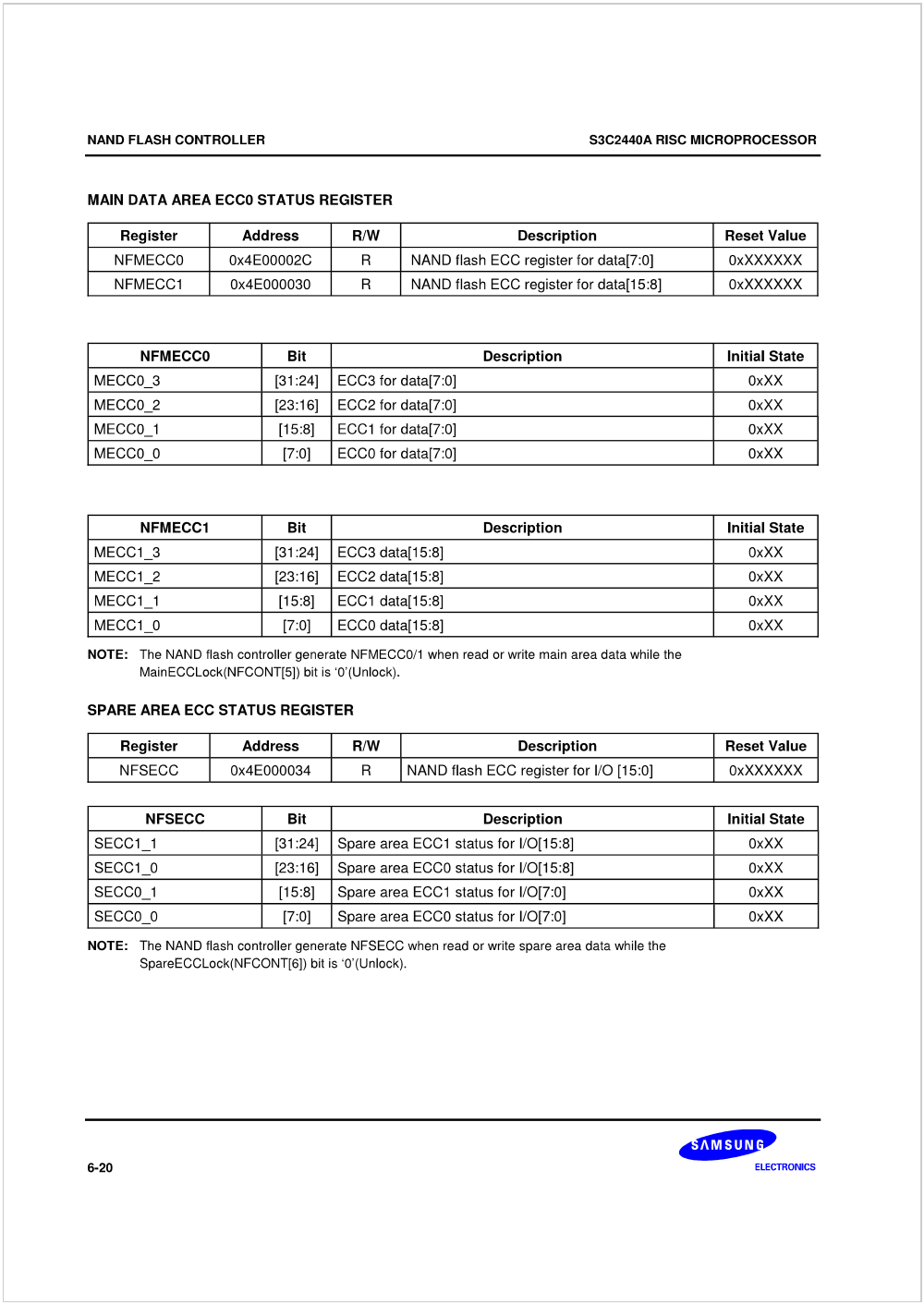
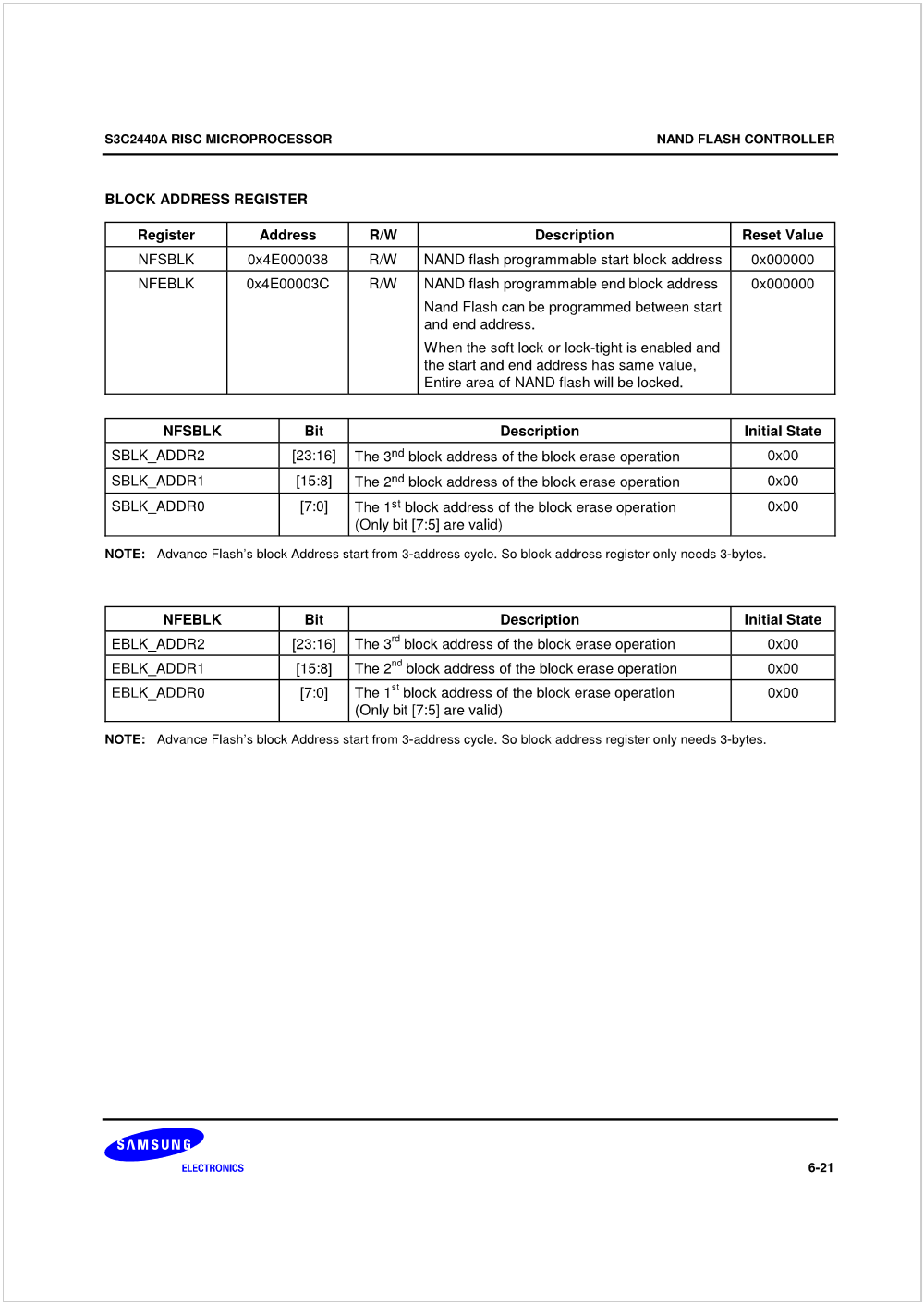
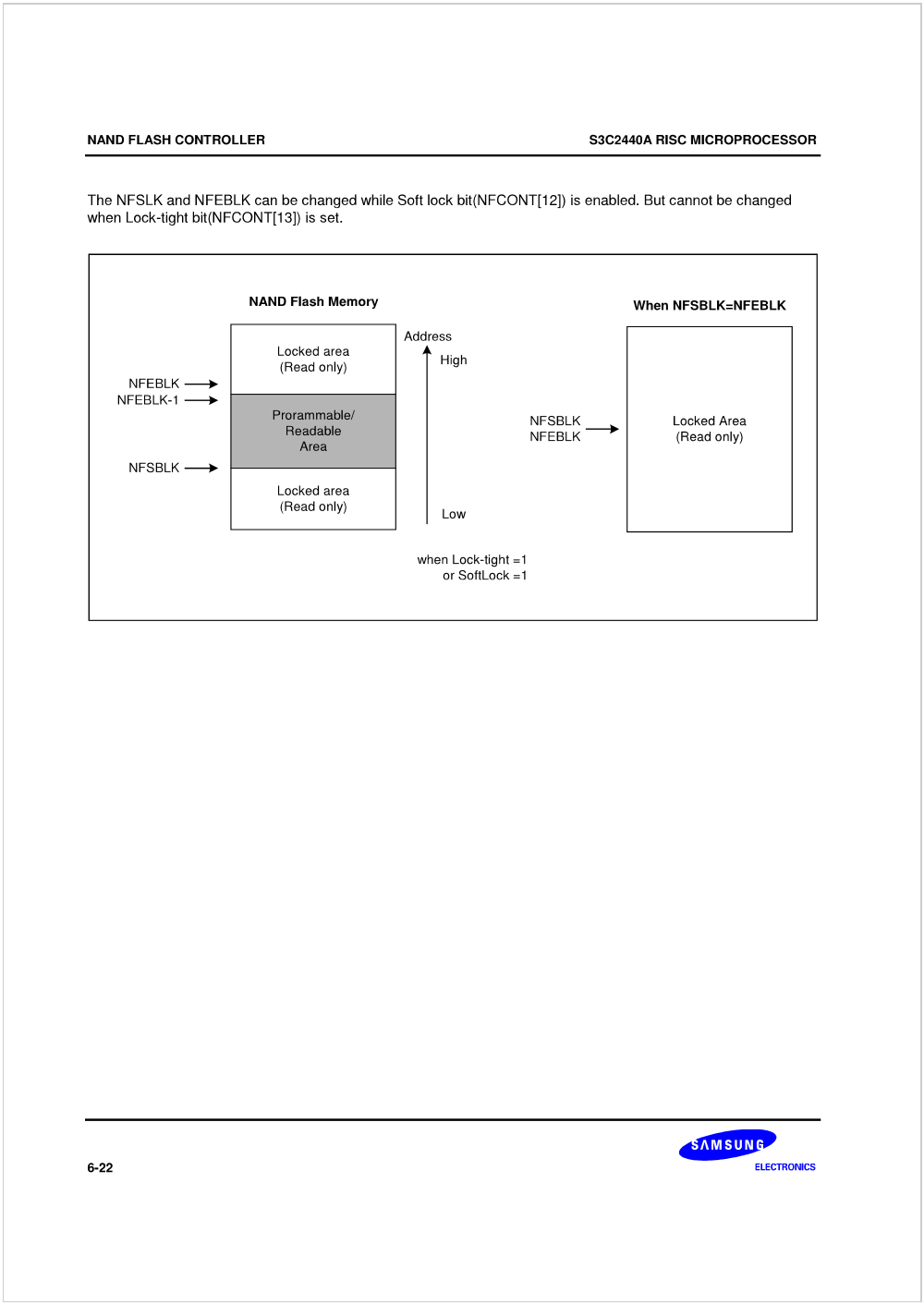
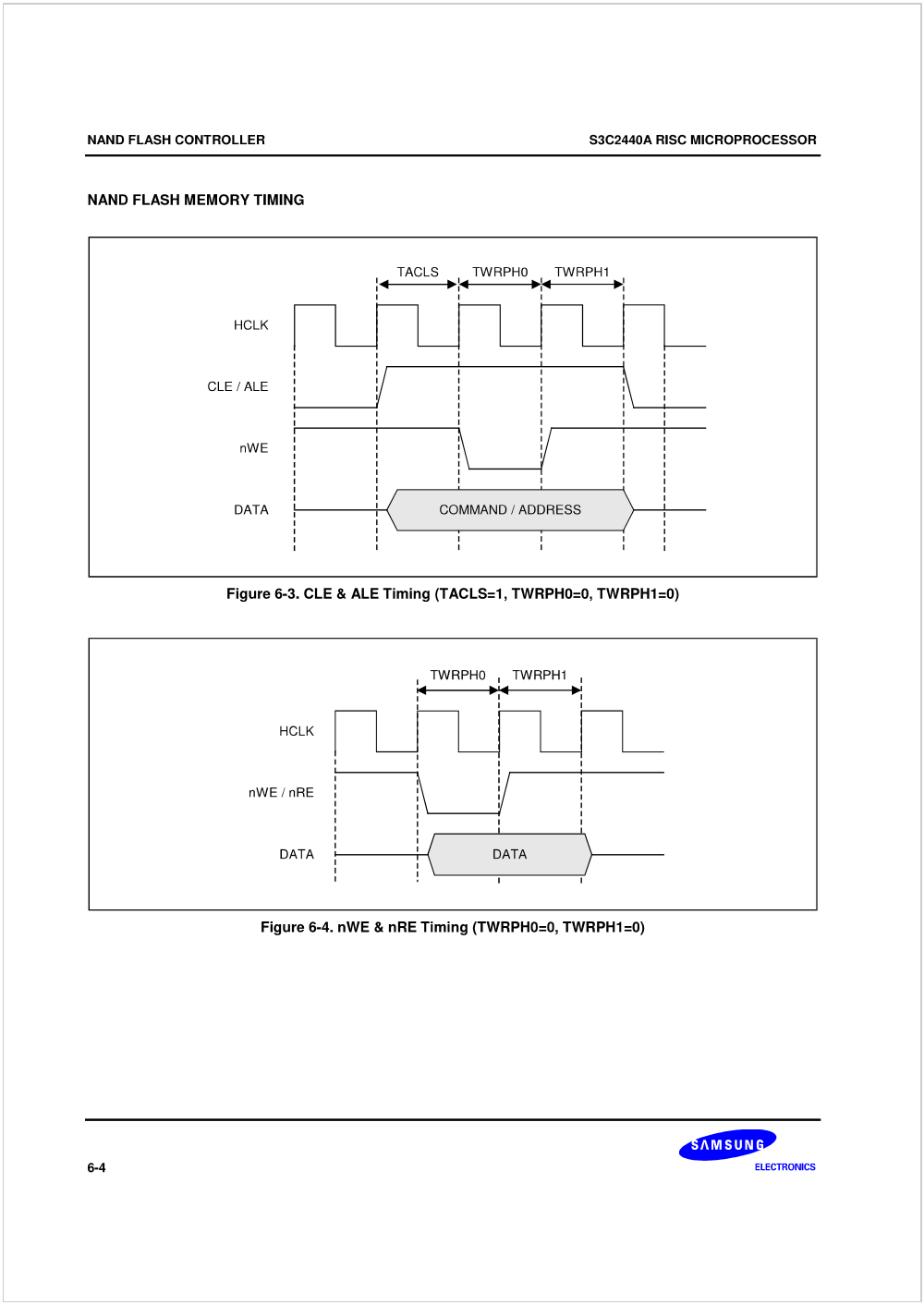
S3C2440-Nand Flash Memory Timing
K9F2G08U0C-Key Characteristic
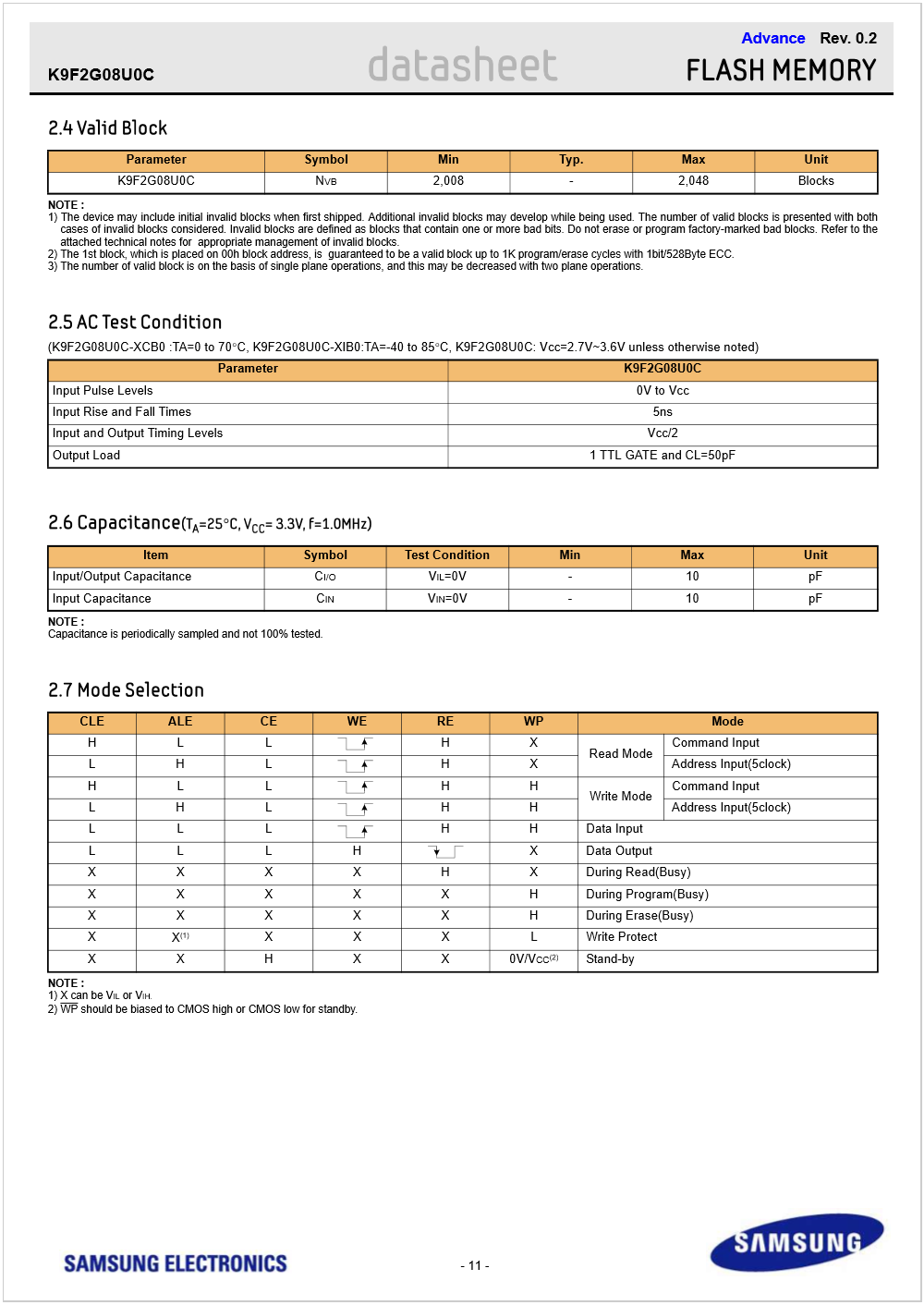

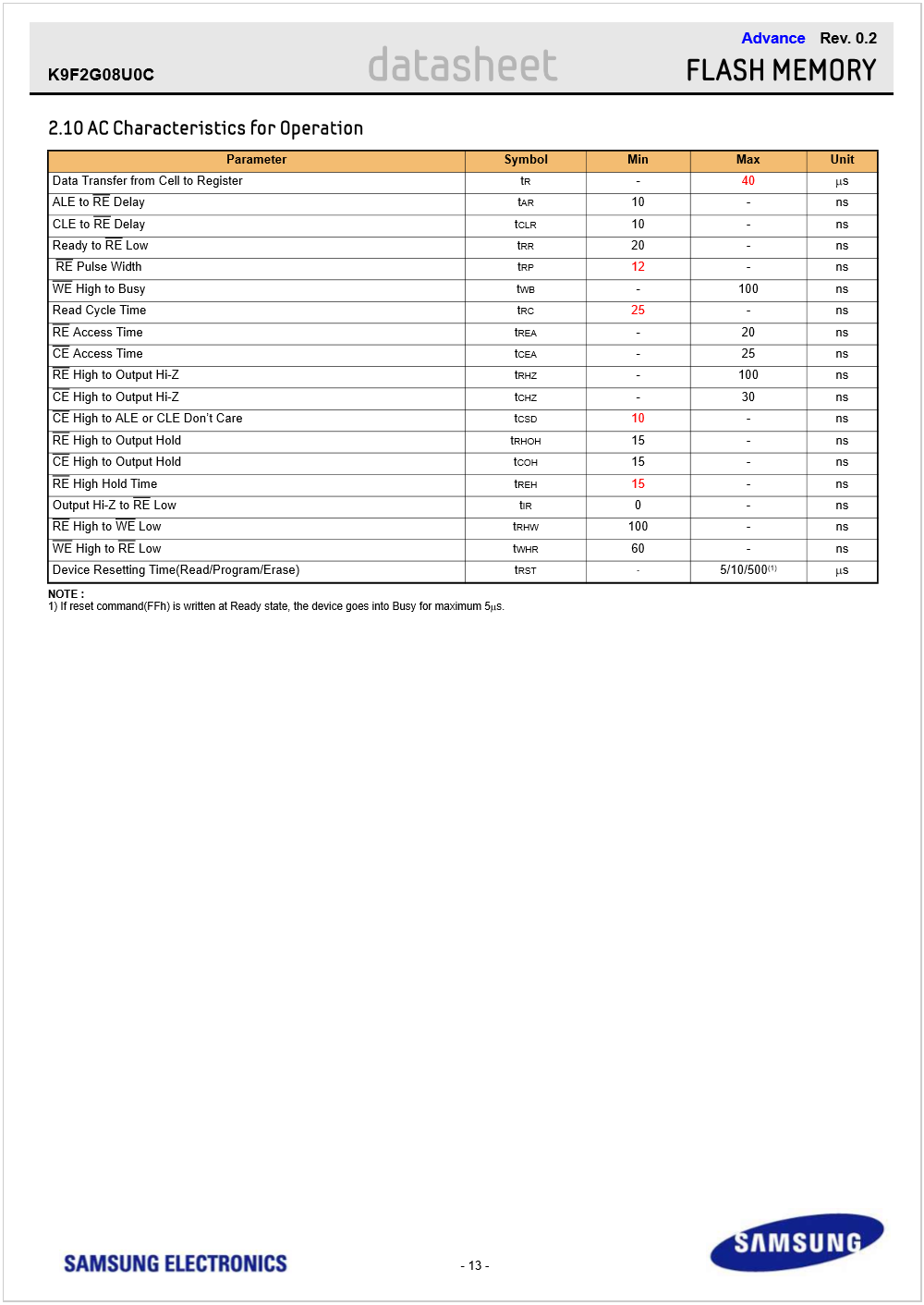
K9F2G08U0C-Operation Timing
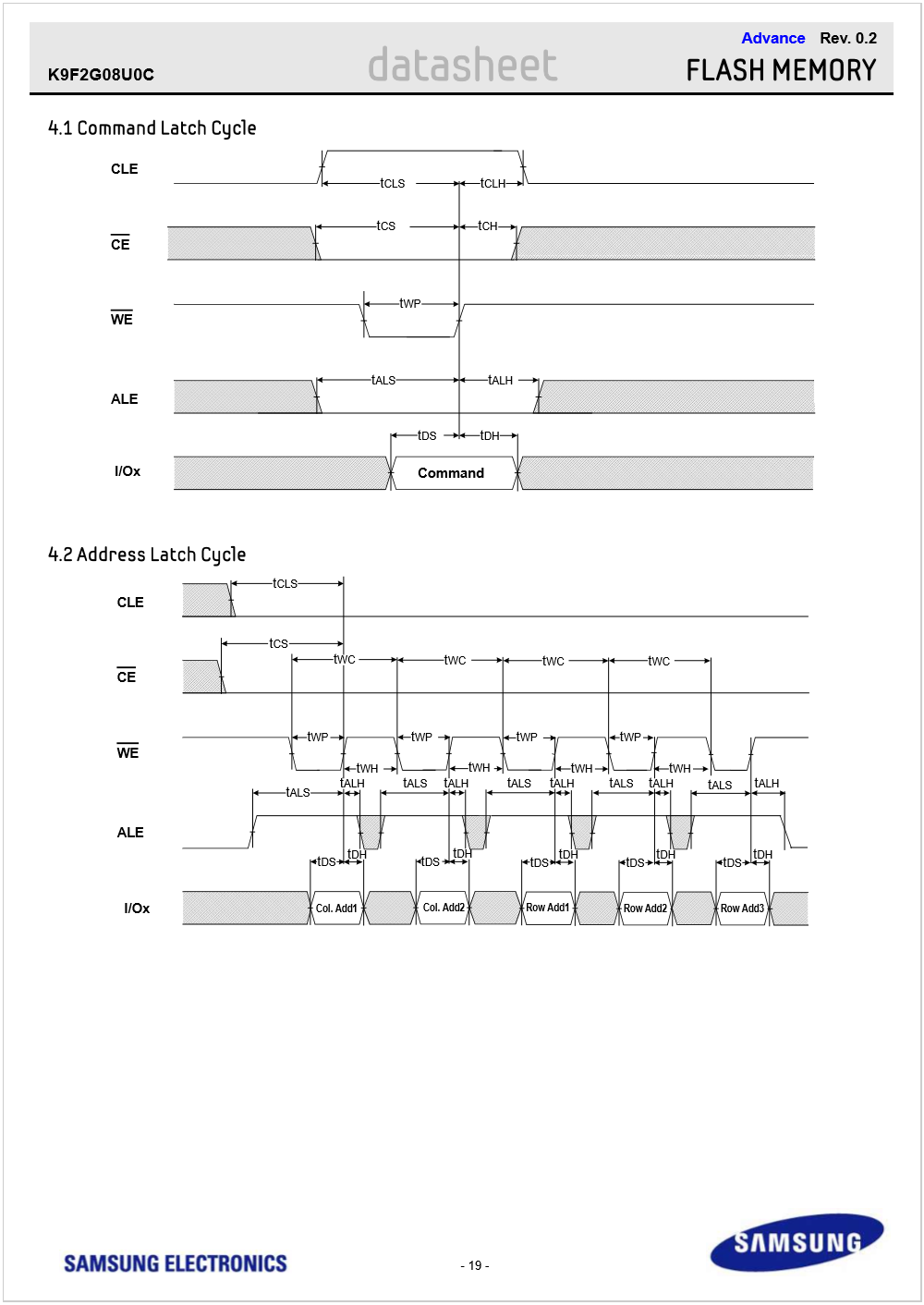
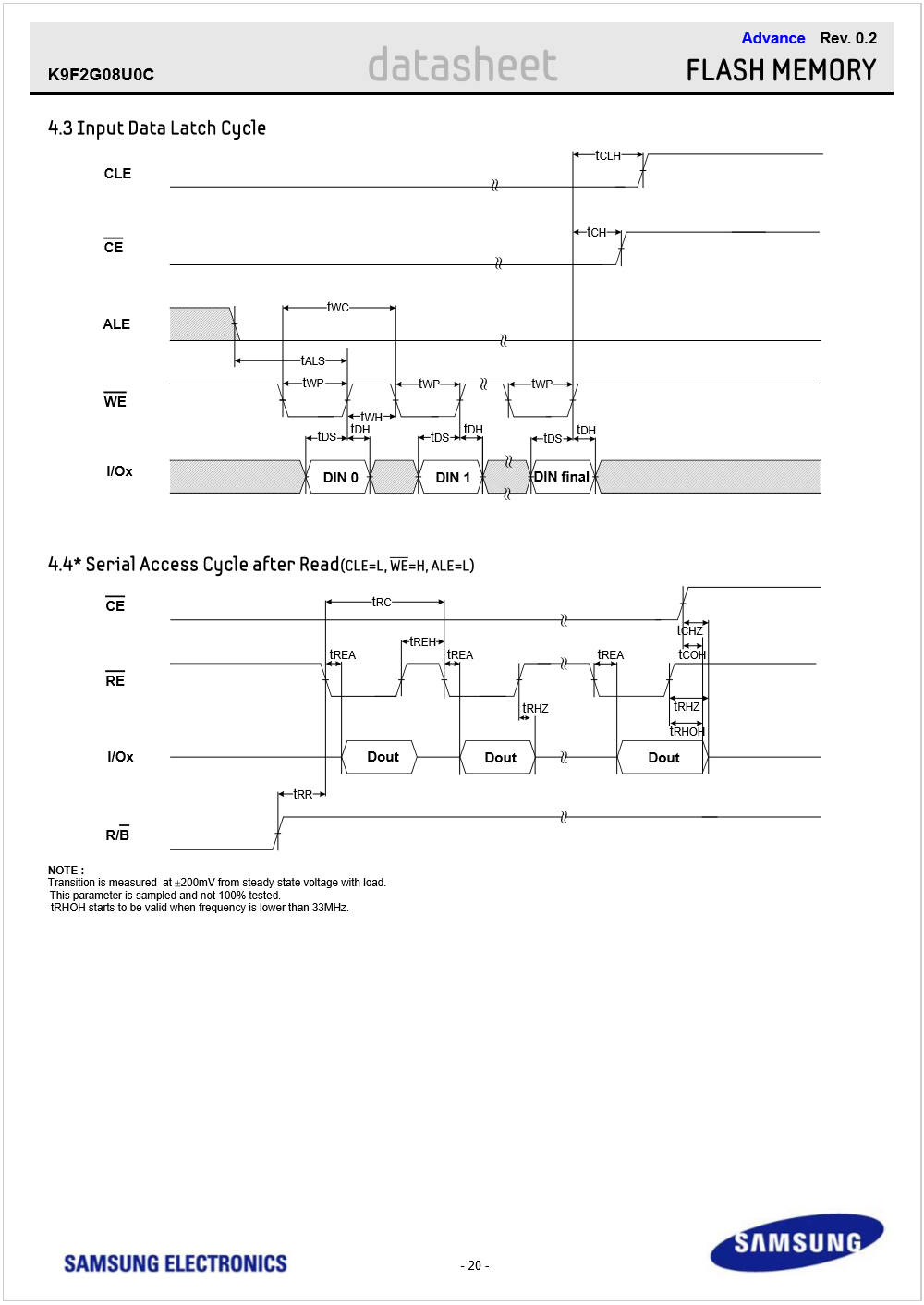
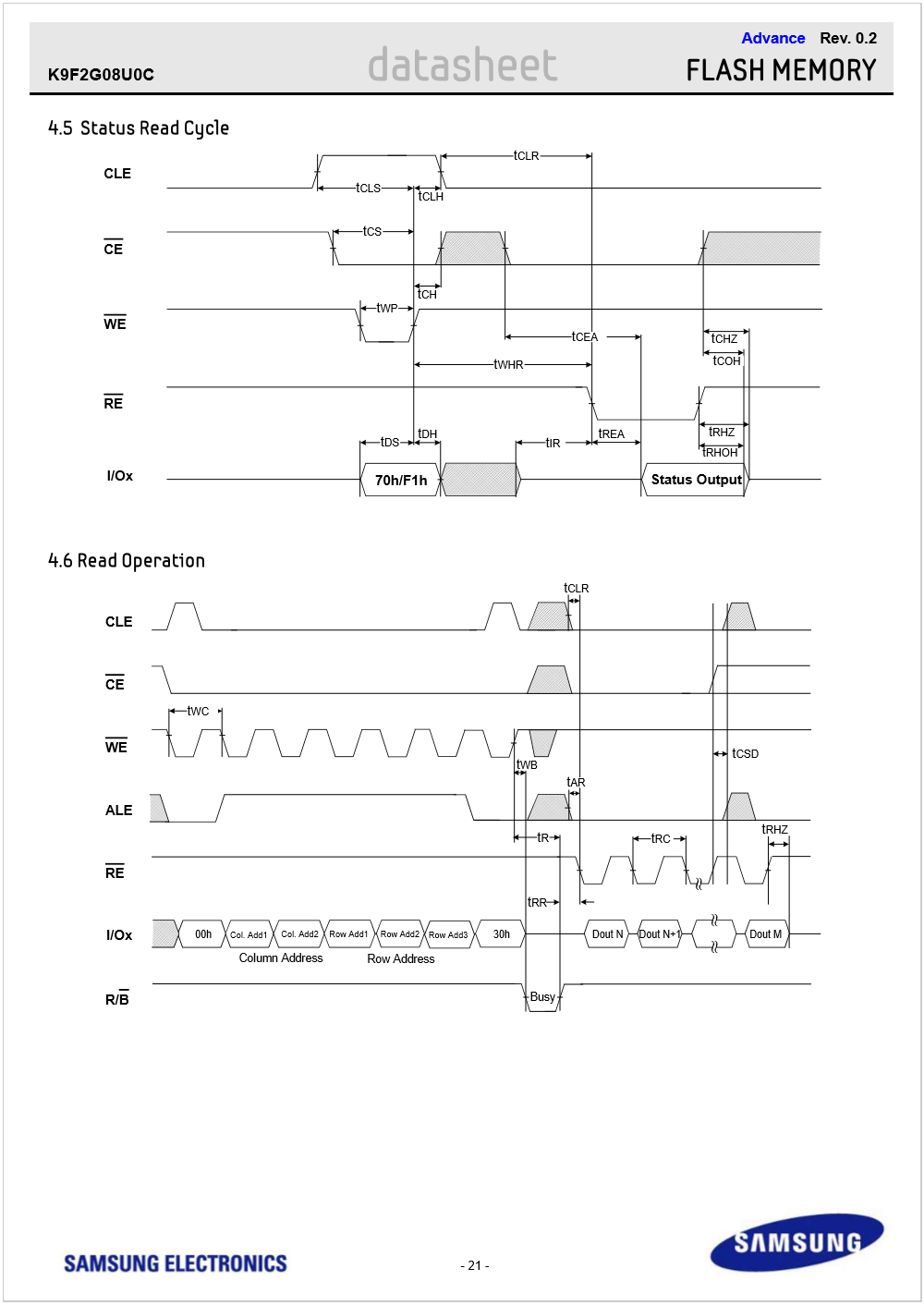
驱动程序
driver.c
1
19
24
26
29 };
47
48
52 [] .name .size .offset },
59
60 [] .name .offset .size },
65
66 [] .name .offset .size },
71
72 [] .name .offset .size },
77 };
78
79 {
81 {
83 regs_nand }
86 regs_nand }
90 }
92
93 {
95 {
97 regs_nand }
100 {
102 regs_nand }
105 }
107
108 {
110 }
112
113
114 {
117
119 nand
123 regs_nand
125 nand nand nand nand nand nand
135 clk clk_enable(clk);
139
140 regs_nand
146 regs_nand
150
151 mtd mtd mtd
156 nand_scan(mtd, );
159
160 add_mtd_partitions(mtd, nand_parts, );
162
163
167 ;
168 }
169
170 {
172 del_mtd_partitions(mtd);
173 kfree(nand);
174 kfree(mtd);
175 iounmap(regs_nand);
176 }
178
179 module_init(nand_init);
180 module_exit(nand_exit);
181 MODULE_LICENSE("GPL");
182 /******** 1 end ********/
Makefile
1
3 make -C
6 make -C rm -rf modules.order
9
10 obj-m += nand_drv.o
调试
pc-linux:
//格式化工具
tar xjf mtd-utils-05.07.23.tar.bz2
cd mtd-utils-05.07.23/util
修改Makefile:
#CROSS=arm-linux-
改为
CROSS=arm-linux-
make
cp flash_erase flash_eraseall /work/nfs_root/fs_mini/bin/
//格式化工具-----end
board-uboot:
nfs 30000000 192.168.0.103:/work/nfs_root/uImage_f
//使用NFS作为根文件系统
set bootargs console=ttySAC0 root=/dev/nfs nfsroot=192.168.0.103:/work/nfs_root/fs_mini ip=192.168.0.33:192.168.0.103:192.168.0.1:255.255.255.0::eth0:off
bootm 30000000
board-linux:
insmod nand_drv.ko
flash_eraseall /dev/mtd3 // yaffs //格式化
mount -t yaffs /dev/mtdblock3 /mnt
//挂接
NAND Flash驱动的更多相关文章
- Smart210学习记录----nand flash驱动
[详解]如何编写Linux下Nand Flash驱动 :http://www.cnblogs.com/linux-rookie/articles/3016990.html 当读写文件请求到来的时候, ...
- Nand Flash驱动(实现初始化以及读操作)
简单制作一个Nand Flash驱动(只需要初始化Flash以及读Flash) 打开2440芯片手册,K9F2G08U0M芯片手册(因为2440中Nand Flash是用的256MB(2Gb)内存,8 ...
- linux2.6.30.4内核移植(2)——Nand Flash驱动移植
内核源码:linux2.6.30.4 交叉编译工具:3.4.5 移植linux内核至:TQ2440 工作基础:http://www.cnblogs.com/nufangrensheng/p/36696 ...
- linux下Pl353 NAND Flash驱动分析
linux的NAND Flash驱动位于drivers/mtd/nand子文件夹下: nand_base.c-->定义通用的nand flash基本操作函数,如读写page,可自己重写这些函数 ...
- NAND FLASH 驱动分析
NAND FLASH是一个存储芯片 那么: 这样的操作很合理"读地址A的数据,把数据B写到地址A" 问1. 原理图上NAND FLASH和S3C2440之间只有数据线, ...
- 如何编写linux下nand flash驱动-2
[Nand Flash引脚(Pin)的说明] 图3.Nand Flash引脚功能说明 上图是常见的Nand Flash所拥有的引脚(Pin)所对应的功能,简单翻译如下: 1. I/O0 ~ ...
- 如何编写linux下nand flash驱动-4
2. 软件方面 如果想要在Linux下编写Nand Flash驱动,那么就先要搞清楚Linux下,关于此部分的整个框架.弄明白,系统是如何管理你的nand flash的,以及,系统都帮你做 ...
- 15.1 linux操作系统下nand flash驱动框架2
当我们需要在操作系统上读写普通文件的时候,总是需要一层层往下,最终到达硬件相关操作,当然底层设备大多数都是块设备 NAND FLASH就作为一个最底层的块设备. 而写驱动,就是要构建硬件与操作系统之间 ...
- 十八、Nand Flash驱动和Nor Flash驱动
在读者学习本章之前,最好了解Nand Flash读写过程和操作,可以参考:Nand Flash裸机操作. 一开始想在本章写eMMC框架和设备驱动,但是没有找到关于eMMC设备驱动具体写法,所以本章仍继 ...
- Linux 下 Nand Flash 驱动说明
注册 driver_register 通过 module_init(s3c2410_nand_init);注册 Nand Flash 驱动. 在 s3c2410_nand_init ()中通过 dri ...
随机推荐
- Pyhton语言的优缺点
python作为一门高级编程语言,它的诞生虽然很偶然,但是它得到程序员的喜爱却是必然之路. 龟叔给Python的定位是“优雅”.“明确”.“简单”,所以Python程序看上去总是简单易懂,初学者学Py ...
- SpringMVC 注解配置
使用注解配置spring mvc (1)spring mvc的配置文件 <?xml version="1.0" encoding="UTF-8"?> ...
- IOS 错误原因
当xcode提示以下错误时,很可能的原因是由于ViewController中的View在Controller中连接了outlet,然后又删除了Controller中对应的属性,导致xcode找不到这个 ...
- 如何在django-filter中用choice field 的 value 值过滤对象
如果我们有这样一个model: class IPInfoModel(models.Model): TYPE_INTRANET = 1 TYPE_INTERNET = 2 IP_TYPES = ( (T ...
- Swift-如何快速学习Swift
关于本文: 1.说明本文写作的目的 2.整理了Swift的基本语法树 3.看图作文 一.写作目的 昨天看了一个知识专栏,作者讲述的是“如何研究性的学习”.整个课程1个小时9分钟,花了我19块人民币.其 ...
- python 爬虫原理
简单来说互联网是由一个个站点和网络组成的大网,我们通过浏览器访问站点,站点把HTML.JS.CSS代码返回给浏览器,这些代码经过浏览器解析.渲染,将丰富多彩的网页呈现我们眼前: 一.爬虫是什么? 如果 ...
- Python作业篇 day04
###一.写代码,有如下列表,按照要求实现每一个功能 li=['alex','bibi','cc0','didi'] #1.计算列表的长度 #2.列表中追加元素'seven',并输出添加后的列表 #3 ...
- Android_实验小心得_持续补充中......
1.LineLayout布局控件宽度百分比显示 其中,宽度百分比 = 控件权重 / 所在parent中所有控件权重和 <LinearLayout android:layout_width=&qu ...
- 如何将文件压缩成.tar.gz格式的文件
1.下载“7-ZIP“这个软件 2.安装7-ZIP以后,直接在你想要打包的文件上点右键菜单,会有一个7-ZIP的子菜单栏,类似WinRAR和WinZIP的那种右键菜单.然后选“7-ZIP”->“ ...
- Manjro i3 桌面 添加输入法 及无声音配置方法(This sound device does not have any capture controls.问题)
一.i3桌面添加输入法 1.把配置写在 /etc/environment中 export GTK_IM_MODULE=fcitx export QT_IM_MODULE=fcitx export XM ...