
Identityserver4 ClientCredentials授权
转自:https://www.cnblogs.com/hyqq/p/14138024.html;侵删。
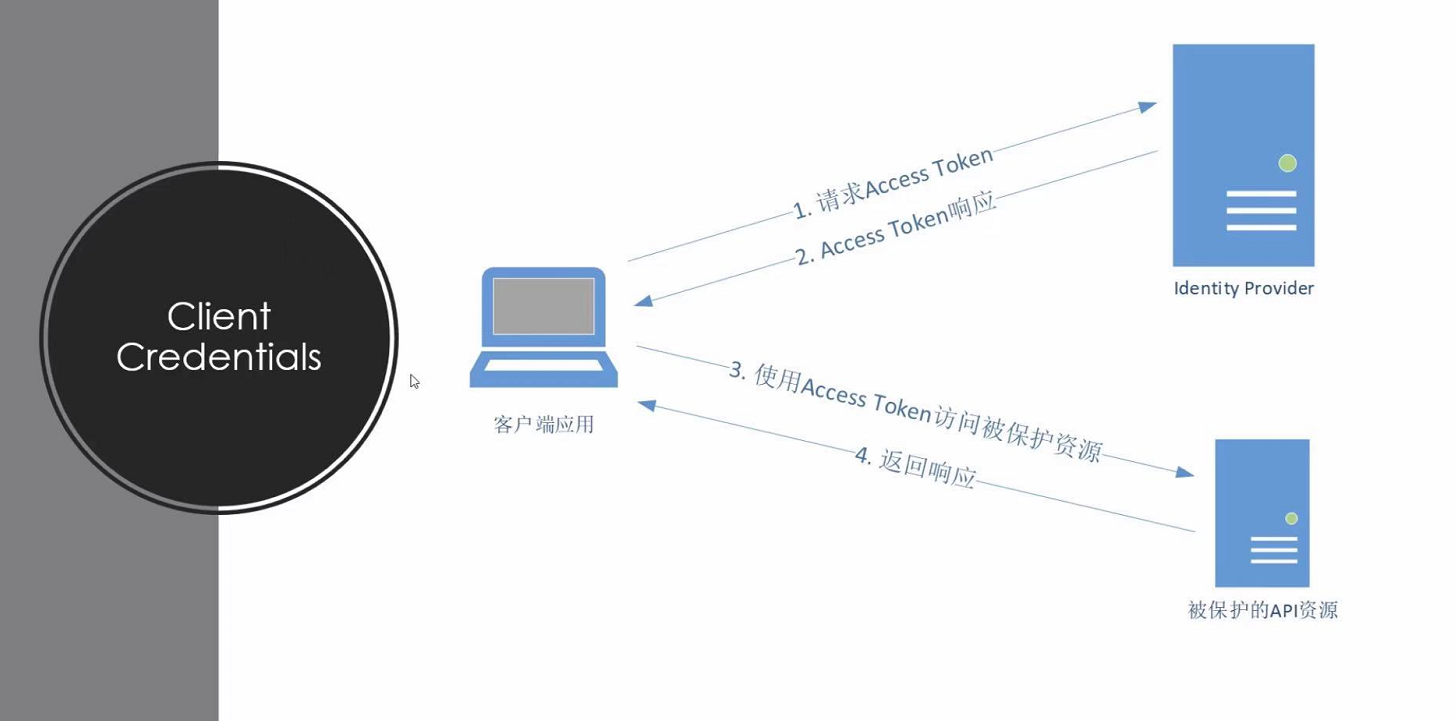
Client Credentials
客户端应用不代表用户,客户端应用本身就相当于资源所有者
通常用于机器对机器的通信
客户端也需要身份认证
详细查看https://oauth.net/2/grant-types/client-credentials/
安装identityserver4模板
dotnet new -i identityserver4.templates //下载identityserver4模板

dotnet new is4inmem --name Idp //创建一个is4inmem模板的项目 名字为Idp
Config代码
using IdentityServer4.Models;

using System.Collections.Generic;

namespace Idp

{

    public static class Config

    {

        public static IEnumerable<IdentityResource> IdentityResources =>

            new IdentityResource[]

            {

                new IdentityResources.OpenId(),

                new IdentityResources.Profile(),

            };

        public static IEnumerable<ApiScope> ApiScopes =>

            new ApiScope[]

            {

                new ApiScope("scope1"),

            };

        public static IEnumerable<ApiResource> ApiResources =>

            new ApiResource[]

            {

                new ApiResource("api1","#api1")

                {

                    //!!!重要

                    Scopes = { "scope1"}

                }

            };

        public static IEnumerable<Client> Clients =>

            new Client[]

            {

                // m2m client credentials flow client

                new Client

                {

                    ClientId = "console client",

                    ClientName = "Client Credentials Client",

                    AllowedGrantTypes = GrantTypes.ClientCredentials,

                    ClientSecrets = { new Secret("511536EF-F270-4058-80CA-1C89C192F69A".Sha256()) },

                    AllowedScopes = { "scope1" }

                },

            };

    }

}
startup代码
using IdentityServerHost.Quickstart.UI;

using Microsoft.AspNetCore.Builder;

using Microsoft.AspNetCore.Hosting;

using Microsoft.Extensions.Configuration;

using Microsoft.Extensions.DependencyInjection;

using Microsoft.Extensions.Hosting;

namespace Idp

{

    public class Startup

    {

        public IWebHostEnvironment Environment { get; }

        public IConfiguration Configuration { get; }

        public Startup(IWebHostEnvironment environment, IConfiguration configuration)

        {

            Environment = environment;

            Configuration = configuration;

        }

        public void ConfigureServices(IServiceCollection services)

        {

            services.AddControllersWithViews();

            //注册IdentityServer

            var builder = services.AddIdentityServer(options =>

            {

                options.Events.RaiseErrorEvents = true;

                options.Events.RaiseInformationEvents = true;

                options.Events.RaiseFailureEvents = true;

                options.Events.RaiseSuccessEvents = true;

                // see https://identityserver4.readthedocs.io/en/latest/topics/resources.html

                options.EmitStaticAudienceClaim = true;

            })

                //用户

                .AddTestUsers(TestUsers.Users);

            // in-memory, code config

            builder.AddInMemoryIdentityResources(Config.IdentityResources);

            builder.AddInMemoryApiScopes(Config.ApiScopes);

            //添加API资源

            builder.AddInMemoryApiResources(Config.ApiResources);

            builder.AddInMemoryClients(Config.Clients);

            // not recommended for production - you need to store your key material somewhere secure

            builder.AddDeveloperSigningCredential();

        }

        public void Configure(IApplicationBuilder app)

        {

            if (Environment.IsDevelopment())

            {

                app.UseDeveloperExceptionPage();

            }

            app.UseStaticFiles();

            app.UseRouting();

            app.UseIdentityServer();

            app.UseAuthorization();

            app.UseEndpoints(endpoints =>

            {

                endpoints.MapDefaultControllerRoute();

            });

        }

    }

}
创建一个控制台应用 consoleclient
安装identitymodel库
Program代码
using IdentityModel.Client;

using System;

using System.Net.Http;

using System.Threading.Tasks;

namespace consoleclient

{

    class Program

    {

        static async Task Main(string[] args)

        {

            //

            var client = new HttpClient();

            var disco = await client.GetDiscoveryDocumentAsync("http://localhost:5001");

            if (disco.IsError)

            {

                Console.WriteLine(disco.Error);

                return;

            }

            //请求accesstoken

            var tokenResponse = await client.RequestClientCredentialsTokenAsync(new ClientCredentialsTokenRequest

            {

                Address = disco.TokenEndpoint,

                ClientId = "console client",

                ClientSecret = "511536EF-F270-4058-80CA-1C89C192F69A",

                Scope = "scope1"

            });

            if (tokenResponse.IsError)

            {

                Console.WriteLine(tokenResponse.Error);

                return;

            }

            Console.ReadKey();

        }

    }

}
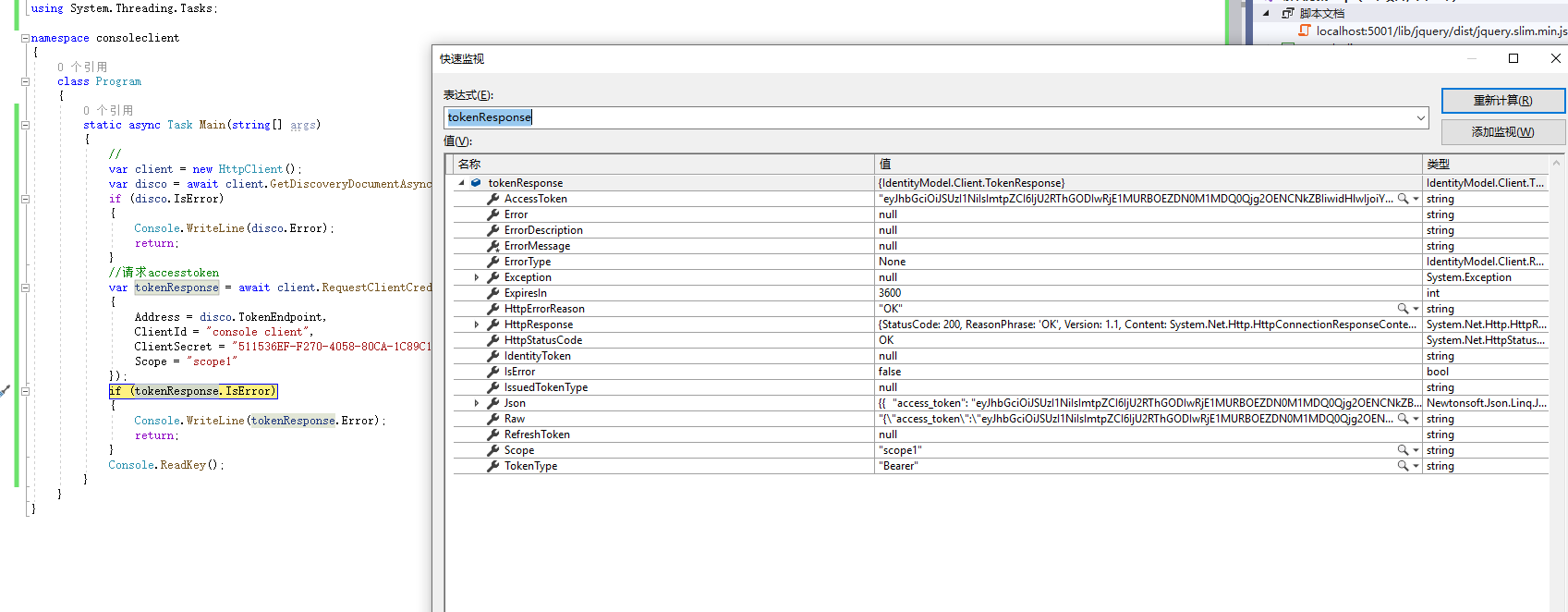
启动2个项目 监听tokenresponse
创建空的web项目 添加Controller文件夹 添加IdentityController控制器
添加Microsoft.AspNetCore.Authentication.JwtBearer库
IdentityController代码
using Microsoft.AspNetCore.Authorization;

using Microsoft.AspNetCore.Mvc;

using System.Linq;

namespace scope1

{

    [Route("api/[controller]")]

    [ApiController]

    [Authorize]

    public class IdentityController : ControllerBase

    {

        [HttpGet]

        public IActionResult Get()

        {

            return new JsonResult(from c in User.Claims select new { c.Type,c.Value} );

        }

    }

}
Startup代码
using Microsoft.AspNetCore.Authentication.JwtBearer;

using Microsoft.AspNetCore.Builder;

using Microsoft.AspNetCore.Hosting;

using Microsoft.Extensions.DependencyInjection;

using Microsoft.Extensions.Hosting;

namespace scope1

{

    public class Startup

    {

        public void ConfigureServices(IServiceCollection services)

        {

            services.AddControllers();

            services.AddAuthentication(JwtBearerDefaults.AuthenticationScheme)

        .AddJwtBearer(options =>

        {

            //IdentityServer地址

            options.Authority = "http://localhost:5000";

            //对应Idp中ApiResource的Name

            options.Audience = "api1";

            //不使用https

            options.RequireHttpsMetadata = false;

        });

        }

        public void Configure(IApplicationBuilder app, IWebHostEnvironment env)

        {

            if (env.IsDevelopment())

            {

                app.UseDeveloperExceptionPage();

            }

            app.UseRouting();

            //身份验证

            app.UseAuthentication();

            //授权

            app.UseAuthorization();

            app.UseEndpoints(endpoints =>

            {

                endpoints.MapControllers();

            });

        }

    }

}
继续修改consoleclient项目的Program.cs
using IdentityModel.Client;

using Newtonsoft.Json.Linq;

using System;

using System.Net.Http;

using System.Threading.Tasks;

namespace consoleclient

{

    class Program

    {

        static async Task Main(string[] args)

        {

            var client = new HttpClient();

            var disco = await client.GetDiscoveryDocumentAsync("http://localhost:5000");

            if (!disco.IsError)

            {

                //请求accesstoken

                var tokenResponse = await client.RequestClientCredentialsTokenAsync(new ClientCredentialsTokenRequest

                {

                    Address = disco.TokenEndpoint,

                    ClientId = "console client",

                    ClientSecret = "511536EF-F270-4058-80CA-1C89C192F69A",

                    Scope = "scope1"

                });

                if (!tokenResponse.IsError)

                {

                    //使用请求accesstoken访问被保护的资源

                    var apiClient = new HttpClient();

                    apiClient.SetBearerToken(tokenResponse.AccessToken);

                    var response = await apiClient.GetAsync("http://localhost:5001/api/Identity");

                    var content = await response.Content.ReadAsStringAsync();

                    Console.WriteLine(JArray.Parse(content));

                }

            }

        }

    }

}
启动程序
打印结果
Identityserver4 ClientCredentials授权的更多相关文章
- IdentityServer4 自定义授权模式
IdentityServer4除了提供常规的几种授权模式外(AuthorizationCode.ClientCredentials.Password.RefreshToken.DeviceCode), ...
- IdentityServer4(客户端授权模式)
1.新建三个项目 IdentityServer:端口5000 IdentityAPI:端口5001 IdentityClient: 2.在IdentityServer项目中添加IdentityServ ...
- IdentityServer4 (3) 授权码模式(Authorization Code)
写在前面 1.源码(.Net Core 2.2) git地址:https://github.com/yizhaoxian/CoreIdentityServer4Demo.git 2.相关章节 2.1. ...
- 一看就懂的IdentityServer4认证授权设计方案
查阅了大多数相关资料,总结设计一个IdentityServer4认证授权方案,我们先看理论,后设计方案. 1.快速理解认证授权 我们先看一下网站发起QQ认证授权,授权通过后获取用户头像,昵称的流程. ...
- 认证授权:IdentityServer4 - 各种授权模式应用
前言: 前面介绍了IdentityServer4 的简单应用,本篇将继续讲解IdentityServer4 的各种授权模式使用示例 授权模式: 环境准备 a)调整项目结构如下: b)调整cz.Id ...
- Swagger+IdentityServer4测试授权验证
1.Bearer授权操作,添加如下代码 services.AddSwaggerGen(options => { options.AddSecurityDefinition("Beare ...
- IdentityServer4 QuckStart 授权与自定义Claims
最近在折腾IdentityServer4,为了简单,直接使用了官方给的QuickStart示例项目作为基础进行搭建.有一说一,为了保护一个API,感觉花费的时间比写一个API还要多. 本文基于ASP. ...
- IdentityServer4系列 | 授权码模式
一.前言 在上一篇关于简化模式中,通过客户端以浏览器的形式请求IdentityServer服务获取访问令牌,从而请求获取受保护的资源,但由于token携带在url中,安全性方面不能保证.因此,我们可以 ...
- 【ASP.NET Core分布式项目实战】(三)整理IdentityServer4 MVC授权、Consent功能实现
本博客根据http://video.jessetalk.cn/my/course/5视频整理(内容可能会有部分,推荐看源视频学习) 前言 由于之前的博客都是基于其他的博客进行开发,现在重新整理一下方便 ...
- Asp.NetCoreWebApi图片上传接口(二)集成IdentityServer4授权访问(附源码)
写在前面 本文地址:http://www.cnblogs.com/yilezhu/p/9315644.html 作者:yilezhu 上一篇关于Asp.Net Core Web Api图片上传的文章使 ...
随机推荐
- M1 执行pod install 报错
解决方案 安装ffi后sudo arch -x86_64 gem install ffi//第一次 需要 如下 后面 直接 pod install 就可以了arch -x86_64 pod insta ...
- Java基础——(综合练习)普通加密
package com.zhao.test; public class Test18 { /*需求: 某系统的数字密码(大于0),比如1983, 采用加密方式进行传输. 规则如下: 先得到每位 ...
- vagrant用密码连接ssh
1通过 ssh address连接 1:进去linux 2:修改配置文件信息 vi /etc/ssh/sshd_config 修改 passwordAuthentication no 改为 passw ...
- [2007年NOIP普及组] 奖学金
某小学最近得到了一笔赞助,打算拿出其中一部分为学习成绩优秀的前5名学生发奖学金.期末,每个学生都有3门课的成绩:语文.数学.英语.先按总分从高到低排序,如果两个同学总分相同,再按语文成绩从高到低排序, ...
- Linux日常指令
Linux: https://man.linuxde.net/ Linux命令大全 基础指令 终端输入: #shutdown -h now : 立即关机 #ls: 显示路径下所有的文件: ...
- spring session + redis实现共享session
一.代码 1.pom.xml <!--spring session--> <dependency> <groupId>org.springframework.boo ...
- GBDT中损失函数的负梯度用来拟合的一些理解
将\(L(y_i,f(x_i))\)在\(f(x_i)=f_{m-1}(x_i)\)处泰勒展开到一阶(舍去余项,故为近似) \[L(y_i,f(x_i))\approx L(y_i,f_{m-1}(x ...
- Epoll的使用例子
本篇文章在上一篇的基础上,使用 epoll 实现了一个事件监听和回调处理的模块.如何编写一个使用该模块的例子呢? 监测什么类型的fd,监测什么类型的事件,监测到事件以后需要做什么?后来可以看看如何将 ...
- 5、MySQL中的锁
1.6. MySQL中的锁 InnoDB中锁非常多,总的来说,可以如下分类: 这些锁都是做什么的?具体含义是什么?我们现在来一一学习. 1.6.1.解决并发事务问题 我们已经知道事务并发执行时可能带来 ...
- JAVA——》微信分账
做一个推荐分享的功能,场景:每推荐成功奖励推荐人一定的推荐金. 这里,我就用调用了微信支付分账接口.链接:https://pay.weixin.qq.com/wiki/doc/api/allocati ...