
springboot集成spring security实现登录和注销
一、导入坐标
<?xml version="1.0" encoding="UTF-8"?>

<project xmlns="http://maven.apache.org/POM/4.0.0" xmlns:xsi="http://www.w3.org/2001/XMLSchema-instance"

         xsi:schemaLocation="http://maven.apache.org/POM/4.0.0 https://maven.apache.org/xsd/maven-4.0.0.xsd">

    <modelVersion>4.0.0</modelVersion>

    <parent>

        <groupId>org.springframework.boot</groupId>

        <artifactId>spring-boot-starter-parent</artifactId>

        <version>2.4.3</version>

        <relativePath/> <!-- lookup parent from repository -->

    </parent>

    <groupId>com.zsh</groupId>

    <artifactId>springsecurity</artifactId>

    <version>0.0.1-SNAPSHOT</version>

    <name>springsecurity</name>

    <description>Demo project for Spring Boot</description>

    <properties>

        <java.version>1.8</java.version>

    </properties>

    <dependencies>

        <dependency>

            <groupId>org.springframework.boot</groupId>

            <artifactId>spring-boot-starter</artifactId>

        </dependency>

        <dependency>

            <groupId>org.springframework.boot</groupId>

            <artifactId>spring-boot-starter-test</artifactId>

            <scope>test</scope>

        </dependency>

        <dependency>

            <groupId>org.springframework.boot</groupId>

            <artifactId>spring-boot-starter-web</artifactId>

            <version>2.3.6.RELEASE</version>

        </dependency>

        <dependency>

            <groupId>org.springframework.boot</groupId>

            <artifactId>spring-boot-starter-security</artifactId>

            <version>2.3.9.RELEASE</version>

        </dependency>

        <dependency>

            <groupId>org.mybatis.spring.boot</groupId>

            <artifactId>mybatis-spring-boot-starter</artifactId>

            <version>2.1.4</version>

        </dependency>

        <dependency>

            <groupId>org.projectlombok</groupId>

            <artifactId>lombok</artifactId>

        </dependency>

        <dependency>

            <groupId>mysql</groupId>

            <artifactId>mysql-connector-java</artifactId>

        </dependency>

        <dependency>

            <groupId>com.baomidou</groupId>

            <artifactId>mybatis-plus-boot-starter</artifactId>

            <version>3.4.1</version>

        </dependency>

    </dependencies>

    <build>

        <plugins>

            <plugin>

                <groupId>org.springframework.boot</groupId>

                <artifactId>spring-boot-maven-plugin</artifactId>

            </plugin>

        </plugins>

    </build>

</project>
二、Users实体类及其数据库表的创建
@Data

public class Users {

    private int id;

    private String username;

    private String password;

}
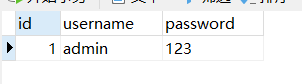
#spring.security.user.name=admin

#spring.security.user.password=admin

spring.datasource.driver-class-name=com.mysql.cj.jdbc.Driver

spring.datasource.url=jdbc:mysql://127.0.0.1:3306/springsecurity?serverTimezone=UTC

spring.datasource.username=root

spring.datasource.password=hao20001010
三、controller,service,mapper层的实现
@RestController

@RequestMapping("/test")

@EnableGlobalMethodSecurity(securedEnabled = true, prePostEnabled = true)

public class SecurityController {

    @RequestMapping("/hello")

    public String hello() {

        return "hello! Spring Security!";

    }

    @PreAuthorize("hasRole('admin')")

    @RequestMapping("/index")

    public String index() {

        return "hello index!";

    }

    @GetMapping("/delete")

    @Secured({"ROLE_user","ROLE_admin"})

    public String delete() {

        return "delete merchandise";

    }

    @GetMapping("/add")

    @PreAuthorize("hasAuthority('admin')")

    public String add() {

        return "add";

    }

    @GetMapping("/update")

    @PostAuthorize("hasAnyAuthority('user')")

    public String update() {

        System.out.println("update方法已经执行!");

        return "update";

    }

}
@Service("userDetailsService")

public class UserDetailServiceImpl implements UserDetailsService {

    @Autowired

    private UserMapper userMapper;

    @Override

    public UserDetails loadUserByUsername(String s) throws UsernameNotFoundException {

        QueryWrapper<Users> wrapper = new QueryWrapper<>();

        wrapper.eq("username", s);

        Users users = userMapper.selectOne(wrapper);

        if (users == null) {

            throw new UsernameNotFoundException("账号或密码错误!");

        } else {

            List<GrantedAuthority> auths = AuthorityUtils.commaSeparatedStringToAuthorityList("ROLE_admin");

            return new User(users.getUsername(), new BCryptPasswordEncoder().encode(users.getPassword()), auths);

        }

    }

}
@Repository

public interface UserMapper extends BaseMapper<Users> {

}
四、核心–编写配置文件
package com.zsh.security.config;

import org.springframework.beans.factory.annotation.Autowired;

import org.springframework.context.annotation.Bean;

import org.springframework.context.annotation.Configuration;

import org.springframework.security.config.annotation.authentication.builders.AuthenticationManagerBuilder;

import org.springframework.security.config.annotation.web.builders.HttpSecurity;

import org.springframework.security.config.annotation.web.configuration.WebSecurityConfigurerAdapter;

import org.springframework.security.core.userdetails.UserDetailsService;

import org.springframework.security.crypto.bcrypt.BCryptPasswordEncoder;

import org.springframework.security.crypto.password.PasswordEncoder;

/**

 * @author:抱着鱼睡觉的喵喵

 * @date:2021/3/12

 * @description:

 */

@Configuration

public class SecurityConfig2 extends WebSecurityConfigurerAdapter {

    @Autowired

    private UserDetailsService userDetailsService;

    @Override

    protected void configure(AuthenticationManagerBuilder auth) throws Exception {

        auth.userDetailsService(userDetailsService).passwordEncoder(passwordEncoder());

    }

    @Override

    protected void configure(HttpSecurity http) throws Exception {

        //logout实现注销,注销之后跳转到fail.html

        http.logout().logoutUrl("/logout").logoutSuccessUrl("/fail.html").permitAll();

        http.exceptionHandling().accessDeniedPage("/noauth.html");

        http.formLogin()

                .loginPage("/login.html")   //设置登录界面

                .loginProcessingUrl("/user/login")  //登录界面url

                .defaultSuccessUrl("/success.html").permitAll()     //默认登录成功界面

                .and().authorizeRequests()      //哪些资源可以直接访问

                    .antMatchers("/","/test/hello","/user/loin").permitAll()    //不做处理

                    //.antMatchers("/test/index").hasAuthority("admin")

//                    .antMatchers("/test/index").hasAnyAuthority("admin","manager")

                    //.antMatchers("/test/index").hasRole("admin")

                      .antMatchers("/test/index").hasRole("admin")

                .anyRequest().authenticated()   //所有请求都可以访问

                .and().csrf().disable();        //关闭CSRF

    }

    @Bean

    PasswordEncoder passwordEncoder() {

        return new BCryptPasswordEncoder();

    }

}
五、页面的实现
<!DOCTYPE html>

<html lang="en">

<head>

    <meta charset="UTF-8">

    <title>Title</title>

</head>

<body>

    <form action="/user/login" method="post">

        username:<input type="text" name="username"> <br>

        password:<input type="password" name="password"><br>

        <input type="submit" value="提交">

    </form>

</body>

</html>
<!DOCTYPE html>

<html lang="en">

<head>

    <meta charset="UTF-8">

    <title>Title</title>

</head>

<body>

    <a>已退出!</a>

    <a href="/login.html">去登陆</a>

</body>

</html>
<!DOCTYPE html>

<html lang="en">

<head>

    <meta charset="UTF-8">

    <title>Title</title>

</head>

<body>

    <a style="background-color: red; margin-top: 100px; margin-left: 100px">no auth</a>

</body>

</html>
<!DOCTYPE html>

<html lang="en">

<head>

    <meta charset="UTF-8">

    <title>Title</title>

</head>

<body>

    <a>登录成功</a>

    <a href="/logout">注销登录</a>

</body>

</html>
运行结果
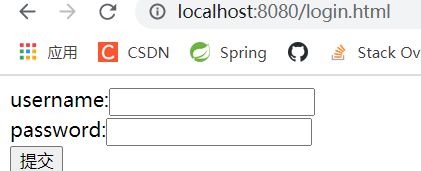
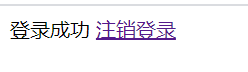
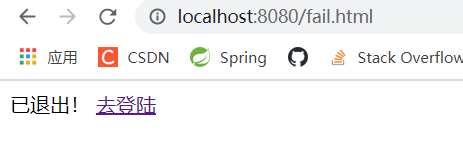
当在登录状态时,直接去访问/test/index 能够直接到主页面
springboot集成spring security实现登录和注销的更多相关文章
- SpringBoot集成Spring Security(6)——登录管理
文章目录 一.自定义认证成功.失败处理 1.1 CustomAuthenticationSuccessHandler 1.2 CustomAuthenticationFailureHandler 1. ...
- SpringBoot集成Spring Security(4)——自定义表单登录
通过前面三篇文章,你应该大致了解了 Spring Security 的流程.你应该发现了,真正的 login 请求是由 Spring Security 帮我们处理的,那么我们如何实现自定义表单登录呢, ...
- SpringBoot集成Spring Security(2)——自动登录
在上一章:SpringBoot集成Spring Security(1)——入门程序中,我们实现了入门程序,本篇为该程序加上自动登录的功能. 文章目录 一.修改login.html二.两种实现方式 2. ...
- SpringBoot集成Spring Security入门体验
一.前言 Spring Security 和 Apache Shiro 都是安全框架,为Java应用程序提供身份认证和授权. 二者区别 Spring Security:重量级安全框架 Apache S ...
- SpringBoot集成Spring Security(7)——认证流程
文章目录 一.认证流程 二.多个请求共享认证信息 三.获取用户认证信息 在前面的六章中,介绍了 Spring Security 的基础使用,在继续深入向下的学习前,有必要理解清楚 Spring Sec ...
- SpringBoot集成Spring Security(5)——权限控制
在第一篇中,我们说过,用户<–>角色<–>权限三层中,暂时不考虑权限,在这一篇,是时候把它完成了. 为了方便演示,这里的权限只是对角色赋予权限,也就是说同一个角色的用户,权限是 ...
- SpringBoot 集成Spring security
Spring security作为一种安全框架,使用简单,能够很轻松的集成到springboot项目中,下面讲一下如何在SpringBoot中集成Spring Security.使用gradle项目管 ...
- SpringBoot集成Spring Security
1.Spring Security介绍 Spring security,是一个强大的和高度可定制的身份验证和访问控制框架.它是确保基于Spring的应用程序的标准 --来自官方参考手册 Spring ...
- SpringBoot集成Spring Security(授权与认证)
⒈添加starter依赖 <dependency> <groupId>org.springframework.boot</groupId> <artifact ...
随机推荐
- Spring系列16:ApplicationContext扩展国际化
本文内容 BeanFactory对比ApplicationContext ApplicationContext的扩展能力 国际化 BeanFactory对比ApplicationContext 简单点 ...
- 一些JDK自带的性能分析利器
有时候碰到服务器CPU飙升或者程序卡死之类的问题,一般都不太好定位.这类bug一般都隐藏的比较深并且还可能是偶发性的,比较棘手. 对于此类问题,一般我们都有固定的分析流程.借助于JDK自带的一些分析工 ...
- Mybatis——一级缓存与二级缓存
关于Mybatis的学习主要参考了狂神的视频 一级缓存 (1).使用范围:从sqlSession会话开始到结束 (2).使用:默认打开,无法关闭 (3).测试使用(需要打开日志观察数据库的连接情况): ...
- 网络编程 基础 基于socket的tcp和udp连接
网络开发的框架 C/S B/S 架构 程序都是bs架构的程序(b指浏览器,s指服务器) c(client)是客户端,s(server)是服务器 bs架构是cs架构的一种 未来的趋势, pc端bs架构, ...
- /proc/uptime参数的意义
有关/proc/uptime这个文件里两个参数所代表的意义: [root@app ~]#cat /proc/uptime 3387048.81 3310821.00 第一个参数是代表从系统启动到现在的 ...
- 2、DTO(数据传输对象)
DTO:Data Transfer Object 即数据传输对象. 有些人会问这个DTO是干嘛的,不是已经有了Model实体类了么? 首先说一下,DTO是干嘛了.DTO的引入,应该说是伴随着分层架构设 ...
- Kubernetes:存储管理
Blog:博客园 个人 参考:Volumes | Kubernetes.Persistent Volumes | Kubernetes.Kubernetes 基础入门实战 简单来说,存储卷是定义在Po ...
- Minikube使用文档
最近在参与社区flink-operator的开发,开发的过程中经常使用到minikube来本地验证这篇文章记录下相关使用 安装 https://minikube.sigs.k8s.io/docs/st ...
- grafana初级入门
grafana初级入门 预备知识 Metrics.Tracing和Logging的区别 监控.链路追踪及日志作为实时监测系统运行状况,这三个领域都有对应的工具和解决方案. Metrics 监控指标的定 ...
- redis之 主从复制和哨兵(一)
一.Redis主从复制 主从复制:主节点负责写数据,从节点负责读数据,主节点定期把数据同步到从节点保证数据的一致性 1. 主从复制的相关操作 a,配置主从复制方式一.新增redis6380.conf, ...